Vue 3 + TypeScript 从零实现一个简易版的 Figma 画布编辑器
·
一、描述
1、项目核心功能设计
-
画布基础功能
- 空白画布渲染
- 多图层管理(增删改、层级调整)
- 元素拖拽、缩放、旋转
- 撤销/重做(Undo/Redo)
-
支持的元素类型
- 矩形、圆形、文本
- 自由路径(铅笔工具)
-
属性编辑
- 颜色、边框、透明度
- 字体、字号(文本元素)
-
辅助功能
- 网格背景
- 对齐线(Snap to Guide)
- 导出为图片
2、技术栈选择
- 核心库: Vue 3 + TypeScript + Composition API
- 状态管理: Pinia(比 Vuex 更轻量)
- 拖拽交互: vue-draggable-next 或自实现
- 数学计算: paper.js(处理图形变换)
- 渲染优化: 虚拟滚动(针对大量元素)
- 持久化: localStorage 或 IndexedDB
二、具体实现:
1.确认已安装Node.js
2.项目初始化
npm create vite@latest figma-editor --template vue-ts
cd figma-editor
npm install pinia paperjs @vueuse/core
npm install pinia vue-draggable-next @vueuse/core
3.项目结构如图:
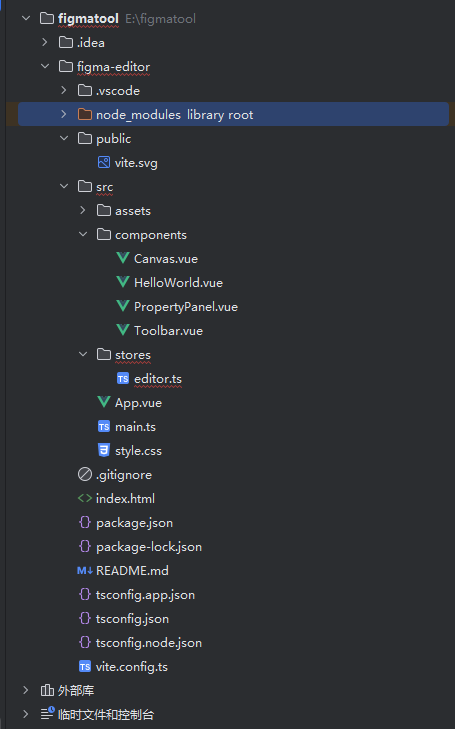
4.具体代码如下
4.1 Canvas.vue 画布组件 (核心)(src/components/Canvas.vue)
<template>
  <div class="canvas-container">
    <svg
      ref="canvas"
      :width="width"
      :height="height"
      @mousedown="handleMouseDown"
      @mousemove="handleMouseMove"
      @mouseup="handleMouseUp"
      @click="handleCanvasClick"
    >
      <!-- 网格背景 -->
      <pattern
        id="grid"
        width="20"
        height="20"
        patternUnits="userSpaceOnUse"
      >
        <path d="M 20 0 L 0 0 0 20" fill="none" stroke="#eee" stroke-width="0.5"/>
      </pattern>
      <rect width="100%" height="100%" fill="url(#grid)"/>

      <!-- 渲染所有元素 -->
      <g v-for="element in elements" :key="element.id">
        <!-- 矩形 -->
        <rect
          v-if="element.type === 'rect'"
          :x="element.x"
          :y="element.y"
          :width="element.width"
          :height="element.height"
          :fill="element.fill"
          :stroke="selectedElementId === element.id ? '#1890ff' : 'none'"
          stroke-width="2"
          @click.stop="selectElement(element.id)"
          :transform="`rotate(${element.rotation || 0}, ${element.x + element.width/2}, ${element.y + element.height/2})`"
        />

        <!-- 圆形 -->
        <circle
          v-if="element.type === 'circle'"
          :cx="element.x"
          :cy="element.y"
          :r="element.radius"
          :fill="element.fill"
          :stroke="selectedElementId === element.id ? '#1890ff' : 'none'"
          stroke-width="2"
          @click.stop="selectElement(element.id)"
        />
      </g>
    </svg>
  </div>
</template>

<script lang="ts" setup>
import { useEditorStore } from '@/stores/editor'
import { storeToRefs } from 'pinia'
import { ref, onMounted } from 'vue'

const store = useEditorStore()
const { elements, selectedElementId } = storeToRefs(store)

const width = ref(800)
const height = ref(600)
const canvas = ref<SVGElement | null>(null)

// 选择元素
const selectElement = (id: string) => {
  store.selectedElementId = id
}

// 点击空白处取消选择
const handleCanvasClick = (e: MouseEvent) => {
  if (e.target === canvas.value) {
    store.selectedElementId = null
  }
}

// 拖拽逻辑
let isDragging = false
let startX = 0
let startY = 0
let draggedElement: EditorElement | null = null

const handleMouseDown = (e: MouseEvent) => {
  const target = e.target as SVGElement
  if (target.tagName !== 'rect' && target.tagName !== 'circle') return

  isDragging = true
  startX = e.clientX
  startY = e.clientY
  draggedElement = elements.value.find(el => el.id === selectedElementId.value) || null
  e.preventDefault()
}

const handleMouseMove = (e: MouseEvent) => {
  if (!isDragging || !draggedElement) return

  const dx = e.clientX - startX
  const dy = e.clientY - startY

  store.updateElement(draggedElement.id, {
    x: draggedElement.x + dx,
    y: draggedElement.y + dy
  })

  startX = e.clientX
  startY = e.clientY
}

const handleMouseUp = () => {
  isDragging = false
  draggedElement = null
}
</script>

<style scoped>
.canvas-container {
  border: 1px solid #ddd;
  overflow: auto;
  background-color: white;
}
</style>
4.2 工具栏组件 (src/components/Toolbar.vue)
<template>
  <div class="toolbar">
    <button @click="addRectangle">添加矩形</button>
    <button @click="addCircle">添加圆形</button>
    <button @click="deleteSelected" :disabled="!selectedElementId">删除</button>
    <button @click="undo" :disabled="!canUndo">撤销</button>
    <button @click="redo" :disabled="!canRedo">重做</button>

    <div v-if="selectedElement" class="color-picker">
      <label>填充色:
        <input type="color" v-model="selectedElement.fill" @change="updateElementColor">
      </label>
    </div>
  </div>
</template>

<script lang="ts" setup>
import { useEditorStore } from '@/stores/editor'
import { storeToRefs } from 'pinia'

const store = useEditorStore()
const { selectedElementId, selectedElement, canUndo, canRedo } = storeToRefs(store)

const addRectangle = () => {
  store.addElement({
    type: 'rect',
    x: 100,
    y: 100,
    width: 150,
    height: 100,
    fill: '#3aa757'
  })
}

const addCircle = () => {
  store.addElement({
    type: 'circle',
    x: 200,
    y: 200,
    radius: 50,
    fill: '#eb4034'
  })
}

const deleteSelected = () => {
  store.deleteSelected()
}

const undo = () => {
  store.undo()
}

const redo = () => {
  store.redo()
}

const updateElementColor = () => {
  if (selectedElement.value) {
    store.updateElement(selectedElement.value.id, {
      fill: selectedElement.value.fill
    })
  }
}
</script>

<style scoped>
.toolbar {
  padding: 10px;
  background: #f5f5f5;
  display: flex;
  gap: 10px;
  align-items: center;
  border-bottom: 1px solid #ddd;
}

button {
  padding: 5px 10px;
  cursor: pointer;
}

.color-picker {
  margin-left: auto;
}
</style>
4.3 属性面板组件(src/components/PropertyPanel.vue)
<template>
  <div class="property-panel" v-if="selectedElement">
    <h3>属性编辑</h3>

    <div class="property-group">
      <label>位置 X:
        <input type="number" v-model.number="selectedElement.x" @change="updatePosition">
      </label>
      <label>位置 Y:
        <input type="number" v-model.number="selectedElement.y" @change="updatePosition">
      </label>
    </div>

    <div class="property-group" v-if="selectedElement.type === 'rect'">
      <label>宽度:
        <input type="number" v-model.number="selectedElement.width" @change="updateRectSize">
      </label>
      <label>高度:
        <input type="number" v-model.number="selectedElement.height" @change="updateRectSize">
      </label>
    </div>

    <div class="property-group" v-if="selectedElement.type === 'circle'">
      <label>半径:
        <input type="number" v-model.number="selectedElement.radius" @change="updateCircleRadius">
      </label>
    </div>

    <div class="property-group">
      <label>旋转角度:
        <input type="number" v-model.number="selectedElement.rotation" @change="updateRotation">
      </label>
    </div>
  </div>
</template>

<script lang="ts" setup>
import { useEditorStore } from '@/stores/editor'
import { storeToRefs } from 'pinia'

const store = useEditorStore()
const { selectedElement } = storeToRefs(store)

const updatePosition = () => {
  if (selectedElement.value) {
    store.updateElement(selectedElement.value.id, {
      x: selectedElement.value.x,
      y: selectedElement.value.y
    })
  }
}

const updateRectSize = () => {
  if (selectedElement.value?.type === 'rect') {
    store.updateElement(selectedElement.value.id, {
      width: selectedElement.value.width,
      height: selectedElement.value.height
    })
  }
}

const updateCircleRadius = () => {
  if (selectedElement.value?.type === 'circle') {
    store.updateElement(selectedElement.value.id, {
      radius: selectedElement.value.radius
    })
  }
}

const updateRotation = () => {
  if (selectedElement.value) {
    store.updateElement(selectedElement.value.id, {
      rotation: selectedElement.value.rotation || 0
    })
  }
}
</script>

<style scoped>
.property-panel {
  width: 250px;
  padding: 15px;
  border-left: 1px solid #ddd;
  background: #f9f9f9;
}

.property-group {
  margin-bottom: 15px;
}

label {
  display: block;
  margin-bottom: 8px;
}

input[type="number"] {
  width: 60px;
  margin-left: 5px;
}
</style>
4.4 主组件整合 (src/App.vue)
<template>
  <div class="app-container">
    <Toolbar />
    <div class="main-content">
      <Canvas />
      <PropertyPanel />
    </div>
  </div>
</template>

<script lang="ts" setup>
import Toolbar from './components/Toolbar.vue'
import Canvas from './components/Canvas.vue'
import PropertyPanel from './components/PropertyPanel.vue'
</script>

<style>
* {
  margin: 0;
  padding: 0;
  box-sizing: border-box;
}

.app-container {
  display: flex;
  flex-direction: column;
  height: 100vh;
}

.main-content {
  display: flex;
  flex: 1;
  overflow: hidden;
}
</style>
4.5 入口文件(src/main.ts)
import { createApp } from 'vue'
import { createPinia } from 'pinia'
import App from './App.vue'

const app = createApp(App)
app.use(createPinia())

app.mount('#app')
4.6 状态管理 (Pinia Store)(src/stores/editor.ts)
import { defineStore } from 'pinia'

// 元素类型定义
type ElementType = 'rect' | 'circle' | 'text'

interface BaseElement {
  id: string
  type: ElementType
  x: number
  y: number
  fill: string
  rotation?: number
}

interface RectElement extends BaseElement {
  type: 'rect'
  width: number
  height: number
}

interface CircleElement extends BaseElement {
  type: 'circle'
  radius: number
}

type EditorElement = RectElement | CircleElement

interface EditorState {
  elements: EditorElement[]
  selectedElementId: string | null
  history: EditorElement[][]
  historyIndex: number
}

export const useEditorStore = defineStore('editor', {
  state: (): EditorState => ({
    elements: [],
    selectedElementId: null,
    history: [[]],
    historyIndex: 0
  }),

  getters: {
    selectedElement(state): EditorElement | null {
      return state.elements.find(el => el.id === state.selectedElementId) || null
    },
    canUndo(state): boolean {
      return state.historyIndex > 0
    },
    canRedo(state): boolean {
      return state.historyIndex < state.history.length - 1
    }
  },

  actions: {
    addElement(element: Omit<EditorElement, 'id'>) {
      const newElement = {
        ...element,
        id: Date.now().toString()
      } as EditorElement
      this.elements.push(newElement)
      this.saveHistory()
    },

    deleteSelected() {
      if (this.selectedElementId) {
        this.elements = this.elements.filter(el => el.id !== this.selectedElementId)
        this.selectedElementId = null
        this.saveHistory()
      }
    },

    saveHistory() {
      // 移除当前指针后的历史记录
      this.history = this.history.slice(0, this.historyIndex + 1)
      // 深拷贝当前状态
      this.history.push(JSON.parse(JSON.stringify(this.elements)))
      this.historyIndex++
    },

    undo() {
      if (this.canUndo) {
        this.historyIndex--
        this.elements = JSON.parse(JSON.stringify(this.history[this.historyIndex]))
      }
    },

    redo() {
      if (this.canRedo) {
        this.historyIndex++
        this.elements = JSON.parse(JSON.stringify(this.history[this.historyIndex]))
      }
    },

    updateElement(id: string, updates: Partial<EditorElement>) {
      const index = this.elements.findIndex(el => el.id === id)
      if (index !== -1) {
        this.elements[index] = { ...this.elements[index], ...updates }
        this.saveHistory()
      }
    }
  }
})
5.可能遇到的问题
 Failed to run dependency scan. Skipping dependency pre-bundling. Error: The following dependencies are imported but could not be resolved:

  @/stores/editor (imported by E:/figmatool/figma-editor/src/components/Canvas.vue?id=0)

Are they installed?
    at file:///E:/figmatool/figma-editor/node_modules/vite/dist/node/chunks/config.js:10902:33
    at process.processTicksAndRejections (node:internal/process/task_queues:105:5)
    at async file:///E:/figmatool/figma-editor/node_modules/vite/dist/node/chunks/config.js:34350:15
解决方案:
这个错误是因为 Vite 无法解析 @/stores/editor 这样的路径别名。我们需要在 Vite 配置中正确设置路径别名。以下是完整的解决方案:
5.1. 修改 vite.config.ts
在项目根目录创建/修改 vite.config.ts
import { defineConfig } from 'vite'
import vue from '@vitejs/plugin-vue'
import path from 'path'

// https://vitejs.dev/config/
export default defineConfig({
  plugins: [vue()],
  resolve: {
    alias: {
      '@': path.resolve(__dirname, './src')
    }
  }
})
注意:需要先安装 path 的类型定义:
npm install --save-dev @types/node
5.2. 确保 TypeScript 也识别路径别名
修改 tsconfig.json:
{
  "compilerOptions": {
    "target": "ESNext",
    "module": "ESNext",
    "moduleResolution": "node",
    "strict": true,
    "jsx": "preserve",
    "sourceMap": true,
    "resolveJsonModule": true,
    "esModuleInterop": true,
    "lib": ["ESNext", "DOM"],
    "baseUrl": ".",
    "paths": {
      "@/*": ["src/*"]
    }
  },
  "include": ["src/**/*.ts", "src/**/*.d.ts", "src/**/*.tsx", "src/**/*.vue"]
}
如果仍然报错
尝试以下额外步骤:
方案A:使用相对路径临时解决
// 在组件中修改导入语句
import { useEditorStore } from '../stores/editor'
方案B:检查依赖完整性
rm -rf node_modules package-lock.json
npm install
方案C:显式声明路径别名
在 vite.config.ts 中更详细地声明:
alias: {
  '@': path.resolve(__dirname, './src'),
  '@stores': path.resolve(__dirname, './src/stores')
}
然后可以这样导入:
import { useEditorStore } from '@stores/editor'
6.启动项目
启动开发服务器:
npm run dev
7.效果图如下:
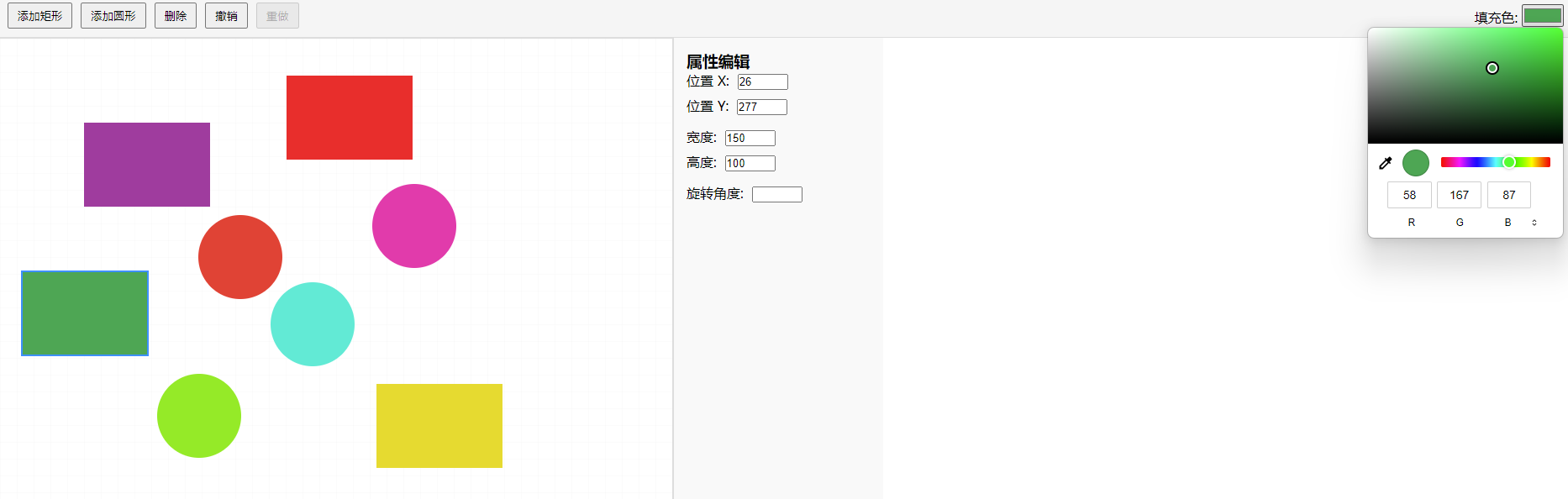

Agent 垂直技术社区,欢迎活跃、内容共建。
更多推荐


 14
14 0
0- 0


 已为社区贡献1条内容

所有评论(0)