Vue3 基础实战练习
·
Vue3 基础实战练习
1. 需求
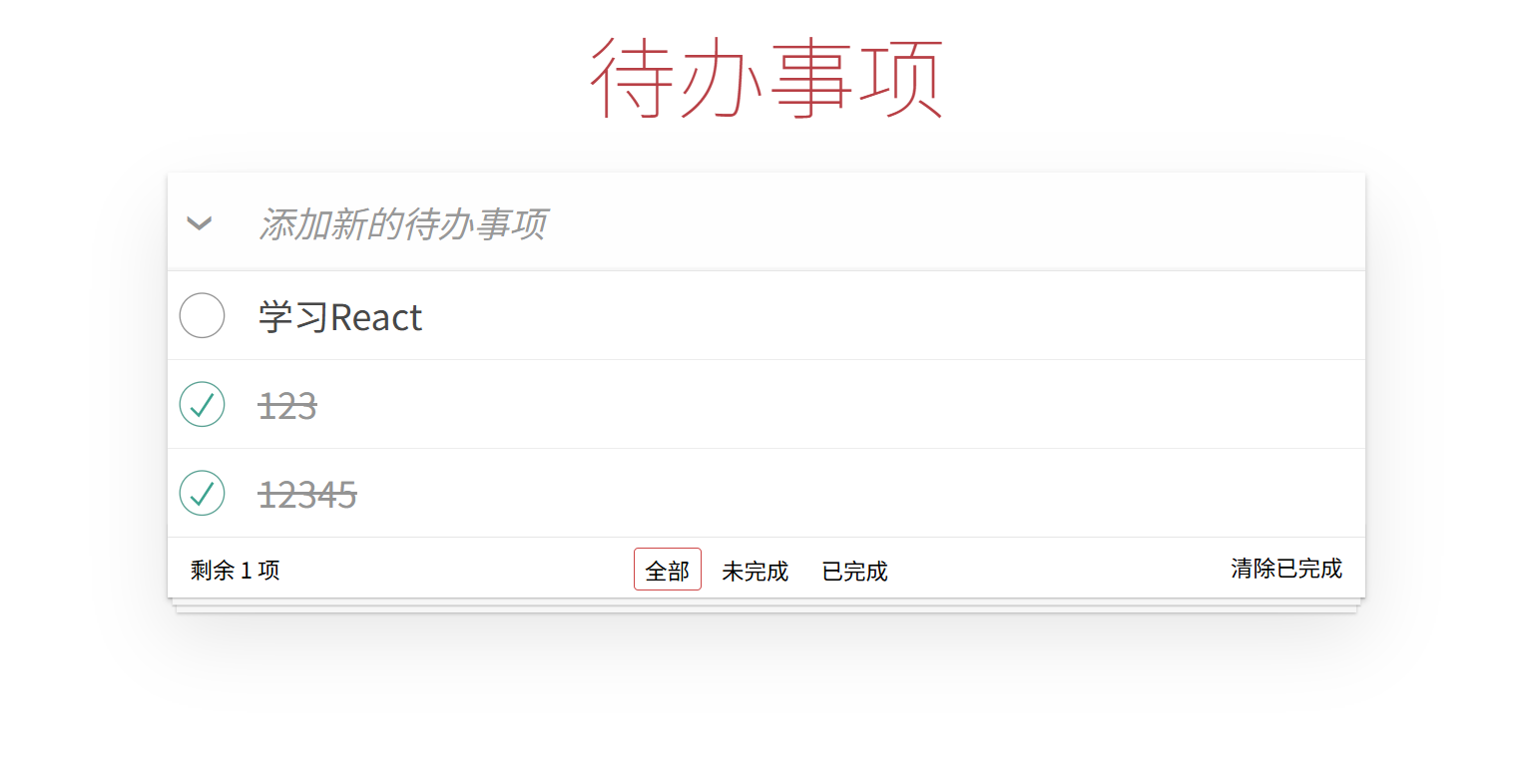
如图所示,现在需要书写一个待办事项,要求实现以下功能:
- 顶部可输入需要新增的待办事项,点击 Ctrl + Enter 键实现添加;
- 中间显示待办事项列表,可进行勾选/取消勾选,表示已完成/为完成;
- 每个待办事项可进行双击,进入编辑状态,点击Ctrl + Enter 或者失去焦点,则完成编辑。如果当前事项没有文字,则进行删除;
- 每个待办事项右侧都有一个删除按钮,悬浮显示,点击进行删除;
- 底部显示 3 个部分:
(1)左侧显示剩余未完成的数量;
(2)中间为“全部”、“未完成”、“已完成” 3个tab页,点击进行状态切换;
(3)右侧为“清理已完成”按钮,点击删除所有已完成的待办事项; - 所有的删除事件都要进行二次确认操作;
- 每次修改完成后,都要对待办事项列表进行缓存,页面刷新后仍能看到原来的列表。
2. 设计思路(和之前的基础知识进行结合)
- 顶部的待办事项输入框,可以使用 v-model 绑定一个 ref,也可以在后续的
@keyup.ctrl.enter="addTodo"(添加待办事件)中直接使用事件input的取值方式event.target.value.trim(); - 待办事项列表使用一个响应式数组
todos进行存储。 - 但是,值得注意的是,因为要根据不同状态
visibility(全部、未完成、已完成)展示不同的列表,所以我们最好使用一个过滤器,用于过滤不同状态的待办事项。在使用计算属性选择对应的展示列表。比如:
// 接下来我们需要一个过滤器,用于过滤不同状态的待办事项
const filters = {
  all: (todos) => todos, // 全部
  active: (todos) => todos.filter((todo) => !todo.completed), // 未完成
  completed: (todos) => todos.filter((todo) => todo.completed) // 已完成
}

// 接下来,根据当前的状态(all、active、completed)去调用对应的过滤器函数
const filteredTodos = computed(() => filters[visibility.value](todos.value))
- 编辑时,需要有
editedTodo和beforeEditCache两个数据,用于存储当前编辑的待办事项和缓存编辑前的标题,便于编辑后的赋值和取消编辑时的恢复。
const editedTodo = ref() // 存储当前编辑的待办事项,没有传递初始值,默认值为 undefined
let beforeEditCache = '' // 缓存编辑前的标题,用于取消编辑时恢复
- 删除时,如果没有使用UI组件,可以使用浏览器自带
window.confirm进行处理:
function removeTodo(todo) {
  if (window.confirm('确定要删除此待办事项吗?')) {
    todos.value.splice(todos.value.indexOf(todo), 1)
  } else {
    if (beforeEditCache) {
      todo.title = beforeEditCache
      beforeEditCache = ''
    }
  }
}
最后,缓存部分,我们可以设置一个侦听器 watchEffect (至于为什么使用 watchEffect,而非watch,不清楚的同学,可以返回上一章《Vue3 侦听器》进行了解),侦听todos的变化,每次变化都存储在localStorage中,便于每次刷新时从缓存中初始化数据:
// 设置侦听器
watchEffect(() => {
  // 每次 todos 变化时,都需要存储
  // 因为使用到了 todos,因此这个 todos 会变成一个依赖,只要 todos 变化,就会触发这个侦听器
  localStorage.setItem(STORAGE_KEY, JSON.stringify(todos.value))
})
3. 代码实现
注意,css部分不是本次练习的重点,大家可以直接复制,引用在App.vue中。
本次练习,基本将之前学到的模板语法、响应式基础、类与样式绑定、条件渲染、列表渲染、事件处理、表单输入绑定、侦听器都做到了应用。大家最好自己先实现一遍,再对照以下代码查看区别。
App.vue:
<template>
  <!-- 最外层容器 -->
  <section class="todoapp">
    <!-- 头部 -->
    <header class="header">
      <h1>待办事项</h1>
      <input type="text" class="new-todo" placeholder="添加新的待办事项" @keyup.ctrl.enter="addTodo" />
    </header>
    <!-- 待办列表 -->
    <section class="main">
      <!-- 全选按钮 -->
      <input type="checkbox" id="toggle-all" class="toggle-all" />
      <label for="toggle-all">全部完成</label>
      <!-- 待办事项列表 -->
      <ul class="todo-list">
        <li v-for="todo in filteredTodos" :key="todo.id" :class="{
          completed: todo.completed,
          editing: todo === editedTodo
        }">
          <div class="view">
            <input type="checkbox" class="toggle" v-model="todo.completed">
            <label @dblclick="editTodo(todo)">{{ todo.title }}</label>
            <button class="destroy" @click="removeTodo(todo)"></button>
          </div>
          <!-- 编辑框 -->
          <input type="text" class="edit" v-if="todo === editedTodo" v-model="todo.title"
            @keyup.ctrl.enter="doneEdit(todo)" @blur="doneEdit(todo)" @keyup.escape="cancelEdit(todo)"
            @vue:mounted="({ el }) => el.focus()" />
        </li>
      </ul>
    </section>
    <!-- 底部 -->
    <footer class="footer">
      <span class="todo-count">
        <span>剩余 {{ remaining }} 项</span>
      </span>
      <ul class="filters">
        <li>
          <a href="#/all" :class="{ selected: visibility === 'all' }">全部</a>
        </li>
        <li>
          <a href="#/active" :class="{ selected: visibility === 'active' }">未完成</a>
        </li>
        <li>
          <a href="#/completed" :class="{ selected: visibility === 'complete' }">已完成</a>
        </li>
      </ul>
      <button class="clear-completed" @click="removeAllCompleted" v-show="todos.length > remaining">
        清除已完成
      </button>
    </footer>
  </section>
</template>

<script setup>
import { ref, computed, watchEffect } from 'vue';

const STORAGE_KEY = 'todo-list'
// 从本地存储中获取待办事项列表,没有就使用空数组初始化(第一次)
const todos = ref(JSON.parse(localStorage.getItem(STORAGE_KEY)) || []);
const visibility = ref('all') // 默认显示所有待办事项
const editedTodo = ref() // 存储当前待办事项,默认值为Undefined
let beforeEditCache = '' // 缓存编辑前的标题,用于取消编辑时恢复

const filters = {
  all: (todos) => todos,
  active: (todos) => todos.filter(todo => !todo.completed),
  completed: (todos) => todos.filter(todo => todo.completed)
}

// 根据当前状态显示对应的待办事项
const filteredTodos = computed(() => filters[visibility.value](todos.value))
const remaining = computed(() => filters.active(todos.value).length)

// 添加待办事项
function addTodo(event) {
  const value = event.target.value.trim()
  if (value) {
    todos.value.push({
      id: Date.now(),
      title: value,
      completed: false
    })
    event.target.value = '' // 清空输入框
    // console.log('todos', todos.value)
    // console.log('filteredTodos', filteredTodos.value)
  }
}

// 删除待办事项
function removeTodo(todo) {
  if (window.confirm('确定删除当前待办事项吗?')) {
    todos.value.splice(todos.value.indexOf(todo), 1)
  } else {
    todo.title = beforeEditCache
    beforeEditCache = ''
  }
}

// 添加侦听器
watchEffect(() => {
  // 每次待办事项列表变化时,更新本地存储
  // 因为todos.value是响应式的,所以这里不需要手动触发更新
  localStorage.setItem(STORAGE_KEY, JSON.stringify(todos.value))
})

// 编辑
function editTodo(todo) {
  editedTodo.value = todo
  beforeEditCache = todo.title
}

// 完成编辑方法
function doneEdit(todo) {
  if (editedTodo.value) {
    editedTodo.value = null // 只有置空了才会退出编辑模式
    todo.title = todo.title.trim()
    if (!todo.title) {
      removeTodo(todo)
    }
  } { }
}

// 取消编辑
function cancelEdit(todo) {
  editedTodo.value = null // 只有置空了才会退出编辑模式
  // 需要将标题还原
  todo.title = beforeEditCache
}

// 删除所有已完成
function removeAllCompleted() {
  if(window.confirm('确定要删除所有已完成的待办事项吗?')) {
    todos.value = filters.active(todos.value)
  }
}

// 监听 hash 变化
window.addEventListener('hashchange', onHashChange)

function onHashChange() {
  const route = window.location.hash.replace(/#\/?/, '')
  console.log('route', route)
  if (filters[route]) {
    visibility.value = route
  } else {
    window.location.hash = ''
    visibility.value = 'all'
  }
}

</script>

<style lang="scss" scoped>
@import './assets/todo.css';
</style>
todo.css:
html,
body {
  margin: 0;
  padding: 0;
}

button {
  margin: 0;
  padding: 0;
  border: 0;
  background: none;
  font-size: 100%;
  vertical-align: baseline;
  font-family: inherit;
  font-weight: inherit;
  color: inherit;
  -webkit-appearance: none;
  appearance: none;
  -webkit-font-smoothing: antialiased;
  -moz-osx-font-smoothing: grayscale;
}

body {
  font:
    14px 'Helvetica Neue',
    Helvetica,
    Arial,
    sans-serif;
  line-height: 1.4em;
  background: #f5f5f5;
  color: #111111;
  min-width: 230px;
  max-width: 550px;
  margin: 0 auto;
  -webkit-font-smoothing: antialiased;
  -moz-osx-font-smoothing: grayscale;
  font-weight: 300;
}

.hidden {
  display: none;
}

.todoapp {
  background: #fff;
  margin: 130px auto;
  position: relative;
  box-shadow:
    0 2px 4px 0 rgba(0, 0, 0, 0.2),
    0 25px 50px 0 rgba(0, 0, 0, 0.1);
  width: 800px;
}

.todoapp input::-webkit-input-placeholder {
  font-style: italic;
  font-weight: 400;
  color: rgba(0, 0, 0, 0.4);
}

.todoapp input::-moz-placeholder {
  font-style: italic;
  font-weight: 400;
  color: rgba(0, 0, 0, 0.4);
}

.todoapp input::input-placeholder {
  font-style: italic;
  font-weight: 400;
  color: rgba(0, 0, 0, 0.4);
}

.todoapp h1 {
  position: absolute;
  top: -150px;
  width: 100%;
  font-size: 60px;
  font-weight: 200;
  text-align: center;
  color: #b83f45;
  -webkit-text-rendering: optimizeLegibility;
  -moz-text-rendering: optimizeLegibility;
  text-rendering: optimizeLegibility;
}

.new-todo,
.edit {
  position: relative;
  margin: 0;
  width: 100%;
  font-size: 24px;
  font-family: inherit;
  font-weight: inherit;
  line-height: 1.4em;
  color: inherit;
  padding: 6px;
  border: 1px solid #999;
  box-shadow: inset 0 -1px 5px 0 rgba(0, 0, 0, 0.2);
  box-sizing: border-box;
  -webkit-font-smoothing: antialiased;
  -moz-osx-font-smoothing: grayscale;
}

.new-todo {
  padding: 16px 16px 16px 60px;
  height: 65px;
  border: none;
  background: rgba(0, 0, 0, 0.003);
  box-shadow: inset 0 -2px 1px rgba(0, 0, 0, 0.03);
}

.main {
  position: relative;
  z-index: 2;
  border-top: 1px solid #e6e6e6;
}

.toggle-all {
  width: 1px;
  height: 1px;
  border: none; /* Mobile Safari */
  opacity: 0;
  position: absolute;
  right: 100%;
  bottom: 100%;
}

.toggle-all + label {
  display: flex;
  align-items: center;
  justify-content: center;
  width: 45px;
  height: 65px;
  font-size: 0;
  position: absolute;
  top: -65px;
  left: -0;
}

.toggle-all + label:before {
  content: '❯';
  display: inline-block;
  font-size: 22px;
  color: #949494;
  padding: 10px 27px 10px 27px;
  -webkit-transform: rotate(90deg);
  transform: rotate(90deg);
}

.toggle-all:checked + label:before {
  color: #484848;
}

.todo-list {
  margin: 0;
  padding: 0;
  list-style: none;
}

.todo-list li {
  position: relative;
  font-size: 24px;
  border-bottom: 1px solid #ededed;
}

.todo-list li:last-child {
  border-bottom: none;
}

.todo-list li.editing {
  border-bottom: none;
  padding: 0;
}

.todo-list li.editing .edit {
  display: block;
  width: calc(100% - 43px);
  padding: 12px 16px;
  margin: 0 0 0 43px;
}

.todo-list li.editing .view {
  display: none;
}

.todo-list li .toggle {
  text-align: center;
  width: 40px;
  /* auto, since non-WebKit browsers doesn't support input styling */
  height: auto;
  position: absolute;
  top: 0;
  bottom: 0;
  margin: auto 0;
  border: none; /* Mobile Safari */
  -webkit-appearance: none;
  appearance: none;
}

.todo-list li .toggle {
  opacity: 0;
}

.todo-list li .toggle + label {
  /*
		Firefox requires `#` to be escaped - https://bugzilla.mozilla.org/show_bug.cgi?id=922433
		IE and Edge requires *everything* to be escaped to render, so we do that instead of just the `#` - https://developer.microsoft.com/en-us/microsoft-edge/platform/issues/7157459/
	*/
  background-image: url('data:image/svg+xml;utf8,%3Csvg%20xmlns%3D%22http%3A//www.w3.org/2000/svg%22%20width%3D%2240%22%20height%3D%2240%22%20viewBox%3D%22-10%20-18%20100%20135%22%3E%3Ccircle%20cx%3D%2250%22%20cy%3D%2250%22%20r%3D%2250%22%20fill%3D%22none%22%20stroke%3D%22%23949494%22%20stroke-width%3D%223%22/%3E%3C/svg%3E');
  background-repeat: no-repeat;
  background-position: center left;
}

.todo-list li .toggle:checked + label {
  background-image: url('data:image/svg+xml;utf8,%3Csvg%20xmlns%3D%22http%3A%2F%2Fwww.w3.org%2F2000%2Fsvg%22%20width%3D%2240%22%20height%3D%2240%22%20viewBox%3D%22-10%20-18%20100%20135%22%3E%3Ccircle%20cx%3D%2250%22%20cy%3D%2250%22%20r%3D%2250%22%20fill%3D%22none%22%20stroke%3D%22%2359A193%22%20stroke-width%3D%223%22%2F%3E%3Cpath%20fill%3D%22%233EA390%22%20d%3D%22M72%2025L42%2071%2027%2056l-4%204%2020%2020%2034-52z%22%2F%3E%3C%2Fsvg%3E');
}

.todo-list li label {
  word-break: break-all;
  padding: 15px 15px 15px 60px;
  display: block;
  line-height: 1.2;
  transition: color 0.4s;
  font-weight: 400;
  color: #484848;
}

.todo-list li.completed label {
  color: #949494;
  text-decoration: line-through;
}

.todo-list li .destroy {
  display: none;
  position: absolute;
  top: 0;
  right: 10px;
  bottom: 0;
  width: 40px;
  height: 40px;
  margin: auto 0;
  font-size: 30px;
  color: #949494;
  transition: color 0.2s ease-out;
}

.todo-list li .destroy:hover,
.todo-list li .destroy:focus {
  color: #c18585;
}

.todo-list li .destroy:after {
  content: '×';
  display: block;
  height: 100%;
  line-height: 1.1;
}

.todo-list li:hover .destroy {
  display: block;
}

.todo-list li .edit {
  display: none;
}

.todo-list li.editing:last-child {
  margin-bottom: -1px;
}

.footer {
  padding: 10px 15px;
  height: 20px;
  text-align: center;
  font-size: 15px;
  border-top: 1px solid #e6e6e6;
}

.footer:before {
  content: '';
  position: absolute;
  right: 0;
  bottom: 0;
  left: 0;
  height: 50px;
  overflow: hidden;
  box-shadow:
    0 1px 1px rgba(0, 0, 0, 0.2),
    0 8px 0 -3px #f6f6f6,
    0 9px 1px -3px rgba(0, 0, 0, 0.2),
    0 16px 0 -6px #f6f6f6,
    0 17px 2px -6px rgba(0, 0, 0, 0.2);
}

.todo-count {
  float: left;
  text-align: left;
}

.todo-count strong {
  font-weight: 300;
}

.filters {
  margin: 0;
  padding: 0;
  list-style: none;
  position: absolute;
  right: 0;
  left: 0;
}

.filters li {
  display: inline;
}

.filters li a {
  color: inherit;
  margin: 3px;
  padding: 3px 7px;
  text-decoration: none;
  border: 1px solid transparent;
  border-radius: 3px;
}

.filters li a:hover {
  border-color: #db7676;
}

.filters li a.selected {
  border-color: #ce4646;
}

.clear-completed,
html .clear-completed:active {
  float: right;
  position: relative;
  line-height: 19px;
  text-decoration: none;
  cursor: pointer;
}

.clear-completed:hover {
  text-decoration: underline;
}

.info {
  margin: 65px auto 0;
  color: #4d4d4d;
  font-size: 11px;
  text-shadow: 0 1px 0 rgba(255, 255, 255, 0.5);
  text-align: center;
}

.info p {
  line-height: 1;
}

.info a {
  color: inherit;
  text-decoration: none;
  font-weight: 400;
}

.info a:hover {
  text-decoration: underline;
}

/*
	Hack to remove background from Mobile Safari.
	Can't use it globally since it destroys checkboxes in Firefox
*/
@media screen and (-webkit-min-device-pixel-ratio: 0) {
  .toggle-all,
  .todo-list li .toggle {
    background: none;
  }

  .todo-list li .toggle {
    height: 40px;
  }
}

@media (max-width: 430px) {
  .footer {
    height: 50px;
  }

  .filters {
    bottom: 10px;
  }
}

:focus,
.toggle:focus + label,
.toggle-all:focus + label {
  box-shadow: 0 0 2px 2px #cf7d7d;
  outline: 0;
}
上一章 《Vue3 侦听器(watch 和 watchEffect)》
下一章 《Vue3 模板引用——ref》

Agent 垂直技术社区,欢迎活跃、内容共建。
更多推荐
 6
6 0
0- 0


 已为社区贡献33条内容

所有评论(0)