C#四部曲基础——实践小项目
·
一.需求分析
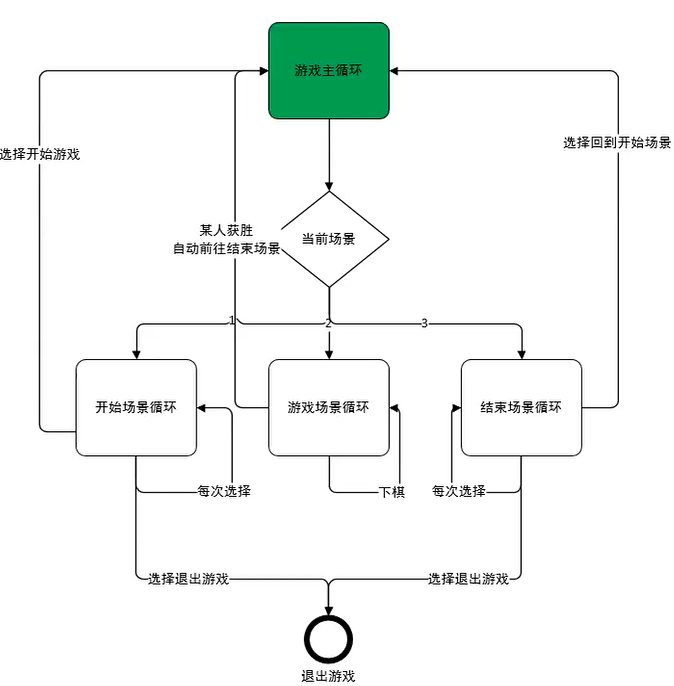
二.控制台基础设置
控制台初始化(隐藏光标,设置窗口和缓冲区的大小)
namespace Csharp基础实践
{
    internal class Program
    {
        static void Main(string[] args)
        {
            //控制台初始化
            int width = 50;
            int height = 30;
            ConsoleInit(width, height);
        }

        static void ConsoleInit(int w,int h)
        {
            //基础设置
            Console.CursorVisible = false;
            Console.SetWindowSize(w,h);
            Console.SetBufferSize(w,h);
        }
    }
}
三.多个场景
场景枚举(场景设置) 和 场景主循环(场景选择)
using System;

namespace Csharp基础实践
{
    #region 2.多个场景(场景设置)
    enum E_SceneType
    {
        /// <summary>
        /// 开始场景
        /// </summary>
        Begin,
        /// <summary>
        /// 游戏场景
        /// </summary>
        Game,
        /// <summary>
        /// 结束场景
        /// </summary>
        End,
    }
    #endregion
    internal class Program
    {
        static void Main(string[] args)
        {
            #region 1.控制台初始化
            //控制台初始化
            int width = 50;
            int height = 30;
            ConsoleInit(width, height);
            #endregion
            #region 2.多个场景(场景选择)
            E_SceneType sceneType = E_SceneType.Begin;
            while (true)
            {
                switch (sceneType)
                {
                    case E_SceneType.Begin:
                        //开始场景
                        Console.Clear();
                        break;
                    case E_SceneType.Game:
                        //游戏场景
                        Console.Clear();
                        break;
                    case E_SceneType.End:
                        //结束场景
                        Console.Clear();
                        break;
                    default:
                        break;
                }
            }
            #endregion
        }

        static void ConsoleInit(int w,int h)
        {
            //基础设置
            Console.CursorVisible = false;
            Console.SetWindowSize(w,h);
            Console.SetBufferSize(w,h);
        }

    }
}
四.开始场景逻辑实现
static void BeginScene(int w,int h,ref E_SceneType sceneType)
{
    Console.SetCursorPosition(w / 2 - 3, 8);
    Console.Write("飞行棋");

    int nowSelect = 0;
    bool isQuitBegin = false;
    while (true)
    {
        Console.SetCursorPosition(w / 2 - 4, 13);
        Console.ForegroundColor = nowSelect == 0 ? ConsoleColor.Red : ConsoleColor.White;
        Console.Write("开始游戏");
        Console.SetCursorPosition(w / 2 - 4, 15);
        Console.ForegroundColor = nowSelect == 1 ? ConsoleColor.Red : ConsoleColor.White;
        Console.Write("退出游戏");

        switch (Console.ReadKey(true).Key)
        {
            case ConsoleKey.W:
                --nowSelect;
                if (nowSelect < 0)
                {
                    nowSelect = 0;
                }
                break;
            case ConsoleKey.S:
                ++nowSelect;
                if (nowSelect > 1)
                {
                    nowSelect = 1;
                }
                break;
            case ConsoleKey.J:
                switch (nowSelect)
                {
                    case 0:
                        sceneType = E_SceneType.Game;
                        isQuitBegin = true;
                        break;
                    case 1:
                        Environment.Exit(0);
                        break;
                }
                break;
        }
        if (isQuitBegin)
        {
            break;
        }
    }
主函数中的while循环的switch语句中
case E_SceneType.Begin:
    //开始场景
    Console.Clear();
    BeginScene(width, height, ref sceneType);
    break;
五.游戏场景逻辑实现
static void GameScene(int w ,int h , ref E_SceneType sceneType)
{
    //不变的红墙
    DrawWall(w,h);
    //绘制地图
    Map map = new Map(14,2,90);
    map.Draw();
    //创建玩家
    Player player = new Player(E_PlayerType.Player, 0);
    Player computer = new Player(E_PlayerType.Computer, 0);
    DrawPlayer(player, computer, map);
    bool isGameOver = false;
    while (true)
    {
        Console.ReadKey(true);
        isGameOver = RandomMove(w, h,ref player,ref computer,map);
        map.Draw();
        DrawPlayer(player, computer, map);
        if (isGameOver)
        {
            Console.ReadKey(true);
            sceneType = E_SceneType.End;
            break;
        }

        Console.ReadKey(true);
        isGameOver = RandomMove(w, h, ref computer, ref player, map);
        map.Draw();
        DrawPlayer(player, computer, map);
        if (isGameOver)
        {
            Console.ReadKey(true);
            sceneType = E_SceneType.End;
            break;
        }
    }
}
1.不变的红墙
#region 4.游戏场景逻辑(①不变的红墙)
static void DrawWall(int w, int h)
{
    //墙
    Console.ForegroundColor = ConsoleColor.Red;
    for(int i = 0; i < w; i+=2)
    {
        //最上方的墙
        Console.SetCursorPosition(i, 0);
        Console.Write("■");
        //中间的两墙
        Console.SetCursorPosition(i, h-6);
        Console.Write("■");
        Console.SetCursorPosition(i, h-11);
        Console.Write("■");
        //最下方的墙
        Console.SetCursorPosition(i, h-1);
        Console.Write("■");
    }
    for(int i = 0; i < h; i++)
    {
        //左边
        Console.SetCursorPosition(0, i);
        Console.Write("■");
        //右边
        Console.SetCursorPosition(w-2, i);
        Console.Write("■");
    }
    //文字消息
    Console.ForegroundColor = ConsoleColor.White;
    Console.SetCursorPosition(2, h - 10);
    Console.Write("□:普通格子");

    Console.ForegroundColor = ConsoleColor.Blue;
    Console.SetCursorPosition(2, h - 9);
    Console.Write("‖:暂停,一回合不动");

    Console.ForegroundColor = ConsoleColor.Red;
    Console.SetCursorPosition(26, h - 9);
    Console.Write("●:炸弹,倒退5格");

    Console.ForegroundColor = ConsoleColor.Yellow;
    Console.SetCursorPosition(2, h - 8);
    Console.Write("¤:时空隧道,随机倒退,暂停,换位置");

    Console.ForegroundColor = ConsoleColor.Magenta;
    Console.SetCursorPosition(2, h - 7);
    Console.Write("★:玩家");

    Console.ForegroundColor = ConsoleColor.Cyan;
    Console.SetCursorPosition(12, h - 7);
    Console.Write("▲:电脑");

    Console.ForegroundColor = ConsoleColor.DarkGreen;
    Console.SetCursorPosition(22, h - 7);
    Console.Write("◎:玩家和电脑重合");

    Console.ForegroundColor = ConsoleColor.White;
    Console.SetCursorPosition(2, h - 5);
    Console.Write("按任意键投掷骰子");
}
#endregion
2.格子类型枚举和格子结构体
#region 4.游戏场景逻辑(②格子结构体和格子枚举)
/// <summary>
/// 格子类型枚举
/// </summary>
enum E_GridType
{
    /// <summary>
    /// 普通格子
    /// </summary>
    Normal,
    /// <summary>
    /// 暂停
    /// </summary>
    Pause,
    /// <summary>
    /// 炸弹
    /// </summary>
    Bomb,
    /// <summary>
    /// 时空隧道
    /// </summary>
    Tunnel,
}
/// <summary>
/// 位置信息结构体
/// </summary>
struct Vector2
{
    public int x;
    public int y;

    public Vector2(int x,int y)
    {
        this.x = x;
        this.y = y;
    }
}
/// <summary>
/// 格子结构体
/// </summary>
struct Grid
{
    //格子的类型
    public E_GridType type;
    //格子的位置
    public Vector2 position;
    public Grid(int x,int y,E_GridType type)
    {
        position.x = x;
        position.y = y;
        this.type = type;
    }
    public void Draw()
    {
        Console.SetCursorPosition(position.x, position.y);
        switch (type)
        {
            case E_GridType.Normal:
                Console.ForegroundColor = ConsoleColor.White;
                Console.Write("□");
                break;
            case E_GridType.Pause:
                Console.ForegroundColor = ConsoleColor.Blue;
                Console.Write("‖");
                break;
            case E_GridType.Bomb:
                Console.ForegroundColor = ConsoleColor.Red;
                Console.Write("●");
                break;
            case E_GridType.Tunnel:
                Console.ForegroundColor = ConsoleColor.Yellow;
                Console.Write("¤");
                break;
        }
    }
}
#endregion
3.地图结构体
#region 4.游戏场景逻辑(③地图结构体)
struct Map
{
    public Grid[] grids;

    public Map(int x,int y, int num)
    {
        grids = new Grid[num];

        //计数器
        int indexX = 0;
        int indexY = 0;
        int stepNum = 2;
        Random r= new Random();
        int randowNum;
        for(int i = 0; i < num; i++)
        {
            randowNum = r.Next(0,100);
            if(randowNum < 85 || i == 0 || i== num - 1)
            {
                grids[i].type = E_GridType.Normal;
            }else if(randowNum < 90)
            {
                grids[i].type = E_GridType.Pause;
            }
            else if (randowNum < 95)
            {
                grids[i].type = E_GridType.Bomb;
            }
            else
            {
                grids[i].type = E_GridType.Tunnel;
            }
            grids[i].position = new Vector2(x,y);
            if(indexX == 10)
            {
                y++;
                ++indexY;
                if(indexY == 2)
                {
                    indexX = 0;
                    indexY = 0;
                    stepNum = -stepNum;
                }
            }
            else
            {
                x += stepNum;
                ++indexX;
            }
        }
    }

    public void Draw()
    {
        for(int i = 0; i < grids.Length; i++)
        {
            grids[i].Draw();
        }
    }
}
#endregion
4.玩家和电脑结构体
#region 4.游戏场景逻辑(④玩家和电脑结构体)
enum E_PlayerType
{
    /// <summary>
    /// 玩家
    /// </summary>
    Player,
    /// <summary>
    /// 电脑
    /// </summary>
    Computer,
}
struct Player
{
    //玩家类型
    public E_PlayerType type;
    //所在地图的索引
    public int index;
    public Player(E_PlayerType type, int index)
    {
        this.type = type;
        this.index = index;
    }
    public void Draw(Map map)
    {
        //设置位置
        Grid gird = map.grids[index];
        Console.SetCursorPosition(gird.position.x,gird.position.y);
        //设置颜色和设置图标
        switch (type)
        {
            case E_PlayerType.Player:
                Console.ForegroundColor = ConsoleColor.Cyan;
                Console.Write("★");
                break;
            case E_PlayerType.Computer:
                Console.ForegroundColor = ConsoleColor.Magenta;
                Console.Write("▲");
                break;
        }
    }
}
#endregion
#region 4.游戏场景逻辑(④创建玩家)
static void DrawPlayer(Player player, Player computer,Map map)
{
if (player.index == computer.index)
{
Console.ForegroundColor = ConsoleColor.DarkGreen;
Console.SetCursorPosition(map.grids[player.index].position.x, map.grids[player.index].position.y);
Console.Write("◎");
}
else
{
player.Draw(map);
computer.Draw(map);
}
}
#endregion5.扔骰子
#region 4.游戏场景逻辑(⑤投掷骰子)
static void ClearInfo(int h)
{
    Console.SetCursorPosition(2, h - 5);
    Console.Write("                                            ");
    Console.SetCursorPosition(2, h - 4);
    Console.Write("                                            ");
    Console.SetCursorPosition(2, h - 3);
    Console.Write("                                            ");
    Console.SetCursorPosition(2, h - 2);
    Console.Write("                                            ");
}
static bool RandomMove(int w,int h,ref Player p,ref Player otherP,Map m)
{
    ClearInfo(h);
    Console.ForegroundColor = p.type == E_PlayerType.Player ? ConsoleColor.Cyan : ConsoleColor.Magenta;

    if (p.isPause)
    {
        Console.SetCursorPosition(2, h - 5);
        Console.Write("处于暂停,{0}需要暂停一会", p.type == E_PlayerType.Player ? "你" : "电脑");
        p.isPause = false;
        return false;
    }

    Random r = new Random();
    int randomNum = r.Next(1, 7);
    p.index += randomNum;
    Console.SetCursorPosition(2, h - 5);
    Console.Write("{0}扔出的点数为:{1}", p.type == E_PlayerType.Player ? "你" : "电脑",randomNum);

    if (p.index >= m.grids.Length - 1)
    {
        p.index = m.grids.Length - 1;
        Console.SetCursorPosition(2, h - 4);
        if (p.type == E_PlayerType.Player)
        {
            Console.Write("恭喜你,率先到达了终点");
        }
        else
        {
            Console.Write("很遗憾,电脑率先到达了终点");
        }
        Console.SetCursorPosition(2, h - 3);
        Console.Write("按任意键结束");
        return true;
    }
    else
    {
        Grid grid = m.grids[p.index];
        switch (grid.type)
        {
            case E_GridType.Normal:
                Console.SetCursorPosition(2, h - 4);
                Console.Write("{0}到达了一个安全位置", p.type == E_PlayerType.Player ? "你" : "电脑");
                Console.SetCursorPosition(2, h - 3);
                Console.Write("按任意键投掷骰子,让{0}开始投掷骰子", p.type == E_PlayerType.Player ? "电脑" : "你");
                break;
            case E_GridType.Pause:
                Console.SetCursorPosition(2, h - 4);
                Console.Write("{0}到达了暂停点,需要暂停一回合", p.type == E_PlayerType.Player ? "你" : "电脑");
                Console.SetCursorPosition(2, h - 3);
                Console.Write("按任意键投掷骰子,让{0}开始投掷骰子", p.type == E_PlayerType.Player ? "电脑" : "你");
                p.isPause = true;
                break;
            case E_GridType.Bomb:
                p.index -= 5;
                if (p.index < 0)
                {
                    p.index = 0;
                }
                Console.SetCursorPosition(2, h - 4);
                Console.Write("{0}踩到了炸弹,后退五格", p.type == E_PlayerType.Player ? "你" : "电脑");
                Console.SetCursorPosition(2, h - 3);
                Console.Write("按任意键投掷骰子,让{0}开始投掷骰子", p.type == E_PlayerType.Player ? "电脑" : "你");
                break;
            case E_GridType.Tunnel:
                Console.SetCursorPosition(2, h - 4);
                Console.Write("{0}触发了时空隧道", p.type == E_PlayerType.Player ? "你" : "电脑");
                randomNum = r.Next(1, 91);
                if (randomNum <= 30)
                {
                    p.isPause = true;
                    Console.SetCursorPosition(2, h - 3);
                    Console.Write("触发了暂停一回合 ");
                }
                else if(randomNum <= 60)
                {
                    Console.SetCursorPosition(2, h - 3);
                    Console.Write("触发了倒退5个");
                    p.index -= 5;
                    if (p.index < 0)
                    {
                        p.index = 0;
                    }
                }
                else
                {
                    Console.SetCursorPosition(2, h - 3);
                    Console.Write("惊喜!惊喜!双方交换位置");
                    int temp = p.index;
                    p.index = otherP.index;
                    otherP.index = temp;
                }
                Console.SetCursorPosition(2, h - 2);
                Console.Write("按任意键投掷骰子,让{0}开始投掷骰子", p.type == E_PlayerType.Player ? "电脑" : "你");
                break;
        }

    }
    return false;
}

#endregion
六.结束场景逻辑实现
#region 5.结束场景逻辑
static void EndScene(int w, int h, ref E_SceneType sceneType)
{
    Console.ForegroundColor = ConsoleColor.White;
    Console.SetCursorPosition(w / 2 - 4, 8);
    Console.Write("游戏结束");

    int nowSelect = 0;
    bool isQuitEnd = false;
    while (true)
    {
        Console.SetCursorPosition(w / 2 - 5, 13);
        Console.ForegroundColor = nowSelect == 0 ? ConsoleColor.Red : ConsoleColor.White;
        Console.Write("返回主菜单");
        Console.SetCursorPosition(w / 2 - 4, 15);
        Console.ForegroundColor = nowSelect == 1 ? ConsoleColor.Red : ConsoleColor.White;
        Console.Write("退出游戏");

        switch (Console.ReadKey(true).Key)
        {
            case ConsoleKey.W:
                --nowSelect;
                if (nowSelect < 0)
                {
                    nowSelect = 0;
                }
                break;
            case ConsoleKey.S:
                ++nowSelect;
                if (nowSelect > 1)
                {
                    nowSelect = 1;
                }
                break;
            case ConsoleKey.J:
                switch (nowSelect)
                {
                    case 0:
                        sceneType = E_SceneType.Begin;
                        isQuitEnd = true;
                        break;
                    case 1:
                        Environment.Exit(0);
                        break;
                }
                break;
        }
        if (isQuitEnd)
        {
            break;
        }
    }
}
#endregion
Agent 垂直技术社区,欢迎活跃、内容共建。
更多推荐
 3
3 0
0- 0


 已为社区贡献17条内容

所有评论(0)