【C++现代#1】C++11 并发支持库 -- 线程管理(thread)
·

📃个人主页:island1314
⛺️ 欢迎关注:👍点赞 👂🏽留言 😍收藏 💞 💞 💞
- 生活总是不会一帆风顺,前进的道路也不会永远一马平川,如何面对挫折影响人生走向 – 《人民日报》
线程管理(thread)
| 组件 | 描述 |
|---|---|
std::thread |
核心: 用于创建和管理新线程的类。你可以将任何可调用对象(函数、Lambda 表达式、函数对象)作为线程的执行体。 |
std::thread::join() |
阻塞当前线程,直到它所关联的线程执行完毕。必须 在 std::thread 对象析构前调用 join() 或 detach()。 |
std::thread::detach() |
将线程与 std::thread 对象分离,使其在后台独立运行。当主程序结束时,被分离的线程会终止。 |
std::this_thread |
命名空间,提供操作当前线程的函数,如 std::this_thread::sleep_for() (睡眠一段时间)。 |
1. thread 库
[thread库](thread - C++ Reference)
- thread库文档:https://zh.cppreference.com/w/cpp/thread/thread 和 https://legacy.cplusplus.com/reference/thread/thread/
- thread库底层是对各个系统的线程库进行封装,如Linux下的
pthread库和 Windows 下 Thread库等,所以C++11thread库 的第一个特点是可以跨平台,第二个特点是Linux 和 Windows下提供的线程库都是面向过程的,C++11thread是库面向对象的,并且融合了一些C++11语言特点,如右值引用的移动语义,可变模板参数等,用起来会更好用一些。
下面线程创建这里有4个构造函数,日常最常用的是第2个,他支持传一个可调用对象和参数即可相比pthread create而言,这里不再局限于只传递函数指针,其次就是参数传递也更方便,
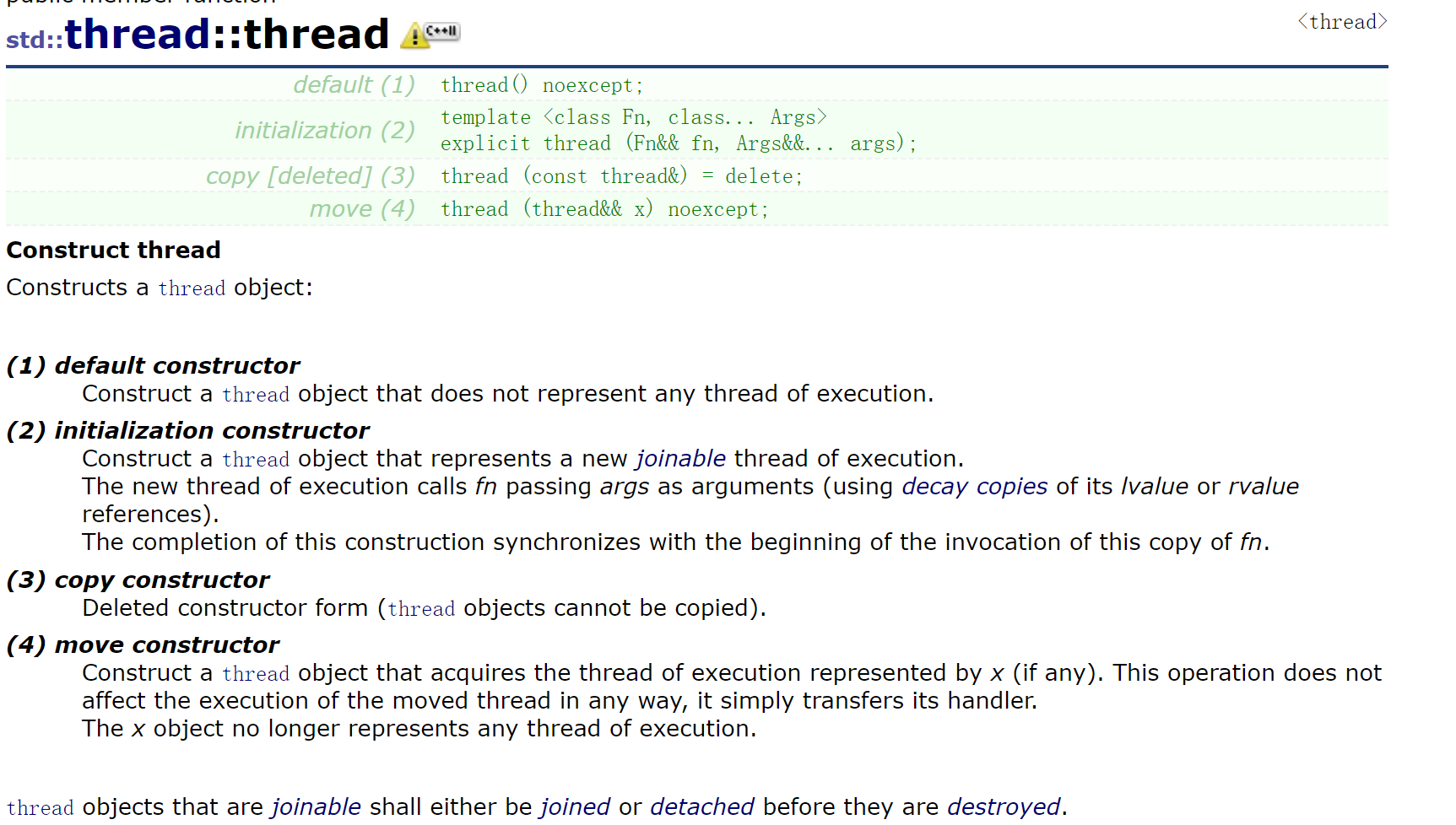
- 另外也可以用第1个和第4个配合来创建线程,我们可以把右值线程对象移动构造或者移动赋值给另一个线程对象。
- 第3个可以看到线程对象是不支持拷贝的。
// pthread库
int pthread_create(pthread_t *tidp,const pthread_attr_t *attr, void *(*start_rtn)(void*), void *arg);

// windows线程创建API
HANDLE CreateThread(
 LPSECURITY_ATTRIBUTES lpThreadAttributes,//SD
 SIZE_T dwStackSize,//initialstacksize
 LPTHREAD_START_ROUTINE lpStartAddress,//threadfunction
 LPVOID lpParameter,//threadargument
 DWORD dwCreationFlags,//creationoption
 LPDWORD lpThreadId//threadidentifier
)
void join();
- join 是主线程结束前需要阻塞等待创建的从线程,否则主线程结束,进程就结束了,从线程可能还在运行就被强行终止了。
class thread::id是一个thread的内部类用来表示线程id,支持比较大小,流插入和提取,通过特化hash仿函数做unordered_map和unordered_set的id等。底层的角度看thread本质还是封装各个平台的线程库接口。各个平台的线程id表示类型不同,所以只能用一个类来进行封装。线程对象可以通过get id获取线程id,在执行体内可以通过this_thread::get _id()获取线程id。
代码演示
#define _CRT_SECURE_NO_WARINGS 1
#include <iostream>
#include <thread>
#include <vector>
#include <mutex>
using namespace std;

void Print(int n, int i) {
	for (; i < n; i++) {
		cout << this_thread::get_id() << ": " << i << endl;;;
	}
	cout << endl;
}

int main() {
	thread t1(Print, 5, 0);
	thread t2(Print, 10, 5);
	t1.join();
	t2.join();
	// 获取当前运行线程 ID
	cout << "main: " << this_thread::get_id() << endl;
	return 0;
}
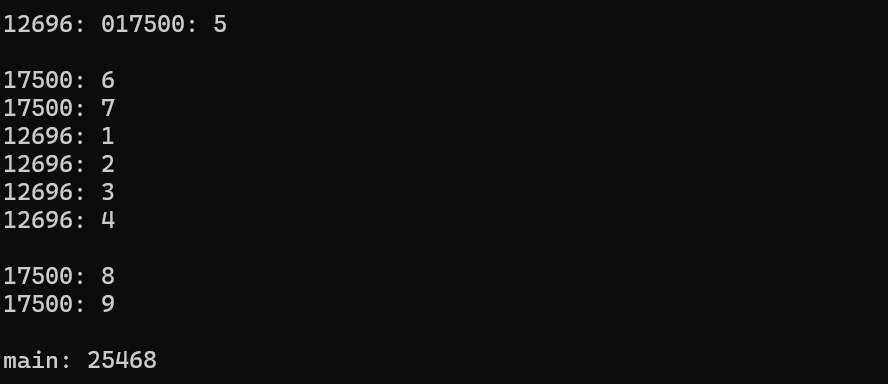
结果如下:(先后顺序带有无序性)
2. this_thread
官方文档:https://legacy.cplusplus.com/reference/thread/this_thread/
概念:this_thread 是一个命名空间,主要封装了线程相关的4个全局接口函数。
| 函数 | 作用 | 描述 |
|---|---|---|
get_id() |
获取当前线程的唯一标识符。 | 返回一个 std::thread::id 类型的对象。每个正在运行的线程都有一个唯一的 ID。用于区分或记录是哪个线程在执行某段代码 |
yield() |
切换到其他线程 | 操作系统可以决定是否切换到另一个等待执行的线程。这有助于实现更公平的调度,但具体行为取决于操作系统和实现(例如:FIFO) |
sleep_until() |
休眠直到指定时间点 | 阻塞当前线程的执行,直至抵达指定的sleep time。函数可能会因为调度或资源纠纷延迟而阻塞到 sleep time 之后的某个时间点。 |
sleep_for(duration) |
让当前线程**休眠(阻塞)**一段指定的时间。 | 线程会暂停执行,直到指定的时间间隔过去或被外部信号中断。这常用于调试、模拟耗时操作,或控制线程的执行速率。 |
sleep_for 和 sleep_uniti 需要结合 <chrono> 才能用,在 chrono 下还有一些其他的类,如下:
- https://legacy.cplusplus.com/reference/chrono/chrono 是一个计时相关的类型。
- https://legacy.cplusplus.com/reference/chrono/duration/ 是用来管理一个相对时间段的类。
- https://legacy.cplusplus.com/reference/chrono/time_point/ 是用来管理一个绝对时间点的类。
template <class Clock, class Duration>
  void sleep_until (const chrono::time_point<Clock,Duration>& abs_time);

template <class Rep, class Period>
  void sleep_for (const chrono::duration<Rep,Period>& rel_time);
示例一:倒计时
int main() {
	cout << "countdown: \n";
	for (int i = 5; i > 0; --i) {
		cout << i << std::endl;
		this_thread::sleep_for(std::chrono::seconds(1));

	}
	cout << "Lift off!\n";
	return 0;
}
示例二:时间
int main()
{
	using namespace std::chrono;

	duration<int, std::ratio<60 * 60 * 24> > one_day(1);
	system_clock::time_point today = system_clock::now();
	system_clock::time_point tomorrow = today + one_day;

	time_t tt;
	tt = system_clock::to_time_t(today);
	std::cout << "today is: " << ctime(&tt);
	tt = system_clock::to_time_t(tomorrow);
	std::cout << "tomorrow will be: " << ctime(&tt);

	return 0;
}
示例三:get_id() 和 sleep_for()
void worker_function(int id) {
    // 1. 获取当前线程的ID
    std::thread::id this_id = std::this_thread::get_id();

    std::cout << "Worker Thread #" << id
              << " (Native ID: " << this_id << ") is starting.\n";

    // 2. 使用 sleep_for 让线程休眠
    // 模拟一个耗时操作,休眠 100 毫秒
    std::this_thread::sleep_for(std::chrono::milliseconds(100));

    std::cout << "Worker Thread #" << id
              << " (Native ID: " << this_id << ") is finishing.\n";
}

int main() {
    // 主线程 ID
    std::cout << "Main Thread (Native ID: "
              << std::this_thread::get_id() << ") is starting work.\n";

    // 创建两个工作线程
    std::thread t1(worker_function, 1);
    std::thread t2(worker_function, 2);

    // 等待两个工作线程结束
    t1.join();
    t2.join();

    std::cout << "Main Thread is done.\n";
    return 0;
}

// 输出
Main Thread (Native ID: 140735165922304) is starting work.
Worker Thread #1 (Native ID: 1234567890) is starting.
Worker Thread #2 (Native ID: 9876543210) is starting.
Worker Thread #1 (Native ID: 1234567890) is finishing.
Worker Thread #2 (Native ID: 9876543210) is finishing.
Main Thread is done.
【★,°:.☆( ̄▽ ̄)/$:.°★ 】那么本篇到此就结束啦,如果有不懂 和 发现问题的小伙伴可以在评论区说出来哦,同时我还会继续更新相关的内容,请持续关注我 !!


Agent 垂直技术社区,欢迎活跃、内容共建。
更多推荐



 17
17 0
0- 0


 已为社区贡献24条内容

所有评论(0)