python 连接 tekla pythonnet
·
Tekla.Structures Namespace | Tekla Developer Center
pip install pythonnet
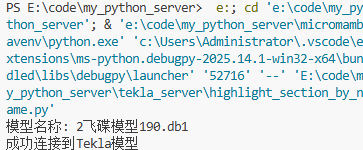
import clr
import sys
import os

# 尝试添加Tekla API DLL路径(根据实际安装路径调整)
tekla_path = r"F:\Program Files\Tekla Structures\2024.0\bin"  # 请根据实际版本调整路径
if tekla_path not in sys.path:
    sys.path.append(tekla_path)

try:
    # 引用 Tekla Open API 的 DLL
    clr.AddReference('Tekla.Structures')
    clr.AddReference('Tekla.Structures.Model')

    from Tekla.Structures.Model import Model

    # 连接到 Tekla Model
    model = Model()
    if model.GetConnectionStatus():
        print("模型名称:", model.GetInfo().ModelName)
        print("成功连接到Tekla模型")
    else:
        print("无法连接到模型")

except Exception as e:
    print(f"Tekla API初始化失败: {e}")
    print("请确保Tekla Structures已正确安装,并检查DLL路径配置")
Agent 垂直技术社区,欢迎活跃、内容共建。
更多推荐


 2
2 0
0- 0


 已为社区贡献25条内容

所有评论(0)