uniapp + Vue2 + Vuex + 持久化存储
1. 简介
本文档介绍了如何在 uniapp 中使用 Vue2 和 Vuex 实现模块化状态管理,并使用 vuex-persistedstate 插件来进行持久化存储,确保状态在应用重新加载后能够持久化保存。
2. 项目结构
在我们的项目中,Vuex 被用来管理全局状态,vuex-persistedstate 用来保持状态的持久化存储。项目中的 Vuex 状态被分成多个模块,每个模块具有自己的状态、mutations 和 actions。
2.1 目录结构
src/
  ├── store/
  │    ├── modules/
  │    │   ├── counter.js
  │    │   └── userInfo.js
  │    └── store.js
  └── App.vue
3. 主要代码解析
3.1 store/store.js — 主入口
import Vue from 'vue';
import Vuex from 'vuex';
import counter from './modules/counter'; // 引入模块文件
import userInfo from './modules/userInfo'; // 引入模块文件
import createPersistedState from 'vuex-persistedstate'; // 引入持久化插件

Vue.use(Vuex); // 使用 Vuex 插件

const store = new Vuex.Store({
  modules: {
    counter, // 注册计数模块
    userInfo, // 注册用户信息模块
  },
  plugins: [
    createPersistedState({
      storage: {
        getItem: (key) => uni.getStorageSync(key), // 从本地存储获取数据
        setItem: (key, value) => uni.setStorageSync(key, value), // 将数据存储到本地
        removeItem: (key) => uni.removeStorageSync(key), // 删除本地存储数据
      },
      paths: ['counter', 'userInfo'], // 指定持久化的模块,这里持久化 counter 和 userInfo 模块
    }),
  ],
});

export default store;
-
Vuex.Store创建了一个 Vuex 仓库,包含了counter和userInfo两个模块。 -
createPersistedState是持久化插件,用于让Vuex的状态在页面刷新后依然保持不变。 -
paths属性用于指定哪些模块的数据需要被持久化。
3.2 store/modules/counter.js — 计数模块
export default {
  namespaced: true, // 启用模块化命名空间
  state: {
    count: 10, // 初始值
  },
  mutations: {
    increment(state) {
      state.count++; // 计数加1
    },
    decrement(state) {
      state.count--; // 计数减1
    },
  },
  actions: {
    increment({ commit }) {
      commit('increment'); // 调用 mutation 来增加计数
    },
    decrement({ commit }) {
      commit('decrement'); // 调用 mutation 来减少计数
    },
  },
};
-
该模块负责管理
count状态,提供increment和decrement变更方法。 -
namespaced: true使得模块化命名空间生效,确保各个模块的mutation和action名称不会冲突。
3.3 store/modules/userInfo.js — 用户信息模块
export default {
  namespaced: true, // 启用模块化命名空间
  state: {
    count: 10, // 示例字段
  },
  mutations: {
    increment(state) {
      state.count++; // 计数加1
    },
    decrement(state) {
      state.count--; // 计数减1
    },
  },
  actions: {
    increment({ commit }) {
      commit('increment'); // 调用 mutation 来增加计数
    },
    decrement({ commit }) {
      commit('decrement'); // 调用 mutation 来减少计数
    },
  },
};
main.js
// #ifndef VUE3
import Vue from 'vue';
import App from './App';

Vue.config.productionTip = false;
import store from './store/index'; // 引入store文件
App.mpType = 'app';

const app = new Vue({
  ...App,
  store,
});
app.$mount();
// #endif
// #ifdef VUE3
import { createSSRApp } from 'vue';
import App from './App.vue';
export function createApp() {
  const app = createSSRApp(App);
  return {
    app,
  };
}
// #endif
4. 在组件中使用 Vuex
4.1 引入并使用 Vuex 状态
在组件中,你可以通过 this.$store.state 来访问状态,或通过 this.$store.commit() 和 this.$store.dispatch() 来触发 mutations 和 actions。
<template>
  <view>
    <text>当前计数: {{ count }}</text>
    <button @click="increment">增加</button>
    <button @click="decrement">减少</button>
  </view>
</template>

<script>
export default {
  computed: {
    // 通过 Vuex 获取计数
    count() {
      return this.$store.state.counter.count;
    },
  },
  methods: {
    increment() {
      // 提交 mutation 进行计数增加
      this.$store.dispatch('counter/increment');
    },
    decrement() {
      // 提交 mutation 进行计数减少
      this.$store.dispatch('counter/decrement');
    },
  },
};
</script>
-
computed用于从Vuex获取状态,这里获取的是counter模块的count。 -
methods中通过dispatch来触发actions,例如调用counter/increment来增加计数。
4.2 使用持久化存储
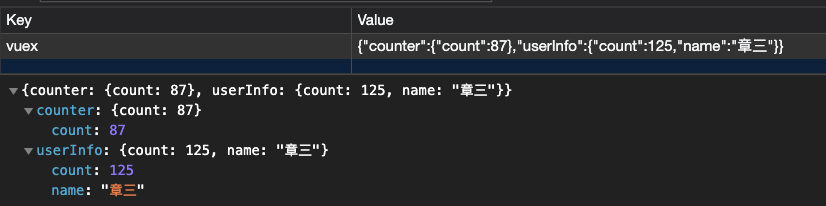
vuex-persistedstate 插件会自动处理将 counter 和 userInfo 模块的状态保存到本地存储中。即使刷新页面,状态仍然能够保留。
5. 注意事项
-
命名空间:使用
namespaced: true可以避免模块间命名冲突。如果不使用命名空间,需要在调用mutation和action时避免命名重复。 -
持久化存储:默认情况下,
vuex-persistedstate会将指定的模块保存到localStorage中。你可以根据需要自定义存储方式,例如使用uni.setStorageSync。
存储效果

Agent 垂直技术社区,欢迎活跃、内容共建。
更多推荐



 4
4 0
0- 0


 已为社区贡献2条内容

所有评论(0)