【Java】MP3音频的播放和界面的实现
·
首先我们先明确mp3有那些结构,MP3分为播放界面和播放列表界面,播放界面由暂停,上一首,下一首的按键,进度条和背景组成。播放列表界面由音乐的列表,上传和存入列表的按钮组成。下面是演示结果:
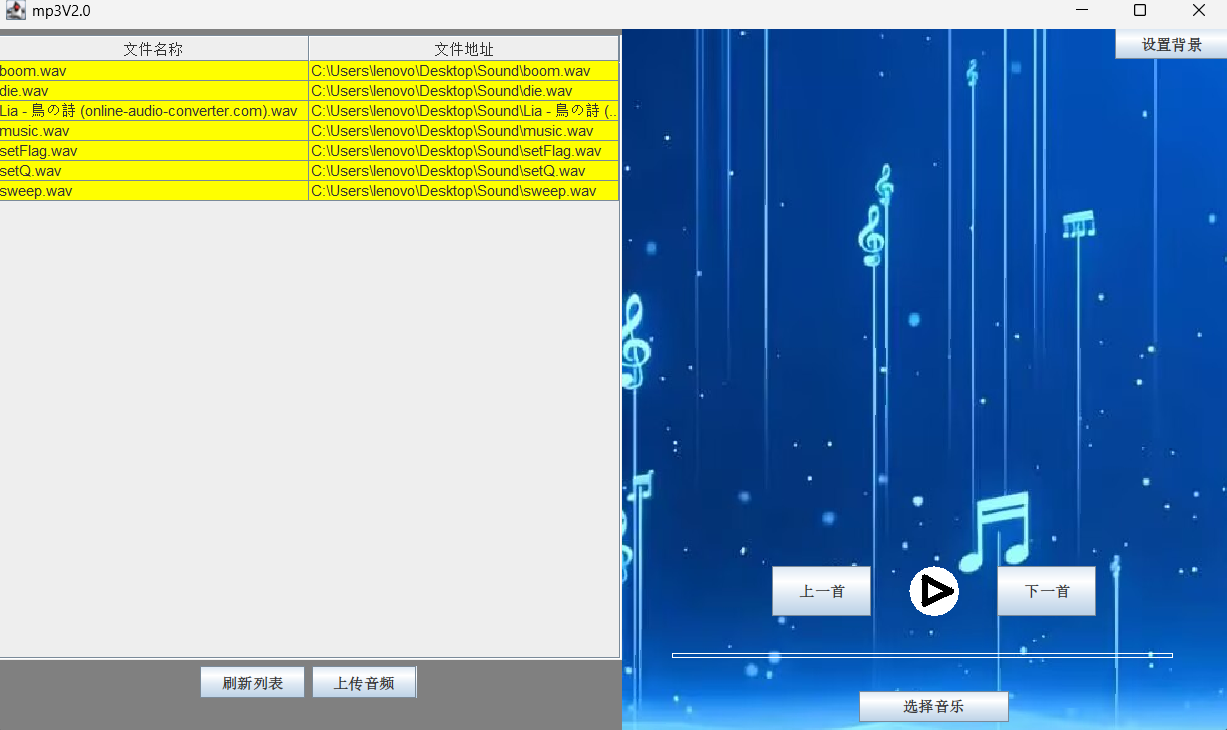
我们创建一个界面用jpanle画布将其分为左右两侧,以下是界面的创建和按钮的实现:
public void showUI(){
        JFrame mp3=new JFrame("mp3V2.0");
        mp3.setSize(1000,600);
        mp3.setLocationRelativeTo(null);//居中
        mp3.setDefaultCloseOperation(JFrame.EXIT_ON_CLOSE);

        //操作面
        JPanel music=new JPanel();
        music.setBackground(Color.gray);
        music.setPreferredSize(new Dimension(500,0));
        music.setLayout(new FlowLayout());//流式布局
        mp3.add(music,BorderLayout.WEST);//将画布添加至界面左侧
        //刷新面的按钮添加
        JButton load=new JButton("刷新列表");
        JButton mange=new JButton("上传音频");
        //创建列表
        String[] title={"文件名称","文件地址"};
        String[][] musicFileList={};
        JTable fileList=new JTable(new DefaultTableModel(musicFileList,title));
        fileList.setBackground(Color.yellow);
        //这里只是设置了表格,还要用JScrollPane来显示滚轮
        JScrollPane showTable=new JScrollPane(fileList);
        showTable.setPreferredSize(new Dimension(500,500));
        //按顺序添加组件
        music.add(showTable);
        music.add(load);
        music.add(mange);

        //播放界面
        PlayerPanel player=new PlayerPanel(true);
        player.setPreferredSize(new Dimension(500,0));
        player.setLayout(null);//不设置布局,直接固定组件
        JButton setBack = new JButton("设置背景");
        JButton choose = new JButton("选择音乐");
        JButton nextMusic = new JButton("下一首");
        JButton lastMusic = new JButton("上一首");
        //设置位置
        setBack.setBounds(395,0,90,25);
        choose.setBounds(190,530,120,25);
        nextMusic.setBounds(300,430,80,40);
        lastMusic.setBounds(120,430,80,40);
        //面板获取按钮
        player.getButton(setBack,choose,nextMusic,lastMusic);
        //添加按钮
        player.add(setBack);
        player.add(choose);
        player.add(nextMusic);
        player.add(lastMusic);
        mp3.add(player,BorderLayout.CENTER);

        mp3.setVisible(true);//显示界面
    }
其中PlayerPanle是继承JPanel的类,该类的实现如下:
public class PlayerPanel extends JPanel {
    //播放器界面
    private int w,h;
    public String backFilePath;//背景的文件路径
    public Image background;
    private boolean isPause;
    private boolean isLock=false;
    private int process=0;
    private int time;
    public JButton setBack,choose,nextMusic,lastMusic;

    //获取画笔和暂停键的状态
    public PlayerPanel(boolean isPause){
        this.isPause=isPause;
    }
    public void setIsLock(boolean isLock){
        this.isLock=isLock;
    }
    public boolean getIsLock(){
        return this.isLock;
    }
    public void setIsPause(boolean isPause){
        this.isPause=isPause;
    }
    public boolean getIsPause(){
        return this.isPause;
    }
    public void setTime(int time){
        this.time=time;
    }
    public int getTime(){
        return this.time;
    }
    public void setProcess(int pro){
        this.process=pro;
    }
    //获取背景路径
    public void getPath(String path){
        this.backFilePath=path;
        background=new ImageIcon(path).getImage();
    }

    //绘制背景板
    public void drawBack(Graphics g,Image img){
        if(img!=null){
            g.drawImage(img,0,0,null);
        }else{
            BufferedImage image=new BufferedImage(w,h,BufferedImage.TYPE_INT_ARGB);
            File file=new File("C:\\Users\\lenovo\\Desktop\\background\\C8A1A262D7A26D992AFBF878C064103D.jpg");
            try {
                BufferedImage img1 = ImageIO.read(file);
                Graphics imgG=image.getGraphics();
                int bit=Math.min(img1.getWidth()/w,1);
                bit=Math.min(img1.getHeight()/h,bit);
                for (int i = 0; i < w; i+=bit) {
                    for (int j = 0; j < h; j+=bit) {
                        imgG.setColor(new Color(img1.getRGB(i,j)));
                        imgG.fillRect(i,j,1,1);
                    }
                }
            } catch (IOException ex) {
                throw new RuntimeException(ex);
            }
            g.drawImage(image,0,0,null);
        }
    }

    //绘制暂停键
    public void drawPause(boolean isPause,Graphics g){
        g.setColor(Color.white);
        g.fillOval(230,430,40,40);
        Graphics2D graphics=(Graphics2D) g;
        graphics.setStroke(new BasicStroke(5.0f));
        if(!isPause){//绘制播放键(||),isPause是false没有暂停
            graphics.setColor(Color.black);
            graphics.drawLine(245, 440, 245, 460);
            graphics.drawLine(255, 440, 255, 460);
            System.out.println("播放");
        }else {//绘制暂停键(|>)
            graphics.setColor(Color.black);
            graphics.drawLine(243, 440, 243, 460);
            graphics.drawLine(243, 440, 263, 450);
            graphics.drawLine(263, 450, 243, 460);
            System.out.println("暂停");
        }
    }

    //绘制进度条
    public void drawProcess(Graphics g,int pro){
        g.setColor(Color.white);
        g.drawRect(40,500,400,3);
        g.setColor(Color.black);
        g.fillRect(40, 500, pro, 4);
    }

    //获取按钮
    public void getButton(JButton setBack,JButton choose,JButton nextMusic,JButton lastMusic){
        this.setBack=setBack;
        this.choose=choose;
        this.nextMusic=nextMusic;
        this.lastMusic=lastMusic;
    }
    //重写刷新方式
    public void paint(Graphics g) {
        super.paint(g);
        Dimension dim1=this.getSize();
        w= dim1.width;
        h=dim1.height;
        drawBack(g,this.background);
        drawProcess(g,this.process);//先画进度条防止暂停键的Graphics2D转化影响
        drawPause(this.isPause,g);
        setBack.repaint();
        choose.repaint();
        nextMusic.repaint();
        lastMusic.repaint();
    }
}
我们通过固定的地址来存储文件目录,所以界面初始化时可以显示已上传的内容,实现方法如下:
public void getTable(String path, HashMap<String,String> map,JTable jt,JScrollPane js)
            throws IOException {//通过地址来给表格初始化
        File file=new File(path);//创建对应地址的文件
        BufferedReader bRead=new BufferedReader(new FileReader(file));//读取文件的文本内容
        String line=null;
        for (int i = 0; (line=bRead.readLine())!=null; i++) {//用变量获取一行文本内容
            String[] dataStr=line.split("#");//用一个数组存取一行的内容,以#来分隔
            if(dataStr.length<2){continue;}
            String id=dataStr[0];
            String way=dataStr[1];
            DefaultTableModel model=(DefaultTableModel) jt.getModel();//获取表格的模板
            String[][] row={{id,way}};
            map.put(id,way);
            model.addRow(row[0]);
            jt.updateUI();
            js.setViewportView(jt);
        }
    }
再在界面实现中添加方法:
//用创建的方法来实现表格
        HashMap<String,String> musicMap=new HashMap<>();
        try {
            getTable("C:\\Users\\lenovo\\IdeaProjects\\untitled\\src\\com11\\Music Library.txt",musicMap,fileList,showTable);
        } catch (IOException e) {
            throw new RuntimeException(e);
        }
接下来就是实现按钮的功能,先创建一个监听器:
public class ButtonListener implements ActionListener {

   private JTable table;
    private HashMap<String,String> musicMap;
    private PlayerPanel panel;
    private int loadMusicNum=0;
    private int point=0;//指向第几首歌
    private Lock lock;
    private Condition stopMusic;
    private Condition stopLine;

    public ButtonListener(JTable table, HashMap<String,String> hashmap, PlayerPanel panel, Lock lock,Condition stopMusic,Condition stopLine){
        this.lock=lock;
        this.stopMusic=stopMusic;
        this.stopLine=stopLine;
        this.panel =panel;
        this.musicMap=hashmap;
        this.table=table;
    }


    public void actionPerformed(ActionEvent e) {
        String bunStr=e.getActionCommand();//获取按钮文本
        if(bunStr.equals("刷新列表")){}
        if(bunStr.equals("上传音频")){}
        if(bunStr.equals("设置背景")){}
        if(bunStr.equals("选择音乐")){}
        if(bunStr.equals("下一首")){}
        if(bunStr.equals("上一首")){}
    }
}
重写它的构造方法,获取想要的内容,通过获取按钮文本,识别想要的功能。
接着编写每个按钮的功能,先实现上传音频:
if(bunStr.equals("上传音频")){
            load(this.table);
        }
//编写方法封装
    private void load(JTable table){
        JFileChooser jfc=new JFileChooser();
        jfc.setFileSelectionMode(JFileChooser.DIRECTORIES_ONLY);//只选择文件夹
        int state=jfc.showDialog(null,"选择文件夹");//选择按钮的文本,显示文件选择器,返回值为int
        if(state==JFileChooser.APPROVE_OPTION){//通过比对返回值,来识别是否进行以下操作
            //获取文件夹中的文件,如果是音频文件就放在表格中
            File file=jfc.getSelectedFile();
            DefaultTableModel model=(DefaultTableModel) table.getModel();
            for(File file1:file.listFiles()){
                if(file1.isFile()){
                    if(file1.getName().endsWith(".wav")){
                        String[][] str= {{file1.getName(), file1.getAbsolutePath()}};
                        model.addRow(str[0]);
                        loadMusicNum++;//记录添加的个数
                    }
                }
            }
            table.updateUI();//刷新列表,显示添加后的列表
        }
    }
if(bunStr.equals("刷新列表")){
            try {
                renewList("C:\\Users\\lenovo\\IdeaProjects\\untitled\\src\\com11\\Music Library.txt",musicMap,table);
            } catch (IOException ex) {
                throw new RuntimeException(ex);
            }
        }

private void renewList(String path, HashMap<String,String> map, JTable jt) throws IOException {
        File file=new File(path);
        //获取文本的写入
        BufferedWriter bfWriter=new BufferedWriter(new FileWriter(file));
        for(int i=0;i<loadMusicNum;i++){
            String id=(String) jt.getModel().getValueAt(i,0);//object要进行强制类型转化
            String strPath=(String) jt.getModel().getValueAt(i,1);
            bfWriter.write(id+"#"+strPath+"\r\n");//将列表中获取的新文本覆盖原来的文本
            map.put(id,strPath);//将数据存入map中
        }
        bfWriter.flush();//将缓冲区的文本写入文件中
        bfWriter.close();//关闭写入流
    }
if(bunStr.equals("设置背景")){
            drawBack(panel);
        }

private void drawBack(PlayerPanel panel){
        JFileChooser jFileChooser=new JFileChooser();
        jFileChooser.setFileSelectionMode(JFileChooser.FILES_ONLY);//只选择文件
        jFileChooser.setFileFilter(new FileNameExtensionFilter("JPG & PDF & PNG","jpg","pdf","png"));//选择文件的后缀
        int state=jFileChooser.showDialog(null,"选择背景图");
        if(state==JFileChooser.APPROVE_OPTION){
            String path=jFileChooser.getSelectedFile().getAbsolutePath();
            panel.getPath(path);
            panel.repaint();
        }
    }
if(bunStr.equals("选择音乐")){
            File choose=getFile();
        }

private File getFile(){
        JFileChooser jfc=new JFileChooser();
        jfc.setFileSelectionMode(JFileChooser.FILES_ONLY);
        jfc.setFileFilter(new FileNameExtensionFilter("WAV","wav"));
        int state=jfc.showDialog(null,"选择音频");
        if(state==JFileChooser.APPROVE_OPTION){
            return jfc.getSelectedFile();
        }
        return null;
    }
好了通过按钮监听器我们获取到了wav的文件,下面就要来实现音频的播放了,这里我们可以使用Runnable类的接口来添加在线程中,启用线程实现音频的播放:
public class PlayerThread implements Runnable{

    private SourceDataLine output;//音频外部的输出
    private AudioInputStream input;//音频输入流
    private AudioFormat format;//音频的格式
    private Lock lock;
    private Condition stopMusic;
    private PlayerPanel panel;

    public PlayerThread(File file, PlayerPanel panel, Lock lock,Condition stopMusic) throws UnsupportedAudioFileException, IOException, LineUnavailableException {
        this.input=AudioSystem.getAudioInputStream(file);//获取音频文件的输入流
        this.format=input.getFormat();
        DataLine.Info streamFormat=new DataLine.Info(SourceDataLine.class,format);//获取一个输出通道,类型为外部设备输出,格式为输入流的格式
        this.output=(SourceDataLine) AudioSystem.getLine(streamFormat);//获得外部输出通道
        this.lock=lock;
        this.stopMusic=stopMusic;
        this.panel=panel;
    }
    public void run(){
        try {
            //先获取时间
            synchronized (panel){
                panel.setTime((int)(input.getFrameLength())/(int)(format.getFrameRate()));//总帧数÷每秒帧数
            }
            output.open(format);//打开通道,准备硬件
            output.start();//开启外部设备,不写就听不见声音
            byte[] abData=new byte[512];//缓存区
            int nBytesRead;
            while ((nBytesRead = input.read(abData, 0, abData.length))>=0) {//识别是否将内容获取完
                lock.lock();
                try {
                    while (panel.getIsPause()) {
                        panel.setIsLock(true);
                        stopMusic.await();
                    }
                    output.write(abData, 0, nBytesRead);//外部设备输出
                }finally {
                    lock.unlock();
                }
            }
            output.flush();//将缓冲区的内容全部输出
            output.close();//关闭通道
            panel.setIsPause(true);
        } catch (LineUnavailableException | InterruptedException | IOException e) {
            throw new RuntimeException(e);
        }
    }
}
还可以在编写一个进度条的线程接口:
public class LineThread implements Runnable {
    private PlayerPanel panel;
    private Lock lock;
    private Condition stopLine;
    private int pro = 0;
    private Graphics g;

    public LineThread(PlayerPanel panel, Lock lock, Condition stopLine) {
        this.panel = panel;
        this.lock = lock;
        this.stopLine = stopLine;
        this.g = panel.getGraphics();
    }

    public void run() {
        while (pro <= 400) {
            try {
                Thread.sleep((panel.getTime()*1000)/400);
            } catch (InterruptedException e) {
                throw new RuntimeException(e);
            }
            lock.lock();
            try {
                while (panel.getIsPause()) {
                    stopLine.await();
                }
                g.setColor(Color.black);
                g.fillRect(40 + pro, 500, 1, 4);
                pro++;
                panel.setProcess(pro);
            } catch (InterruptedException e) {
                throw new RuntimeException(e);
            } finally {
                lock.unlock();
            }
        }
        panel.setProcess(0);
    }
}
现在可以将按钮监听器中,点击“选择音乐”的操作进行修改:
if(bunStr.equals("选择音乐")) {
            File choose = getFile();
            try {
                panel.setIsPause(false);
                PlayerThread playerThread = new PlayerThread(choose, panel, lock, stopMusic);
                LineThread lineThread = new LineThread(panel, lock, stopLine);
                new Thread(playerThread).start();
                new Thread(lineThread).start();
                panel.repaint();
            } catch (UnsupportedAudioFileException | IOException | LineUnavailableException ex) {
                throw new RuntimeException(ex);
            }
        }
最后将监听器添加在按钮和界面中就可以实现基础的播放了:
Lock lock=new ReentrantLock();
        Condition stopMusic=lock.newCondition();
        Condition stopLine=lock.newCondition();//对应两个线程
        ButtonListener btl=new ButtonListener(fileList,musicMap,player,lock,stopMusic,stopLine);
        load.addActionListener(btl);
        mange.addActionListener(btl);
        setBack.addActionListener(btl);
        choose.addActionListener(btl);
        nextMusic.addActionListener(btl);
        lastMusic.addActionListener(btl);
        PauseListener pauseListener =new PauseListener(player,stopMusic,stopLine,lock);
        player.addMouseMotionListener(pauseListener);
        player.addMouseListener(pauseListener);
现在我们就还差暂停的实现和上下首的选择。

Agent 垂直技术社区,欢迎活跃、内容共建。
更多推荐


 6
6 0
0- 0


 已为社区贡献7条内容

所有评论(0)