将 HTML 表格一键导出为 Excel:Python 实战教程
·
在数据处理和网页爬虫项目中,我们经常会遇到从 HTML 页面中提取表格的需求。手动复制粘贴不仅低效,还容易出错。本文将带你使用 Python + BeautifulSoup + pandas,实现 一键将 HTML 中的多个表格导出为 Excel 文件(.xlsx),支持多 Sheet 自动分表,代码简洁、实用性强。
一、依赖安装
pip install beautifulsoup4 pandas openpyxl二、实现代码
from bs4 import BeautifulSoup
import pandas as pd


def html_table_to_xlsx(html_content, output_file):
    """
    将 HTML 中的表格提取并导出为 xlsx 文件。

    :param html_content: HTML 文本内容
    :param output_file: 导出的 xlsx 文件路径
    """
    # 使用 BeautifulSoup 解析 HTML
    soup = BeautifulSoup(html_content, 'html.parser')


    # 查找 HTML 中的所有表格
    tables = soup.find_all('table')
    if not tables:
        print("HTML 中没有找到表格!")
        return


    # 逐个解析表格并导出到 Excel
    with pd.ExcelWriter(output_file, engine='openpyxl') as writer:
        for i, table in enumerate(tables):
            # 将表格转为 DataFrame
            df = pd.read_html(str(table))[0]
            # 写入 Excel,不同表格写入不同的 sheet
            sheet_name = f"Sheet{i + 1}"
            df.to_excel(writer, index=False, sheet_name=sheet_name)


    print(f"表格已成功导出到 {output_file}")


# 示例 HTML 内容
html_content = """
<html>
<head><title>测试表格</title></head>
<body>
    <table border="1">
        <tr>
            <th>姓名</th>
            <th>年龄</th>
            <th>城市</th>
        </tr>
        <tr>
            <td>张三</td>
            <td>28</td>
            <td>北京</td>
        </tr>
        <tr>
            <td>李四</td>
            <td>34</td>
            <td>上海</td>
        </tr>
    </table>
</body>
</html>
"""


# 调用函数,将 HTML 中的表格导出为 Excel 文件
html_table_to_xlsx(html_content, "output.xlsx")
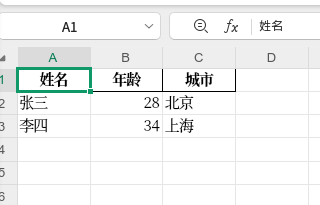
三、最终效果

Agent 垂直技术社区,欢迎活跃、内容共建。
更多推荐
 2
2 0
0- 0


 已为社区贡献31条内容

所有评论(0)