JavaScript 循环相关疑问:只说结论
·
详细内容可以参考我的其他文章,本篇只说结论(可忽略示例代码),方便快速查阅。
 https://blog.csdn.net/Irene1991/article/details/99832725?ops_request_misc=%257B%2522request%255Fid%2522%253A%2522e5aa975e138b71526651f3e716642682%2522%252C%2522scm%2522%253A%252220140713.130102334.pc%255Fblog.%2522%257D&request_id=e5aa975e138b71526651f3e716642682&biz_id=0&utm_medium=distribute.pc_search_result.none-task-blog-2~blog~first_rank_ecpm_v1~rank_v31_ecpm-1-99832725-null-null.nonecase&utm_term=for&spm=1018.2226.3001.4450
正文
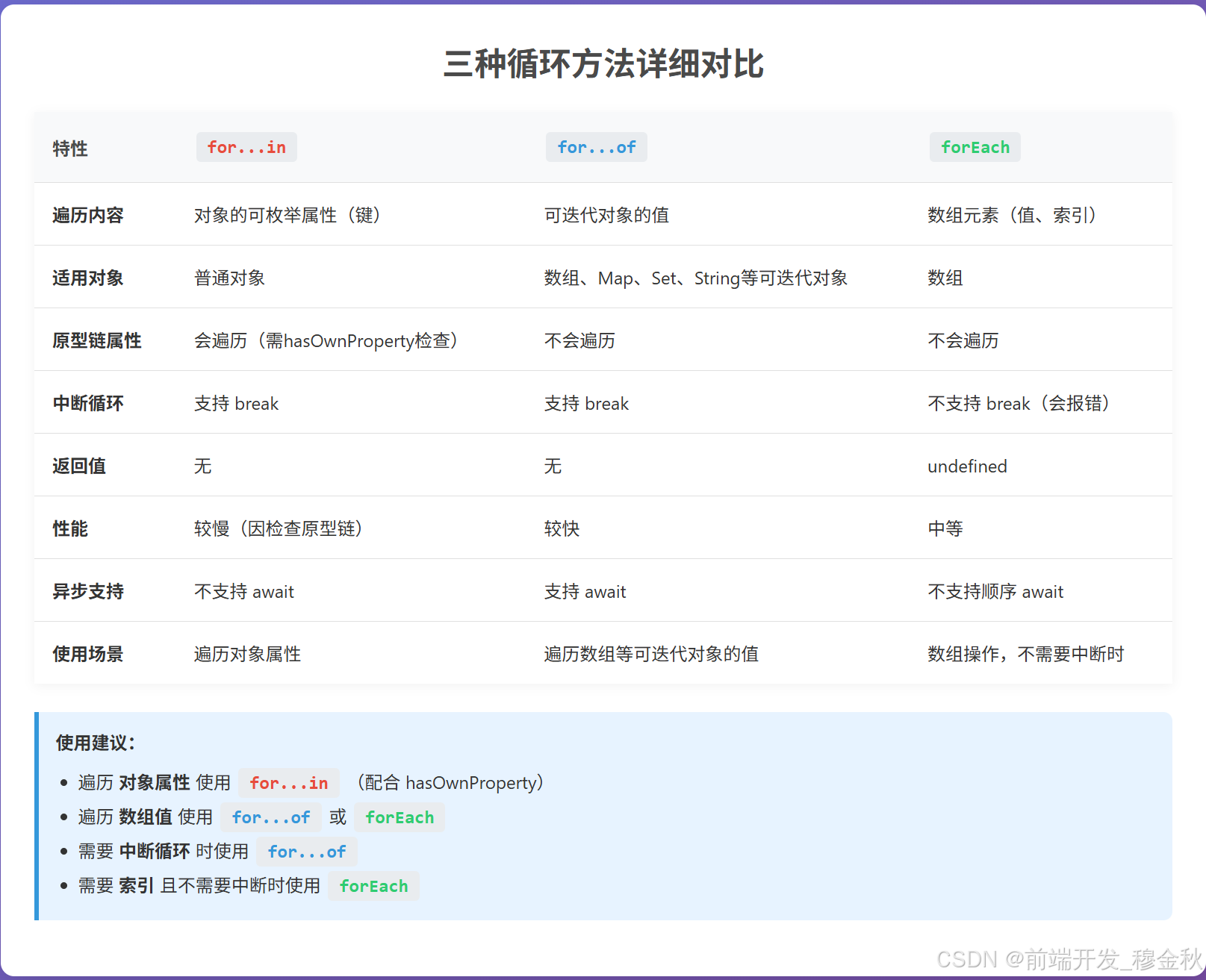
for in for of forEach 对比
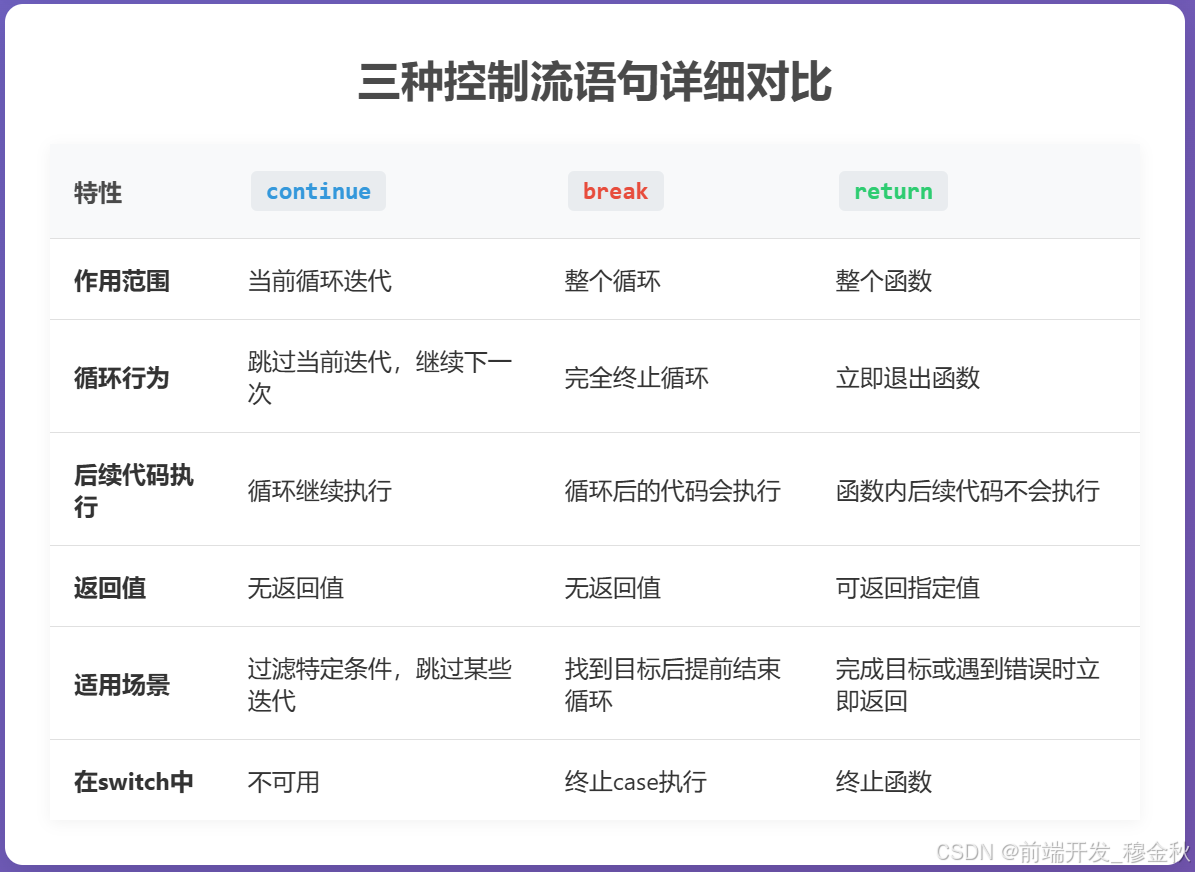
continue break return 对比
示例代码1
Deepseek提供。
<!DOCTYPE html>
<html lang="zh-CN">
<head>
<meta charset="UTF-8">
<meta name="viewport" content="width=device-width, initial-scale=1.0">
<title>JavaScript循环方法详解</title>
<style>
* {
box-sizing: border-box;
margin: 0;
padding: 0;
font-family: 'Segoe UI', Tahoma, Geneva, Verdana, sans-serif;
}
body {
background: linear-gradient(135deg, #667eea 0%, #764ba2 100%);
color: #333;
min-height: 100vh;
padding: 20px;
}
.container {
max-width: 1400px;
margin: 0 auto;
}
header {
text-align: center;
margin-bottom: 40px;
color: white;
text-shadow: 0 2px 5px rgba(0,0,0,0.2);
}
h1 {
font-size: 2.5rem;
margin-bottom: 10px;
}
.subtitle {
font-size: 1.2rem;
opacity: 0.9;
max-width: 800px;
margin: 0 auto;
line-height: 1.6;
}
.content {
display: flex;
flex-wrap: wrap;
gap: 25px;
justify-content: center;
margin-bottom: 40px;
}
.card {
background: white;
border-radius: 12px;
box-shadow: 0 10px 30px rgba(0,0,0,0.15);
padding: 25px;
flex: 1;
min-width: 300px;
max-width: 400px;
transition: transform 0.3s, box-shadow 0.3s;
}
.card:hover {
transform: translateY(-5px);
box-shadow: 0 15px 35px rgba(0,0,0,0.2);
}
.card h2 {
color: #4a4a4a;
margin-bottom: 20px;
padding-bottom: 10px;
border-bottom: 2px solid #f0f0f0;
display: flex;
align-items: center;
gap: 10px;
}
.card-icon {
width: 30px;
height: 30px;
background: #667eea;
border-radius: 50%;
display: flex;
align-items: center;
justify-content: center;
color: white;
font-weight: bold;
}
.code-container {
background: #2d2d2d;
color: #f8f8f2;
border-radius: 8px;
padding: 20px;
margin: 20px 0;
overflow-x: auto;
font-family: 'Consolas', monospace;
line-height: 1.5;
font-size: 0.9rem;
}
.output {
background: #f8f9fa;
border-left: 4px solid #667eea;
padding: 15px;
margin: 20px 0;
border-radius: 0 8px 8px 0;
min-height: 120px;
}
.output h3 {
margin-bottom: 10px;
color: #4a4a4a;
}
.output pre {
white-space: pre-wrap;
font-family: 'Consolas', monospace;
}
.button {
background: #667eea;
color: white;
border: none;
padding: 12px 24px;
border-radius: 6px;
cursor: pointer;
font-size: 1rem;
font-weight: 600;
transition: background 0.3s, transform 0.2s;
display: block;
width: 100%;
margin-top: 20px;
}
.button:hover {
background: #5a6fd8;
transform: translateY(-2px);
}
.button:active {
transform: translateY(0);
}
.comparison {
background: white;
border-radius: 12px;
box-shadow: 0 10px 30px rgba(0,0,0,0.15);
padding: 30px;
margin-top: 30px;
}
.comparison h2 {
color: #4a4a4a;
margin-bottom: 25px;
text-align: center;
font-size: 1.8rem;
}
table {
width: 100%;
border-collapse: collapse;
margin-top: 20px;
box-shadow: 0 2px 10px rgba(0,0,0,0.05);
}
th, td {
padding: 16px;
text-align: left;
border-bottom: 1px solid #e0e0e0;
}
th {
background: #f8f9fa;
font-weight: 600;
color: #4a4a4a;
}
tr:last-child td {
border-bottom: none;
}
tr:hover {
background: #f8f9fa;
}
.keyword {
display: inline-block;
background: #e9ecef;
padding: 4px 10px;
border-radius: 4px;
font-family: 'Consolas', monospace;
font-weight: bold;
margin: 2px;
}
.for-in {
color: #e74c3c;
}
.for-of {
color: #3498db;
}
.for-each {
color: #2ecc71;
}
.highlight {
background-color: #fff9c4;
padding: 2px 4px;
border-radius: 3px;
}
.note {
background: #e7f3ff;
border-left: 4px solid #3498db;
padding: 15px;
margin: 20px 0;
border-radius: 0 8px 8px 0;
}
.example-data {
background: #f0f8ff;
padding: 15px;
border-radius: 8px;
margin: 20px 0;
}
@media (max-width: 768px) {
.content {
flex-direction: column;
}
.card {
max-width: 100%;
}
}
</style>
</head>
<body>
<div class="container">
<header>
<h1>JavaScript循环方法详解</h1>
<p class="subtitle">深入比较 for...in、for...of 和 forEach 的语法、用途和区别,帮助您选择正确的循环方法</p>
</header>
<div class="example-data">
<h3>示例数据:</h3>
<pre><code>const array = ['苹果', '香蕉', '橙子'];
const object = {a: '苹果', b: '香蕉', c: '橙子'};
const map = new Map([['a', '苹果'], ['b', '香蕉'], ['c', '橙子']]);
const set = new Set(['苹果', '香蕉', '橙子']);</code></pre>
</div>
<div class="content">
<div class="card">
<h2><span class="card-icon">1</span> <span class="keyword for-in">for...in</span></h2>
<p>遍历对象的<strong>可枚举属性</strong>,包括原型链上的属性</p>
<div class="code-container">
<pre><code>// 遍历对象属性
for (const key in object) {
console.log(`${key}: ${object[key]}`);
}
// 遍历数组索引(不推荐)
for (const index in array) {
console.log(`${index}: ${array[index]}`);
}</code></pre>
</div>
<div class="output">
<h3>输出结果:</h3>
<pre id="for-in-output">点击运行查看结果</pre>
</div>
<button class="button" id="run-for-in">运行 for...in 示例</button>
<div class="note">
<strong>注意:</strong> for...in 会遍历原型链上的可枚举属性,使用 <code>hasOwnProperty</code> 检查可避免这个问题。
</div>
</div>
<div class="card">
<h2><span class="card-icon">2</span> <span class="keyword for-of">for...of</span></h2>
<p>遍历<strong>可迭代对象</strong>的值(Array, Map, Set, String等)</p>
<div class="code-container">
<pre><code>// 遍历数组值
for (const value of array) {
console.log(value);
}
// 遍历Map
for (const [key, value] of map) {
console.log(`${key}: ${value}`);
}
// 遍历Set
for (const value of set) {
console.log(value);
}</code></pre>
</div>
<div class="output">
<h3>输出结果:</h3>
<pre id="for-of-output">点击运行查看结果</pre>
</div>
<button class="button" id="run-for-of">运行 for...of 示例</button>
<div class="note">
<strong>特点:</strong> 简洁语法,支持 break、continue 和 return。
</div>
</div>
<div class="card">
<h2><span class="card-icon">3</span> <span class="keyword for-each">forEach</span></h2>
<p>Array方法,对数组的每个元素执行一次提供的函数</p>
<div class="code-container">
<pre><code>// 基本用法
array.forEach((value, index, arr) => {
console.log(`${index}: ${value}`);
});
// 使用thisArg参数
const counter = { count: 0 };
array.forEach(function(value) {
this.count++;
console.log(`${this.count}: ${value}`);
}, counter);</code></pre>
</div>
<div class="output">
<h3>输出结果:</h3>
<pre id="for-each-output">点击运行查看结果</pre>
</div>
<button class="button" id="run-for-each">运行 forEach 示例</button>
<div class="note">
<strong>注意:</strong> forEach 无法使用 break 或 return 中断循环,会抛出错误。
</div>
</div>
</div>
<div class="comparison">
<h2>三种循环方法详细对比</h2>
<table>
<tr>
<th>特性</th>
<th><span class="keyword for-in">for...in</span></th>
<th><span class="keyword for-of">for...of</span></th>
<th><span class="keyword for-each">forEach</span></th>
</tr>
<tr>
<td><strong>遍历内容</strong></td>
<td>对象的可枚举属性(键)</td>
<td>可迭代对象的值</td>
<td>数组元素(值、索引)</td>
</tr>
<tr>
<td><strong>适用对象</strong></td>
<td>普通对象</td>
<td>数组、Map、Set、String等可迭代对象</td>
<td>数组</td>
</tr>
<tr>
<td><strong>原型链属性</strong></td>
<td>会遍历(需hasOwnProperty检查)</td>
<td>不会遍历</td>
<td>不会遍历</td>
</tr>
<tr>
<td><strong>中断循环</strong></td>
<td>支持 break</td>
<td>支持 break</td>
<td>不支持 break(会报错)</td>
</tr>
<tr>
<td><strong>返回值</strong></td>
<td>无</td>
<td>无</td>
<td>undefined</td>
</tr>
<tr>
<td><strong>性能</strong></td>
<td>较慢(因检查原型链)</td>
<td>较快</td>
<td>中等</td>
</tr>
<tr>
<td><strong>异步支持</strong></td>
<td>不支持 await</td>
<td>支持 await</td>
<td>不支持顺序 await</td>
</tr>
<tr>
<td><strong>使用场景</strong></td>
<td>遍历对象属性</td>
<td>遍历数组等可迭代对象的值</td>
<td>数组操作,不需要中断时</td>
</tr>
</table>
<div class="note" style="margin-top: 25px;">
<h4>使用建议:</h4>
<ul style="margin-left: 20px; margin-top: 10px;">
<li>遍历<strong>对象属性</strong>使用 <span class="keyword for-in">for...in</span>(配合 hasOwnProperty)</li>
<li>遍历<strong>数组值</strong>使用 <span class="keyword for-of">for...of</span> 或 <span class="keyword for-each">forEach</span></li>
<li>需要<strong>中断循环</strong>时使用 <span class="keyword for-of">for...of</span></li>
<li>需要<strong>索引</strong>且不需要中断时使用 <span class="keyword for-each">forEach</span></li>
</ul>
</div>
</div>
</div>
<script>
// 示例数据
const array = ['苹果', '香蕉', '橙子'];
const object = {a: '苹果', b: '香蕉', c: '橙子'};
const map = new Map([['a', '苹果'], ['b', '香蕉'], ['c', '橙子']]);
const set = new Set(['苹果', '香蕉', '橙子']);
// 为对象添加原型属性用于演示
Object.prototype.extraProperty = '原型链属性';
// for...in 示例
document.getElementById('run-for-in').addEventListener('click', function() {
const outputElement = document.getElementById('for-in-output');
outputElement.textContent = '';
outputElement.textContent += '=== 遍历对象 ===\n';
for (const key in object) {
if (object.hasOwnProperty(key)) {
outputElement.textContent += `${key}: ${object[key]}\n`;
}
}
outputElement.textContent += '\n=== 遍历数组(不推荐)===\n';
for (const index in array) {
outputElement.textContent += `${index}: ${array[index]}\n`;
}
outputElement.textContent += '\n=== 遍历对象(包含原型属性)===\n';
for (const key in object) {
outputElement.textContent += `${key}: ${object[key]}\n`;
}
});
// for...of 示例
document.getElementById('run-for-of').addEventListener('click', function() {
const outputElement = document.getElementById('for-of-output');
outputElement.textContent = '';
outputElement.textContent += '=== 遍历数组 ===\n';
for (const value of array) {
outputElement.textContent += `${value}\n`;
}
outputElement.textContent += '\n=== 遍历Map ===\n';
for (const [key, value] of map) {
outputElement.textContent += `${key}: ${value}\n`;
}
outputElement.textContent += '\n=== 遍历Set ===\n';
for (const value of set) {
outputElement.textContent += `${value}\n`;
}
outputElement.textContent += '\n=== 使用break中断 ===\n';
for (const value of array) {
outputElement.textContent += `${value}\n`;
if (value === '香蕉') break;
}
outputElement.textContent += '循环被break中断\n';
});
// forEach 示例
document.getElementById('run-for-each').addEventListener('click', function() {
const outputElement = document.getElementById('for-each-output');
outputElement.textContent = '';
outputElement.textContent += '=== 基本用法 ===\n';
array.forEach((value, index, arr) => {
outputElement.textContent += `${index}: ${value}\n`;
});
outputElement.textContent += '\n=== 使用thisArg ===\n';
const counter = { count: 0 };
array.forEach(function(value) {
this.count++;
outputElement.textContent += `${this.count}: ${value}\n`;
}, counter);
outputElement.textContent += '\n=== 尝试使用return(无效)===\n';
array.forEach((value) => {
outputElement.textContent += `${value}\n`;
if (value === '香蕉') {
outputElement.textContent += '尝试return...\n';
return; // 这不会中断循环
}
});
outputElement.textContent += '循环完成 - return无法中断forEach\n';
});
</script>
</body>
</html>示例代码2
Deepseek提供。
<!DOCTYPE html>
<html lang="zh-CN">
<head>
<meta charset="UTF-8">
<meta name="viewport" content="width=device-width, initial-scale=1.0">
<title>JavaScript控制流语句详解</title>
<style>
* {
box-sizing: border-box;
margin: 0;
padding: 0;
font-family: 'Segoe UI', Tahoma, Geneva, Verdana, sans-serif;
}
body {
background: linear-gradient(135deg, #667eea 0%, #764ba2 100%);
color: #333;
min-height: 100vh;
padding: 20px;
}
.container {
max-width: 1400px;
margin: 0 auto;
}
header {
text-align: center;
margin-bottom: 40px;
color: white;
text-shadow: 0 2px 5px rgba(0,0,0,0.2);
}
h1 {
font-size: 2.5rem;
margin-bottom: 10px;
}
.subtitle {
font-size: 1.2rem;
opacity: 0.9;
max-width: 800px;
margin: 0 auto;
line-height: 1.6;
}
.content {
display: flex;
flex-wrap: wrap;
gap: 25px;
justify-content: center;
margin-bottom: 40px;
}
.card {
background: white;
border-radius: 12px;
box-shadow: 0 10px 30px rgba(0,0,0,0.15);
padding: 25px;
flex: 1;
min-width: 300px;
max-width: 400px;
transition: transform 0.3s, box-shadow 0.3s;
}
.card:hover {
transform: translateY(-5px);
box-shadow: 0 15px 35px rgba(0,0,0,0.2);
}
.card h2 {
color: #4a4a4a;
margin-bottom: 20px;
padding-bottom: 10px;
border-bottom: 2px solid #f0f0f0;
display: flex;
align-items: center;
gap: 10px;
}
.card-icon {
width: 30px;
height: 30px;
border-radius: 50%;
display: flex;
align-items: center;
justify-content: center;
color: white;
font-weight: bold;
}
.continue-icon {
background: #3498db;
}
.break-icon {
background: #e74c3c;
}
.return-icon {
background: #2ecc71;
}
.code-container {
background: #2d2d2d;
color: #f8f8f2;
border-radius: 8px;
padding: 20px;
margin: 20px 0;
overflow-x: auto;
font-family: 'Consolas', monospace;
line-height: 1.5;
font-size: 0.9rem;
}
.output {
background: #f8f9fa;
border-left: 4px solid #667eea;
padding: 15px;
margin: 20px 0;
border-radius: 0 8px 8px 0;
min-height: 150px;
}
.output h3 {
margin-bottom: 10px;
color: #4a4a4a;
}
.output pre {
white-space: pre-wrap;
font-family: 'Consolas', monospace;
line-height: 1.4;
}
.button {
background: #667eea;
color: white;
border: none;
padding: 12px 24px;
border-radius: 6px;
cursor: pointer;
font-size: 1rem;
font-weight: 600;
transition: background 0.3s, transform 0.2s;
display: block;
width: 100%;
margin-top: 20px;
}
.button:hover {
background: #5a6fd8;
transform: translateY(-2px);
}
.button:active {
transform: translateY(0);
}
.comparison {
background: white;
border-radius: 12px;
box-shadow: 0 10px 30px rgba(0,0,0,0.15);
padding: 30px;
margin-top: 30px;
}
.comparison h2 {
color: #4a4a4a;
margin-bottom: 25px;
text-align: center;
font-size: 1.8rem;
}
table {
width: 100%;
border-collapse: collapse;
margin-top: 20px;
box-shadow: 0 2px 10px rgba(0,0,0,0.05);
}
th, td {
padding: 16px;
text-align: left;
border-bottom: 1px solid #e0e0e0;
}
th {
background: #f8f9fa;
font-weight: 600;
color: #4a4a4a;
}
tr:last-child td {
border-bottom: none;
}
tr:hover {
background: #f8f9fa;
}
.keyword {
display: inline-block;
background: #e9ecef;
padding: 4px 10px;
border-radius: 4px;
font-family: 'Consolas', monospace;
font-weight: bold;
margin: 2px;
}
.continue {
color: #3498db;
}
.break {
color: #e74c3c;
}
.return {
color: #2ecc71;
}
.highlight {
background-color: #fff9c4;
padding: 2px 4px;
border-radius: 3px;
}
.note {
background: #e7f3ff;
border-left: 4px solid #3498db;
padding: 15px;
margin: 20px 0;
border-radius: 0 8px 8px 0;
}
.flow-chart {
background: white;
border-radius: 12px;
box-shadow: 0 10px 30px rgba(0,0,0,0.15);
padding: 30px;
margin: 30px 0;
text-align: center;
}
.flow-chart h2 {
color: #4a4a4a;
margin-bottom: 20px;
}
.flow-item {
display: inline-block;
margin: 10px;
padding: 15px 25px;
border-radius: 8px;
font-weight: bold;
color: white;
}
.flow-normal { background: #95a5a6; }
.flow-continue { background: #3498db; }
.flow-break { background: #e74c3c; }
.flow-return { background: #2ecc71; }
.arrow {
font-size: 24px;
color: #7f8c8d;
margin: 0 10px;
}
.practical-example {
background: white;
border-radius: 12px;
box-shadow: 0 10px 30px rgba(0,0,0,0.15);
padding: 30px;
margin-top: 30px;
}
.practical-example h2 {
color: #4a4a4a;
margin-bottom: 20px;
}
@media (max-width: 768px) {
.content {
flex-direction: column;
}
.card {
max-width: 100%;
}
.flow-item {
display: block;
margin: 10px auto;
max-width: 200px;
}
}
</style>
</head>
<body>
<div class="container">
<header>
<h1>JavaScript控制流语句详解</h1>
<p class="subtitle">深入理解 continue、break 和 return 在循环和函数中的不同行为和作用</p>
</header>
<div class="content">
<div class="card">
<h2><span class="card-icon continue-icon">C</span> <span class="keyword continue">continue</span></h2>
<p><strong>跳过当前迭代</strong>,继续执行循环的下一次迭代</p>
<div class="code-container">
<pre><code>function processNumbers(numbers) {
let result = [];
for (let i = 0; i < numbers.length; i++) {
console.log(`处理: ${numbers[i]}`);
// 跳过负数
if (numbers[i] < 0) {
console.log('跳过负数');
continue; // 跳到下一次迭代
}
result.push(numbers[i] * 2);
console.log(`结果: ${numbers[i]} * 2 = ${numbers[i] * 2}`);
}
console.log('循环结束');
return result;
}
const numbers = [1, -2, 3, -4, 5];
console.log('最终结果:', processNumbers(numbers));</code></pre>
</div>
<div class="output">
<h3>输出结果:</h3>
<pre id="continue-output">点击运行查看结果</pre>
</div>
<button class="button" id="run-continue">运行 continue 示例</button>
<div class="note">
<strong>特点:</strong> 仅跳过当前迭代,循环继续执行。适用于需要过滤某些情况的场景。
</div>
</div>
<div class="card">
<h2><span class="card-icon break-icon">B</span> <span class="keyword break">break</span></h2>
<p><strong>完全终止循环</strong>,执行循环后的语句</p>
<div class="code-container">
<pre><code>function findFirstNegative(numbers) {
let firstNegative = null;
for (let i = 0; i < numbers.length; i++) {
console.log(`检查: ${numbers[i]}`);
// 找到第一个负数就停止
if (numbers[i] < 0) {
firstNegative = numbers[i];
console.log(`找到第一个负数: ${numbers[i]}`);
break; // 终止整个循环
}
}
console.log('循环结束');
return firstNegative;
}
const numbers = [1, 2, -3, -4, 5];
console.log('最终结果:', findFirstNegative(numbers));</code></pre>
</div>
<div class="output">
<h3>输出结果:</h3>
<pre id="break-output">点击运行查看结果</pre>
</div>
<button class="button" id="run-break">运行 break 示例</button>
<div class="note">
<strong>特点:</strong> 完全退出当前循环,循环后的代码会执行。适用于找到目标后提前结束循环。
</div>
</div>
<div class="card">
<h2><span class="card-icon return-icon">R</span> <span class="keyword return">return</span></h2>
<p><strong>终止函数执行</strong>并返回指定的值</p>
<div class="code-container">
<pre><code>function processUntilNegative(numbers) {
let result = [];
for (let i = 0; i < numbers.length; i++) {
console.log(`处理: ${numbers[i]}`);
// 遇到负数就立即返回
if (numbers[i] < 0) {
console.log('遇到负数,立即返回');
return result; // 终止整个函数
}
result.push(numbers[i] * 2);
console.log(`结果: ${numbers[i]} * 2 = ${numbers[i] * 2}`);
}
console.log('循环结束 - 这行代码不会执行');
return result;
}
const numbers = [1, 2, -3, 4, 5];
console.log('最终结果:', processUntilNegative(numbers));</code></pre>
</div>
<div class="output">
<h3>输出结果:</h3>
<pre id="return-output">点击运行查看结果</pre>
</div>
<button class="button" id="run-return">运行 return 示例</button>
<div class="note">
<strong>特点:</strong> 立即退出整个函数,函数内后续代码都不会执行。可以返回一个值。
</div>
</div>
</div>
<div class="flow-chart">
<h2>控制流可视化</h2>
<div class="flow-item flow-normal">循环开始</div>
<div class="arrow">↓</div>
<div class="flow-item flow-normal">迭代处理</div>
<div class="arrow">↓</div>
<div class="flow-item flow-continue">遇到 continue</div>
<div class="arrow">↻</div>
<div class="flow-item flow-normal">下一次迭代</div>
<br><br>
<div class="flow-item flow-normal">循环开始</div>
<div class="arrow">↓</div>
<div class="flow-item flow-normal">迭代处理</div>
<div class="arrow">↓</div>
<div class="flow-item flow-break">遇到 break</div>
<div class="arrow">↓</div>
<div class="flow-item flow-normal">循环后代码</div>
<br><br>
<div class="flow-item flow-normal">函数开始</div>
<div class="arrow">↓</div>
<div class="flow-item flow-normal">循环处理</div>
<div class="arrow">↓</div>
<div class="flow-item flow-return">遇到 return</div>
<div class="arrow">↓</div>
<div class="flow-item flow-normal">函数结束</div>
</div>
<div class="comparison">
<h2>三种控制流语句详细对比</h2>
<table>
<tr>
<th>特性</th>
<th><span class="keyword continue">continue</span></th>
<th><span class="keyword break">break</span></th>
<th><span class="keyword return">return</span></th>
</tr>
<tr>
<td><strong>作用范围</strong></td>
<td>当前循环迭代</td>
<td>整个循环</td>
<td>整个函数</td>
</tr>
<tr>
<td><strong>循环行为</strong></td>
<td>跳过当前迭代,继续下一次</td>
<td>完全终止循环</td>
<td>立即退出函数</td>
</tr>
<tr>
<td><strong>后续代码执行</strong></td>
<td>循环继续执行</td>
<td>循环后的代码会执行</td>
<td>函数内后续代码不会执行</td>
</tr>
<tr>
<td><strong>返回值</strong></td>
<td>无返回值</td>
<td>无返回值</td>
<td>可返回指定值</td>
</tr>
<tr>
<td><strong>适用场景</strong></td>
<td>过滤特定条件,跳过某些迭代</td>
<td>找到目标后提前结束循环</td>
<td>完成目标或遇到错误时立即返回</td>
</tr>
<tr>
<td><strong>在switch中</strong></td>
<td>不可用</td>
<td>终止case执行</td>
<td>终止函数</td>
</tr>
</table>
</div>
<div class="practical-example">
<h2>实际应用场景示例</h2>
<div class="code-container">
<pre><code>// 实际应用:用户数据验证和处理
function validateUsers(users) {
const validUsers = [];
for (let user of users) {
// 跳过没有邮箱的用户
if (!user.email) {
console.log(`跳过用户 ${user.name}:缺少邮箱`);
continue;
}
// 如果遇到管理员,立即返回(权限检查)
if (user.role === 'admin') {
console.log('发现管理员,停止处理');
return { adminFound: true, users: validUsers };
}
// 如果用户已标记为删除,停止处理这个列表
if (user.deleted) {
console.log('发现已删除用户,停止处理列表');
break;
}
validUsers.push(user);
console.log(`添加用户: ${user.name}`);
}
return { adminFound: false, users: validUsers };
}
// 测试数据
const users = [
{ name: '张三', email: 'zhang@example.com', role: 'user' },
{ name: '李四', email: '', role: 'user' },
{ name: '王五', email: 'wang@example.com', role: 'admin' },
{ name: '赵六', email: 'zhao@example.com', role: 'user', deleted: true },
{ name: '钱七', email: 'qian@example.com', role: 'user' }
];
console.log(validateUsers(users));</code></pre>
</div>
<div class="output">
<h3>输出结果:</h3>
<pre id="practical-output">点击运行查看实际应用</pre>
</div>
<button class="button" id="run-practical">运行实际应用示例</button>
</div>
</div>
<script>
// continue 示例
document.getElementById('run-continue').addEventListener('click', function() {
const outputElement = document.getElementById('continue-output');
outputElement.textContent = '';
function processNumbers(numbers) {
let result = [];
for (let i = 0; i < numbers.length; i++) {
outputElement.textContent += `处理: ${numbers[i]}\n`;
// 跳过负数
if (numbers[i] < 0) {
outputElement.textContent += '跳过负数\n';
continue; // 跳到下一次迭代
}
result.push(numbers[i] * 2);
outputElement.textContent += `结果: ${numbers[i]} * 2 = ${numbers[i] * 2}\n`;
}
outputElement.textContent += '循环结束\n';
return result;
}
const numbers = [1, -2, 3, -4, 5];
const finalResult = processNumbers(numbers);
outputElement.textContent += `最终结果: [${finalResult.join(', ')}]`;
});
// break 示例
document.getElementById('run-break').addEventListener('click', function() {
const outputElement = document.getElementById('break-output');
outputElement.textContent = '';
function findFirstNegative(numbers) {
let firstNegative = null;
for (let i = 0; i < numbers.length; i++) {
outputElement.textContent += `检查: ${numbers[i]}\n`;
// 找到第一个负数就停止
if (numbers[i] < 0) {
firstNegative = numbers[i];
outputElement.textContent += `找到第一个负数: ${numbers[i]}\n`;
break; // 终止整个循环
}
}
outputElement.textContent += '循环结束\n';
return firstNegative;
}
const numbers = [1, 2, -3, -4, 5];
const finalResult = findFirstNegative(numbers);
outputElement.textContent += `最终结果: ${finalResult}`;
});
// return 示例
document.getElementById('run-return').addEventListener('click', function() {
const outputElement = document.getElementById('return-output');
outputElement.textContent = '';
function processUntilNegative(numbers) {
let result = [];
for (let i = 0; i < numbers.length; i++) {
outputElement.textContent += `处理: ${numbers[i]}\n`;
// 遇到负数就立即返回
if (numbers[i] < 0) {
outputElement.textContent += '遇到负数,立即返回\n';
return result; // 终止整个函数
}
result.push(numbers[i] * 2);
outputElement.textContent += `结果: ${numbers[i]} * 2 = ${numbers[i] * 2}\n`;
}
outputElement.textContent += '循环结束 - 这行代码不会执行\n';
return result;
}
const numbers = [1, 2, -3, 4, 5];
const finalResult = processUntilNegative(numbers);
outputElement.textContent += `最终结果: [${finalResult.join(', ')}]`;
});
// 实际应用示例
document.getElementById('run-practical').addEventListener('click', function() {
const outputElement = document.getElementById('practical-output');
outputElement.textContent = '';
function validateUsers(users) {
const validUsers = [];
for (let user of users) {
// 跳过没有邮箱的用户
if (!user.email) {
outputElement.textContent += `跳过用户 ${user.name}:缺少邮箱\n`;
continue;
}
// 如果遇到管理员,立即返回(权限检查)
if (user.role === 'admin') {
outputElement.textContent += '发现管理员,停止处理\n';
return { adminFound: true, users: validUsers };
}
// 如果用户已标记为删除,停止处理这个列表
if (user.deleted) {
outputElement.textContent += '发现已删除用户,停止处理列表\n';
break;
}
validUsers.push(user);
outputElement.textContent += `添加用户: ${user.name}\n`;
}
return { adminFound: false, users: validUsers };
}
// 测试数据
const users = [
{ name: '张三', email: 'zhang@example.com', role: 'user' },
{ name: '李四', email: '', role: 'user' },
{ name: '王五', email: 'wang@example.com', role: 'admin' },
{ name: '赵六', email: 'zhao@example.com', role: 'user', deleted: true },
{ name: '钱七', email: 'qian@example.com', role: 'user' }
];
const result = validateUsers(users);
outputElement.textContent += `处理结果: ${JSON.stringify(result, null, 2)}`;
});
</script>
</body>
</html>
Agent 垂直技术社区,欢迎活跃、内容共建。
更多推荐

 7
7 0
0- 0


 已为社区贡献71条内容

所有评论(0)