C#LINQ数据处理--排序篇
在实际工作中,常常会遇到大量对于数据处理的问题,排序就是一个典型的例子。
如果是一个新手小白,对于类似的问题,一般会从最基础的想法出发,对数据排序,即将数据提取出来,进行简单的比大小,手动排序,然后输出。
但是在工作中遇到的数据往往是以列表的形式封装的,里面存储的实例的类型也不仅仅是单纯的int,float这种值类型(通常是数组,枚举或者struct类型),这时候如果还想用手工排序,代码量可能会翻天,以下推荐两种比较实用的方法。
一.使用sort排序
sort方法是列表中自带的排序方法,使用sort可以实现快速的数据排序,需要注意的是,使用该方法,会改变原有的列表顺序,如果想要生成新的列表而保留原有的,推荐使用LINQ框架的OrderBy排序(后面讲到)。
示例如下(后面会给完整代码):
//使用list<T>自带的sort排序
detections.Sort((a, b) => b.Confidence.CompareTo(a.Confidence));
Console.WriteLine("sort排序后检测结果:");
foreach (var detection in detections) { Console.WriteLine(detection.ToString()); }其中detections是一个列表,里面存储的是struct类型的数据。该方法接受一个函数作为参数传入,并且在内存中改变其列表的数据排序,confidence是列表里面实例的一个属性,这里的底层逻辑是,如果b-a>0,则保留b在a的前面,即降序排序,如果想要升序,将a和b的位置调换即可。
二.使用LINQ的order排序
LINQ(Language Integrated Query,语言集成查询)是 C# 中的一项强大功能,它将查询能力直接集成到语言中,让你可以用类似 SQL 的语法来查询各种数据源,如数组、列表、数据库、XML、JSON 等。而OrderBy方法则体现了C#对数据处理的强大能力,他的调用非常简单,分OrderBy(升序)和OrderByDescending(降序),需要注意的是,该方法是将需要排序的对象在内存中复制一份出来,再操作,所以得用对应数据类型的变量来“接”住它的返回值。
由此可见,使用这种排序方法可能会加大内存的负担,毕竟要在内存中分配新的地址来存储排序后的结果,不过如果使用量不大的话,影响是微乎其微的,而且它的使用会相对来说更加直白。
示例如下:
//使用LINQ(C#内置数据处理框架)中的order排序
var detections1 = detections.OrderByDescending(a => a.Confidence).ToList();
Console.WriteLine("orderdescending排序后检测结果:");
foreach(var detection in detections1) {Console.WriteLine(detection.ToString()); }如图,该函数也需要接受一个函数作为参数传入,并且在里面调用了传入的函数返回值,不同的是,在调用结束后返回的是IOrderedEnumerable<T>类型的数据,需要将其转回list类型(或对应当前使用的类型)再使用。
三.整体代码如下:
using System;
using System.Collections.Generic;
using System.IO.Pipes;
using System.Linq;
using System.Text;
using System.Threading.Tasks;

namespace LIANXI
{
    internal class Program
    {
        static void Main(string[] args)
        {
            var detections = new List<DetectionResult>
            {
                new DetectionResult("person",0.87f,new Rectangle(20,15,300,400)),
                new DetectionResult("dog",0.54f,new Rectangle(60,50,150,200)),
                new DetectionResult("cat",0.72f,new Rectangle(30,60,200,200)),
                new DetectionResult("bird",0.92f,new Rectangle(40,20,50,80)),
            };
            Console.WriteLine("原检测结果:");
            foreach (var detection in detections) { Console.WriteLine(detection.ToString()); }


            //使用list<T>自带的sort排序
            detections.Sort((a, b) => b.Confidence.CompareTo(a.Confidence));
            Console.WriteLine("sort排序后检测结果:");
            foreach (var detection in detections) { Console.WriteLine(detection.ToString()); }


            //使用LINQ(C#内置数据处理框架)中的order排序
            var detections1 = detections.OrderByDescending(a => a.Confidence).ToList();
            Console.WriteLine("orderdescending排序后检测结果:");
            foreach(var detection in detections1) {Console.WriteLine(detection.ToString()); }

        }
        //创建数据类
        public struct DetectionResult
        {
            public string Lable {  get; set; }
            public float Confidence { get; set; }
            public Rectangle Bounds { get; set; }
            //构造函数,用于初始化值
            public DetectionResult(string lable, float confidence, Rectangle bounds)
            {
                Lable = lable;
                Confidence = confidence;
                Bounds = bounds;
            }
            //重写tostring函数,在Console.WriteLine中会自动调用
            //$字符串提取也会默认调用Rectangle中的ToString
            public override string ToString() => $"[{Lable}],检测框{Bounds},置信度{Confidence}";
        }
        //创建矩形类
        public struct Rectangle
        {
            public int x,y,width,height;
            public Rectangle(int x,int y,int width,int height)
            {
                this.x = x;
                this.y = y;
                this.width = width;
                this.height = height;
            }
            public override string ToString() => $"({x},{y},{width},{height})";

        }
    }
}
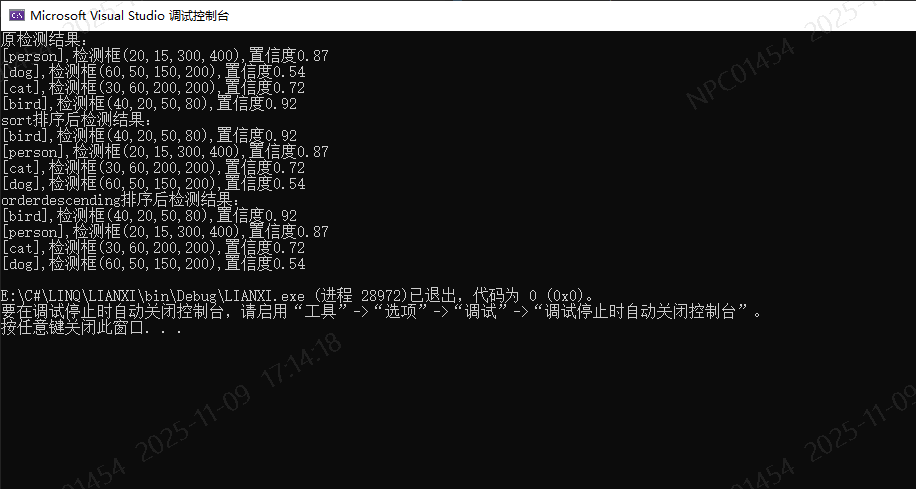
结果如下:

Agent 垂直技术社区,欢迎活跃、内容共建。
更多推荐

 6
6 0
0- 0


 已为社区贡献1条内容

所有评论(0)