【Rust】m2 mac 编译linux 、aarch、win 程序
前言
使用MAC 编译Linux 、Aarch、Win程序。
步骤如下
一、编译Linux,
(1) 安装homebrew,(自行安装,不再赘述)
(2) 安装cmake,官网下,不要用brew安装,brew安装的是最新的。注意(版本一定不要太高。3.29.9就行)。版本高比如rdkafka这些库就会报错。
(3) 安装target
brew install x86_64-unknown-linux-musl
(4) 安装Linux gcc 命令待补充
brew install x86_64-unknown-linux-musl

安装完成在项目的.config 里面。指定链接器
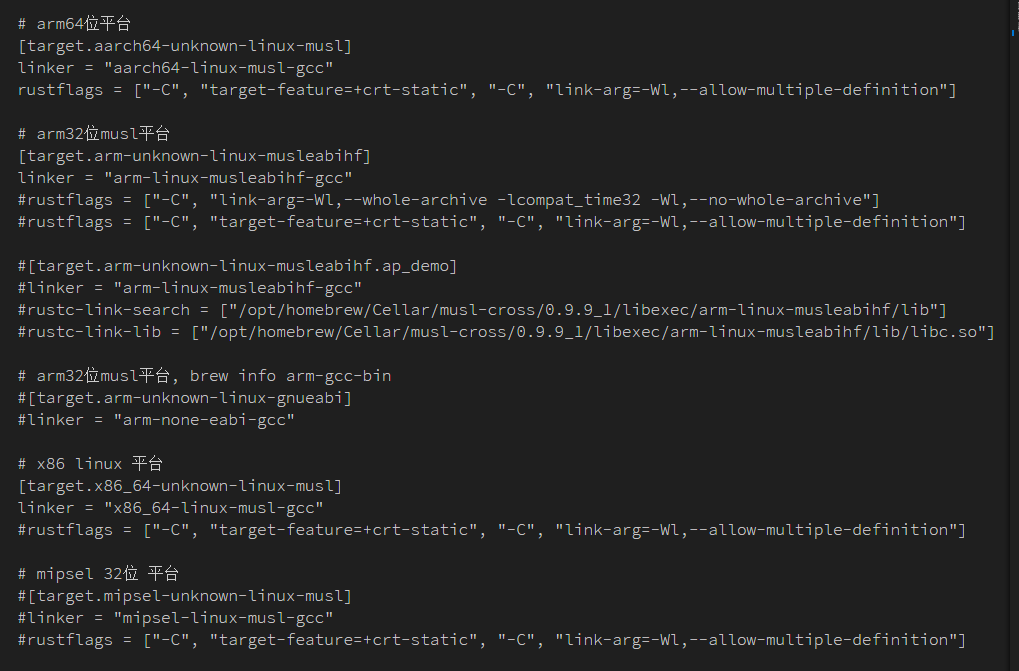
二、编译aarch-unknown
安装:target
fucker@m4 macmini a5 % rustup target add aarch64-unknown-linux-musl
info: component 'rust-std' for target 'aarch64-unknown-linux-musl' is up to date
安装底层库:
# 这个库不在主仓库里面,需要手动添加
brew tap messense/macos-cross-toolchains

# 安装
brew install aarch64-linux-musl-cross
fucker@m4 macmini bin % brew install aarch64-unknown-linux-musl
==> Fetching downloads for: aarch64-unknown-linux-musl
✔︎ Bottle Manifest bdw-gc (8.2.10)                                                                  [Downloaded    7.3KB/  7.3KB]
✔︎ Bottle Manifest m4 (1.4.20)                                                                      [Downloaded   11.7KB/ 11.7KB]
✔︎ Bottle Manifest libtool (2.5.4)                                                                  [Downloaded   13.8KB/ 13.8KB]
✔︎ Bottle Manifest libunistring (1.4.1)                                                             [Downloaded    7.3KB/  7.3KB]
✔︎ Bottle Manifest pkgconf (2.5.1)                                                                  [Downloaded   12.2KB/ 12.2KB]
✔︎ Bottle Manifest readline (8.3.1)                                                                 [Downloaded   12.3KB/ 12.3KB]
✔︎ Bottle Manifest guile (3.0.10)                                                                   [Downloaded   22.1KB/ 22.1KB]
✔︎ Bottle Manifest mpdecimal (4.0.1)                                                                [Downloaded   11.9KB/ 11.9KB]
✔︎ Bottle mpdecimal (4.0.1)                                                                         [Downloaded  185.7KB/185.7KB]
✔︎ Bottle Manifest ca-certificates (2025-11-04)                                                     [Downloaded    2.0KB/  2.0KB]
✔︎ Bottle ca-certificates (2025-11-04)                                                              [Downloaded  134.7KB/134.7KB]
✔︎ Bottle Manifest openssl@3 (3.6.0)                                                                [Downloaded   11.8KB/ 11.8KB]
✔︎ Bottle Manifest sqlite (3.51.0)                                                                  [Downloaded   11.4KB/ 11.4KB]
✔︎ Bottle Manifest python@3.12 (3.12.12)                                                            [Downloaded   27.9KB/ 27.9KB]
✔︎ Bottle m4 (1.4.20)                                                                               [Downloaded  279.3KB/279.3KB]
✔︎ Bottle bdw-gc (8.2.10)                                                                           [Downloaded  557.4KB/557.4KB]
✔︎ Bottle libtool (2.5.4)                                                                           [Downloaded    1.1MB/  1.1MB]
✔︎ Bottle libunistring (1.4.1)                                                                      [Downloaded    1.9MB/  1.9MB]
✔︎ Bottle pkgconf (2.5.1)                                                                           [Downloaded  121.9KB/121.9KB]
⠙ Bottle readline (8.3.1)                                                                          [Downloading 454.7KB/758.2KB]
⠙ Bottle guile (3.0.10)                                                                            [Downloading 491.5KB/ 13.8MB]
⠙ Bottle openssl@3 (3.6.0)                                                                         [Downloading 405.5KB/ 10.9MB]
⠙ Bottle sqlite (3.51.0)                                                                           [Downloading 340.0KB/  2.4MB]
⠙ Bottle python@3.12 (3.12.12)                                                                     [Downloading 716.8KB/ 18.1MB]
⠙ Formula aarch64-unknown-linux-musl (13.3.0)
这个比较简单,下载完成后,基本没有其他问题了。
三、编译Windows程序。
安装:target
rustup target add x-windwos-gun
安装mingw-w64库: (重要,需要点时间。会断)
fucker@m4 macmini bin % ./brew install mingw-w64
==> Fetching downloads for: mingw-w64
✔︎ Bottle Manifest mingw-w64 (13.0.0_2)                                                                                                                          [Downloaded   73.9KB/ 73.9KB]
^[[24~⠙ Bottle mingw-w64 (13.0.0_2)                                                                                                                                   [Downloading 143.2MB/35
✔︎ Bottle mingw-w64 (13.0.0_2)                                                                                                                                   [Downloaded  351.3MB/351.3MB]
==> Pouring mingw-w64--13.0.0_2.arm64_sequoia.bottle.tar.gz
🍺  /opt/homebrew/Cellar/mingw-w64/13.0.0_2: 8,382 files, 1.4GB
==> Running `brew cleanup mingw-w64`...
Disable this behaviour by setting `HOMEBREW_NO_INSTALL_CLEANUP=1`.
Hide these hints with `HOMEBREW_NO_ENV_HINTS=1` (see `man brew`).
fucker@m4 macmini ~ %
编译,发现报错,最后一个包没过去
pc-windows-gnu/debug/build/zstd-sys-68f1408581f1dcbf/out" "-L" "/Users/s/.cargo/registry/src/rsproxy.cn-e3de039b2554c837/windows_x86_64_gnu-0.48.5/lib" "-L" "/Users/s/.cargo/registry/src/rsproxy.cn-e3de039b2554c837/windows_x86_64_gnu-0.52.5/lib" "-L" "/Users/s/.cargo/registry/src/rsproxy.cn-e3de039b2554c837/winapi-x86_64-pc-windows-gnu-0.4.0/lib" "-o" "/Users/s/apv5/target/x86_64-pc-windows-gnu/debug/deps/apm-2c3562a486a3fc40.exe" "-Wl,--gc-sections" "-no-pie" "-nodefaultlibs" "-Wl,--disable-runtime-pseudo-reloc" "<sysroot>/lib/rustlib/x86_64-pc-windows-gnu/lib/rsend.o" = note: some arguments are omitted. use --verbose to show all linker arguments = note: /opt/homebrew/Cellar/mingw-w64/13.0.0_2/toolchain-x86_64/bin/x86_64-w64-mingw32-ld: cannot find -lPacket: No such file or directory collect2: error: ld returned 1 exit status
-lPacket 没找到 ⇒ 你在 x86_64-pc-windows-gnu 交叉链接 Windows 可执行文件时缺了 Npcap/WinPcap 的 Packet 导入库(MinGW 需要 libPacket.a,而 SDK 里是 MSVC 的 Packet.lib)。因为用到了packet但是没有libpacket.a文件。
但是我有dll 文件,可以dump成def 文件。然后在编译成 .a 文件。
# /opt/homebrew/bin/x86_64-w64-mingw32-objdump -p ./Packet.dll > packet.dump

# 我用下面这个方法
strings Packet.dll | grep -E '^Packet|^Ndis|^Bpf' > Packet.def

然后手动在文件开头加:
LIBRARY Packet
EXPORTS


#执行命令生成libpacket.a 文件 。
/opt/homebrew/bin/x86_64-w64-mingw32-dlltool \
    -d Packet.def \
    -l libPacket.a
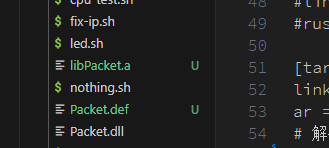
修改config.toml 文件。指定.a 目录
[target.x86_64-pc-windows-gnu]
linker = "x86_64-w64-mingw32-gcc"
ar = "x86_64-w64-mingw32-gcc-ar"
# 解决apm在windows环境下的运行问题 disable-runtime-pseudo-reloc
rustflags = ["-C", "link-arg=-Wl,--disable-runtime-pseudo-reloc",
    "-C", "link-arg=-L/Users/s/aop/script/dev",        # 让 linker 知道 .a 所在目录
    "-C", "link-arg=-lPacket",   ]
在编译,成功

三、注意
编译文件缺少哪些库增加库基本就可以解决问题。 by the way ,报错太长,把我的chatgpt的token 直接用完了。艹。
四、结语
至此……在这台 M2 Mac 上,
Linux、AArch、Windows 的编译壁垒——全部被击碎。
三界的构建之门,尽在掌控。
数据流永不枯竭,代码矩阵为你铺路 —— 冲破架构壁垒,你的指令终将穿透所有未知节点,继续向核心进发!

Agent 垂直技术社区,欢迎活跃、内容共建。
更多推荐


 3
3 0
0- 0


 已为社区贡献9条内容

所有评论(0)