【实际项目3】C#把文件夹中的RGB图片变为Gray图片
·
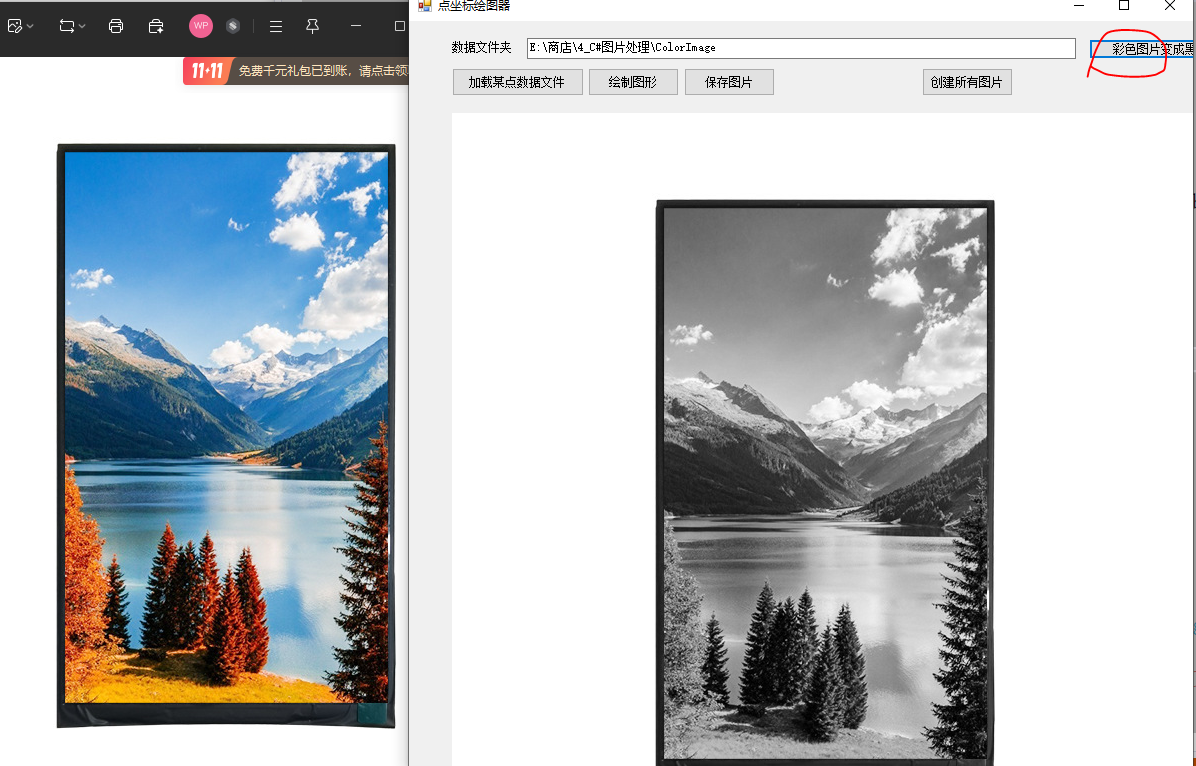
. 某个项目需要把某文件夹中的RGB图片变为Gray图片。
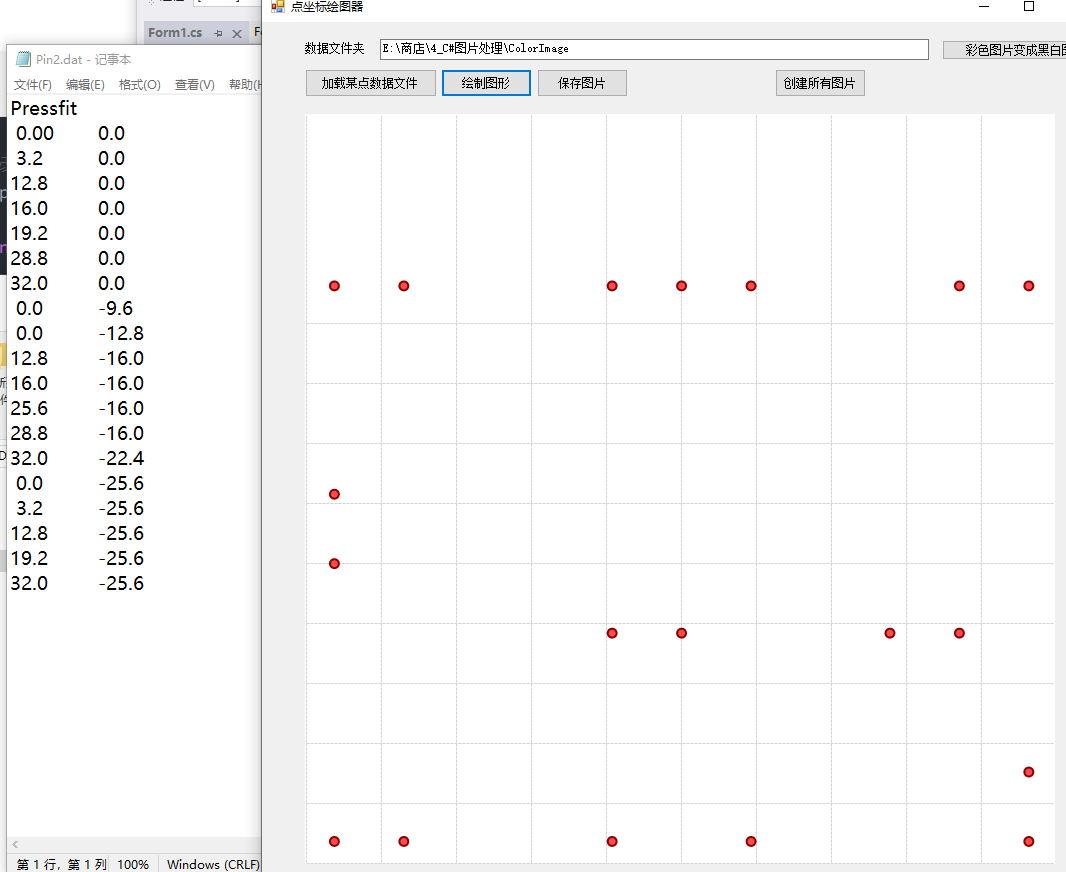
以及需要把某个pin针文件中根据pin针的位置进行绘图,下图所示。
具体代码见:https://download.csdn.net/download/qq_34047402/92324511
C#把RGB图片变成Gray图片以及读取一些列点的XY坐标值进行绘图资源-CSDN下载
一、RGB图片变为Grey图片。
 private void btnColorBmpToGrey_Click(object sender, EventArgs e)
 {
     // 获取源文件夹中的所有BMP文件
     string[] bmpFiles = Directory.GetFiles(this.txtFolderName.Text);


     string folderPath = this.txtFolderName.Text + @"\image";
     // 检查文件夹是否存在
     if (!Directory.Exists(folderPath))
     {
         // 如果不存在,则创建文件夹
         Directory.CreateDirectory(folderPath);
         Console.WriteLine("文件夹已创建: " + folderPath);
     }

     foreach (string file in bmpFiles)
     {
         string fileName = Path.GetFileName(file); // 获取文件名,包括扩展名
         string destinationPath = Path.Combine(folderPath, fileName); // 目标文件路径

         using (Bitmap originalImage = new Bitmap(file))
         {
            Bitmap bmp= RgbToGrayScale(originalImage);
             // 保存二值化图片(保持BMP格式,同名保存)

             this.pictureBox.Height = bmp.Height;
             this.pictureBox.Width = bmp.Width;
             this.pictureBox.Image = bmp;

             pictureBox.Image.Save(destinationPath, System.Drawing.Imaging.ImageFormat.Bmp);
          }
     }
 }
  /// <summary>
  /// 将源图像灰度化,并转化为8位灰度图像。
  /// </summary>
  /// <param name="original"> 源图像。 </param>
  /// <returns> 8位灰度图像。 </returns>
  public static Bitmap RgbToGrayScale(Bitmap original)
  {
      if (original != null)
      {
          // 将源图像内存区域锁定
          Rectangle rect = new Rectangle(0, 0, original.Width, original.Height);
          BitmapData bmpData = original.LockBits(rect, ImageLockMode.ReadOnly,
               original.PixelFormat);

          // 获取图像参数
          int width = bmpData.Width;
          int height = bmpData.Height;
          int stride = bmpData.Stride;  // 扫描线的宽度
          int offset = stride - width * 3;  // 显示宽度与扫描线宽度的间隙
          IntPtr ptr = bmpData.Scan0;   // 获取bmpData的内存起始位置
          int scanBytes = stride * height;  // 用stride宽度,表示这是内存区域的大小

          // 分别设置两个位置指针,指向源数组和目标数组
          int posScan = 0, posDst = 0;
          byte[] rgbValues = new byte[scanBytes];  // 为目标数组分配内存
          Marshal.Copy(ptr, rgbValues, 0, scanBytes);  // 将图像数据拷贝到rgbValues中
                                                       // 分配灰度数组
          byte[] grayValues = new byte[width * height]; // 不含未用空间。
                                                        // 计算灰度数组
          for (int i = 0; i < height; i++)
          {
              for (int j = 0; j < width; j++)
              {
                  double temp = rgbValues[posScan++] * 0.11 +
                      rgbValues[posScan++] * 0.59 +
                      rgbValues[posScan++] * 0.3;

                  grayValues[posDst++] =(byte) temp;

              }
              // 跳过图像数据每行未用空间的字节,length = stride - width * bytePerPixel
              posScan += offset;
          }

          // 内存解锁
          Marshal.Copy(rgbValues, 0, ptr, scanBytes);
          original.UnlockBits(bmpData);  // 解锁内存区域

          // 构建8位灰度位图
          Bitmap retBitmap = BuiltGrayBitmap(grayValues, width, height);
          return retBitmap;
      }
      else
      {
          return null;
      }
  }
 /// <summary>
 /// 用灰度数组新建一个8位灰度图像。
 /// </summary>
 /// <param name="rawValues"> 灰度数组(length = width * height)。 </param>
 /// <param name="width"> 图像宽度。 </param>
 /// <param name="height"> 图像高度。 </param>
 /// <returns> 新建的8位灰度位图。 </returns>
 private static Bitmap BuiltGrayBitmap(byte[] rawValues, int width, int height)
 {
     // 新建一个8位灰度位图,并锁定内存区域操作
     Bitmap bitmap = new Bitmap(width, height, PixelFormat.Format8bppIndexed);
     BitmapData bmpData = bitmap.LockBits(new Rectangle(0, 0, width, height),
          ImageLockMode.WriteOnly, PixelFormat.Format8bppIndexed);

     // 计算图像参数
     int offset = bmpData.Stride - bmpData.Width;        // 计算每行未用空间字节数
     IntPtr ptr = bmpData.Scan0;                         // 获取首地址
     int scanBytes = bmpData.Stride * bmpData.Height;    // 图像字节数 = 扫描字节数 * 高度
     byte[] grayValues = new byte[scanBytes];            // 为图像数据分配内存

     // 为图像数据赋值
     int posSrc = 0, posScan = 0;                        // rawValues和grayValues的索引
     for (int i = 0; i < height; i++)
     {
         for (int j = 0; j < width; j++)
         {
             grayValues[posScan++] = rawValues[posSrc++];
         }
         // 跳过图像数据每行未用空间的字节,length = stride - width * bytePerPixel
         posScan += offset;
     }

     // 内存解锁
     Marshal.Copy(grayValues, 0, ptr, scanBytes);
     bitmap.UnlockBits(bmpData);  // 解锁内存区域

     // 修改生成位图的索引表,从伪彩修改为灰度
     ColorPalette palette;
     // 获取一个Format8bppIndexed格式图像的Palette对象
     using (Bitmap bmp = new Bitmap(1, 1, PixelFormat.Format8bppIndexed))
     {
         palette = bmp.Palette;
     }
     for (int i = 0; i < 256; i++)
     {
         palette.Entries[i] = Color.FromArgb(i, i, i);
     }
     // 修改生成位图的索引表
     bitmap.Palette = palette;

     return bitmap;
 }
二、把一个pin针的坐标位置值转换成图片。
using System;
using System.Collections.Generic;
using System.Diagnostics;
using System.Drawing;
using System.Drawing.Imaging;
using System.IO;
using System.Runtime.InteropServices;
using System.Windows.Forms;
namespace PointPlotter
{
public partial class Form1 : Form
{
private List<PointF> points = new List<PointF>();
public Form1()
{
InitializeComponent();
this.Text = "点坐标绘图器";
this.Size = new Size(800, 600);
this.StartPosition = FormStartPosition.CenterScreen;
}
private List<PointF> ReadPointsFromFile(string filename)
{
var pointsList = new List<PointF>();
int lineNumber = 0;
try
{
using (StreamReader reader = new StreamReader(filename))
{
string line;
while ((line = reader.ReadLine()) != null)
{
lineNumber++;
line = line.Trim();
// 跳过空行和注释行
if (string.IsNullOrEmpty(line) || line.StartsWith("#"))
continue;
string[] parts = line.Split(new char[] { ' ', '\t' }, StringSplitOptions.RemoveEmptyEntries);
if (parts.Length >= 2)
{
if (float.TryParse(parts[0], out float x) && float.TryParse(parts[1], out float y))
{
pointsList.Add(new PointF(x, y));
}
else
{
Console.WriteLine($"警告: 第 {lineNumber} 行数据格式错误: {line}");
}
}
else
{
Console.WriteLine($"警告: 第 {lineNumber} 行数据不完整: {line}");
}
}
}
}
catch (Exception ex)
{
throw new Exception($"读取文件 '{filename}' 时出错 (第 {lineNumber} 行): {ex.Message}");
}
return pointsList;
}
private void PlotPoints(PictureBox pictureBox)
{
if (points.Count == 0)
{
// MessageBox.Show("没有可绘制的点数据,请先加载数据文件", "提示",
// MessageBoxButtons.OK, MessageBoxIcon.Warning);
return;
}
// 创建位图
Bitmap bitmap = new Bitmap(pictureBox.Width, pictureBox.Height);
using (Graphics g = Graphics.FromImage(bitmap))
{
// 设置高质量绘图
g.SmoothingMode = System.Drawing.Drawing2D.SmoothingMode.AntiAlias;
g.Clear(Color.White);
// 计算坐标范围
float minX = float.MaxValue, maxX = float.MinValue;
float minY = float.MaxValue, maxY = float.MinValue;
foreach (var point in points)
{
minX = Math.Min(minX, point.X);
maxX = Math.Max(maxX, point.X);
minY = Math.Min(minY, point.Y);
maxY = Math.Max(maxY, point.Y);
}
// 添加边距
float marginX = (maxX - minX) * 0.04f;
float marginY = (maxY - minY) * 0.04f;
minX -= marginX; maxX += marginX;
minY -= marginY; maxY += marginY;
// 计算缩放比例
float scaleX = (pictureBox.Width ) / (maxX - minX);
float scaleY = (pictureBox.Height) / (maxY - minY);
float scale = Math.Min(scaleX, scaleY);
// 绘制坐标轴
DrawCoordinateSystem(g, pictureBox.Width, pictureBox.Height, minX, maxX, minY, maxY, scale);
// 绘制点
DrawPoints(g, points, minX, minY, scale, pictureBox.Width, pictureBox.Height);
}
pictureBox.Image = bitmap;
}
private void DrawCoordinateSystem(Graphics g, int width, int height, float minX, float maxX, float minY, float maxY, float scale)
{
Pen axisPen = new Pen(Color.Black, 2);
Pen gridPen = new Pen(Color.LightGray, 1) { DashStyle = System.Drawing.Drawing2D.DashStyle.Dash };
Font labelFont = new Font("Arial", 8);
Brush labelBrush = Brushes.Black;
// 计算原点位置(左下角)
float originX = 1;
float originY = height - 1;
// 绘制坐标轴
// g.DrawLine(axisPen, originX, originY, width - 2, originY); // X轴
// g.DrawLine(axisPen, originX, 1, originX, originY); // Y轴
// 绘制网格和刻度
float stepX = (maxX - minX) / 10;
float stepY = (maxY - minY) / 10;
for (float x = minX; x <= maxX; x += stepX)
{
float screenX = originX + (x - minX) * scale;
g.DrawLine(gridPen, screenX, 1, screenX, originY);
// g.DrawString(x.ToString("F1"), labelFont, labelBrush, screenX - 10, originY + 5);
}
for (float y = minY; y <= maxY; y += stepY)
{
float screenY = originY - (y - minY) * scale;
g.DrawLine(gridPen, originX, screenY, width - 1, screenY);
// g.DrawString(y.ToString("F1"), labelFont, labelBrush, 5, screenY - 6);
}
// 绘制坐标轴标签
// Font titleFont = new Font("Arial", 10, FontStyle.Bold);
// g.DrawString("X坐标", titleFont, Brushes.Black, width / 2 - 20, originY + 20);
// g.DrawString("Y坐标", titleFont, Brushes.Black, 10, 20);
axisPen.Dispose();
gridPen.Dispose();
// labelFont.Dispose();
// titleFont.Dispose();
}
private void DrawPoints(Graphics g, List<PointF> points, float minX, float minY, float scale, int width, int height)
{
float originX = 1;
float originY = height - 1;
// 绘制点(圆形)
Brush pointBrush = new SolidBrush(Color.FromArgb(180, Color.Red));
Pen pointPen = new Pen(Color.DarkRed, 2);
Font labelFont = new Font("Arial", 7);
Brush labelBrush = Brushes.Blue;
float pointRadius = 4.5f;
foreach (var point in points)
{
// 转换为屏幕坐标
float screenX = originX + (point.X - minX) * scale;
float screenY = originY - (point.Y - minY) * scale;
// 绘制圆形点
g.FillEllipse(pointBrush, screenX - pointRadius, screenY - pointRadius,
pointRadius * 2, pointRadius * 2);
g.DrawEllipse(pointPen, screenX - pointRadius, screenY - pointRadius,
pointRadius * 2, pointRadius * 2);
// 绘制坐标标签
// string label = $"({point.X:F1}, {point.Y:F1})";
// g.DrawString(label, labelFont, labelBrush, screenX + 8, screenY - 6);
}
pointBrush.Dispose();
pointPen.Dispose();
labelFont.Dispose();
}
private void SaveImage(PictureBox pictureBox)
{
if (pictureBox.Image == null)
{
MessageBox.Show("没有可保存的图片,请先绘制图形", "提示",
MessageBoxButtons.OK, MessageBoxIcon.Warning);
return;
}
using (SaveFileDialog saveFileDialog = new SaveFileDialog())
{
saveFileDialog.Filter = "PNG图片 (*.png)|*.png|JPEG图片 (*.jpg)|*.jpg|BMP图片 (*.bmp)|*.bmp";
saveFileDialog.Title = "保存图片";
saveFileDialog.FileName = "points_plot.png";
if (saveFileDialog.ShowDialog() == DialogResult.OK)
{
try
{
// 根据选择的格式保存图片
var format = System.Drawing.Imaging.ImageFormat.Png;
string extension = Path.GetExtension(saveFileDialog.FileName).ToLower();
switch (extension)
{
case ".jpg":
case ".jpeg":
format = System.Drawing.Imaging.ImageFormat.Jpeg;
break;
case ".bmp":
format = System.Drawing.Imaging.ImageFormat.Bmp;
break;
default:
format = System.Drawing.Imaging.ImageFormat.Png;
break;
}
pictureBox.Image.Save(saveFileDialog.FileName, format);
MessageBox.Show($"图片已保存为: {saveFileDialog.FileName}", "保存成功",
MessageBoxButtons.OK, MessageBoxIcon.Information);
}
catch (Exception ex)
{
MessageBox.Show($"保存图片时出错: {ex.Message}", "错误",
MessageBoxButtons.OK, MessageBoxIcon.Error);
}
}
}
}
private void SaveImage(PictureBox pictureBox, string strDir, string fileName)
{
if (pictureBox.Image == null)
{
return;
}
try
{
// 根据选择的格式保存图片
var format = System.Drawing.Imaging.ImageFormat.Bmp;
string extension = Path.GetExtension(fileName).ToLower();
switch (extension)
{
case ".jpg":
case ".jpeg":
format = System.Drawing.Imaging.ImageFormat.Jpeg;
break;
case ".bmp":
format = System.Drawing.Imaging.ImageFormat.Bmp;
break;
default:
format = System.Drawing.Imaging.ImageFormat.Png;
break;
}
string FullFileName = Path.Combine(strDir, fileName);
pictureBox.Image.Save(FullFileName, format);
}
catch (Exception ex)
{
;
}
}
private void CreateListPictures()
{
ListFilesInFolder();
string folderPath = this.txtFolderName.Text + @"\image";
// 检查文件夹是否存在
if (!Directory.Exists(folderPath))
{
// 如果不存在,则创建文件夹
Directory.CreateDirectory(folderPath);
Console.WriteLine("文件夹已创建: " + folderPath);
}
if (files!=null && files.Length>0)
{
foreach(var file in files)
{
points = ReadPointsFromFile(file);
if(points!=null && points.Count>0)
{
PlotPoints(pictureBox);
SaveImage(pictureBox, this.strFolderName + @"\image", Path.GetFileNameWithoutExtension(file) + ".jpg");
}
}
}
}
string strFolderName = string.Empty;
string[] files = null;
public void ListFilesInFolder()
{
strFolderName = this.txtFolderName.Text;
Console.WriteLine("文件列表:");
Console.WriteLine(new string('-', 50));
try
{
// 获取所有文件
files = Directory.GetFiles(strFolderName);
foreach (string file in files)
{
Console.WriteLine(file);
}
Console.WriteLine($"\n共找到 {files.Length} 个文件");
}
catch (Exception ex)
{
Console.WriteLine($"读取文件夹时出错: {ex.Message}");
}
}
private void btnLoad_Click(object sender, EventArgs e)
{
using (OpenFileDialog openFileDialog = new OpenFileDialog())
{
openFileDialog.Filter = "文本文件 (*.dat)|*.dat|所有文件 (*.*)|*.*";
openFileDialog.Title = "选择点坐标数据文件";
if (openFileDialog.ShowDialog() == DialogResult.OK)
{
try
{
points = ReadPointsFromFile(openFileDialog.FileName);
MessageBox.Show($"成功加载 {points.Count} 个点坐标", "加载完成",
MessageBoxButtons.OK, MessageBoxIcon.Information);
}
catch (Exception ex)
{
MessageBox.Show($"读取文件时出错: {ex.Message}", "错误",
MessageBoxButtons.OK, MessageBoxIcon.Error);
}
}
}
}
private void btnPlot_Click(object sender, EventArgs e)
{
PlotPoints(pictureBox);
}
private void btnSave_Click(object sender, EventArgs e)
{
SaveImage(pictureBox);
}
private void btnCreatePictures_Click(object sender, EventArgs e)
{
CreateListPictures();
}
}
}
Agent 垂直技术社区,欢迎活跃、内容共建。
更多推荐


 2
2 0
0- 0


 已为社区贡献1条内容

所有评论(0)