Flutter:分享微信好友,分享到朋友圈
·
首页微信分享功能实现文档
概述
本文档记录了在 Flutter 应用首页实现微信分享功能的核心代码过程,支持分享到微信好友和朋友圈,自动压缩图片符合微信 64KB 限制。
实现位置: lib/pages/tab/home/controller.dart
技术栈
fluwx: ^4.1.0- 微信分享 SDKDuCompress- 图片压缩工具(基于flutter_image_compress),请参考图片压缩dio: ^5.7.0- 下载图片GetX- 状态管理
实现步骤
步骤 1:在 HomeController 添加导入和字段
在 lib/pages/tab/home/controller.dart 文件顶部添加导入:
import 'dart:typed_data';
import 'dart:io';
import 'package:fluwx/fluwx.dart';
import 'package:dio/dio.dart';
在 HomeController 类中添加字段:
class HomeController extends GetxController {
  Fluwx? _fluwx; // 微信SDK实例
  int currentCsjVideoId = 0; // 当前播放的视频ID

  // ... 其他字段
}
步骤 2:在 onInit() 中初始化微信 SDK
void onInit() {
super.onInit();
// ... 其他初始化代码
// 初始化微信SDK
_fluwx = Fluwx();
_initWechat();
}
/// 初始化微信SDK
Future<void> _initWechat() async {
try {
await _fluwx?.registerApi(
appId: Constants.wxOpenPlatformAppid, // wxda**********f1e7
doOnAndroid: true,
doOnIOS: true,
);
debugPrint('微信SDK注册成功: ${Constants.wxOpenPlatformAppid}');
} catch (e) {
debugPrint('微信SDK注册失败: $e');
}
}
步骤 3:实现分享入口方法
/// 分享到微信
void shareWechat() async {
  try {
    // 1. 检查微信是否已安装
    bool isInstalled = await _fluwx?.isWeChatInstalled ?? false;
    if (!isInstalled) {
      Get.snackbar('提示', '请先安装微信客户端', backgroundColor: Colors.orange);
      return;
    }

    // 2. 获取当前视频信息(穿山甲视频)
    final detailModel = await HomeApi.videoDetail(currentCsjVideoId, 2);

    // 3. 构建分享链接(包含推荐码)
    var userinfo = await UserApi.getUserInfo();
    var sn = userinfo.sn;
    final shareUrl = '${Constants.wpApiBaseUrl}/h5/share?id=${detailModel.id}&type=2&ref=$sn';

    // 4. 弹出选择分享目标的对话框
    _showShareTargetDialog(detailModel, shareUrl);
  } catch (e) {
    debugPrint('微信分享异常: $e');
    Get.snackbar('错误', '分享失败: $e', backgroundColor: Colors.red);
  }
}
步骤 4:实现底部弹出式分享对话框
/// 显示分享目标选择对话框(底部弹出)
void _showShareTargetDialog(HomeVideoDetailModel detailModel, String shareUrl) {
  showModalBottomSheet(
    context: Get.context!,
    backgroundColor: Colors.transparent,
    builder: (ctx) => Container(
      decoration: BoxDecoration(
        color: Colors.white,
        borderRadius: BorderRadius.only(
          topLeft: Radius.circular(20.w),
          topRight: Radius.circular(20.w),
        ),
      ),
      child: SafeArea(
        child: Column(
          mainAxisSize: MainAxisSize.min,
          children: [
            // 拖拽指示器
            <Widget>[].toRow().tight(width: 72.w, height: 8.w)
              .backgroundColor(const Color(0xffE4E4E4))
              .borderRadius(all: 8.w)
              .marginOnly(top: 20.w, bottom: 30.w),

            // 标题
            TextWidget.body('分享到', size: 32.sp, color: Colors.black, weight: FontWeight.w600),
            SizedBox(height: 40.w),

            // 分享选项:微信会话、朋友圈
            Row(
              mainAxisAlignment: MainAxisAlignment.spaceEvenly,
              children: [
                _buildShareOption(
                  icon: 'assets/icon/icon-weixin.png',
                  label: '微信会话',
                  onTap: () {
                    Get.back();
                    _shareToWechat(detailModel, shareUrl, WeChatScene.session);
                  },
                ),
                _buildShareOption(
                  icon: 'assets/icon/icon-weixin.png',
                  label: '朋友圈',
                  onTap: () {
                    Get.back();
                    _shareToWechat(detailModel, shareUrl, WeChatScene.timeline);
                  },
                ),
              ],
            ),

            SizedBox(height: 40.w),

            // 取消按钮
            Container(
              width: double.infinity,
              height: 88.w,
              margin: EdgeInsets.symmetric(horizontal: 30.w),
              decoration: BoxDecoration(
                color: const Color(0xffF5F5F5),
                borderRadius: BorderRadius.circular(16.w),
              ),
              child: Center(
                child: TextWidget.body('取消', size: 32.sp, color: const Color(0xff666666)),
              ),
            ).onTap(() => Get.back()),

            SizedBox(height: 30.w),
          ],
        ),
      ),
    ),
  );
}

/// 构建分享选项 UI
Widget _buildShareOption({
  required String icon,
  required String label,
  required VoidCallback onTap,
}) {
  return Column(
    children: [
      Container(
        width: 110.w,
        height: 110.w,
        decoration: BoxDecoration(
          color: Colors.grey[100],
          borderRadius: BorderRadius.circular(20.w),
        ),
        child: ImgWidget(path: icon, width: 60.w, height: 60.w),
      ).onTap(onTap),
      SizedBox(height: 20.w),
      TextWidget.body(label, size: 24.sp, color: Colors.black87),
    ],
  );
}
步骤 5:执行微信分享(核心逻辑)
/// 执行微信分享
Future<void> _shareToWechat(
  HomeVideoDetailModel detailModel,
  String shareUrl,
  WeChatScene scene,
) async {
  try {
    // 准备分享数据
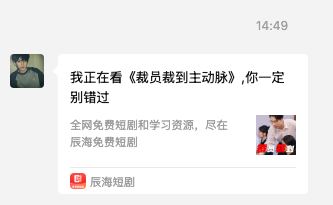
    final title = '我正在看《${detailModel.title ?? '精彩短剧'}》,你一定别错过';
    final description = '全网免费短剧和学习资源,尽在辰海免费短剧';
    final coverUrl = detailModel.coverUrl ?? '';

    // 下载并压缩封面图片作为缩略图
    Uint8List? thumbData;
    if (coverUrl.isNotEmpty) {
      try {
        thumbData = await _downloadImageAsBytes(coverUrl);
        // 微信要求缩略图必须小于64KB
        if (thumbData != null && thumbData.length > 64 * 1024) {
          debugPrint('缩略图大小超过64KB,使用无缩略图分享');
          thumbData = null;
        }
      } catch (e) {
        debugPrint('下载封面图片失败: $e');
        thumbData = null;
      }
    }

    // 使用网页分享模型
    final model = WeChatShareWebPageModel(
      shareUrl,
      title: title,
      description: description,
      thumbData: thumbData,
      scene: scene, // WeChatScene.session(好友) 或 WeChatScene.timeline(朋友圈)
    );

    // 执行分享
    final result = await _fluwx?.share(model);

    if (result == true) {
      debugPrint('微信分享调用成功');
    } else {
      Get.snackbar('提示', '分享失败,请重试', backgroundColor: Colors.orange);
    }
  } catch (e) {
    debugPrint('微信分享执行异常: $e');
    Get.snackbar('错误', '分享失败: $e', backgroundColor: Colors.red);
  }
}
步骤 6:图片下载和智能压缩(关键功能)
核心算法:渐进式压缩,从高分辨率逐步降低到满足 64KB 限制
/// 下载图片并转换为字节数组(带压缩)
Future<Uint8List?> _downloadImageAsBytes(String imageUrl) async {
  try {
    // 1. 下载图片到临时文件
    final dio = Dio();
    final tempDir = Directory.systemTemp;
    final tempPath = '${tempDir.path}/share_thumb_${DateTime.now().millisecondsSinceEpoch}.jpg';

    await dio.download(imageUrl, tempPath, options: Options(receiveTimeout: const Duration(seconds: 10)));

    final tempFile = File(tempPath);
    if (!await tempFile.exists()) return null;

    // 2. 检查原始文件大小
    final fileSize = await tempFile.length();
    debugPrint('原始图片大小: ${fileSize / 1024} KB');

    Uint8List? result;

    // 3. 如果小于64KB,直接使用
    if (fileSize < 64 * 1024) {
      result = await tempFile.readAsBytes();
      debugPrint('图片大小符合要求,直接使用');
    } else {
      // 4. 如果大于64KB,使用DuCompress渐进式压缩
      debugPrint('图片大小超过64KB,开始压缩...');

      // 渐进式压缩策略:从大到小尝试
      final compressionLevels = [
        {'width': 800, 'height': 600},
        {'width': 640, 'height': 480},
        {'width': 480, 'height': 360},
        {'width': 320, 'height': 240},
      ];

      for (var level in compressionLevels) {
        final compressedFile = await DuCompress.image(
          tempPath,
          minWidth: level['width']!,
          minHeight: level['height']!,
        );

        if (compressedFile != null) {
          final compressedFileObj = File(compressedFile.path);
          final compressedSize = await compressedFileObj.length();
          debugPrint('压缩后图片大小: ${compressedSize / 1024} KB (${level['width']}x${level['height']})');

          if (compressedSize < 64 * 1024) {
            // 压缩成功,符合要求
            result = await compressedFileObj.readAsBytes();
            debugPrint('压缩成功,图片大小符合要求');
            await compressedFileObj.delete(); // 清理临时文件
            break;
          } else {
            // 继续尝试更小的尺寸
            await compressedFileObj.delete();
          }
        }
      }

      if (result == null) {
        debugPrint('无法将图片压缩到64KB以下');
      }
    }

    // 5. 清理原始临时文件
    await tempFile.delete();

    return result;
  } catch (e) {
    debugPrint('下载/压缩图片失败: $e');
    return null;
  }
}
压缩策略说明:
- 检查原始图片大小,< 64KB 直接使用
- > 64KB 时按以下级别逐步压缩:800x600 → 640x480 → 480x360 → 320x240
- 每次压缩后检查大小,符合要求则停止
- 所有级别都失败则返回 null,使用无缩略图分享
步骤 7:在 HomePage 触发分享
在 lib/pages/tab/home/view.dart 中的视频播放监听器添加分享事件:
videoPlayListener: VideoPlayListener(
  onClickItem: (item) {
    if (item == 'share') {
      print('穿山甲:分享: $item');
      controller.shareWechat(); // 调用控制器的分享方法
    }
    // ... 其他事件处理
  },
),
配置要求
微信开放平台配置
- AppID:
wxda**********f1e7 - 需在微信开放平台配置应用包名和签名
Android 配置
在 AndroidManifest.xml 添加微信回调 Activity
iOS 配置
在 Info.plist 添加 URL Scheme 和白名单
测试要点
- ✅ 检查微信是否安装
- ✅ 分享链接格式正确(包含 id、type、ref 参数)
- ✅ 封面图片自动下载和压缩
- ✅ 底部对话框 UI 显示正常
- ✅ 分享到微信好友和朋友圈都正常
关键技术点总结
- 微信 SDK 初始化 - 在
onInit()中注册 AppID - 底部弹出对话框 - 使用
showModalBottomSheet替代普通 Dialog - 图片智能压缩 - 渐进式压缩策略,确保符合 64KB 限制
- 临时文件管理 - 下载和压缩后及时清理临时文件
- 完整错误处理 - 每个步骤都有 try-catch 和用户提示


Agent 垂直技术社区,欢迎活跃、内容共建。
更多推荐


 5
5 0
0- 0


 已为社区贡献20条内容

所有评论(0)