Android高低版本+MQTTX+MQTT,AS+Java
1 前言
最近有需求要写MQTT客户端,用于和MQTT服务器通讯。现将用到的工具、开发过程、遇到的问题和解决办法记录下来。
2 MQTTX
使用MQTTX主要有两个原因。第一,由于公司内外网原因,所以要用第三方软件测试MQTT的连通性。第二,第三方软件接收消息的界面会比AS的控制台更直观,因为AS控制台还会打印一些业务的调试信息。如果没有这两方面的顾虑,可以直接跳过2 MQTTX,进入3 Android连接MQTT。
下面使用MQTTX来测试连接和收发消息:
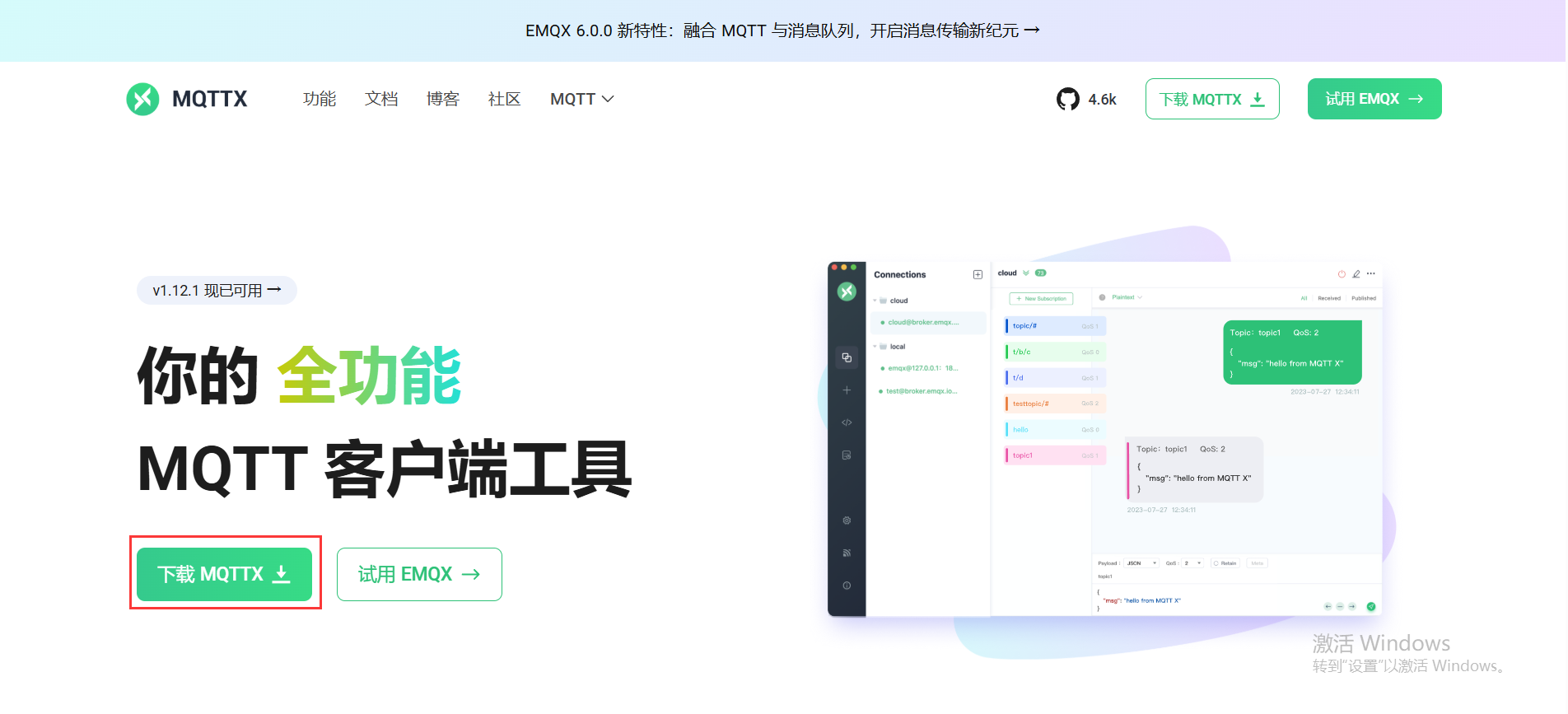
2.1 MQTTX下载
在这里简单叙述一下,在MQTTX官网https://mqttx.app/zh下载
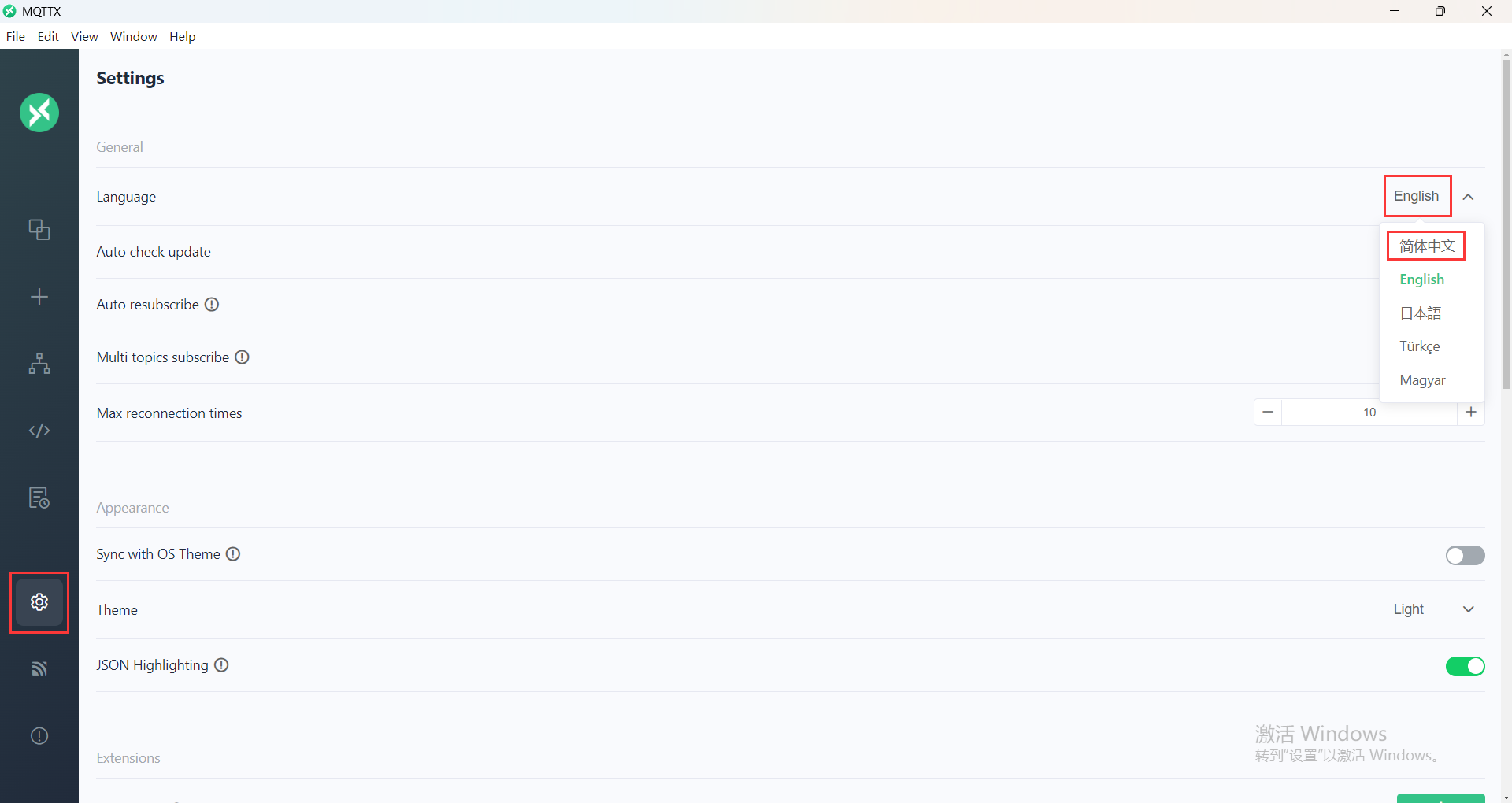
2.2 MQTTX语言更改
如果初始是英语,可以在设置中改成中文
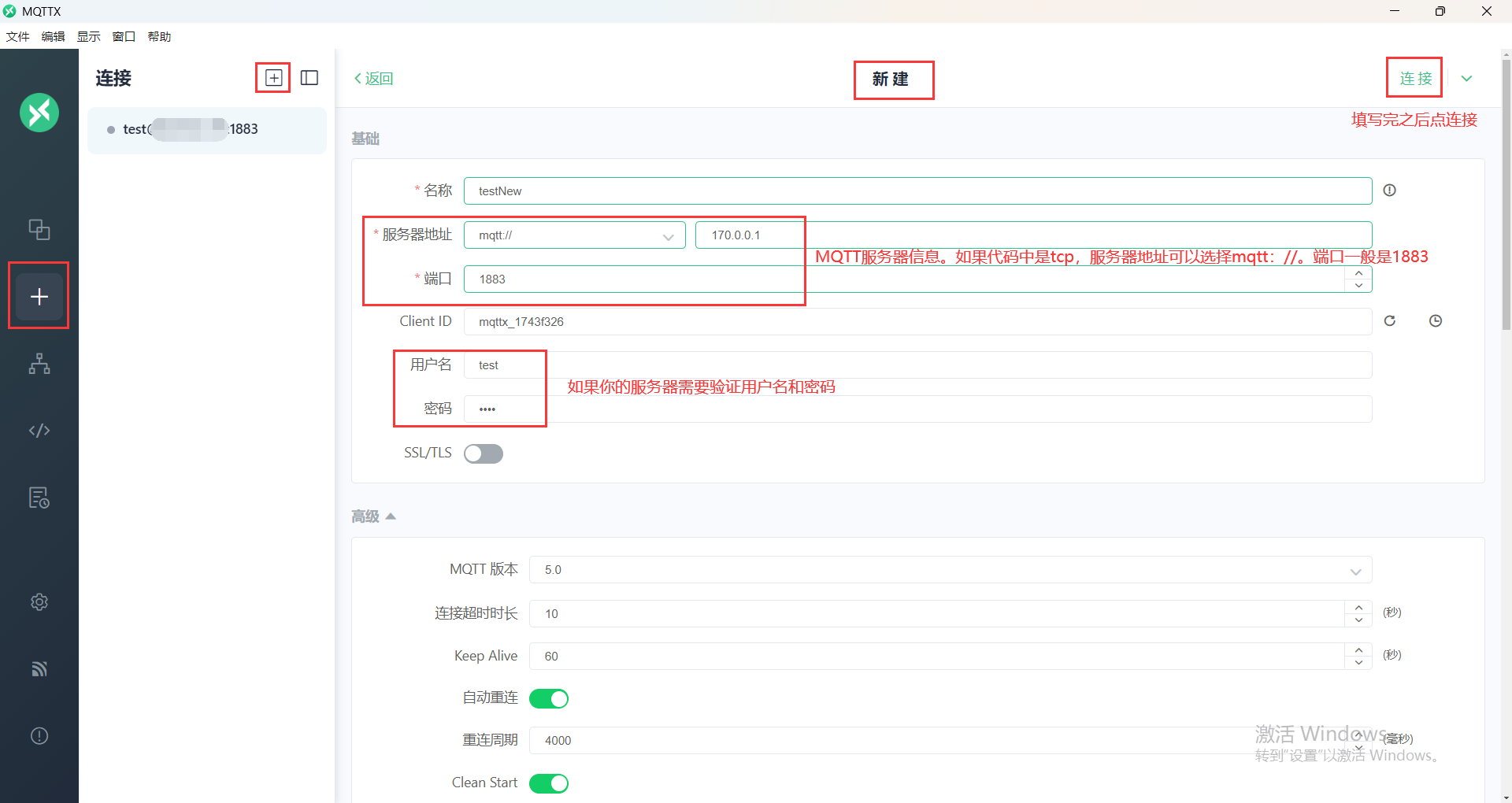
2.3 连接MQTT
填写MQTT服务器信息,点击连接
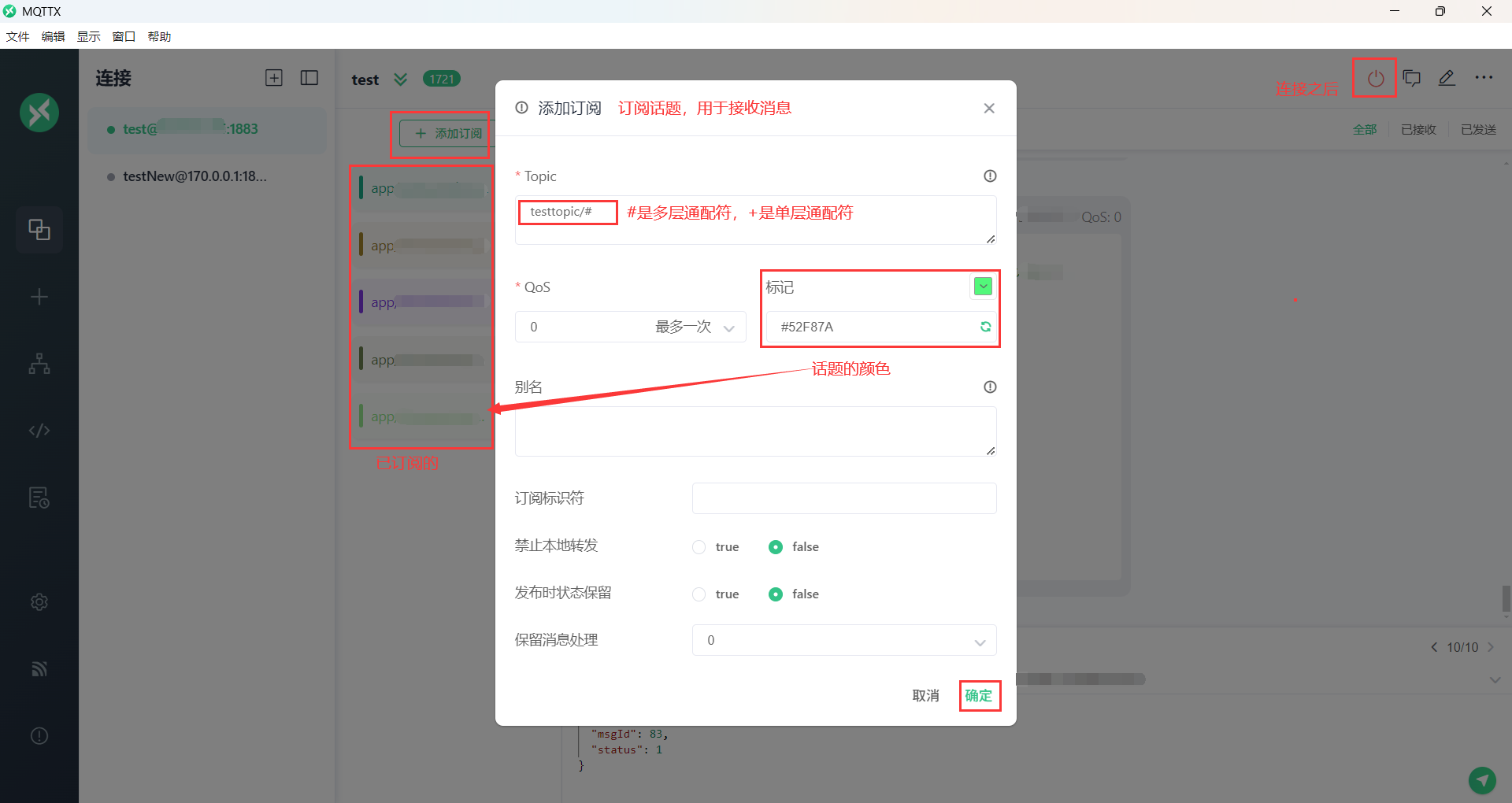
2.4 订阅话题
连接之后,订阅话题,用于接收消息
2.5 发送消息示例
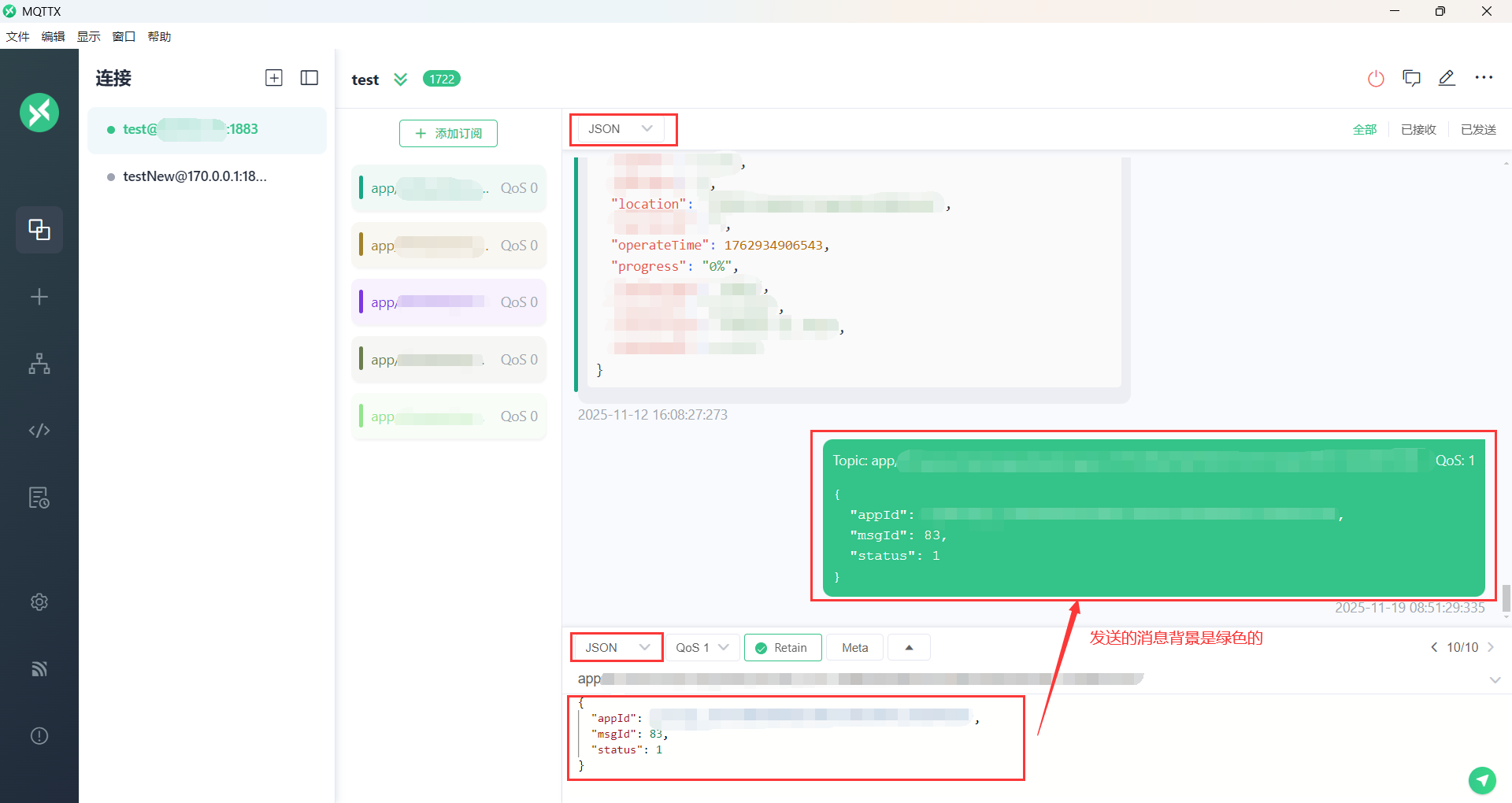
2.6 接收消息示例
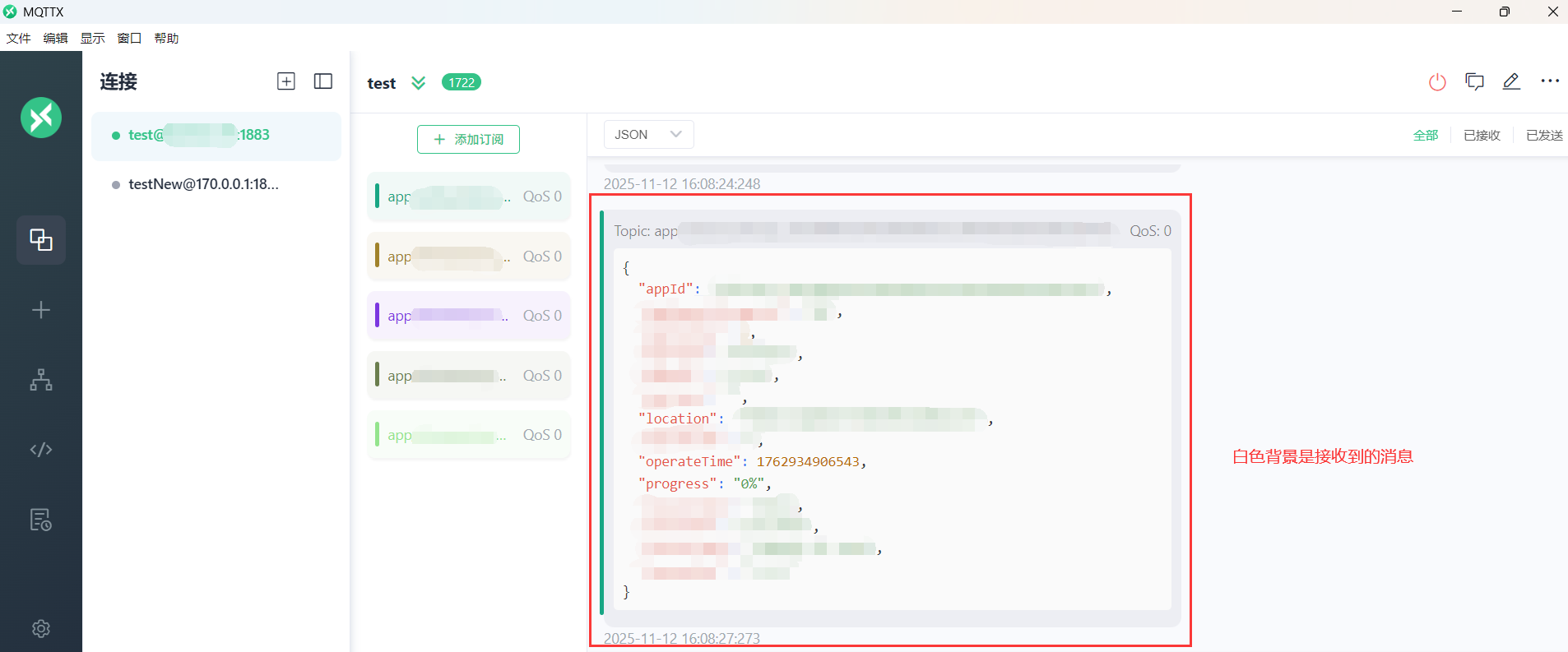
测试完连通性之后,开始写代码
3 Android连接MQTT
3.1 添加依赖
//build.gradle(Module:app)
implementation 'org.eclipse.paho:org.eclipse.paho.client.mqttv3:1.2.5'
implementation 'io.github.mayzs:paho.mqtt.android:1.1.7'
注意,第二个用的是github上的,而不是'org.eclipse.paho:org.eclipse.paho.client.mqttv3-1.1.0'。因为:
“旧版本的MQTT库实现中没有使用FLAG_IMMUTABLE。2年前设计的一款APP,现已不支持Android12版本,运行时会出现闪退现象,通过debug发现错误提示如下...在网上搜索发现已经有大佬将这个库修复,我只需要直接导入即可"(参考链接2)
3.2 添加权限
Android高版本需要更高的权限:
“在AndroidManifest.xml中的service标签添加android:foregroundServiceType="dataSync"并添加相应的权限,Android14对于权限的要求更加严格,如果不添加以下权限,在连接MQTT时会出错,APP出现闪退现象”(参考链接1)
<!--  AndroidManifest.xml  -->
<!--  参考链接2-Android12+MQTT  -->
<uses-permission android:name="android.permission.WAKE_LOCK" />

<uses-permission android:name="android.permission.WRITE_EXTERNAL_STORAGE"/><uses-permission android:name="android.permission.ACCESS_NETWORK_STATE" /><uses-permission android:name="android.permission.READ_PHONE_STATE" />
<uses-permission android:name="android.permission.READ_EXTERNAL_STORAGE"/>
<uses-permission android:name="android.permission.INTERNET" />

<!--  参考链接1-Android14+MQTT,Android 14添加权限  -->
<uses-permission android:name="android.permission.FOREGROUND_SERVICE" />
<uses-permission android:name="android.permission.FOREGROUND_SERVICE_DATA_SYNC" />
<uses-permission android:name="android.permission.SCHEDULE_EXACT_ALARM" />
<uses-permission android:name="android.permission.USE_EXACT_ALARM" />

<application
    android:icon="@mipmap/ic_launcher"
    android:label="@string/app_name"
    android:theme="@style/AppTheme">

    <service
        android:name=".MqttService"
        android:enabled="true"
        android:exported="true"
        android:foregroundServiceType="dataSync"/>
    <service
        android:name="org.eclipse.paho.android.service.MqttService"
        android:enabled="true"
        android:exported="true"
        android:foregroundServiceType="dataSync"/>
</application>
3.3 兼容Android高版本代码(参考链接1)
从参考链接1中复制粘贴NotificationHelper类,并在mqtt初始化中添加相应代码:
(参考链接1开始)
“需要注意client.setForegroundService(notification,1));中的notification需要自己手动添加,这并不属于某个库或类。
如下,新建NotificationHelper类:
package com.wang.mqtt;
import android.app.Notification;
import android.app.NotificationChannel;
import android.app.NotificationManager;
import android.app.PendingIntent;
import android.content.Context;
import android.content.Intent;
import android.os.Build;
import androidx.core.app.NotificationCompat;

public class NotificationHelper {
    public static final String CHANNEL_ID = "MqttServiceChannel";
    private Context context;

    public NotificationHelper(Context context) {
        this.context = context;
        createNotificationChannel();
    }

    private void createNotificationChannel() {
        if (Build.VERSION.SDK_INT >= Build.VERSION_CODES.O) {
            CharSequence name = "Mqtt Service Channel";
            String description = "Channel for Mqtt Service";
            int importance = NotificationManager.IMPORTANCE_DEFAULT;
            NotificationChannel channel = new NotificationChannel(CHANNEL_ID, name, importance);
            channel.setDescription(description);

            NotificationManager notificationManager = context.getSystemService(NotificationManager.class);
            notificationManager.createNotificationChannel(channel);
        }
    }

    public Notification createNotification() {
        Intent intent = new Intent(context, MainActivity.class);
        PendingIntent pendingIntent = PendingIntent.getActivity(context, 0, intent, PendingIntent.FLAG_IMMUTABLE);

        return new NotificationCompat.Builder(context, CHANNEL_ID)
                .setContentTitle("Mqtt Service")
                .setContentText("Mqtt Service is running")
                .setSmallIcon(R.mipmap.ic_launcher)
                .setContentIntent(pendingIntent)
                .setPriority(NotificationCompat.PRIORITY_DEFAULT)
                .build();
    }
}
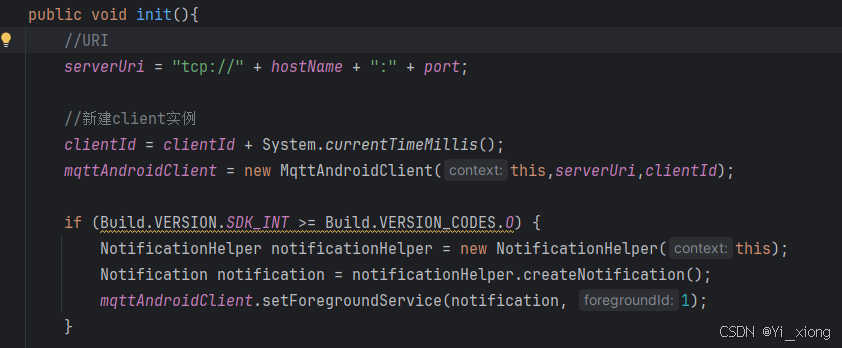
在MqttService的init函数中添加以下代码:
if (Build.VERSION.SDK_INT >= Build.VERSION_CODES.O) {
NotificationHelper notificationHelper = new NotificationHelper(this);
Notification notification = notificationHelper.createNotification();
mqttAndroidClient.setForegroundService(notification, 1);
}
也就是
”(参考链接1结束)
3.4 MqttManger类
MqttManger类采用单例模式,实现了创建MQTT客户端、设置回调、连接MQTT服务器、订阅消息、发送以及接收消息等功能。
参数说明
连接参数
- serverUri: MQTT服务器地址,格式为
tcp://host:port或ssl://host:port - clientId:
- 客户端唯一标识符
- 如果为null或空,会自动生成一个唯一ID
- 服务器使用此ID识别客户端,对于持久会话很重要
- username/password: MQTT服务器认证凭据(可选)
- qos: 服务质量等级
- 0: 最多一次(可能丢失消息)
- 1: 至少一次(可能重复)
- 2: 恰好一次(确保只收到一次)
- cleanSession:
- true: 清除会话,服务器不会保存客户端订阅和未接收的消息
- false: 保留会话,服务器会保存客户端订阅和未接收的消息
主题参数
- jsonTopic: 用于接收JSON格式消息的主题
- binaryTopic: 用于接收二进制数据的主题
方法说明
核心方法
- init(Context, String, String): 初始化MQTT客户端,设置服务器URI和客户端ID
- connect(): 连接到MQTT服务器
- disconnect(): 断开与MQTT服务器的连接
- release(): 释放资源,应在不再需要时调用
订阅与发布
- subscribeTopics(): 内部方法,订阅预设的主题
- publish(String, String, boolean): 发布字符串消息
- publishBinary(String, byte[], boolean): 发布二进制消息
消息处理
- processMessage(String, MqttMessage):
- 根据主题判断消息类型
- 对于jsonTopic,尝试解析为JSONObject
- 对于binaryTopic,直接处理二进制数据
import android.app.Notification;
import android.content.Context;
import android.os.Build;
import android.util.Log;

import org.eclipse.paho.android.service.MqttAndroidClient;
import org.eclipse.paho.client.mqttv3.IMqttActionListener;
import org.eclipse.paho.client.mqttv3.IMqttDeliveryToken;
import org.eclipse.paho.client.mqttv3.IMqttToken;
import org.eclipse.paho.client.mqttv3.MqttCallbackExtended;
import org.eclipse.paho.client.mqttv3.MqttClient;
import org.eclipse.paho.client.mqttv3.MqttConnectOptions;
import org.eclipse.paho.client.mqttv3.MqttException;
import org.eclipse.paho.client.mqttv3.MqttMessage;
import org.json.JSONObject;
import org.json.JSONException;

import com.example.app.other.NotificationHelper;


import java.io.UnsupportedEncodingException;

public class MqttManager {
    private static final String TAG = "MqttManager";

    // 单例实例
    private static volatile MqttManager instance;

    // MQTT客户端
    private MqttAndroidClient mqttClient;

    // MQTT连接参数
    private String serverUri = "tcp://170.0.0.1:1883";      // MQTT服务器地址,格式:tcp://host:port 或 ssl://host:port//需要替换成自己的MQTT服务器地址
    private String clientId = MqttClient.generateClientId();       // 客户端唯一标识,通常使用设备唯一ID或随机生成
    private String username = "admin";       // 认证用户名(可选),即如果你的MQTT服务器需要认证用户名和密码
    private String password = "12345";       // 认证密码(可选)
    private int qos = 1;           // 服务质量等级:0-最多一次,1-至少一次,2-恰好一次
    private boolean cleanSession = true; // 是否清除会话

    // 订阅的主题
    private String jsonTopic;    // 接收JSON数据的主题
    private String binaryTopic; // 接收二进制数据的主题

    // 私有构造函数
    private MqttManager(Context context) {
        // 创建MQTT客户端
        mqttClient = new MqttAndroidClient(context, serverUri, this.clientId);

        //使用唯一主题路径,确保设备只接收目标消息,即每台设备只接收属于自己的消息。在主题中动态嵌入clientId
        this.jsonTopic = "device/json/" + clientId;  // 如: device/json//12345
        this.binaryTopic = "device/binary/" + clientId;

        // 设置回调
        mqttClient.setCallback(new MqttCallbackExtended() {
            @Override
            public void connectComplete(boolean reconnect, String serverURI) {
                Log.d(TAG, "MQTT连接成功: " + (reconnect ? "重连" : "首次连接"));
                subscribeTopics();//连接成功后订阅话题
            }

            @Override
            public void connectionLost(Throwable cause) {
                Log.e(TAG, "MQTT连接丢失", cause);
            }

            @Override
            public void messageArrived(String topic, MqttMessage message) throws Exception {
                Log.d(TAG, "收到消息, 主题: " + topic);
                processMessage(topic, message);//处理收到的消息
            }

            @Override
            public void deliveryComplete(IMqttDeliveryToken token) {
                Log.d(TAG, "消息投递完成");
            }
        });

        //解决Android高版本的兼容性问题(Android15已测试)。如果不加,会闪退,无法连接MQTT
        if (Build.VERSION.SDK_INT >= Build.VERSION_CODES.O) {
            NotificationHelper notificationHelper = new NotificationHelper(context);
            Notification notification = notificationHelper.createNotification();
            mqttClient.setForegroundService(notification, 1);
        }
    }

    /**
     * 获取单例实例
     *
     * @param context Android上下文
     */
    public static MqttManager getInstance(Context context) {
        if (instance == null) {
            synchronized (MqttManager.class) {
                if (instance == null) {
                    instance = new MqttManager(context);
                }
            }
        }
        return instance;
    }

    /**
     * 设置QoS等级
     *
     * @param qos 0,1或2
     */
    public void setQos(int qos) {
        if (qos >= 0 && qos <= 2) {
            this.qos = qos;
        }
    }

    /**
     * 设置是否清除会话
     *
     * @param cleanSession true表示清除,false表示保留
     */
    public void setCleanSession(boolean cleanSession) {
        this.cleanSession = cleanSession;
    }

    /**
     * 连接到MQTT服务器
     */
    public void connect() {
        if (mqttClient == null) {
            Log.e(TAG, "MQTT客户端未初始化");
            return;
        }

        try {
            MqttConnectOptions options = new MqttConnectOptions();
            options.setCleanSession(cleanSession);
            options.setUserName(username);
            options.setPassword(password.toCharArray());
            options.setAutomaticReconnect(true); // 自动重连
            options.setConnectionTimeout(10);    // 连接超时时间(秒)
            options.setKeepAliveInterval(60);    // 心跳间隔(秒)

            Log.d(TAG, "尝试连接到MQTT服务器: " + serverUri);
            mqttClient.connect(options, null, new IMqttActionListener() {
                @Override
                public void onSuccess(IMqttToken asyncActionToken) {
                    Log.d(TAG, "MQTT连接成功");
                }

                @Override
                public void onFailure(IMqttToken asyncActionToken, Throwable exception) {
                    Log.e(TAG, "MQTT连接失败", exception);
                }
            });
        } catch (MqttException e) {
            Log.e(TAG, "MQTT连接异常", e);
        }
    }

    /**
     * 订阅主题
     */
    private void subscribeTopics() {
        try {
            // 订阅JSON主题
            mqttClient.subscribe(jsonTopic, qos, null, new IMqttActionListener() {
                @Override
                public void onSuccess(IMqttToken asyncActionToken) {
                    Log.d(TAG, "订阅成功: " + jsonTopic);
                }

                @Override
                public void onFailure(IMqttToken asyncActionToken, Throwable exception) {
                    Log.e(TAG, "订阅失败: " + jsonTopic, exception);
                }
            });

            // 订阅二进制主题
            mqttClient.subscribe(binaryTopic, qos, null, new IMqttActionListener() {
                @Override
                public void onSuccess(IMqttToken asyncActionToken) {
                    Log.d(TAG, "订阅成功: " + binaryTopic);
                }

                @Override
                public void onFailure(IMqttToken asyncActionToken, Throwable exception) {
                    Log.e(TAG, "订阅失败: " + binaryTopic, exception);
                }
            });
        } catch (MqttException e) {
            Log.e(TAG, "订阅主题异常", e);
        }
    }

    /**
     * 处理接收到的消息
     *
     * @param topic   消息主题
     * @param message MQTT消息
     */
    private void processMessage(String topic, MqttMessage message) {
        try {
            if (topic.equals(jsonTopic)) {
                // 处理JSON数据
                String payload = new String(message.getPayload(), "UTF-8");
                try {
                    JSONObject json = new JSONObject(payload);
                    Log.d(TAG, "收到JSON数据: " + json.toString());
                    // 在这里处理JSON数据,可以发送事件或调用回调
                } catch (JSONException e) {
                    Log.e(TAG, "JSON解析失败", e);
                }
            } else if (topic.equals(binaryTopic)) {
                // 处理二进制数据
                byte[] binaryData = message.getPayload();
                Log.d(TAG, "收到二进制数据,长度: " + binaryData.length);
                // 在这里处理二进制数据,可以发送事件或调用回调
            } else {
                Log.w(TAG, "收到未知主题的消息: " + topic);
            }
        } catch (UnsupportedEncodingException e) {
            Log.e(TAG, "消息编码异常", e);
        }
    }

    /**
     * 发布消息(JSON)
     *
     * @param topic   主题
     * @param payload 消息内容,是Bean转换后的JSON字符串
     */
    public void publish(String topic, String payload) {
        try {
            MqttMessage message = new MqttMessage(payload.getBytes("UTF-8"));
            message.setQos(qos);
            mqttClient.publish(topic, message);
        } catch (UnsupportedEncodingException | MqttException e) {
            Log.e(TAG, "发布消息异常", e);
        }
    }

    /**
     * 发布二进制消息
     *
     * @param topic      主题
     * @param binaryData 二进制数据
     */
    public void publishBinary(String topic, byte[] binaryData) {
        try {
            MqttMessage message = new MqttMessage(binaryData);
            message.setQos(qos);
            mqttClient.publish(topic, message);
        } catch (MqttException e) {
            Log.e(TAG, "发布二进制消息异常", e);
        }
    }

    /**
     * 断开连接
     */
    public void disconnect() {
        if (mqttClient != null && mqttClient.isConnected()) {
            try {
                mqttClient.disconnect();
                Log.d(TAG, "MQTT已断开连接");
            } catch (MqttException e) {
                Log.e(TAG, "断开连接异常", e);
            }
        }
    }

    /**
     * 释放资源
     */
    public void release() {
        disconnect();
        if (mqttClient != null) {
            mqttClient.unregisterResources();
            mqttClient = null;
        }
        instance = null;
    }
}
3.5 在MainActivity中启动MQTT服务
private MqttManager mqttManager = null;

@Override
protected void onCreate(@Nullable Bundle savedInstanceState) {
    super.onCreate(savedInstanceState);

    mqttManager=MqttManager.getInstance(getApplicationContext());//使用ApplicationContext防止内存泄露
    if(!mqttManager.isConnected()){
        mqttManager.connect();
    }
}

//在需要的地方调用发布消息
public void testPublish(String topic,String appId,String location,String msgId){
    String jsonString=new GsonBuilder().create().toJson(new TestBean(appId, location,msgId,System.currentTimeMillis()), TestBean.class);
    //发布信息
    mqttManager.publish(topic,jsonString);
}

//在合适的地方释放资源 mqttManager.release();
3.6 打包
打release包后发现无法连接Mqtt,但debug正常。引入混淆配置:
#proguard-rules.pro(ProGuard Rules for ":app")

#MQTT连接
# 保留 MQTT 核心类
-keep class org.eclipse.paho.client.mqttv3.** { *; }
-keep interface org.eclipse.paho.client.mqttv3.** { *; }

# 保留 Android 扩展库
-keep class io.github.mayzs.** { *; }
-keep interface io.github.mayzs.** { *; }

# 保留 MQTT 回调相关
-keepclassmembers class * implements org.eclipse.paho.client.mqttv3.MqttCallback {
    public *;
}

# 保留 MQTT 异步操作相关
-keepclassmembers class * extends org.eclipse.paho.client.mqttv3.MqttClient {
    public *;
}

# 保留服务连接相关
-keepclassmembers class * extends android.app.Service {
    public *;
}

# 保留 MQTT 消息类
-keep class org.eclipse.paho.client.mqttv3.MqttMessage { *; }

# 保留 QoS 相关枚举
-keepclassmembers enum org.eclipse.paho.client.mqttv3.MqttClientPersistence* {
    *;
}

# 保留 SSL 相关(如果使用安全连接)
-keep class org.eclipse.paho.client.mqttv3.internal.security.* { *; }
-keep class org.eclipse.paho.client.mqttv3.internal.ssl.* { *; }

# 保留 Android 服务组件
-keepclassmembers class * extends io.github.mayzs.paho.mqtt.android.service.MqttService {
    public *;
}

# 保留 Android 通知相关(后台服务需要)
-keepclassmembers class * extends io.github.mayzs.paho.mqtt.android.service.MqttAndroidClient {
    public *;
}

# 保留网络连接相关
-keep class org.eclipse.paho.client.mqttv3.internal.*ClientComms* { *; }
-keep class org.eclipse.paho.client.mqttv3.internal.wire.* { *; }

# 保留心跳相关
-keep class org.eclipse.paho.client.mqttv3.internal.ClientState { *; }
之后release包也能正常连接Mqtt了。
3.7 Android唯一ID工具类-DeviceIdUtil类
由于MQTT的连接参数clientId是客户端唯一标识,通常使用设备唯一ID或随机生成。搜索到了这篇文章,可以直接用。
“可惜的是Android平台并没有提供稳定的API来让我们获取到唯一设备ID。你可能要说IMEI和Mac地址可以获取到,但是它并不会适配Android的所有版本。在高版本中这个已经被弃用了,比如Android9.0、Android10.0、Android11.0。虽然现在Android11.0还没有正式投产,但是已经有Beta版本可以提供给开发者进行开发了,因此我们的应用如果要适配高版本就要另谋出路。”
文中有测试的说明和截图:"这里需要对Android的以往版本进行适配,可以选取几个有代表性的版本,那就是Android5.0、Android6.0、Android8.0、Android10.0。为了测试方便我会下载对应版本的模拟器来测试...可以通过硬件标识来制作唯一设备id。
通过一个工具类来获取,这个工具类我也是通过视频学到的,挺牛逼的。
新建一个DeviceIdUtil 类。
package com.llw.onlyphoneid;

import android.content.Context;
import android.os.Build;
import android.provider.Settings;
import android.telephony.TelephonyManager;
import android.util.Log;

import java.security.MessageDigest;
import java.util.Locale;
import java.util.UUID;


/**
 * 获取手机的唯一标识ID
 */
public class DeviceIdUtil {

    public static String getDeviceId(Context context) {

        StringBuilder sbDeviceId = new StringBuilder();

        String imei = getIMEI(context);
        String androidId = getAndroidId(context);
        String serial = getSerial();
        String uuid = getDeviceUUID();

        //附加imei
        if (imei != null && imei.length() > 0) {
            sbDeviceId.append(imei);
            sbDeviceId.append("|");
        }
        //附加androidId
        if (androidId != null && androidId.length() > 0) {
            sbDeviceId.append(androidId);
            sbDeviceId.append("|");
        }
        //附加serial
        if (serial != null && serial.length() > 0) {
            sbDeviceId.append(serial);
            sbDeviceId.append("|");
        }
        //附加uuid
        if (uuid != null && uuid.length() > 0) {
            sbDeviceId.append(uuid);
        }

        if (sbDeviceId.length() > 0) {
            try {
                byte[] hash = getHashByString(sbDeviceId.toString());
                String sha1 = bytesToHex(hash);
                if (sha1 != null && sha1.length() > 0) {
                    //返回最终的DeviceId
                    return sha1;
                }
            } catch (Exception e) {
                e.printStackTrace();
            }
        }
        return null;
    }

    /**
     * 转16进制字符串
     *
     * @param data 数据
     * @return 16进制字符串
     */
    private static String bytesToHex(byte[] data) {
        StringBuilder sb = new StringBuilder();
        String string;
        for (int i = 0; i < data.length; i++) {
            string = (Integer.toHexString(data[i] & 0xFF));
            if (string.length() == 1) {
                sb.append("0");
            }
            sb.append(string);
        }
        return sb.toString().toUpperCase(Locale.CHINA);
    }

    /**
     * 取 SHA1
     *
     * @param data 数据
     * @return 对应的Hash值
     */
    private static byte[] getHashByString(String data) {
        try {
            MessageDigest messageDigest = MessageDigest.getInstance("SHA1");
            messageDigest.reset();
            messageDigest.update(data.getBytes("UTF-8"));
            return messageDigest.digest();
        } catch (Exception e) {
            return "".getBytes();
        }
    }


    /**
     * 获取硬件的UUID
     *
     * @return
     */
    private static String getDeviceUUID() {
        String deviceId = "9527" + Build.ID +
                Build.DEVICE +
                Build.BOARD +
                Build.BRAND +
                Build.HARDWARE +
                Build.PRODUCT +
                Build.MODEL +
                Build.SERIAL;
        return new UUID(deviceId.hashCode(), Build.SERIAL.hashCode()).toString().replace("-", "");
    }

    private static String getSerial() {
        try {
            if (Build.VERSION.SDK_INT >= Build.VERSION_CODES.O) {
                return Build.getSerial();
            }
        } catch (Exception e) {
            e.printStackTrace();
        }

        return null;
    }

    /**
     * 获取AndroidId
     *
     * @param context 上下文
     * @return AndroidId
     */
    private static String getAndroidId(Context context) {
        try {
            String androidId = Settings.Secure.getString(context.getContentResolver(),
                    Settings.Secure.ANDROID_ID);
            return androidId;
        } catch (Exception e) {
            e.printStackTrace();
        }
        return "";
    }

    /**
     * 获取IMEI
     *
     * @param context 上下文
     * @return IMEI
     */
    private static String getIMEI(Context context) {
        try {
            TelephonyManager telephonyManager = (TelephonyManager)
                    context.getSystemService(Context.TELEPHONY_SERVICE);
            return telephonyManager.getDeviceId();
        } catch (Exception e) {
            e.printStackTrace();
        }

        return "";
    }
}
然后回到MainActivity,在onCreate中。”
@Override
    protected void onCreate(Bundle savedInstanceState) {
        super.onCreate(savedInstanceState);
        setContentView(R.layout.activity_main);

        initView();//初始化

        //唯一标识ID,兼容Android版本
        Toast.makeText(this, DeviceIdUtil.getDeviceId(this), Toast.LENGTH_SHORT).show();
        Log.d(TAG, "Android " + android.os.Build.VERSION.RELEASE);
        Log.d(TAG, "deviceId--> " + DeviceIdUtil.getDeviceId(this));
    }
3.8 参考链接汇总
参考链接1:Android14+MQTT
参考链接2:Android12+MQTT
参考链接3:Android设备唯一标识(适配Android版本)

Agent 垂直技术社区,欢迎活跃、内容共建。
更多推荐
 31
31 0
0- 0


 已为社区贡献1条内容

所有评论(0)