Python+PIL+Numpy实现色情图片识别
·
程序概述
这是一个基于肤色检测和图像内容分析的色情图片识别系统,通过多种算法综合判断图片是否包含色情内容。
'''通过库实现色情图片识别'''
# 局限性
# 1、依赖颜色特征:对黑白图片或特殊光照条件敏感
# 2、无法理解语义:只能检测皮肤,不能理解图片的具体内容
# 3、参数敏感:阈值设置对结果影响较大
# 这个程序通过综合多种图像特征,在保持较高检测率的同时,有效降低了文档类图片的误判率。

import os               # 用于文件和目录操作
from PIL import Image   # 用于图像处理
import numpy as np      # 用于数值计算和数组操作

# 核心类
class BalancedNudeDetector:
    # 初始化方法,加载图片并转换为RGB模式
    def __init__(self, image_path):
        self.image_path = image_path
        self.image = Image.open(image_path)

        if self.image.mode != 'RGB':
            self.image = self.image.convert('RGB')
        # 记录图片尺寸和总像素数
        self.width, self.height = self.image.size
        self.total_pixels = self.width * self.height
        self.skin_pixels = []  # 初始化皮肤像素列表

    # 检测肤色像素
    def detect_skin_pixels(self):
        """肤色像素检测"""
        pixels = self.image.load()
        skin_pixels = []

        # 遍历图片每个像素
        for y in range(self.height):
            for x in range(self.width):
                r, g, b = pixels[x, y]

                # 使用多种肤色检测算法,使用RGB和YCbCr两种算法检测肤色
                if self._is_skin_rgb(r, g, b) or self._is_skin_ycbcr(r, g, b):
                    skin_pixels.append((x, y, r, g, b))  # 记录所有被识别为肤色的像素

        self.skin_pixels = skin_pixels
        return len(skin_pixels)

    # RGB颜色空间的肤色检测
    def _is_skin_rgb(self, r, g, b):
        """RGB空间的肤色检测"""
        return (r > 95 and g > 40 and b > 20 and       # R > 95, G > 40, B > 20:确保颜色不是太暗
                max(r, g, b) - min(r, g, b) > 15 and   # 最大最小值差 > 15:排除灰度像素
                abs(r - g) > 15 and r > g and r > b)   # |R-G| > 15 且 R > G > B:符合肤色在RGB空间的分布特征

    # YCbCr颜色空间的肤色检测
    def _is_skin_ycbcr(self, r, g, b):
        """YCbCr空间的肤色检测"""
        y = 0.299 * r + 0.587 * g + 0.114 * b              # Y:亮度分量
        cb = 128 - 0.168736 * r - 0.331364 * g + 0.5 * b   # Cb:蓝色色度分量
        cr = 128 + 0.5 * r - 0.418688 * g - 0.081312 * b   # Cr:红色色度分量

        # 标准的YCbCr肤色范围,肤色在Cb(97.5-142.5)和Cr(134-176)范围内
        return (97.5 <= cb <= 142.5 and 134 <= cr <= 176)

    # 分析图片内容特征,区分真实皮肤和文档
    def analyze_image_content(self):
        """分析图片内容特征,区分真实皮肤和文档"""
        pixels = self.image.load()

        # 计算颜色分布和纹理特征
        color_variance = self._calculate_color_variance(pixels)
        texture_score = self._estimate_texture_complexity(pixels)
        skin_continuity = self._analyze_skin_continuity()

        # 检测文档特征
        text_features = self._detect_text_features(pixels)

        return {
            'color_variance': color_variance,
            'texture_score': texture_score,
            'skin_continuity': skin_continuity,
            'text_like_score': text_features['text_score'],
            'has_grid_pattern': text_features['has_grid'],
            'is_likely_document': text_features['text_score'] > 0.8 or text_features['has_grid']
        }

    # 计算颜色方差
    def _calculate_color_variance(self, pixels):
        """计算颜色方差"""
        color_diffs = []
        for y in range(0, self.height, 10):
            for x in range(0, self.width, 10):
                r, g, b = pixels[x, y]
                diff = max(r, g, b) - min(r, g, b)    # 采样计算像素间的颜色差异,真实皮肤图片通常有较高的颜色方差,文档类图片颜色方差较低
                color_diffs.append(diff)

        return np.mean(color_diffs) if color_diffs else 0

    # 估计纹理复杂度
    def _estimate_texture_complexity(self, pixels):
        """估计纹理复杂度"""
        changes = 0
        total_checks = 0

        for y in range(1, self.height, 5):
            for x in range(1, self.width, 5):
                r1, g1, b1 = pixels[x, y]
                r2, g2, b2 = pixels[x - 1, y]
                diff = abs(r1 - r2) + abs(g1 - g2) + abs(b1 - b2)    # 检查相邻像素的颜色变化,真实皮肤有复杂的纹理,变化较多,文档类图片纹理简单,变化较少
                if diff > 30:
                    changes += 1
                total_checks += 1

        return changes / total_checks if total_checks > 0 else 0

    # 分析皮肤区域的连续性
    def _analyze_skin_continuity(self):
        """分析皮肤区域的连续性"""
        if not self.skin_pixels:
            return 0

        # 简单的皮肤连续性分析
        skin_ratio = len(self.skin_pixels) / self.total_pixels

        # 真实皮肤通常有较大的连续区域
        # 这里简化处理,使用皮肤占比作为连续性指标
        return skin_ratio

    # 检测文字和表格特征
    def _detect_text_features(self, pixels):
        """检测文字和表格特征"""
        edge_count = 0
        grid_pattern_count = 0
        total_pixels_checked = 0

        # 检查网格模式(表格特征)
        grid_threshold = self.width // 50  # 假设网格间距

        for y in range(grid_threshold, self.height - grid_threshold, grid_threshold):
            for x in range(grid_threshold, self.width - grid_threshold, grid_threshold):
                # 检查水平和垂直线条
                horizontal_line = True
                vertical_line = True

                # 检查水平线
                for dx in range(-2, 3):
                    if x + dx < self.width:
                        r1, g1, b1 = pixels[x + dx, y]
                        r2, g2, b2 = pixels[x + dx, y - grid_threshold]
                        contrast = abs(r1 - r2) + abs(g1 - g2) + abs(b1 - b2)
                        if contrast < 100:
                            horizontal_line = False
                            break

                # 检查垂直线
                for dy in range(-2, 3):
                    if y + dy < self.height:
                        r1, g1, b1 = pixels[x, y + dy]
                        r2, g2, b2 = pixels[x - grid_threshold, y + dy]
                        contrast = abs(r1 - r2) + abs(g1 - g2) + abs(b1 - b2)
                        if contrast < 100:
                            vertical_line = False
                            break

                if horizontal_line and vertical_line:
                    grid_pattern_count += 1

                total_pixels_checked += 1

        # 文字特征检测:通过边缘检测识别文字
        for y in range(1, self.height - 1, 3):
            for x in range(1, self.width - 1, 3):
                center_r, center_g, center_b = pixels[x, y]

                neighbors = [
                    pixels[x - 1, y], pixels[x + 1, y],
                    pixels[x, y - 1], pixels[x, y + 1]
                ]
                # 高对比度区域通常表示文字边缘
                high_contrast_count = 0
                for nr, ng, nb in neighbors:
                    contrast = abs(center_r - nr) + abs(center_g - ng) + abs(center_b - nb)
                    if contrast > 100:
                        high_contrast_count += 1

                if high_contrast_count >= 2:
                    edge_count += 1

        text_score = edge_count / (self.width * self.height / 9) if (self.width * self.height / 9) > 0 else 0
        grid_score = grid_pattern_count / total_pixels_checked if total_pixels_checked > 0 else 0

        return {
            'text_score': text_score,
            'has_grid': grid_score > 0.1  # 如果有10%以上的点显示网格特征
        }

    # 综合判断是否为色情图片
    def is_pornographic_balanced(self):
        """平衡的判断方法"""
        skin_pixel_count = self.detect_skin_pixels()
        skin_ratio = skin_pixel_count / self.total_pixels * 100

        content_analysis = self.analyze_image_content()

        print(f"分析结果:")
        print(f"  皮肤像素数: {skin_pixel_count}")
        print(f"  皮肤占比: {skin_ratio:.2f}%")
        print(f"  颜色方差: {content_analysis['color_variance']:.1f}")
        print(f"  纹理复杂度: {content_analysis['texture_score']:.3f}")
        print(f"  皮肤连续性: {content_analysis['skin_continuity']:.3f}")
        print(f"  文字特征得分: {content_analysis['text_like_score']:.3f}")
        print(f"  网格模式: {'是' if content_analysis['has_grid_pattern'] else '否'}")
        print(f"  疑似文档: {'是' if content_analysis['is_likely_document'] else '否'}")

        # 主要判断逻辑
        if content_analysis['is_likely_document']:
            # 如果是文档类图片,但皮肤占比异常高,需要进一步检查
            if skin_ratio > 90 and content_analysis['texture_score'] < 0.01:
                print("  ⚠️  高皮肤占比但低纹理,可能是纯色背景文档")
                return False, skin_ratio, "文档类图片"
            elif skin_ratio > 80:
                print("  ⚠️  高皮肤占比文档,需要人工复核")
                return False, skin_ratio, "需人工复核的文档"
            else:
                print("  📄 识别为文档/书法类图片")
                return False, skin_ratio, "文档类图片"

        # 正常色情图片检测条件
        is_porn = (
                skin_ratio > 15 and  # 皮肤占比足够高
                content_analysis['skin_continuity'] > 0.1 and  # 皮肤区域有连续性
                content_analysis['texture_score'] > 0.005 and  # 有一定纹理复杂度
                not content_analysis['has_grid_pattern']  # 没有网格模式
        )

        # 高风险条件
        high_risk = (
                skin_ratio > 50 and
                content_analysis['skin_continuity'] > 0.3 and
                content_analysis['texture_score'] > 0.01
        )

        if is_porn:
            if high_risk:
                print("  🔞 判断: 高风险色情内容")
                risk_level = "高风险"
            else:
                print("  🔍 判断: 可能包含敏感内容")
                risk_level = "中风险"
        else:
            print("  ✅ 判断: 可能安全")
            risk_level = "低风险"

        return is_porn, skin_ratio, risk_level

# 分析目录中的所有图片
def analyze_all_images(directory_path):
    """分析目录中的所有图片"""
    if not os.path.exists(directory_path):
        print(f"目录不存在: {directory_path}")
        return

    supported_formats = ('.png', '.jpg', '.jpeg', '.bmp', '.gif')
    image_files = []

    for filename in os.listdir(directory_path):
        if filename.lower().endswith(supported_formats):
            full_path = os.path.join(directory_path, filename)
            if os.path.isfile(full_path):
                image_files.append(full_path)

    if not image_files:
        print("目录中没有找到图片文件")
        return

    print(f"开始检测目录: {directory_path}")
    print(f"找到 {len(image_files)} 个图片文件")
    print("=" * 80)

    results = []

    for image_path in image_files:
        try:
            filename = os.path.basename(image_path)
            print(f"\n检测图片: {filename}")
            print("-" * 50)

            detector = BalancedNudeDetector(image_path)
            is_porn, skin_ratio, risk_level = detector.is_pornographic_balanced()

            # 保存结果
            result_info = {
                'filename': filename,
                'is_porn': is_porn,
                'skin_ratio': skin_ratio,
                'risk_level': risk_level
            }
            results.append(result_info)

            print(f"最终判定: {'🔞 色情内容' if is_porn else '✅ 安全内容'}")
            print("=" * 80)

        except Exception as e:
            print(f"❌ 处理图片 {os.path.basename(image_path)} 时出错: {str(e)}")
            continue

    # 生成统计报告
    generate_detailed_report(results, directory_path)

    return results

# 生成详细统计报告
def generate_detailed_report(results, directory_path):
    """生成详细统计报告"""
    if not results:
        print("没有可统计的结果")
        return

    print("\n" + "=" * 80)
    print("📊 详细检测报告")
    print("=" * 80)

    total_images = len(results)
    porn_images = sum(1 for r in results if r['is_porn'])
    safe_images = total_images - porn_images

    # 按风险级别分组
    high_risk = sum(1 for r in results if r['risk_level'] == '高风险')
    medium_risk = sum(1 for r in results if r['risk_level'] == '中风险')
    low_risk = sum(1 for r in results if r['risk_level'] == '低风险')
    document_images = sum(1 for r in results if '文档' in r['risk_level'])

    print(f"📁 检测目录: {directory_path}")
    print(f"📷 总图片数: {total_images}")
    print(f"🔞 色情图片: {porn_images}")
    print(f"✅ 安全图片: {safe_images}")
    print(f"📈 色情比例: {porn_images / total_images * 100:.1f}%")

    print(f"\n🎯 风险分布:")
    print(f"   高风险: {high_risk} 张")
    print(f"   中风险: {medium_risk} 张")
    print(f"   低风险: {low_risk} 张")
    if document_images > 0:
        print(f"   文档类: {document_images} 张")

    # 列出所有图片的详细结果
    print(f"\n📋 所有图片检测结果:")
    for result in sorted(results, key=lambda x: x['filename']):
        status = "🔞 色情" if result['is_porn'] else "✅ 安全"
        print(
            f"   {result['filename']}: {status} (皮肤占比: {result['skin_ratio']:.2f}%, 风险: {result['risk_level']})")

    # 特别标注需要人工复核的图片
    need_review = [r for r in results if '需人工复核' in r['risk_level']]
    if need_review:
        print(f"\n⚠️  需要人工复核的图片:")
        for result in need_review:
            print(f"   - {result['filename']} (皮肤占比: {result['skin_ratio']:.2f}%)")


if __name__ == "__main__":
    target_directory = r'C:\Users\Administrator\PycharmProjects\Python_study_ex\实例-01 图片识别\imag2'

    print("🎯 平衡版色情图片检测系统")
    print("=" * 60)

    # 执行批量检测
    results = analyze_all_images(target_directory)

    print("\n🎉 检测完成!")
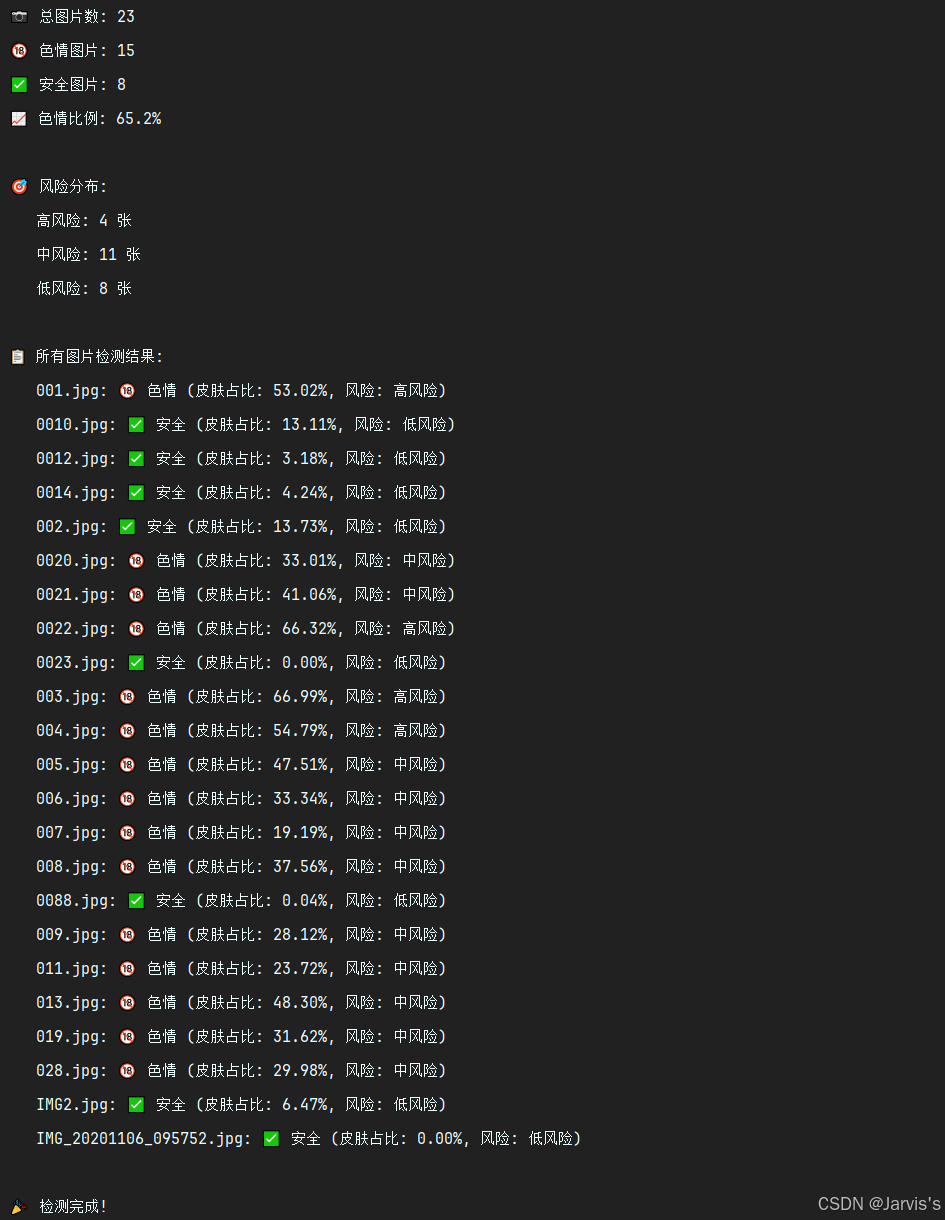
图片数据截图:
执行结果:

Agent 垂直技术社区,欢迎活跃、内容共建。
更多推荐
 3
3 0
0- 0


 已为社区贡献1条内容

所有评论(0)