【开源工具】Zotero_Item_Updater|在 Zotero 中运行的 JavaScript 脚本,用于自动从 dblp 或 谷歌学术网站获取并解析首个 BibTeX 条目,以更新选中的文献信
开源地址
https://github.com/shandianchengzi/Zotero_Item_Updater:这是一个在 Zotero 中运行的 JavaScript 脚本,用于自动从 dblp 或 谷歌学术网站获取并解析首个 BibTeX 条目,以更新选中的文献信息。This is a JavaScript script for Zotero, designed to automatically fetch and parse the first BibTeX entry from dblp or Google Scholar to update selected bibliographic information.
如果你有Quicker,你可以直接使用我分享的动作:传送门点这里~
最新介绍会在Github或Quicker里,本博客不会再更新。
文章目录
中文README
简介
这是一个 Zotero 中能够运行的 JavaScript 脚本,它的作用是当你选中一个或者多个条目之后,能够从 dblp 网站或者 Google Scholar 上面自动获取搜索排列为第一条的搜索结果的 Bibtex 信息,并解析用以填充文献信息。
以下是两则数据安全性声明:
- 为保证数据的安全性如果获取的条目的类型,与 Zotero 中原本的类型不一致,将会新建一个条目,并把相关信息、附件、标签都拷贝过去,但保留原条目不删除。
- 除了作者、编辑的信息会直接覆盖,标题的信息不会覆盖之外,其他任何信息都是仅在原数据为空的情况下才引入 Bibtex 的信息,即不会覆盖原有的信息。
使用方式
无 Quicker 使用方式
- 选中你想填充的文献条目
- 点击“工具”-“开发者”-“Run JavaScript”
- 将
main.js代码复制粘贴进去 - 再点击左上角“Run”按钮即可运行。
后续考虑做UI打包成 Zotero 右键插件。
有 Quicker 使用方式
如果你有Quicker,你可以直接使用我分享的动作:传送门点这里~
Quicker 具体使用方式可以直接看动作页简介。
另外,如果你是新用户的话我的邀请码是 970091-5834,填邀请码之后再付费能够各增加三个月会员。
顺利的情况如下: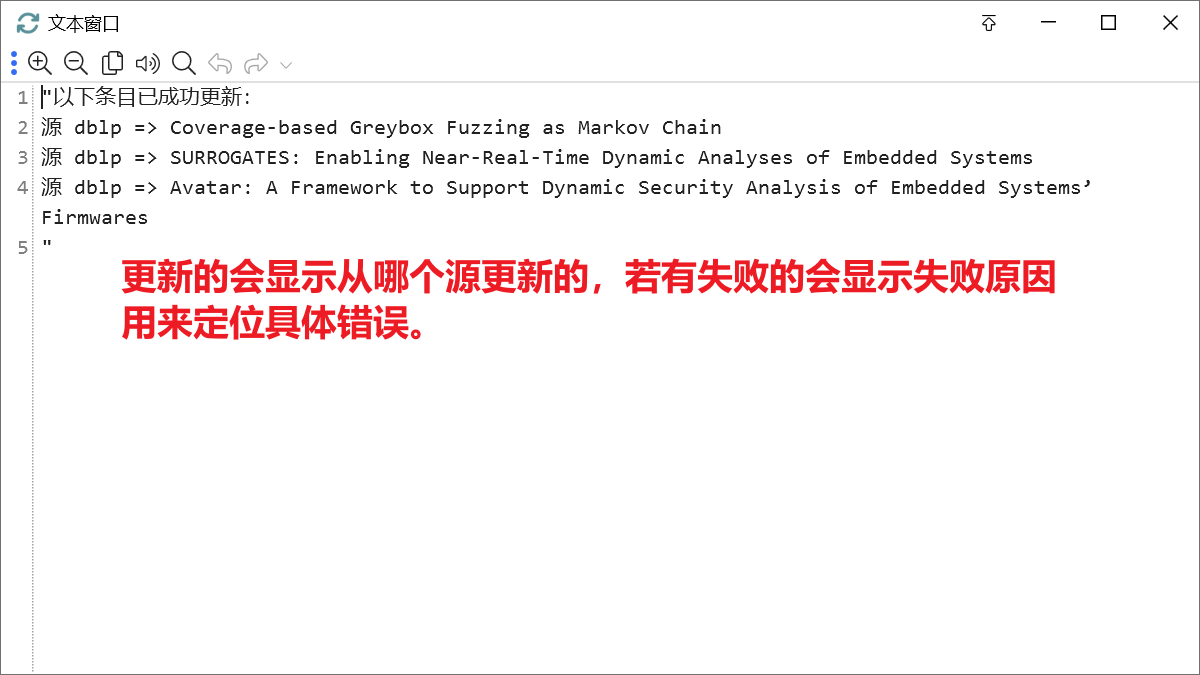
出现问题的情况如下: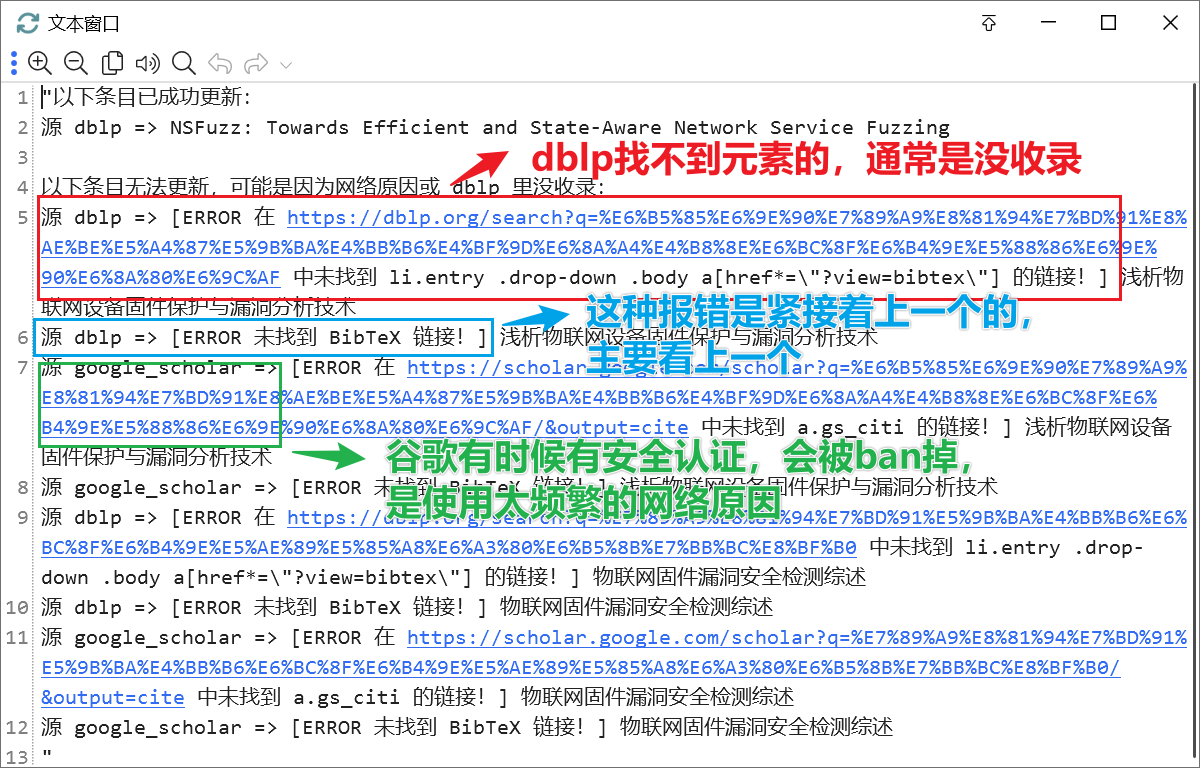
待办
- 支持更多 Bibtex 来源站
- DBLP
- Google Scholar
- 整理代码,使用 Zotero 自带的解析 BibTex 功能
- 整理代码,使用 Zotero 的数据库操作精简复制条目的代码部分
- 整理代码,抽离并设计用户可配置项
- 做 UI,将其作为 Zotero 右键选项
- 打包成xpi插件
English README
Introduction
This is a JavaScript script that can run in Zotero. It is designed to automatically fetch and parse the first BibTeX entry from the dblp website when you select one or multiple items, and then use it to fill in the bibliographic information.
Here are two data safety statements:
- To ensure data safety, if the type of entry obtained does not match the original type in Zotero, a new entry will be created, and relevant information, attachments, and tags will be copied over, but the original entry will not be deleted.
- Except for directly overwriting the author and editor information, and not overwriting the title information, any other information will only be introduced from the BibTeX entry if the original data is empty, meaning it will not overwrite existing information.
How to Use
Without Quicker
- Select the bibliographic items you want to fill in
- Click “Tools”-“Developer”-“Run JavaScript”
- Copy and paste the
main.jscode - Click the “Run” button in the upper left corner to run.
Consider making a UI and packaging it as a Zotero right-click plugin in the future.
With Quicker
If you have Quicker, you can directly use the action I shared: Click here to go to the portal~
You can directly view the introduction on the action page for the specific usage of Quicker.
Also, if you are a new user, my invitation code is 970091-5834. After entering the invitation code, you can add three months of membership for each payment.
If success, the output is: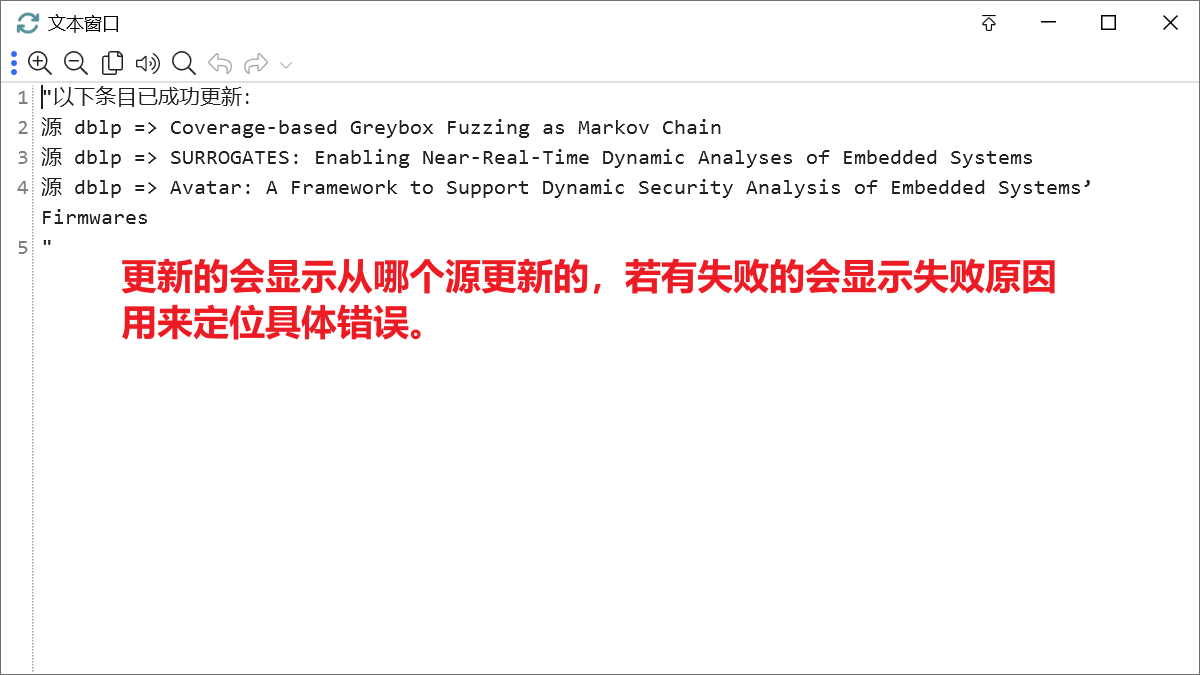
If something wrong, the output is: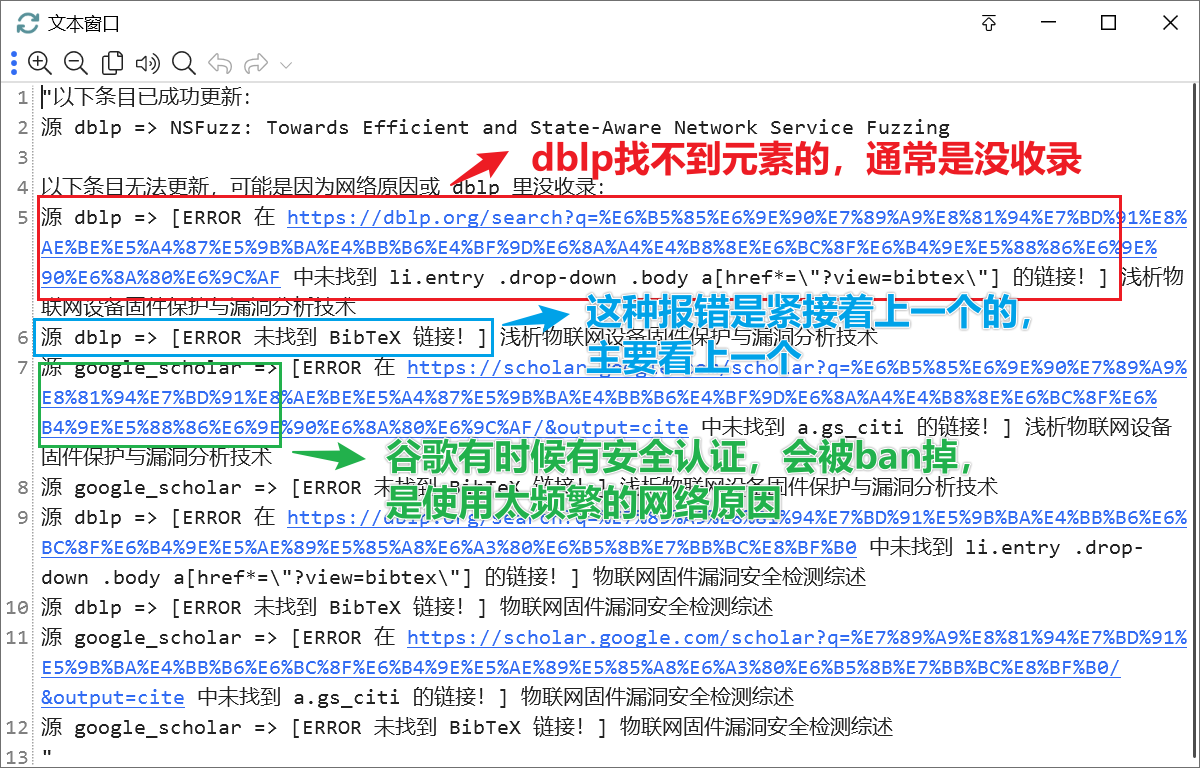
Now the outputs are Chinese, because I am Chinese. Translating them is a heavy work for me, so I won’t provide English until I start to write my right-click plugin.
To-Do
- Support more Bibtex source sites
- DBLP
- Google Scholar
- Organize code, use Zotero’s built-in BibTex parsing feature
- Refactor the code, using Zotero’s database operations to streamline the process of copying entries
- Refactor the code, extract and design user-configurable options
- Develop a UI, to integrate it as a Zotero right-click option
- Package as an xpi plugin
本账号所有文章均为原创,欢迎转载,请注明文章出处:https://shandianchengzi.blog.csdn.net/article/details/155349548。百度和各类采集站皆不可信,搜索请谨慎鉴别。技术类文章一般都有时效性,本人习惯不定期对自己的博文进行修正和更新,因此请访问出处以查看本文的最新版本。

Agent 垂直技术社区,欢迎活跃、内容共建。
更多推荐
 14
14 0
0- 0


 已为社区贡献8条内容

所有评论(0)