VSCode Task Buttons 自定义任务插件使用
废话不多说,下面直接以 CMakeLists 项目为例:
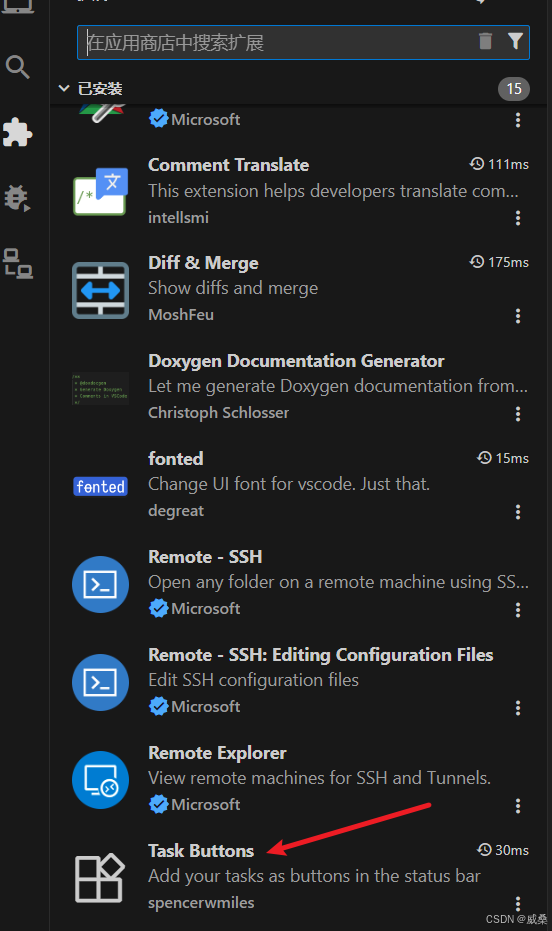
安装该插件,创建这些文件,文件夹:
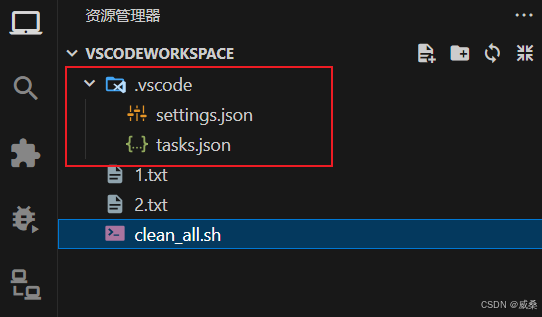
settings.json :
{
    "VsCodeTaskButtons.showCounter": true,
    "VsCodeTaskButtons.tasks": [
        {
            "label": "$(compare-changes)Mode(Release)",
            "task": "toggle-build-mode",
            "tooltip": "切换构建模式(Debug/Release)"
        },
        {
            "label": "$(trash)Clean",
            "task": "clean-all",
            "tooltip": "清理所有构建缓存"
        },
        {
            "label": "$(tools)Build",
            "task": "build",
            "tooltip": "重新构建"
        },
        {
            "label": "$(package)Install",
            "task": "install",
            "tooltip": "安装到系统或目标目录"
        },
        {
            "label": "$(rocket)Clean & ReBuild",
            "task": "clean&rebuild",
            "tooltip": "清理并重新构建"
        },
        {
            "label": "$(zap)Run",
            "task": "run",
            "tooltip": "运行"
        }
    ],
    "buildMode": "Release"
}
tasks.json :
{
    "version": "2.0.0",
    "tasks": [
        {
            "label": "toggle-build-mode",
            "type": "shell",
            "command": "FILE=.vscode/settings.json; MODE=$(grep '\"buildMode\"' \"$FILE\" | grep -oE '(Debug|Release)'); if [ \"$MODE\" = \"Debug\" ]; then sed -i 's/\"buildMode\": \"Debug\"/\"buildMode\": \"Release\"/' \"$FILE\";  sed -i 's/\"label\": \"$(compare-changes)Mode(Debug)\"/\"label\": \"$(compare-changes)Mode(Release)\"/' \"$FILE\"; echo \"已切换到 Release\"; else sed -i 's/\"buildMode\": \"Release\"/\"buildMode\": \"Debug\"/' \"$FILE\";  sed -i 's/\"label\": \"$(compare-changes)Mode(Release)\"/\"label\": \"$(compare-changes)Mode(Debug)\"/' \"$FILE\"; echo \"已切换到 Debug\"; fi",
            "options": {
                "cwd": "${workspaceFolder}",
                "shell": {
                    "executable": "/bin/bash",
                    "args": [
                        "-c"
                    ]
                }
            },
            "problemMatcher": []
        },
        {
            "label": "clean-all",
            "type": "shell",
            "command": "./clean_all.sh all",
            "options": {
                "cwd": "${workspaceFolder}",
                "shell": {
                    "executable": "/bin/bash",
                    "args": [
                        "-c"
                    ]
                }
            },
            "group": "build",
            "detail": "清理所有构建缓存"
        },
        {
            "label": "build",
            "type": "shell",
            "command": "MODE=${config:buildMode}; mkdir -p build/$MODE && cd build/$MODE && cmake -DCMAKE_BUILD_TYPE=$MODE -DVARIABLE_FOR_CMAKELISTS=${input:CMake_Variable} ../.. && make -j$(nproc || 1)",
            "options": {
                "cwd": "${workspaceFolder}",
                "shell": {
                    "executable": "/bin/bash",
                    "args": [
                        "-c"
                    ]
                }
            },
            "group": {
                "kind": "build",
                "isDefault": true
            },
            "detail": "执行 CMake 构建(等同 make/ninja)"
        },
        {
            "label": "install",
            "type": "shell",
            "command": "MODE=${config:buildMode};cd build/$MODE && make install",
            "options": {
                "cwd": "${workspaceFolder}",
                "shell": {
                    "executable": "/bin/bash",
                    "args": [
                        "-c"
                    ]
                }
            },
            "group": "build",
            "problemMatcher": [],
            "detail": "执行 Release 安装 (CMAKE_INSTALL_PREFIX)"
        },
        {
            "label": "clean&rebuild",
            "type": "shell",
            "command": "MODE=${config:buildMode}; ./clean_all.sh all && mkdir -p build/$MODE && cd build/$MODE && cmake -DCMAKE_BUILD_TYPE=$MODE -DVARIABLE_FOR_CMAKELISTS=${input:CMake_Variable} ../.. && make -j$(nproc || 1)",
            "options": {
                "cwd": "${workspaceFolder}",
                "shell": {
                    "executable": "/bin/bash",
                    "args": [
                        "-c"
                    ]
                }
            },
            "group": "build",
            "problemMatcher": [],
            "detail": "使用 clean_all.sh 进行清理 + 重新构建"
        },
        {
            "label": "run",
            "type": "shell",
            "command": "MODE=${config:buildMode}; EXE=$(find ./build/$MODE -maxdepth 1 -type f -executable | head -n 1); if [ -z \"$EXE\" ]; then echo 'No executable found'; exit 1; fi; \"$EXE\"",
            "options": {
                "cwd": "${workspaceFolder}",
                "shell": {
                    "executable": "/bin/bash",
                    "args": [
                        "-c"
                    ]
                }
            },
            "group": "build",
            "problemMatcher": [],
            "detail": "运行 EDAN_AISEMIP 可执行文件"
        }
    ],
    "inputs": [
        {
            "id": "CMake_Variable",
            "type": "promptString",
            "default": "XXX",
            "description": "VARIABLE_FOR_CMAKELISTS"
        }
    ]
}
-DVARIABLE_FOR_CMAKELISTS=${input:CMake_Variable} 此处的意思是:向 CMake 传入一个变量 VARIABLE_FOR_CMAKELISTS,其值由 VS Code 的 input(用户输入/预定义)决定。
下面逐项解释这个 VS Code tasks.json 中各字段和结构的含义,帮助理解在构建系统中的作用。
顶层字段
version
指定当前 tasks.json 的格式版本。2.0.0 是 VS Code 任务系统的稳定版本。
tasks
包含一组任务(task)对象,每个 task 定义了一项可执行的命令,例如 build / clean / install 等。
每个 task 的字段说明
下面以你的任务为例统一说明。
1. label
该任务在 VS Code 命令面板、快捷栏中的名称。
例如 "label": "build" 就是任务名。
2. type
执行任务的方式。
"shell" 表示该任务使用 Shell 执行(/bin/bash)。
3. command
实际执行的 Shell 命令。
例子:
mkdir -p build && cd build && cmake -DUSE_AISERVICE=ON .. && make -j$(nproc || 1)
4. options
覆盖执行命令时的环境设置,如工作目录、shell 指定等。
cwd
指定任务运行时的当前工作目录。
一般是:
"${workspaceFolder}"
也就是项目根目录。
shell
强制使用的 shell 类型。
示例:
"shell": {
"executable": "/bin/bash",
"args": ["-c"]
}
表示以 /bin/bash -c "<command>" 方式运行命令。
5. group
将任务归入某个任务组,VS Code 会借此识别默认构建任务等。
用法示例
"group": "build"
表示此任务属于构建组(Build Group)。
对象格式:
"group": {
"kind": "build",
"isDefault": true
}
其中:
kind: build → 属于构建组
isDefault: true → 设置为默认构建任务
6. problemMatcher
VS Code 用来解析编译器输出(如 GCC)的错误/警告,让它们跳转到源代码位置。
"$gcc" 是内置的 GCC 错误格式解析器。
例如 build 任务中:
"problemMatcher": ["$gcc"]
代表 VS Code 会解析 GCC 输出,使 “点击错误跳转文件” 生效。
7. detail
对任务的详细说明,会在 UI 中展示。
总结(任务整体含义)
clean-all
执行:
./clean_all.sh all
清理构建缓存。
build(默认构建任务)
执行以下步骤:
建立 build 目录
进入 build
执行 CMake 配置(开启 USE_AISERVICE)
使用 make + 多核编译
并且支持解析 GCC 错误。
install
使用 cmake --build ... --target install 安装工程到指定的 prefix。
clean&rebuild
先 clean_all.sh
再执行一次干净的构建。
run
运行可执行文件

Agent 垂直技术社区,欢迎活跃、内容共建。
更多推荐


 29
29 0
0- 0


 已为社区贡献1条内容

所有评论(0)