Vue 双向绑定 v-model 指令
·
一、前言
Vue 用 v-model 一句话实现“数据 ↔ 表单”双向同步,底层自动生成 :value 和 @input,还支持 .lazy/.number/.trim 等实用修饰符,是日常开发中最常用的表单绑定方式。
| 写法 | 效果 |
|---|---|
.lazy |
失焦时同步,减少频率 |
.number |
自动转 Number 类型 |
.trim |
去掉首尾空格 |
支持所有表单元素:
input / textarea
input[type=checkbox|radio]
select(单选或多选)
二、代码示例
<script setup>
import { ref } from 'vue'

const text = ref('')
const gender = ref('male')   // 默认值
const city = ref('')   // 默认值
const hobbies = ref(['reading'])          // 默认已选阅读

function onInput(e) {
  text.value = e.target.value
}
</script>

<template>
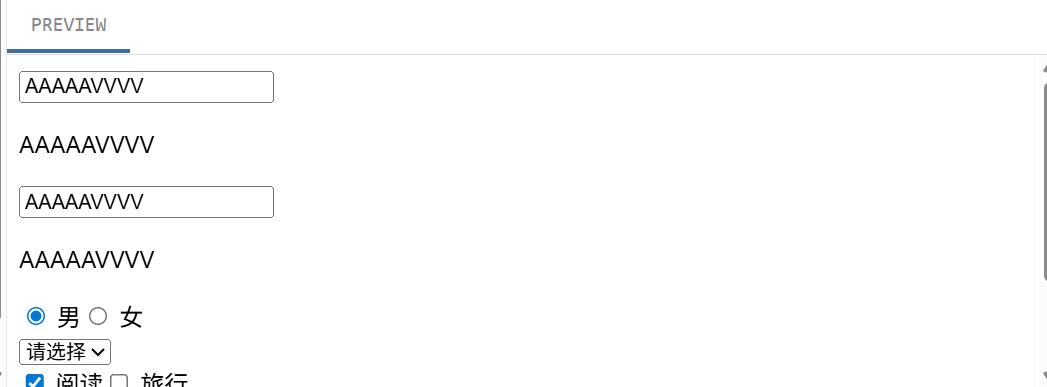
  <input :value="text" @input="onInput" placeholder="Type here">
  <p>{{ text }}</p>

  <input v-model="text" placeholder="Type here">
  <p>{{ text }}</p>

  <label><input type="radio" value="male"  v-model="gender"> 男</label>
  <label><input type="radio" value="female" v-model="gender"> 女</label>
<br>
	<!-- 官方糖 -->
  <select v-model="city">
    <option value="">请选择</option>
    <option value="bj">北京</option>
    <option value="sh">上海</option>
  </select>
  <br>

  <!-- 官方糖 -->
<label><input type="checkbox" value="reading" v-model="hobbies"> 阅读</label>
<label><input type="checkbox" value="travel"  v-model="hobbies"> 旅行</label>
<br>

<input v-model.lazy="text" />
  <p>同步值:{{ text }}</p>

</template>

Agent 垂直技术社区,欢迎活跃、内容共建。
更多推荐


 1
1 0
0- 0


 已为社区贡献6条内容

所有评论(0)