OpenHarmony 与 Flutter 的完美融合财务管理应用:预算提醒服务
·
更新概述
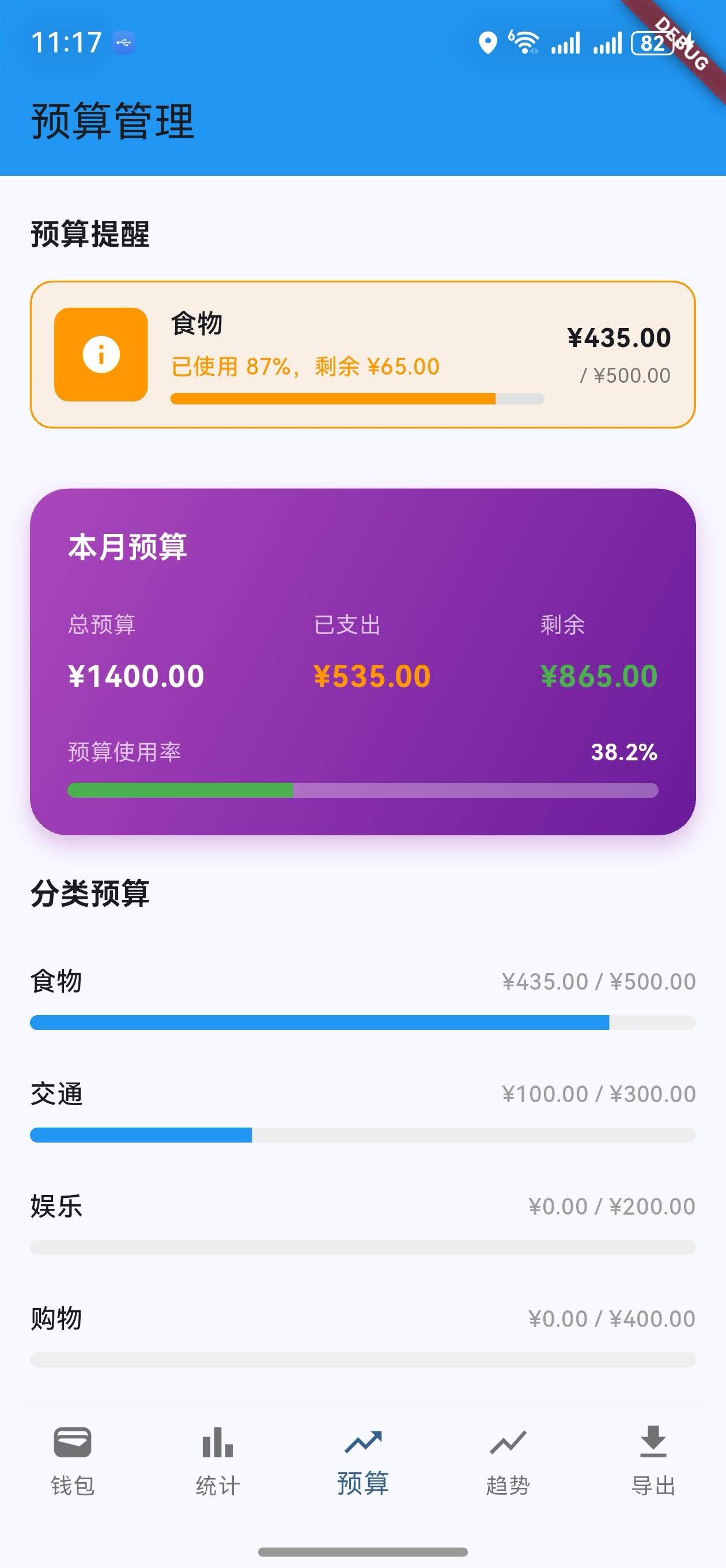
v1.10.0 版本为 OpenHarmony 钱包应用增加了智能的预算提醒通知功能。系统会实时监控各分类的支出情况,当支出接近或超过预算时自动生成警告提醒。新增的预算提醒卡片在预算管理页面顶部显示,帮助用户及时控制支出。
核心功能更新
1. 预算提醒模型
BudgetReminder 类定义
/// 预算提醒模型
class BudgetReminder {
  final String id;
  final String category;
  final double budgetAmount;
  final double currentExpense;
  final DateTime createdAt;
  bool isNotified;

  BudgetReminder({
    required this.id,
    required this.category,
    required this.budgetAmount,
    required this.currentExpense,
    required this.createdAt,
    this.isNotified = false,
  });

  /// 获取预算使用率
  double get usageRate => currentExpense / budgetAmount;

  /// 是否超支
  bool get isOverBudget => currentExpense > budgetAmount;

  /// 获取剩余预算
  double get remaining => budgetAmount - currentExpense;

  /// 获取超支金额
  double get overspend => isOverBudget ? currentExpense - budgetAmount : 0;

  /// 获取警告级别(0-低, 1-中, 2-高)
  int get warningLevel {
    if (usageRate >= 1.0) return 2;
    if (usageRate >= 0.8) return 1;
    return 0;
  }

  /// 获取警告信息
  String get warningMessage {
    if (isOverBudget) {
      return '已超支 ¥${overspend.toStringAsFixed(2)}';
    } else if (usageRate >= 0.8) {
      return '已使用 ${(usageRate * 100).toStringAsFixed(0)}%,剩余 ¥${remaining.toStringAsFixed(2)}';
    }
    return '正常';
  }

  /// 获取警告颜色
  Color get warningColor {
    switch (warningLevel) {
      case 2:
        return Colors.red;
      case 1:
        return Colors.orange;
      default:
        return Colors.green;
    }
  }
}
说明:
- 记录分类、预算额、当前支出
- 计算使用率和剩余预算
- 自动判断警告级别(0-低, 1-中, 2-高)
- 生成对应的警告信息和颜色
警告级别说明
| 级别 | 条件 | 颜色 | 图标 |
|---|---|---|---|
| 0 (低) | 使用率 < 80% | 绿色 | ℹ️ |
| 1 (中) | 80% ≤ 使用率 < 100% | 橙色 | ℹ️ |
| 2 (高) | 使用率 ≥ 100% | 红色 | ⚠️ |
2. 预算提醒服务
BudgetReminderService 类
/// 预算提醒服务
class BudgetReminderService {
  /// 检查预算并生成提醒
  static List<BudgetReminder> checkBudgets(
    Map<String, double> budgets,
    List<wallet.Transaction> transactions,
  ) {
    List<BudgetReminder> reminders = [];

    for (var entry in budgets.entries) {
      final category = entry.key;
      final budgetAmount = entry.value;

      // 计算该分类的当前支出
      double currentExpense = 0;
      for (var transaction in transactions) {
        if (transaction.category == category &&
            transaction.type == wallet.TransactionType.expense) {
          currentExpense += transaction.amount;
        }
      }

      reminders.add(BudgetReminder(
        id: category,
        category: category,
        budgetAmount: budgetAmount,
        currentExpense: currentExpense,
        createdAt: DateTime.now(),
      ));
    }

    return reminders;
  }

  /// 获取需要提醒的预算
  static List<BudgetReminder> getRemindersToNotify(
    List<BudgetReminder> reminders,
  ) {
    return reminders.where((r) => r.warningLevel > 0 && !r.isNotified).toList();
  }

  /// 获取超支预算
  static List<BudgetReminder> getOverBudgets(
    List<BudgetReminder> reminders,
  ) {
    return reminders.where((r) => r.isOverBudget).toList();
  }
}
说明:
checkBudgets: 检查所有预算并生成提醒列表getRemindersToNotify: 获取需要通知的提醒(未通知且有警告)getOverBudgets: 获取所有超支的预算
3. 预算提醒显示
预算提醒卡片
/// 构建预算提醒
Widget _buildBudgetReminders() {
  final reminders = BudgetReminderService.checkBudgets(_budgets, widget.transactions);
  final warningReminders = reminders.where((r) => r.warningLevel > 0).toList();

  if (warningReminders.isEmpty) {
    return const SizedBox.shrink();
  }

  return Padding(
    padding: const EdgeInsets.symmetric(horizontal: 16),
    child: Column(
      crossAxisAlignment: CrossAxisAlignment.start,
      children: [
        Text(
          '预算提醒',
          style: Theme.of(context).textTheme.titleMedium?.copyWith(
                fontWeight: FontWeight.bold,
              ),
        ),
        const SizedBox(height: 12),
        ...warningReminders.map((reminder) {
          return Padding(
            padding: const EdgeInsets.only(bottom: 12),
            child: Container(
              padding: const EdgeInsets.all(12),
              decoration: BoxDecoration(
                border: Border.all(color: reminder.warningColor),
                borderRadius: BorderRadius.circular(12),
                color: reminder.warningColor.withOpacity(0.1),
              ),
              child: Row(
                children: [
                  Container(
                    width: 50,
                    height: 50,
                    decoration: BoxDecoration(
                      color: reminder.warningColor,
                      borderRadius: BorderRadius.circular(8),
                    ),
                    child: Center(
                      child: Icon(
                        reminder.isOverBudget
                            ? Icons.warning
                            : Icons.info,
                        color: Colors.white,
                        size: 24,
                      ),
                    ),
                  ),
                  const SizedBox(width: 12),
                  Expanded(
                    child: Column(
                      crossAxisAlignment: CrossAxisAlignment.start,
                      children: [
                        Text(
                          reminder.category,
                          style: const TextStyle(
                            fontWeight: FontWeight.w600,
                            fontSize: 14,
                          ),
                        ),
                        const SizedBox(height: 4),
                        Text(
                          reminder.warningMessage,
                          style: TextStyle(
                            fontSize: 12,
                            color: reminder.warningColor,
                            fontWeight: FontWeight.w500,
                          ),
                        ),
                        const SizedBox(height: 6),
                        ClipRRect(
                          borderRadius: BorderRadius.circular(4),
                          child: LinearProgressIndicator(
                            value: math.min(reminder.usageRate, 1.0),
                            minHeight: 6,
                            backgroundColor: Colors.grey.shade300,
                            valueColor: AlwaysStoppedAnimation<Color>(
                              reminder.warningColor,
                            ),
                          ),
                        ),
                      ],
                    ),
                  ),
                  const SizedBox(width: 12),
                  Column(
                    crossAxisAlignment: CrossAxisAlignment.end,
                    children: [
                      Text(
                        '¥${reminder.currentExpense.toStringAsFixed(2)}',
                        style: const TextStyle(
                          fontWeight: FontWeight.w600,
                          fontSize: 14,
                        ),
                      ),
                      const SizedBox(height: 2),
                      Text(
                        '/ ¥${reminder.budgetAmount.toStringAsFixed(2)}',
                        style: TextStyle(
                          fontSize: 11,
                          color: Colors.grey.shade600,
                        ),
                      ),
                    ],
                  ),
                ],
              ),
            ),
          );
        }).toList(),
      ],
    ),
  );
}
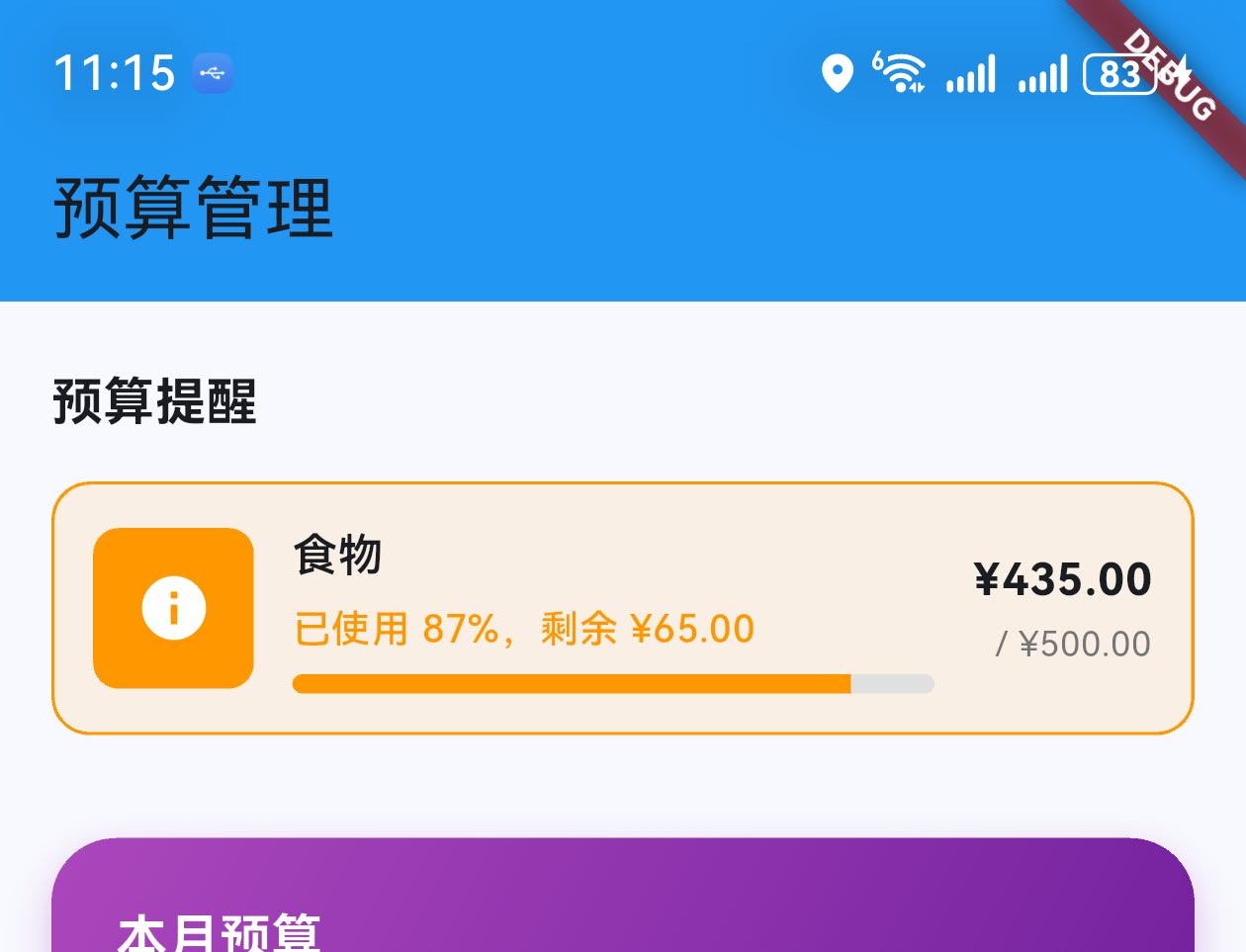
说明:
- 仅显示有警告的提醒(warningLevel > 0)
- 每个提醒卡片包含:
- 警告图标(颜色和图标根据级别变化)
- 分类名称
- 警告信息
- 进度条(显示使用率)
- 支出金额和预算额
UI 变化
预算管理页面更新
- 新增预算提醒部分:在预算概览上方显示
- 动态显示:仅当有警告时显示
- 颜色编码:根据警告级别显示不同颜色
预算管理页面布局
┌─────────────────────────────────┐
│  预算管理                        │
├─────────────────────────────────┤
│  预算提醒                        │
│  ┌─────────────────────────┐   │
│  │ ⚠️ 食物                  │   │
│  │ 已超支 ¥15.00           │   │
│  │ [████████████] 150%     │   │
│  │ ¥150 / ¥100             │   │
│  └─────────────────────────┘   │
│  ┌─────────────────────────┐   │
│  │ ℹ️ 交通                  │   │
│  │ 已使用 80%,剩余 ¥20    │   │
│  │ [████████░░] 80%        │   │
│  │ ¥80 / ¥100              │   │
│  └─────────────────────────┘   │
├─────────────────────────────────┤
│  本月预算                        │
│  总预算: ¥1000  支出: ¥450      │
│  剩余: ¥550  使用率: 45%        │
├─────────────────────────────────┤
│  分类预算                        │
│  [食物] [交通] [购物] ...       │
└─────────────────────────────────┘
提醒工作流程
1. 用户进入预算管理页面
   ↓
2. 系统调用 BudgetReminderService.checkBudgets()
   ↓
3. 遍历所有预算分类
   ↓
4. 计算每个分类的当前支出
   ↓
5. 创建 BudgetReminder 对象
   ↓
6. 过滤出有警告的提醒 (warningLevel > 0)
   ↓
7. 在页面顶部显示提醒卡片
版本对比
| 功能 | v1.9.0 | v1.10.0 |
|---|---|---|
| 标签管理 | ✅ | ✅ |
| 分类统计 | ✅ | ✅ |
| 自定义标签 | ✅ | ✅ |
| 预算管理页面 | ✅ | ✅ |
| 预算提醒模型 | ❌ | ✅ |
| 预算提醒服务 | ❌ | ✅ |
| 预算警告显示 | ❌ | ✅ |
| 智能警告级别 | ❌ | ✅ |
| 实时提醒 | ❌ | ✅ |
使用场景
场景 1:监控支出
- 进入预算管理页面
- 查看预算提醒部分
- 了解各分类的支出情况
- 及时调整消费
场景 2:避免超支
- 看到橙色警告(使用率 80%)
- 减少该分类的支出
- 避免进入红色超支状态
场景 3:处理超支
- 看到红色警告(已超支)
- 查看超支金额
- 调整下月预算或增加收入
下一步计划
v1.11.0 将继续增强功能,计划增加:
- 📱 数据同步功能
- 🌙 深色模式支持
- 📊 高级统计分析
- 💾 本地数据持久化
感谢使用 OpenHarmony 钱包! 🎉
如有建议或问题,欢迎反馈。
欢迎加入开源鸿蒙跨平台社区:https://openharmonycrossplatform.csdn.net

Agent 垂直技术社区,欢迎活跃、内容共建。
更多推荐

 21
21 0
0- 0


 已为社区贡献4条内容

所有评论(0)