C#面向对象OOP编程核心精要
·
🎯面向对象三大特征:
-
封装 (Encapsulation)
-
隐藏细节,暴露接口
-
字段私有,属性公开
-
内部逻辑对外透明-
-
-
继承 (Inheritance)
-
代码复用,层次扩展
-
单继承保证清晰性
-
子类扩展父类功能
-
-
多态 (Polymorphism)
-
接口统一,实现多样
-
编译时看左边,运行时看右边
-
提高扩展性和维护性
-
📝 类与对象要点
带返回值方法定义:
public 数据类型  方法名([参数列表])
{
    //...逻辑代码
    return 结果;
}

public bool  IsEvenNumber(int number)
{
    //...逻辑代码
    return true;
}

public int Add(int score1, int score2)
{
    return score1 + score2;
}
类构成
public class Student
{
    // 字段私有
    private string _name; //一般用下划线_加小写字母

    // 属性公开
    public string Name { get; set; } //一般用字段名大写

    // 构造方法
    public Student(string name)   //public + 类名
    {
        this.name = name;
    }

    // 方法
    public void Study()
    {
        Console.WriteLine("学习");
    }
}
```
对象创建
🔄 继承关键点
// 传统方式
Student stu1 = new Student("张三");
// 对象初始化器
Student stu2 = new Student
{
    Name = "李四"
};
```
🔥继承规则
子类继承父类构造函数
关键字:base
public class Animal
{
    public string Name { get; set; }

    public Animal(string name)
    {
        this.Name = name;
    }
}

public class Dog : Animal
{
    public string Breed { get; set; }

    // 使用base调用基类构造函数
    public Dog(string name, string breed) : base(name)
    {
        this.Breed = breed;
    }
}
子类继承父类方法
父类方法名前加virtual
子类方法名前加override
public class BaseClass
{
    public virtual void Show()
    {
        Console.WriteLine("基类方法");
    }
}

public class DerivedClass : BaseClass
{
    public override void Show()
    {
        Console.WriteLine("派生类方法");
        base.Show(); // 调用基类被重写的方法
    }
}
多态应用,向上向下转型
Animal animal = new Dog();  // 向上转型
animal.Move();  // 输出"奔跑" - 运行时多态

//向上转型
Animal a = new Dog();
//向下转型
Dog d = (Dog)a;🍉抽象类abstract
public abstract class Animal
{
    // 抽象方法(没有实现)
    public abstract void MakeSound();

public class Dog : Animal
{
    // 实现抽象方法
    public override void MakeSound()
    {
        Console.WriteLine("汪汪汪");
    }
}
⚡ 静态成员
静态类与方法
关键字:static
public static class MathHelper
{
    public static int Add(int a, int b)
    {
        return a + b;
    }
}
// 使用

int result = MathHelper.Add(1, 2);
```
🔧 接口设计
接口定义与实现
只能继承一个父类,接口可以无数个
public interface IFlyable //接口名一般+一个I
{
    void Fly();
}
public class Bird : IFlyable
{
    public void Fly()
    {
        Console.WriteLine("鸟儿飞翔");
    }
}
```
💡 核心原则
1. 单一职责:一个类只做一件事
2. 开放封闭:对扩展开放,对修改封闭
3. 里氏替换:子类可替换父类
4. 接口隔离:小接口优于大接口
5. 依赖倒置:依赖抽象而非具体
🔫接口与类的关系
-
类与类之间: 继承关系, 一个类只能直接继承一个父类,但是支持多层继承
-
类与接口之间: 只有实现关系,一个类可以实现多个接口
-
接口与接口之间: 只有继承关系,一个接口可以继承多个接口
🚀 实用技巧
- 使用属性替代公有字段
- 构造方法用于必要初始化
- 合理使用虚方法和重写
- 接口定义行为,抽象类定义共性
- 静态类用于工具方法
核心思想:面向对象让代码更模块化、可维护、可扩展
🔥🔥🔥面向对象面试高频题:
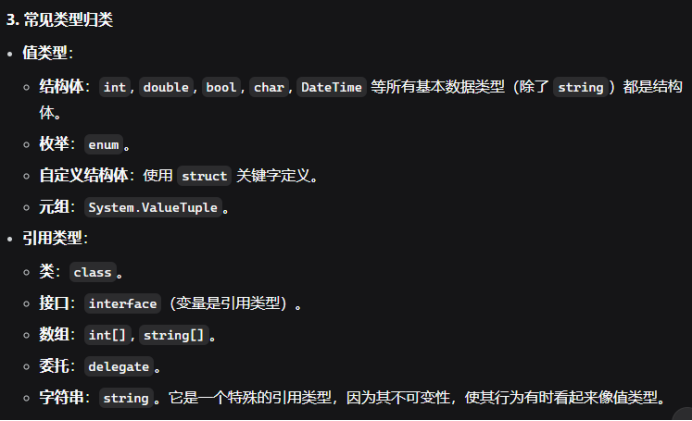
1.C#中的值类型和引用类型有什么区别?
最根本的区别在于它们在内存中的存储方式。
值类型:直接包含值,将一个值类型变量赋给另一个值类型变量,是复制包含的值,默认值是0。
引用类型:只赋值对对象的引用,而不复制对象本身,默认值是null
引用类型有class,delegate,object,string,值类型存储在栈中,引用类型存储在堆中
值类型就像纸质文件:你有一份文件,我给你一份完整的复印件。我们各自修改自己的复印件,互不影响。
引用类型就像共享的云文档链接:我给你的是一个链接。我们通过这个链接访问的是同一份文档。任何人通过这个链接修改了文档,另一个人看到的内容也会改变
2.C#中的ref和out关键字有什么区别?
-
都是按引用类型进行传递
-
属性不是变量不能作为out,ref参数传递
-
ref参数必须初始化,out不需要初始化
-
当方法有多个返回值时,out非常有用
🔥🔥常见异常类型:
✨转换异常System.InvalidCastException
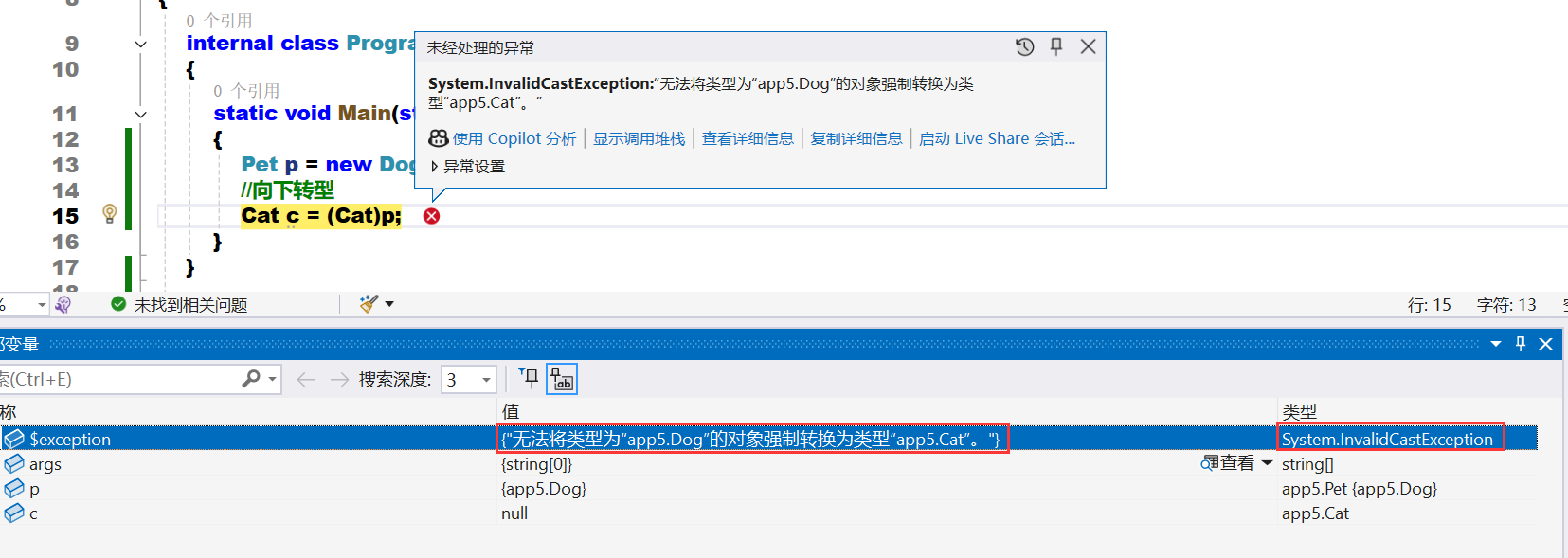
解决方法:
// ❌ 危险做法:直接强制转换
string text = (string)someObject; // 可能抛InvalidCastException

// ✅ 安全做法1:使用as运算符
string text = someObject as string;
if (text != null) {
    // 安全使用text
}

// ✅ 安全做法2:先检查再转换
if (someObject is string) {
    string text = (string)someObject; // 现在安全了
}

// ✅ 安全做法3:模式匹配(推荐)
if (someObject is string text) {
    // 直接使用text
}

// ❌ 危险做法:直接Parse
int number = int.Parse(userInput); // 可能抛FormatException

// ✅ 安全做法:使用TryParse
if (int.TryParse(userInput, out int number)) {
    // 安全使用number
}

// ❌ 危险做法:直接遍历转换
foreach (string item in mixedList) {
    // 可能抛InvalidCastException
}

// ✅ 安全做法:使用OfType过滤
foreach (string item in mixedList.OfType<string>()) {
    // 只处理能转换的元素
}

// ❌ 危险做法:不检查就拆箱
object boxed = 42;
double value = (double)boxed; // InvalidCastException

// ✅ 安全做法:正确拆箱
object boxed = 42;
double value = (double)(int)boxed; // 先拆箱为正确类型
✨索引越界异常System.IndexOutOfRangeException
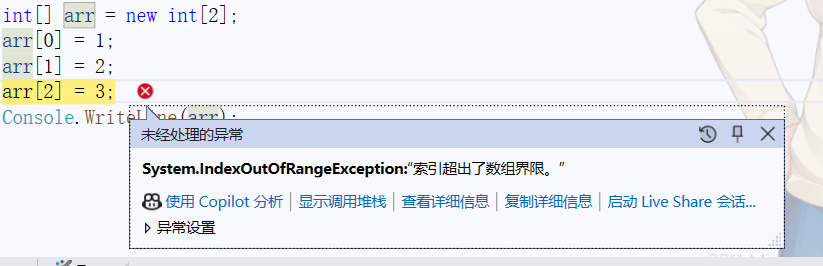
解决方法:
// 1. 始终检查索引范围
int index = 3;
if (index >= 0 && index < numbers.Length) {
    int value = numbers[index];
}

// 2. 正确循环边界
for (int i = 0; i < numbers.Length; i++) { // 使用 < 而不是 <=
    Console.WriteLine(numbers[i]);
}

// 3. 使用安全访问方法
string text = "hello";
if (index < text.Length) {
    char c = text[index];
}

// 4. 列表安全访问
List<string> list = new List<string> {"a", "b"};
if (index < list.Count) {
    string item = list[index];
}

// 5. 使用TryGet模式
public static bool TryGetValue<T>(T[] array, int index, out T value) {
    if (index >= 0 && index < array.Length) {
        value = array[index];
        return true;
    }
    value = default(T);
    return false;
}

// 使用
if (TryGetValue(numbers, 3, out int result)) {
    Console.WriteLine(result);
}

// 6. 使用foreach避免索引
foreach (var number in numbers) { // 不会越界
    Console.WriteLine(number);
}

// 7. 使用LINQ的ElementAtOrDefault
var item = list.ElementAtOrDefault(5); // 越界返回null/default
if (item != null) {
    // 安全使用
}
✨空指针异常System.NullReferenceException
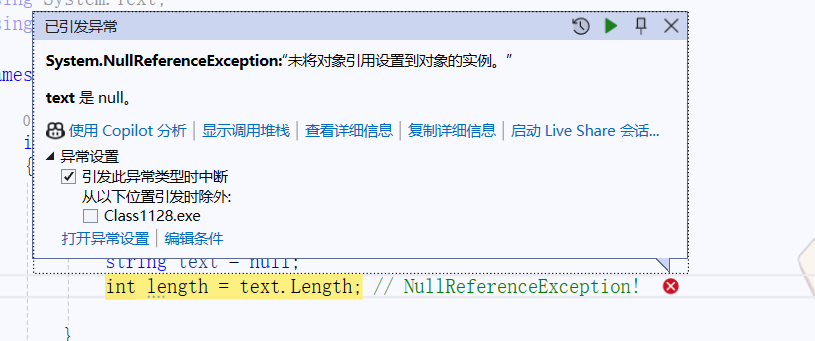
解决方法:
// 1. 使用空条件运算符 (?.)
string name = GetName();
int? length = name?.Length; // 如果name为null,返回null
Console.WriteLine(name?.ToUpper()); // 安全调用

// 2. 链式安全访问
Person person = GetPerson();
string city = person?.Address?.City; // 任一环节为null都返回null

// 3. 空合并运算符 (??)
string displayName = name ?? "未知"; // name为null时使用默认值
string result = name?.ToUpper() ?? "默认值";

// 4. 集合安全遍历
List<string> list = new List<string> { "a", null, "c" };
foreach (var item in list) {
    if (item != null) {
        Console.WriteLine(item.Length);
    }
}

// 或者使用LINQ过滤
var validItems = list.Where(item => item != null);
foreach (var item in validItems) {
    Console.WriteLine(item.Length);
}

// 5. 参数空检查
public void ProcessData(string data) {
    if (data == null) {
        throw new ArgumentNullException(nameof(data));
    }
    // 安全使用data
}

// 6. 使用C# 8.0可空引用类型
#nullable enable
string? nullableString = null; // 明确声明可空
string nonNullableString = "hello"; // 不可空,编译器会检查

// 7. 模式匹配
if (person is { Address: { City: string city } }) {
    Console.WriteLine(city); // city肯定不为null
}

// 8. 使用空字符串代替null
string text = GetText() ?? string.Empty;
if (text.Length > 0) { // 安全,不会是null
    // 处理文本
}-
空指针异常是运行时异常,编译时无法完全避免
-
使用
?.运算符 进行安全访问 -
启用可空引用类型 获得编译器帮助
-
始终验证输入参数,特别是公共API
-
合理使用默认值 替代null

Agent 垂直技术社区,欢迎活跃、内容共建。
更多推荐



 19
19 0
0- 0


 已为社区贡献3条内容

所有评论(0)