LLM之Agent(三十三)|AI Agents(二):从零开始构建Agent
在之前的博客文章(LLM之Agent(三十二)|AI Agents(一)简介)中,我们对AI Agents进行了全面的概述,讨论了它们的特点、组成部分、发展历程、挑战和未来的可能性。
在本篇博客中,我们将探讨如何使用 Python 从零开始构建一个智能体。该智能体能够根据用户输入做出决策,选择合适的工具,并执行相应的任务。让我们开始吧!
一、什么是agent?
智能体是一个自主实体,能够感知其环境、做出决策并采取行动以实现特定目标。 智能体的复杂程度各不相同,从对刺激做出反应的简单反应型智能体到能够随着时间推移学习和适应的更高级的智能体。常见的智能体类型包括:
-
反应型智能体(Reactive Agents): 直接对环境变化做出反应,没有内部记忆。
-
基于模型的智能体(Model-Based Agents): 利用内部世界模型进行决策。
-
目标导向型智能体(Goal-Based Agents): 根据实现特定目标来规划行动。
-
基于效用的智能体(Utility-Based Agents): 根据效用函数评估潜在行动,以最大化结果。
例如聊天机器人、推荐系统和自动驾驶汽车,它们都利用不同类型的agent来高效、智能地执行任务。
Agent的核心组成部分包括:
-
模型 :智能体的大脑,负责处理输入并生成响应;
-
工具 :智能体可以根据用户请求执行的预定义功能;
-
工具箱 :智能体可使用的工具集合;
-
系统提示 :指导智能体如何处理用户输入并选择正确工具的指令集。
二、从零构建Agent
现在,让我们卷起袖子开始从零构建吧!

2.1 先决条件
-
Python 3.8+
-
Ollama
本文源码在https://github.com/ArronAI007/Awesome-AGI/tree/main/Agent/Tutorials/Agent%20from%20Scratch仓库下,从该仓库下载requirements.txt进行安装所需依赖库。
pip install -r requirements.txt使用ollama安装大模型
ollama pull mistral # Replace 'mistral' with the model needed 2.2 开始实施
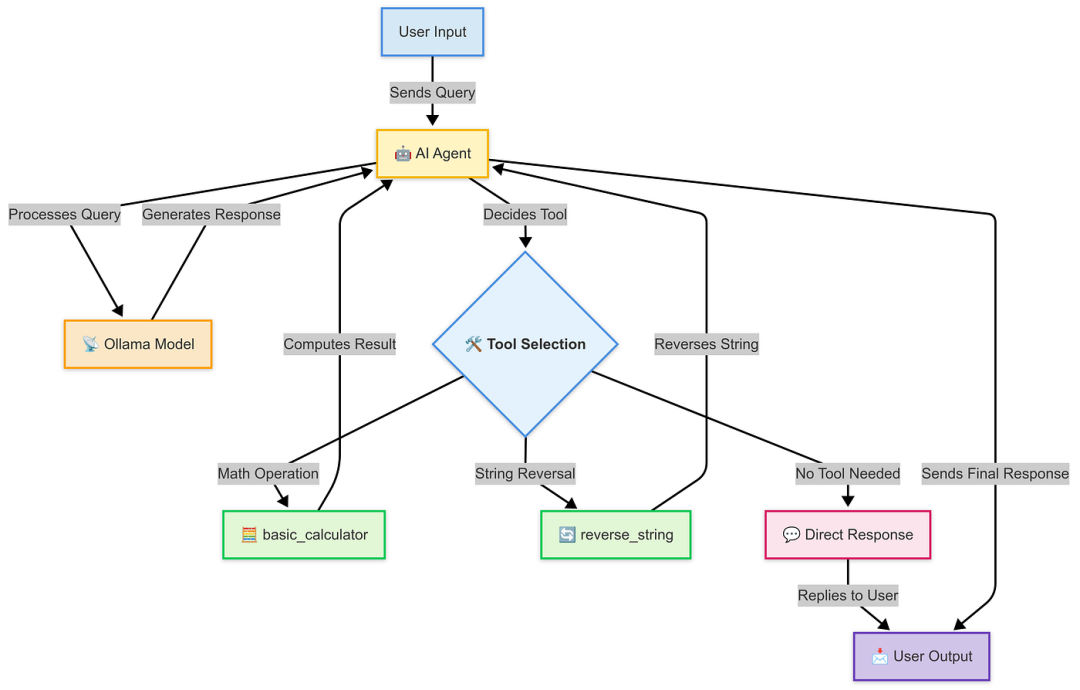
Step1:定义模型类
我们首先需要一个能够处理用户输入的模型。我们将创建一个 OllamaModel 类,该类会与本地 API 交互以生成响应。
以下是一个基本实现:
from termcolor import colored
import os
from dotenv import load_dotenv
load_dotenv()
### Models
import requests
import json
import operator
class OllamaModel:
    def __init__(self, model, system_prompt, temperature=0, stop=None):
        """
        Initializes the OllamaModel with the given parameters.
        Parameters:
        model (str): The name of the model to use.
        system_prompt (str): The system prompt to use.
        temperature (float): The temperature setting for the model.
        stop (str): The stop token for the model.
        """
        self.model_endpoint = "http://localhost:11434/api/generate"
        self.temperature = temperature
        self.model = model
        self.system_prompt = system_prompt
        self.headers = {"Content-Type": "application/json"}
        self.stop = stop
    def generate_text(self, prompt):
        """
        Generates a response from the Ollama model based on the provided prompt.
        Parameters:
        prompt (str): The user query to generate a response for.
        Returns:
        dict: The response from the model as a dictionary.
        """
        payload = {
            "model": self.model,
            "format": "json",
            "prompt": prompt,
            "system": self.system_prompt,
            "stream": False,
            "temperature": self.temperature,
            "stop": self.stop
        }
        try:
            request_response = requests.post(
                self.model_endpoint,
                headers=self.headers,
                data=json.dumps(payload)
            )
            print("REQUEST RESPONSE", request_response)
            request_response_json = request_response.json()
            response = request_response_json['response']
            response_dict = json.loads(response)
            print(f"\n\nResponse from Ollama model: {response_dict}")
            return response_dict
        except requests.RequestException as e:
            response = {"error": f"Error in invoking model! {str(e)}"}
            return response
此类使用模型名称、系统提示符、温度和停止令牌进行初始化。`generate_text` 向模型 API 发送请求并返回响应。
Step2:为agent创建工具
下一步是创建agent可以使用的工具。这些工具是简单的 Python 函数,用于执行特定任务。以下是一个基本计算器和一个字符串反转器的示例:
def basic_calculator(input_str):
    """
    Perform a numeric operation on two numbers based on the input string or dictionary.
    Parameters:
    input_str (str or dict): Either a JSON string representing a dictionary with keys 'num1', 'num2', and 'operation',
                            or a dictionary directly. Example: '{"num1": 5, "num2": 3, "operation": "add"}'
                            or {"num1": 67869, "num2": 9030393, "operation": "divide"}
    Returns:
    str: The formatted result of the operation.
    Raises:
    Exception: If an error occurs during the operation (e.g., division by zero).
    ValueError: If an unsupported operation is requested or input is invalid.
    """
    try:
        # Handle both dictionary and string inputs
        if isinstance(input_str, dict):
            input_dict = input_str
        else:
            # Clean and parse the input string
            input_str_clean = input_str.replace("'", "\"")
            input_str_clean = input_str_clean.strip().strip("\"")
            input_dict = json.loads(input_str_clean)
        # Validate required fields
        if not all(key in input_dict for key in ['num1', 'num2', 'operation']):
            return "Error: Input must contain 'num1', 'num2', and 'operation'"
        num1 = float(input_dict['num1'])  # Convert to float to handle decimal numbers
        num2 = float(input_dict['num2'])
        operation = input_dict['operation'].lower()  # Make case-insensitive
    except (json.JSONDecodeError, KeyError) as e:
        return "Invalid input format. Please provide valid numbers and operation."
    except ValueError as e:
        return "Error: Please provide valid numerical values."
    # Define the supported operations with error handling
    operations = {
        'add': operator.add,
        'plus': operator.add,  # Alternative word for add
        'subtract': operator.sub,
        'minus': operator.sub,  # Alternative word for subtract
        'multiply': operator.mul,
        'times': operator.mul,  # Alternative word for multiply
        'divide': operator.truediv,
        'floor_divide': operator.floordiv,
        'modulus': operator.mod,
        'power': operator.pow,
        'lt': operator.lt,
        'le': operator.le,
        'eq': operator.eq,
        'ne': operator.ne,
        'ge': operator.ge,
        'gt': operator.gt
    }
    # Check if the operation is supported
    if operation not in operations:
        return f"Unsupported operation: '{operation}'. Supported operations are: {', '.join(operations.keys())}"
    try:
        # Special handling for division by zero
        if (operation in ['divide', 'floor_divide', 'modulus']) and num2 == 0:
            return "Error: Division by zero is not allowed"
        # Perform the operation
        result = operations[operation](num1, num2)
        # Format result based on type
        if isinstance(result, bool):
            result_str = "True" if result else "False"
        elif isinstance(result, float):
            # Handle floating point precision
            result_str = f"{result:.6f}".rstrip('0').rstrip('.')
        else:
            result_str = str(result)
        return f"The answer is: {result_str}"
    except Exception as e:
        return f"Error during calculation: {str(e)}"
def reverse_string(input_string):
    """
    Reverse the given string.
    Parameters:
    input_string (str): The string to be reversed.
    Returns:
    str: The reversed string.
    """
    # Check if input is a string
    if not isinstance(input_string, str):
        return "Error: Input must be a string"
    # Reverse the string using slicing
    reversed_string = input_string[::-1]
    # Format the output
    result = f"The reversed string is: {reversed_string}"
    return result
这些函数旨在根据提供的输入执行特定任务。`basic_calculator` 处理算术运算,而 reverse_string 反转给定的字符串。
Step 3: 构建工具箱
ToolBox 类存储了agent可以使用的所有工具,并为每个工具提供描述:
class ToolBox:
    def __init__(self):
        self.tools_dict = {}
    def store(self, functions_list):
        """
        Stores the literal name and docstring of each function in the list.
        Parameters:
        functions_list (list): List of function objects to store.
        Returns:
        dict: Dictionary with function names as keys and their docstrings as values.
        """
        for func in functions_list:
            self.tools_dict[func.__name__] = func.__doc__
        return self.tools_dict
    def tools(self):
        """
        Returns the dictionary created in store as a text string.
        Returns:
        str: Dictionary of stored functions and their docstrings as a text string.
        """
        tools_str = ""
        for name, doc in self.tools_dict.items():
            tools_str += f"{name}: \"{doc}\"\n"
        return tools_str.strip()
本类将帮助agent了解有哪些工具可用以及每种工具的功能。
Step 4: 创建代理类
Agent需要思考,决定使用哪个工具,并执行该工具。以下是 Agent 类:
agent_system_prompt_template = """
You are an intelligent AI assistant with access to specific tools. Your responses must ALWAYS be in this JSON format:
{{
    "tool_choice": "name_of_the_tool",
    "tool_input": "inputs_to_the_tool"
}}
TOOLS AND WHEN TO USE THEM:
1. basic_calculator: Use for ANY mathematical calculations
   - Input format: {{"num1": number, "num2": number, "operation": "add/subtract/multiply/divide"}}
   - Supported operations: add/plus, subtract/minus, multiply/times, divide
   - Example inputs and outputs:
     Input: "Calculate 15 plus 7"
     Output: {{"tool_choice": "basic_calculator", "tool_input": {{"num1": 15, "num2": 7, "operation": "add"}}}}
     Input: "What is 100 divided by 5?"
     Output: {{"tool_choice": "basic_calculator", "tool_input": {{"num1": 100, "num2": 5, "operation": "divide"}}}}
2. reverse_string: Use for ANY request involving reversing text
   - Input format: Just the text to be reversed as a string
   - ALWAYS use this tool when user mentions "reverse", "backwards", or asks to reverse text
   - Example inputs and outputs:
     Input: "Reverse of 'Howwwww'?"
     Output: {{"tool_choice": "reverse_string", "tool_input": "Howwwww"}}
     Input: "What is the reverse of Python?"
     Output: {{"tool_choice": "reverse_string", "tool_input": "Python"}}
3. no tool: Use for general conversation and questions
   - Example inputs and outputs:
     Input: "Who are you?"
     Output: {{"tool_choice": "no tool", "tool_input": "I am an AI assistant that can help you with calculations, reverse text, and answer questions. I can perform mathematical operations and reverse strings. How can I help you today?"}}
     Input: "How are you?"
     Output: {{"tool_choice": "no tool", "tool_input": "I'm functioning well, thank you for asking! I'm here to help you with calculations, text reversal, or answer any questions you might have."}}
STRICT RULES:
1. For questions about identity, capabilities, or feelings:
   - ALWAYS use "no tool"
   - Provide a complete, friendly response
   - Mention your capabilities
2. For ANY text reversal request:
   - ALWAYS use "reverse_string"
   - Extract ONLY the text to be reversed
   - Remove quotes, "reverse of", and other extra text
3. For ANY math operations:
   - ALWAYS use "basic_calculator"
   - Extract the numbers and operation
   - Convert text numbers to digits
Here is a list of your tools along with their descriptions:
{tool_descriptions}
Remember: Your response must ALWAYS be valid JSON with "tool_choice" and "tool_input" fields.
"""
class Agent:
    def __init__(self, tools, model_service, model_name, stop=None):
        """
        Initializes the agent with a list of tools and a model.
        Parameters:
        tools (list): List of tool functions.
        model_service (class): The model service class with a generate_text method.
        model_name (str): The name of the model to use.
        """
        self.tools = tools
        self.model_service = model_service
        self.model_name = model_name
        self.stop = stop
    def prepare_tools(self):
        """
        Stores the tools in the toolbox and returns their descriptions.
        Returns:
        str: Descriptions of the tools stored in the toolbox.
        """
        toolbox = ToolBox()
        toolbox.store(self.tools)
        tool_descriptions = toolbox.tools()
        return tool_descriptions
    def think(self, prompt):
        """
        Runs the generate_text method on the model using the system prompt template and tool descriptions.
        Parameters:
        prompt (str): The user query to generate a response for.
        Returns:
        dict: The response from the model as a dictionary.
        """
        tool_descriptions = self.prepare_tools()
        agent_system_prompt = agent_system_prompt_template.format(tool_descriptions=tool_descriptions)
        # Create an instance of the model service with the system prompt
        if self.model_service == OllamaModel:
            model_instance = self.model_service(
                model=self.model_name,
                system_prompt=agent_system_prompt,
                temperature=0,
                stop=self.stop
            )
        else:
            model_instance = self.model_service(
                model=self.model_name,
                system_prompt=agent_system_prompt,
                temperature=0
            )
        # Generate and return the response dictionary
        agent_response_dict = model_instance.generate_text(prompt)
        return agent_response_dict
    def work(self, prompt):
        """
        Parses the dictionary returned from think and executes the appropriate tool.
        Parameters:
        prompt (str): The user query to generate a response for.
        Returns:
        The response from executing the appropriate tool or the tool_input if no matching tool is found.
        """
        agent_response_dict = self.think(prompt)
        tool_choice = agent_response_dict.get("tool_choice")
        tool_input = agent_response_dict.get("tool_input")
        for tool in self.tools:
            if tool.__name__ == tool_choice:
                response = tool(tool_input)
                print(colored(response, 'cyan'))
                return
        print(colored(tool_input, 'cyan'))
        return
这个类有三个主要方法:
-
prepare_tools :存储并返回工具的描述。
-
think: 根据用户提示决定使用哪个工具。
-
work: 执行所选工具并返回结果。
Step 5: 运行代理
最后,让我们把所有内容整合起来并运行代理。在脚本的 main 部分,初始化代理并开始接收用户输入:
# Example usage
if __name__ == "__main__":
    """
    Instructions for using this agent:
    Example queries you can try:
    1. Calculator operations:
       - "Calculate 15 plus 7"
       - "What is 100 divided by 5?"
       - "Multiply 23 and 4"
    2. String reversal:
       - "Reverse the word 'hello world'"
       - "Can you reverse 'Python Programming'?"
    3. General questions (will get direct responses):
       - "Who are you?"
       - "What can you help me with?"
    Ollama Commands (run these in terminal):
    - Check available models:    'ollama list'
    - Check running models:      'ps aux | grep ollama'
    - List model tags:          'curl http://localhost:11434/api/tags'
    - Pull a new model:         'ollama pull mistral'
    - Run model server:         'ollama serve'
    """
    tools = [basic_calculator, reverse_string]
    # Uncomment below to run with OpenAI
    # model_service = OpenAIModel
    # model_name = 'gpt-3.5-turbo'
    # stop = None
    # Using Ollama with llama2 model
    model_service = OllamaModel
    model_name = "llama2"  # Can be changed to other models like 'mistral', 'codellama', etc.
    stop = "<|eot_id|>"
    agent = Agent(tools=tools, model_service=model_service, model_name=model_name, stop=stop)
    print("\nWelcome to the AI Agent! Type 'exit' to quit.")
    print("You can ask me to:")
    print("1. Perform calculations (e.g., 'Calculate 15 plus 7')")
    print("2. Reverse strings (e.g., 'Reverse hello world')")
    print("3. Answer general questions\n")
    while True:
        prompt = input("Ask me anything: ")
        if prompt.lower() == "exit":
            break
        agent.work(prompt)
三、结论
在这篇博文中,我们逐步探索了如何实现智能体。我们搭建了环境,定义了模型,创建了必要的工具,并构建了一个结构化的工具箱来支持智能体的功能。最后,我们通过运行智能体来展示其实际运行效果。
这种结构化的方法为构建能够自动执行任务并做出明智决策的智能交互式代理奠定了坚实的基础。随着人工智能代理的不断发展,其应用范围将扩展到各个行业,从而提高效率并促进创新。

Agent 垂直技术社区,欢迎活跃、内容共建。
更多推荐



 32
32 0
0- 0


 已为社区贡献10条内容

所有评论(0)