C++入门:string常见操作(中)size() 、迭代器、push_back()、+=运算、pop_back()、insert
目录
3.size()
string中提供了size()函数用于获取字符串长度。
在c++中关于字符串的操作函数都是包含在string中的,所以需要调用这些函数时,通常用.点运算符。
示例:
#include <iostream>
#include <string>    //添加string头文件

using namespace std;

int main()
{
	string s;
	string s1 = "hello";
	string s2 = "hello world";
	string s3 = "12ab!~        ";

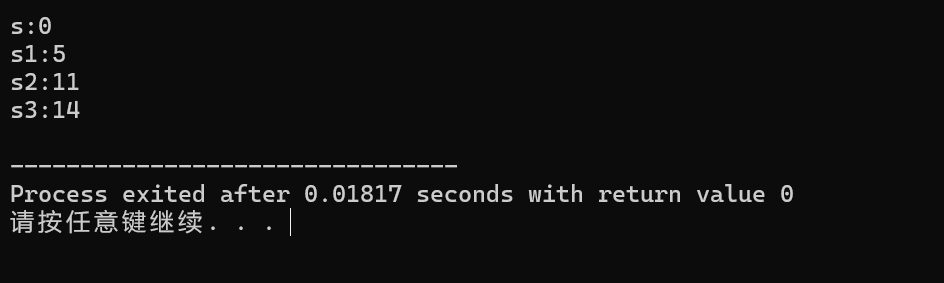
	cout << "s:" << s.size() << endl;
	cout << "s1:" << s1.size() << endl;
	cout << "s2:" << s2.size() << endl;
	cout << "s3:" << s3.size() << endl;

	return 0;
} 
Tips:
前面提到的像char、int、double等内置类型的数据在操作的时候,不会使用.操作符的。
string是C++提供的一种更复杂的封装类型,在string类型的变量中加入了操作这个字符的各种方法(函数),比如求字符串长度、字符串末尾插入一个字符等操作。所以要对sting类型的变量进行各种操作,就可以使用.操作符来使用这些函数。
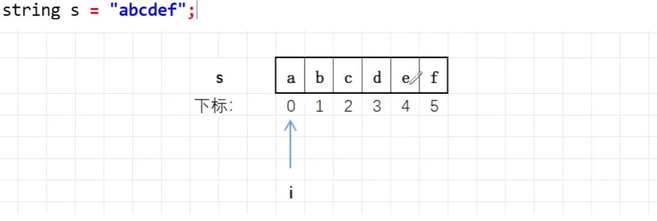
通过size()能获得字符串的长度,顺便就可以使用这个长度遍历字符串的,注意string字符串是可以通过下标访问的。
示例:
#include <iostream>
#include <string>

using namespace std;

int main()
{
	string s = "abcdef";
	int i = 0;
	for (i = 0; i < s.size(); i++)
	{
		cout << s[i] << " ";
	}
	return 0;
}
4.迭代器(iterator)
迭代器是一种对象,它可以用来遍历容器(比如我们现在学习的string)中的元素,迭代器的作用类似于指针,或者数组下标。
!不过访问迭代器指向的值,需要解引用(*)。
C++中的string提供了多种迭代器,用于遍历和操作字符串中的内容。这里给大家介绍一种最常用的迭代器。
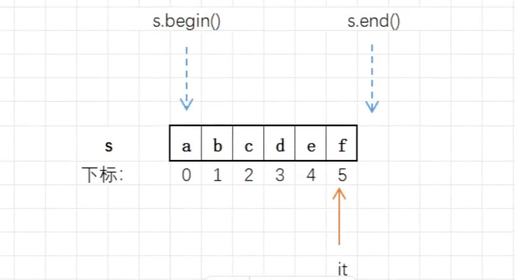
4.1begin()和end()
begin():范围指向字符串第一个字符的迭代器,需要一个迭代器的变量来接收。end():返回指向字符串最后一个字符的下一个位置的迭代器(该位置不属于字符串)。string中begin()和end()返回的迭代器的类型是string::itreator。
string s = "abcdef"

Tips:
- 迭代器是可以进行大小比较,也可以进行
+或—整数运算的。
比如: it++, 就是让迭代器前进一步,it--就是让迭代器退后一步。
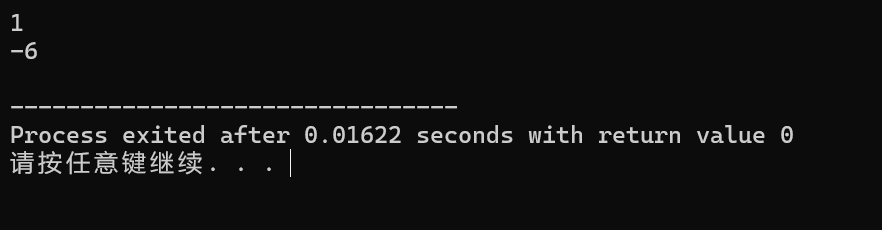
- 同一个容器的两个迭代器也可以相减,相减结果的绝对值,是两个迭代器中间元素的个数。
#include <iostream>
#include <string>

using namespace std;

int main()
{
	string s = "abcdef";
	string ::iterator it1 = s.begin();
	string ::iterator it2 = s.end();
	cout << (it1 < it2) << endl;
	cout << it1 - it2 << endl;

	return 0;
}
正序遍历:
迭代器通常用于遍历字符串的,可以正序遍历,也可以逆序遍历。
#include <iostream>
#include <string>

using namespace std;

int main()
{
    string s = "abcdef";
    //auto it 是让编译器自动推到it的类型
	for (auto it = s.begin(); it != s.end(); ++it)
	{
		cout << *it << ' ';
	 }

	 //string::iterator 是正向迭代器类型
	 //string::iterator it, 是直接创建迭代器,it是针对字符串的迭代器
	 for (string::iterator it = s.begin(); it != s.end(); ++it)
	 {
	 	cout << *it << ' ';
	  }
	return 0;
}
逆序遍历:
#include <iostream>
#include <string>

using namespace std;

int main()
{
	string s = "abcedf";
	for (string::iterator it = s.end() - 1; it >= s.begin(); --it)
	{
		cout << *it << ' ';
	}
	return 0;
}
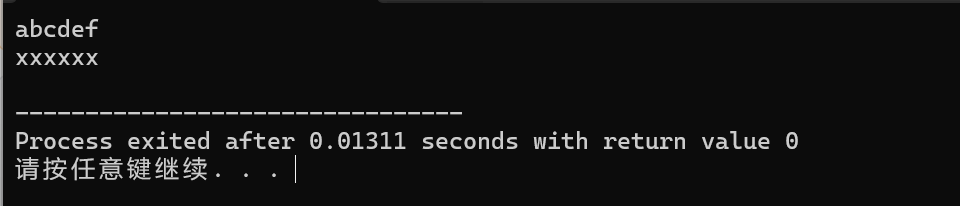
!通过迭代器找到元素后,改变迭代器指向的元素,是可以直接改变字符串内容的。
#include <iostream>
#include <string>

using namespace std;

int main()
{
	string str = "abcdef";
	cout << str << endl;
	for (string::iterator it = str.begin(); it != str.end(); ++it)
	{
		*it = 'x';
	}
	cout << str << endl;
	return 0;
}
5.push_back()
push_back()用于在字符串尾部插一个字符。
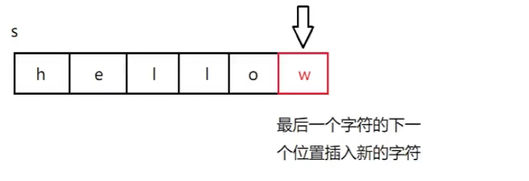
示例:
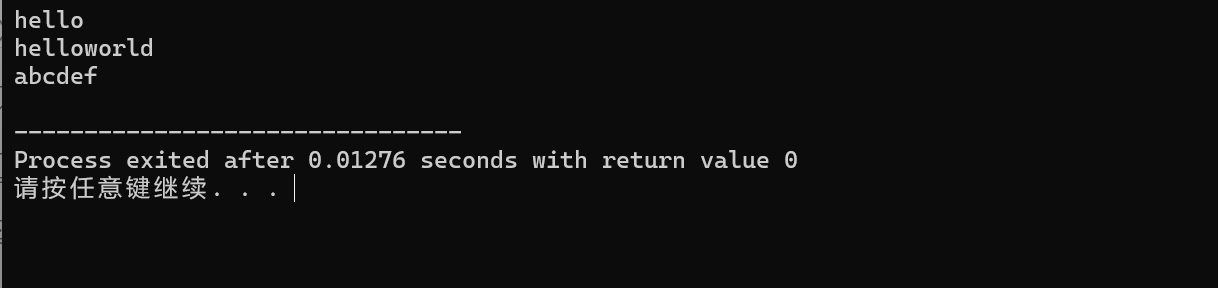
#include <iostream>
#include <string>

using namespace std;

int main()
{
	//向空字符串中尾插字符
	string s;
	s.push_back('h');
	s.push_back('e');
	s.push_back('l');
	s.push_back('l');
	s.push_back('o');
	cout << s << endl;


	//向非空字符串中尾插字符
	string s1 = "hello";
	s1.push_back('w');
	s1.push_back('o');
	s1.push_back('r');
	s1.push_back('l');
	s1.push_back('d');
	cout << s1 << endl;

	//批量插入字符
	string s2;
	for (char c = 'a'; c <= 'f'; c++)
	{
		s2.push_back(c);
	 }
	 cout << s2 <<endl;

	return 0;
}
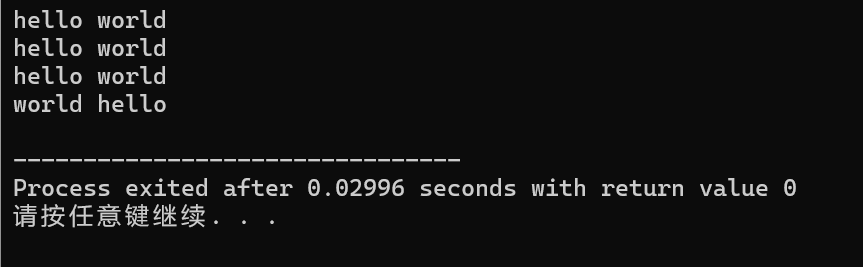
6.字符串的+=和+运算
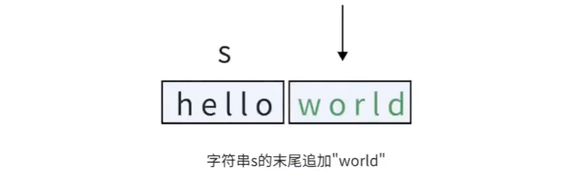
push_back()是用在字符串后添加一个字符,然而部分情况下我们需要向原有字符串后继续添加字符串。
其实string类型的字符串是支持+和+=运算的。这里本质是string中重载了operator+=这个操作符。
示例:
#include <iostream>
#include <string>

using namespace std;

int main()
{
	string s = "hello";
	s += " world";
	cout << s << endl;

	//除了+=操作,也可以使用'+'灵活进行字符串拼接
	//1.尾部拼接
	string s1 = "hello";
	cout << s1 + " world" << endl;    //s1是"hello world"

	s1 = s1 + " world";
	cout << s1 <<endl;

	//2.头部拼接
	string s2 = "hello";
	s2 = "world " + s2;
	cout << s2 << endl;             //s2是"world hello"


	return 0;
}
7.pop_back()
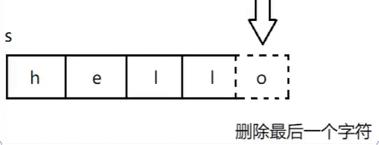
pop_back()用于删除字符串中尾部的一个字符。这个成员函数是在C++11标准中引入的,有的编译器可能不支持。
示例:
#include <iostream>
#include <string>

using namespace std;

int main()
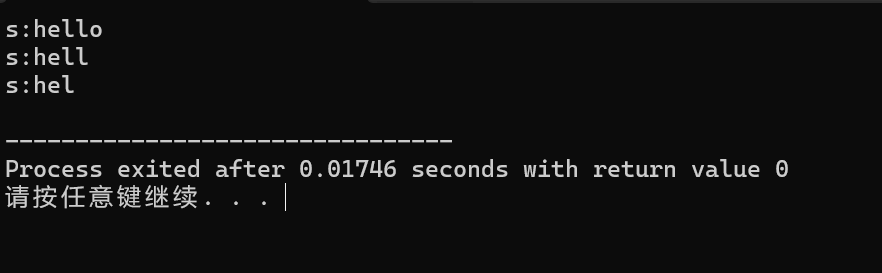
{
	string s = "hello";
	cout << "s:" << s << endl;
	//尾删
	s.pop_back();
	cout << "s:" << s << endl;
	 //尾删
	s.pop_back();
	cout << "s:" << s << endl;
	return 0;
}
注意:
当字符串中没有字符的时候,再调用pop_back()时,程序会出现异常。这种行为也是未定义行为,要避免这么使用。
#include <iostream>
#include <string>

using namespace std;

int main()
{
	string s;
	s.pop_back();
	return 0;
}
在DevC++上,程序最终崩溃了

为避免循环删除导致对空字符串进⾏尾删,可以将上⾯错误的代码改写成:
#include <iostream>
#include <string>

using namespace std;

int main()
{
	string s = "abc";
	while(s.size() > 0)  //通过size()函数来扣你工资字符串的长度
	{
		s.pop_back();
	}
	return 0;
}
Tips:
不可对空字符串继续进行pop_back()操作,否则程序出现异常
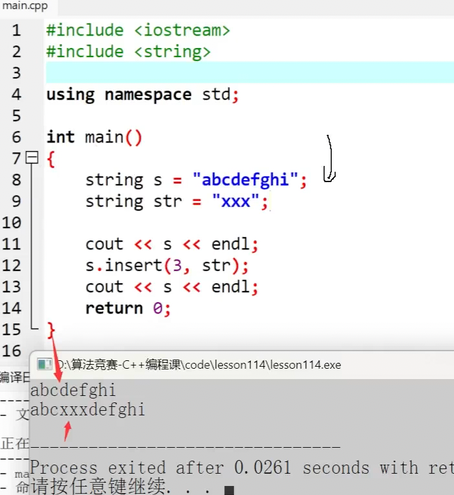
8.insert
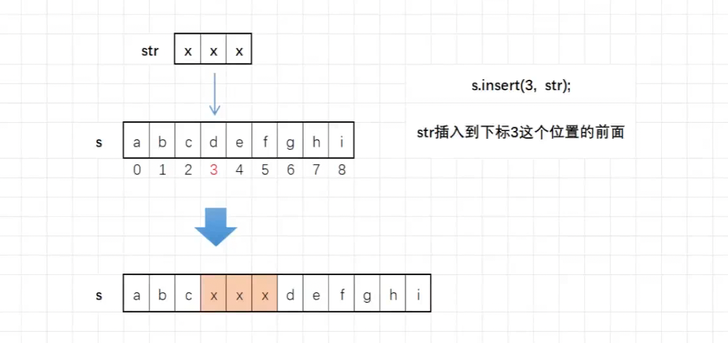
如果我们需要在字符串中间的某个位置插⼊⼀个字符串,怎么办呢?这时候我们得掌握⼀个函数就是 insert
函数原型如下:
string& insert (size_t pos, const string& str); //pos位置前⾯插⼊⼀个string字符串
string& insert (size_t pos, const char* s); //pos位置前⾯插⼊⼀个C⻛格的字符串
string& insert (size_t pos, size_t n, char c);//pos位置前⾯插⼊n个字符c
示例:

Agent 垂直技术社区,欢迎活跃、内容共建。
更多推荐


 21
21 0
0- 0


 已为社区贡献8条内容

所有评论(0)