C++基础:http框架路由匹配算法实现
2025/11/29:
做完了httpcontext和request的部分,以此为基础来构建一下路由匹配的相关代码,具体见之前的博客。response部分其实并没有什么好讲的,构建包远比解析包简单,自行了解即可。
系列文章:
参考:kama httpserver
复现:TinyHttpServer
一、当我们解析路由时,我们在解析什么
路由其实就是一个匹配 -> 调用函数的过程。同样的,网上有很多现成的资料,这里便不再赘述。
路由有两种,即静态路由和动态路由:
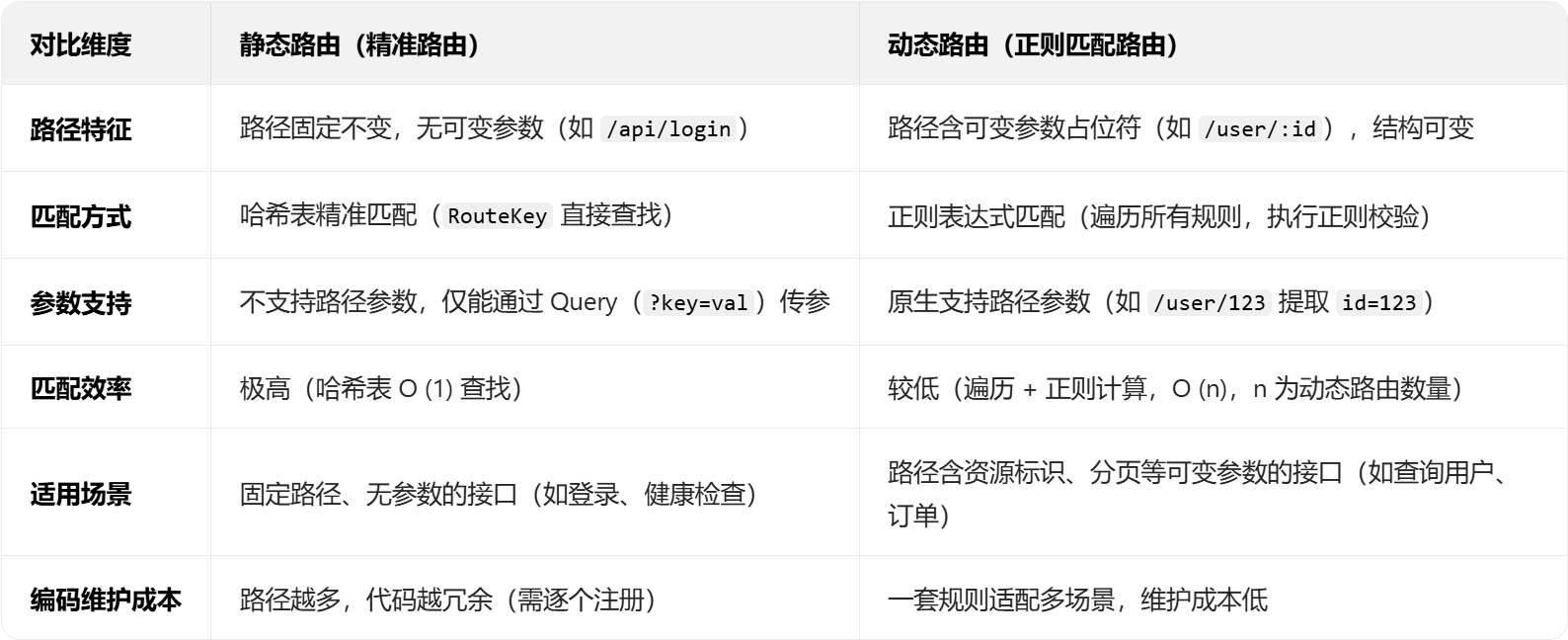
这个表格基本把两者的区别和各自的优势以及不足讲的很清楚了。在前文的request解析中,我们在request中就做了静态路由的相关适配,即把请求路径问号后面的参数结构化存储在request对象中。动态路由的相关处理就留到这里写。
不过值得注意的是,路由handler的执行有两种方式,一种是简单的处理,直接构建一个回调函数,检测路由解析后调用对应回调函数,另一种就是对象式的处理器,处理器是一个类,内部还有多个参数或函数对象,用于比较复杂的处理流程。
上述两种执行应当如何实现呢,这里先贴上两种执行方式:
// 对象式处理器
using HandlerPtr = std::shared_ptr<RouterHandler>;
// 简单回调函数
using HandlerCallback = std::function<void(const HttpRequest &, HttpResponse

// 抽象路由处理器类,所有自定义路由处理器需继承该类并实现handle方法
class RouterHandler
{
public:
    virtual ~RouterHandler() = default;

    // 纯虚函数,处理HTTP请求并生成响应
    virtual void handle(const HttpRequest& req, HttpResponse* resp) = 0;
};*)>;
这么看这两种实现应该就很清楚了,不过如果想要成统一的形式也可以,毕竟这么写的话在查找路由对应处理器时还得多一层判断。
二、内部对象
这部分第一次看其实是有点难以理解的。
	  // 路由键(请求方法 + URI)
    struct RouteKey
    {
        HttpRequest::Method method;
        std::string path;

        bool operator==(const RouteKey &other) const
        {
            return method == other.method && path == other.path;
        }
    };
    struct RouteCallbackObj
    {
        HttpRequest::Method method_;
        std::regex pathRegex_;
        HandlerCallback callback_;
        RouteCallbackObj(HttpRequest::Method method, std::regex pathRegex, const HandlerCallback &callback)
            : method_(method), pathRegex_(pathRegex), callback_(callback) {}
    };

    // 动态路由处理器对象
    // 请求方法(get post) + 正则表达式路径 + 方法处理器指针
    // 由addRoute方法从httpserver添加
    struct RouteHandlerObj
    {
        HttpRequest::Method method_;
        std::regex pathRegex_;
        HandlerPtr handler_;
        RouteHandlerObj(HttpRequest::Method method, std::regex pathRegex, HandlerPtr handler)
            : method_(method), pathRegex_(pathRegex), handler_(handler) {}
    };

    std::unordered_map<RouteKey, HandlerPtr, RouteKeyHash>      handlers_;       // 精准匹配
    std::unordered_map<RouteKey, HandlerCallback, RouteKeyHash> callbacks_; // 精准匹配
    std::vector<RouteHandlerObj>                                regexHandlers_;     // 正则匹配
    std::vector<RouteCallbackObj>                               regexCallbacks_;   // 正则匹配
静态路由匹配的两个对象 handlers_ 和 callbacks_其实还算好理解,就是建立了一个静态路由到函数 or 对象的映射,这里不讲了。
先看 RouteHandlerObj 和 RouteCallbackObj 这两个封装,这两个是为动态匹配路由准备的,可以看到里面有一个 Method 一个正则表达式(用于匹配路由),以及对应的处理器对象 or 回调函数。在路由过程中,会逐个遍历vector中的对象,使用 regex_match 进行匹配,若能匹配上便执行对应函数。
三、函数解析
基本上这里的函数都比较好理解,这里放一下所有用到的函数声明:
    // 注册路由处理器
    void registerHandler(HttpRequest::Method method, const std::string &path, HandlerPtr handler);

    // 注册回调函数形式的处理器
    void registerCallback(HttpRequest::Method method, const std::string &path, const HandlerCallback &callback);

    // 注册动态路由处理器
    void addRegexHandler(HttpRequest::Method method, const std::string &path, HandlerPtr handler)
    {
        std::regex pathRegex = convertToRegex(path);
        regexHandlers_.emplace_back(method, pathRegex, handler);
    }

    // 注册动态路由处理函数
    void addRegexCallback(HttpRequest::Method method, const std::string &path, const HandlerCallback &callback)
    {
        std::regex pathRegex = convertToRegex(path);
        regexCallbacks_.emplace_back(method, pathRegex, callback);
    }

    // 处理请求
    bool route(const HttpRequest &req, HttpResponse *resp);

// 根据传入路径来生成正则表达式,该正则表达式会在路由匹配时使用
    // 输入路由模式:/user/:id/profile/:section (路由模式由用户定义)
    // 生成正则:^/user/([^/]+)/profile/([^/]+)$(该正则表达式用于在函数extractPathParameters中提取路径参数)
    std::regex convertToRegex(const std::string &pathPattern)
    {
        // 将路径模式转换为正则表达式,支持匹配任意路径参数
        std::string regexPattern = "^" + std::regex_replace(pathPattern, std::regex(R"(/:([^/]+))"), R"(/([^/]+))") + "$";
        return std::regex(regexPattern);
    }

    // 提取路径参数
    void extractPathParameters(const std::smatch &match, HttpRequest &request)
    {
        // Assuming the first match is the full path, parameters start from index 1
        for (size_t i = 1; i < match.size(); ++i)
        {
            request.setPathParameters("param" + std::to_string(i), match[i].str());
        }
    }
这几个函数其实也比较好理解,自行看源代码即可。其中比较重要的函数是router和动态路由正则表达式生成相关的内容。
这里就简单讲一下router:
bool Router::route(const HttpRequest &req, HttpResponse *resp)
{
    RouteKey key{req.method(), req.path()};

    // 先在注册的静态路由中查找
    // 查找处理器
    auto handlerIt = handlers_.find(key);
    if (handlerIt != handlers_.end())
    {
        // 找到处理器则执行
        handlerIt->second->handle(req, resp);
        return true;
    }

    // 查找回调函数
    auto callbackIt = callbacks_.find(key);
    if (callbackIt != callbacks_.end())
    {
        callbackIt->second(req, resp);
        return true;
    }

    // 查找动态路由处理器 使用之前注册的正则表达式进行匹配
    /*
     * 注册动态路由时,路径会被转换为正则表达式进行匹配
     * 动态路由使查询url相应的回调时,即使url中带有路径参数(user/:123)也能正确匹配到对应的回调
     */
    for (const auto &[method, pathRegex, handler] : regexHandlers_)
    {
        std::smatch match;
        // 待匹配字符串
        std::string pathStr(req.path());
        // 如果方法匹配并且动态路由匹配,则执行处理器
        // match用于存储正则表达式匹配结果,返回一个结果数组
        if (method == req.method() && std::regex_match(pathStr, match, pathRegex))
        {
            // 复制构造一个新的请求对象以便修改
            HttpRequest newReq(req);
            extractPathParameters(match, newReq);

            handler->handle(newReq, resp);
            return true;
        }
    }

    // 查找动态路由回调函数
    for (const auto &[method, pathRegex, callback] : regexCallbacks_)
    {
        std::smatch match;
        std::string pathStr(req.path());
        // 如果方法匹配并且动态路由匹配,则执行回调函数
        if (method == req.method() && std::regex_match(pathStr, match, pathRegex))
        {
             // Extract path parameters and add them to the request
            HttpRequest newReq(req); // 因为这里需要用这一次所以是可以改的
            extractPathParameters(match, newReq);

            callback(req, resp);
            return true;
        }
    }

    return false;
}
跟我们前面说的一样,这里先根据hash映射查看当前路由是否是静态路由,能查到则分别在回调函数和处理器对象里找对应的处理方法;否则前往动态路由vector来进行逐个匹配操作以及回调查找。流程还是比较容易理解的。
可以看到,在路由的模块,http 框架实现了具体功能的执行。
结合我们之前写过的 Request 以及 Response 模块来看,从上层的角度来总结, http 框架先对报文做解析,封装为结构化对象,路由模块再通过这个结构化 request 对象的 path 部分进行方法的 search,执行具体的功能调用。也就是说,当我们后期搞了一个http server之后,可以通过在路由模块中建立回调函数和处理器对象的方式来构建具体的功能。
四、单元测试
又来到了喜闻乐见的单元测试模块,这里我们主要测试 路由模块的功能是否可以正常使用。当然,经过前段时间的练习,发现自己的单元测试方法有点野鸡,这里拿 gtest 库规范一下单元测试的写法:
#include "./gtest/gtest.h"
#include <chrono>
#include <iostream>
#include <atomic>
#include "router/Router.h"
#include "http/HttpResponse.h"
#include "http/HttpRequest.h"

// 注意:下面的 makeRequest 可能需根据你项目中 HttpRequest 的实际 API 调整。
// 假设存在默认构造 + setMethod/setPath 或构造函数 (Method, path)。
// 如果项目提供不同构造,请在此处替换为真实构造调用。
// 该函数用于测试过程中快速构造 HttpRequest 对象。
static HttpRequest makeRequest(HttpRequest::Method method, const std::string &path)
{
    HttpRequest req;

    req.setMethod(method);
    req.setPath(path);

    return req;
}

// 基本行为测试:精确匹配回调
TEST(RouterTest, ExactCallbackMatch)
{
    Router router;
    std::atomic<int> hitCount{0};

    // 注册一个简单的回调函数路由
    router.registerCallback(HttpRequest::Method::kGet, "/test/exact", [&](const HttpRequest &req, HttpResponse *resp) {
        (void)req; (void)resp;
        ++hitCount;
    });

    // 构造请求对象
    HttpRequest req = makeRequest(HttpRequest::Method::kGet, "/test/exact");

    const int iterations = 10;
    for (int i = 0; i < iterations; ++i)
    {
        bool routed = router.route(req, nullptr);
        (void)routed;
    }

    std::cout << "ExactCallbackMatch: expected=" << iterations
              << ", actual=" << hitCount.load() << "\n";

    ASSERT_EQ(hitCount.load(), iterations);
}

// 精确匹配对象式处理器(RouterHandler)
// 需要项目中已定义 RouterHandler 基类且接口为 virtual void handle(...)
class TestHandler : public RouterHandler
{
public:
    std::atomic<int> &counter_;
    TestHandler(std::atomic<int> &c) : counter_(c) {}
    void handle(const HttpRequest &req, HttpResponse *resp) override
    {
        (void)req; (void)resp;
        ++counter_;
    }
};

TEST(RouterTest, ExactObjectHandlerMatch)
{
    Router router;
    std::atomic<int> hitCount{0};

    auto handler = std::make_shared<TestHandler>(hitCount);
    router.registerHandler(HttpRequest::Method::kPost, "/obj/handle", handler);

    HttpRequest req = makeRequest(HttpRequest::Method::kPost, "/obj/handle");

    const int iterations = 7;
    for (int i = 0; i < iterations; ++i)
        router.route(req, nullptr);

    std::cout << "ExactObjectHandlerMatch: expected=" << iterations
              << ", actual=" << hitCount.load() << "\n";

    ASSERT_EQ(hitCount.load(), iterations);
}

// 正则路由匹配(动态路由)和失败分支测试
TEST(RouterTest, RegexCallbackMatchAndMiss)
{
    Router router;
    std::atomic<int> hitCount{0};

    // 动态路由模式示例:/user/:id/profile/:section
    router.addRegexCallback(HttpRequest::Method::kGet, "/user/:id/profile/:section",
                            [&](const HttpRequest &req, HttpResponse *resp) {
                                (void)req; (void)resp;
                                ++hitCount;
                            });

    HttpRequest good = makeRequest(HttpRequest::Method::kGet, "/user/123/profile/overview");
    HttpRequest bad1 = makeRequest(HttpRequest::Method::kGet, "/user//profile/overview");
    HttpRequest bad2 = makeRequest(HttpRequest::Method::kPost, "/user/123/profile/overview"); // method mismatch

    bool r1 = router.route(good, nullptr);
    bool r2 = router.route(bad1, nullptr);
    bool r3 = router.route(bad2, nullptr);

    std::cout << "RegexCallbackMatchAndMiss: good_routed=" << r1
              << ", bad1_routed=" << r2 << ", bad2_routed=" << r3
              << ", callback_hits=" << hitCount.load() << "\n";

    ASSERT_TRUE(r1);
    ASSERT_FALSE(r2);
    ASSERT_FALSE(r3);
    ASSERT_EQ(hitCount.load(), 1);
}

// 性能与吞吐量测试(测量路由平均延迟、总耗时、吞吐量)
// 说明:此测试为性能基准,运行大量次以获取数值指标,作为回归检测可调低次数。
TEST(RouterTest, ThroughputAndLatency)
{
    Router router;
    std::atomic<int> hitCount{0};

    router.registerCallback(HttpRequest::Method::kGet, "/perf/test", [&](const HttpRequest &req, HttpResponse *resp) {
        (void)req; (void)resp;
        ++hitCount;
    });

    HttpRequest req = makeRequest(HttpRequest::Method::kGet, "/perf/test");

    const int totalRequests = 10000; // 如 CI 时间有限可减少到 1000
    using clock = std::chrono::high_resolution_clock;
    auto t0 = clock::now();
    for (int i = 0; i < totalRequests; ++i)
    {
        router.route(req, nullptr);
    }
    auto t1 = clock::now();

    auto total_us = std::chrono::duration_cast<std::chrono::microseconds>(t1 - t0).count();
    double avg_us = static_cast<double>(total_us) / totalRequests;
    double throughput = (totalRequests * 1e6) / static_cast<double>(total_us); // req/s
    double success_rate = (100.0 * hitCount.load()) / totalRequests;

    std::cout << "ThroughputAndLatency: total_requests=" << totalRequests
              << ", hits=" << hitCount.load()
              << ", total_us=" << total_us
              << ", avg_us=" << avg_us
              << ", req_per_s=" << throughput
              << ", success_rate_percent=" << success_rate << "\n";

    ASSERT_EQ(hitCount.load(), totalRequests);
    ASSERT_GT(throughput, 0.0);
}

// 路由失败率与边界测试:不存在路由
TEST(RouterTest, NotFoundRoute)
{
    Router router;
    HttpRequest req = makeRequest(HttpRequest::Method::kGet, "/does/not/exist");
    bool routed = router.route(req, nullptr);

    std::cout << "NotFoundRoute: routed=" << routed << "\n";
    ASSERT_FALSE(routed);
}

int main(int argc, char **argv)
{
    ::testing::InitGoogleTest(&argc, argv);
    return RUN_ALL_TESTS();
}
这个单元测试基本覆盖了所有的路由场景,得到输出结果如下:
[==========] Running 5 tests from 1 test suite.
[----------] Global test environment set-up.
[----------] 5 tests from RouterTest
[ RUN      ] RouterTest.ExactCallbackMatch
ExactCallbackMatch: expected=10, actual=10
[       OK ] RouterTest.ExactCallbackMatch (0 ms)
[ RUN      ] RouterTest.ExactObjectHandlerMatch
ExactObjectHandlerMatch: expected=7, actual=7
[       OK ] RouterTest.ExactObjectHandlerMatch (0 ms)
[ RUN      ] RouterTest.RegexCallbackMatchAndMiss
RegexCallbackMatchAndMiss: good_routed=1, bad1_routed=0, bad2_routed=0, callback_hits=1
[       OK ] RouterTest.RegexCallbackMatchAndMiss (0 ms)
[ RUN      ] RouterTest.ThroughputAndLatency
ThroughputAndLatency: total_requests=10000, hits=10000, total_us=2591, avg_us=0.2591, req_per_s=3.85951e+06, success_rate_percent=100
[       OK ] RouterTest.ThroughputAndLatency (2 ms)
[ RUN      ] RouterTest.NotFoundRoute
NotFoundRoute: routed=0
[       OK ] RouterTest.NotFoundRoute (0 ms)
[----------] 5 tests from RouterTest (3 ms total)

[----------] Global test environment tear-down
[==========] 5 tests from 1 test suite ran. (4 ms total)
[  PASSED  ] 5 tests.

进程已结束,退出代码为 0
路由模块工作正常

Agent 垂直技术社区,欢迎活跃、内容共建。
更多推荐


 21
21 0
0- 0


 已为社区贡献6条内容

所有评论(0)