Vue 学习随笔系列二十七 -- el-select选项框回显及下拉选项自定义样式
·
一、多选情况
1、效果图
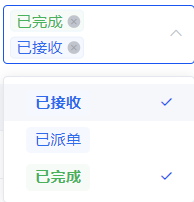
2、代码实现
<el-select
  clearable
  multiple
  v-model="formInline.currentStatus"
  class="currentStatusSelect"
  @change="handleChange"
  placeholder="请选择当前状态">
  <el-option
    v-for="item in currentStatusList"
    :key="item.value"
      :label="item.label"
      :value="item.label">
      <el-tag
        :style="formatStatus(item.label)?.style"
      >
        {{ item.label }}
      </el-tag>
    </el-option>
  </el-select>
methods 或 computed
    formatStatus() {
      const tempMap = {
        '已派单': {
          style: { color: '#2F6CED', borderRadius: '4px', background: '#F5F8FE', border: '#EAF0FD'}
        },
        '已完成': {
          style: { color: '#47B259', borderRadius: '4px', background: '#F6FBF7', border: '#EDF7FE'}
        },
        '已接收': {
          style: { color: '#2F6CED', borderRadius: '4px', background: '#F5F8FE', border: '#EAF0FD'}
        },
      }
      return status => {
        return tempMap[status] || {}
      }
    },
// change 事件重新赋值,实现单选
handleChange(val) {
      this.tagStyleElem.innerHTML = this.formInline.currentStatus
        .map( (value, index) =>
          `.currentStatusSelect .el-tag:nth-child(${index + 1}) {
            color: ${this.formatStatus(value)?.style?.color};
            border-color: ${this.formatStatus(value)?.style?.border};
            background-color: ${this.formatStatus(value)?.style?.background};
          }`
        ).join('')
    }
二、单选
1、效果图

2、代码实现
<el-select
  clearable
  multiple
  v-model="formInline.currentStatus"
  class="currentStatusSelect"
  @change="handleChange"
  placeholder="请选择当前状态">
  <el-option
    v-for="item in currentStatusList"
    :key="item.value"
      :label="item.label"
      :value="item.label">
      <el-tag
        :style="formatStatus(item.label)?.style"
      >
        {{ item.label }}
      </el-tag>
    </el-option>
  </el-select>
methods 或 computed
    formatStatus() {
      const tempMap = {
        '已派单': {
          style: { color: '#2F6CED', borderRadius: '4px', background: '#F5F8FE', border: '#EAF0FD'}
        },
        '已完成': {
          style: { color: '#47B259', borderRadius: '4px', background: '#F6FBF7', border: '#EDF7FE'}
        },
        '已接收': {
          style: { color: '#2F6CED', borderRadius: '4px', background: '#F5F8FE', border: '#EAF0FD'}
        },
      }
      return status => {
        return tempMap[status] || {}
      }
    },
// change 事件重新赋值,实现单选
handleChange(val) {
      this.formInline.currentStatus = [val[val.length-1]];

      this.tagStyleElem.innerHTML = this.formInline.currentStatus
        .map( (value, index) =>
          `.currentStatusSelect .el-tag {
            color: ${this.formatStatus(value)?.style?.color};
            border-color: ${this.formatStatus(value)?.style?.border};
            background-color: ${this.formatStatus(value)?.style?.background};
          }`
        ).join('')
    }

Agent 垂直技术社区,欢迎活跃、内容共建。
更多推荐


 4
4 0
0- 0


 已为社区贡献1条内容

所有评论(0)