React Native for OpenHarmony 实战:农历转换实现
今天我们用 React Native 实现一个农历转换工具,把公历日期转换成农历日期和干支纪年。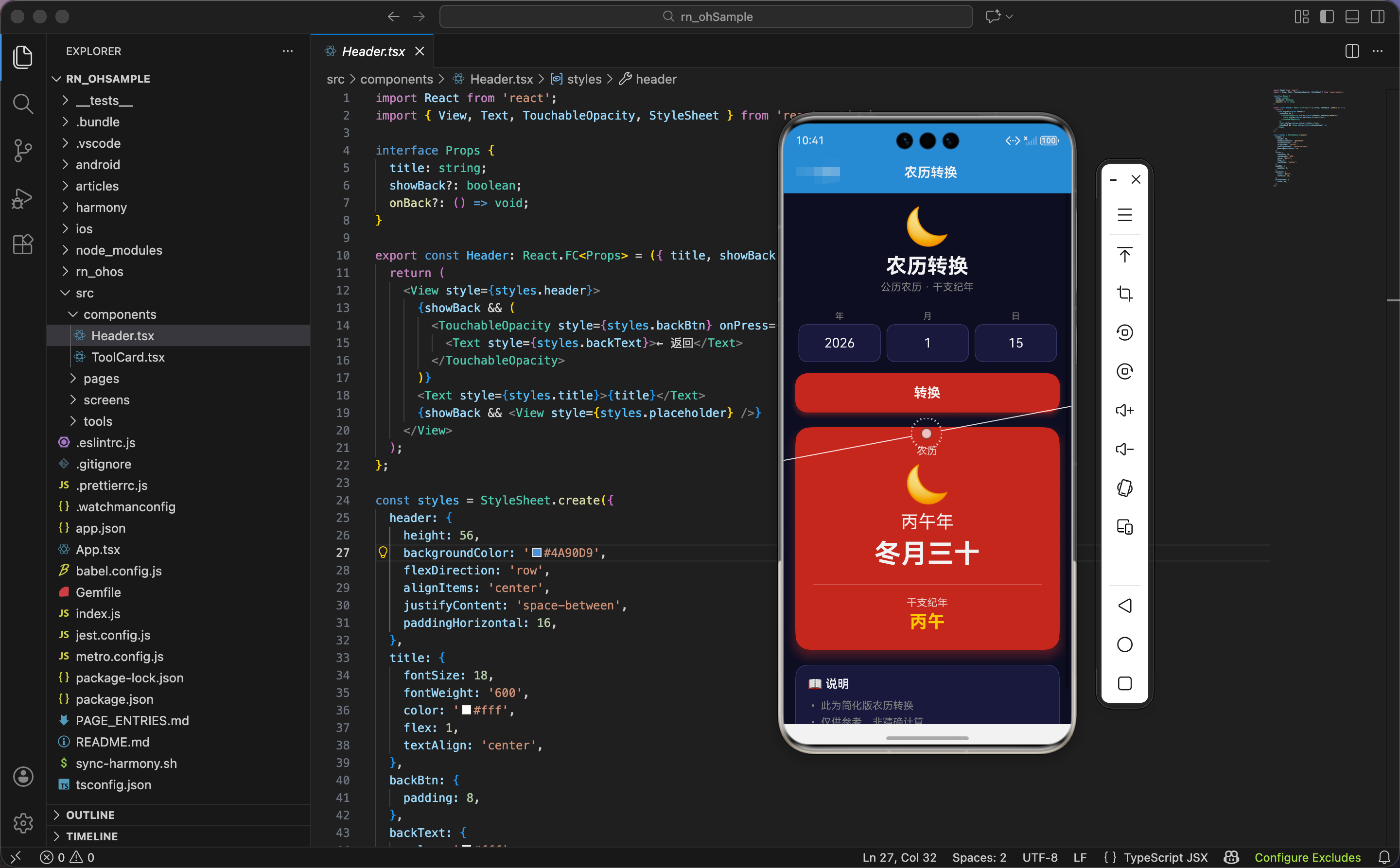
农历数据
import React, { useState, useRef } from 'react';
import { View, Text, TextInput, TouchableOpacity, StyleSheet, ScrollView, Animated } from 'react-native';

const tianGan = ['甲', '乙', '丙', '丁', '戊', '己', '庚', '辛', '壬', '癸'];
const diZhi = ['子', '丑', '寅', '卯', '辰', '巳', '午', '未', '申', '酉', '戌', '亥'];
const lunarMonths = ['正', '二', '三', '四', '五', '六', '七', '八', '九', '十', '冬', '腊'];
const lunarDays = ['初一', '初二', '初三', '初四', '初五', '初六', '初七', '初八', '初九', '初十',
  '十一', '十二', '十三', '十四', '十五', '十六', '十七', '十八', '十九', '二十',
  '廿一', '廿二', '廿三', '廿四', '廿五', '廿六', '廿七', '廿八', '廿九', '三十'];
农历转换需要四组数据。
天干:tianGan 数组包含 10 个天干,甲乙丙丁戊己庚辛壬癸。天干是中国古代纪年法的一部分,每 10 年循环一次。
地支:diZhi 数组包含 12 个地支,子丑寅卯辰巳午未申酉戌亥。地支对应十二生肖,每 12 年循环一次。
天干地支组合:天干和地支组合成 60 个干支,比如甲子、乙丑、丙寅…癸亥。60 年一个甲子轮回。
农历月份:lunarMonths 数组包含 12 个月份名称。正月、二月…十月、冬月、腊月。冬月是十一月,腊月是十二月。
农历日期:lunarDays 数组包含 30 个日期名称。初一到初十,十一到二十,廿一到三十。“廿"读作"niàn”,表示二十。
为什么用这些名称?因为农历是中国传统历法,月份和日期都有特定的称呼。正月是一年的开始,腊月是一年的结束。初一是每月的第一天,十五是月圆之日。
状态设计
export const LunarCalendar: React.FC = () => {
  const today = new Date();
  const [year, setYear] = useState(today.getFullYear().toString());
  const [month, setMonth] = useState((today.getMonth() + 1).toString());
  const [day, setDay] = useState(today.getDate().toString());
  const [result, setResult] = useState<any>(null);

  const scaleAnim = useRef(new Animated.Value(0)).current;
  const rotateAnim = useRef(new Animated.Value(0)).current;
状态设计包含年月日、转换结果、动画值。
初始值:用当前日期初始化年月日。today.getFullYear() 获取年份,today.getMonth() + 1 获取月份(月份从 0 开始,需要加 1),today.getDate() 获取日期。
为什么用字符串?因为 TextInput 的 value 必须是字符串。用 toString() 把数字转成字符串。
转换结果:result 是对象或 null,包含农历年月日和干支纪年。
两个动画值:
scaleAnim:结果卡片的缩放动画rotateAnim:月亮图标的旋转动画
干支纪年计算
const getLunarYear = (y: number) => tianGan[(y - 4) % 10] + diZhi[(y - 4) % 12] + '年';
根据公历年份计算干支纪年。
天干索引:(y - 4) % 10。为什么减 4?因为公元 4 年是甲子年(天干地支的起点)。用年份减 4,再对 10 取余,得到天干索引。
地支索引:(y - 4) % 12。同样减 4,对 12 取余,得到地支索引。
组合:天干 + 地支 + “年”。
举例:计算 2024 年的干支纪年。
- 天干索引:(2024 - 4) % 10 = 2020 % 10 = 0,天干是"甲"
- 地支索引:(2024 - 4) % 12 = 2020 % 12 = 4,地支是"辰"
- 干支纪年:甲辰年
为什么用取余运算?因为天干 10 年一循环,地支 12 年一循环。取余运算能自动处理循环。
简化农历转换
  const simpleLunar = () => {
    const y = parseInt(year);
    const m = parseInt(month);
    const d = parseInt(day);
    const lunarMonth = ((m + 10) % 12) || 12;
    const lunarDay = ((d + 15) % 30) || 30;
    return {
      year: getLunarYear(y),
      month: lunarMonths[lunarMonth - 1] + '月',
      day: lunarDays[lunarDay - 1],
      ganZhi: tianGan[(y - 4) % 10] + diZhi[(y - 4) % 12],
    };
  };
简化版农历转换,用公式近似计算。
解析输入:parseInt() 把字符串转成整数。
农历月份:((m + 10) % 12) || 12。公历月份加 10,对 12 取余。如果结果是 0,用 12 代替。
为什么加 10?因为农历和公历有大约 1-2 个月的偏移。加 10 是一个近似值。
农历日期:((d + 15) % 30) || 30。公历日期加 15,对 30 取余。如果结果是 0,用 30 代替。
为什么加 15?因为农历和公历的日期也有偏移。加 15 是一个近似值。
返回对象:
year:干支纪年,比如"甲辰年"month:农历月份,比如"正月"day:农历日期,比如"初一"ganZhi:干支,比如"甲辰"
注意:这是简化版算法,不是精确的农历转换。精确的农历转换需要考虑闰月、大小月、节气等因素,非常复杂。这里只是用公式近似计算,仅供参考。
为什么用简化版?因为精确的农历转换需要大量的数据表和复杂的算法。对于一个小工具来说,简化版已经足够。而且避免使用第三方库,保证鸿蒙兼容性。
转换函数
  const convert = () => {
    const y = parseInt(year);
    const m = parseInt(month);
    const d = parseInt(day);
    if (y >= 1900 && y <= 2100 && m >= 1 && m <= 12 && d >= 1 && d <= 31) {
      scaleAnim.setValue(0);
      rotateAnim.setValue(0);
      setResult(simpleLunar());
      Animated.parallel([
        Animated.spring(scaleAnim, { toValue: 1, friction: 4, useNativeDriver: true }),
        Animated.timing(rotateAnim, { toValue: 1, duration: 500, useNativeDriver: true }),
      ]).start();
    }
  };
转换按钮点击时,计算农历,触发动画。
解析输入:parseInt() 把字符串转成整数。
验证输入:
- 年份:1900-2100
- 月份:1-12
- 日期:1-31
为什么限制年份范围?因为简化版算法只适用于 1900-2100 年。超出这个范围,误差会很大。
重置动画值:把缩放和旋转动画值都设为 0。
设置结果:调用 simpleLunar() 计算农历。
并行动画:
- 缩放动画:弹簧效果,
friction: 4控制弹性 - 旋转动画:500ms 线性动画
为什么用并行动画?因为缩放和旋转同时发生,视觉效果更好。弹簧效果让卡片有弹性,旋转让月亮图标转一圈。
旋转插值
const spin = rotateAnim.interpolate({ inputRange: [0, 1], outputRange: ['0deg', '360deg'] });
把动画值 0-1 映射到旋转角度 0-360 度。月亮图标旋转一圈。
界面渲染:头部和输入
  return (
    <ScrollView style={styles.container}>
      <View style={styles.header}>
        <Text style={styles.headerEmoji}>🌙</Text>
        <Text style={styles.headerTitle}>农历转换</Text>
        <Text style={styles.headerSubtitle}>公历农历 · 干支纪年</Text>
      </View>

      <View style={styles.inputSection}>
        <View style={styles.inputGroup}>
          <Text style={styles.label}>年</Text>
          <TextInput style={styles.input} value={year} onChangeText={setYear} keyboardType="numeric" placeholderTextColor="#666" />
        </View>
        <View style={styles.inputGroup}>
          <Text style={styles.label}>月</Text>
          <TextInput style={styles.input} value={month} onChangeText={setMonth} keyboardType="numeric" placeholderTextColor="#666" />
        </View>
        <View style={styles.inputGroup}>
          <Text style={styles.label}>日</Text>
          <TextInput style={styles.input} value={day} onChangeText={setDay} keyboardType="numeric" placeholderTextColor="#666" />
        </View>
      </View>

      <TouchableOpacity style={styles.btn} onPress={convert} activeOpacity={0.8}>
        <Text style={styles.btnText}>转换</Text>
      </TouchableOpacity>
头部显示标题和副标题,输入区域包含年月日输入框,转换按钮。
头部:
- 图标:🌙 月亮,代表农历
- 标题:农历转换
- 副标题:公历农历 · 干支纪年
输入区域:
- 横向布局,三个输入框并排
- 每个输入框上方有标签:年、月、日
keyboardType="numeric":数字键盘placeholderTextColor="#666":占位符颜色
转换按钮:
- 红色背景
#c0392b - 带阴影效果
activeOpacity={0.8}:点击时透明度变为 0.8
为什么用红色按钮?因为红色是中国传统的喜庆颜色,符合农历的文化背景。
结果显示
      {result && (
        <Animated.View style={[styles.result, { transform: [{ scale: scaleAnim }] }]}>
          <Text style={styles.resultTitle}>农历</Text>
          <Animated.Text style={[styles.lunarYear, { transform: [{ rotate: spin }] }]}>🌙</Animated.Text>
          <Text style={styles.lunarYearText}>{result.year}</Text>
          <Text style={styles.lunarDate}>{result.month}{result.day}</Text>
          <View style={styles.ganZhiBox}>
            <Text style={styles.ganZhiLabel}>干支纪年</Text>
            <Text style={styles.ganZhi}>{result.ganZhi}</Text>
          </View>
        </Animated.View>
      )}
结果卡片显示农历信息。
条件渲染:只有 result 不为 null 时才显示。
卡片动画:缩放从 0 到 1,弹簧效果。
标题:白色半透明文字"农历"。
月亮图标:
- 字号 50
- 应用旋转动画,旋转一圈
农历年份:白色文字,字号 24,比如"甲辰年"。
农历日期:白色文字,字号 36,加粗,比如"正月初一"。
干支纪年区域:
- 顶部有分隔线
- 标签"干支纪年":白色半透明
- 干支:金色
#ffd700,字号 24,加粗,比如"甲辰"
为什么用金色显示干支?因为金色代表尊贵、传统,符合干支纪年的文化内涵。
说明信息
      <View style={styles.info}>
        <Text style={styles.infoTitle}>📖 说明</Text>
        <Text style={styles.infoText}>• 此为简化版农历转换</Text>
        <Text style={styles.infoText}>• 仅供参考,非精确计算</Text>
        <Text style={styles.infoText}>• 干支纪年按年份计算</Text>
      </View>
    </ScrollView>
  );
};
底部显示说明信息。
三条说明:
- 此为简化版农历转换
- 仅供参考,非精确计算
- 干支纪年按年份计算
为什么要说明?因为这是简化版算法,不是精确的农历转换。用户需要知道这一点,避免误解。
鸿蒙 ArkTS 对比:农历计算
@State year: string = new Date().getFullYear().toString()
@State month: string = (new Date().getMonth() + 1).toString()
@State day: string = new Date().getDate().toString()
@State result: any = null

getLunarYear(y: number): string {
  const tianGan = ['甲', '乙', '丙', '丁', '戊', '己', '庚', '辛', '壬', '癸']
  const diZhi = ['子', '丑', '寅', '卯', '辰', '巳', '午', '未', '申', '酉', '戌', '亥']
  return tianGan[(y - 4) % 10] + diZhi[(y - 4) % 12] + '年'
}

simpleLunar() {
  const y = parseInt(this.year)
  const m = parseInt(this.month)
  const d = parseInt(this.day)
  const lunarMonth = ((m + 10) % 12) || 12
  const lunarDay = ((d + 15) % 30) || 30
  return {
    year: this.getLunarYear(y),
    month: lunarMonths[lunarMonth - 1] + '月',
    day: lunarDays[lunarDay - 1],
    ganZhi: tianGan[(y - 4) % 10] + diZhi[(y - 4) % 12]
  }
}

convert() {
  const y = parseInt(this.year)
  const m = parseInt(this.month)
  const d = parseInt(this.day)
  if (y >= 1900 && y <= 2100 && m >= 1 && m <= 12 && d >= 1 && d <= 31) {
    this.result = this.simpleLunar()
    animateTo({ duration: 500 }, () => {
      this.scaleAnim = 1
      this.rotateAnim = 1
    })
  }
}
ArkTS 中的农历计算逻辑完全一样。核心是天干地支的取余运算和简化版农历公式。parseInt()、取余运算、字符串拼接都是标准 JavaScript 语法,跨平台通用。
动画差异:ArkTS 用 animateTo() 触发动画,React Native 用 Animated.parallel()。但动画效果一样:缩放和旋转。
样式定义
const styles = StyleSheet.create({
  container: { flex: 1, backgroundColor: '#0f0f23', padding: 16 },
  header: { alignItems: 'center', marginBottom: 24 },
  headerEmoji: { fontSize: 50, marginBottom: 8 },
  headerTitle: { fontSize: 28, fontWeight: '700', color: '#fff' },
  headerSubtitle: { fontSize: 14, color: '#888', marginTop: 4 },
  inputSection: { flexDirection: 'row', marginBottom: 16 },
  inputGroup: { flex: 1, marginHorizontal: 4 },
  label: { fontSize: 12, color: '#888', marginBottom: 4, textAlign: 'center' },
  input: { backgroundColor: '#1a1a3e', color: '#fff', padding: 14, borderRadius: 12, fontSize: 18, textAlign: 'center', borderWidth: 1, borderColor: '#3a3a6a' },
  btn: { backgroundColor: '#c0392b', padding: 16, borderRadius: 16, alignItems: 'center', marginBottom: 20, shadowColor: '#c0392b', shadowOffset: { width: 0, height: 4 }, shadowOpacity: 0.4, shadowRadius: 8, elevation: 6 },
  btnText: { color: '#fff', fontSize: 18, fontWeight: '700' },
  result: { backgroundColor: '#c0392b', padding: 24, borderRadius: 20, alignItems: 'center', marginBottom: 20, shadowColor: '#c0392b', shadowOffset: { width: 0, height: 8 }, shadowOpacity: 0.4, shadowRadius: 16, elevation: 10 },
  resultTitle: { color: 'rgba(255,255,255,0.8)', marginBottom: 8 },
  lunarYear: { fontSize: 50, marginBottom: 8 },
  lunarYearText: { color: '#fff', fontSize: 24, marginBottom: 8 },
  lunarDate: { color: '#fff', fontSize: 36, fontWeight: '700' },
  ganZhiBox: { marginTop: 20, paddingTop: 16, borderTopWidth: 1, borderTopColor: 'rgba(255,255,255,0.2)', alignItems: 'center', width: '100%' },
  ganZhiLabel: { color: 'rgba(255,255,255,0.8)', marginBottom: 4 },
  ganZhi: { color: '#ffd700', fontSize: 24, fontWeight: '700' },
  info: { backgroundColor: '#1a1a3e', padding: 16, borderRadius: 16, borderWidth: 1, borderColor: '#3a3a6a' },
  infoTitle: { fontSize: 16, fontWeight: '600', marginBottom: 12, color: '#fff' },
  infoText: { fontSize: 14, color: '#888', marginBottom: 6 },
});
容器用深蓝黑色背景。输入区域横向布局,三个输入框平分空间。按钮和结果卡片都用红色背景,带阴影。干支用金色显示。说明信息用深蓝色背景,带边框。
小结
这个农历转换工具展示了干支纪年和简化版农历转换的实现。用天干地支的取余运算计算干支纪年,用公式近似计算农历日期。旋转动画让月亮图标转一圈,弹簧动画让结果卡片有弹性。
欢迎加入开源鸿蒙跨平台社区:https://openharmonycrossplatform.csdn.net

Agent 垂直技术社区,欢迎活跃、内容共建。
更多推荐

 3
3 0
0- 0


 已为社区贡献3条内容

所有评论(0)