C++日志库 - 18种方法选型
文章目录
1、前言
最近有时间研究下C++ 的记录日志的方法,包括各个方法的简述、使用特点、适用场景、推荐指数等。本文调研常见的 18 种 记录日志方法(包含:qInstallMessageHandler、Glog、Easylogging++、Qslog、Log4qt、Log4cpp、Log4cxx、Log4c、Log4cplus、Pantheios POCO、ACE、Boost.Log、G3log、Plog、spdlog、Rsyslog等),后续添加了笔者最推荐的 3种 典型方法的要领思路、使用方法和示例等,倾注了很多精力。希望此文不要沉底,请多多支持,谢谢~
2、归纳
| 序号 | 名称 | 简述使用特点 | 适用场景 | 官网 | 最新更新 | 推荐指数 |
|---|---|---|---|---|---|---|
| 1 | qInstallMessageHandler | Qt 亲儿子,可安装自定义的日志输出处理函数,把日志输出到文件,控制台等,可查看 Qt 的帮助文档。Release 版本默认不包含文件名、函数名和行数信息,需要在 .pro 文件中加入代码。 | Qt5.0 及以上版本 跨平台开发场景 | 地址 | 随 Qt 不断升级 | ⭐⭐⭐⭐⭐ |
| 2 | Glog | 谷歌 亲儿子,一个 C++ 语言的应用级日志记录框架,提供了 C++ 风格的流操作和各种辅助宏 | 常常与Breakpad结合跨平台使用 | 地址 | 2022-04-05 | ⭐⭐⭐⭐⭐ |
| 3 | Easylogging++ | 巨简单。轻量级高性能 C++ 日志库,只需要一个头文件,无需任何外部依赖。支持文件配置,提供了强大的自定义日志格式的能力,还提供对第三方库,STL容器的支持 | 几乎所有主流平台和编译器都支持 | 地址 | 2023-07-20 | ⭐⭐⭐⭐ |
| 4 | Log4cplus | 一个基于 Log4j简单易用的 C++ 日志记录 API,提供了对日志管理和配置的线程安全、灵活和任意粒度控制 | 使用 C++ 跨平台开发场景 | 地址 | 2023-11-17 | ⭐⭐⭐⭐ |
| 5 | Qslog | 基于Qt的轻量级开源日志库,使用Qt的QDebug类的易于使用的记录器。QsLog是在麻省理工学院许可下以开源形式发布的 | 适用于Qt的多库集成场景 | 地址 | 2023-06-21 | ⭐⭐⭐⭐ |
| 6 | Log4cpp | LGPL的开源项目,是基于 Log4j的 C++ 类库,可以灵活地记录到文件、syslog、IDSA 和其他目的地 | 适用 C++ 跨平台开发场景 | 地址 | 2023-03-12 | ⭐⭐⭐ |
| 7 | Pantheios | 号称 C/C++ 领域速度最快的程序诊断日志库,一类型安全、高效、泛型和可扩展性的 C++ 日志 API 库 | 适用于对速度有特别追求的场景 | 地址 | 2020-07-05 | ⭐⭐⭐ |
| 8 | Plog | Plog 是一个 C++ 日志库,其设计尽可能简单、小巧且灵活,非常小。它是作为现有大型库的替代方案而创建的,并提供一些独特的功能,如CSV 日志格式和宽字符串支持 | 适用于对系统空间有要求的场景 | 地址 | 2023-08-20 | ⭐⭐⭐ |
| 9 | Rsyslog | Linux原生日志系统Rsyslog,可用于接受来自各种来源的输入,做处理后将结果输出到不同的目的地 | 适用于纯Linux场景 | 地址 | 2023-02-13 | ⭐⭐⭐ |
| 10 | ACE | 是一个很强大的跨平台的网络通信中间件,ACE日志输出的本身格式很类似log4cpp的日志格式 | 适用于中间件跨平台场景 | 地址 | 2023-12-14 | ⭐⭐⭐ |
| 11 | spdlog | 主打高性能与易用性。一个快速的 C++ 日志库,只包含头文件,是一个高速异步日志库,支持多线程和旋转文件日志 | 适用于高负载的系统 | 地址 | 2023-07-09 | ⭐⭐⭐ |
| 12 | G3log | 一个开源、支持跨平台的异步 C++ 日志框架,支持自定义日志格式。基于 g2log 构建,提升了性能,支持自定义格式 | 适用于对日志记录格式有特别要求的场景 | 地址 | 2023-12-07 | ⭐⭐⭐ |
| 13 | Log4qt | 用Trolltech Qt Framework的Apache Software Foundation Log4j包的C ++端口,它旨在供开源和商业Qt项目使用 | 适用于老版本Qt4 | 地址 | 2009-03-01 | ⭐⭐ |
| 14 | Poco.Log | 提供了好的日志支持文档。Poco库借助了C++库强大的网络和系统支持,易于集成到其他应用程序中,支持多个日志记录器和过滤器 | 适用于服务端和客户端的日志模块 | 地址 | 2023-12-05 | ⭐⭐ |
| 15 | Log4c | 基本上都是一些纯c的东西,移植性比Log4cxx、Log4cpp要好 | 使用 C 较多的场景 | 地址 | 2016-01-30 | ⭐⭐ |
| 16 | log.c | C 语言的日志功能模块,代码简洁,就一个 .c 和 .h 文件,一共 200 行,设计优雅 | 使用 C 较多的场景 | 地址 | 2016-01-30 | ⭐⭐ |
| 17 | Boost.Log | 由Boost库提供的日志记录工具,支持多个不同的后端日志器,可以定制多种记录格式 | 适用于任何Boost项目 | 地址 | 2023-12-14 | ⭐ |
| 18 | Log4cxx | Java 社区著名的 Log4j 的 C++ 移植版,用于为 C++ 程序提供日志功能,以便开发者对目标程序进行调试和审计,需要依赖于APR,不能和Qt的qDebug和qInfo等联调 | 适用于仅在Linux的Apache环境项目 | 地址 | 2023-05-01 | ⭐ |
3、典型
3.1、qInstallMessageHandler
3.1.1、简介
qInstallMessageHandler 位于 - Global Qt Declarations下边,属于全局函数。
QtMessageHandler qInstallMessageHandler(QtMessageHandler handler)
qInstallMessageHandler 的作用 主要是是对 打印消息的控制,能控制打印的输出,调试,信息,警告,严重,致命错误等五个等级。
Installs a Qt message handler which has been defined previously. Returns a pointer to the previous message handler.
The message handler is a function that prints out debug messages, warnings, critical and fatal error messages. The Qt library (debug mode) contains hundreds of warning messages that are printed when internal errors (usually invalid function arguments) occur. Qt built in release mode also contains such warnings unless QT_NO_WARNING_OUTPUT and/or QT_NO_DEBUG_OUTPUT have been set during compilation. If you implement your own message handler, you get total control of these messages.
The default message handler prints the message to the standard output under X11 or to the debugger under Windows. If it is a fatal message, the application aborts immediately.
Only one message handler can be defined, since this is usually done on an application-wide basis to control debug output.
To restore the message handler, call qInstallMessageHandler(0).
3.1.2、示例
官方示例
#include <qapplication.h>
#include <stdio.h>
#include <stdlib.h>
void myMessageOutput(QtMsgType type, const QMessageLogContext &context, const QString &msg)
{
    QByteArray localMsg = msg.toLocal8Bit();
    switch (type) {
    case QtDebugMsg:
        fprintf(stderr, "Debug: %s (%s:%u, %s)\n", localMsg.constData(), context.file, context.line, context.function);
        break;
    case QtInfoMsg:
        fprintf(stderr, "Info: %s (%s:%u, %s)\n", localMsg.constData(), context.file, context.line, context.function);
        break;
    case QtWarningMsg:
        fprintf(stderr, "Warning: %s (%s:%u, %s)\n", localMsg.constData(), context.file, context.line, context.function);
        break;
    case QtCriticalMsg:
        fprintf(stderr, "Critical: %s (%s:%u, %s)\n", localMsg.constData(), context.file, context.line, context.function);
        break;
    case QtFatalMsg:
        fprintf(stderr, "Fatal: %s (%s:%u, %s)\n", localMsg.constData(), context.file, context.line, context.function);
        abort();
    }
}
int main(int argc, char **argv)
{
    qInstallMessageHandler(myMessageOutput);
    QApplication app(argc, argv);
    ...
    return app.exec();
}
3.1.3、思路
- 读取日志配置文件,设置文件输出等级,可以用做在正式项目中调试与日常关键信息打印。
- Log消息输出方法–输出文本。
- 消息模块注册
3.1.4、使用
枚举变量–设置日志等级 0~4 5个等级
enum {
    Fatal = 0,
    Critical,
    Warning,
    Info,
    Debug
} LogLeaver;
int LogType = 4; //日志等级初始化设置
//初始化读取配置文件
void ReadLogInit()
{
    QFile file ("./log_conf.ini");
    if (!file.open(QIODevice::ReadOnly | QIODevice::Text)){//判断文件是否可执行
        return;
    }
    while (!file.atEnd()) {
        QByteArray  strBuf = file.readLine();
        if(strBuf == "[LOG_CONFIG]\n")
        {
            strBuf = file.readLine();
            LogType = strBuf.mid(strBuf.size()-1,1).toInt();
        }
    }
}
//配置文件格式
[LOG_CONFIG]
LogLeaver=4
void message_output(QtMsgType type,const QMessageLogContext &context,const QString &msg)
{
	//加锁:避免对文件的同时读写
    static QMutex mutex;
    mutex.lock();
    //读写消息
    QByteArray localMsg = msg.toLocal8Bit();
    //输出的字符串
    QString strOutStream = "";
    //case 生成要求格式日志文件,加日志等级过滤
    switch (type) {
          case QtDebugMsg:
              if(LogType == Debug)
              {
                  strOutStream = QString("%1 %2 %3 %4 [Debug] %5 \n").arg(QDateTime::currentDateTime().toString("yyyy-MM-dd hh:mm:ss")).arg(QString(context.file)).arg(context.line).arg(QString(context.function)).arg(QString(localMsg));
              }
              break;
          case QtInfoMsg:
              if(LogType >= Info)
              {
                  strOutStream = QString("%1 %2 %3 %4 [Info]: %5 \n").arg(QDateTime::currentDateTime().toString("yyyy-MM-dd hh:mm:ss")).arg(QString(context.file)).arg(context.line).arg(QString(context.function)).arg(QString(localMsg));
              }
              break;
          case QtWarningMsg:
              if(LogType >= Warning)
              {
                  strOutStream = QString("%1 %2 %3 %4 [Warning]: %5 \n").arg(QDateTime::currentDateTime().toString("yyyy-MM-dd hh:mm:ss")).arg(QString(context.file)).arg(context.line).arg(QString(context.function)).arg(QString(localMsg));
              }
              break;
          case QtCriticalMsg:
              if(LogType >= Critical)
              {
                  strOutStream = QString("%1 %2 %3 %4 [Critical]: %5 \n").arg(QDateTime::currentDateTime().toString("yyyy-MM-dd hh:mm:ss")).arg(QString(context.file)).arg(context.line).arg(QString(context.function)).arg(QString(localMsg));
              }
              break;
          case QtFatalMsg:
              if(LogType >= Fatal)
              {
                  strOutStream = QString("%1 %2 %3 %4 [Fatal]: %5 \n").arg(QDateTime::currentDateTime().toString("yyyy-MM-dd hh:mm:ss")).arg(QString(context.file)).arg(context.line).arg(QString(context.function)).arg(QString(localMsg));
              }
              abort();
          }
	//每天生成一个新的log日志文件,文件名 yyyyMMdd.txt
     QString strFileName = QString("%1.txt").arg(QDateTime::currentDateTime().date().toString("yyyyMMdd"));
     QFile logfile(strFileName);
     logfile.open(QIODevice::WriteOnly | QIODevice::Append);
     if(strOutStream != "")
     {
         QTextStream logStream(&logfile);
         logStream<<strOutStream<<"\r\n";
     }
	//清楚缓存文件,解锁
     logfile.flush();
     logfile.close();
     mutex.unlock();
}
int main(int argc, char *argv[])
{
    ReadLogInit();//读取日志等级
    qInstallMessageHandler(message_output);//安装消息处理函数,依靠回调函数,重定向,全局处理
    QApplication a(argc, argv);
    qInfo()<<"\r\n\r\n\r\n**start**";
    //to doing......
}
3.1.5、案例
开源社区日志工具类LogHandler,调用 qDebug() << “Hi”,输出的内容会同时输出到日志文件和控制台,并且日志文件如果不是当天创建的,会使用它的创建日期备份起来,单个日志文件例如大于 5M 后重新创建一个新的日志文件,删除超过 30 天的日志,使用锁确保多线程安全。涉及到的文件有:
main.cpp: 使用示例
LogHandler.h: 自定义日志相关类的头文件
LogHandler.cpp: 自定义日志相关类的实现文件
LogHandler.h:
#ifndef LOGHANDLER_H
#define LOGHANDLER_H
#include <iostream>
#include <QDebug>
#include <QDateTime>
#include <QMutexLocker>
#include <QDir>
#include <QFile>
#include <QFileInfo>
#include <QTimer>
#include <QTextStream>
#include <QTextCodec>
const int g_logLimitSize = 5;
struct LogHandlerPrivate {
    LogHandlerPrivate();
    ~LogHandlerPrivate();
    // 打开日志文件 log.txt,如果日志文件不是当天创建的,则使用创建日期把其重命名为 yyyy-MM-dd.log,并重新创建一个 log.txt
    void openAndBackupLogFile();
    void checkLogFiles(); // 检测当前日志文件大小
    void autoDeleteLog(); // 自动删除30天前的日志
    // 消息处理函数
    static void messageHandler(QtMsgType type, const QMessageLogContext &context, const QString &msg);
    QDir   logDir;              // 日志文件夹
    QTimer renameLogFileTimer;  // 重命名日志文件使用的定时器
    QTimer flushLogFileTimer;   // 刷新输出到日志文件的定时器
    QDate  logFileCreatedDate;  // 日志文件创建的时间
    static QFile *logFile;      // 日志文件
    static QTextStream *logOut; // 输出日志的 QTextStream,使用静态对象就是为了减少函数调用的开销
    static QMutex logMutex;     // 同步使用的 mutex
};
class LogHandler {
public:
    void installMessageHandler();   // 给Qt安装消息处理函数
    void uninstallMessageHandler(); // 取消安装消息处理函数并释放资源
    static LogHandler& Get() {
        static LogHandler m_logHandler;
        return m_logHandler;
    }
private:
    LogHandler();
    LogHandlerPrivate *d;
};
#endif // LOGHANDLER_H
LogHandler.cpp
#include "LogHandler.h"
/************************************************************************************************************
 *                                               LogHandlerPrivate                                          *
 ***********************************************************************************************************/
// 初始化 static 变量
QMutex LogHandlerPrivate::logMutex;
QFile* LogHandlerPrivate::logFile = nullptr;
QTextStream* LogHandlerPrivate::logOut = nullptr;
LogHandlerPrivate::LogHandlerPrivate() {
    logDir.setPath("log"); // TODO: 日志文件夹的路径,为 exe 所在目录下的 log 文件夹,可从配置文件读取
    QString logPath = logDir.absoluteFilePath("today.log"); // 获取日志的路径
    // ========获取日志文件创建的时间========
    // QFileInfo::created(): On most Unix systems, this function returns the time of the last status change.
    // 所以不能运行时使用这个函数检查创建时间,因为会在运行时变化,于是在程序启动时保存下日志文件的最后修改时间,
    logFileCreatedDate = QFileInfo(logPath).lastModified().date(); // 若日志文件不存在,返回nullptr
    // 打开日志文件,如果不是当天创建的,备份已有日志文件
    openAndBackupLogFile();
    // 十分钟检查一次日志文件创建时间
    renameLogFileTimer.setInterval(1000 *  2); // TODO: 可从配置文件读取
    renameLogFileTimer.start();
    QObject::connect(&renameLogFileTimer, &QTimer::timeout, [this] {
        QMutexLocker locker(&LogHandlerPrivate::logMutex);
        openAndBackupLogFile(); // 打开日志文件
        checkLogFiles(); // 检测当前日志文件大小
        autoDeleteLog(); // 自动删除30天前的日志
    });
    // 定时刷新日志输出到文件,尽快的能在日志文件里看到最新的日志
    flushLogFileTimer.setInterval(1000); // TODO: 可从配置文件读取
    flushLogFileTimer.start();
    QObject::connect(&flushLogFileTimer, &QTimer::timeout, [] {
        // qDebug() << QDateTime::currentDateTime().toString("yyyy-MM-dd hh:mm:ss"); // 测试不停的写入内容到日志文件
        QMutexLocker locker(&LogHandlerPrivate::logMutex);
        if (nullptr != logOut) {
            logOut->flush();
        }
    });
}
LogHandlerPrivate::~LogHandlerPrivate() {
    if (nullptr != logFile) {
        logFile->flush();
        logFile->close();
        delete logOut;
        delete logFile;
        // 因为他们是 static 变量
        logOut  = nullptr;
        logFile = nullptr;
    }
}
// 打开日志文件 log.txt,如果不是当天创建的,则使用创建日期把其重命名为 yyyy-MM-dd.log,并重新创建一个 log.txt
void LogHandlerPrivate::openAndBackupLogFile() {
    // 总体逻辑:
    // 1. 程序启动时 logFile 为 nullptr,初始化 logFile,有可能是同一天打开已经存在的 logFile,所以使用 Append 模式
    // 2. logFileCreatedDate is nullptr, 说明日志文件在程序开始时不存在,所以记录下创建时间
    // 3. 程序运行时检查如果 logFile 的创建日期和当前日期不相等,则使用它的创建日期重命名,然后再生成一个新的 log.txt 文件
    // 4. 检查日志文件超过 LOGLIMIT_NUM 个,删除最早的
    // 备注:log.txt 始终为当天的日志文件,当第二天,会执行第3步,将使用 log.txt 的创建日期重命名它
    // 如果日志所在目录不存在,则创建
    if (!logDir.exists()) {
        logDir.mkpath("."); // 可以递归的创建文件夹
    }
    QString logPath = logDir.absoluteFilePath("today.log"); // log.txt的路径
    // [[1]] 程序每次启动时 logFile 为 nullptr
    if (logFile == nullptr) {
        logFile = new QFile(logPath);
        logOut  = (logFile->open(QIODevice::WriteOnly | QIODevice::Text | QIODevice::Append)) ?  new QTextStream(logFile) : nullptr;
        if (logOut != nullptr)
            logOut->setCodec("UTF-8");
        // [[2]] 如果文件是第一次创建,则创建日期是无效的,把其设置为当前日期
        if (logFileCreatedDate.isNull()) {
            logFileCreatedDate = QDate::currentDate();
        }
    }
    // [[3]] 程序运行时如果创建日期不是当前日期,则使用创建日期重命名,并生成一个新的 log.txt
    if (logFileCreatedDate != QDate::currentDate()) {
        logFile->flush();
        logFile->close();
        delete logOut;
        delete logFile;
        QString newLogPath = logDir.absoluteFilePath(logFileCreatedDate.toString("yyyy-MM-dd.log"));;
        QFile::copy(logPath, newLogPath); // Bug: 按理说 rename 会更合适,但是 rename 时最后一个文件总是显示不出来,需要 killall Finder 后才出现
        QFile::remove(logPath); // 删除重新创建,改变创建时间
        // 重新创建 log.txt
        logFile = new QFile(logPath);
        logOut  = (logFile->open(QIODevice::WriteOnly | QIODevice::Text | QIODevice::Truncate)) ?  new QTextStream(logFile) : nullptr;
        logFileCreatedDate = QDate::currentDate();
        if (logOut != nullptr)
            logOut->setCodec("UTF-8");
    }
}
// 检测当前日志文件大小
void LogHandlerPrivate::checkLogFiles() {
    // 如果 protocal.log 文件大小超过5M,重新创建一个日志文件,原文件存档为yyyy-MM-dd_hhmmss.log
    if (logFile->size() > 1024*g_logLimitSize) {
        logFile->flush();
        logFile->close();
        delete logOut;
        delete logFile;
        QString logPath = logDir.absoluteFilePath("today.log"); // 日志的路径
        QString newLogPath = logDir.absoluteFilePath(logFileCreatedDate.toString("yyyy-MM-dd.log"));
        QFile::copy(logPath, newLogPath); // Bug: 按理说 rename 会更合适,但是 rename 时最后一个文件总是显示不出来,需要 killall Finder 后才出现
        QFile::remove(logPath); // 删除重新创建,改变创建时间
        logFile = new QFile(logPath);
        logOut  = (logFile->open(QIODevice::WriteOnly | QIODevice::Text | QIODevice::Truncate)) ?  new QTextStream(logFile) : NULL;
        logFileCreatedDate = QDate::currentDate();
        if (logOut != nullptr)
            logOut->setCodec("UTF-8");
    }
}
// 自动删除30天前的日志
void LogHandlerPrivate::autoDeleteLog()
{
    QDateTime now = QDateTime::currentDateTime();
    // 前30天
    QDateTime dateTime1 = now.addDays(-30);
    QDateTime dateTime2;
    QString logPath = logDir.absoluteFilePath("today.log"); // 日志的路径
    QDir dir(logPath);
    QFileInfoList fileList = dir.entryInfoList();
    foreach (QFileInfo f, fileList ) {
        // "."和".."跳过
        if (f.baseName() == "")
            continue;
        dateTime2 = QDateTime::fromString(f.baseName(), "yyyy-MM-dd");
        if (dateTime2 < dateTime1) { // 只要日志时间小于前30天的时间就删除
            dir.remove(f.absoluteFilePath());
        }
    }
}
// 消息处理函数
void LogHandlerPrivate::messageHandler(QtMsgType type, const QMessageLogContext &context, const QString &msg) {
    QMutexLocker locker(&LogHandlerPrivate::logMutex);
    QString level;
    switch (type) {
    case QtDebugMsg:
        level = "DEBUG";
        break;
    case QtInfoMsg:
        level = "INFO ";
        break;
    case QtWarningMsg:
        level = "WARN ";
        break;
    case QtCriticalMsg:
        level = "ERROR";
        break;
    case QtFatalMsg:
        level = "FATAL";
        break;
    default:
        break;
    }
    // 输出到标准输出: Windows 下 std::cout 使用 GB2312,而 msg 使用 UTF-8,但是程序的 Local 也还是使用 UTF-8
#if defined(Q_OS_WIN)
    QByteArray localMsg = QTextCodec::codecForName("GB2312")->fromUnicode(msg); //msg.toLocal8Bit();
#else
    QByteArray localMsg = msg.toLocal8Bit();
#endif
    std::cout << std::string(localMsg) << std::endl;
    if (nullptr == LogHandlerPrivate::logOut) {
        return;
    }
    // 输出到日志文件, 格式: 时间 - [Level] (文件名:行数, 函数): 消息
    QString fileName = context.file;
    int index = fileName.lastIndexOf(QDir::separator());
    fileName = fileName.mid(index + 1);
    (*LogHandlerPrivate::logOut) << QString("%1 - [%2] (%3:%4, %5): %6\n")
                                    .arg(QDateTime::currentDateTime().toString("yyyy-MM-dd hh:mm:ss")).arg(level)
                                    .arg(fileName).arg(context.line).arg(context.function).arg(msg);
}
/************************************************************************************************************
 *                                               LogHandler                                                 *
 ***********************************************************************************************************/
LogHandler::LogHandler() : d(nullptr) {
}
// 给Qt安装消息处理函数
void LogHandler::installMessageHandler() {
    QMutexLocker locker(&LogHandlerPrivate::logMutex); // 类似C++11的lock_guard,析构时自动解锁
    if (nullptr == d) {
        d = new LogHandlerPrivate();
        qInstallMessageHandler(LogHandlerPrivate::messageHandler); // 给 Qt 安装自定义消息处理函数
    }
}
// 取消安装消息处理函数并释放资源
void LogHandler::uninstallMessageHandler() {
    QMutexLocker locker(&LogHandlerPrivate::logMutex);
    qInstallMessageHandler(nullptr);
    delete d;
    d = nullptr;
}
main.cpp
#include "LogHandler.h"
#include <QApplication>
#include <QDebug>
#include <QTime>
#include <QPushButton>
int main(int argc, char *argv[]) {
    QApplication app(argc, argv);
    // [[1]] 安装消息处理函数
    LogHandler::Get().installMessageHandler();
    // [[2]] 输出测试,查看是否写入到文件
    qDebug() << "Hello";
    qDebug() << "当前时间是: " << QTime::currentTime().toString("hh:mm:ss");
    qInfo() << QString("God bless you!");
    QPushButton *button = new QPushButton("退出");
    button->show();
    QObject::connect(button, &QPushButton::clicked, [&app] {
        qDebug() << "退出";
        app.quit();
    });
    // [[3]] 取消安装自定义消息处理,然后启用
    LogHandler::Get().uninstallMessageHandler();
    qDebug() << "........"; // 不写入日志
    LogHandler::Get().installMessageHandler();
    int ret = app.exec(); // 事件循环结束
    // [[4]] 程序结束时释放 LogHandler 的资源,例如刷新并关闭日志文件
    LogHandler::Get().uninstallMessageHandler();
    return ret;
}
运行效果
Hello
当前时间是: “16:29:42”
“God bless you!”
…
退出
日志文件(exe 所在目录的 log 目录下的 log.txt):
16:29:42 - [Debug] (main.cpp:15, int main(int, char **)): Hello
16:29:42 - [Debug] (main.cpp:16, int main(int, char **)): 当前时间是: “16:29:42”
16:29:42 - [Info ] (main.cpp:17, int main(int, char **)): “God bless you!”
16:29:46 - [Debug] (main.cpp:22, auto main(int, char **)::(anonymous class)::operator()() const): 退出
注意:
Release 版本默认不包含文件名、函数名和行数信息,需要在 .pro 文件中加入一行代码,重新 make 运行后生效。
DEFINES += QT_MESSAGELOGCONTEXT
3.2、Glog
3.2.1、语法
1、错误类型
enum SeverityLevel
{
  google::INFO = 0,
  google::WARNING = 1,
  google::ERROR = 2,
  google::FATAL = 3,
};
2、常用函数
google::SetLogDestination(google::GLOG_INFO, "log/prefix_");  //设置特定严重级别的日志的输出目录和前缀。第一个参数为日志级别,第二个参数表示输出目录及日志文件名前缀
google::SetLogFilenameExtension("logExtension");  //在日志文件名中级别后添加一个扩展名。适用于所有严重级别
google::SetStderrLogging(google::GLOG_INFO);  //大于指定级别的日志都输出到标准输出
3、常用参数(Flags)
FLAGS_logtostderr = true;  //设置日志消息是否转到标准输出而不是日志文件
FLAGS_alsologtostderr = true;  //设置日志消息除了日志文件之外是否去标准输出
FLAGS_colorlogtostderr = true;  //设置记录到标准输出的颜色消息(如果终端支持)
FLAGS_log_prefix = true;  //设置日志前缀是否应该添加到每行输出
FLAGS_logbufsecs = 0;  //设置可以缓冲日志的最大秒数,0指实时输出
FLAGS_max_log_size = 10;  //设置最大日志文件大小(以MB为单位)
FLAGS_stop_logging_if_full_disk = true;  //设置是否在磁盘已满时避免日志记录到磁盘
4、条件输出
LOG_IF(INFO, num_cookies > 10) << "Got lots of cookies";  //当条件满足时输出日志
LOG_EVERY_N(INFO, 10) << "Got the " << google::COUNTER << "th cookie";  //google::COUNTER 记录该语句被执行次数,从1开始,在第一次运行输出日志之后,每隔 10 次再输出一次日志信息
LOG_IF_EVERY_N(INFO, (size > 1024), 10) << "Got the " << google::COUNTER << "th big cookie";  //上述两者的结合,不过要注意,是先每隔 10 次去判断条件是否满足,如果滞则输出日志;而不是当满足某条件的情况下,每隔 10 次输出一次日志信息
LOG_FIRST_N(INFO, 20) << "Got the " << google::COUNTER << "th cookie";  //当此语句执行的前 20 次都输出日志,然后不再输出
5、输出日志
LOG(INFO) << "info test";  //输出一个Info日志
LOG(WARNING) << "warning test";  //输出一个Warning日志
LOG(ERROR) << "error test";  //输出一个Error日志
LOG(FATAL) << "fatal test";  //输出一个Fatal日志,这是最严重的日志并且输出之后会中止程序
6、日志类型
LOG()       //内置日志
VLOG()      //自定义日志
DLOG()      //DEBUG模式可输出的日志
DVLOG()     //DEBUG模式可输出的自定义日志
SYSLOG()    //系统日志,同时通过 syslog() 函数写入到 /var/log/message 文件
PLOG()      //perror风格日志,设置errno状态并输出到日志中
RAW_LOG()   //线程安全的日志,需要#include <glog/raw_logging.h>
3.2.2、下载
Glog的地址 从https://code.google.com/p/google-glog/ 变为了https://github.com/google/glog,请从该链接地址下载最新版。
官方文档:http://google-glog.googlecode.com/svn/trunk/doc/glog.html
3.2.3、配置
在Qt下项目中添加对应Glog的库、头文件。
很简单,这里不做赘述,但有个区别,请注意:
MSVC编译器,把glog/logging.h填到工程下,
MINGW编译器,把glog文件夹以及下面的文件和config.h以及glog-master\src\glog目录下的log_severity.h添加到Qt工程。
3.2.4、使用
#ifndef GLOG_NO_ABBREVIATED_SEVERITIES
#define GLOG_NO_ABBREVIATED_SEVERITIES // 如果不加这个宏定义代码就会报错
#endif
#include <QApplication>
#include "glog/logging.h"
#pragma comment(lib, "glog.lib")
...
int main(int argc, char *argv[])
{
    FLAGS_logtostderr = true;
    FLAGS_colorlogtostderr = true;//是否启用不同颜色显示(如果终端支持)
    google::InitGoogleLogging(argv[0]);//使用glog之前必须先初始化库,仅需执行一次,括号内为程序名
    //google::SetLogDestination(google::GLOG_INFO, "E:\\logs\\INFO_");//INFO级别的日志都存放到logs目录下且前缀为INFO_
    LOG(INFO) << "info";
    LOG(WARNING) << "warning";
    LOG(ERROR) << "error";
    QApplication a(argc, argv);
    return a.exec();
}

3.2.5、相关
我之前写的抓取崩溃信息的文章,Breakpad也是谷歌的,通常和Glog结合使用。
3.3、Easylogging++
3.3.1、要领
-
最新的 Easylogging++ 版本是V9.96,如果编译器不支持C++11的话,是无法编译的,对于Visual Studio系列来说,必须是VS2012或以上版本才行。
-
如果还停留在VS2010、VS2008,VS2005的小伙伴,可以考虑使用EasyLogging++ V8.91版本。需要注意的是,不同的版本在使用方法和功能支持上都会有所差异。
为了开始配置日志库,您必须了解严重性级别。Easylogging++ 故意不使用分层日志记录,以便完全控制启用和禁用的内容。话虽这么说,仍然可以选择使用分层日志记录LoggingFlag::HierarchicalLogging。Easylogging++ 有以下级别(按层次级别排序)
| 等级 | 描述 |
|---|---|
| Global | 代表所有级别的通用级别。在为所有级别设置全局配置时很有用。 |
| Trace | 可用于回溯某些事件的信息 - 比调试日志更有用。 |
| Debug | 对于开发人员调试应用程序最有用的信息事件。仅当未定义 NDEBUG(对于非 VC++)或定义 _DEBUG(对于 VC++)时才适用。 |
| Fatal | 非常严重的错误事件,可能会导致应用程序中止。 |
| Error | 错误信息但会继续应用程序继续运行。 |
| Warning | 表示应用程序中出现错误的信息,但应用程序将继续运行。 |
| Info | 主要用于表示当前应用程序的进度。 |
| Verbose | 非常有用且随详细日志记录级别而变化的信息。详细日志记录不适用于分层日志记录。 |
| Unknown | 仅适用于分层日志记录,用于完全关闭日志记录。 |
3.3.2、兼容
Easylogging++ 需要一个像样的 C++0x 兼容编译器。下表显示了一些已知可与 v9.0+ 一起使用的编译器,对于旧版本,请参阅 github 上相应版本的自述文件
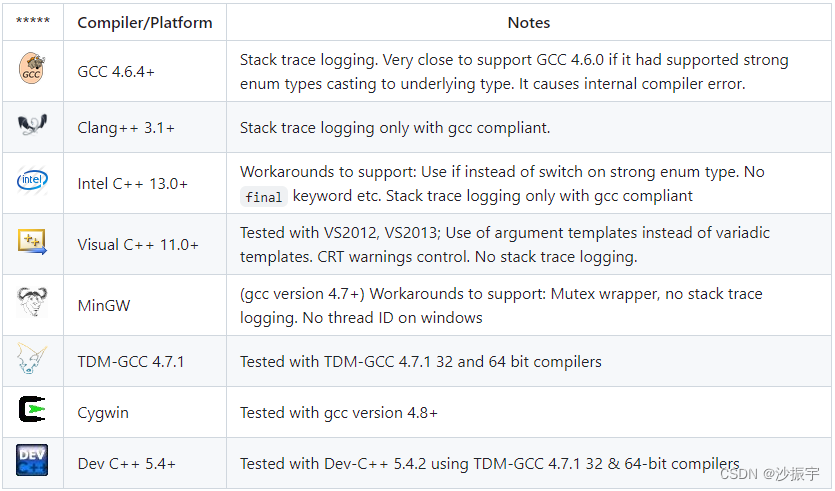
支持的操作系统如下表所示。Easylogging++ 应该可以在列表中未列出的其他主要操作系统上运行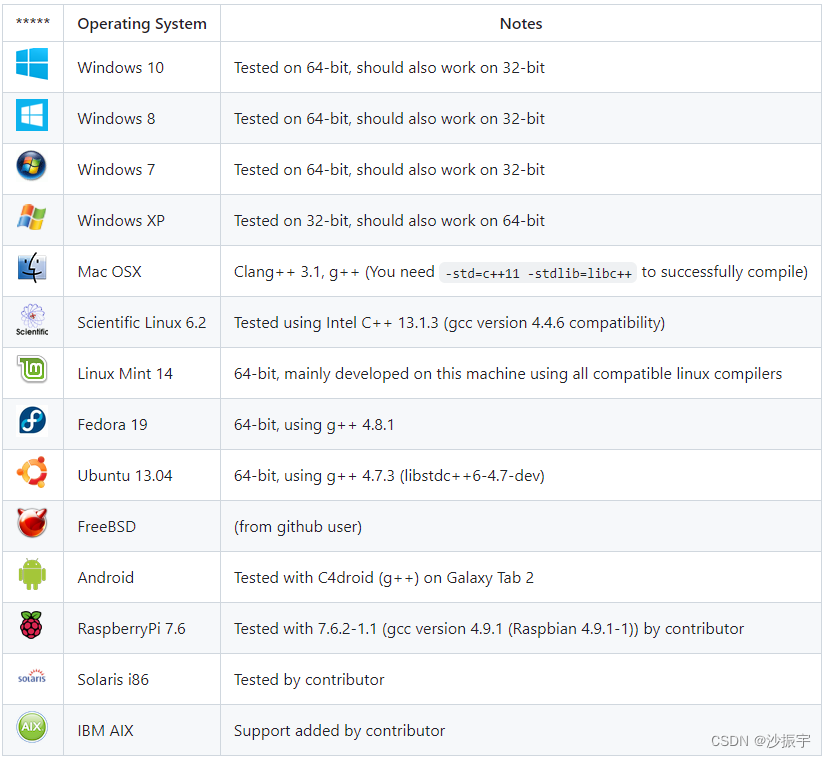
Easylogging++ 还支持以下 C++ 库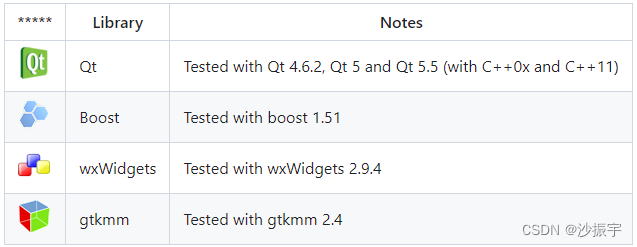
3.3.3、注意
加入到qt项目中报错括号问题135行,建议直接自己指定这个宏136和138选择一个放开,135-139其它都屏蔽,这个意思是你QT的版本
136 QT5.0及以上 (这行5.0以上可以放开)
138 QT5.0以下包含4.X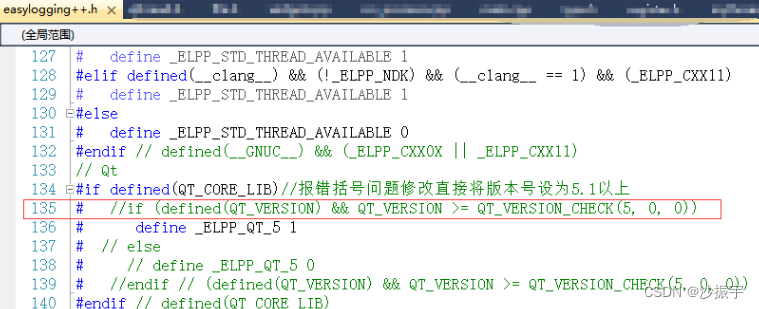
如果项目是Unicode编码格式,那么输出中文log可能报错。
使用VS推荐办法,在项目-属性-C+±预处理-预处理定义,加入宏ELPP_UNICODE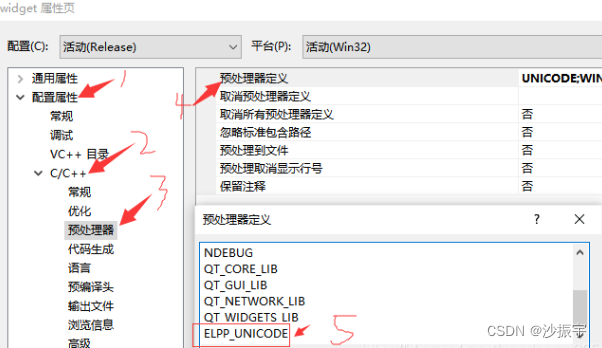
使用Qt推荐方法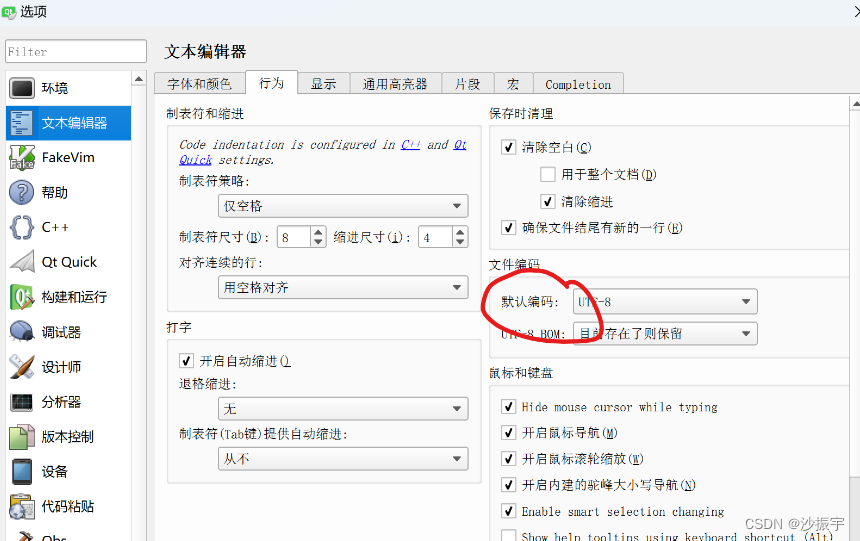
3.3.4、示例
只需要将头文件加入,短短几行代码即可,输出项目当前文件夹下的logs文件下,生成log文件!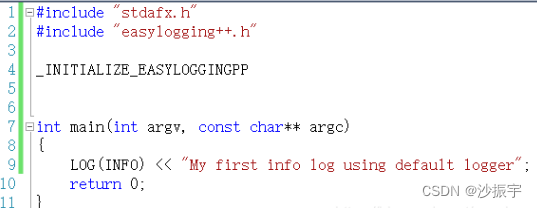

Agent 垂直技术社区,欢迎活跃、内容共建。
更多推荐


 0
0 0
0- 0


 已为社区贡献1条内容

所有评论(0)