在K8s对容器java服务错误日志进行邮件告警(ACK+pvc+pv+nas+python+ELK)
·
目录
2.2、首先创建一个nas存储,阿里云ACK创建PV、绑定PVC
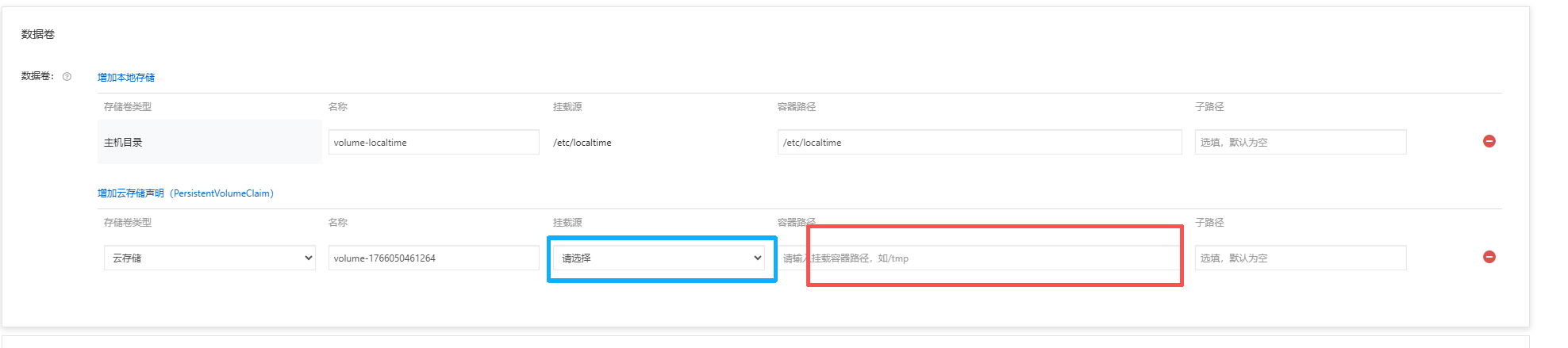
2.3、修改deployment,选择好创建好的PVC,服务在容器中日志挂载的目录/logpath/erro.log
2.4,阿里云的NAS挂载到选定的ECS进行挂载,/mnt/目录
一、背景
为什么会涉及到这个方面呢,当时我们的新项目在发布之后,总是会有很多潜在的问题,一到周末问题较多,所以有了这个需求,在上线后回归的时候为开发快速定位bug。
二、流程步骤
开发将error类型日志统计指定文件一下/log_path/error.log——> 创建pv——>选择Nas网络存储(创建nas存储)——>绑定pvc——>修改yaml选择pvc绑定到容器下的日志路径文件——>将nas挂载到指定的ECS服务器下——>使用Python脚本监控并进行日志告警——>搭建ELK实现日志可视化(可选)
2.1开发设置error日志的输出位置
<?xml version="1.0" encoding="UTF-8"?>
<configuration>
    <!-- 定义日志文件路径 -->
    <property name="LOG_PATH" value="./logs" />
    <property name="ERROR_LOG_FILE" value="${LOG_PATH}/error.log" />

    <!-- 只输出ERROR级别到文件 -->
    <appender name="ERROR_FILE" class="ch.qos.logback.core.rolling.RollingFileAppender">
        <!-- 指定错误日志文件 -->
        <file>${ERROR_LOG_FILE}</file>

        <!-- 日志格式 -->
        <encoder>
            <pattern>%d{yyyy-MM-dd HH:mm:ss.SSS} [%thread] %-5level %logger{36} - %msg%n</pattern>
            <charset>UTF-8</charset>
        </encoder>

        <!-- 只接受ERROR级别日志 -->
        <filter class="ch.qos.logback.classic.filter.ThresholdFilter">
            <level>ERROR</level>
        </filter>

        <!-- 滚动策略:按日期和大小分割 -->
        <rollingPolicy class="ch.qos.logback.core.rolling.TimeBasedRollingPolicy">
            <!-- 按天滚动,保留30天 -->
            <fileNamePattern>${LOG_PATH}/error.%d{yyyy-MM-dd}.%i.log</fileNamePattern>
            <timeBasedFileNamingAndTriggeringPolicy
                class="ch.qos.logback.core.rolling.SizeAndTimeBasedFNATP">
                <maxFileSize>100MB</maxFileSize>
            </timeBasedFileNamingAndTriggeringPolicy>
            <maxHistory>30</maxHistory>
        </rollingPolicy>
    </appender>

    <!-- 控制台输出配置(可选) -->
    <appender name="CONSOLE" class="ch.qos.logback.core.ConsoleAppender">
        <encoder>
            <pattern>%d{HH:mm:ss.SSS} [%thread] %-5level %logger{36} - %msg%n</pattern>
        </encoder>
        <!-- 可以设置为OFF不输出到控制台,或设置想要的级别 -->
        <filter class="ch.qos.logback.classic.filter.ThresholdFilter">
            <level>INFO</level> <!-- 控制台输出INFO及以上 -->
        </filter>
    </appender>

    <!-- 根日志配置 -->
    <root level="ERROR"> <!-- 根日志级别设置为ERROR -->
        <!-- 只关联ERROR文件输出,不输出到控制台 -->
        <appender-ref ref="ERROR_FILE" />
        <!-- 如果需要控制台也显示ERROR,可以加上下面这行 -->
        <!-- <appender-ref ref="CONSOLE" /> -->
    </root>

    <!-- 特定包的特殊配置(可选) -->
    <logger name="com.yourpackage" level="DEBUG" additivity="false">
        <appender-ref ref="ERROR_FILE" />
    </logger>
</configuration>
2.2、首先创建一个nas存储,阿里云ACK创建PV、绑定PVC
这里使用的是阿里云的Nas存储,NAS存储有多种类型,根据你的情况选择,我选择的是容量型的。
为Linux ECS创建并挂载NFS文件系统-文件存储NAS-阿里云
注意:这里最好选择与你准备挂载的ECS是相同区域的,选择相同的VPC以及交换机
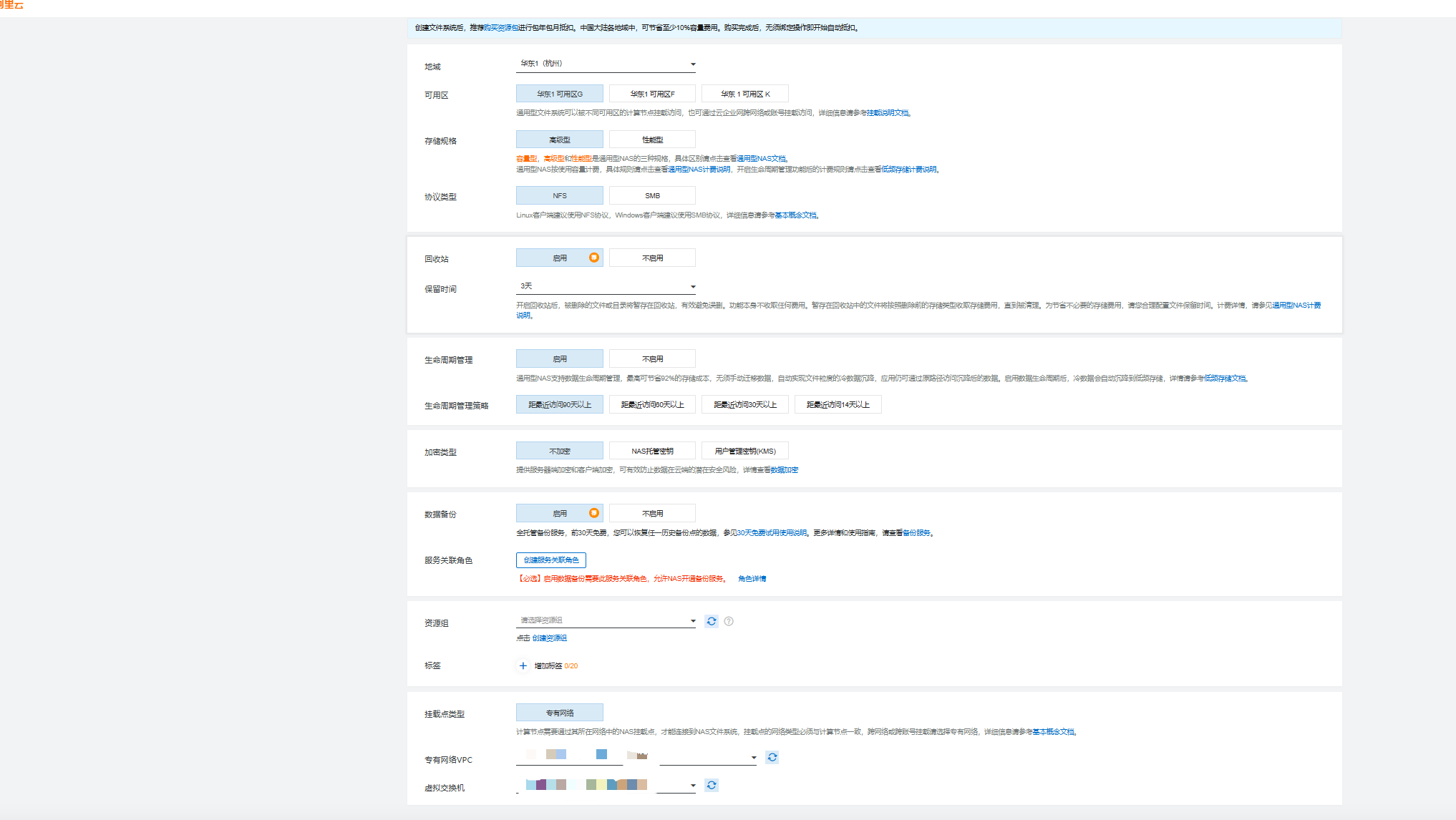
我在这里选择的是NAS可根据你的业务场景进行选择(如果是自建K8s可以使用NFS,iSCSi等网络存储)
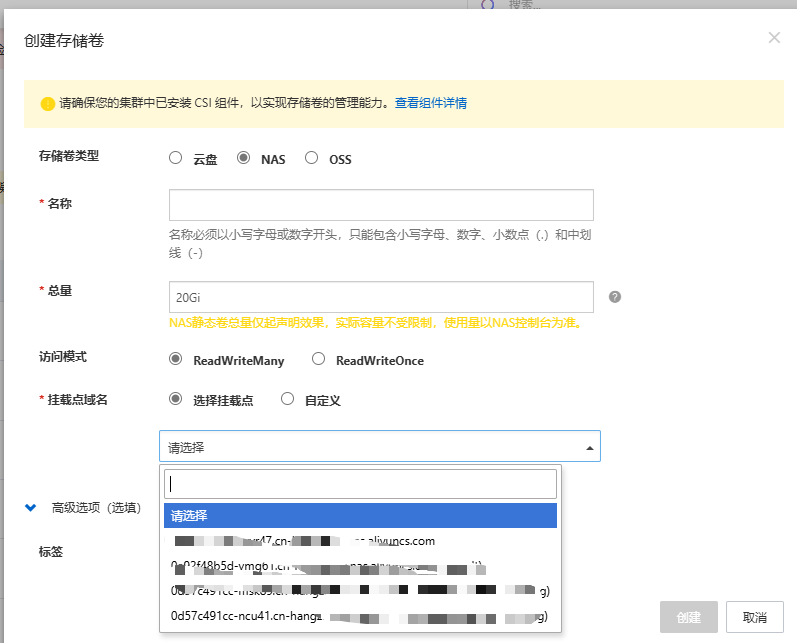
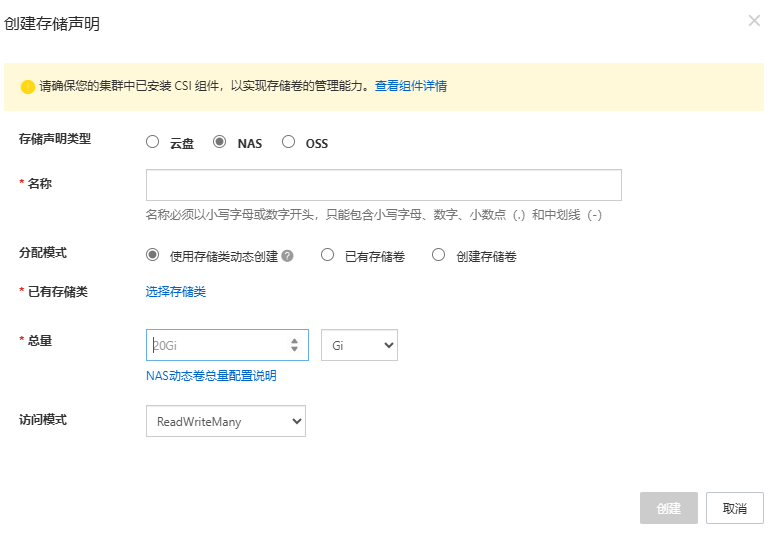
绑定PVC选择已有存储卷
2.3、修改deployment,选择好创建好的PVC,服务在容器中日志挂载的目录/logpath/erro.log
2.4,阿里云的NAS挂载到选定的ECS进行挂载,/mnt/目录
在NAS控制台将NFS协议文件系统挂载到Linux ECS实例-文件存储NAS-阿里云
此时日志文件在ECS的/mnt的目录下。

2.5、通过Python脚本去监控日志文件并进行告警
import os
import re
import time
import smtplib
from datetime import datetime
from email.mime.text import MIMEText
from email.mime.multipart import MIMEMultipart
from email.header import Header

class ContinuousLogMonitor:
    def __init__(self, file_path, check_interval=5, pattern=None):
        """
        :param file_path: 要监控的日志文件路径
        :param check_interval: 检查间隔(秒)
        :param pattern: 要匹配的正则表达式模式
        """
        self.file_path = file_path
        self.check_interval = check_interval
        self.pattern = re.compile(pattern) if pattern else None
        self.last_position = 0
        self.last_notify_time = None

        if not os.path.exists(file_path):
            raise FileNotFoundError(f"文件 {file_path} 不存在")

        self.last_position = os.path.getsize(file_path)

    def _get_new_content(self):
        """获取新增内容并返回(匹配的内容, 新增行数, 匹配行数)"""
        try:
            current_size = os.path.getsize(self.file_path)

            if current_size < self.last_position:
                self.last_position = 0

            if current_size > self.last_position:
                with open(self.file_path, 'r', encoding='utf-8', errors='ignore') as f:
                    f.seek(self.last_position)
                    new_content = f.read()
                    self.last_position = f.tell()

                    # 计算总新增行数
                    added_lines = new_content.count('\n')
                    if not new_content.endswith('\n') and new_content:
                        added_lines += 1

                    # 应用正则过滤
                    matched_lines = []
                    if self.pattern:
                        for line in new_content.splitlines():
                            if self.pattern.search(line):
                                matched_lines.append(line)
                        matched_content = '\n'.join(matched_lines)
                        matched_count = len(matched_lines)
                    else:
                        matched_content = new_content.strip()
                        matched_count = added_lines

                    return matched_content, added_lines, matched_count

            return None, 0, 0
        except Exception as e:
            print(f"读取文件内容时出错: {e}")
            return None, 0, 0

    def send_alert_email(self, content, added_lines, matched_lines):
        """发送告警邮件"""
        if not content:  # 没有匹配内容时不发送
            return False

        if self.last_notify_time and (datetime.now() - self.last_notify_time).seconds < 300:
            return False

        smtp_server = "smtp.163.com" # SMTP服务器
        port = 465
        sender_email = "exmple@qq.com" #发件人邮箱
        password = "xxxxxxxxxxxxxxxxxxxxxxxxxxxxxxxx" #授权码
        receiver_email = "exmple@qq.com" #收件人邮箱

        message = MIMEMultipart()
        message["To"] = receiver_email
        subject = f"日志告警 - {os.path.basename(self.file_path)}"
        if self.pattern:
            subject += f" (匹配{matched_lines}/{added_lines}行)"
        message["Subject"] = Header(subject, "utf-8")

        email_content = f"""
        <h2>日志文件监控告警</h2>
        <p><strong>文件路径:</strong> {self.file_path}</p>
        <p><strong>新增行数:</strong> {added_lines} 行</p>
        {"<p><strong>匹配行数:</strong> " + str(matched_lines) + " 行</p>" if self.pattern else ""}
        <p><strong>匹配模式:</strong> {self.pattern.pattern if self.pattern else '无'}</p>
        <p><strong>告警时间:</strong> {datetime.now().strftime('%Y-%m-%d %H:%M:%S')}</p>
        <p><strong>匹配内容:</strong></p>
        <pre>{content}</pre>
        """

        message.attach(MIMEText(email_content, "html", "utf-8"))

        try:
            with smtplib.SMTP_SSL(smtp_server, port) as server:
                server.login(sender_email, password)
                server.sendmail(sender_email, receiver_email, message.as_string())
            self.last_notify_time = datetime.now()
            return True
        except Exception as e:
            print(f"发送告警邮件失败: {str(e)}")
            return False

    def continuous_monitor(self):
        """持续监控文件变化"""
        print(f"开始持续监控文件: {self.file_path}")
        if self.pattern:
            print(f"监控模式: {self.pattern.pattern}")
        print("按 Ctrl+C 停止监控\n")

        try:
            while True:
                content, added_lines, matched_lines = self._get_new_content()

                if content:
                    print(f"\n[{datetime.now().strftime('%H:%M:%S')}] 新增 {added_lines} 行")
                    if self.pattern:
                        print(f"匹配到 {matched_lines} 行符合模式:")
                    print(content)
                    print("-" * 50)

                    if self.send_alert_email(content, added_lines, matched_lines):
                        if self.pattern:
                            print(f"已发送 {matched_lines}/{added_lines} 行匹配内容的告警邮件")
                        else:
                            print(f"已发送 {added_lines} 行新增内容的告警邮件")
                elif added_lines > 0 and self.pattern:
                    print(f"\n[{datetime.now().strftime('%H:%M:%S')}] 新增 {added_lines} 行 (0 行匹配)")

                time.sleep(self.check_interval)

        except KeyboardInterrupt:
            print("\n监控已停止")
        except Exception as e:
            print(f"\n监控过程中出现错误: {e}")

if __name__ == "__main__":
    import argparse

    parser = argparse.ArgumentParser(description="持续日志监控告警工具(支持正则匹配)")
    parser.add_argument("file", help="要监控的日志文件路径")
    parser.add_argument("-i", "--interval", type=int, default=5,
                       help="检查间隔时间(秒),默认5秒")
    parser.add_argument("-p", "--pattern",
                       help="要匹配的正则表达式模式(如'ERROR|WARN')")

    args = parser.parse_args()

    monitor = ContinuousLogMonitor(args.file, args.interval, args.pattern)
    monitor.continuous_monitor()
这里涉及到邮箱SMTP协议需要邮箱配置一下,python代码启动
nohup python3 MonitorSendMail.py "/mnt/*Error.log" >> monitor.log &
2.6、搭建ELK对日志进行可视化
这里不赘述详细操作
注意:做完这一套开发会谢谢你的!!!

Agent 垂直技术社区,欢迎活跃、内容共建。
更多推荐


 21
21 0
0- 0


 已为社区贡献1条内容

所有评论(0)