【SpringBoot 项目配置 Sentinel 集群限流】
SpringBoot 项目配置 Sentinel 集群限流
一、Sentinel 集群
为什么要使用集群流控呢?假设我们希望给某个用户限制调用某个 API 的总 QPS 为 50,但机器数可能很多(比如有 100台)。这时候我们很自然地就想到,找一个 server 来专门来统计总的调用量,其它的实例都与这台 server 通信来判断是否可以调用。这就是最基础的集群流控的方式。
另外集群流控还可以解决流量不均匀导致总体限流效果不佳的问题。假设集群中有 10 台机器,我们给每台机器设置单机限流阈值为 10QPS,理想情况下整个集群的限流阈值就为 100QPS。不过实际情况下流量到每台机器可能会不均匀,会导致总量没有到的情况下某些机器就开始限流。因此仅靠单机维度去限制的话会无法精确地限制总体流量。而集群流控可以精确地控制整个集群的调用总量,结合单机限流兜底,可以更好地发挥流量控制的效果。
——Sentinel 官方文档
Sentinel 的集群和其他常见的集群为了解决的问题不一样,像是常见的 Redis 集群、MySQL 集群、Nacos 集群等,这些部署一主多从的集群,目的是为了高可用,即保证主节点挂了的情况下,仍然可以提供服务;而 Sentinel 集群限流中的集群,指的不是对Sentinel Dashboard 做集群部署,而是对分布式部署的资源(或者说服务)做统筹的管理,它是对集群做限流的管理,而不是把自己部署成限流。
二、Sentinel 集群架构
- Token Client: 集群流控客户端,用于向所属 Token Server 通信请求 token。集群限流服务端会返回给客户端结果,决定是否限流。
- Token Server: 即集群流控服务端,处理来自 Token Client 的请求,根据配置的集群规则判断是否应该发放 token(是否允许通过)。
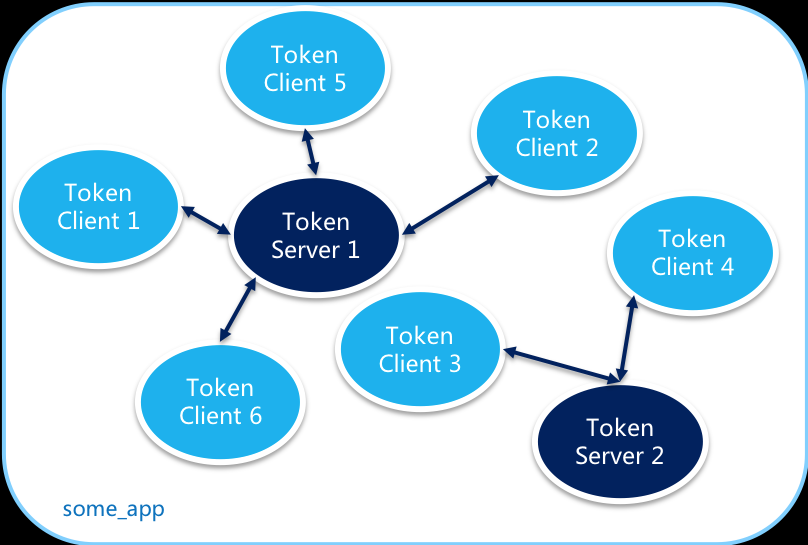
这里需要明确一个非常重要的点:Token Client 自己管理限流规则,限流规则是自己设置的,可以写在代码中,也可以从 Nacos 等配置中心动态的获取,先会判断这个限流规则是否是集群模式,如果不是,就自己处理;如果是,就向 Token Server 请求token。Token Server 的作用只是校验这次请求是否允许通过,允许的话给就颁发token给Client。这样的话Token Server 如何感知限流规则呢,既然 Client 中有限流规则,是在请求token时把集群限流规则发给Server吗?不是这样的,真正的做法是让Server本地也存储同样一份一模一样的集群限流规则,Client与Token之间传递的参数,只有一个集群限流规则的flowId和申请的count数。源码讲解详见后文。
2.1 Token Server
- 独立模式(Alone),即作为独立的 token server 进程启动,独立部署,隔离性好,但是需要额外的部署操作。独立模式适合作为 Global Rate Limiter 给集群提供流控服务。
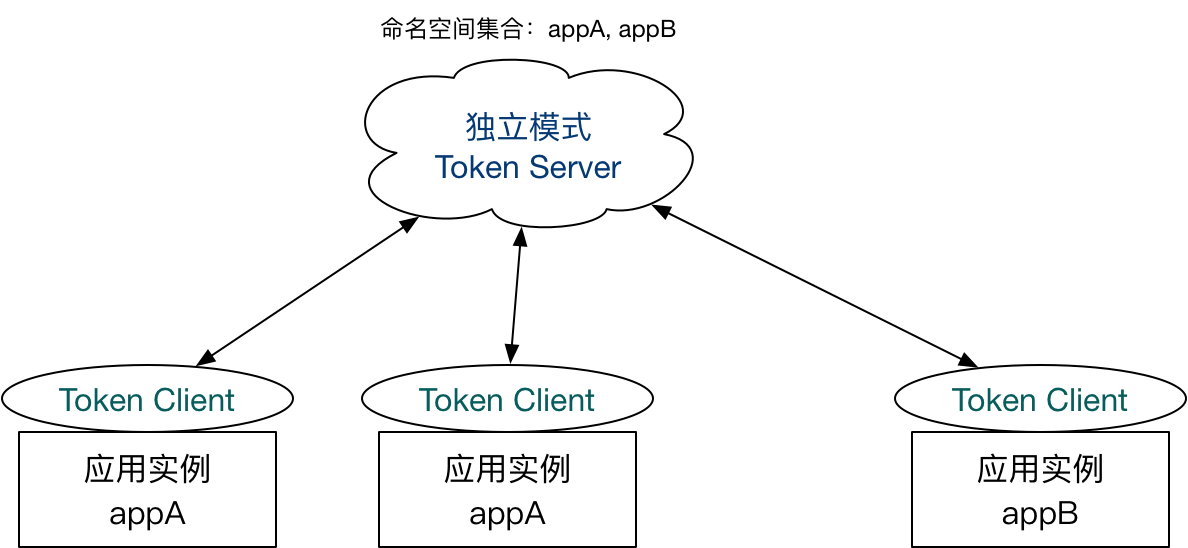
在独立模式下,直接创建对应的 ClusterTokenServer 实例并通过 start 方法启动 Token Server。 - 嵌入模式(Embedded),即Client(或者说应用实例) 作为内置的 token server 与服务在同一进程中启动。在此模式下,集群中各个实例都是对等的,token server 和 client 可以随时进行转变,因此无需单独部署,灵活性比较好。但是隔离性不佳,需要限制 token server 的总 QPS,防止影响应用本身。嵌入模式适合某个应用集群内部的流控。
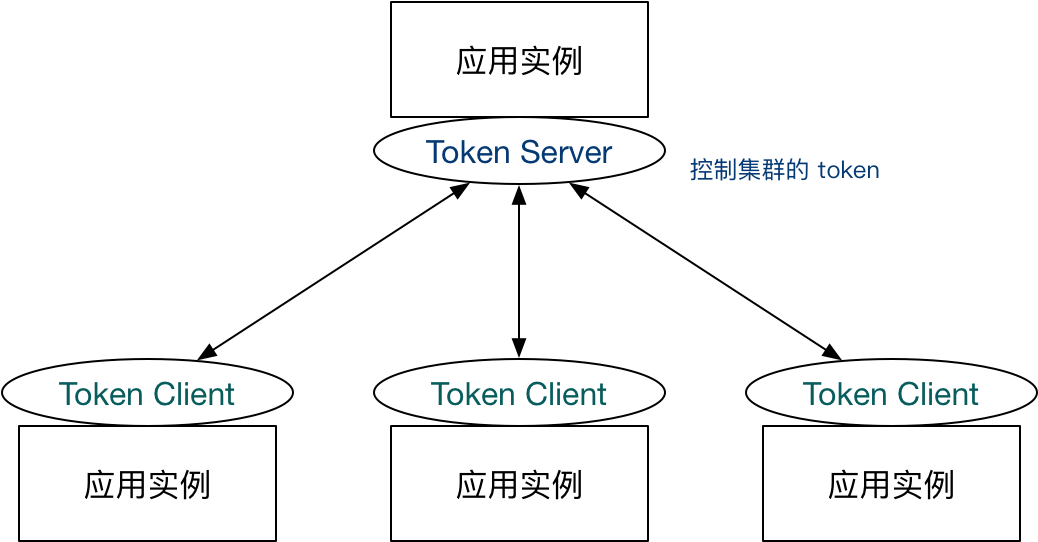
在嵌入模式下,可以通过http://<ip>:<port>/setClusterMode?mode=<xxx>转换集群流控身份,其中 mode 为 0 代表 client,1 代表 server,-1 代表关闭。注意应用端需要引入集群限流客户端或服务端的相应依赖。
2.2 Token Client
Token Client 就是应用实例,如果在启动时未进行配置,则需要对客户端进行基本的配置,比如指定集群限流 token server等,可通过http://<ip>:<port>/cluster/client/modifyConfig?data=<config>进行配置,其中:data 是 JSON 格式的 ClusterClientConfig,对应的配置项:
serverHost: token server hostserverPort: token server 端口requestTimeout: 请求的超时时间(默认为 20 ms)
当然也可以在启动时进行配置,详情请见后文。
三、Sentinel 集群限流中 namespace 源码级详解【本文的核心与关键】
Sentinel支持使用名称空间 (namespace)区分不同应用之间的集群限流规则配置,如服务A的集群限流规则配置和服务B的集群限流规则配置可以使用名称空间隔离。
- 对于服务端而言,namespace设置可以通过
ClusterServerConfigManager.loadServerNamespaceSet(Set<String> namespaceSet);进行设置。 - 但是对于客户端而言,namespace是什么呢?为什么没有配置过呢?如何进行配置呢?
查看com.alibaba.csp.sentinel.cluster.registry.ConfigSupplierRegistry源码可以得到,ConfigSupplierRegistry中定义了namespaceSupplier,而默认的DEFAULT_APP_NAME_SUPPLIER定义为:
可以看到,默认的private static final Supplier<String> DEFAULT_APP_NAME_SUPPLIER = new Supplier<String>() { public String get() { return AppNameUtil.getAppName(); } };namespace是应用名称,我们可以通过ConfigSupplierRegistry.setNamespaceSupplier(Supplier<String> namespaceSupplier);进行自定义。 - 集群限流规则需要在集群限流客户端配置一份,同时集群限流服务端也需要配置一份,缺一不可,否则集群限流不能实现。
看到这儿可能会有一个疑问,在讲namespace,为什么突然开始说限流规则的配置了呢?这是因为Token Client 向 Token server的请求体定义为:
第一步 客户端连接服务端后,客户端会向服务端通过package com.alibaba.csp.sentinel.cluster.request.data; public class FlowRequestData { private long flowId; private int count; private boolean priority; }Netty发送Ping,服务端收到消息后会将客户端的namespace注册到com.alibaba.csp.sentinel.cluster.server.connection.ConnectionManager中,源码如下:
第二步 流量到达客户端,此时客户端向服务端发送申请token的请求,此时请求中只包含 集群限流规则的flowId 和 需要申请的count数 ,客户端收到请求后,会在// 客户端类路径:com.alibaba.csp.sentinel.cluster.client.handler.TokenClientHandler public void channelActive(ChannelHandlerContext ctx) throws Exception { this.currentState.set(2); this.fireClientPing(ctx); RecordLog.info("[TokenClientHandler] Client handler active, remote address: {}", new Object[]{this.getRemoteAddress(ctx)}); } private void fireClientPing(ChannelHandlerContext ctx) { ClusterRequest<String> ping = (new ClusterRequest()).setId(0).setType(0).setData((String)ConfigSupplierRegistry.getNamespaceSupplier().get()); ctx.writeAndFlush(ping); } // 服务端类路径:package com.alibaba.csp.sentinel.cluster.server.handler.TokenServerHandler public void channelRead(ChannelHandlerContext ctx, Object msg) throws Exception { this.globalConnectionPool.refreshLastReadTime(ctx.channel()); if (msg instanceof ClusterRequest) { ClusterRequest request = (ClusterRequest)msg; if (request.getType() == 0) { this.handlePingRequest(ctx, request); return; } RequestProcessor<?, ?> processor = RequestProcessorProvider.getProcessor(request.getType()); if (processor == null) { RecordLog.warn("[TokenServerHandler] No processor for request type: " + request.getType(), new Object[0]); this.writeBadResponse(ctx, request); } else { ClusterResponse<?> response = processor.processRequest(request); this.writeResponse(ctx, response); } } } private void handlePingRequest(ChannelHandlerContext ctx, ClusterRequest request) { if (request.getData() != null && !StringUtil.isBlank((String)request.getData())) { String namespace = (String)request.getData(); String clientAddress = this.getRemoteAddress(ctx); int curCount = ConnectionManager.addConnection(namespace, clientAddress).getConnectedCount(); int status = 0; ClusterResponse<Integer> response = new ClusterResponse(request.getId(), request.getType(), status, curCount); this.writeResponse(ctx, response); } else { this.writeBadResponse(ctx, request); } }ClusterServerConfigManager中通过flowId查找namespace( 此处的namespace 是在服务端注册的 ),再在ClusterFlowRuleManager通过namespace查找集群限流规则,通过GlobalRequestLimiter进行token分发(GlobalRequestLimiter通过ClusterServerConfigManager的监听事件进行初始化),源码如下:
所以这块儿有个BUG(可能也不叫BUG):客户端A自定义了// com.alibaba.csp.sentinel.cluster.flow.DefaultTokenService public TokenResult requestToken(Long ruleId, int acquireCount, boolean prioritized) { if (this.notValidRequest(ruleId, acquireCount)) { return this.badRequest(); } else { FlowRule rule = ClusterFlowRuleManager.getFlowRuleById(ruleId); return rule == null ? new TokenResult(3) : ClusterFlowChecker.acquireClusterToken(rule, acquireCount, prioritized); } } // com.alibaba.csp.sentinel.cluster.flow.ClusterFlowChecker static boolean allowProceed(long flowId) { String namespace = ClusterFlowRuleManager.getNamespace(flowId); return GlobalRequestLimiter.tryPass(namespace); } static TokenResult acquireClusterToken(FlowRule rule, int acquireCount, boolean prioritized) { Long id = rule.getClusterConfig().getFlowId(); if (!allowProceed(id)) { return new TokenResult(-2); } else { ClusterMetric metric = ClusterMetricStatistics.getMetric(id); if (metric == null) { return new TokenResult(-1); } else { double latestQps = metric.getAvg(ClusterFlowEvent.PASS); double globalThreshold = calcGlobalThreshold(rule) * ClusterServerConfigManager.getExceedCount(); double nextRemaining = globalThreshold - latestQps - (double)acquireCount; if (nextRemaining >= (double)0.0F) { metric.add(ClusterFlowEvent.PASS, (long)acquireCount); metric.add(ClusterFlowEvent.PASS_REQUEST, 1L); if (prioritized) { metric.add(ClusterFlowEvent.OCCUPIED_PASS, (long)acquireCount); } return (new TokenResult(0)).setRemaining((int)nextRemaining).setWaitInMs(0); } else { if (prioritized) { double occupyAvg = metric.getAvg(ClusterFlowEvent.WAITING); if (occupyAvg <= ClusterServerConfigManager.getMaxOccupyRatio() * globalThreshold) { int waitInMs = metric.tryOccupyNext(ClusterFlowEvent.PASS, acquireCount, globalThreshold); if (waitInMs > 0) { ClusterServerStatLogUtil.log("flow|waiting|" + id); return (new TokenResult(2)).setRemaining(0).setWaitInMs(waitInMs); } } } metric.add(ClusterFlowEvent.BLOCK, (long)acquireCount); metric.add(ClusterFlowEvent.BLOCK_REQUEST, 1L); ClusterServerStatLogUtil.log("flow|block|" + id, acquireCount); ClusterServerStatLogUtil.log("flow|block_request|" + id, 1); if (prioritized) { metric.add(ClusterFlowEvent.OCCUPIED_BLOCK, (long)acquireCount); ClusterServerStatLogUtil.log("flow|occupied_block|" + id, 1); } return blockedResult(); } } } }namespace为appB时,从Nacos动态获取到了flowId为10001的集群限流规则,但是在服务端注册namespace时,appA对应的flowId应该是10000,appB对应的flowId为10001,恰好appA和appB的某个资源名又是相同的,此时就会打破不同应用之间的隔离。
四、SpringBoot + Nacos 实现Sentinel 集群限流
本Demo实现了通过Nacos动态获取集群限流规则,接入Sentinel Dashboard等,基于 Alibaba Sentinel 的集群流控,包含集群 Token Server、Token Client Starter、Token Client Demo、Nacos 配置与 jMeter 压测脚本等模块,方便本地演示与二次扩展。
4.1 环境
- JDK : 21
- SpringBoot : 3.3.12
- Nacos : 2022.0.0.0
- Sentinel : 1.8.8
4.2 项目结构
sentinel-cluster
    ├── jMeter-script                      		# jMeter 脚本与测试相关文件
    │   └── 集群限流测试.jmx                 	# 示例压测脚本(访问客户端 /hello 接口)
    ├── nacos-config                       		# Nacos 配置(如导出 zip 包)
    │   └── nacos_config.zip               		# Sentinel 相关 DataId / Group 配置打包
    ├── sentinel-cluster-client            		# Sentinel 集群客户端父工程(Maven 聚合)
    │   ├── sentinel-cluster-client-starter    	# Spring Boot Starter 与自动装配
    │   ├── sentinel-cluster-client-demo-A     	# 客户端 Demo A 示例服务(/hello)
    │   └── sentinel-cluster-client-demo-B     	# 客户端 Demo B 示例服务(/hello)
    └── sentinel-cluster-server            		# Sentinel 集群 Token Server 示例服务
4.3 项目地址
sentinel-cluster:https://github.com/M-soldier/sentinel-cluster

Agent 垂直技术社区,欢迎活跃、内容共建。
更多推荐
 23
23 0
0- 0


 已为社区贡献1条内容

所有评论(0)