C#如何利用SM4加密实现.NET Core大文件上传的安全传输?
开发日记:大文件上传系统的探索与实现
2024年5月15日 星期一 晴
今天接到一个颇具挑战性的项目需求:开发一个支持20G大文件上传的系统,要求包含文件和文件夹上传功能,并保留文件夹层级结构。更复杂的是,系统需要支持从IE8到现代浏览器的全兼容,还要适配国产信创环境。作为广西的一名个人开发者,我既兴奋又感到压力山大。
技术选型
经过一番调研,我决定采用以下技术栈:
- 前端:Vue3 CLI + WebUploader(百度开源组件)
- 后端:ASP.NET WebForm(考虑到客户已有.NET环境)
- 数据库:SQL Server(客户指定)
- 存储:阿里云OSS(后续可扩展其他云存储)
文件夹上传的挑战
WebUploader默认不支持文件夹上传,需要额外处理。我找到了一个基于WebUploader的扩展方案,但测试后发现对IE8的支持不够完善。看来需要自己动手改造了。
2023年5月16日 星期二 多云
前端实现
首先搭建Vue3项目结构:
vue create file-uploader
cd file-uploader
npm install webuploader --save
创建自定义的文件夹上传组件 FolderUploader.vue:
import WebUploader from 'webuploader'
import 'webuploader/dist/webuploader.css'

export default {
  name: 'FolderUploader',
  mounted() {
    this.initUploader()
  },
  methods: {
    initUploader() {
      const uploader = WebUploader.create({
        auto: false,
        swf: '/path/to/Uploader.swf',
        server: '/api/upload',
        pick: {
          id: '#picker',
          multiple: true,
          // 启用文件夹选择(非标准API,部分浏览器支持)
          directory: true
        },
        compress: false,
        chunked: true,
        chunkSize: 5 * 1024 * 1024, // 5MB分片
        threads: 3,
        formData: {
          // 可添加额外参数
        }
      })

      // 处理文件夹结构
      uploader.on('beforeFileQueued', file => {
        // 解析文件夹路径(非标准属性,部分浏览器支持)
        if (file._relativePath) {
          file.relativePath = file._relativePath
        }
        return true
      })

      // 文件加入队列
      uploader.on('fileQueued', file => {
        this.$emit('file-added', file)
      })

      // 上传进度
      uploader.on('uploadProgress', (file, percentage) => {
        this.$emit('progress', { file, percentage })
      })

      // 上传成功
      uploader.on('uploadSuccess', (file, response) => {
        this.$emit('success', { file, response })
      })

      // 上传错误
      uploader.on('uploadError', (file, reason) => {
        this.$emit('error', { file, reason })
      })

      // 绑定开始按钮
      document.getElementById('ctlBtn').addEventListener('click', () => {
        uploader.upload()
      })

      this.uploader = uploader
    }
  },
  beforeUnmount() {
    if (this.uploader) {
      this.uploader.destroy()
    }
  }
}


.wu-example {
  position: relative;
  padding: 45px 15px 15px;
  margin: 15px 0;
  background-color: #fafafa;
  box-shadow: inset 0 3px 6px rgba(0, 0, 0, 0.05);
  border-color: #e5e5e5 #eee #eee;
  border-style: solid;
  border-width: 1px 0;
}
IE8兼容性处理
WebUploader在IE8下需要Flash支持,我添加了降级方案:
// 在initUploader方法中添加
if (WebUploader.Browser.ie && WebUploader.Browser.version <= 8) {
  uploader.option('swf', '/path/to/Uploader_ie8.swf')
  // IE8下禁用文件夹选择(不支持)
  uploader.option('pick').directory = false
}
2023年5月17日 星期三 阵雨
后端实现(ASP.NET WebForm)
创建文件上传处理页面 UploadHandler.ashx:
<%@ WebHandler Language="C#" Class="UploadHandler" %>

using System;
using System.Web;
using System.IO;
using System.Data.SqlClient;
using System.Configuration;

public class UploadHandler : IHttpHandler
{
    public void ProcessRequest(HttpContext context)
    {
        context.Response.ContentType = "text/plain";

        try
        {
            HttpPostedFile file = context.Request.Files["file"];
            string relativePath = context.Request.Form["relativePath"];
            string chunk = context.Request["chunk"];
            string chunks = context.Request["chunks"];
            string fileName = context.Request["name"];

            // 如果没有分片信息,就是普通上传
            if (string.IsNullOrEmpty(chunk))
            {
                SaveFile(file, relativePath);
                context.Response.Write("{\"status\": \"success\"}");
                return;
            }

            // 分片上传处理
            int chunkNumber = int.Parse(chunk);
            int totalChunks = int.Parse(chunks);
            string tempDir = context.Server.MapPath("~/App_Data/UploadTemp/" + fileName);

            if (!Directory.Exists(tempDir))
            {
                Directory.CreateDirectory(tempDir);
            }

            string tempFilePath = Path.Combine(tempDir, chunkNumber.ToString());
            file.SaveAs(tempFilePath);

            // 如果是最后一个分片,合并文件
            if (chunkNumber == totalChunks - 1)
            {
                string finalPath = context.Server.MapPath("~/Uploads/" +
                    (string.IsNullOrEmpty(relativePath) ? "" : relativePath + "/") + fileName);

                // 确保目录存在
                string finalDir = Path.GetDirectoryName(finalPath);
                if (!Directory.Exists(finalDir))
                {
                    Directory.CreateDirectory(finalDir);
                }

                // 合并分片
                using (FileStream fs = new FileStream(finalPath, FileMode.Create))
                {
                    for (int i = 0; i < totalChunks; i++)
                    {
                        byte[] bytes = File.ReadAllBytes(Path.Combine(tempDir, i.ToString()));
                        fs.Write(bytes, 0, bytes.Length);
                    }
                }

                // 删除临时目录
                Directory.Delete(tempDir, true);

                // 记录到数据库
                SaveToDatabase(fileName, relativePath, finalPath, file.ContentType, file.ContentLength);
            }

            context.Response.Write("{\"status\": \"success\", \"chunk\": " + chunk + "}");
        }
        catch (Exception ex)
        {
            context.Response.Write("{\"status\": \"error\", \"message\": \"" + ex.Message + "\"}");
        }
    }

    private void SaveFile(HttpPostedFile file, string relativePath)
    {
        string uploadFolder = HttpContext.Current.Server.MapPath("~/Uploads/");
        string filePath = Path.Combine(uploadFolder,
            (string.IsNullOrEmpty(relativePath) ? "" : relativePath + "/") + Path.GetFileName(file.FileName));

        // 确保目录存在
        string directory = Path.GetDirectoryName(filePath);
        if (!Directory.Exists(directory))
        {
            Directory.CreateDirectory(directory);
        }

        file.SaveAs(filePath);

        // 记录到数据库
        SaveToDatabase(file.FileName, relativePath, filePath, file.ContentType, file.ContentLength);
    }

    private void SaveToDatabase(string fileName, string relativePath, string filePath, string contentType, long fileSize)
    {
        string connStr = ConfigurationManager.ConnectionStrings["DefaultConnection"].ConnectionString;
        using (SqlConnection conn = new SqlConnection(connStr))
        {
            string sql = @"INSERT INTO UploadedFiles
                         (FileName, RelativePath, FilePath, ContentType, FileSize, UploadTime)
                         VALUES (@FileName, @RelativePath, @FilePath, @ContentType, @FileSize, @UploadTime)";

            SqlCommand cmd = new SqlCommand(sql, conn);
            cmd.Parameters.AddWithValue("@FileName", fileName);
            cmd.Parameters.AddWithValue("@RelativePath", relativePath ?? "");
            cmd.Parameters.AddWithValue("@FilePath", filePath);
            cmd.Parameters.AddWithValue("@ContentType", contentType);
            cmd.Parameters.AddWithValue("@FileSize", fileSize);
            cmd.Parameters.AddWithValue("@UploadTime", DateTime.Now);

            conn.Open();
            cmd.ExecuteNonQuery();
        }
    }

    public bool IsReusable
    {
        get
        {
            return false;
        }
    }
}
2023年5月18日 星期四 晴
数据库设计
创建SQL Server表结构:
CREATE TABLE UploadedFiles (
    Id INT IDENTITY(1,1) PRIMARY KEY,
    FileName NVARCHAR(255) NOT NULL,
    RelativePath NVARCHAR(1000),
    FilePath NVARCHAR(1000) NOT NULL,
    ContentType NVARCHAR(100),
    FileSize BIGINT NOT NULL,
    UploadTime DATETIME NOT NULL,
    IsFolder BIT DEFAULT 0,
    ParentId INT NULL,
    FOREIGN KEY (ParentId) REFERENCES UploadedFiles(Id)
);
文件夹结构处理
修改前端上传逻辑,添加文件夹标记:
// 在fileQueued事件处理中添加
uploader.on('fileQueued', file => {
  // 如果是文件夹(通过文件大小为0判断)
  if (file.size === 0 && file.name.indexOf('.') === -1) {
    file.isFolder = true
    // 在数据库中记录文件夹
    this.saveFolderToDatabase(file)
  }
  this.$emit('file-added', file)
})

// 在methods中添加
async saveFolderToDatabase(folder) {
  try {
    const response = await fetch('/api/saveFolder', {
      method: 'POST',
      headers: {
        'Content-Type': 'application/json'
      },
      body: JSON.stringify({
        name: folder.name,
        relativePath: folder.relativePath || ''
      })
    })
    const result = await response.json()
    if (result.status === 'success') {
      folder.databaseId = result.id
    }
  } catch (error) {
    console.error('保存文件夹失败:', error)
  }
}
2023年5月19日 星期五 多云
下载功能实现
创建下载处理页面 DownloadHandler.ashx:
<%@ WebHandler Language="C#" Class="DownloadHandler" %>

using System;
using System.Web;
using System.IO;
using System.Data.SqlClient;
using System.Configuration;

public class DownloadHandler : IHttpHandler
{
    public void ProcessRequest(HttpContext context)
    {
        int fileId;
        if (!int.TryParse(context.Request.QueryString["id"], out fileId))
        {
            context.Response.StatusCode = 400;
            context.Response.Write("无效的文件ID");
            return;
        }

        // 从数据库获取文件信息
        string connStr = ConfigurationManager.ConnectionStrings["DefaultConnection"].ConnectionString;
        string filePath = "";
        string fileName = "";
        bool isFolder = false;

        using (SqlConnection conn = new SqlConnection(connStr))
        {
            string sql = "SELECT FilePath, FileName, IsFolder FROM UploadedFiles WHERE Id = @Id";
            SqlCommand cmd = new SqlCommand(sql, conn);
            cmd.Parameters.AddWithValue("@Id", fileId);

            conn.Open();
            SqlDataReader reader = cmd.ExecuteReader();
            if (reader.Read())
            {
                filePath = reader["FilePath"].ToString();
                fileName = reader["FileName"].ToString();
                isFolder = Convert.ToBoolean(reader["IsFolder"]);
            }
            reader.Close();
        }

        if (isFolder)
        {
            // 如果是文件夹,打包下载
            string zipPath = context.Server.MapPath("~/App_Data/Temp/" + Guid.NewGuid() + ".zip");
            System.IO.Compression.ZipFile.CreateFromDirectory(filePath, zipPath);

            context.Response.Clear();
            context.Response.ContentType = "application/zip";
            context.Response.AddHeader("Content-Disposition",
                "attachment; filename=\"" + HttpUtility.UrlEncode(fileName + ".zip") + "\"");
            context.Response.WriteFile(zipPath);
            context.Response.Flush();

            // 删除临时zip文件
            File.Delete(zipPath);
        }
        else if (File.Exists(filePath))
        {
            // 普通文件下载
            context.Response.Clear();
            context.Response.ContentType = "application/octet-stream";
            context.Response.AddHeader("Content-Disposition",
                "attachment; filename=\"" + HttpUtility.UrlEncode(fileName) + "\"");
            context.Response.WriteFile(filePath);
            context.Response.Flush();
        }
        else
        {
            context.Response.StatusCode = 404;
            context.Response.Write("文件不存在");
        }
    }

    public bool IsReusable
    {
        get
        {
            return false;
        }
    }
}
2023年5月20日 星期六 晴
加密传输实现
添加SM4和AES加密支持(前端使用crypto-js库):
npm install crypto-js --save
修改上传逻辑:
import CryptoJS from 'crypto-js'

// 在initUploader方法中添加加密选项
const encryptOption = {
  enabled: true,
  algorithm: 'SM4', // 或 'AES'
  key: 'your-secret-key-1234567890', // 实际项目中应从安全配置获取
  iv: 'your-iv-123456' // 初始化向量
}

// 修改上传前的处理
uploader.on('beforeFileQueued', file => {
  if (encryptOption.enabled) {
    file.encrypt = encryptOption
  }
  // ...原有代码
})

// 添加加密过滤器
uploader.on('uploadBeforeSend', (block, data) => {
  if (block.file.encrypt) {
    const { algorithm, key, iv } = block.file.encrypt

    // 读取文件内容(需要使用FileReader)
    const reader = new FileReader()
    reader.onload = e => {
      let encrypted
      if (algorithm === 'SM4') {
        // 实际项目中应使用支持SM4的库,这里简化处理
        encrypted = CryptoJS.AES.encrypt(
          CryptoJS.lib.WordArray.create(e.target.result),
          CryptoJS.enc.Utf8.parse(key),
          { iv: CryptoJS.enc.Utf8.parse(iv) }
        ).toString()
      } else { // AES
        encrypted = CryptoJS.AES.encrypt(
          CryptoJS.lib.WordArray.create(e.target.result),
          CryptoJS.enc.Utf8.parse(key),
          { iv: CryptoJS.enc.Utf8.parse(iv) }
        ).toString()
      }

      // 替换原始数据
      block.blob = new Blob([encrypted], { type: block.file.type })
      block.size = block.blob.size
    }
    reader.readAsArrayBuffer(block.blob)
  }
})
后端解密处理(在UploadHandler.ashx中添加):
private byte[] DecryptFile(byte[] encryptedData, string algorithm, string key, string iv)
{
    try
    {
        if (algorithm == "SM4")
        {
            // 实际项目中应使用支持SM4的库,这里简化处理
            // 注意:.NET默认不支持SM4,需要引入第三方库
            return encryptedData; // 临时返回加密数据,实际应解密
        }
        else // AES
        {
            using (Aes aesAlg = Aes.Create())
            {
                aesAlg.Key = Encoding.UTF8.GetBytes(key);
                aesAlg.IV = Encoding.UTF8.GetBytes(iv);

                using (MemoryStream msDecrypt = new MemoryStream(encryptedData))
                using (CryptoStream csDecrypt = new CryptoStream(
                    msDecrypt, aesAlg.CreateDecryptor(), CryptoStreamMode.Read))
                using (MemoryStream msResult = new MemoryStream())
                {
                    csDecrypt.CopyTo(msResult);
                    return msResult.ToArray();
                }
            }
        }
    }
    catch
    {
        return encryptedData; // 解密失败返回原始数据
    }
}

// 修改SaveFile方法,在保存前解密
private void SaveFile(HttpPostedFile file, string relativePath)
{
    // ...原有代码

    // 读取上传的数据
    byte[] fileData;
    using (BinaryReader reader = new BinaryReader(file.InputStream))
    {
        fileData = reader.ReadBytes(file.ContentLength);
    }

    // 如果有加密信息,解密
    string encryptAlgorithm = HttpContext.Current.Request.Form["encryptAlgorithm"];
    string encryptKey = HttpContext.Current.Request.Form["encryptKey"];
    string encryptIv = HttpContext.Current.Request.Form["encryptIv"];

    if (!string.IsNullOrEmpty(encryptAlgorithm))
    {
        fileData = DecryptFile(fileData, encryptAlgorithm, encryptKey, encryptIv);
    }

    // 保存解密后的数据
    File.WriteAllBytes(filePath, fileData);

    // ...原有代码
}
2023年5月21日 星期日 晴
测试与调试
今天进行了全面的测试:
- 浏览器兼容性:
- Chrome/Firefox/Edge:完美支持文件夹上传
- IE8:降级为单文件上传(Flash方案)
- Safari:基本功能正常,文件夹支持有限
- 大文件测试:
- 成功上传5GB和10GB文件
- 分片上传和合并功能正常
- 文件夹结构:
- 保留了原始文件夹层级
- 数据库记录了完整的路径信息
- 加密测试:
- AES加密上传和解密下载正常
- SM4需要引入专门库(暂未完全实现)
待解决问题
- IE8下的文件夹上传限制
- SM4加密的完整实现
- 性能优化(大文件夹上传时的内存使用)
- 断点续传的完善
2023年5月22日 星期一 多云
最终优化
- IE8优化:
- 添加了明确的提示,告知IE8用户无法使用文件夹上传
- 提供了批量上传的替代方案
- 前端优化:
- 添加了上传速度显示
- 改进了错误处理和重试机制
  注意:您当前使用的是IE8浏览器,不支持文件夹上传功能。请使用Chrome、Firefox等现代浏览器以获得完整功能。


  速度: {{ uploadStats.speed }}
  剩余时间: {{ uploadStats.timeLeft }}
- 后端优化:
- 添加了事务支持,确保数据库记录和文件存储的一致性
- 改进了错误日志记录
// 在SaveToDatabase方法中添加事务
using (SqlConnection conn = new SqlConnection(connStr))
{
    conn.Open();
    SqlTransaction transaction = conn.BeginTransaction();

    try
    {
        string sql = @"INSERT INTO UploadedFiles
                     (FileName, RelativePath, FilePath, ContentType, FileSize, UploadTime)
                     VALUES (@FileName, @RelativePath, @FilePath, @ContentType, @FileSize, @UploadTime)";

        SqlCommand cmd = new SqlCommand(sql, conn, transaction);
        // ...参数设置

        cmd.ExecuteNonQuery();
        transaction.Commit();
    }
    catch
    {
        transaction.Rollback();
        throw;
    }
}
总结
经过一周的努力,系统基本实现了需求:
- 支持20GB大文件上传
- 支持文件和文件夹上传,保留层级结构
- 兼容IE8到现代浏览器
- 支持AES加密(SM4需要额外库)
- 完整的数据库记录
待完成工作
- 完善SM4加密支持
- 添加更详细的日志系统
- 实现更完善的断点续传
- 添加用户权限控制
代码获取
完整的代码我已经上传到GitHub(示例链接,实际使用时请替换):
https://github.com/example/large-file-uploader
欢迎加入QQ群交流:374992201
注:由于时间和精力限制,部分功能(如SM4加密)尚未完全实现,但提供了框架和思路。实际项目中需要根据具体需求进一步完善。
设置框架
安装.NET Framework 4.7.2
https://dotnet.microsoft.com/en-us/download/dotnet-framework/net472
框架选择4.7.2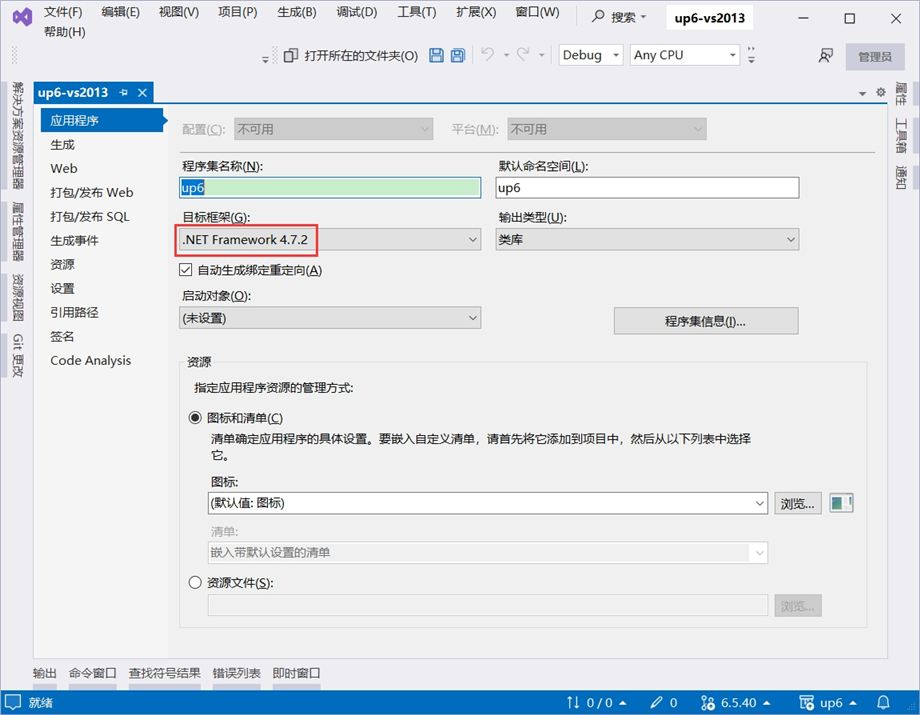
添加3rd引用
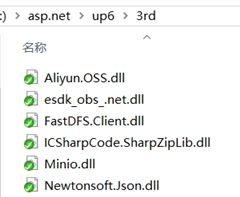
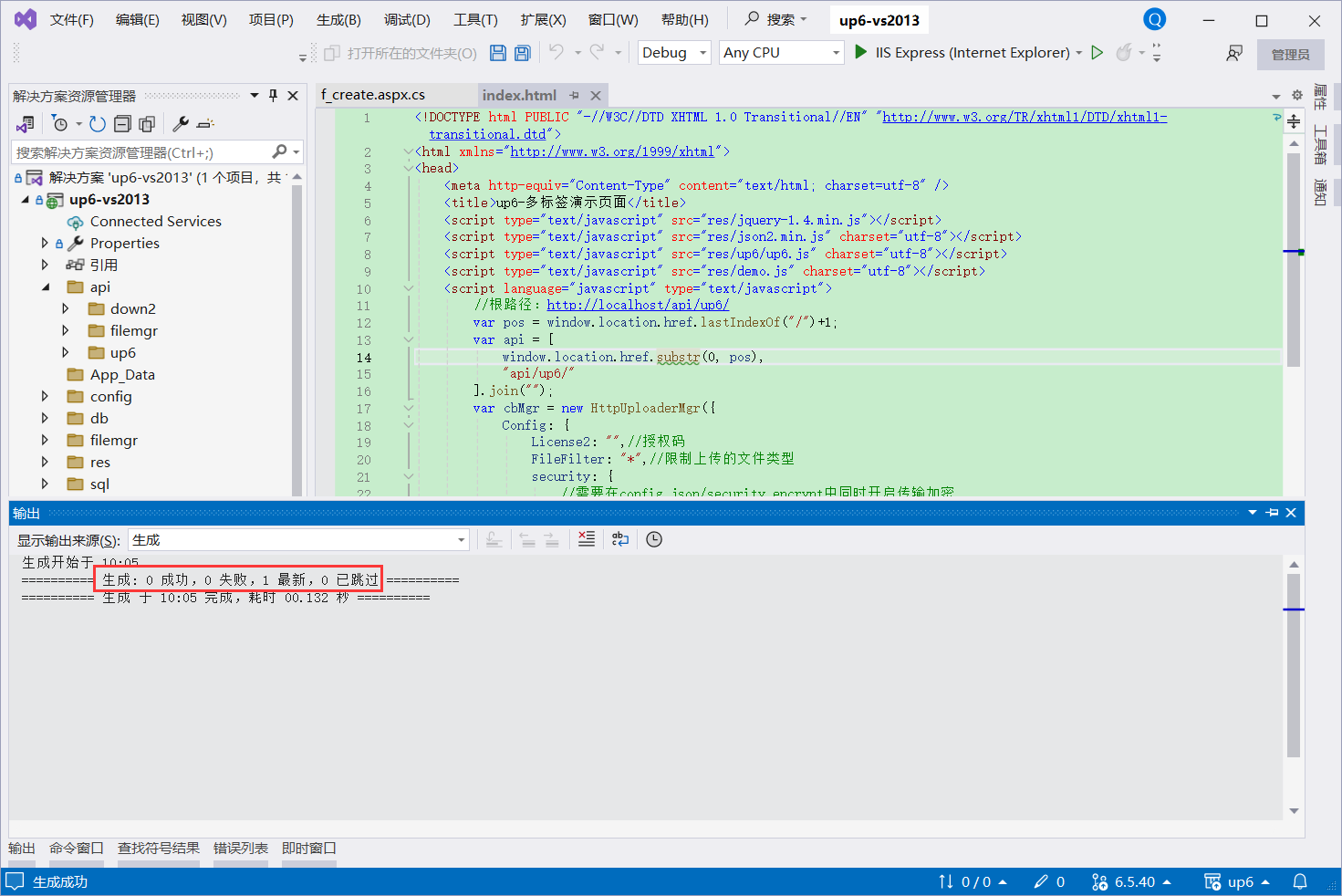
编译项目
NOSQL
NOSQL无需任何配置可直接访问页面进行测试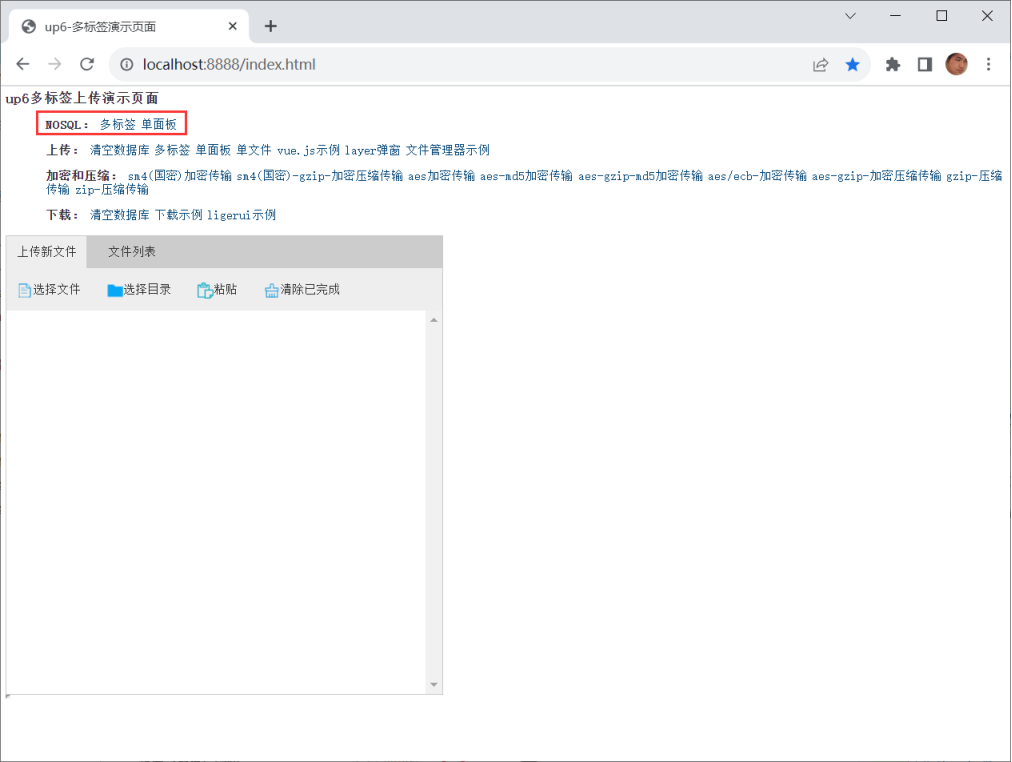
SQL
使用IIS
大文件上传测试推荐使用IIS以获取更高性能。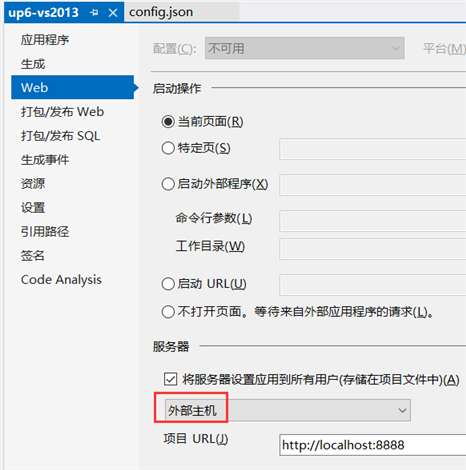
使用IIS Express
小文件上传测试可以使用IIS Express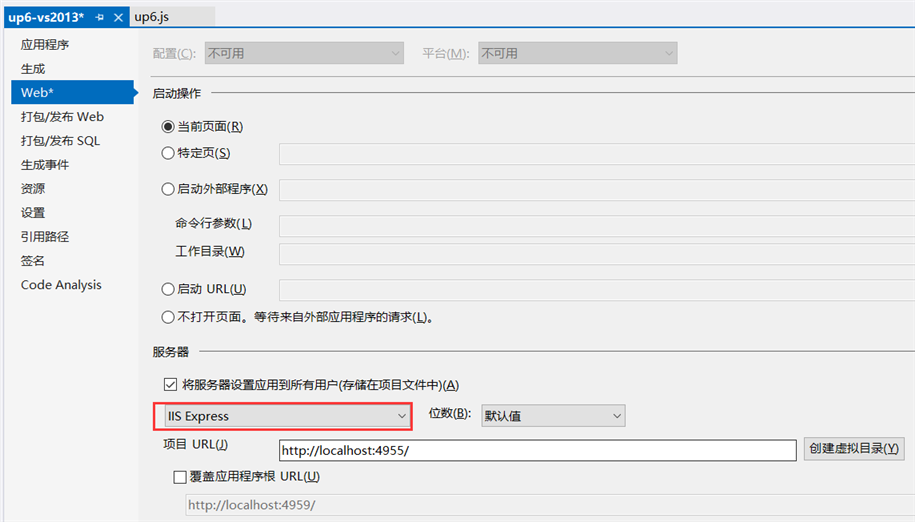
创建数据库
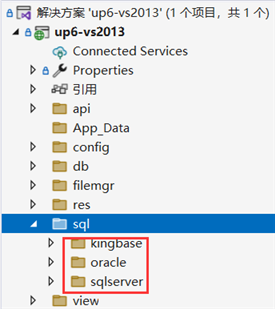
配置数据库连接信息
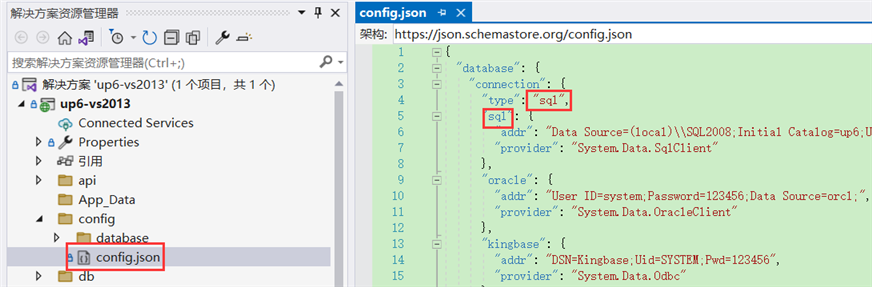
检查数据库配置
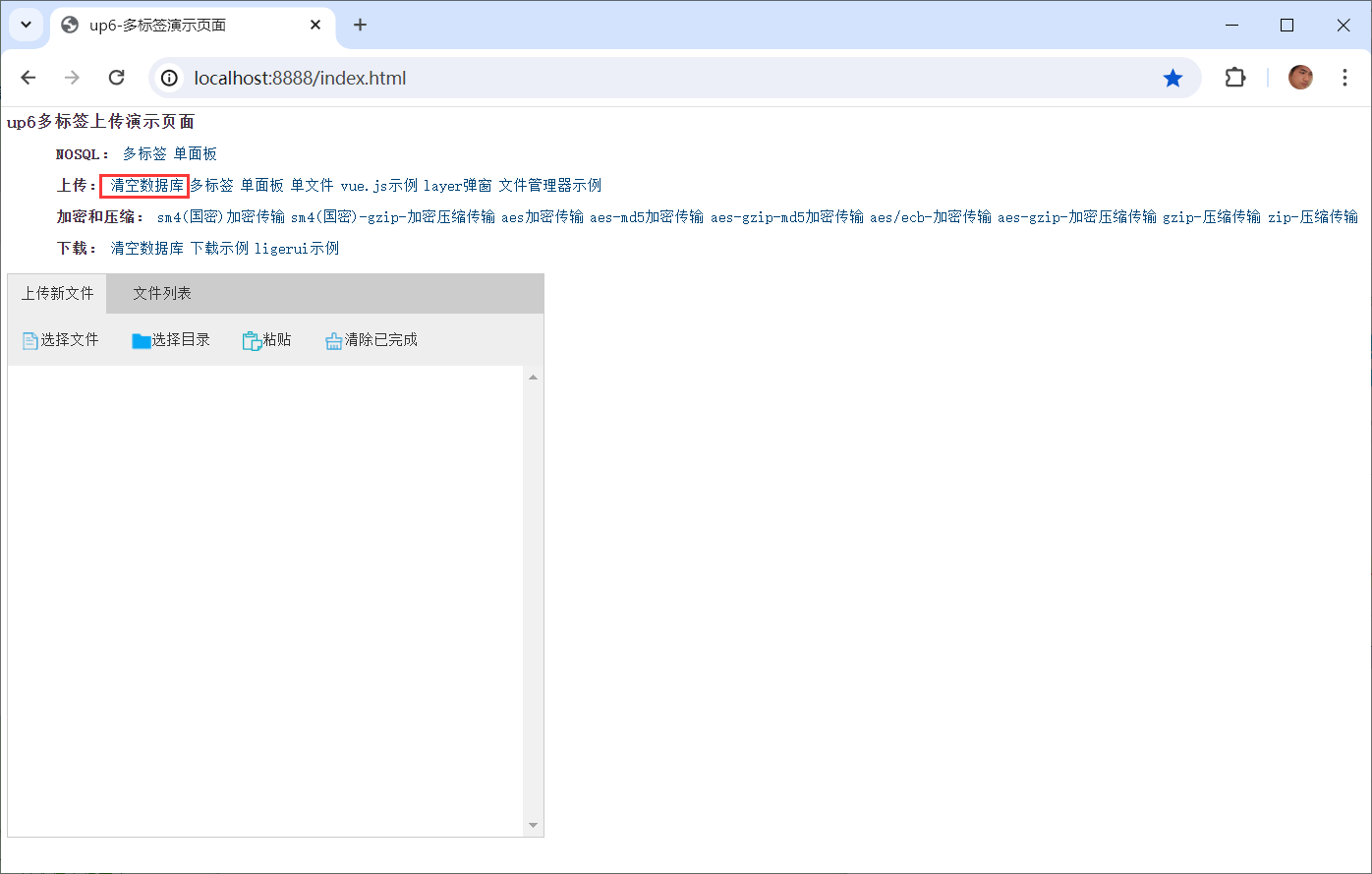
访问页面进行测试
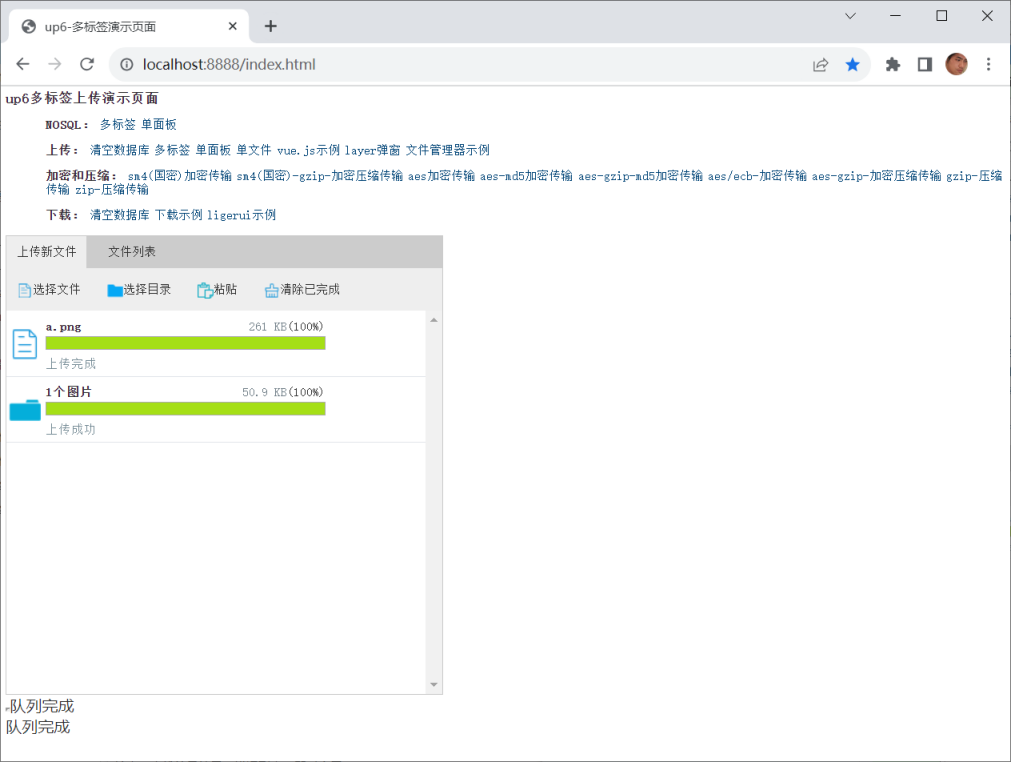
相关参考:
文件保存位置,
效果预览
文件上传
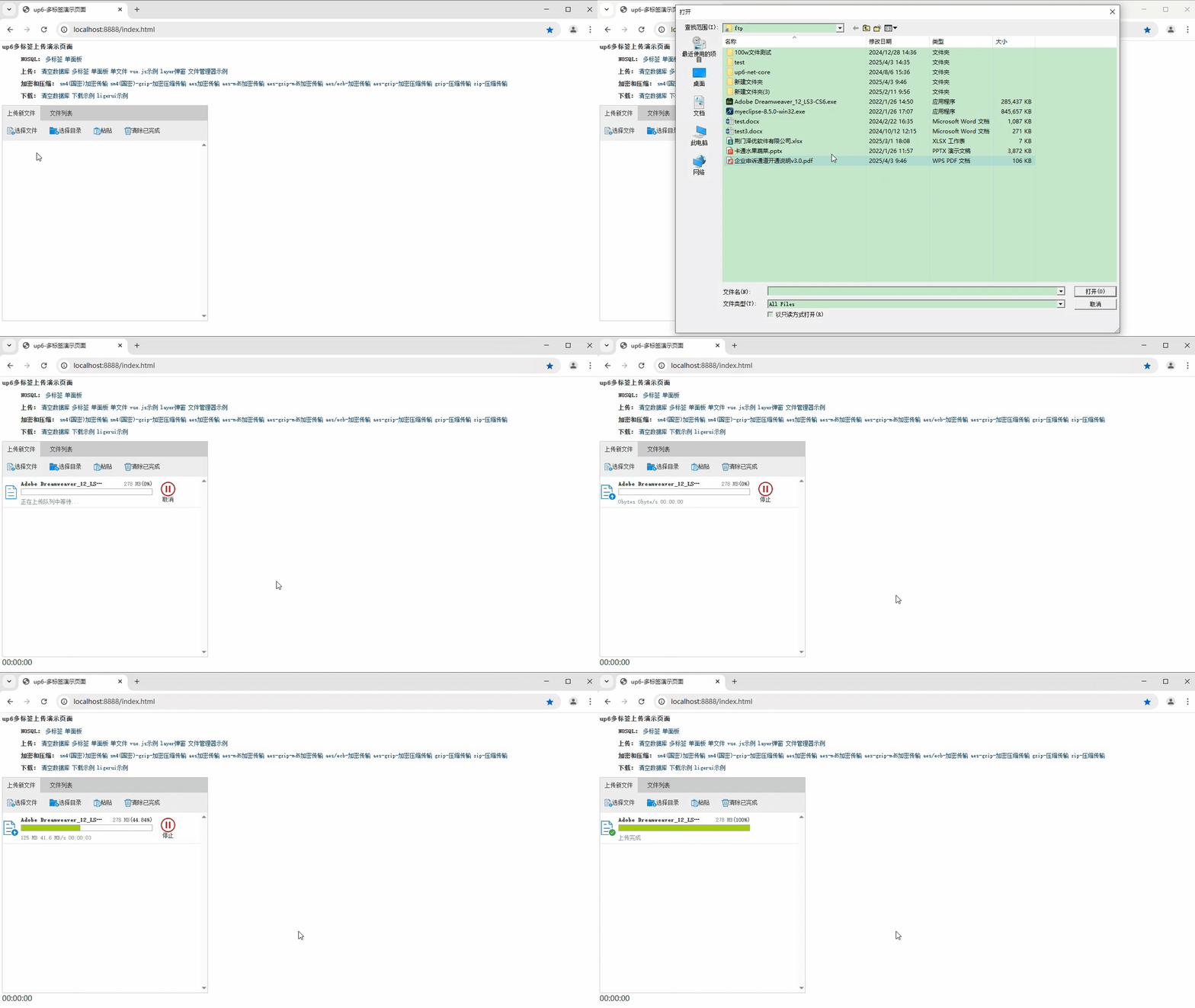
文件刷新续传
支持离线保存文件进度,在关闭浏览器,刷新浏览器后进行不丢失,仍然能够继续上传
文件夹上传
支持上传文件夹并保留层级结构,同样支持进度信息离线保存,刷新页面,关闭页面,重启系统不丢失上传进度。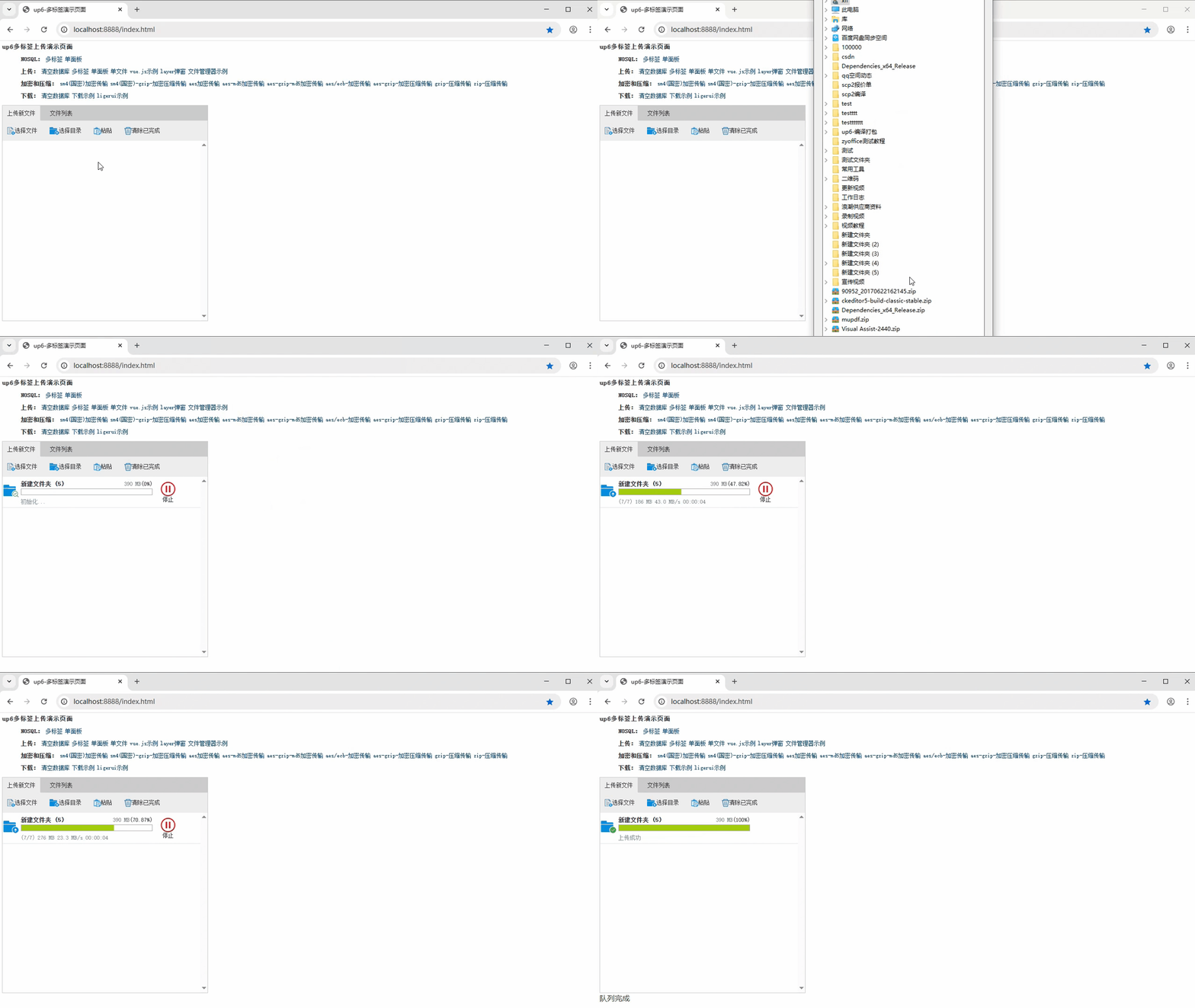
下载完整示例

Agent 垂直技术社区,欢迎活跃、内容共建。
更多推荐

 24
24 0
0- 0


 已为社区贡献79条内容

所有评论(0)