C#与欧姆龙PLC NX102-9000测试FINS通信,使用TCP连接方式,保证通信数据重要...
·
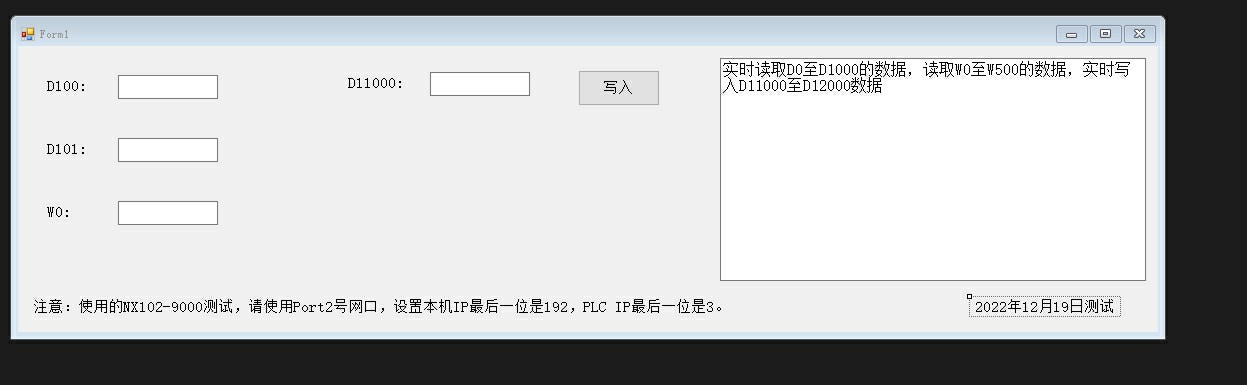
C#与欧姆龙PLC NX102-9000测试FINS通信,使用TCP连接方式,保证通信数据重要性,实时监测是否断线;实时读取D0至D1000寄存器数据,实时读取W0至W500的实时数据,将本机数据写入到D11000至D12000数据寄存器,保证数据交换正常;在工业环境中上位机软件需要与PLC交换数据,获取数据上传至MES系统中。 FINS通信速度较快,数据量大,非常好用。 希望能帮下开始使用欧姆龙PLC的工控朋友们
工业现场最刺激的莫过于看着自己写的代码成功撩上PLC。最近刚用C#调通欧姆龙NX系列的FINS协议,实测这货在千兆网络下能飙到每秒10万点数据吞吐,比某些慢吞吞的协议靠谱多了。直接上干货:
先整个TCP通信框架,核心就Socket那套东西:
public class OmronFinsClient
{
    private Socket _clientSocket;
    private byte[] _receiveBuffer = new byte[4096];
    private bool _isConnected;

    //心跳包间隔
    private const int HeartbeatInterval = 3000;
    private System.Timers.Timer _heartbeatTimer;

    public bool Connect(string ip, int port)
    {
        try
        {
            _clientSocket = new Socket(AddressFamily.InterNetwork, SocketType.Stream, ProtocolType.Tcp);
            _clientSocket.Connect(new IPEndPoint(IPAddress.Parse(ip), port));
            StartHeartbeat();
            return _isConnected = true;
        }
        catch{ /*记日志*/ return false; }
    }
}
注意这个心跳计时器是保命用的,产线网络说崩就崩。定时发个空包探探路:
private void StartHeartbeat()
{
    _heartbeatTimer = new System.Timers.Timer(HeartbeatInterval);
    _heartbeatTimer.Elapsed += (s, e) => {
        if(!SocketConnected)
        {
            _isConnected = false;
            //触发重连逻辑
        }
    };
    _heartbeatTimer.Start();
}
读D区数据要构造FINS命令帧,重点看地址转换:
public byte[] BuildReadCommand(int startAddress, int length)
{
    //命令头
    var header = new byte[] { 0x80, 0x00, 0x02, 0x00, 0x00, 0x00, 0x00, 0x00 };

    //内存区标识:D区是0x82
    byte[] addressBytes = BitConverter.GetBytes(startAddress).Reverse().ToArray(); //大端序
    byte[] command = {
        0x01, //读命令
        0x82, //D区
        addressBytes[0], addressBytes[1], //地址
        0x00, //位地址
        (byte)(length / 256), (byte)(length % 256) //读取长度
    };

    return header.Concat(command).ToArray();
}
这里Reverse()不是手滑,欧姆龙的地址排列是反人类的Big-endian(高位在前),必须把字节数组倒过来。比如D11000要转成0x00 0x02 0xAF 0xC8(别问我为什么,问就是日本人的脑回路)
处理响应数据时得注意粘包:
private void DataReceived(IAsyncResult ar)
{
    int bytesRead = _clientSocket.EndReceive(ar);
    if(bytesRead > 0)
    {
        byte[] validData = new byte[bytesRead];
        Buffer.BlockCopy(_receiveBuffer, 0, validData, 0, bytesRead);

        //解析数据头
        if(validData.Length < 16) return;
        ushort dataLength = BitConverter.ToUInt16(new byte[]{validData[15], validData[14]}, 0);

        //提取有效数据
        byte[] realData = validData.Skip(16).Take(dataLength).ToArray();
        ProcessData(realData); //后续处理
    }
    _clientSocket.BeginReceive(_receiveBuffer, 0, _receiveBuffer.Length, SocketFlags.None, DataReceived, null);
}
写寄存器要注意数据打包:
public void WriteDRegisters(int startAddr, ushort[] values)
{
    byte[] addrBytes = BitConverter.GetBytes(startAddr).Reverse().ToArray();
    List<byte> payload = new List<byte>{
        0x02, //写命令
        0x82, //D区
        addrBytes[0], addrBytes[1],
        0x00 //位地址
    };

    foreach(var val in values)
    {
        payload.AddRange(BitConverter.GetBytes(val).Reverse());
    }

    SendCommand(payload.ToArray());
}
实际应用中有几个坑要注意:
- W区(CIO区)地址从0x00开始计算,和D区不同
- 连续读取超过960字会触发PLC保护机制
- 写入D11000这种高位地址需要确认PLC内存分配
- MES对接时建议用JSON中间件做数据缓冲
最后甩个实时监控的代码片段:
//创建双缓冲队列
ConcurrentQueue<PlcData> _dataQueue = new ConcurrentQueue<PlcData>();

void StartMonitoring()
{
    Task.Run(() => {
        while(_isConnected)
        {
            var dData = ReadRange(0, 1000, MemoryType.D);
            var wData = ReadRange(0, 500, MemoryType.W);

            _dataQueue.Enqueue(new PlcData{
                Timestamp = DateTime.Now,
                DRegisters = dData,
                WRegisters = wData
            });

            Thread.Sleep(100); //根据PLC扫描周期调整
        }
    });
}
记住,工控编程最重要的是稳如老狗。下次可以聊聊怎么用CRC校验防止数据被电磁干扰搞崩,那才是真·刺激战场。代码拿走不谢,出问题别找我(狗头)

Agent 垂直技术社区,欢迎活跃、内容共建。
更多推荐
 5
5 0
0- 0


 已为社区贡献4条内容

所有评论(0)