canvas拖动画图——鼠标拖动绘图工具项目介绍(Python)
这是一个基于 tkinter 开发的交互式绘图应用程序,支持多种图形绘制模式和丰富的自定义选项。
项目概述
使用 tkinter 库构建的绘图应用,通过鼠标拖动实现自由绘制和几何图形绘制功能。
核心功能
主要组件
DrawApp 类:主要应用程序类
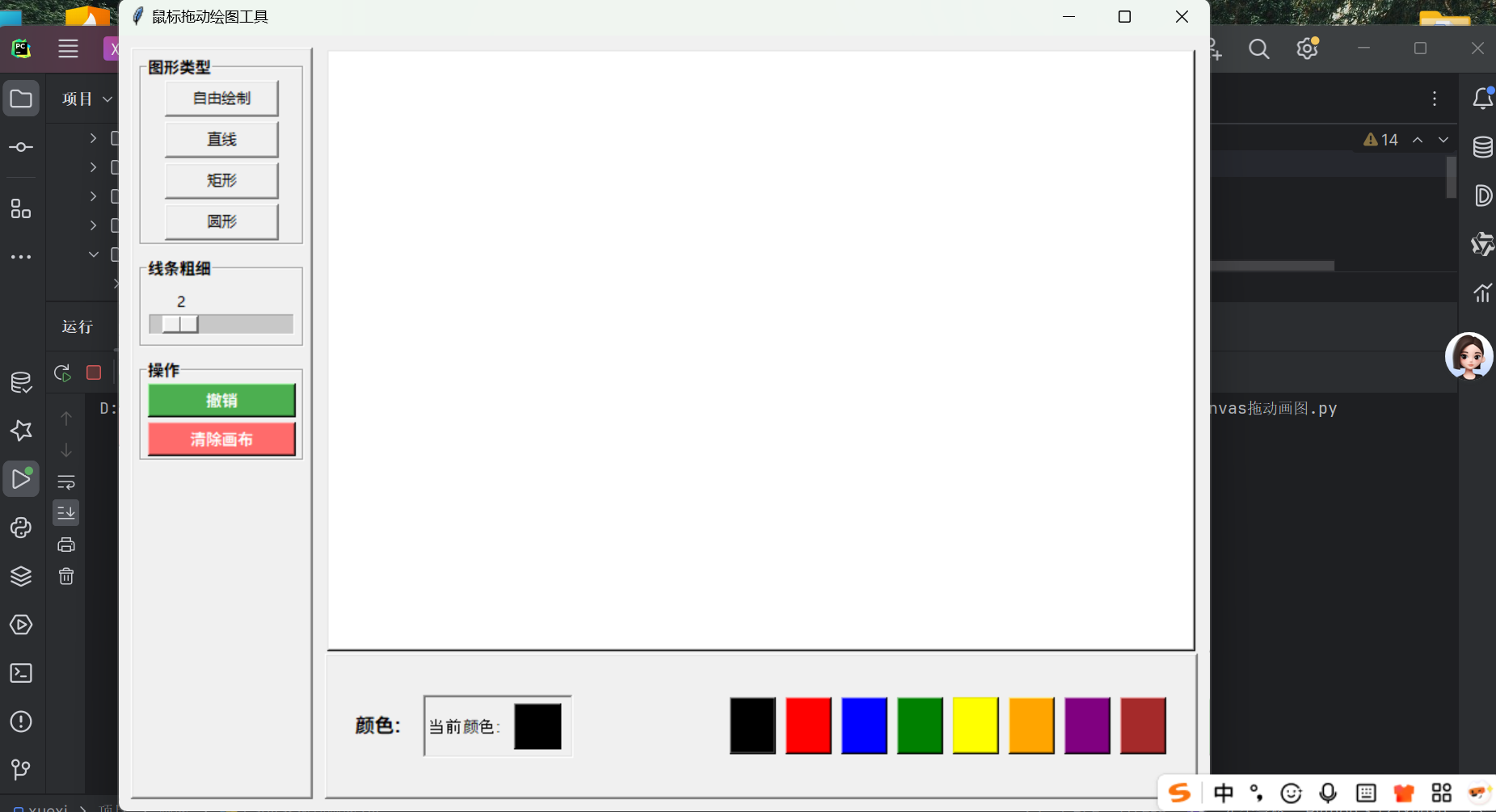
画布区域:白色背景的绘图画布,支持鼠标交互
侧边栏:图形类型、线条粗细和操作按钮
底部区域:颜色选择面板
绘图模式
自由绘制:freehand_draw() - 鼠标拖动连续绘制线条
直线绘制:preview_shape() - 绘制直线段
矩形绘制:拖动绘制矩形
圆形绘制:拖动绘制椭圆形
功能特性
颜色选择:提供8种预设颜色(黑色、红色、蓝色等)
粗细调节:线条粗细范围1-10像素,通过滑块控制
撤销功能:undo_last() - 撤销最后绘制的图形
清除画布:clear_canvas() - 清空所有绘制内容
界面设计
布局结构
左侧边栏:包含图形类型选择、线条粗细调节和操作按钮
中央画布:主要绘图区域,白色背景
底部面板:颜色选择区域,显示当前颜色和可选颜色
交互方式
鼠标事件绑定:
<ButtonPress-1>:按下事件,记录起始位置
<B1-Motion>:拖动事件,实时绘制预览
<ButtonRelease-1>:释放事件,确认绘制
技术实现
核心机制
图形栈管理:使用 shapes_stack 列表管理绘制元素,支持撤销功能
预览绘制:在 preview_shape() 中实现图形预览效果
事件处理:完整的鼠标事件处理链,实现流畅的绘制体验
界面组件
标签框架:使用 tk.LabelFrame 创建分组区域
滑块控件:tk.Scale 实现线条粗细调节
按钮控件:彩色按钮提供直观的操作反馈
运行方式
运行 canvas拖动画图.py 文件启动应用,使用 if __name__ == "__main__" 确保独立运行。
运行效果:
源码:
import tkinter as tk

class DrawApp:
    def __init__(self, root):
        self.root = root
        self.root.title("鼠标拖动绘图工具")
        self.root.geometry("900x700")

        # 初始化绘图参数
        self.last_x = None
        self.last_y = None
        self.start_x = None
        self.start_y = None
        self.current_color = "black"
        self.line_width = 2
        self.drawing_shape = None
        self.shape_type = "freehand"
        self.shapes_stack = []

        # 创建主框架
        main_frame = tk.Frame(root)
        main_frame.pack(fill=tk.BOTH, expand=True, padx=10, pady=10)

        # 左侧边栏框架
        sidebar_frame = tk.Frame(main_frame, width=150, relief=tk.RAISED, bd=2)
        sidebar_frame.pack(side=tk.LEFT, fill=tk.Y, padx=(0, 10))
        sidebar_frame.pack_propagate(False)

        # 创建画布框架(包含画布和底部颜色选择)
        canvas_container = tk.Frame(main_frame)
        canvas_container.pack(side=tk.LEFT, fill=tk.BOTH, expand=True)

        # 创建画布(白色背景)
        self.canvas = tk.Canvas(canvas_container, bg="white", relief=tk.RAISED, bd=2)
        self.canvas.pack(side=tk.TOP, fill=tk.BOTH, expand=True)

        # 底部颜色选择框架(占整个窗口约25%高度)
        color_selector_frame = tk.Frame(canvas_container, height=120, relief=tk.RAISED, bd=2)  # 增加高度到120
        color_selector_frame.pack(side=tk.BOTTOM, fill=tk.X)
        color_selector_frame.pack_propagate(False)  # 固定高度

        # 在左侧边栏添加图形类型选择
        self.create_shape_selection(sidebar_frame)

        # 在左侧边栏添加线条粗细选择
        self.create_thickness_selection(sidebar_frame)

        # 在左侧边栏添加操作按钮
        self.create_operation_buttons(sidebar_frame)

        # 在底部添加颜色选择
        self.create_color_selection(color_selector_frame)

        # 绑定鼠标事件
        self.canvas.bind("<ButtonPress-1>", self.on_press)
        self.canvas.bind("<B1-Motion>", self.on_drag)
        self.canvas.bind("<ButtonRelease-1>", self.on_release)

    def create_shape_selection(self, parent):
        """创建图形类型选择区域"""
        shape_frame = tk.LabelFrame(parent, text="图形类型", font=("Arial", 10, "bold"))
        shape_frame.pack(fill=tk.X, padx=5, pady=5)

        shapes = [("自由绘制", "freehand"), ("直线", "line"), ("矩形", "rectangle"), ("圆形", "oval")]
        self.shape_buttons = {}

        for text, shape in shapes:
            btn = tk.Button(
                shape_frame,
                text=text,
                width=12,
                command=lambda s=shape: self.set_shape(s)
            )
            btn.pack(pady=2, padx=5)
            self.shape_buttons[shape] = btn

    def create_thickness_selection(self, parent):
        """创建线条粗细选择区域"""
        thickness_frame = tk.LabelFrame(parent, text="线条粗细", font=("Arial", 10, "bold"))
        thickness_frame.pack(fill=tk.X, padx=5, pady=5)

        self.thickness_var = tk.IntVar(value=self.line_width)
        thickness_scale = tk.Scale(
            thickness_frame,
            from_=1,
            to=10,
            orient=tk.HORIZONTAL,
            variable=self.thickness_var,
            command=self.change_thickness,
            length=120
        )
        thickness_scale.pack(pady=5)

    def create_operation_buttons(self, parent):
        """创建操作按钮区域"""
        operation_frame = tk.LabelFrame(parent, text="操作", font=("Arial", 10, "bold"))
        operation_frame.pack(fill=tk.X, padx=5, pady=5)

        # 撤销按钮
        self.undo_btn = tk.Button(
            operation_frame,
            text="撤销",
            command=self.undo_last,
            bg="#4CAF50",
            fg="white",
            font=("Arial", 10, "bold")
        )
        self.undo_btn.pack(pady=2, padx=5, fill=tk.X)

        # 清除画布按钮
        self.clear_btn = tk.Button(
            operation_frame,
            text="清除画布",
            command=self.clear_canvas,
            bg="#FF6B6B",
            fg="white",
            font=("Arial", 10, "bold")
        )
        self.clear_btn.pack(pady=2, padx=5, fill=tk.X)

    def create_color_selection(self, parent):
        """创建颜色选择区域"""
        # 主颜色选择区域
        color_main_frame = tk.Frame(parent)
        color_main_frame.pack(fill=tk.BOTH, expand=True, pady=10)  # 增加垂直间距

        # 颜色标题和当前颜色显示
        title_frame = tk.Frame(color_main_frame)
        title_frame.pack(side=tk.LEFT, padx=20)  # 增加水平间距

        tk.Label(title_frame, text="颜色:", font=("Arial", 12, "bold")).pack(side=tk.LEFT)  # 增大字体

        # 当前颜色显示
        self.current_color_frame = tk.Frame(title_frame, relief=tk.SUNKEN, bd=2)
        self.current_color_frame.pack(side=tk.LEFT, padx=(15, 0))

        tk.Label(self.current_color_frame, text="当前颜色:", font=("Arial", 10)).pack(side=tk.LEFT)
        self.color_indicator = tk.Label(
            self.current_color_frame,
            bg=self.current_color,
            width=5,  # 增加宽度
            height=2,  # 增加高度
            relief=tk.RAISED,
            bd=1
        )
        self.color_indicator.pack(side=tk.LEFT, padx=8, pady=5)  # 增加间距

        # 颜色按钮区域
        colors_frame = tk.Frame(color_main_frame)
        colors_frame.pack(side=tk.RIGHT, padx=20)  # 增加水平间距

        colors = ["black", "red", "blue", "green", "yellow", "orange", "purple", "brown"]
        self.color_buttons = []

        for i, color in enumerate(colors):
            btn = tk.Button(
                colors_frame,
                bg=color,
                width=4,  # 增加按钮宽度
                height=2,  # 增加按钮高度
                relief=tk.RAISED,
                bd=2,
                command=lambda c=color: self.change_color(c)
            )
            btn.pack(side=tk.LEFT, padx=4)  # 增加按钮间距
            self.color_buttons.append(btn)

    def change_color(self, color):
        """改变当前绘图颜色"""
        self.current_color = color
        self.color_indicator.config(bg=color)

    def change_thickness(self, value):
        """改变线条粗细"""
        self.line_width = int(value)

    def set_shape(self, shape):
        """设置当前绘制的图形类型"""
        self.shape_type = shape
        print(f"切换到 {shape} 模式")

    def on_press(self, event):
        """按下鼠标左键"""
        self.start_x = event.x
        self.start_y = event.y
        if self.shape_type != "freehand":
            self.drawing_shape = None

    def on_drag(self, event):
        """拖动鼠标"""
        if self.shape_type == "freehand":
            self.freehand_draw(event)
        else:
            self.preview_shape(event)

    def on_release(self, event):
        """释放鼠标"""
        if self.shape_type == "freehand":
            self.reset_last_pos(event)
        elif self.drawing_shape is not None:
            self.finalize_shape(event)
            self.shapes_stack.append(self.drawing_shape)
            self.drawing_shape = None

    def freehand_draw(self, event):
        """自由绘制模式"""
        if self.last_x and self.last_y:
            line_id = self.canvas.create_line(
                self.last_x, self.last_y,
                event.x, event.y,
                fill=self.current_color,
                width=self.line_width,
                smooth=True,
                capstyle=tk.ROUND,
                joinstyle=tk.ROUND
            )
            self.shapes_stack.append(line_id)
        self.last_x = event.x
        self.last_y = event.y

    def preview_shape(self, event):
        """预览图形"""
        if self.drawing_shape:
            self.canvas.delete(self.drawing_shape)

        x0, y0 = self.start_x, self.start_y
        x1, y1 = event.x, event.y

        if self.shape_type == "line":
            self.drawing_shape = self.canvas.create_line(x0, y0, x1, y1,
                                                        fill=self.current_color,
                                                        width=self.line_width)
        elif self.shape_type == "rectangle":
            self.drawing_shape = self.canvas.create_rectangle(x0, y0, x1, y1,
                                                              outline=self.current_color,
                                                              width=self.line_width)
        elif self.shape_type == "oval":
            self.drawing_shape = self.canvas.create_oval(x0, y0, x1, y1,
                                                         outline=self.current_color,
                                                         width=self.line_width)

    def finalize_shape(self, event):
        """确认最终图形"""
        self.canvas.itemconfig(self.drawing_shape, tags="shape")

    def reset_last_pos(self, event):
        """释放鼠标时重置起始位置"""
        self.last_x = None
        self.last_y = None

    def clear_canvas(self):
        """清除画布上所有内容"""
        self.canvas.delete("all")
        self.shapes_stack.clear()

    def undo_last(self):
        """撤销最后的操作"""
        if self.shapes_stack:
            last_item = self.shapes_stack.pop()
            self.canvas.delete(last_item)


if __name__ == "__main__":
    root = tk.Tk()
    app = DrawApp(root)
    root.mainloop()
注:可以免费领取上面代码,给个关注+收藏+点赞即可。

Agent 垂直技术社区,欢迎活跃、内容共建。
更多推荐
 9
9 0
0- 0


 已为社区贡献3条内容

所有评论(0)