create-react-app新建react项目,并外接webpack配置
·
1.安装webpack,webpack-dev-server
# 或指定版本
npm install --save-dev webpack@<version>
# 同时安装
npm install --save-dev webpack webpack-dev-server webpack-cli
2.新建webpack配置文件:webpack.config.js
创建webpack.config.js在项目根目录。博主个人习惯,在根目录中新建config文件夹,在文件夹中新建index.js来配置webpack。
const path = require('path');

module.exports = {

  mode: 'development', // 提供 mode 配置选项,告知 webpack 使用相应模式的内置优化 'none' | 'development' | 'production' 如果没有设置,webpack 会给 mode 的默认值设置为 production。
  devtool: 'source-map', // 选择一种 source map 风格来增强调试过程。不同的值会明显影响到构建(build)和重新构建(rebuild)的速度。 生产环境的话 可以不配
  entry: {
    index: path.resolve(__dirname, '../src/index.js'),
  },
  output: { // 指示 webpack 如何去输出、以及在哪里输出你的「bundle、asset 和其他你所打包或使用 webpack 载入的任何内容」
    filename: 'bundle.[hash].js', // 打包后的名称【hash】会生成哈希值
    path: path.resolve(__dirname, '../dist'), // 构建后的文件的地址
  },
  devServer: {
    port: 3010, // 前端项目端口
    open: true, // 项目启动后是否打开浏览器
    hot: true, // 热加载
  }

}
3.配置packpage.json
修改文件中"scripts"中的build内容

 "build": "webpack --config ./config/index.js",
 "dev": "webpack server --open --config ./config/index.js",
./config/index.js表示代码中webpack.config.js的地址,根据自己实际项目进行修改。
4.安装loader相关包
记录其中遇到的报错。
在控制台执行npm run build。如下图报错

安装处理js的加载器
npm install -D babel-loader @babel/core @babel/preset-env @babel/preset-react错误原因是没有告诉webpack遇到<>标签是怎么处理,js、jsx、tsx等都需要配置加载器。类似报错还有

安装svg loader
npm install svg-react-loader --save-dev配置svg加载器
{
  test: /\.svg$/,
  use: ['svg-react-loader'],
}
缺乏css加载器报错

配置css加载器
npm install --save-dev css-loader{
test: /\.css$/,
use: ['style-loader', 'css-loader'],
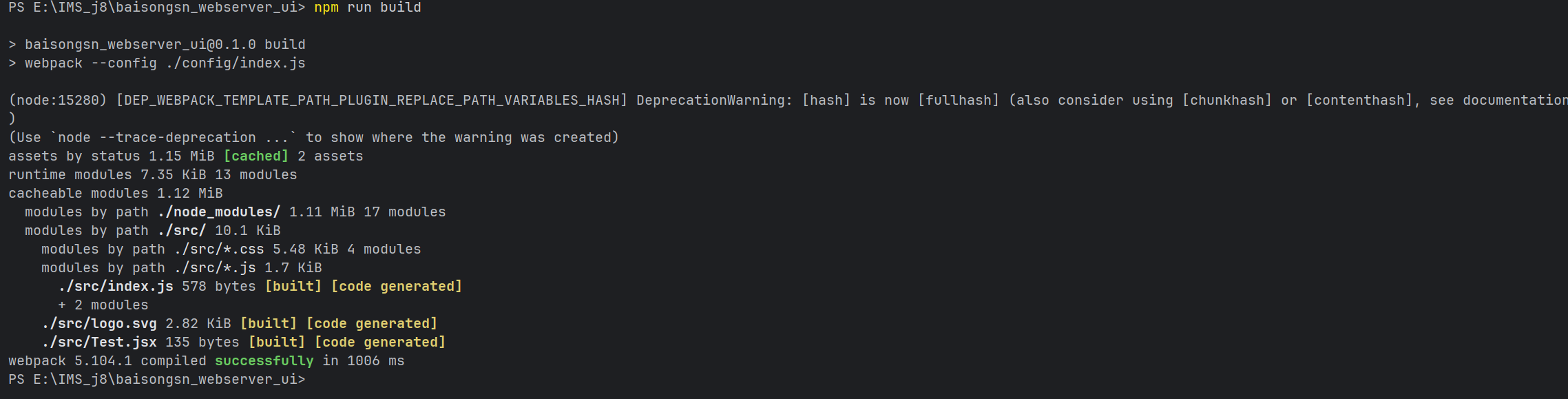
}build成功后如图
5.设置html模板:HtmlWebpackPlugin
HtmlWebpackPlugin简化了 HTML 文件的创建,以便为你的 webpack 包提供服务。这对于那些文件名中包含哈希值,并且哈希值会随着每次编译而改变的 webpack 包特别有用。你可以让该插件为你生成一个 HTML 文件,使用loadsh模板提供模板,或者使用你自己的loader
。
npm install --save-dev html-webpack-plugin用法
const HtmlWebpackPlugin = require('html-webpack-plugin');plugins: [new HtmlWebpackPlugin({
template: path.resolve(__dirname, '../public/index.html'),
})],6.多次build后需要删除上一次build的文件
安装rimraf
npm install -g rimraf配置package.json
"prebuild": "rimraf ./dist",7.运行webpack server启动项目
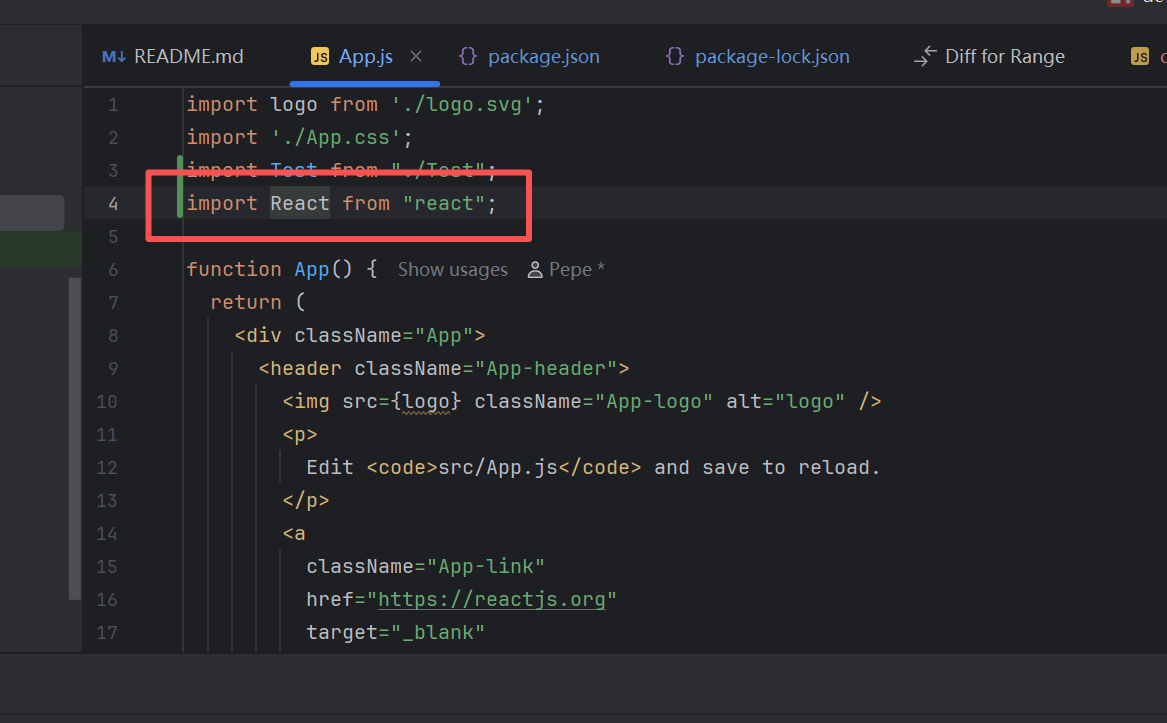
可能会遇到的报错

原因是有个js页面没有引入react导致的,找到对应界面并import即可解决
7.完整的webpack配置文件和package.json文件
svg的加载器做了修改
const path = require('path');
const HtmlWebpackPlugin = require('html-webpack-plugin');
module.exports = {
mode: 'development', // 提供 mode 配置选项,告知 webpack 使用相应模式的内置优化 'none' | 'development' | 'production' 如果没有设置,webpack 会给 mode 的默认值设置为 production。
devtool: 'source-map', // 选择一种 source map 风格来增强调试过程。不同的值会明显影响到构建(build)和重新构建(rebuild)的速度。 生产环境的话 可以不配
entry: {
index: path.resolve(__dirname, '../src/index.js'),
}, // 入口文件
output: { // 指示 webpack 如何去输出、以及在哪里输出你的「bundle、asset 和其他你所打包或使用 webpack 载入的任何内容」
filename: 'bundle.[hash].js', // 打包后的名称【hash】会生成哈希值
path: path.resolve(__dirname, '../dist'), // 构建后的文件的地址
},
resolve: {
extensions: ['.jsx', '...'],
},
plugins: [new HtmlWebpackPlugin({
    template: path.resolve(__dirname, '../public/index.html'),
  })],
module: {
rules: [
{
test: /\.js$/,
exclude: /node_modules/, // 忽略包文件夹
loader: 'babel-loader', // 加载器
options: {
presets: ['@babel/preset-env', '@babel/preset-react'],
}
},
{
test: /\.jsx$/,
exclude: /node_modules/, // 忽略包文件夹
loader: 'babel-loader', // 加载器
options: {
presets: ['@babel/preset-env', '@babel/preset-react'],
}
},
{
test: /\.svg$/,
use: ['svg-sprite-loader'], // svg-sprite-loader svg-react-loader
},
{
test: /\.css$/i,
use: ['style-loader', 'css-loader'],
},
]
},
devServer: {
static: [
{
directory: path.join(__dirname, 'public'),
publicPath: '/public',
}
],
port: 8000,
open: true,
hot: true,
}
}{
"name": "baisongsn_webserver_ui",
"version": "0.1.0",
"private": true,
"dependencies": {
"@testing-library/dom": "^10.4.1",
"@testing-library/jest-dom": "^6.9.1",
"@testing-library/react": "^16.3.1",
"@testing-library/user-event": "^13.5.0",
"html-loader": "^5.1.0",
"react": "^19.2.3",
"react-dom": "^19.2.3",
"react-scripts": "5.0.1",
"svg-sprite-loader": "^6.0.11",
"web-vitals": "^2.1.4"
},
"scripts": {
"start": "react-scripts start",
"prebuild": "rimraf ./dist",
"build": "webpack --config ./config/index.js",
"dev": "webpack server --open --config ./config/index.js",
"test": "react-scripts test",
"eject": "react-scripts eject"
},
"eslintConfig": {
"extends": [
"react-app",
"react-app/jest"
]
},
"browserslist": {
"production": [
">0.2%",
"not dead",
"not op_mini all"
],
"development": [
"last 1 chrome version",
"last 1 firefox version",
"last 1 safari version"
]
},
"devDependencies": {
"@babel/core": "^7.28.5",
"@babel/preset-env": "^7.28.5",
"@babel/preset-react": "^7.28.5",
"babel-loader": "^10.0.0",
"css-loader": "^7.1.2",
"html-webpack-plugin": "^5.6.5",
"svg-react-loader": "^0.4.6",
"webpack": "^5.104.1",
"webpack-cli": "^6.0.1",
"webpack-dev-server": "^5.2.2"
}
}

Agent 垂直技术社区,欢迎活跃、内容共建。
更多推荐

 4
4 0
0- 0


 已为社区贡献1条内容

所有评论(0)