uniapp vue2 vue3 微信小程序 上传图片,拍照, 方案分享
·
具体一块的代码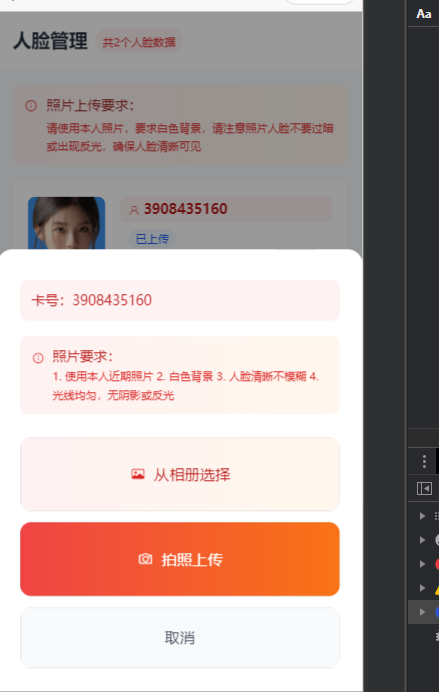
const serverBaseUrl = import.meta.env.VITE_SERVER_BASEURL


// 从相册选择图片(通用兼容版,支持小程序 + H5)

const chooseImageFromAlbum = async (isAlbum, callback) => {

    console.log('isAlbum', isAlbum)

    try {

        // 1. 选择图片(获取临时文件路径)

        const res = await uni.chooseImage({

            count: 1,

            sizeType: ["original", "compressed"],

            sizeType: ['compressed'],

            sourceType: isAlbum ? ["album"] : ["camera"]

        })


        console.log('从相册选择:', res)


        if (!res.tempFilePaths || res.tempFilePaths.length === 0) {

            uni.showToast({ title: '未选择图片', icon: 'none' });

            return;

        }


        const filePath = res.tempFilePaths[0];


        // 2. 直接使用 uni.uploadFile 上传(小程序 + H5 通用)

        const uploadRes = await new Promise((resolve, reject) => {

            uni.showLoading({ title: '上传中...' });

            uni.uploadFile({

                url: serverBaseUrl + '/resource/oss/uploadFace', // 替换为你的后端真实上传接口

                filePath, // 直接传入临时文件路径

                name: 'file', // 与后端接收文件的参数名保持一致(必填)

                header: {

                    // 按需添加请求头,如 Token、Content-Type 等

                    'Authorization': 'Bearer ' + uni.getStorageSync('access_token'),

                    'Content-Type': 'multipart/form-data',

                    'clientid': uni.getStorageSync('client_id'),

                },

                // 按需添加额外参数(如人脸ID、用户信息等)

                formData: {

                    'faceId': currentFace?.id || '',

                    'type': 'avatar'

                },

                success: (res) => {

                    console.log('upsuccess', res)

                    // 小程序端 res.data 是字符串,需要手动转为 JSON

                    let result = res.data;

                    result = JSON.parse(result)

                    console.log('sucessResult', result)

                    if (result.code == 200) {

                        callback ? typeof callback == 'function' && callback(result) : ''

                        resolve(result.data);

                        uni.showToast({ title: result.msg, icon: 'success' });


                    } else {

                        uni.showToast({ title: result.msg, icon: 'none' });

                        reject(res);

                    }


                },

                fail: (err) => {

                    console.log('uperr', err)

                    let result = err.data;


                    result = JSON.parse(result)


                    uni.showToast({ title: result.msg, icon: 'none' });


                    callback ? typeof callback == 'function' && callback(result) : ''


                    reject(err);

                }

            });

        });

        return

        // 3. 处理上传成功后的逻辑

        console.log('上传成功:', uploadRes);

        if (uploadRes.code === 200) { // 与后端返回状态码保持一致

            uni.showToast({ title: '上传成功', icon: 'success' });

            // 可在此处更新人脸数据、刷新列表等

            // await refreshFaceList();

        } else {

            uni.showToast({ title: uploadRes.msg || '上传失败', icon: 'none' });

        }


    } catch (error) {

        console.error('选择/上传图片失败:', error);

        let result = JSON.parse(error.data);

        uni.showToast({

            title: result.msg,

            icon: 'none'

        });

    } finally {

        uni.hideLoading();

        closeActionPopup(); // 无论成功失败,都关闭弹窗

    }

};
当时我写的页面的代码,整个页面的,包括上下业务逻辑的
<template>
<view class="min-h-screen bg-gray-50">
<!-- 顶部标题 -->
<view class="bg-white px-4 py-4 shadow-sm border-b border-red-100">
<view class="flex items-center">
<text class="text-xl font-bold text-gray-800">人脸管理</text>
<view class="ml-2 px-2 py-1 bg-red-50 border border-red-200 rounded-full">
<text class="text-xs text-red-600 font-medium">共{{ faceList.length }}个人脸数据</text>
</view>
</view>
</view>
<!-- 上传提示横幅 -->
<view
class="bg-gradient-to-r from-red-50 to-orange-50 border-l-4 border-red-500 mx-4 mt-4 p-3 rounded-lg shadow-sm">
<view class="flex items-start">
<uni-icons type="info" size="18" color="#dc2626" class="mt-0.5 flex-shrink-0"></uni-icons>
<view class="ml-2 flex-1">
<text class="text-red-800 font-medium text-sm block mb-1">照片上传要求:</text>
<text class="text-red-600 text-xs leading-relaxed">
请使用本人照片,要求白色背景,请注意照片人脸不要过暗或出现反光,确保人脸清晰可见
</text>
</view>
</view>
</view>
<!-- 人脸列表 -->
<scroll-view scroll-y class="h-[calc(100vh-200px)]" :refresher-enabled="true" :refresher-triggered="refreshing"
@refresherrefresh="onRefresh">
<view class="p-4">
<!-- 人脸列表项 -->
<view v-for="face in faceList" :key="face.id"
class="bg-white rounded-xl shadow-sm mb-4 overflow-hidden transition-all duration-200 hover:shadow-md border border-gray-100">
<!-- 核心:重构列表项的flex布局层级 -->
<view class="p-4">
<!-- 第一层:图片 + 右侧所有信息(卡号+信息+按钮) -->
<view class="flex">
<!-- 左侧图片区:固定尺寸,不收缩 -->
<!-- 左侧图片区:固定尺寸,不收缩 -->
<view class="relative shrink-0">
<view
class="w-20 h-20 rounded-lg overflow-hidden border border-gray-200 flex items-center justify-center bg-gray-50">
<!-- 有图片显示图片,无图片显示「未上传」文字 -->
<image v-if="face.imgUrl" :src="face.imgUrl" class="w-full h-full object-cover"
mode="aspectFill" @error="handleImageError(face)" />
<view v-else
class="w-full h-full flex flex-col items-center justify-center text-gray-400"
style="box-shadow: inset 0 0 4px rgba(0,0,0,0.05);">
<uni-icons type="image" size="24" color="#9ca3af" class="mb-1">
<!-- {{ face.userName }} -->
</uni-icons>
<text class="text-xs font-medium">未上传</text>
</view>
</view>
<!-- 右上角已上传图标 -->
<view v-if="face.faceId && face.uploadStatus !== 'error'"
class="absolute -top-2 -right-2 w-6 h-6 rounded-full flex items-center justify-center shadow-md"
style="background: linear-gradient(135deg, #ef4444 0%, #dc2626 100%);">
<uni-icons type="checkmarkempty" size="12" color="#ffffff"></uni-icons>
</view>
<!-- 上传失败图标 -->
<view v-if="face.uploadStatus === 'error'"
class="absolute -top-2 -right-2 w-6 h-6 rounded-full flex items-center justify-center shadow-md bg-red-500">
<uni-icons type="closeempty" size="12" color="#ffffff"></uni-icons>
</view>
</view>
<!-- 右侧所有信息区:占剩余宽度 -->
<view class="flex-1 ml-4 min-w-0">
<!-- 第二层:卡号行(单独一行,占满宽度) -->
<view class="mb-2"> <!-- 卡号和下面区域留间距 -->
<view class="flex items-center bg-red-50 px-2 py-1 rounded-md w-full">
<uni-icons type="person" size="14" color="#dc2626"
class="flex-shrink-0"></uni-icons>
<text class="ml-1 text-red-700 font-semibold text-sm break-all flex-1">
{{ face?.code || `` }}
</text>
</view>
</view>
<!-- 第三层:信息区(左) + 按钮区(右) -->
<view class="flex">
<!-- 左侧信息区:占2/3宽度(核心:卡号占整行,这里信息+按钮分两列) -->
<view class="flex-2 min-w-0">
<!-- 姓名和状态 -->
<view class="flex items-center mb-1">
<!-- <text v-if="face.name" class="text-gray-800 font-medium text-sm">
{{ face.name }}
</text> -->
<view
class="ml-2 px-2 py-0.5 rounded-full text-xs font-medium shrink-0 border"
:class="getStatusTextClass(face).split(' ')">
{{ getStatusText(face) }}
</view>
</view>
<!-- 备注信息 -->
<text v-if="face.remark" class="block text-gray-500 text-xs mb-1 truncate">
备注: {{ face.remark || '无' }}
</text>
<!-- 时间信息 -->
<view class="flex flex-col space-y-0.5 mb-2">
<view class="flex items-center">
<uni-icons type="calendar" size="12" color="#9ca3af"></uni-icons>
<text class="ml-1 text-gray-500 text-xs">
创建: {{ formatTime(face.createTime) }}
</text>
</view>
<view class="flex items-center">
<uni-icons type="refreshempty" size="12" color="#9ca3af"></uni-icons>
<text class="ml-1 text-gray-500 text-xs">
更新: {{ formatTime(face.updateTime) }}
</text>
</view>
</view>
<!-- 进度条(上传中显示) -->
<!-- <view v-if="face.uploading && face.uploadProgress < 100">
<view class="w-full bg-gray-200 rounded-full h-1.5 overflow-hidden">
<view
class="bg-gradient-to-r from-red-500 to-orange-500 h-1.5 rounded-full transition-all duration-300"
:style="{ width: `${face.uploadProgress}%` }"></view>
</view>
<view class="flex justify-between items-center mt-1">
<text class="text-xs text-gray-500">上传中...</text>
<text class="text-xs font-medium text-red-600">{{ face.uploadProgress
}}%</text>
</view>
</view> -->
</view>
<!-- 右侧按钮区:占1/3宽度,垂直居中,不收缩 -->
<view class=" flex-1 flex flex-col justify-center items-end ml-4 shrink-0">
<!-- 未上传或上传失败状态 -->
<button
class="px-3 py-1.5 bg-gradient-to-r from-red-500 to-red-600 text-white rounded-lg text-sm font-medium active:opacity-80 transition-all duration-200 whitespace-nowrap min-w-[60px] shadow-sm hover:shadow-md"
@click="handleUploadFace(face)" style="font-size: 12px;">
{{ face.imgUrl ? '上传' : "更新" }}
</button>
<!-- 已上传状态 -->
<!-- <button v-if="face.imgUrl "
class="px-3 py-1.5 bg-gradient-to-r from-orange-500 to-orange-600 text-white rounded-lg text-sm font-medium active:opacity-80 transition-all duration-200 whitespace-nowrap min-w-[60px] shadow-sm hover:shadow-md"
@click="handleUpdateFace(face)"
style="font-size: 12px;">
{{ '更新' }}
</button> -->
<!-- 错误信息提示 -->
<!-- <text v-if="face.uploadStatus === 'error'"
class="text-red-500 text-xs mt-1 text-center max-w-[80px] truncate font-medium">
上传失败
</text> -->
</view>
</view>
</view>
</view>
</view>
<!-- 分隔线 -->
<!-- <view class="border-t border-gray-100 mx-4"></view> -->
<!-- 底部信息 -->
<!-- <view class="px-4 py-2 flex items-center justify-between">
<view class="flex items-center">
<uni-icons type="location" size="12" color="#9ca3af"></uni-icons>
<text class="ml-1 text-gray-500 text-xs">{{ face.department || '未分配部门' }}</text>
</view>
<view class="flex items-center">
<uni-icons type="staff" size="12" color="#9ca3af"></uni-icons>
<text class="ml-1 text-gray-500 text-xs">{{ face.position || '未分配职位' }}</text>
</view>
</view> -->
</view>
<!-- 空状态 -->
<view v-if="faceList.length === 0 && !loading" class="flex flex-col items-center justify-center py-16">
<view class="relative">
<view
class="w-32 h-32 rounded-full bg-gradient-to-br from-red-50 to-orange-50 flex items-center justify-center">
<uni-icons type="person" size="48" color="#dc2626" class="opacity-60"></uni-icons>
</view>
<!-- <view
class="absolute -top-2 -right-2 w-12 h-12 rounded-full bg-red-100 flex items-center justify-center">
<uni-icons type="plusempty" size="20" color="#dc2626"></uni-icons>
</view> -->
</view>
<text class="text-gray-600 font-medium mt-6">暂无卡片数据</text>
<text class="text-gray-400 text-sm mt-2">请联系管理员添加卡片信息</text>
</view>
</view>
</scroll-view>
<!-- 操作面板弹窗 -->
<uni-popup ref="actionPopup" type="bottom" :mask-click="true">
<view class="bg-white rounded-t-2xl p-6">
<view class="mb-4">
<!-- <text class="text-lg font-semibold text-gray-800">
{{ currentFace?.name ? `为 ${currentFace.name} ${currentFace.faceId ? '更新' : '上传'}人脸` : '选择上传方式' }}
</text> -->
<view v-if="currentFace" class="mt-2 p-3 bg-red-50 rounded-lg border border-red-200">
<text class="text-red-700 text-sm font-medium">卡号:{{ currentFace.code }}</text>
</view>
</view>
<!-- 上传提示(弹窗内也显示) -->
<view class="mb-6 p-3 bg-gradient-to-r from-red-50 to-orange-50 rounded-lg border border-red-300">
<view class="flex items-start">
<uni-icons type="info" size="16" color="#dc2626" class="mt-0.5 flex-shrink-0"></uni-icons>
<view class="ml-2">
<text class="text-red-700 font-medium text-sm block">照片要求:</text>
<text class="text-red-600 text-xs leading-relaxed">
1. 使用本人近期照片<br>
2. 白色背景<br>
3. 人脸清晰不模糊<br>
4. 光线均匀,无阴影或反光
</text>
</view>
</view>
</view>
<view class="space-y-3">
<button
class="w-full py-4 bg-gradient-to-r from-red-50 to-orange-50 border-2 border-red-200 rounded-xl flex items-center justify-center active:scale-98 transition-all duration-200"
@click="getPicture(true)" :disabled="uploading">
<uni-icons type="image" size="20" color="#dc2626"></uni-icons>
<text class="ml-2 text-red-700 font-medium">从相册选择</text>
</button>
<button
class="w-full py-4 bg-gradient-to-r from-red-500 to-orange-500 text-white rounded-xl flex items-center justify-center active:scale-98 transition-all duration-200 shadow-md"
@click="takePhoto" :disabled="uploading">
<uni-icons type="camera" size="20" color="#ffffff"></uni-icons>
<text class="ml-2 font-medium">拍照上传</text>
</button>
<button
class="w-full py-3 bg-gray-50 border border-gray-200 rounded-xl active:scale-98 transition-all duration-200"
@click="closeActionPopup" :disabled="uploading">
<text class="text-gray-600">取消</text>
</button>
</view>
</view>
</uni-popup>
<!-- 加载状态 -->
<uni-load-more v-if="loading" status="loading" :icon-type="'circle'"
:content-text="{ contentdown: '上拉显示更多', contentrefresh: '正在加载...', contentnomore: '没有更多数据了' }" />
</view>
</template>
<script setup>
import { ref, onMounted } from 'vue'
import { onPullDownRefresh } from '@dcloudio/uni-app'
import { faceListAPi, updateUserCarApi } from '@/api/face' // 导入上传接口
// 人脸数据列表 - 从接口获取,不添加新卡片
const faceList = ref([])
// 状态变量
const refreshing = ref(false)
const uploading = ref(false)
const loading = ref(false)
const actionPopup = ref(null)
const currentFace = ref(null)
// 加载人脸列表(使用模拟数据)
const getList = async () => {
try {
loading.value = true
// 模拟API延迟
const res = await faceListAPi()
console.log(res)
console.log('人脸数据加载成功:', faceList.value)
faceList.value = res
return res
} catch (error) {
console.error('加载人脸列表失败:', error)
uni.showToast({
title: '加载失败',
icon: 'none'
})
return null
} finally {
loading.value = false
}
}
// 获取默认头像
const getDefaultAvatar = (face) => {
// 可以根据人员ID或名称生成默认头像
return '/static/placeholder-face.png'
}
// 处理图片加载失败
const handleImageError = (face) => {
// 图片加载失败时使用默认头像
face.avatar = getDefaultAvatar(face)
}
// 状态相关函数
const getStatusText = (face) => {
if (!face.imgUrl) return '未上传'
return '已上传'
}
const getStatusTextClass = (face) => {
if (!face.faceId) return 'bg-blue-50 text-blue-600 border-blue-200'
if (face.uploadStatus === 'error') return 'bg-red-50 text-red-600 border-red-200'
return 'bg-green-50 text-green-600 border-green-200'
}
// 格式化时间
const formatTime = (time) => {
if (!time) return '未更新'
try {
const date = new Date(time)
return `${date.getMonth() + 1}月${date.getDate()}日 ${date.getHours().toString().padStart(2, '0')}:${date.getMinutes().toString().padStart(2, '0')}`
} catch (e) {
console.log('时间格式化错误:', e)
return time || '未知时间'
}
}
// 下拉刷新
const onRefresh = async () => {
refreshing.value = true
try {
await getList()
uni.showToast({
title: '刷新成功',
icon: 'success',
duration: 1500
})
} catch (error) {
uni.showToast({
title: '刷新失败',
icon: 'none'
})
} finally {
refreshing.value = false
}
}
// 处理上传人脸
const handleUploadFace = (face) => {
console.log('处理上传人脸:', face)
currentFace.value = face
openActionPopup()
}
// 打开操作面板
const openActionPopup = () => {
if (actionPopup.value) {
actionPopup.value.open()
}
}
// 关闭操作面板
const closeActionPopup = () => {
if (actionPopup.value) {
actionPopup.value.close()
}
}
const takePhoto = () => {
getPicture(false)
}
const getPicture = (stat = true) => {
chooseImageFromAlbum(stat, (res) => {
console.log('获取到的图片', res)
const data = {
img: res?.data?.ossId || null,
id: currentFace.value.id
}
updateUserCarApi(data).then((req) => {
console.log('req', req)
getList()
})
})
}
const serverBaseUrl = import.meta.env.VITE_SERVER_BASEURL
// 从相册选择图片(通用兼容版,支持小程序 + H5)
const chooseImageFromAlbum = async (isAlbum, callback) => {
console.log('isAlbum', isAlbum)
try {
// 1. 选择图片(获取临时文件路径)
const res = await uni.chooseImage({
count: 1,
sizeType: ["original", "compressed"],
sizeType: ['compressed'],
sourceType: isAlbum ? ["album"] : ["camera"]
})
console.log('从相册选择:', res)
if (!res.tempFilePaths || res.tempFilePaths.length === 0) {
uni.showToast({ title: '未选择图片', icon: 'none' });
return;
}
const filePath = res.tempFilePaths[0];
// 2. 直接使用 uni.uploadFile 上传(小程序 + H5 通用)
const uploadRes = await new Promise((resolve, reject) => {
uni.showLoading({ title: '上传中...' });
uni.uploadFile({
url: serverBaseUrl + '/resource/oss/uploadFace', // 替换为你的后端真实上传接口
filePath, // 直接传入临时文件路径
name: 'file', // 与后端接收文件的参数名保持一致(必填)
header: {
// 按需添加请求头,如 Token、Content-Type 等
'Authorization': 'Bearer ' + uni.getStorageSync('access_token'),
'Content-Type': 'multipart/form-data',
'clientid': uni.getStorageSync('client_id'),
},
// 按需添加额外参数(如人脸ID、用户信息等)
formData: {
'faceId': currentFace?.id || '',
'type': 'avatar'
},
success: (res) => {
console.log('upsuccess', res)
// 小程序端 res.data 是字符串,需要手动转为 JSON
let result = res.data;
result = JSON.parse(result)
console.log('sucessResult', result)
if (result.code == 200) {
callback ? typeof callback == 'function' && callback(result) : ''
resolve(result.data);
uni.showToast({ title: result.msg, icon: 'success' });
} else {
uni.showToast({ title: result.msg, icon: 'none' });
reject(res);
}
},
fail: (err) => {
console.log('uperr', err)
let result = err.data;
result = JSON.parse(result)
uni.showToast({ title: result.msg, icon: 'none' });
callback ? typeof callback == 'function' && callback(result) : ''
reject(err);
}
});
});
return
// 3. 处理上传成功后的逻辑
console.log('上传成功:', uploadRes);
if (uploadRes.code === 200) { // 与后端返回状态码保持一致
uni.showToast({ title: '上传成功', icon: 'success' });
// 可在此处更新人脸数据、刷新列表等
// await refreshFaceList();
} else {
uni.showToast({ title: uploadRes.msg || '上传失败', icon: 'none' });
}
} catch (error) {
console.error('选择/上传图片失败:', error);
let result = JSON.parse(error.data);
uni.showToast({
title: result.msg,
icon: 'none'
});
} finally {
uni.hideLoading();
closeActionPopup(); // 无论成功失败,都关闭弹窗
}
};
// 生命周期
onMounted(() => {
console.log('组件挂载')
getList()
})
onPullDownRefresh(async () => {
console.log('下拉刷新')
await onRefresh()
uni.stopPullDownRefresh()
})
</script>
<style lang="scss">
page {
background-color: #f9fafb;
}
/* 按钮禁用样式 */
button[disabled] {
opacity: 0.5;
transform: none !important;
}
/* 自定义滚动条样式 */
::-webkit-scrollbar {
width: 4px;
}
::-webkit-scrollbar-track {
background: #f1f1f1;
}
::-webkit-scrollbar-thumb {
background: linear-gradient(to bottom, #ef4444, #dc2626);
border-radius: 2px;
}
/* 新增优化样式 */
.min-w-0 {
min-width: 0;
}
.break-all {
word-break: break-all;
word-wrap: break-word;
}
/* 红色主题相关样式 */
.text-red-theme {
color: #dc2626;
}
.bg-red-theme {
background-color: #dc2626;
}
/* 过渡动画 */
.transition-all {
transition-property: all;
transition-timing-function: cubic-bezier(0.4, 0, 0.2, 1);
transition-duration: 150ms;
}
/* 卡片悬停效果 */
.hover:shadow-md:hover {
box-shadow: 0 4px 6px -1px rgba(239, 68, 68, 0.1), 0 2px 4px -1px rgba(239, 68, 68, 0.06);
}
</style>
Agent 垂直技术社区,欢迎活跃、内容共建。
更多推荐


 2
2 0
0- 0


 已为社区贡献1条内容

所有评论(0)