langgraph图片化显示替代方案
·
from typing import TypedDict, List
from langgraph.graph import START, END, StateGraph

class AgentState(TypedDict):
    messages: List[str]
    current_step: str

def hello_node(state: AgentState):
    state["messages"].append("hello")
    state["current_step"] = "hello"
    return state

def goodbye_node(state: AgentState):
    state["messages"].append("goodbye")
    state["current_step"] = "goodbye"
    return state

builder = StateGraph(AgentState)
builder.add_node("hello", hello_node)
builder.add_node("goodbye", goodbye_node)
builder.add_edge(START, "hello")
builder.add_edge("hello", "goodbye")
builder.add_edge("goodbye", END)

graph1 = builder.compile()

# 执行工作流
res = graph1.invoke({"messages": [], "current_step": ""})
print("工作流执行结果:", res["messages"])

# from IPython.display import Image
# Image(graph1.get_graph().draw_mermaid_png())

mermaid_text = graph1.get_graph().draw_mermaid()
# 生成HTML可视化文件
html_content = f"""
<!DOCTYPE html>
<html>
<head>
    <title>LangGraph工作流可视化</title>
    <script type="module">
        import mermaid from 'https://cdn.jsdelivr.net/npm/mermaid@10/dist/mermaid.esm.min.mjs';
        mermaid.initialize({{ startOnLoad: true }});
    </script>
</head>
<body>
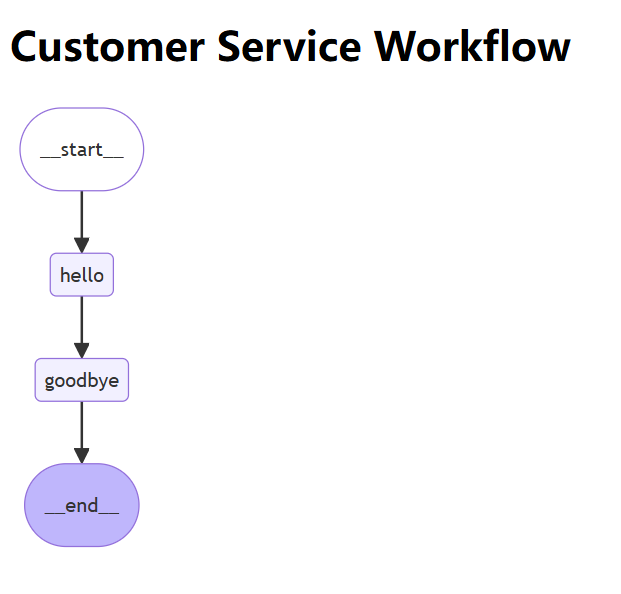
    <h1>Customer Service Workflow</h1>
    <div class="mermaid">
{mermaid_text}
    </div>
</body>
</html>
"""

html_filename = "workflow_visualization1.html"
with open(html_filename, "w", encoding="utf-8") as f:
    f.write(html_content)
print(f"✅ HTML可视化文件已保存为: {html_filename}")
代码示例如上,核心生图代码:
mermaid_text = graph1.get_graph().draw_mermaid()
# 生成HTML可视化文件
html_content = f"""
<!DOCTYPE html>
<html>
<head>
    <title>LangGraph工作流可视化</title>
    <script type="module">
        import mermaid from 'https://cdn.jsdelivr.net/npm/mermaid@10/dist/mermaid.esm.min.mjs';
        mermaid.initialize({{ startOnLoad: true }});
    </script>
</head>
<body>
    <h1>Customer Service Workflow</h1>
    <div class="mermaid">
{mermaid_text}
    </div>
</body>
</html>
"""

html_filename = "workflow_visualization1.html"
with open(html_filename, "w", encoding="utf-8") as f:
    f.write(html_content)
print(f"✅ HTML可视化文件已保存为: {html_filename}")
然后打开html即可得到如下显示

Agent 垂直技术社区,欢迎活跃、内容共建。
更多推荐
 0
0 0
0- 0


 已为社区贡献3条内容

所有评论(0)