Python + Tkinter 开发的本地电子书管理阅读器
·
一、程序整体功能概述
这是一款基于 Python + Tkinter 开发的本地电子书管理阅读器,专门管理本地电子书文件,自带 EPUB/TXT 内置阅读窗口,支持多主题、分类筛选、批量管理,所有配置、书单本地 JSON 存储,无联网、无广告。
核心功能分类
1. 文件导入与扫描
- 单 / 批量导入电子书文件(epub/txt/pdf/mobi/azw3/doc/docx/rtf)
- 一键扫描整个文件夹,自动识别所有支持格式
- 导入时自动按书名首字生成拼音 / 数字 / 英文分类,无需手动归类
2. 书籍库列表管理
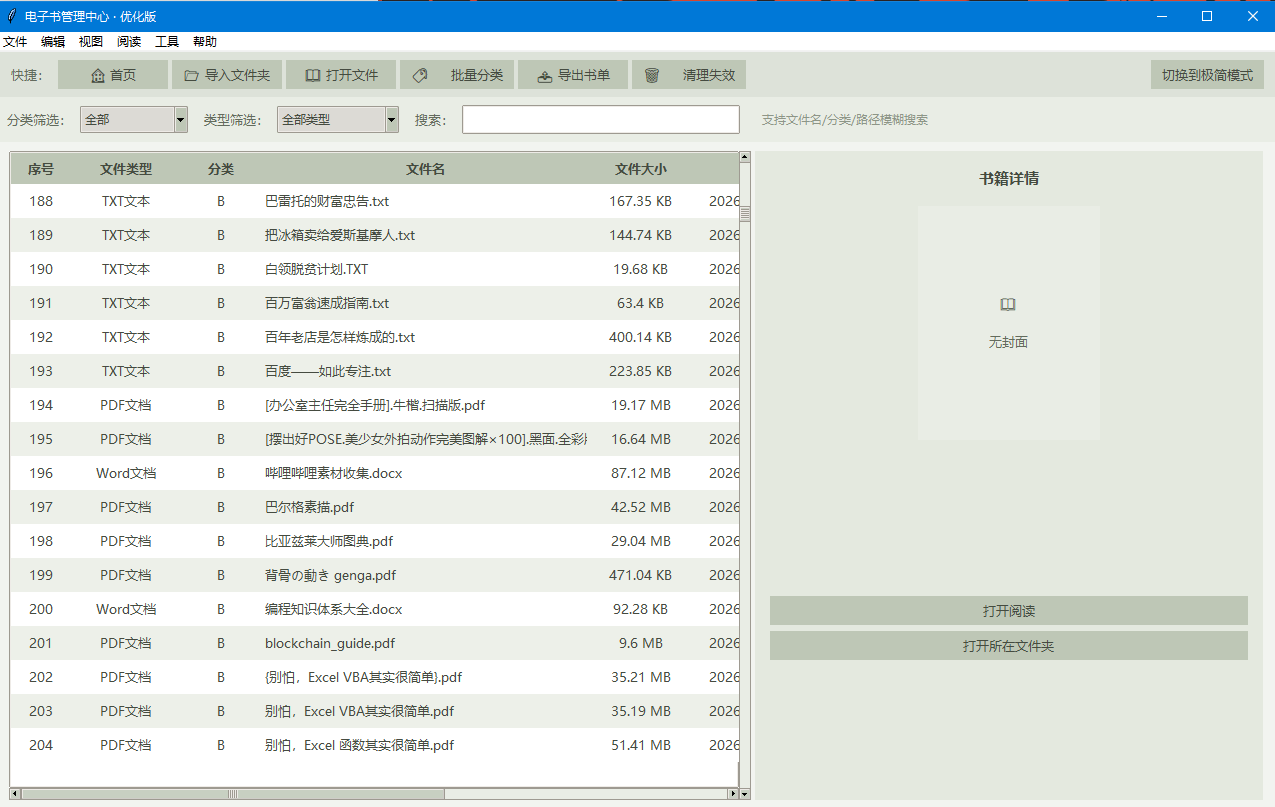
- 表格展示:序号、文件类型、分类、文件名、大小、添加时间、完整路径
- 多条件筛选:分类筛选、文件类型筛选、关键词模糊搜索(匹配文件名 / 分类 / 路径)
- 表格排序:点击表头切换升序 / 降序(分类、文件名、大小、添加时间、路径)
- 文件有效性检测:自动判断文件是否被删除 / 移动,失效文件标红
- 清理失效记录、批量删除书单、清空全部书单(仅删记录,不删除本地原文件)
- 批量修改书籍分类
- 导出完整书单为 TXT 文档备份
3. 内置阅读器(仅支持 EPUB、TXT)
- TXT 自动按 “第 X 章” 分割章节,生成目录
- EPUB 完整解析:提取真实书名、作者、封面、章节、内嵌图片
- 左侧章节目录快速跳转
- 自定义阅读排版:
- 自动读取系统全部中文字体切换
- 四档字号、三档行间距
- 支持 EPUB 内图片缩放展示,大图自动适配阅读宽度
- 阅读设置永久保存
4. 书籍详情面板
- 左右分割布局,选中书籍右侧展示信息
- EPUB 自动加载、缓存封面缩略图;其他文档显示默认图标
- 展示真实书名、作者、文件大小、所属分类
- 快捷按钮:打开阅读、打开文件所在文件夹
5. 界面自定义(6 套完整主题)
- 经典奶咖、冷调灰蓝、抹茶护眼、烟粉柔紫、深色墨灰(夜间)、豆沙护眼
- 三种表格行密度:紧凑 / 标准 / 宽松
- 双界面模式:顶部经典菜单栏 / 极简无菜单模式
- 所有界面配置自动记忆:窗口尺寸、分栏宽度、主题、筛选条件、排序、阅读字体字号等
6. 快捷操作
- 双击书籍直接打开阅读
- 右键菜单快速操作(打开、定位文件夹、批量改分类、删除)
- 状态栏实时统计:总文件数、当前筛选数量、失效文件、当前筛选 / 排序规则
- 一键返回首页(清空所有筛选搜索)
7. 数据持久化
epub_library.json:存储所有导入书籍的路径、大小、分类、添加时间reader_config.json:存储全部界面、阅读、布局配置- 封面缓存字典,避免重复解析 EPUB 封面卡顿
8. 外部文件调用
PDF/MOBI/AZW3/Word 等不支持内置预览,自动调用系统默认软件打开; 找不到阅读器时弹出对应安装提示。
二、需要安装的第三方依赖
# 处理图片(EPUB封面、书中插图渲染)
pip install pillow

# 中文转拼音(自动生成书籍分类)
pip install pypinyin
三、程序代码
import os
import json
import re
import time
import zipfile
import io
import xml.etree.ElementTree as ET
import tkinter as tk
from tkinter import filedialog, messagebox, ttk, Menu, PanedWindow, font
import webbrowser
# ===================== 依赖检查 =====================
try:
from PIL import Image, ImageTk
HAS_PIL = True
except ImportError:
HAS_PIL = False
try:
from pypinyin import lazy_pinyin
HAS_PINYIN = True
except ImportError:
HAS_PINYIN = False
# ===================== 6套主题配色系统 =====================
THEMES = {
"经典奶咖": {
"bg_main": "#F5F1ED", "bg_toolbar": "#E8E2DB", "bg_filter": "#F0ECE8",
"bg_status": "#DDD6CE", "bg_panel": "#EDE7E0", "bg_reader": "#F7F3EF",
"text_primary": "#4A4540", "text_secondary": "#6B6560", "text_disabled": "#9A938C",
"row_odd": "#F0ECE8", "row_even": "#FFFFFF",
"row_invalid_bg": "#E8D5D2", "row_invalid_fg": "#A65D52",
"header_bg": "#D9D2CA", "accent": "#B8A99A", "border": "#C9C0B7",
"title_color": "#3D3834", "select_bg": "#C9BFB3", "menu_bg": "#EDE7E0"
},
"冷调灰蓝": {
"bg_main": "#F0F2F5", "bg_toolbar": "#DCE0E6", "bg_filter": "#E8EBF0",
"bg_status": "#CBD2DC", "bg_panel": "#E3E8EF", "bg_reader": "#F4F6F8",
"text_primary": "#434A54", "text_secondary": "#656D78", "text_disabled": "#9098A0",
"row_odd": "#EDF0F4", "row_even": "#FFFFFF",
"row_invalid_bg": "#E0D5D8", "row_invalid_fg": "#A05B65",
"header_bg": "#C5CFDA", "accent": "#8A9AAE", "border": "#B8C2CE",
"title_color": "#383E48", "select_bg": "#B0BECD", "menu_bg": "#E3E8EF"
},
"抹茶护眼": {
"bg_main": "#F2F4F0", "bg_toolbar": "#DDE2D9", "bg_filter": "#E9EDE5",
"bg_status": "#C8D0C2", "bg_panel": "#E4E9DF", "bg_reader": "#F5F7F3",
"text_primary": "#454B40", "text_secondary": "#636B5D", "text_disabled": "#8E9688",
"row_odd": "#EDF0E9", "row_even": "#FFFFFF",
"row_invalid_bg": "#E5D7D4", "row_invalid_fg": "#A25E55",
"header_bg": "#BEC7B6", "accent": "#96A68E", "border": "#B0BAA7",
"title_color": "#3A4036", "select_bg": "#A8B59E", "menu_bg": "#E4E9DF"
},
"烟粉柔紫": {
"bg_main": "#F5F0F2", "bg_toolbar": "#E2D9DE", "bg_filter": "#EDE5E9",
"bg_status": "#D0C3CB", "bg_panel": "#E8DFE4", "bg_reader": "#F7F2F4",
"text_primary": "#4A4247", "text_secondary": "#6B6167", "text_disabled": "#998F95",
"row_odd": "#F0E9ED", "row_even": "#FFFFFF",
"row_invalid_bg": "#E7D3D1", "row_invalid_fg": "#A55D56",
"header_bg": "#C9BCC4", "accent": "#A8929E", "border": "#BEB0B8",
"title_color": "#3E373B", "select_bg": "#B8A6B0", "menu_bg": "#E8DFE4"
},
"深色墨灰": {
"bg_main": "#2B2D30", "bg_toolbar": "#232528", "bg_filter": "#26282B",
"bg_status": "#1E1F22", "bg_panel": "#202225", "bg_reader": "#2E3033",
"text_primary": "#D0D2D5", "text_secondary": "#9EA1A6", "text_disabled": "#6C6F74",
"row_odd": "#2A2C2F", "row_even": "#323437",
"row_invalid_bg": "#4A2E2E", "row_invalid_fg": "#E08080",
"header_bg": "#383A3E", "accent": "#5C626A", "border": "#3A3C40",
"title_color": "#E8E9EB", "select_bg": "#4A5058", "menu_bg": "#25272A"
},
"豆沙护眼": {
"bg_main": "#F0E9DC", "bg_toolbar": "#E3D9C7", "bg_filter": "#EBE3D4",
"bg_status": "#D4C7AE", "bg_panel": "#E0D5C0", "bg_reader": "#F5EFE3",
"text_primary": "#5C4D3A", "text_secondary": "#7D6E5A", "text_disabled": "#A89A84",
"row_odd": "#EBE3D4", "row_even": "#F7F1E5",
"row_invalid_bg": "#E0C8C2", "row_invalid_fg": "#A86458",
"header_bg": "#D4C7AE", "accent": "#B8A688", "border": "#C8BBA5",
"title_color": "#4A3D2E", "select_bg": "#C8B89A", "menu_bg": "#E0D5C0"
}
}
CONFIG_FILE = "reader_config.json"
RECORD_FILE = "epub_library.json"
COVER_CACHE = {}
SUPPORT_EXT = {
".epub": "EPUB电子书", ".txt": "TXT文本", ".pdf": "PDF文档",
".mobi": "MOBI电子书", ".azw3": "Kindle电子书", ".docx": "Word文档",
".doc": "Word文档", ".rtf": "RTF文档"
}
NS_CONTAINER = {"c": "urn:oasis:names:tc:opendocument:xmlns:container"}
NS_OPF = {"opf": "http://www.idpf.org/2007/opf", "dc": "http://purl.org/dc/elements/1.1/"}
DENSITY_CONFIG = {"紧凑模式": 22, "标准模式": 28, "宽松模式": 34}
FONT_SIZE_MAP = {"小": 10, "标准": 12, "大": 14, "超大": 16}
LINE_SPACING_MAP = {"紧凑": 2, "标准": 4, "宽松": 8}
# ===================== 系统字体获取 =====================
def get_system_fonts():
"""获取系统可用的中文字体列表"""
all_fonts = font.families()
# 优先推荐的中文字体(按优先级排序)
preferred_cn = [
"微软雅黑", "宋体", "黑体", "楷体", "仿宋", "思源黑体", "思源宋体",
"苹方", "华文黑体", "华文宋体", "华文中宋", "华文楷体", "华文仿宋",
"方正舒体", "方正姚体", "隶书", "幼圆"
]
# 筛选系统中实际存在的字体
available = [f for f in preferred_cn if f in all_fonts]
# 保底字体
if not available:
available = ["Microsoft YaHei", "SimSun", "SimHei"]
return available
# ===================== 配置读写 =====================
def load_config():
default = {
"theme": "经典奶咖",
"density": "标准模式",
"menu_mode": "经典模式",
"category_filter": "全部",
"type_filter": "全部类型",
"sort_col": "category",
"sort_reverse": False,
"reader_font": "微软雅黑",
"reader_font_size": "标准",
"reader_line_spacing": "标准",
"window_geometry": "1280x780",
"sash_pos": 920
}
if not os.path.exists(CONFIG_FILE):
return default
try:
with open(CONFIG_FILE, "r", encoding="utf-8") as f:
data = json.load(f)
default.update(data)
return default
except:
return default
def save_config(config):
try:
with open(CONFIG_FILE, "w", encoding="utf-8") as f:
json.dump(config, f, ensure_ascii=False, indent=2)
except:
pass
# ===================== 工具函数 =====================
def get_auto_category(book_name):
book_name = book_name.strip()
if not book_name:
return "其他"
first_char = ""
for c in book_name:
if c.isalnum() or '\u4e00' <= c <= '\u9fff':
first_char = c
break
if not first_char:
return "其他"
if first_char.isascii() and first_char.isalpha():
return first_char.upper()
elif first_char.isdigit():
return "0-9"
elif HAS_PINYIN and '\u4e00' <= first_char <= '\u9fff':
try:
return lazy_pinyin(first_char)[0][0].upper()
except:
return "中文书籍"
return "其他"
def html_to_text(html_str):
html_str = re.sub(r"<br\s*/?>", "\n", html_str, flags=re.IGNORECASE)
html_str = re.sub(r"</p>|</div>|</h\d>|</li>", "\n\n", html_str, flags=re.IGNORECASE)
text = re.sub(r"<[^>]+>", "", html_str)
text = re.sub(r" ", " ", text)
text = re.sub(r"[ \t]+", " ", text)
text = re.sub(r"\n{3,}", "\n\n", text)
return text.strip()
def parse_epub_full(epub_path):
if not os.path.isfile(epub_path):
raise FileNotFoundError("文件不存在")
with zipfile.ZipFile(epub_path, "r") as zf:
container_xml = zf.read("META-INF/container.xml").decode("utf-8", errors="ignore")
container_root = ET.fromstring(container_xml)
rootfile_node = container_root.find("c:rootfiles/c:rootfile", NS_CONTAINER)
if rootfile_node is None:
raise ValueError("非标准EPUB格式")
opf_path = rootfile_node.attrib["full-path"]
opf_dir = os.path.dirname(opf_path).replace("\\", "/")
opf_content = zf.read(opf_path).decode("utf-8", errors="ignore")
opf_root = ET.fromstring(opf_content)
title_node = opf_root.find("opf:metadata/dc:title", NS_OPF)
title = title_node.text.strip() if title_node is not None and title_node.text else "无书名"
author_node = opf_root.find("opf:metadata/dc:creator", NS_OPF)
author = author_node.text.strip() if author_node is not None and author_node.text else "未知作者"
cover_data = None
cover_meta = opf_root.find("opf:metadata/opf:meta[@name='cover']", NS_OPF)
if cover_meta is not None:
cover_id = cover_meta.attrib.get("content", "")
cover_item = opf_root.find(f"opf:manifest/opf:item[@id='{cover_id}']", NS_OPF)
if cover_item is not None:
cover_href = cover_item.attrib.get("href", "")
cover_full = os.path.join(opf_dir, cover_href).replace("\\", "/")
if cover_full in zf.namelist():
try:
cover_data = zf.read(cover_full)
except:
pass
manifest = {}
for item in opf_root.findall("opf:manifest/opf:item", NS_OPF):
manifest[item.attrib["id"]] = os.path.join(opf_dir, item.attrib["href"]).replace("\\", "/")
spine_ids = [item.attrib["idref"] for item in opf_root.findall("opf:spine/opf:itemref", NS_OPF)]
chapters = []
for idx, chap_id in enumerate(spine_ids, 1):
chap_path = manifest.get(chap_id)
if not chap_path or chap_path not in zf.namelist():
continue
try:
chap_html = zf.read(chap_path).decode("utf-8", errors="ignore")
chap_dir = os.path.dirname(chap_path).replace("\\", "/")
blocks = []
chap_title = f"第{idx}章"
title_match = re.search(r"<title>(.*?)</title>", chap_html, re.IGNORECASE)
if title_match and title_match.group(1).strip():
chap_title = title_match.group(1).strip()
img_pattern = re.compile(r"<img[^>]+src=[\"'](.*?)[\"'][^>]*>", re.IGNORECASE)
last_pos = 0
for match in img_pattern.finditer(chap_html):
clean_text = html_to_text(chap_html[last_pos:match.start()])
if clean_text.strip():
blocks.append({"type": "text", "content": clean_text})
img_full = os.path.join(chap_dir, match.group(1)).replace("\\", "/")
if img_full in zf.namelist():
try:
blocks.append({"type": "image", "data": zf.read(img_full)})
except:
pass
last_pos = match.end()
clean_text = html_to_text(chap_html[last_pos:])
if clean_text.strip():
blocks.append({"type": "text", "content": clean_text})
if blocks:
chapters.append({"title": chap_title, "blocks": blocks})
except:
continue
if not chapters:
chapters.append({"title": "无内容", "blocks": [{"type": "text", "content": "本书未提取到可阅读的内容"}]})
return {
"title": title,
"author": author,
"cover": cover_data,
"chapters": chapters
}
def get_epub_meta_fast(epub_path):
if epub_path in COVER_CACHE:
return COVER_CACHE[epub_path]
try:
full = parse_epub_full(epub_path)
meta = {"title": full["title"], "author": full["author"], "cover": full["cover"]}
COVER_CACHE[epub_path] = meta
return meta
except:
meta = {"title": os.path.basename(epub_path), "author": "未知", "cover": None}
COVER_CACHE[epub_path] = meta
return meta
def read_txt_file(txt_path):
encodings = ["utf-8", "gbk", "gb2312", "utf-16"]
for enc in encodings:
try:
with open(txt_path, "r", encoding=enc) as f:
content = f.read()
lines = content.splitlines()
chapters = []
current_title = "全文"
current_content = []
for line in lines:
if re.match(r"^第[一二三四五六七八九十百千0-9]+[章节卷部]", line.strip()) and len(line.strip()) < 30:
if current_content:
chapters.append({
"title": current_title,
"blocks": [{"type": "text", "content": "\n".join(current_content)}]
})
current_title = line.strip()
current_content = []
else:
current_content.append(line)
if current_content:
chapters.append({
"title": current_title,
"blocks": [{"type": "text", "content": "\n".join(current_content)}]
})
if not chapters:
chapters.append({"title": "全文", "blocks": [{"type": "text", "content": content}]})
return {
"title": os.path.basename(txt_path),
"author": "TXT文档",
"cover": None,
"chapters": chapters
}
except UnicodeDecodeError:
continue
raise ValueError("无法识别文件编码")
# ===================== 主程序类 =====================
class EpubLibraryApp:
def __init__(self, root):
self.root = root
self.config = load_config()
self.theme = THEMES[self.config["theme"]]
self.system_fonts = get_system_fonts()
# 窗口初始化
self.root.title("电子书管理中心 · 优化版")
try:
self.root.geometry(self.config["window_geometry"])
except:
self.root.geometry("1280x780")
self.root.minsize(1000, 600)
self.root.configure(bg=self.theme["bg_main"])
# 样式初始化
self.style = ttk.Style()
self.style.theme_use("clam")
self._init_theme_style()
# 数据状态
self.book_data = self._load_records()
self.file_valid = {}
self.sort_col = self.config["sort_col"]
self.sort_reverse = self.config["sort_reverse"]
self.current_category = self.config["category_filter"]
self.current_type = self.config["type_filter"]
self.search_keyword = ""
self.categories = self._get_all_categories()
self.type_list = self._get_all_types()
self.cover_photo_ref = None
# 构建界面
if self.config["menu_mode"] == "经典模式":
self._build_menubar()
self._build_ui()
self._refresh_table_tags()
# 初始化数据
self._check_all_files_valid(silent=True)
self._refresh_table()
self._update_status()
# 窗口关闭事件
self.root.protocol("WM_DELETE_WINDOW", self._on_close)
def _init_theme_style(self):
c = self.theme
self.style.configure(".", font=("微软雅黑", 10), foreground=c["text_primary"])
self.style.configure("TButton", background=c["header_bg"], foreground=c["text_primary"],
padding=(10, 4), borderwidth=0)
self.style.map("TButton", background=[("active", c["accent"]), ("pressed", c["border"])])
self.style.configure("TCombobox", fieldbackground=c["row_even"], background=c["header_bg"],
foreground=c["text_primary"], padding=3)
self.style.configure("TEntry", fieldbackground=c["row_even"], foreground=c["text_primary"], padding=4)
row_h = DENSITY_CONFIG[self.config["density"]]
self.style.configure("Treeview", background=c["row_even"], foreground=c["text_primary"],
fieldbackground=c["row_even"], rowheight=row_h, borderwidth=0)
self.style.configure("Treeview.Heading", background=c["header_bg"], foreground=c["text_primary"],
font=("微软雅黑", 10, "bold"), padding=6, borderwidth=0)
self.style.map("Treeview.Heading", background=[("active", c["accent"])])
self.style.map("Treeview", background=[("selected", c["select_bg"])])
self.style.configure("TScrollbar", background=c["bg_status"], troughcolor=c["bg_filter"],
borderwidth=0, arrowsize=12)
self.style.configure("TSeparator", background=c["border"])
def _refresh_table_tags(self):
c = self.theme
self.tree.tag_configure("odd", background=c["row_odd"])
self.tree.tag_configure("even", background=c["row_even"])
self.tree.tag_configure("invalid", background=c["row_invalid_bg"], foreground=c["row_invalid_fg"])
# ===================== 菜单栏 =====================
def _build_menubar(self):
c = self.theme
menubar = Menu(self.root, bg=c["menu_bg"], fg=c["text_primary"],
font=("微软雅黑", 10), tearoff=0)
self.root.config(menu=menubar)
self.menubar = menubar
# 文件
file_menu = Menu(menubar, tearoff=0, bg=c["bg_main"], fg=c["text_primary"],
font=("微软雅黑", 10), activebackground=c["accent"], activeforeground="#ffffff")
file_menu.add_command(label="导入文件...", command=self._import_files)
file_menu.add_command(label="导入文件夹...", command=self._import_folder)
file_menu.add_separator()
file_menu.add_command(label="导出书单...", command=self._export_book_list)
file_menu.add_separator()
file_menu.add_command(label="清理失效记录", command=self._clean_invalid)
file_menu.add_separator()
file_menu.add_command(label="退出", command=self.root.quit)
menubar.add_cascade(label="文件", menu=file_menu)
# 编辑
edit_menu = Menu(menubar, tearoff=0, bg=c["bg_main"], fg=c["text_primary"],
font=("微软雅黑", 10), activebackground=c["accent"], activeforeground="#ffffff")
edit_menu.add_command(label="批量设置分类", command=self._set_category_batch)
edit_menu.add_separator()
edit_menu.add_command(label="删除选中记录", command=self._delete_selected)
edit_menu.add_command(label="清空全部记录", command=self._clear_all)
edit_menu.add_separator()
edit_menu.add_command(label="刷新文件状态", command=self._refresh_file_status)
menubar.add_cascade(label="编辑", menu=edit_menu)
# 视图
view_menu = Menu(menubar, tearoff=0, bg=c["bg_main"], fg=c["text_primary"],
font=("微软雅黑", 10), activebackground=c["accent"], activeforeground="#ffffff")
theme_menu = Menu(view_menu, tearoff=0, bg=c["bg_main"], fg=c["text_primary"],
font=("微软雅黑", 10), activebackground=c["accent"], activeforeground="#ffffff")
self.theme_var = tk.StringVar(value=self.config["theme"])
for name in THEMES.keys():
theme_menu.add_radiobutton(label=name, variable=self.theme_var,
command=lambda n=name: self._switch_theme(n))
view_menu.add_cascade(label="配色主题", menu=theme_menu)
density_menu = Menu(view_menu, tearoff=0, bg=c["bg_main"], fg=c["text_primary"],
font=("微软雅黑", 10), activebackground=c["accent"], activeforeground="#ffffff")
self.density_var = tk.StringVar(value=self.config["density"])
for name in DENSITY_CONFIG.keys():
density_menu.add_radiobutton(label=name, variable=self.density_var,
command=lambda n=name: self._switch_density(n))
view_menu.add_cascade(label="显示密度", menu=density_menu)
view_menu.add_separator()
self.menu_mode_var = tk.StringVar(value=self.config["menu_mode"])
view_menu.add_radiobutton(label="经典菜单模式", variable=self.menu_mode_var,
command=lambda: self._switch_menu_mode("经典模式"))
view_menu.add_radiobutton(label="极简工具栏模式", variable=self.menu_mode_var,
command=lambda: self._switch_menu_mode("极简模式"))
view_menu.add_separator()
view_menu.add_command(label="返回首页", command=self._go_home)
menubar.add_cascade(label="视图", menu=view_menu)
# 阅读
read_menu = Menu(menubar, tearoff=0, bg=c["bg_main"], fg=c["text_primary"],
font=("微软雅黑", 10), activebackground=c["accent"], activeforeground="#ffffff")
font_menu = Menu(read_menu, tearoff=0, bg=c["bg_main"], fg=c["text_primary"],
font=("微软雅黑", 10), activebackground=c["accent"], activeforeground="#ffffff")
self.reader_font_var = tk.StringVar(value=self.config["reader_font"])
for f in self.system_fonts:
font_menu.add_radiobutton(label=f, variable=self.reader_font_var,
command=lambda ff=f: self._save_reader_setting("reader_font", ff))
read_menu.add_cascade(label="阅读字体", menu=font_menu)
size_menu = Menu(read_menu, tearoff=0, bg=c["bg_main"], fg=c["text_primary"],
font=("微软雅黑", 10), activebackground=c["accent"], activeforeground="#ffffff")
self.reader_size_var = tk.StringVar(value=self.config["reader_font_size"])
for s in FONT_SIZE_MAP.keys():
size_menu.add_radiobutton(label=s, variable=self.reader_size_var,
command=lambda ss=s: self._save_reader_setting("reader_font_size", ss))
read_menu.add_cascade(label="字号大小", menu=size_menu)
space_menu = Menu(read_menu, tearoff=0, bg=c["bg_main"], fg=c["text_primary"],
font=("微软雅黑", 10), activebackground=c["accent"], activeforeground="#ffffff")
self.reader_space_var = tk.StringVar(value=self.config["reader_line_spacing"])
for s in LINE_SPACING_MAP.keys():
space_menu.add_radiobutton(label=s, variable=self.reader_space_var,
command=lambda ss=s: self._save_reader_setting("reader_line_spacing", ss))
read_menu.add_cascade(label="行间距", menu=space_menu)
menubar.add_cascade(label="阅读", menu=read_menu)
# 工具
tool_menu = Menu(menubar, tearoff=0, bg=c["bg_main"], fg=c["text_primary"],
font=("微软雅黑", 10), activebackground=c["accent"], activeforeground="#ffffff")
tool_menu.add_command(label="打开选中文件", command=self._open_file)
tool_menu.add_command(label="打开所在文件夹", command=self._open_file_folder)
tool_menu.add_separator()
tool_menu.add_command(label="检查所有文件有效性", command=self._refresh_file_status)
menubar.add_cascade(label="工具", menu=tool_menu)
# 帮助
help_menu = Menu(menubar, tearoff=0, bg=c["bg_main"], fg=c["text_primary"],
font=("微软雅黑", 10), activebackground=c["accent"], activeforeground="#ffffff")
help_menu.add_command(label="操作指南", command=self._show_help)
help_menu.add_separator()
help_menu.add_command(label="关于", command=lambda: messagebox.showinfo(
"关于", "电子书管理中心 · 优化版\n\n✅ 系统字体自动加载\n✅ 6套主题配色\n✅ 双菜单模式\n✅ 全状态记忆"))
menubar.add_cascade(label="帮助", menu=help_menu)
def _remove_menubar(self):
self.root.config(menu="")
if hasattr(self, 'menubar'):
del self.menubar
# ===================== 模式与主题切换 =====================
def _switch_menu_mode(self, mode):
self.config["menu_mode"] = mode
save_config(self.config)
if mode == "经典模式":
self._build_menubar()
else:
self._remove_menubar()
# 更新工具栏按钮文字
self.toggle_menu_btn.config(text="切换到经典菜单" if mode == "极简模式" else "切换到极简模式")
messagebox.showinfo("模式切换", f"已切换为「{mode}」")
def _switch_theme(self, theme_name):
if theme_name not in THEMES:
return
self.config["theme"] = theme_name
self.theme = THEMES[theme_name]
save_config(self.config)
self._init_theme_style()
self.root.configure(bg=self.theme["bg_main"])
if self.config["menu_mode"] == "经典模式":
self._remove_menubar()
self._build_menubar()
# 更新各区域背景
self.tool_frame.configure(bg=self.theme["bg_toolbar"])
self.filter_frame.configure(bg=self.theme["bg_filter"])
self.paned_window.configure(bg=self.theme["bg_main"])
self.detail_frame.configure(bg=self.theme["bg_panel"])
self.status_bar.configure(bg=self.theme["bg_status"], fg=self.theme["text_secondary"])
for w in self.tool_frame.winfo_children():
if isinstance(w, tk.Label):
w.configure(bg=self.theme["bg_toolbar"], fg=self.theme["text_secondary"])
for w in self.filter_frame.winfo_children():
if isinstance(w, tk.Label):
w.configure(bg=self.theme["bg_filter"], fg=self.theme["text_secondary"])
for w in self.detail_frame.winfo_children():
if isinstance(w, tk.Label):
w.configure(bg=self.theme["bg_panel"])
# 更新右键菜单配色
self.right_menu.config(bg=self.theme["bg_main"], fg=self.theme["text_primary"],
activebackground=self.theme["accent"])
self.cover_label.configure(bg=self.theme["bg_filter"])
self._refresh_table_tags()
self._refresh_table()
self._update_detail_panel()
def _switch_density(self, density_name):
if density_name not in DENSITY_CONFIG:
return
self.config["density"] = density_name
save_config(self.config)
self.style.configure("Treeview", rowheight=DENSITY_CONFIG[density_name])
self._refresh_table()
def _save_reader_setting(self, key, value):
self.config[key] = value
save_config(self.config)
def _go_home(self):
self.current_category = "全部"
self.current_type = "全部类型"
self.search_keyword = ""
self.sort_col = "category"
self.sort_reverse = False
self.category_combo.set("全部")
self.type_combo.set("全部类型")
self.search_entry.delete(0, tk.END)
self._refresh_table()
self._update_status()
# ===================== 数据持久化 =====================
def _load_records(self):
if not os.path.exists(RECORD_FILE):
return {}
try:
with open(RECORD_FILE, "r", encoding="utf-8") as f:
data = json.load(f)
if isinstance(data, dict):
for path in data:
info = data[path]
if "category" not in info or info["category"] == "未分类":
info["category"] = get_auto_category(info["name"])
if "file_type" not in info:
ext = os.path.splitext(path)[1].lower()
info["file_type"] = SUPPORT_EXT.get(ext, "其他文件")
return data
except:
pass
return {}
def _save_records(self):
try:
with open(RECORD_FILE, "w", encoding="utf-8") as f:
json.dump(self.book_data, f, ensure_ascii=False, indent=2)
except:
pass
def _get_all_categories(self):
return sorted(set(info.get("category", "其他") for info in self.book_data.values()))
def _get_all_types(self):
return sorted(set(info.get("file_type", "未知") for info in self.book_data.values()))
# ===================== 格式化 =====================
@staticmethod
def _format_size(byte_num):
if byte_num < 1024:
return f"{byte_num} B"
elif byte_num < 1024 * 1024:
return f"{round(byte_num / 1024, 2)} KB"
else:
return f"{round(byte_num / 1024 / 1024, 2)} MB"
@staticmethod
def _format_time(timestamp):
return time.strftime("%Y-%m-%d %H:%M:%S", time.localtime(timestamp))
# ===================== 导入 =====================
def _import_files(self):
file_types = [("所有支持格式", "*.epub *.txt *.pdf *.mobi *.azw3 *.docx *.doc")] + \
[(name, f"*{ext}") for ext, name in SUPPORT_EXT.items()] + [("所有文件", "*.*")]
paths = filedialog.askopenfilenames(title="选择电子书/文档文件", filetypes=file_types)
if paths:
self._add_books(paths)
def _import_folder(self):
folder = filedialog.askdirectory(title="选择文件夹,自动扫描所有电子书")
if not folder:
return
file_list = []
for root, _, files in os.walk(folder):
for file in files:
ext = os.path.splitext(file)[1].lower()
if ext in SUPPORT_EXT:
file_list.append(os.path.join(root, file))
if not file_list:
messagebox.showinfo("提示", "该文件夹内未找到支持的电子书/文档文件")
return
self._add_books(file_list)
def _add_books(self, path_list):
add_count = 0
for path in path_list:
if path in self.book_data:
continue
try:
stat = os.stat(path)
file_name = os.path.basename(path)
ext = os.path.splitext(file_name)[1].lower()
self.book_data[path] = {
"name": file_name,
"file_type": SUPPORT_EXT.get(ext, "其他文件"),
"size": stat.st_size,
"add_time": time.time(),
"category": get_auto_category(file_name)
}
self.file_valid[path] = True
add_count += 1
except:
continue
self._save_records()
self.categories = self._get_all_categories()
self.type_list = self._get_all_types()
self._update_filter_combos()
self._refresh_table()
self._update_status()
messagebox.showinfo("导入完成", f"成功新增 {add_count} 个文件\n已自动按书名首字母分类")
# ===================== 筛选 =====================
def _update_filter_combos(self):
cat_options = ["全部"] + self.categories
self.category_combo["values"] = cat_options
if self.current_category not in cat_options:
self.current_category = "全部"
self.category_combo.set(self.current_category)
type_options = ["全部类型"] + self.type_list
self.type_combo["values"] = type_options
if self.current_type not in type_options:
self.current_type = "全部类型"
self.type_combo.set(self.current_type)
def _on_category_change(self, event):
self.current_category = self.category_combo.get()
self.config["category_filter"] = self.current_category
save_config(self.config)
self._refresh_table()
self._update_status()
def _on_type_change(self, event):
self.current_type = self.type_combo.get()
self.config["type_filter"] = self.current_type
save_config(self.config)
self._refresh_table()
self._update_status()
def _on_search_input(self, event):
self.search_keyword = self.search_entry.get().strip().lower()
self._refresh_table()
self._update_status()
# ===================== 分类管理 =====================
def _set_category_batch(self):
selected = self.tree.selection()
if not selected:
messagebox.showwarning("提示", "请先选中要修改分类的文件")
return
win = tk.Toplevel(self.root)
win.title("批量设置分类")
win.geometry("340x180")
win.resizable(False, False)
win.transient(self.root)
win.grab_set()
win.configure(bg=self.theme["bg_main"])
tk.Label(win, text=f"已选中 {len(selected)} 个文件",
font=("微软雅黑", 11), bg=self.theme["bg_main"],
fg=self.theme["text_primary"]).pack(pady=12)
tk.Label(win, text="选择或输入分类名称:", bg=self.theme["bg_main"],
fg=self.theme["text_secondary"]).pack(anchor="w", padx=25)
cat_var = tk.StringVar(value=self.categories[0] if self.categories else "")
ttk.Combobox(win, textvariable=cat_var, values=self.categories, width=28).pack(padx=25, pady=6)
def confirm():
cat_name = cat_var.get().strip()
if not cat_name:
messagebox.showwarning("提示", "请输入或选择分类名称")
return
for item in selected:
path = self.tree.item(item, "values")[6]
if path in self.book_data:
self.book_data[path]["category"] = cat_name
self._save_records()
self.categories = self._get_all_categories()
self._update_filter_combos()
self._refresh_table()
self._update_status()
win.destroy()
messagebox.showinfo("完成", f"已将 {len(selected)} 个文件分类为「{cat_name}」")
ttk.Button(win, text="确定", command=confirm).pack(pady=15)
# ===================== 排序 =====================
def _sort_table(self, col):
if self.sort_col == col:
self.sort_reverse = not self.sort_reverse
else:
self.sort_col = col
self.sort_reverse = False
self.config["sort_col"] = col
self.config["sort_reverse"] = self.sort_reverse
save_config(self.config)
self._refresh_table()
# ===================== 文件状态 =====================
def _check_all_files_valid(self, silent=False):
invalid_count = 0
for path in self.book_data:
valid = os.path.isfile(path)
self.file_valid[path] = valid
if not valid:
invalid_count += 1
if not silent:
messagebox.showinfo("检查完成", f"共检查 {len(self.book_data)} 个文件\n失效文件 {invalid_count} 个(已标红)")
def _refresh_file_status(self):
self._check_all_files_valid(silent=False)
self._refresh_table()
self._update_status()
def _clean_invalid(self):
invalid_paths = [p for p, v in self.file_valid.items() if not v]
if not invalid_paths:
messagebox.showinfo("提示", "没有失效的记录")
return
if messagebox.askyesno("确认清理", f"确定清理 {len(invalid_paths)} 条失效记录吗?"):
for p in invalid_paths:
self.book_data.pop(p, None)
self.file_valid.pop(p, None)
COVER_CACHE.pop(p, None)
self._save_records()
self.categories = self._get_all_categories()
self.type_list = self._get_all_types()
self._update_filter_combos()
self._refresh_table()
self._update_status()
self._update_detail_panel()
# ===================== 表格刷新 =====================
def _refresh_table(self):
for item in self.tree.get_children():
self.tree.delete(item)
filtered = []
for path, info in self.book_data.items():
if self.current_category != "全部" and info.get("category", "其他") != self.current_category:
continue
if self.current_type != "全部类型" and info.get("file_type", "") != self.current_type:
continue
filtered.append((path, info))
if self.search_keyword:
result = []
for path, info in filtered:
if (self.search_keyword in info["name"].lower() or
self.search_keyword in info.get("category", "").lower() or
self.search_keyword in info.get("file_type", "").lower() or
self.search_keyword in path.lower()):
result.append((path, info))
filtered = result
sort_keys = {
"category": lambda x: x[1].get("category", ""),
"file_type": lambda x: x[1].get("file_type", ""),
"name": lambda x: x[1]["name"].lower(),
"size": lambda x: x[1]["size"],
"add_time": lambda x: x[1]["add_time"],
"path": lambda x: x[0]
}
if self.sort_col in sort_keys:
filtered.sort(key=sort_keys[self.sort_col], reverse=self.sort_reverse)
for idx, (path, info) in enumerate(filtered, 1):
is_valid = self.file_valid.get(path, True)
tag = "invalid" if not is_valid else ("odd" if idx % 2 == 1 else "even")
self.tree.insert("", tk.END, values=(
idx,
info.get("file_type", "未知"),
info.get("category", "其他"),
info["name"],
self._format_size(info["size"]),
self._format_time(info["add_time"]),
path
), tags=(tag,))
# ===================== 删除 =====================
def _delete_selected(self):
selected = self.tree.selection()
if not selected:
messagebox.showwarning("提示", "请先选中要删除的记录")
return
if messagebox.askyesno("确认删除", f"确定删除选中的 {len(selected)} 条记录吗?\n(仅删除记录,不会删除原文件)"):
for item in selected:
path = self.tree.item(item, "values")[6]
self.book_data.pop(path, None)
self.file_valid.pop(path, None)
COVER_CACHE.pop(path, None)
self._save_records()
self.categories = self._get_all_categories()
self.type_list = self._get_all_types()
self._update_filter_combos()
self._refresh_table()
self._update_status()
self._update_detail_panel()
def _clear_all(self):
if messagebox.askyesno("确认清空", "确定删除全部书籍记录吗?\n此操作不可恢复,且不会删除原文件"):
self.book_data.clear()
self.file_valid.clear()
COVER_CACHE.clear()
self._save_records()
self.categories = []
self.type_list = []
self._update_filter_combos()
self._refresh_table()
self._update_status()
self._update_detail_panel()
# ===================== 文件打开 =====================
def _open_file(self, event=None):
selected = self.tree.selection()
if not selected:
return
row = self.tree.item(selected[0], "values")
file_path = row[6]
file_type = row[1]
if not os.path.isfile(file_path):
messagebox.showerror("文件丢失", "该文件已被移动或删除,请重新导入")
return
ext = os.path.splitext(file_path)[1].lower()
if ext == ".epub":
try:
book = parse_epub_full(file_path)
self._show_reader(book, file_type)
except Exception as e:
if messagebox.askyesno("内置预览失败", f"无法解析该EPUB:{str(e)}\n是否使用系统默认软件打开?"):
self._open_with_system(file_path, ext)
return
if ext == ".txt":
try:
book = read_txt_file(file_path)
self._show_reader(book, file_type)
except Exception as e:
if messagebox.askyesno("内置预览失败", f"无法读取该TXT:{str(e)}\n是否使用系统默认软件打开?"):
self._open_with_system(file_path, ext)
return
# 其他格式直接调用系统软件
self._open_with_system(file_path, ext)
def _open_with_system(self, file_path, ext=""):
try:
if os.name == "nt":
os.startfile(file_path)
else:
webbrowser.open(file_path)
except Exception as e:
# 针对不同格式给出友好提示
tip = ""
if ext in [".mobi", ".azw3"]:
tip = "\n\n💡 提示:MOBI/AZW3格式需要安装阅读器才能打开\n推荐安装:Calibre、Kindle for PC 等软件"
elif ext == ".pdf":
tip = "\n\n💡 提示:请安装PDF阅读器(如Adobe Reader、WPS等)"
elif ext in [".doc", ".docx", ".rtf"]:
tip = "\n\n💡 提示:请安装办公软件(如WPS、Microsoft Office等)"
messagebox.showerror("打开失败", f"无法调用系统程序打开该文件。\n错误信息:{str(e)}{tip}")
def _open_file_folder(self):
selected = self.tree.selection()
if not selected:
messagebox.showwarning("提示", "请先选中一个文件")
return
file_path = self.tree.item(selected[0], "values")[6]
if not os.path.exists(file_path):
messagebox.showerror("错误", "文件不存在,无法定位")
return
try:
if os.name == "nt":
os.system(f'explorer /select,"{os.path.normpath(file_path)}"')
else:
webbrowser.open(os.path.dirname(file_path))
except Exception as e:
messagebox.showerror("失败", f"无法打开文件夹:{str(e)}")
# ===================== 导出书单 =====================
def _export_book_list(self):
save_path = filedialog.asksaveasfilename(
title="导出书单",
defaultextension=".txt",
filetypes=[("文本文件", "*.txt")],
initialfile="我的电子书清单.txt"
)
if not save_path:
return
try:
with open(save_path, "w", encoding="utf-8") as f:
f.write(f"我的电子书清单(共{len(self.book_data)}本)\n")
f.write("=" * 60 + "\n\n")
for idx, (path, info) in enumerate(self.book_data.items(), 1):
f.write(f"{idx}. {info['name']}\n")
f.write(f" 分类:{info.get('category', '其他')}\n")
f.write(f" 类型:{info.get('file_type', '未知')}\n")
f.write(f" 大小:{self._format_size(info['size'])}\n")
f.write(f" 路径:{path}\n\n")
messagebox.showinfo("导出成功", f"书单已保存到:\n{save_path}")
except Exception as e:
messagebox.showerror("导出失败", str(e))
# ===================== 帮助说明 =====================
def _show_help(self):
help_win = tk.Toplevel(self.root)
help_win.title("操作指南")
help_win.geometry("720x580")
help_win.transient(self.root)
help_win.configure(bg=self.theme["bg_main"])
text_frame = tk.Frame(help_win, bg=self.theme["bg_main"])
text_frame.pack(expand=True, fill="both", padx=12, pady=12)
scroll = ttk.Scrollbar(text_frame)
scroll.pack(side="right", fill="y")
text = tk.Text(text_frame, wrap="word", font=("微软雅黑", 10),
yscrollcommand=scroll.set, bg=self.theme["bg_reader"],
fg=self.theme["text_primary"], bd=0, padx=12, pady=10)
scroll.config(command=text.yview)
text.pack(expand=True, fill="both")
help_content = """
━━━━━━━━━━ 功能操作指南 ━━━━━━━━━━
【一、双菜单模式】
1. 经典菜单模式:顶部标准菜单栏,功能齐全
2. 极简工具栏模式:隐藏菜单,纵向空间更大
3. 快捷工具栏有「切换菜单模式」按钮,两种模式下都可一键切换
4. 模式自动记忆,下次启动沿用
【二、6套主题配色】
经典奶咖:暖棕灰调,温润柔和(默认)
冷调灰蓝:蓝灰冷调,清爽沉静
抹茶护眼:绿灰调,降低视觉疲劳
烟粉柔紫:粉紫灰调,柔和雅致
深色墨灰:夜间模式,低蓝光不刺眼
豆沙护眼:经典护眼色,长时间阅读首选
【三、封面与详情面板】
- 选中EPUB自动显示书籍封面缩略图
- 显示真实书名、作者、文件大小、分类
- 拖动中间分隔条可调整面板宽度
- 智能缓存封面,切换流畅不卡顿
【四、专业阅读排版】
- 字体:自动加载系统已安装的所有中文字体
- 字号:小 / 标准 / 大 / 超大 四档
- 行间距:紧凑 / 标准 / 宽松 三档
- 所有设置永久保存,下次打开自动沿用
【五、全状态记忆】
- 窗口大小、位置自动还原
- 主题、密度、菜单模式自动保存
- 分类筛选、排序方式自动记忆
- 阅读排版设置永久生效
【六、格式说明】
✅ 内置阅读:EPUB(尽可查看文字)、TXT(自动分章)
⚠️ 系统打开:PDF、MOBI、AZW3、DOC、DOCX、RTF
- MOBI/AZW3:需安装Calibre、Kindle等阅读器
- PDF:需安装PDF阅读器
- Office文档:需安装WPS/Office
【七、快捷操作】
- 双击左键:打开选中文件
- 右键单击:弹出快捷操作菜单
- Ctrl+点击:多选文件,批量操作
- 拖动分隔条:调整详情面板宽度
【八、数据说明】
1. 书籍记录保存在 epub_library.json
2. 程序配置保存在 reader_config.json
3. 删除操作仅删除程序记录,不会删除本地原文件
"""
text.insert(tk.END, help_content.strip())
text.config(state="disabled")
# ===================== 内置阅读器 =====================
def _show_reader(self, book, file_type):
reader_win = tk.Toplevel(self.root)
reader_win.title(f"阅读:{book['title']}")
reader_win.geometry("980x680")
reader_win.minsize(720, 520)
reader_win.configure(bg=self.theme["bg_main"])
img_references = []
font_name = self.config["reader_font"]
# 确保字体存在
if font_name not in self.system_fonts:
font_name = self.system_fonts[0]
font_size = FONT_SIZE_MAP[self.config["reader_font_size"]]
line_space = LINE_SPACING_MAP[self.config["reader_line_spacing"]]
# 顶部工具栏
top_bar = tk.Frame(reader_win, bg=self.theme["bg_toolbar"], pady=8)
top_bar.pack(fill="x")
ttk.Button(top_bar, text="← 返回", command=reader_win.destroy).pack(side="left", padx=12)
tk.Label(top_bar, text=f"📖 {book['title']}",
font=("微软雅黑", 14, "bold"),
bg=self.theme["bg_toolbar"],
fg=self.theme["title_color"]).pack(side="left", padx=10)
# 排版设置(右侧)
tk.Label(top_bar, text="行距:", bg=self.theme["bg_toolbar"],
fg=self.theme["text_secondary"]).pack(side="right", padx=(10, 3))
space_cb = ttk.Combobox(top_bar, values=list(LINE_SPACING_MAP.keys()), width=6, state="readonly")
space_cb.set(self.config["reader_line_spacing"])
space_cb.pack(side="right", padx=2)
tk.Label(top_bar, text="字号:", bg=self.theme["bg_toolbar"],
fg=self.theme["text_secondary"]).pack(side="right", padx=(10, 3))
size_cb = ttk.Combobox(top_bar, values=list(FONT_SIZE_MAP.keys()), width=6, state="readonly")
size_cb.set(self.config["reader_font_size"])
size_cb.pack(side="right", padx=2)
tk.Label(top_bar, text="字体:", bg=self.theme["bg_toolbar"],
fg=self.theme["text_secondary"]).pack(side="right", padx=(10, 3))
font_cb = ttk.Combobox(top_bar, values=self.system_fonts, width=10, state="readonly")
font_cb.set(font_name)
font_cb.pack(side="right", padx=2)
tk.Label(top_bar, text=f"作者:{book['author']}", font=("微软雅黑", 10),
bg=self.theme["bg_toolbar"], fg=self.theme["text_secondary"]).pack(side="right", padx=15)
# 主体区域
main_frame = tk.Frame(reader_win, bg=self.theme["bg_main"])
main_frame.pack(expand=True, fill="both", padx=12, pady=10)
# 左侧目录
toc_frame = tk.Frame(main_frame, width=230, bg=self.theme["bg_filter"])
toc_frame.pack(side="left", fill="y")
toc_frame.pack_propagate(False)
tk.Label(toc_frame, text=" 章节目录", font=("微软雅黑", 11, "bold"),
bg=self.theme["bg_filter"], fg=self.theme["text_primary"]).pack(pady=8, anchor="w", padx=10)
toc_listbox = tk.Listbox(toc_frame, font=("微软雅黑", 10), bd=0,
bg=self.theme["bg_filter"], fg=self.theme["text_primary"],
selectbackground=self.theme["accent"], selectforeground="#ffffff",
activestyle="none", highlightthickness=0)
toc_listbox.pack(expand=True, fill="both", padx=5, pady=2)
toc_scroll = ttk.Scrollbar(toc_frame, command=toc_listbox.yview)
toc_scroll.pack(side="right", fill="y")
toc_listbox.config(yscrollcommand=toc_scroll.set)
# 右侧正文
text_frame = tk.Frame(main_frame, bg=self.theme["bg_reader"])
text_frame.pack(side="left", expand=True, fill="both", padx=12)
text_scroll = ttk.Scrollbar(text_frame)
text_scroll.pack(side="right", fill="y")
text_box = tk.Text(
text_frame, wrap="word", font=(font_name, font_size),
yscrollcommand=text_scroll.set,
spacing1=line_space, spacing2=line_space // 2,
padx=20, pady=15, bd=0, bg=self.theme["bg_reader"],
fg=self.theme["text_primary"], highlightthickness=0
)
text_scroll.config(command=text_box.yview)
text_box.pack(expand=True, fill="both")
text_box.tag_configure("title", font=("微软雅黑", font_size + 3, "bold"),
spacing1=15, spacing2=10, foreground=self.theme["title_color"])
text_box.tag_configure("img_center", justify="center", spacing1=12, spacing2=12)
chapter_positions = []
max_img_width = 650
for chap in book["chapters"]:
toc_listbox.insert(tk.END, f" {chap['title']}")
chapter_positions.append(text_box.index(tk.END))
text_box.insert(tk.END, f"\n{chap['title']}\n\n", "title")
for block in chap["blocks"]:
if block["type"] == "text":
text_box.insert(tk.END, block["content"] + "\n")
elif block["type"] == "image" and HAS_PIL:
try:
img = Image.open(io.BytesIO(block["data"]))
w, h = img.size
if w > max_img_width:
ratio = max_img_width / w
new_h = int(h * ratio)
try:
img = img.resize((max_img_width, new_h), Image.Resampling.LANCZOS)
except AttributeError:
img = img.resize((max_img_width, new_h), Image.LANCZOS)
photo = ImageTk.PhotoImage(img)
img_references.append(photo)
text_box.image_create(tk.END, image=photo)
text_box.insert(tk.END, "\n", "img_center")
except:
text_box.insert(tk.END, "\n[图片加载失败]\n\n")
text_box.config(state="disabled")
def jump_to_chapter(event):
sel = toc_listbox.curselection()
if sel:
text_box.see(chapter_positions[sel[0]])
toc_listbox.bind("<<ListboxSelect>>", jump_to_chapter)
# 实时应用排版设置
def apply_settings(_=None):
fn = font_cb.get()
fs = FONT_SIZE_MAP[size_cb.get()]
ls = LINE_SPACING_MAP[space_cb.get()]
text_box.config(font=(fn, fs), spacing1=ls, spacing2=ls // 2)
text_box.tag_configure("title", font=("微软雅黑", fs + 3, "bold"))
self.config["reader_font"] = fn
self.config["reader_font_size"] = size_cb.get()
self.config["reader_line_spacing"] = space_cb.get()
save_config(self.config)
font_cb.bind("<<ComboboxSelected>>", apply_settings)
size_cb.bind("<<ComboboxSelected>>", apply_settings)
space_cb.bind("<<ComboboxSelected>>", apply_settings)
# ===================== 详情面板 =====================
def _on_tree_select(self, event):
self._update_detail_panel()
def _update_detail_panel(self):
selected = self.tree.selection()
if not selected:
self.cover_label.config(image="", text="\n\n📚\n选中书籍\n查看详情\n\n")
self.detail_title.config(text="")
self.detail_author.config(text="")
self.detail_size.config(text="")
self.detail_category.config(text="")
return
row = self.tree.item(selected[0], "values")
path = row[6]
ext = os.path.splitext(path)[1].lower()
self.detail_title.config(text=row[3])
self.detail_size.config(text=f"大小:{row[4]}")
self.detail_category.config(text=f"分类:{row[2]}")
self.detail_author.config(text="")
# EPUB 解析真实元数据与封面
if ext == ".epub" and HAS_PIL:
meta = get_epub_meta_fast(path)
self.detail_title.config(text=meta["title"])
self.detail_author.config(text=f"作者:{meta['author']}")
if meta["cover"]:
try:
img = Image.open(io.BytesIO(meta["cover"]))
w, h = img.size
max_w = 180
if w > max_w:
ratio = max_w / w
new_h = int(h * ratio)
img = img.resize((max_w, new_h), Image.LANCZOS)
self.cover_photo_ref = ImageTk.PhotoImage(img)
self.cover_label.config(image=self.cover_photo_ref, text="")
return
except:
pass
# 无封面默认占位
self.cover_label.config(image="", text="\n📖\n\n无封面\n")
self.cover_label.config(bg=self.theme["bg_filter"])
# ===================== 右键菜单 =====================
def _show_right_menu(self, event):
item = self.tree.identify_row(event.y)
if item:
if item not in self.tree.selection():
self.tree.selection_set(item)
self.right_menu.post(event.x_root, event.y_root)
# ===================== 状态栏 =====================
def _update_status(self):
total = len(self.book_data)
show = len(self.tree.get_children())
invalid = sum(1 for v in self.file_valid.values() if not v)
sort_name = {
"category": "分类", "file_type": "类型", "name": "文件名",
"size": "大小", "add_time": "添加时间", "path": "路径"
}.get(self.sort_col, self.sort_col)
order = "降序" if self.sort_reverse else "升序"
self.status_var.set(
f" 共 {total} 个文件 | 当前显示 {show} 个 | 失效 {invalid} 个"
f" | 分类:{self.current_category} | 排序:{sort_name}({order})"
)
# ===================== 构建主界面 =====================
def _build_ui(self):
c = self.theme
# ========== 快捷工具栏 ==========
self.tool_frame = tk.Frame(self.root, bg=c["bg_toolbar"], pady=8)
self.tool_frame.pack(fill="x")
tk.Label(self.tool_frame, text="快捷:", bg=c["bg_toolbar"],
fg=c["text_secondary"], font=("微软雅黑", 10)).pack(side="left", padx=(12, 3))
ttk.Button(self.tool_frame, text="🏠 首页", command=self._go_home).pack(side="left", padx=2)
ttk.Button(self.tool_frame, text="📂 导入文件夹", command=self._import_folder).pack(side="left", padx=2)
ttk.Button(self.tool_frame, text="📖 打开文件", command=self._open_file).pack(side="left", padx=2)
ttk.Button(self.tool_frame, text="🏷️ 批量分类", command=self._set_category_batch).pack(side="left", padx=2)
ttk.Button(self.tool_frame, text="📤 导出书单", command=self._export_book_list).pack(side="left", padx=2)
ttk.Button(self.tool_frame, text="🗑️ 清理失效", command=self._clean_invalid).pack(side="left", padx=2)
# 切换菜单模式按钮(解决极简模式切不回来的问题)
toggle_text = "切换到极简模式" if self.config["menu_mode"] == "经典模式" else "切换到经典菜单"
self.toggle_menu_btn = ttk.Button(self.tool_frame, text=toggle_text,
command=self._toggle_menu_mode)
self.toggle_menu_btn.pack(side="right", padx=12)
# ========== 筛选搜索栏 ==========
self.filter_frame = tk.Frame(self.root, bg=c["bg_filter"], pady=8)
self.filter_frame.pack(fill="x", padx=0)
tk.Label(self.filter_frame, text=" 分类筛选:", font=("微软雅黑", 10),
bg=c["bg_filter"], fg=c["text_secondary"]).pack(side="left")
self.category_combo = ttk.Combobox(self.filter_frame, state="readonly", width=12)
self.category_combo.pack(side="left", padx=5)
self.category_combo.bind("<<ComboboxSelected>>", self._on_category_change)
tk.Label(self.filter_frame, text=" 类型筛选:", font=("微软雅黑", 10),
bg=c["bg_filter"], fg=c["text_secondary"]).pack(side="left")
self.type_combo = ttk.Combobox(self.filter_frame, state="readonly", width=14)
self.type_combo.pack(side="left", padx=5)
self.type_combo.bind("<<ComboboxSelected>>", self._on_type_change)
tk.Label(self.filter_frame, text=" 搜索:", font=("微软雅黑", 10),
bg=c["bg_filter"], fg=c["text_secondary"]).pack(side="left")
self.search_entry = ttk.Entry(self.filter_frame, width=38)
self.search_entry.pack(side="left", padx=5)
self.search_entry.bind("<KeyRelease>", self._on_search_input)
tk.Label(self.filter_frame, text=" 支持文件名/分类/路径模糊搜索",
fg=c["text_disabled"], font=("微软雅黑", 9),
bg=c["bg_filter"]).pack(side="left", padx=6)
# ========== 左右分栏(列表 + 详情) ==========
self.paned_window = PanedWindow(self.root, orient=tk.HORIZONTAL,
bg=c["bg_main"], sashrelief=tk.FLAT, sashwidth=4)
self.paned_window.pack(expand=True, fill="both", padx=12, pady=8)
# 左侧:表格区域
left_frame = tk.Frame(self.paned_window, bg=c["bg_main"])
self.paned_window.add(left_frame, width=self.config["sash_pos"])
columns = ("idx", "file_type", "category", "name", "size", "add_time", "path")
self.tree = ttk.Treeview(left_frame, columns=columns, show="headings")
col_config = [
("idx", "序号", 60, "center"),
("file_type", "文件类型", 110, "center"),
("category", "分类", 80, "center"),
("name", "文件名", 330, "w"),
("size", "文件大小", 100, "center"),
("add_time", "添加时间", 170, "center"),
("path", "完整路径", 370, "w")
]
for col_key, text, width, anchor in col_config:
self.tree.heading(col_key, text=text,
command=lambda c=col_key: self._sort_table(c))
self.tree.column(col_key, width=width, anchor=anchor)
v_scroll = ttk.Scrollbar(left_frame, orient="vertical", command=self.tree.yview)
h_scroll = ttk.Scrollbar(left_frame, orient="horizontal", command=self.tree.xview)
self.tree.configure(yscrollcommand=v_scroll.set, xscrollcommand=h_scroll.set)
v_scroll.pack(side="right", fill="y")
h_scroll.pack(side="bottom", fill="x")
self.tree.pack(expand=True, fill="both")
# 绑定事件
self.tree.bind("<<TreeviewSelect>>", self._on_tree_select)
self.tree.bind("<Double-1>", self._open_file)
self.tree.bind("<Button-3>", self._show_right_menu)
# 右键菜单
self.right_menu = Menu(self.root, tearoff=0, font=("微软雅黑", 10),
bg=c["bg_main"], fg=c["text_primary"],
activebackground=c["accent"], activeforeground="#ffffff")
self.right_menu.add_command(label="打开文件", command=self._open_file)
self.right_menu.add_command(label="打开所在文件夹", command=self._open_file_folder)
self.right_menu.add_separator()
self.right_menu.add_command(label="批量修改分类", command=self._set_category_batch)
self.right_menu.add_separator()
self.right_menu.add_command(label="删除选中记录", command=self._delete_selected)
# 右侧:详情面板
self.detail_frame = tk.Frame(self.paned_window, bg=c["bg_panel"], width=260)
self.paned_window.add(self.detail_frame)
tk.Label(self.detail_frame, text="书籍详情", font=("微软雅黑", 11, "bold"),
bg=c["bg_panel"], fg=c["text_primary"]).pack(pady=(15, 10))
# 封面区域
self.cover_label = tk.Label(
self.detail_frame, text="\n📖\n\n无封面\n",
bg=c["bg_filter"], fg=c["text_secondary"],
font=("微软雅黑", 10), width=22, height=12,
relief=tk.FLAT
)
self.cover_label.pack(pady=5)
# 信息区域
info_box = tk.Frame(self.detail_frame, bg=c["bg_panel"])
info_box.pack(fill="x", padx=15, pady=10)
self.detail_title = tk.Label(info_box, text="", font=("微软雅黑", 11, "bold"),
bg=c["bg_panel"], fg=c["title_color"], wraplength=220, justify="left")
self.detail_title.pack(anchor="w", pady=3)
self.detail_author = tk.Label(info_box, text="", font=("微软雅黑", 10),
bg=c["bg_panel"], fg=c["text_secondary"])
self.detail_author.pack(anchor="w", pady=2)
self.detail_size = tk.Label(info_box, text="", font=("微软雅黑", 10),
bg=c["bg_panel"], fg=c["text_secondary"])
self.detail_size.pack(anchor="w", pady=2)
self.detail_category = tk.Label(info_box, text="", font=("微软雅黑", 10),
bg=c["bg_panel"], fg=c["text_secondary"])
self.detail_category.pack(anchor="w", pady=2)
# 详情面板操作按钮
btn_box = tk.Frame(self.detail_frame, bg=c["bg_panel"])
btn_box.pack(fill="x", padx=15, pady=10)
ttk.Button(btn_box, text="打开阅读", command=self._open_file).pack(fill="x", pady=3)
ttk.Button(btn_box, text="打开所在文件夹", command=self._open_file_folder).pack(fill="x", pady=3)
# ========== 底部状态栏 ==========
self.status_var = tk.StringVar()
self.status_bar = tk.Label(self.root, textvariable=self.status_var, anchor="w",
bg=c["bg_status"], fg=c["text_secondary"], font=("微软雅黑", 9))
self.status_bar.pack(fill="x", side="bottom")
# 初始化筛选下拉
self._update_filter_combos()
# ===================== 切换菜单模式(工具栏按钮专用) =====================
def _toggle_menu_mode(self):
if self.config["menu_mode"] == "经典模式":
target = "极简模式"
else:
target = "经典模式"
self._switch_menu_mode(target)
# ===================== 窗口关闭保存状态 =====================
def _on_close(self):
# 保存窗口大小位置
self.config["window_geometry"] = self.root.geometry()
# 保存分隔条位置
try:
self.config["sash_pos"] = self.paned_window.sash_coord(0)[0]
except:
pass
save_config(self.config)
self.root.destroy()
# ===================== 程序入口 =====================
if __name__ == "__main__":
root = tk.Tk()
app = EpubLibraryApp(root)
root.mainloop()
四、成品

Agent 垂直技术社区,欢迎活跃、内容共建。
更多推荐
 3
3 0
0- 0


 已为社区贡献2条内容

所有评论(0)