【课程笔记 - 下】LangGraph从入门到实战 - 进阶(AI智能体Agent)
PreView:【课程笔记 - 上】LangGraph从入门到实战 - 基础(理论 + 图Graph)-CSDN博客
AI智能体
- Agent I:实现了多轮对话,但没有记忆功能
- Agent II:实现了记忆功能,但上下文窗口会越来越长
- Agent III:ReAct(Reasoning and Acting,推理和行动)Agent,用一个循环(loop)把 Agent 连接到一个或多个工具(tools)上
- Agent IV:人机协作Agent,人类能够提供持续的反馈,当人类反馈满意时,AI智能体停止
- Agent V:RAG(检索增强生成)Agent,包含多个 Agent(Retrieval Agent 和 LLM Agent)
Agent I
- Human Message:由人类提供给AI的消息提示
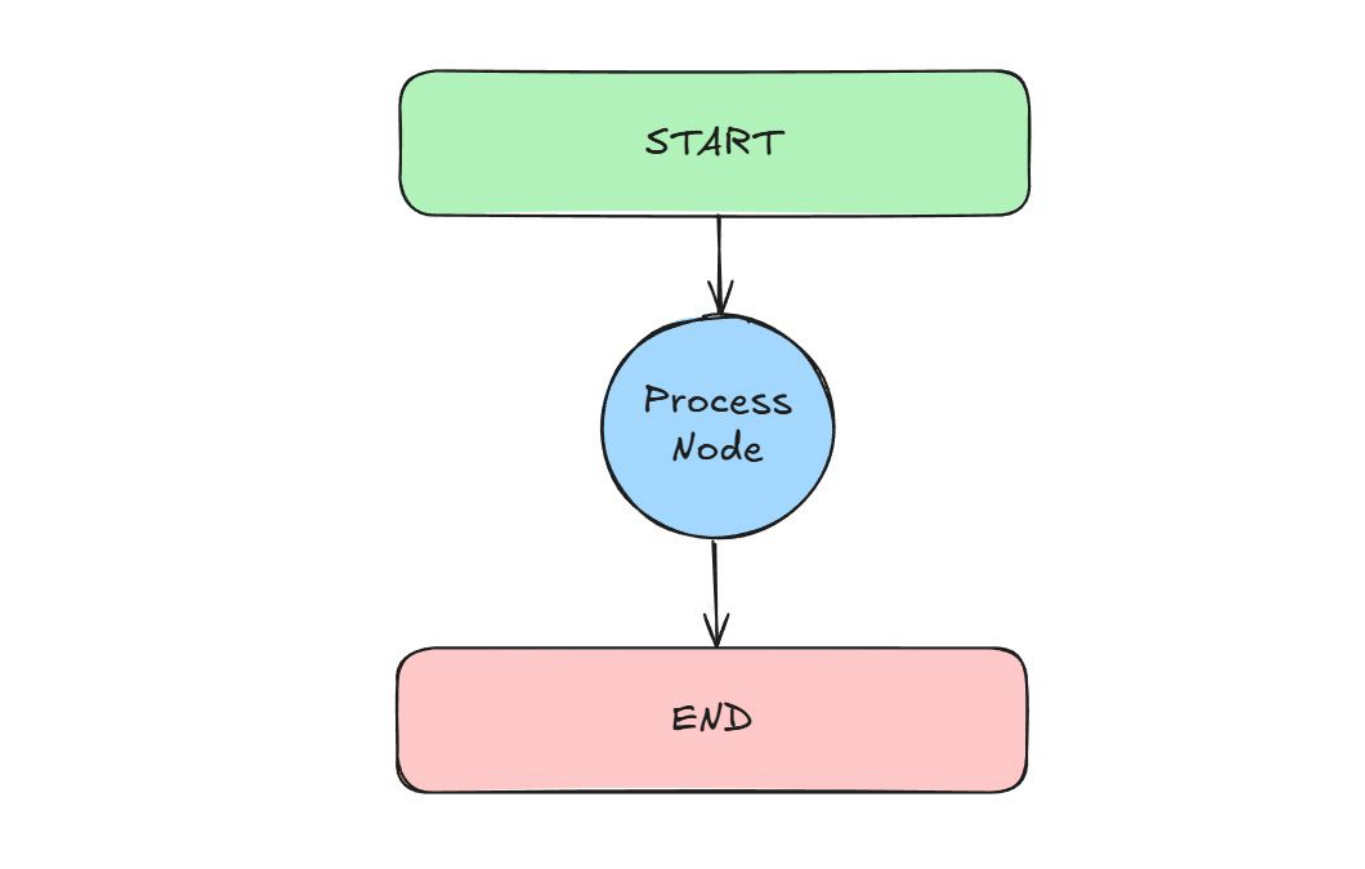
- 图结构:Start -> Process Node -> End
- 集成LLM:把LLM嵌入到节点(Process Node)函数里,函数本身充当动作
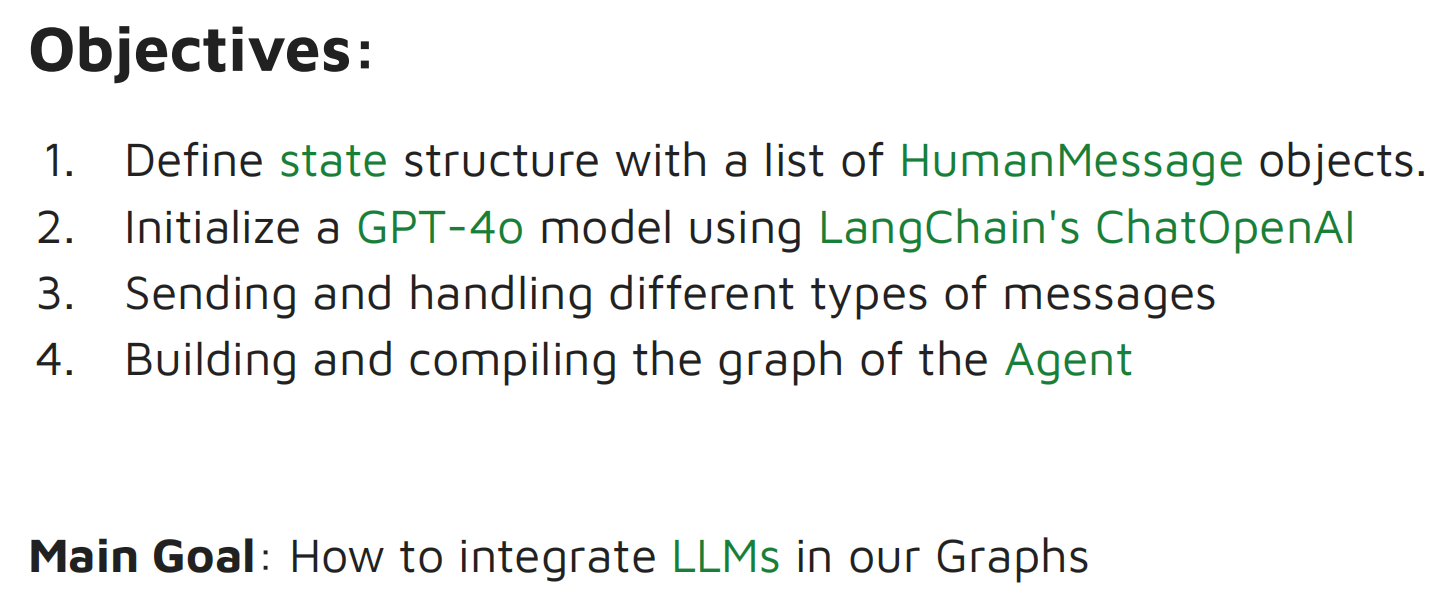
例1:Simple Bot
- 为什么要导入langchain相关的库?LangGraph 是建立在 LangChain 之上的,而 LangChain 本身已经有很成熟的库了,所以 LangGraph 的设计方式就是直接利用 LangChain 提供的强大且成熟的库
- 如果用本地部署的大模型(如通过 Ollama),就不需要 API 密钥,而是直接用 Ollama 的集成库;如果用 ChatGPT 等外部大语言模型,必须要有 API 来跟它的服务通信
- 调用图时,输入的是人类消息,需要明确标注为 HumanMessage 类型
from typing import TypedDict, List
from langchain_core.messages import HumanMessage   # 使用 HumanMessage
from langchain_openai import ChatOpenAI   # 使用 LLM
from langgraph.graph import StateGraph, START, END
from dotenv import load_dotenv    # 用来存储敏感信息(如 API 密钥或配置值)的文件,主要是出于安全考虑

load_dotenv()   # 加载 env 文件

class AgentState(TypedDict):
    messages: List[HumanMessage]

llm = ChatOpenAI(model="mimo-v2.5-pro")

# 节点函数,传入状态并返回状态
def process(state: AgentState) -> AgentState:
    response = llm.invoke(state["messages"])
    print(f"\nAI: {response.content}")
    return state

graph = StateGraph(AgentState)
graph.add_node("process", process)
graph.add_edge(START, "process")
graph.add_edge("process", END)
agent = graph.compile()

user_input = input("Enter: ")
# 多轮对话
while user_input != "exit":
    agent.invoke({"messages": [HumanMessage(content=user_input)]})
    user_input = input("Enter: ")
配置信息写在 .env 文件中,内容如下,获取见 Xiaomi MiMo 开放平台:
OPENAI_API_KEY=
OPENAI_BASE_URL=https://token-plan-cn.xiaomimimo.com/v1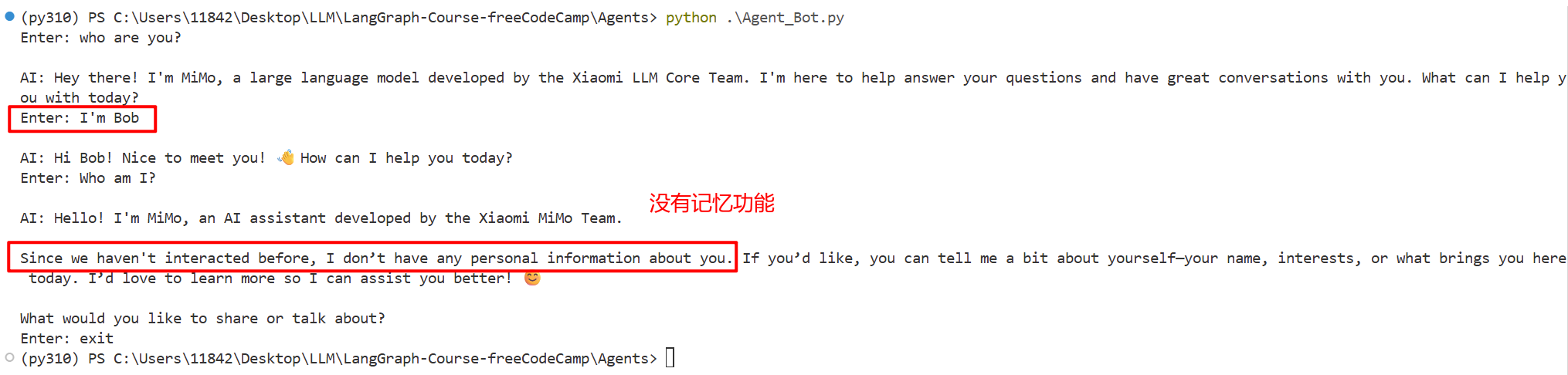
总结:实现了多轮对话,但没有+记忆功能
多轮对话是怎么实现的
这里只是多次调用单轮对话,而不是真正的多轮对话(要实现多轮对话,必须在每次调用时传入完整的对话历史,见 Agent II)
多次调用单轮对话:
while user_input != "exit":
    agent.invoke({"messages": [HumanMessage(content=user_input)]})  # 每次循环都创建新的列表 [HumanMessage(content=user_input)],只包含当前输入,不包含历史对话
    user_input = input("Enter: ")
Agent II
Agent I 存在的问题是我们之前说过的内容它记不住,因为每次调用的是独立API。Agent II 要加上记忆(Memory)功能
例2:Chat Bot
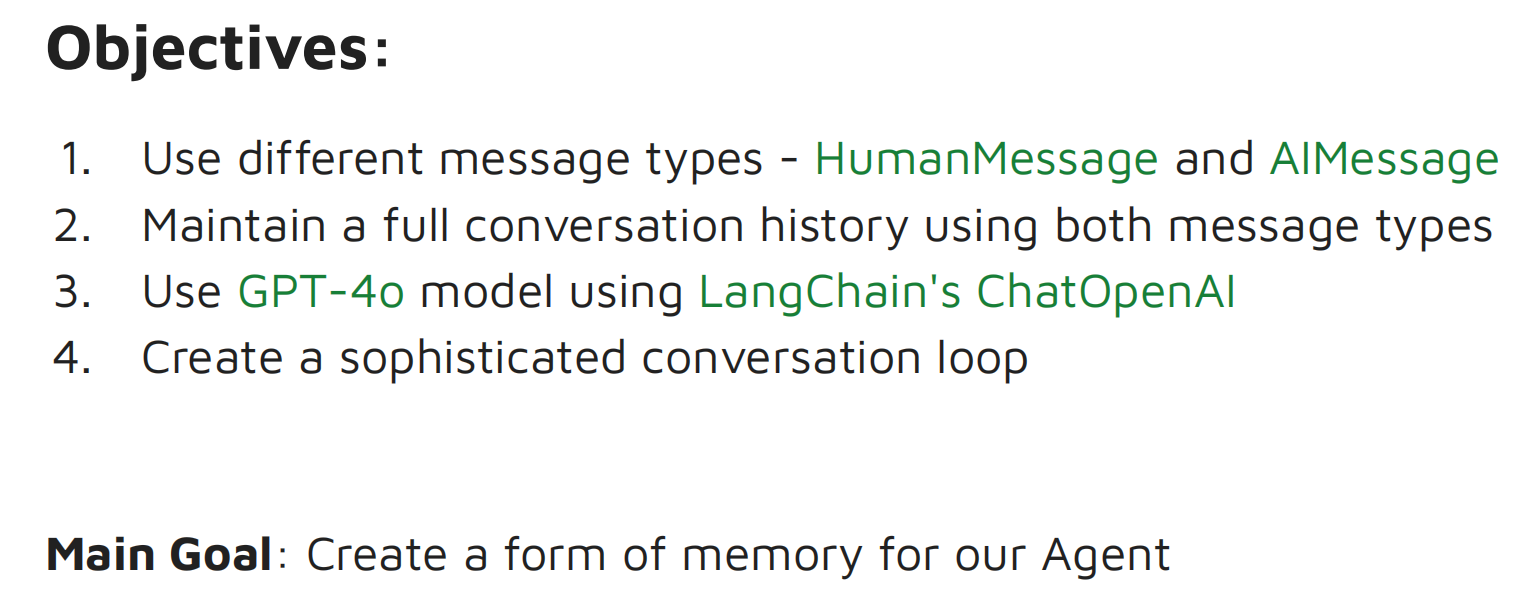
- 使用不同类型的消息(Human Message & AI Message),并用这两种消息类型维护完整的对话历史
- 创建一个复杂的对话循环(loop)
# 导入部分新增了 AI消息 和 Union类型注解
from typing import TypedDict, List, Union
from langchain_core.messages import HumanMessage, AIMessage
from langchain_openai import ChatOpenAI
from langgraph.graph import StateGraph, START, END
from dotenv import load_dotenv

load_dotenv()

class AgentState(TypedDict):
    messages: List[Union[HumanMessage, AIMessage]]   # 允许在这个状态键中存储人类消息或AI消息
    # 或写成
    # messages: List[HumanMessage]
    # messages_ai: List[AIMessage]

llm = ChatOpenAI(model="mimo-v2.5-pro")

def process(state: AgentState) -> AgentState:
    """This node will solve the request you input"""
    response = llm.invoke(state["messages"])
    # response.content 提取响应的内容部分,也就是LLM返回的答案或结果
    state["messages"].append(AIMessage(content=response.content))    # 添加AI消息
    print(f"\nAI: {response.content}")
    print("CURRENT STATE: ", state["messages"])   # 当前状态的一个快照
    return state

graph = StateGraph(AgentState)
graph.add_node("process", process)
graph.add_edge(START, "process")
graph.add_edge("process", END)
agent = graph.compile()

conversation_history = []   # 初始化对话历史

user_input = input("Enter: ")
while user_input != "exit":
    conversation_history.append(HumanMessage(content=user_input))   # 对话历史记录中添加了人类消息,即用户输入的内容
    result = agent.invoke({"messages": conversation_history})   # 编译后的图,包含了整个对话历史记录
    conversation_history = result["messages"]
    user_input = input("Enter: ")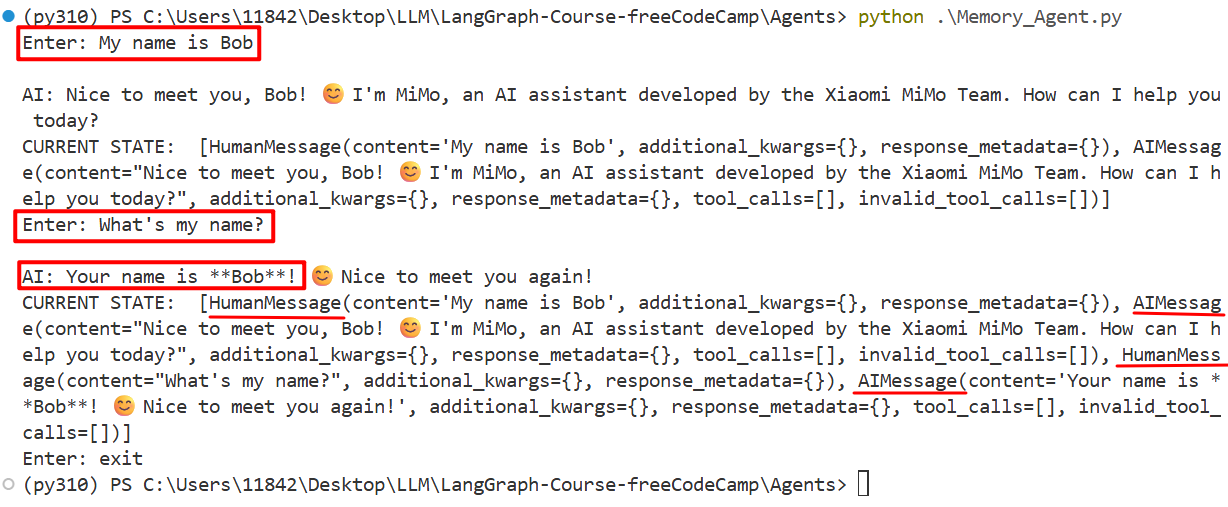
- 忽略了额外的关键字参数(additional_kwargs)和响应元数据(response_metadata)
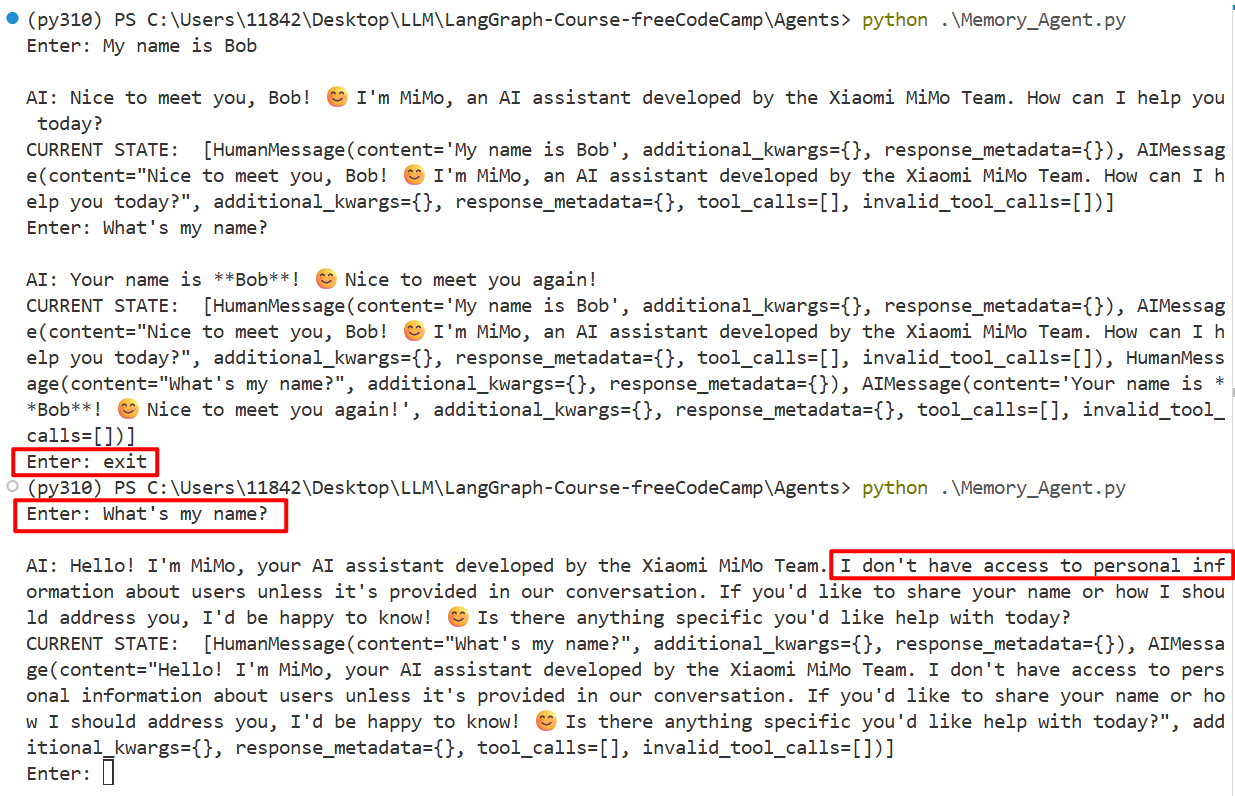
问题:退出程序时,所有变量中的数据都会被清除,状态自然也被清除了
- 一个潜在的解决方案是将数据存储在一个数据库中(如果做 RAG 应用,可以使用向量数据库)
- 这里就简单地用文本文件存储(不是最稳健的方式,但是一种快速高效的数据存储方式)
# 文本文件存储
with open("logging.txt", "w") as file:
    file.write("Your Conversation Log:\n")
    # 对话历史存储了 AI消息 和 人类消息(所有图外信息),状态被锁定在图内,对话历史是状态的一个副本
    for message in conversation_history:
        if isinstance(message, HumanMessage):
            file.write(f"You: {message.content}\n")
        elif isinstance(message, AIMessage):
            file.write(f"AI: {message.content}\n\n")
    file.write("End of Conversation")

print("Conversation saved to logging.txt")
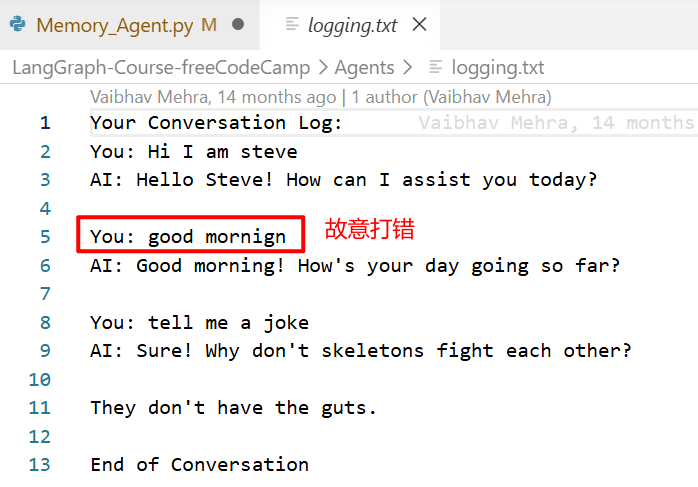
从 logging.txt 中可以看出,实际的人类消息是未经修改存储下来的,无论在状态中传入什么人类消息,都会保持原样
总结:实现了记忆功能,但上下文窗口越来越长,这是一个问题,随着词元增多,成本会越来越大。一个简单的解决方案是:在代码中写一些逻辑,比如人类消息的数量超过5条,就从历史记录中删除第一条人类消息(因为最新的消息更有可能相关,第一条消息有更大可能性是可以被移除的内容)
Memory记忆是怎么实现的
1. conversation_history 列表持续累积
conversation_history = []   # 初始化对话历史

while user_input != "exit":
    conversation_history.append(HumanMessage(content=user_input))   # 每次追加新用户输入
    result = agent.invoke({"messages": conversation_history})        # 传入完整历史
    conversation_history = result["messages"]                        # 更新为包含AI回复的完整历史
2. AgentState 中的 messages 列表不断扩展
def process(state: AgentState) -> AgentState:
    response = llm.invoke(state["messages"])  # 传入的是完整历史
    state["messages"].append(AIMessage(content=response.content))  # 追加新回复
    return state
3. 状态更新后回写到 conversation_history
conversation_history = result["messages"] # 将图内状态同步回外部历史Agent III
例3:ReAct Agent(Reasoning and Acting Agent)
ReAct 代表推理和行动,是最常见的一种智能体类型
- 用一个循环,把 Agent 连接到工具(可以是一个或多个)上
- Agent 或背后的 LLM 的任务,不仅是决定选择哪个工具,还要判断什么时候不再需要调用工具。当这种情况发生时会进入 END
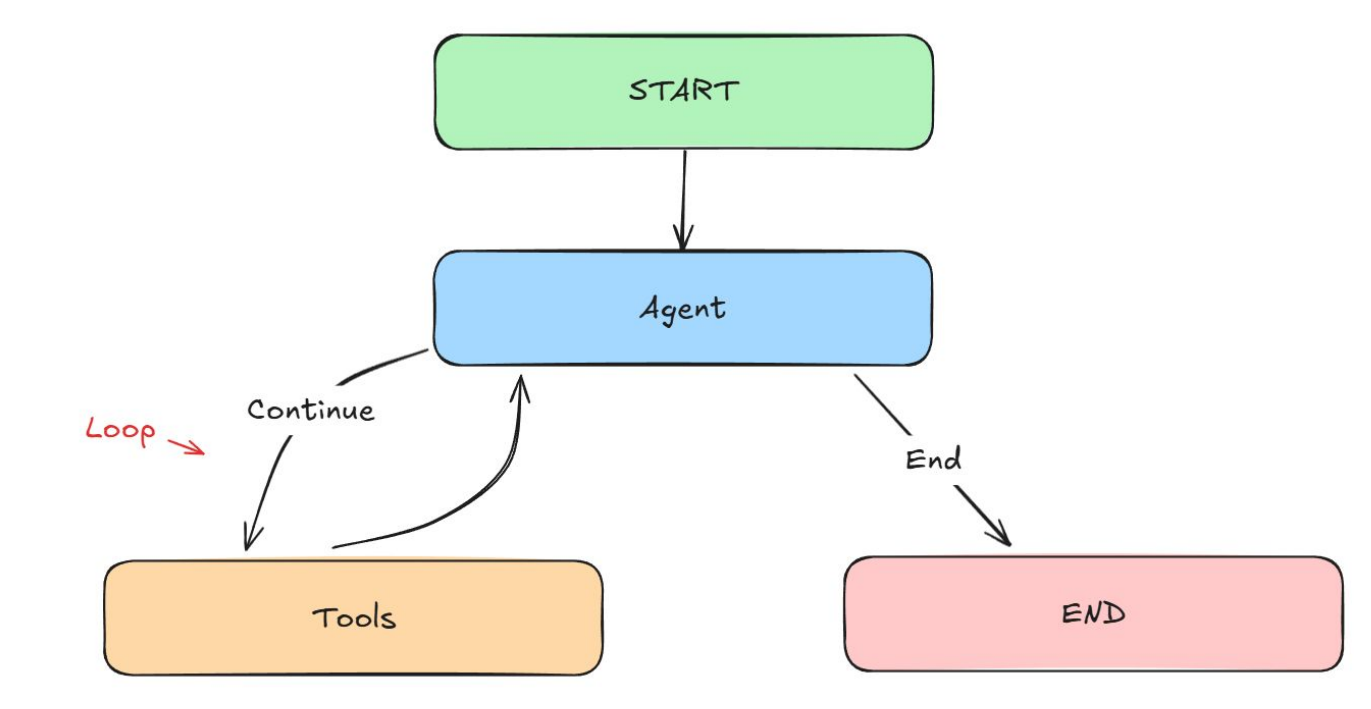
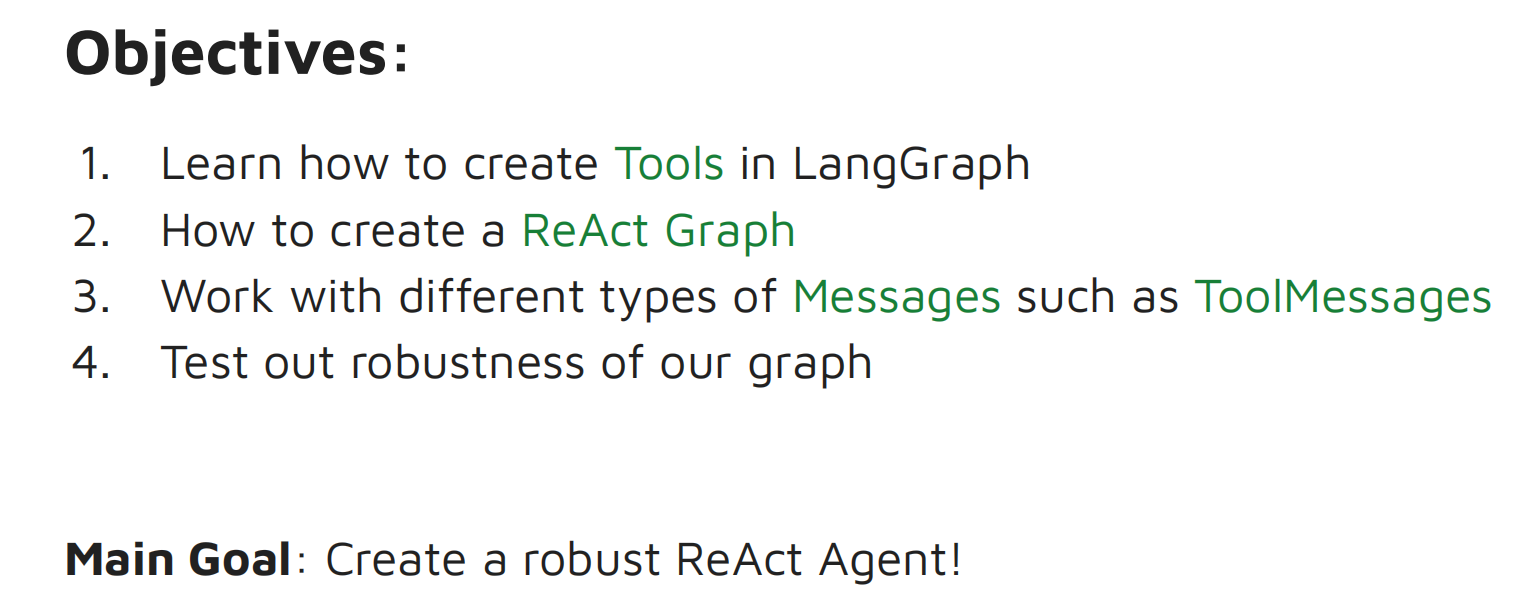
构建一个 ReAct Agent 的目标:
- 如何创建工具,以及如何处理工具消息(ToolMessages)。注:还有更多类型的消息,如系统消息(SystemMessages)、基础消息(BaseMessages)
- 构建一个 ReAct 图,并测试图的鲁棒性
补充知识:
(1)Annotated, Sequence 也是类型注解
- Annotated 为变量或键提供额外的上下文,而不会影响其本身的数据类型
# 假设我想创建一个 TypedDict,里面有一个 email 键(字符串类型)
# 问题在于,像 email 这样的键需要符合特定格式,如必须是 abc@gmail.com 这样的形式
# 但如果传入 abcd-dash-gmail.com 之类的东西,就不再是有效的 email 格式了,但从技术上讲它仍然是字符串,所以通过了验证
# 如何解决这个问题呢?这就是 Annotated 的作用

# 1.传入数据类型;2.提供额外的信息或上下文,为这个键或变量添加元数据
email = Annotated[str, "This has to be a valid email format!"]

# 如何实际查看元数据呢?
print(email.__metadata__) # ("This has to be a valid email format!",)- Sequence 自动处理状态更新,例如向聊天历史记录中添加新消息。它实际上是为了避免对图节点进行任何列表操作。显然,当我们使用图和节点并更新状态时,我们需要做很多列表操作,而 Sequence 可以处理其中的很多内容
(2)消息类型:BaseMessage、ToolMessage、SystemMessage
- ToolMessage:工具被调用后,数据会传回LLM,传递的信息包括内容本身和工具调用ID
- SystemMessage:用来向LLM提供指令的消息
- BaseMessage:LangGraph中所有消息类型的基类。BaseMessage是父类,其他的Human、AI、Tool、System Message都是它的子类,它们会继承BaseMessage的所有属性,也会有自己的属性
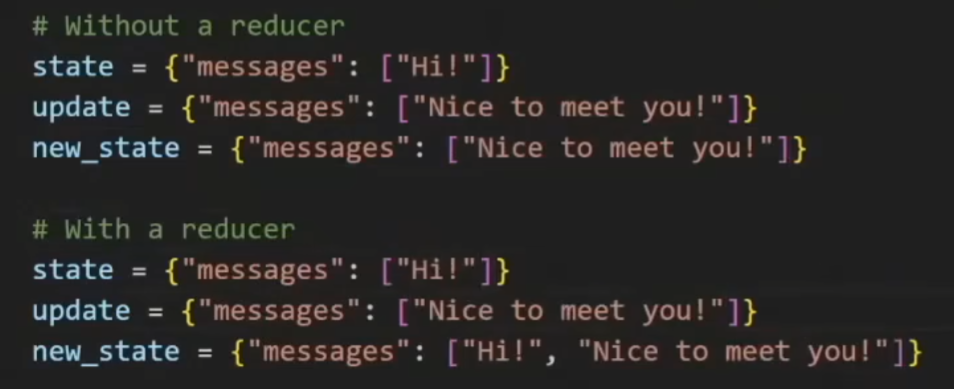
(3)add_messages 是一个reducer函数
- reducer函数本质上就是一条规则,控制节点更新如何与现有状态合并(换句话说,如何将新数据合并到当前状态中)。如果没有reducer函数,更新会完全覆盖现有的值或状态
- 简而言之,reducer函数实际上只是聚合状态中的数据,允许我们将所有内容追加到状态中而不会发生覆盖(因为我们想保留状态)
from typing import Annotated    # Annotated: provides additional context without affecting the type itself
from typing import Sequence     # Sequence: to automatically handle the state updates for sequences such as by adding new messages to a chat history
from typing import TypedDict
from dotenv import load_dotenv   # 存储 API 密钥
from langchain_core.messages import BaseMessage       # The foundational class for all message types in LangGraph
from langchain_core.messages import ToolMessage       # Passes data back to LLM after it calls a tool such as the content and the tool_call_id
from langchain_core.messages import SystemMessage     # Message for providing instructions to the LLM
from langchain_openai import ChatOpenAI
from langchain_core.tools import tool
from langgraph.graph.message import add_messages    # add_messages 是一个reducer函数(通过追加而不是覆盖来保留状态)
from langgraph.graph import StateGraph, END
from langgraph.prebuilt import ToolNode    # 工具节点,会将工具的输出连接回状态(State),以便其他节点可以使用这些信息

load_dotenv()

# 定义智能体的状态
class AgentState(TypedDict):
    # 消息序列(Sequence)是数据类型。这里提供了元数据(add_messages),因此使用 Annotated 关键字
    messages: Annotated[Sequence[BaseMessage], add_messages]

# 创建工具。使用装饰器
@tool
def add(a: int, b:int):
    """This is an addition function that adds 2 numbers together"""    # 函数必须要有文档字符串,如果没有会报错。文档字符串的作用是告诉LLM这个工具是用来干什么的
    return a + b

@tool
def subtract(a: int, b: int):
    """Subtraction function"""
    return a - b

@tool
def multiply(a: int, b: int):
    """Multiplication function"""
    return a * b

# 将工具融入LLM
tools = [add, subtract, multiply]

model = ChatOpenAI(model = "mimo-v2.5-pro").bind_tools(tools)   # 此时 LLM 可以访问所有的工具了

# 创建节点
def model_call(state:AgentState) -> AgentState:
    system_prompt = SystemMessage(content=
        "You are my AI assistant, please answer my query to the best of your ability."    # 系统消息
    )
    response = model.invoke([system_prompt] + state["messages"])   # 调用模型,传入系统消息 + 查询(人类消息的形式)
    return {"messages": [response]}   # 更新状态

# 条件边
def should_continue(state: AgentState):    # 传入状态
    messages = state["messages"]
    last_message = messages[-1]    # 获取最后一条消息,看看是否还需要运行更多工具
    if not last_message.tool_calls:
        return "end"    # 如果没有更多工具调用了,就结束
    else:
        return "continue"   # 否则就去到工具节点,选择工具并执行所有操作

graph = StateGraph(AgentState)
graph.add_node("our_agent", model_call)

# 工具节点本质上就是一个单独的节点,它包含所有不同的工具
tool_node = ToolNode(tools=tools)
graph.add_node("tools", tool_node)

graph.set_entry_point("our_agent")   # 设置入口点

# 添加条件边
graph.add_conditional_edges(
    "our_agent",
    should_continue,
    {
        "continue": "tools",
        "end": END,
    },
)

graph.add_edge("tools", "our_agent")   # 这就是创建循环连接的方式(条件边只提供了一个单向的有向边,从Agent到工具节点,或从Agent到终点),因此还需要另一条边(从工具节点到Agent)

app = graph.compile()

# 辅助函数(并非 LangGraph 的一部分),可以让每个工具调用等操作以更好的方式输出
def print_stream(stream):
    for s in stream:
        message = s["messages"][-1]
        if isinstance(message, tuple):
            print(message)
        else:
            message.pretty_print()

# 流式处理
# inputs = {"messages": [("user", "Add 3 + 4.")]}
inputs = {"messages": [("user", "Add 40 + 12 and then multiply the result by 6. Also tell me a joke please.")]}
print_stream(app.stream(inputs, stream_mode="values"))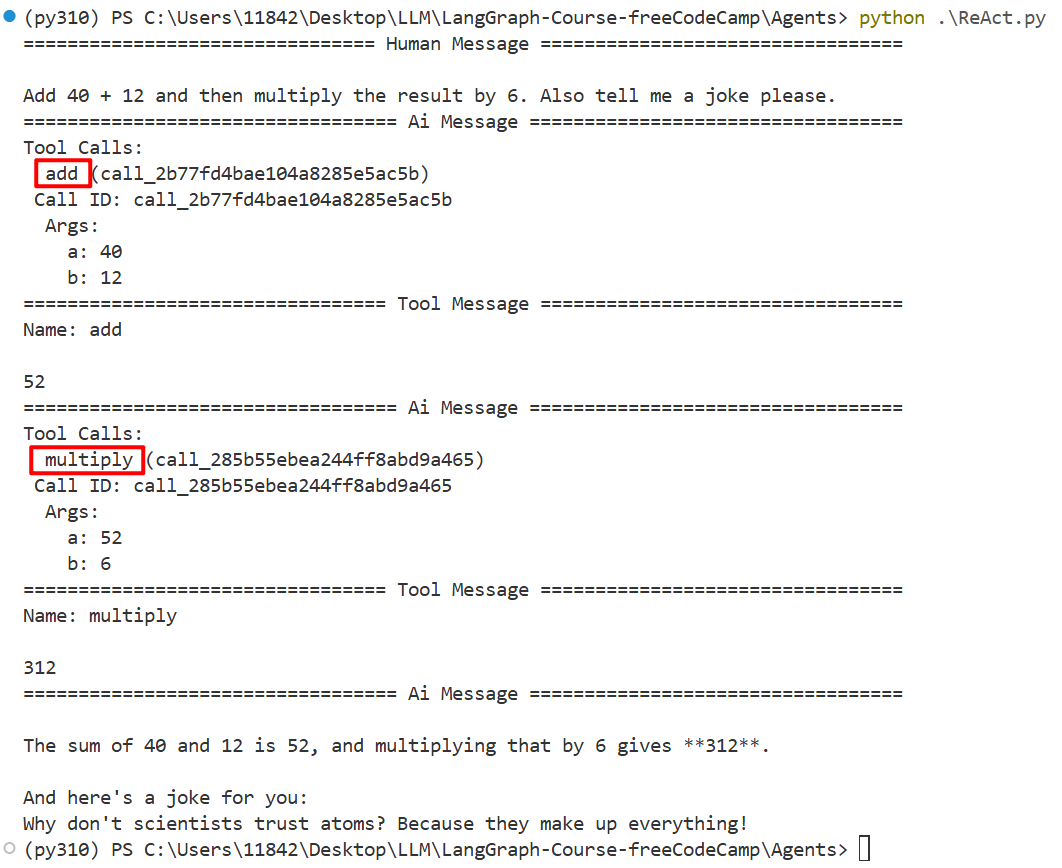
- LLM没有使用它训练时学到的内置信息来得出答案。LLM不知道如何做数学题,它只是通过概率猜测下一个输出。但通过工具调用的方式,我们实际上能够正确地将两个数字相加
- LLM实际上决定了应该将哪些参数传递给每个工具
- 所有工具调用完成后回传给Agent,Agent会再次检查,如果还有别的需求,会再将新的结果添加到最终信息中
调用什么/多少次工具的loop是怎么实现的
用户输入 → Agent(推理) → 需要工具? → 执行工具 → 返回结果 → Agent(再次推理)→ ...
                ↓ 不需要工具
              结束
1. 工具绑定(Tool Binding)
LLM 被赋予工具调用能力。模型输出时可以选择调用工具,而不是直接生成文本
model = ChatOpenAI(model="mimo-v2.5-pro").bind_tools(tools)2. 状态管理(State)
add_messages reducer 自动追加新消息到历史,保留完整的对话上下文
class AgentState(TypedDict):
    messages: Annotated[Sequence[BaseMessage], add_messages]
3. Agent 节点(推理)
接收当前状态(包含所有历史消息),LLM 决定 直接回答 或 调用工具
def model_call(state:AgentState) -> AgentState:
    system_prompt = SystemMessage(content="...")
    response = model.invoke([system_prompt] + state["messages"])
    return {"messages": [response]}
4. 条件边(路由决策)
def should_continue(state: AgentState):
    last_message = state["messages"][-1]
    if not last_message.tool_calls:
        return "end"      # 没有工具调用 → 结束
    else:
        return "continue" # 有工具调用 → 执行工具
5. 工具节点(执行)
自动解析 tool_calls -> 执行对应的工具函数 -> 将结果封装为 ToolMessage 追加到状态
tool_node = ToolNode(tools=tools)6. 循环连接
形成 Agent → 工具 → Agent → 工具 → ... 循环,直到 Agent 决定不再需要工具
graph.add_edge("tools", "our_agent") # 工具执行后回到 Agent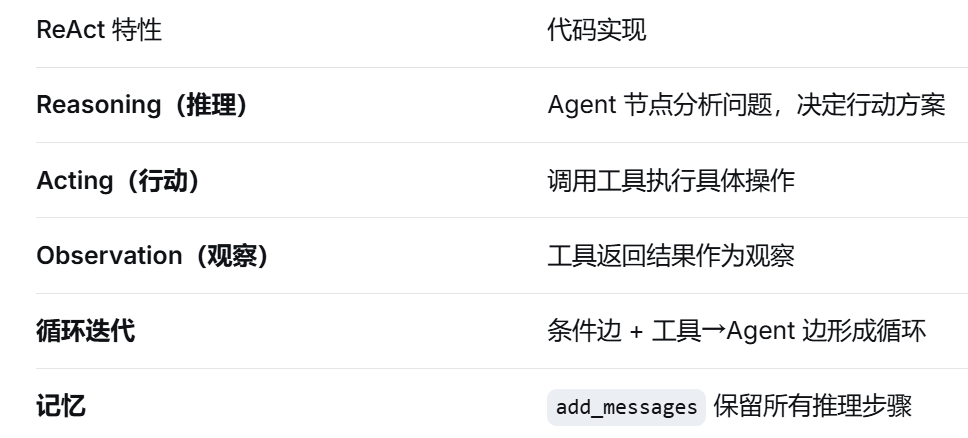
Agent IV
例4:DRAFTER(起草助手)
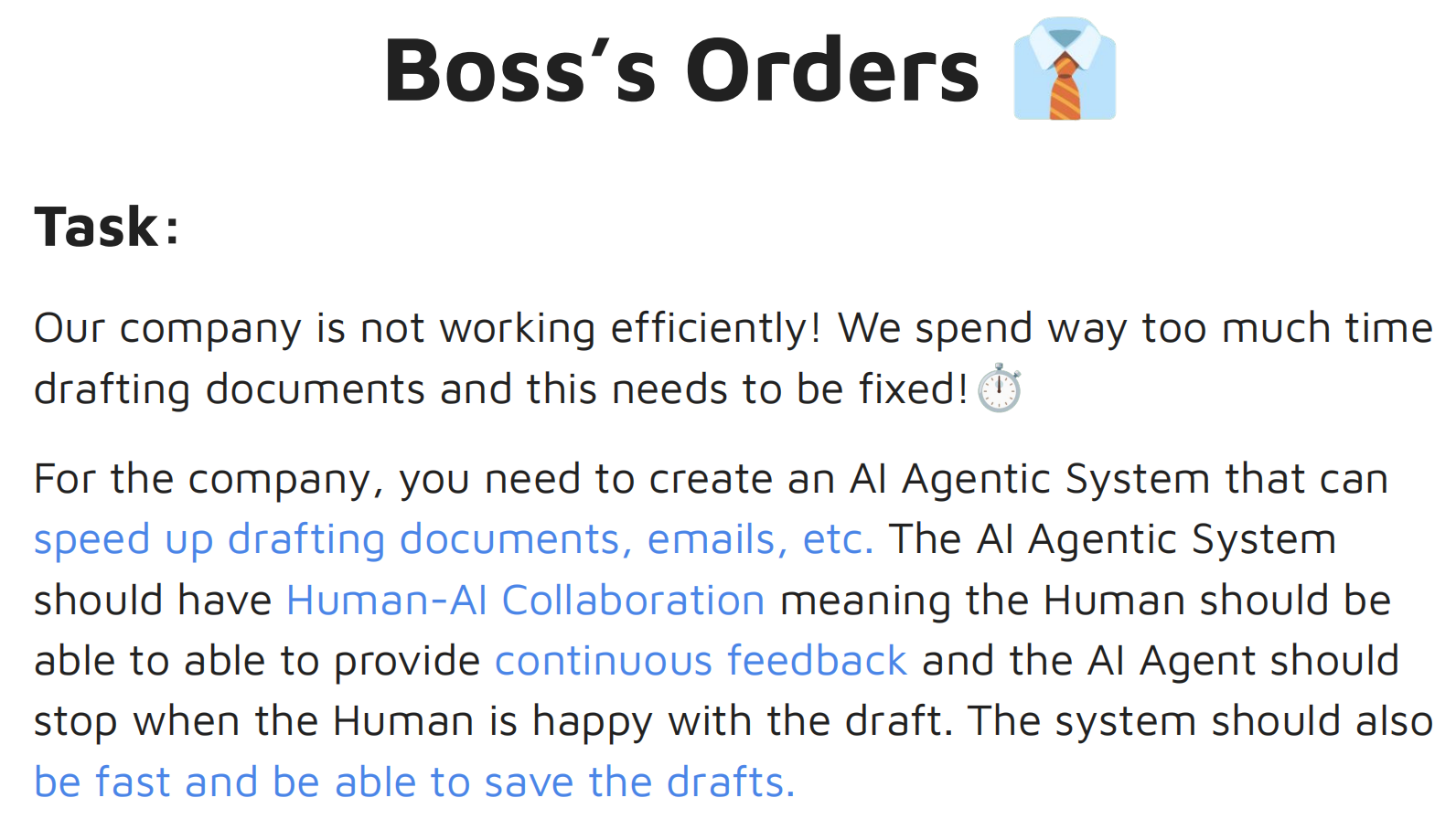
任务:需要创建一个AI智能体系统,能够加快起草文件、电子邮件等的速度。这个AI智能体系统应该具备人机协作功能,即人类能够提供持续的反馈,且当人类对草稿满意时,AI智能体应该停止。这个系统还应该运行快速,并且能够保存草稿
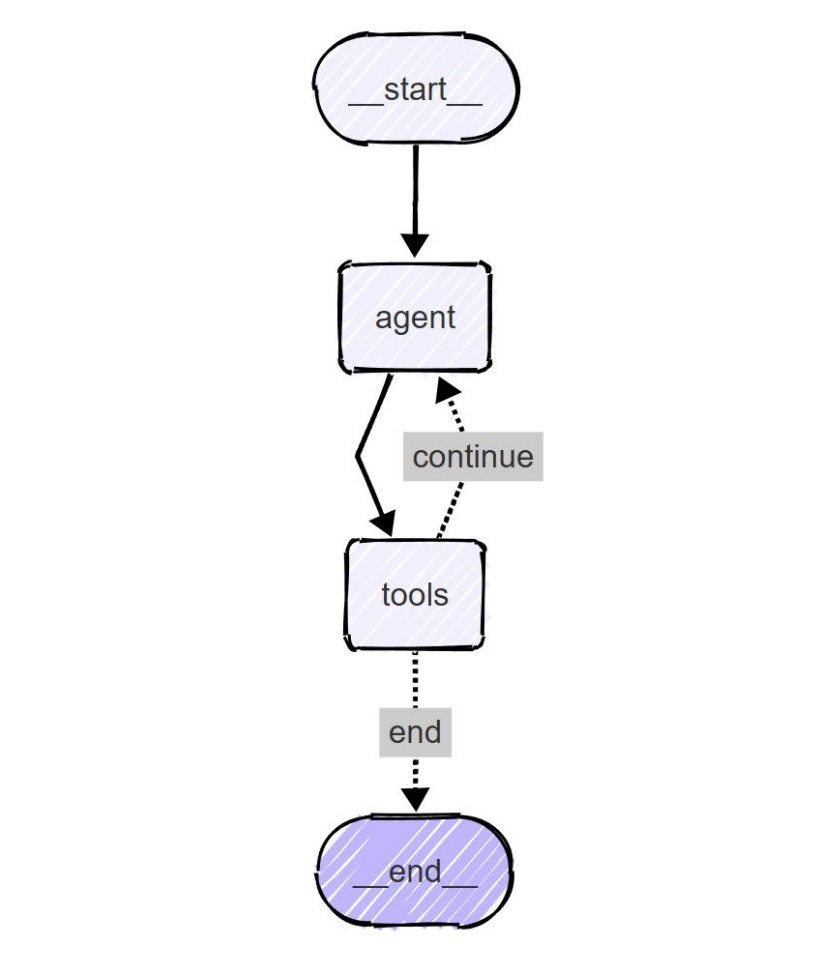
本例的 Agent 也可以访问工具,但跟 ReAct 智能体的结构不同。因为这里的其中一个工具是保存工具,可以保存草稿。一旦我们保存了草稿,这个过程就应该结束,因此 tools -> END。而 ReAct 的 tools -> Agent
补充知识:
- 为了在工具中传递状态,LangGraph 中正确的做法是通过一种叫注入状态的方式(本课程未涉及)。一个变通的方法是使用全局变量,工具所做的任何更新都会更新全局变量。当我们继续保存时,保存工具会使用这个全局变量中的内容,并将其保存到一个文本文件中
- 定义两个工具:更新工具、保存工具(智能体并不总是必须选择工具,也不一定完全依赖 LLM 本身。智能体节点背后有一个LLM作为后端支持,bind_tools 函数通过提供一些工具扩展了它的能力范围)
from typing import Annotated, Sequence, TypedDict
from dotenv import load_dotenv
from langchain_core.messages import BaseMessage, HumanMessage, ToolMessage, SystemMessage
from langchain_openai import ChatOpenAI
from langchain_core.tools import tool
from langgraph.graph.message import add_messages
from langgraph.graph import StateGraph, END
from langgraph.prebuilt import ToolNode

load_dotenv()

# 定义全局变量(为了在工具中传递状态)
document_content = ""

class AgentState(TypedDict):
    messages: Annotated[Sequence[BaseMessage], add_messages]

# 更新工具
@tool
def update(content: str) -> str:   # content 参数将由后台的 LLM 提供
    """Updates the document with the provided content."""    # 文档字符串,用提供的内容更新文档
    global document_content
    document_content = content
    return f"Document has been updated successfully! The current content is:\n{document_content}"

# 保存工具
@tool
def save(filename: str) -> str:   # 文件名也由 LLM 提供
    """Save the current document to a text file and finish the process.
    Args:
        filename: Name for the text file.   # 强调文本文件,这样 LLM 就知道它需要传递的文件名末尾必须有 .txt
    """
    global document_content
    if not filename.endswith('.txt'):
        filename = f"{filename}.txt"
    try:
        with open(filename, 'w') as file:    # 将保存在全局变量中的内容,以文本文件的形式,在指定文件名之下保存
            file.write(document_content)
        print(f"\n💾 Document has been saved to: {filename}")
        return f"Document has been saved successfully to '{filename}'."
    except Exception as e:    # 异常处理
        return f"Error saving document: {str(e)}"

# 工具列表
tools = [update, save]

# 调用模型 + 绑定工具
model = ChatOpenAI(model="mimo-v2.5-pro").bind_tools(tools)

# 初始化智能体(智能体是图中的一个节点)
def our_agent(state: AgentState) -> AgentState:
    # 系统消息
    system_prompt = SystemMessage(content=f"""
    You are Drafter, a helpful writing assistant. You are going to help the user update and modify documents.

    - If the user wants to update or modify content, use the 'update' tool with the complete updated content.
    - If the user wants to save and finish, you need to use the 'save' tool.
    - Make sure to always show the current document state after modifications.

    The current document content is:{document_content}
    """)

    if not state["messages"]:    # 第一次使用
        user_input = "I'm ready to help you update a document. What would you like to create?"
        user_message = HumanMessage(content=user_input)
    else:    # 更新状态
        user_input = input("\nWhat would you like to do with the document? ")
        print(f"\n👤 USER: {user_input}")
        user_message = HumanMessage(content=user_input)

    all_messages = [system_prompt] + list(state["messages"]) + [user_message]
    response = model.invoke(all_messages)

    print(f"\n🤖 AI: {response.content}")
    if hasattr(response, "tool_calls") and response.tool_calls:
        print(f"🔧 USING TOOLS: {[tc['name'] for tc in response.tool_calls]}")

    return {"messages": list(state["messages"]) + [user_message, response]}   # 返回更新后的状态

# 条件边函数,条件边是从 tools 节点出来的,要么指向 Agent,要么结束流程
def should_continue(state: AgentState) -> str:
    """Determine if we should continue or end the conversation."""
    messages = state["messages"]
    if not messages:
        return "continue"

    # This looks for the most recent tool message....
    for message in reversed(messages):
        # ... and checks if this is a ToolMessage resulting from save
        if (isinstance(message, ToolMessage) and    # 如果是更新工具,肯定得走 continue;如果是保存工具,直接走 END
            "saved" in message.content.lower() and
            "document" in message.content.lower()):
            return "end"   # goes to the end edge which leads to the endpoint
    return "continue"

# 为了让打印的消息在终端上格式更易读
def print_messages(messages):
    """Function I made to print the messages in a more readable format"""
    if not messages:
        return
    for message in messages[-3:]:
        if isinstance(message, ToolMessage):
            print(f"\n🛠️ TOOL RESULT: {message.content}")

graph = StateGraph(AgentState)

# 有智能体节点和工具节点
graph.add_node("agent", our_agent)
graph.add_node("tools", ToolNode(tools))

graph.set_entry_point("agent")    # 起点
graph.add_edge("agent", "tools")   # 智能体要调用工具,有向边

# 条件边
graph.add_conditional_edges(
    "tools",
    should_continue,
    {
        "continue": "agent",
        "end": END,    # 终点
    },
)

app = graph.compile()

# 调用图
def run_document_agent():
    print("\n ===== DRAFTER =====")
    state = {"messages": []}    # 从空列表初始化,也可以传入一些现有的内容(邮件或文档内容)
    for step in app.stream(state, stream_mode="values"):
        if "messages" in step:
            print_messages(step["messages"])
    print("\n ===== DRAFTER FINISHED =====")

if __name__ == "__main__":
    run_document_agent()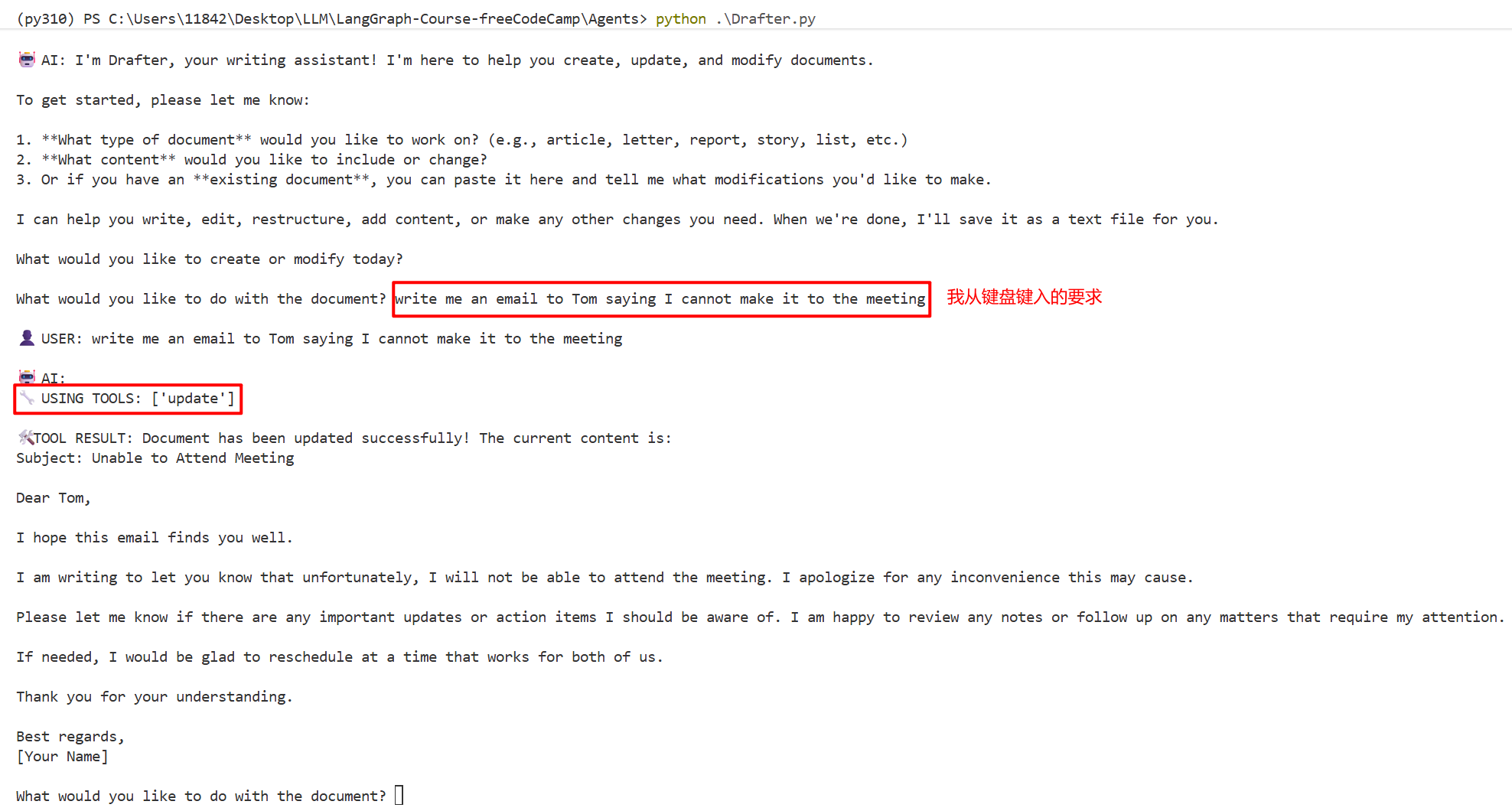
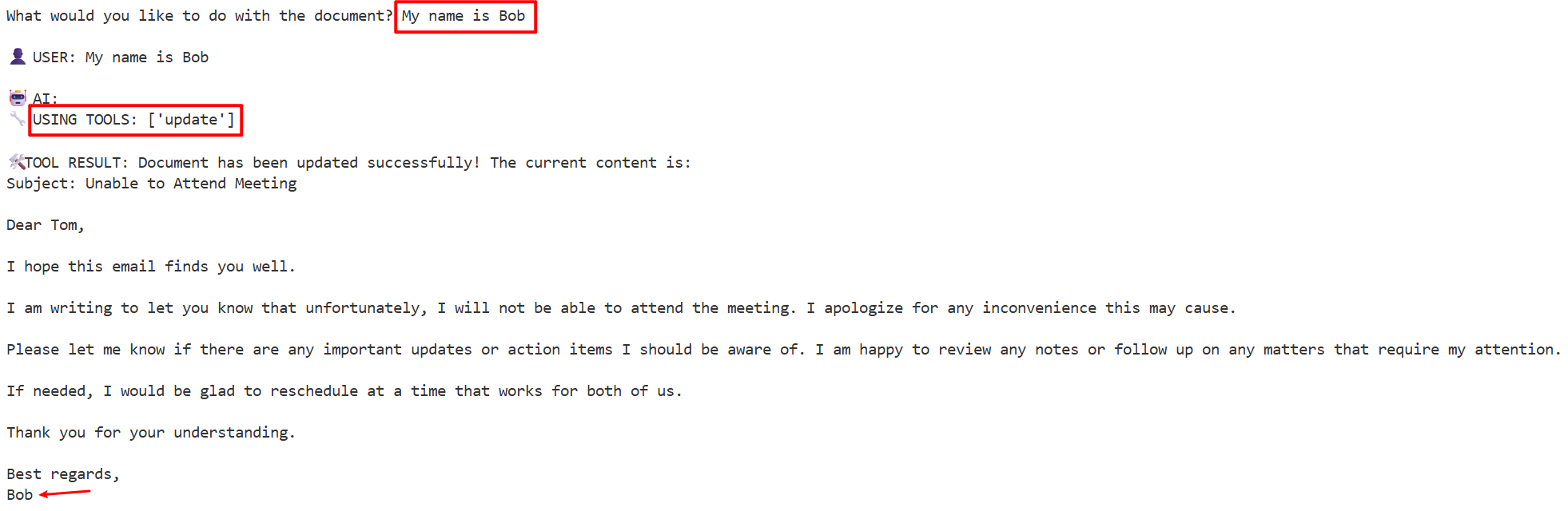
假设已经修改ok了,需要保存:
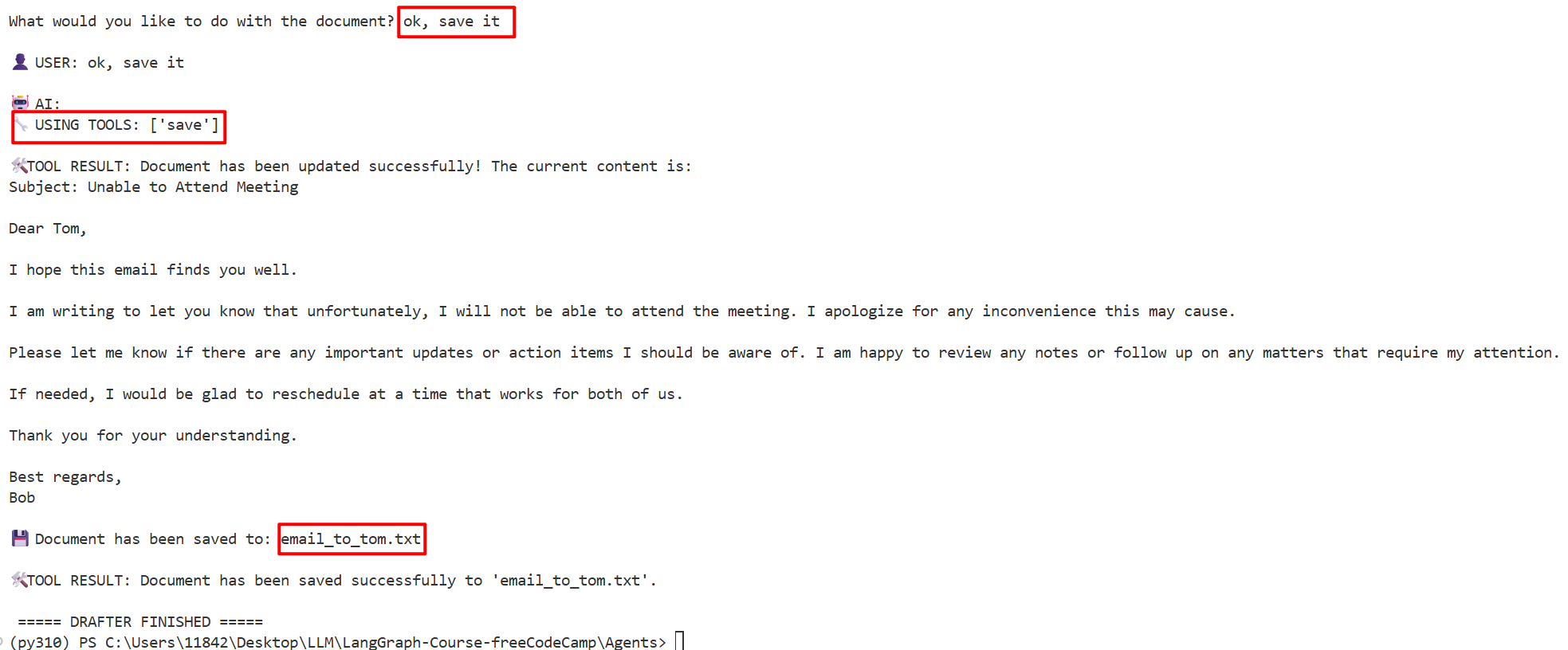
- 注意,我们从未传入文件名,这完全是Agent自己生成的
扩展(人机协作):
- GPT-4.0 Canvas
- 还可以添加语音功能,如使用 OpenAI Whisper 进行语音到文本的转换,或添加 11 labs 进行文本到语音的转换,甚至可以制作一个语音界面(图形用户界面 GUI)
如何在工具中传递状态
注意,本节的例子中工具并没有直接传递状态,而是通过全局变量 document_content 来共享数据
document_content = ""  # 全局变量

@tool
def update(content: str) -> str:
    global document_content  # 依赖全局变量
    document_content = content
    return f"Document has been updated..."

@tool
def save(filename: str) -> str:
    global document_content  # 同样依赖全局变量
    with open(filename, 'w') as file:
file.write(document_content)注入状态(文档内容作为状态的一部分,安全可控地在 Agent 节点和 Tool 节点之间流转,不再依赖全局变量)的写法:LangGraph 中如何实现状态注入:InjectedState-CSDN博客
Agent V
例5:RAG(检索增强生成)
- 包含两个智能体,一个是检索器智能体,一个是LLM智能体
- 有条件边和循环
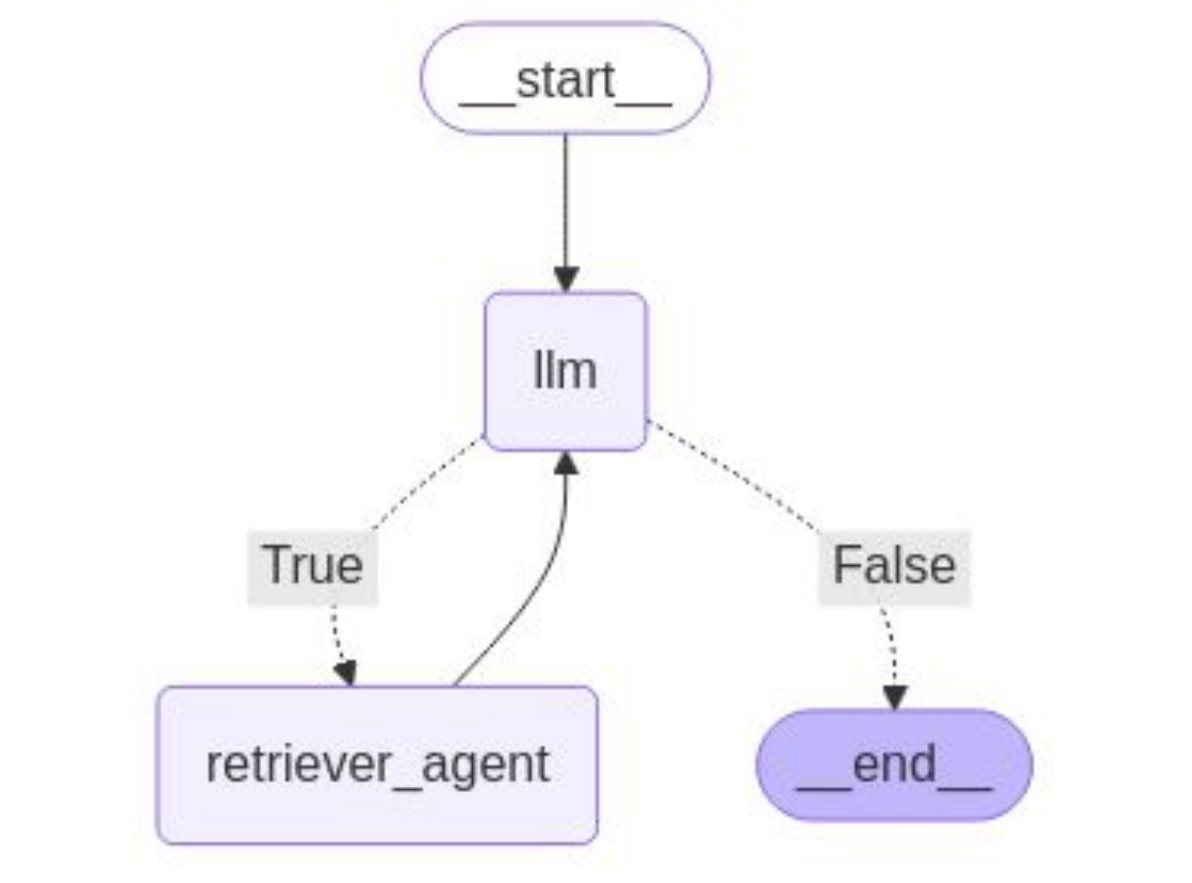
补充知识:
- 参数 temperature,描述了模型输出的随机性。设为0会让模型输出更具确定性,设为1模型输出会更随机
- 嵌入模型,把文本转换成向量嵌入。要确保嵌入模型与正在使用的LLM兼容,例如,假设使用的是OpenAI模型,但用的嵌入模型来自Ollama,那么它们很可能不兼容(一个潜在的差异可能是向量维度)
# 原写法
from langchain_openai import OpenAIEmbeddings

# Our Embedding Model - has to also be compatible with the LLM
embeddings = OpenAIEmbeddings(
    model="text-embedding-3-small",
    base_url="https://api.openai.com/v1",
    api_key="你的OpenAI key",
)
由于我没有 OpenAI 的 embeddings API,只有小米的接口(小米的接口只支持聊天(chat completions),不支持 embeddings,会返回404),所以这里用 HuggingFace 的嵌入模型替代
# 现写法
from langchain_huggingface import HuggingFaceEmbeddings

# Our Embedding Model - 使用本地 HuggingFace 模型,避免依赖 OpenAI embeddings API
embeddings = HuggingFaceEmbeddings(
    model_name="sentence-transformers/all-MiniLM-L6-v2",
    ...
)
all-MiniLM-L6-v2 是一个轻量级的句子嵌入模型,由 Sentence Transformers 团队基于 Microsoft 的 MiniLM 架构微调而来
关键特点:
- 用途:把文本转换成 384 维的向量,用于语义相似度搜索、聚类、检索等任务
- 大小:约 80MB,很小,CPU 也能跑
- 效果:在 MTEB 基准上表现不错,属于性价比很高的选择
- 速度:非常快,适合本地开发和 demo在此 RAG 场景里,嵌入模型的作用是把 PDF 文本块和用户查询都转成向量,然后通过向量相似度找到最相关的文档片段。如果想用更高质量的模型,可以换成 BAAI/bge-base-zh-v1.5(中文更好)或 all-mpnet-base-v2(英文更准),但体积会大一些
- 分块chunk。有两个参数,chunk_size(块大小,注意是字符数,而非单词数或token数)、chunk_overlap(块重叠,连续的块应该有一些共同的字符,以保持上下文的连贯性)
- 检索器retriever,负责检索最相似块。默认检索类型是相似性(similarity),返回最相似chunk数为4
- 有两个Agent:
- LLM Agent,调用LLM和当前状态,将消息转换为列表,传递系统消息给LLM,返回更新后的状态作为消息
- Retriever Agent,会从LLM响应中执行两次调用。首先检查是否有有效的工具,如果有一个工具,且其名称是一个正确指定的工具,就会执行相关操作
(1)前置部分
from dotenv import load_dotenv
import os
from langgraph.graph import StateGraph, END
from typing import TypedDict, Annotated, Sequence
from langchain_core.messages import BaseMessage, SystemMessage, HumanMessage, ToolMessage
from operator import add as add_messages
from langchain_openai import ChatOpenAI
from langchain_huggingface import HuggingFaceEmbeddings
from langchain_community.document_loaders import PyPDFLoader   # 加载 PDF 文件
from langchain_text_splitters import RecursiveCharacterTextSplitter   # langchain.text_splitter 在新版 langchain 中已迁移到独立包 langchain_text_splitters,用于切分 chunk
from langchain_chroma import Chroma   # 向量数据库,存储向量嵌入
from langchain_core.tools import tool

load_dotenv()
(2)切块(chunk) -> 创建向量数据库(chroma)
- 切块:from langchain_text_splitters import RecursiveCharacterTextSplitter
- 创建向量数据库:from langchain_chroma import Chroma
# Our Embedding Model - 使用本地 HuggingFace 模型,避免依赖 OpenAI embeddings API
embeddings = HuggingFaceEmbeddings(
    model_name="sentence-transformers/all-MiniLM-L6-v2",
)

pdf_path = "Stock_Market_Performance_2024.pdf"   # 2024年股票市场表现

# Safety measure I have put for debugging purposes :)
if not os.path.exists(pdf_path):
    raise FileNotFoundError(f"PDF file not found: {pdf_path}")

pdf_loader = PyPDFLoader(pdf_path) # This loads the PDF

# Checks if the PDF is there
try:
    pages = pdf_loader.load()
    print(f"PDF has been loaded and has {len(pages)} pages")   # 9页
except Exception as e:
    print(f"Error loading PDF: {e}")
    raise

# Chunking Process
text_splitter = RecursiveCharacterTextSplitter(
    chunk_size=1000,
    chunk_overlap=200
)

# 将文本分块过程应用到文档的所有页面
pages_split = text_splitter.split_documents(pages) # We now apply this to our pages

# 向量数据库所在位置
persist_directory = r"C:\Users\11842\Desktop\LLM\LangGraph-Course-freeCodeCamp\Agents"
collection_name = "stock_market_hf"

# If our collection does not exist in the directory, we create using the os command
if not os.path.exists(persist_directory):
    os.makedirs(persist_directory)

# 创建向量嵌入(chroma向量数据库)
try:
    # Here, we actually create the chroma database using our embeddigns model
    vectorstore = Chroma.from_documents(
        documents=pages_split,   # 页面如何分割
        embedding=embeddings,    # 使用哪种嵌入
        persist_directory=persist_directory,   # 存储在哪里
        collection_name=collection_name    # 集合名称
    )
    print(f"Created ChromaDB vector store!")
except Exception as e:
    print(f"Error setting up ChromaDB: {str(e)}")
    raise
向量数据库长啥样呢?看下面:
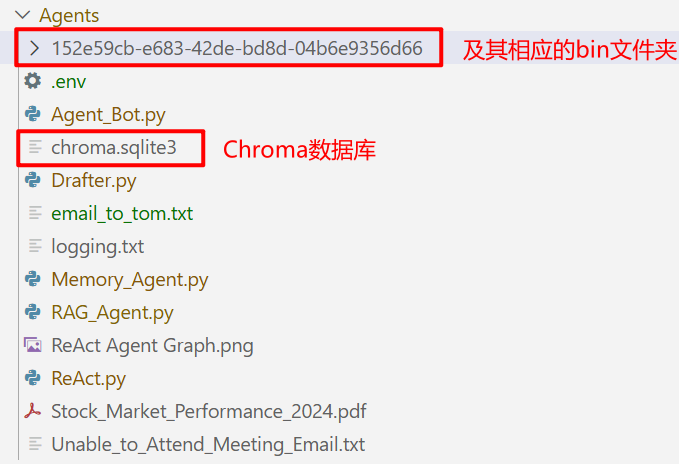
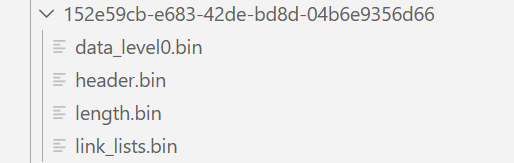
- 数据存储在 persist_directory 指定的路径(即 Agents 目录)下的 ChromaDB 内部结构里
- chroma.sqlite3 和 UUID 文件夹就是 ChromaDB 的存储
- 集合名(collection_name)stock_market_hf 是 ChromaDB 的集合名,记录在 SQLite 数据库里,是数据库内部的标识符,不是单独的目录
(3)创建检索器
# Now we create our retriever
retriever = vectorstore.as_retriever(
    search_type="similarity",   # 默认设置
    search_kwargs={"k": 5} # K is the amount of chunks to return(默认值为4)
)
(4)创建工具tools、状态AgentState、条件边
- 将检索器封装为 LLM 可调用的工具,接收query,返回所有找到的相似chunk
- 条件边:Agent Loop
# 接收查询并输出一个字符串
@tool
def retriever_tool(query: str) -> str:
    """
    This tool searches and returns the information from the Stock Market Performance 2024 document.
    """
    docs = retriever.invoke(query)
    if not docs:
        return "I found no relevant information in the Stock Market Performance 2024 document."
    results = []
    for i, doc in enumerate(docs):
        results.append(f"Document {i+1}:\n{doc.page_content}")    # 存储所有找到的相似块
    return "\n\n".join(results)

tools = [retriever_tool]

llm = ChatOpenAI(model="mimo-v2.5-pro", temperature = 0)    # I want to minimize hallucination - temperature = 0 makes the model output more deterministic 趋于0 更确定;趋于1 更随机
llm = llm.bind_tools(tools)

class AgentState(TypedDict):
    messages: Annotated[Sequence[BaseMessage], add_messages]

# 条件边函数,检查最后一条消息是否包含任何工具调用
def should_continue(state: AgentState) -> bool:
    """Check if the last message contains tool calls."""
    result = state['messages'][-1]
    return hasattr(result, 'tool_calls') and len(result.tool_calls) > 0
(5)创建 LLM Agent、Retriever Agent
- LLM Agent:基于当前状态调用LLM,返回更新后的状态(消息列表)
- Retriever Agent:从LLM的响应中执行 Tool Calls
# 系统提示词
# “请始终引用你在答案中使用的文档的具体部分”,为了确保它不会产生幻觉
system_prompt = """
You are an intelligent AI assistant who answers questions about Stock Market Performance in 2024 based on the PDF document loaded into your knowledge base.
Use the retriever tool available to answer questions about the stock market performance data. You can make multiple calls if needed.
If you need to look up some information before asking a follow up question, you are allowed to do that!
Please always cite the specific parts of the documents you use in your answers.
"""

tools_dict = {our_tool.name: our_tool for our_tool in tools} # Creating a dictionary of our tools

# LLM Agent,调用LLM和当前状态
def call_llm(state: AgentState) -> AgentState:
    """Function to call the LLM with the current state."""
    messages = list(state['messages'])
    messages = [SystemMessage(content=system_prompt)] + messages
    message = llm.invoke(messages)
    return {'messages': [message]}

# Retriever Agent
# 如果有一个工具,且其名称是一个正确指定的工具,就会执行相关操作
def take_action(state: AgentState) -> AgentState:
    """Execute tool calls from the LLM's response."""
    tool_calls = state['messages'][-1].tool_calls
    results = []
    for t in tool_calls:
        print(f"Calling Tool: {t['name']} with query: {t['args'].get('query', 'No query provided')}")
        # 检查 LLM 选择的工具是否有效
        if not t['name'] in tools_dict: # Checks if a valid tool is present
            print(f"\nTool: {t['name']} does not exist.")
            result = "Incorrect Tool Name, Please Retry and Select tool from List of Available tools."
        else:
            result = tools_dict[t['name']].invoke(t['args'].get('query', ''))
            print(f"Result length: {len(str(result))}")
        # Appends the Tool Message
        results.append(ToolMessage(tool_call_id=t['id'], name=t['name'], content=str(result)))
    print("Tools Execution Complete. Back to the model!")
    return {'messages': results}
(6)构建图并编译
graph = StateGraph(AgentState)

# 把两个AI智能体作为节点,并添加它们各自的动作
graph.add_node("llm", call_llm)
graph.add_node("retriever_agent", take_action)

# 条件边,从LLM节点开始
graph.add_conditional_edges(
    "llm",
    should_continue,
    {True: "retriever_agent", False: END}
)

graph.add_edge("retriever_agent", "llm")
graph.set_entry_point("llm")

rag_agent = graph.compile()

# 允许我们不断向 Graph 提问并接收答案
def running_agent():
    print("\n=== RAG AGENT===")
    while True:
        user_input = input("\nWhat is your question: ")
        if user_input.lower() in ['exit', 'quit']:
            break
        messages = [HumanMessage(content=user_input)] # converts back to a HumanMessage type
        result = rag_agent.invoke({"messages": messages})
        print("\n=== ANSWER ===")
        print(result['messages'][-1].content)

running_agent()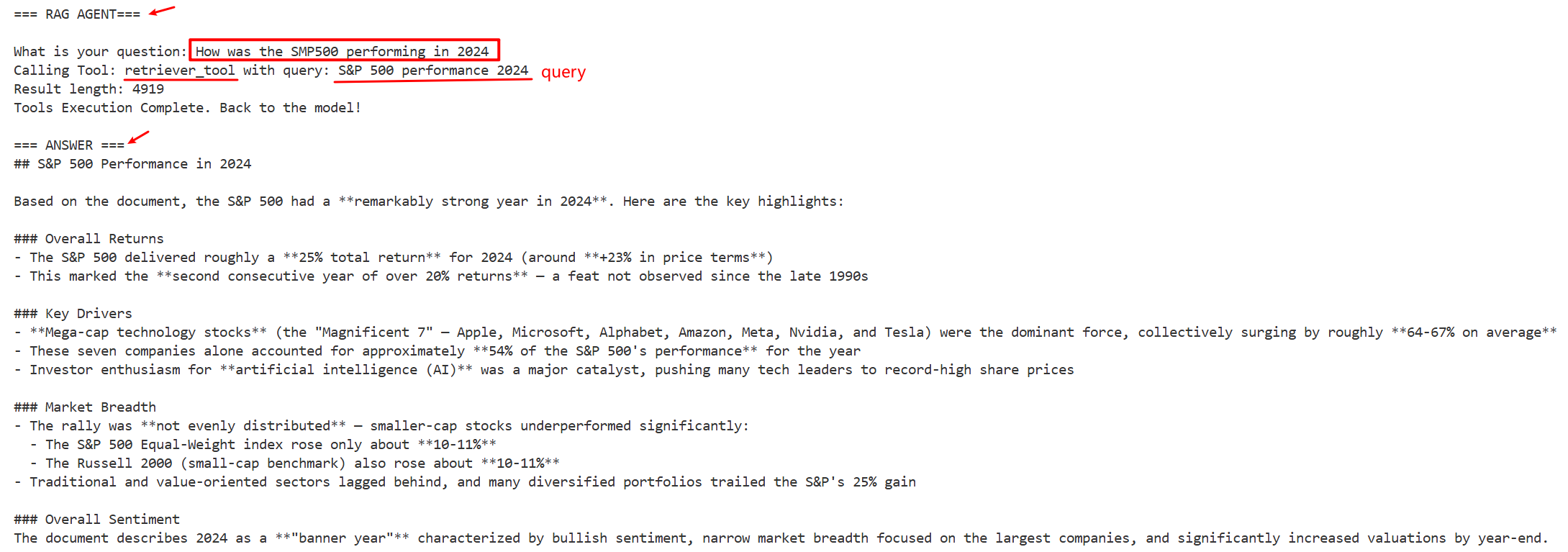
如果提问跟 PDF 文档无关的问题:

RAG是怎么实现的
通过检索增强生成,获取外部知识(使用向量检索获取相关文档,基于检索结果生成回答,可溯源到引用文档)
用户输入 → LLM Agent → 需要检索? → Retriever Agent → 向量检索 → 返回文档
                ↓ 不需要                           ↓
              直接回答 ←──────────────────────────┘
1. 文档加载
将 PDF 文件加载到内存中,pages 是包含所有页面内容的列表
pdf_loader = PyPDFLoader("Stock_Market_Performance_2024.pdf")
pages = pdf_loader.load()  # 加载 PDF 的所有页面
2. 文本分割 (Chunking)
为什么需要分块?
- PDF 可能很长,超出模型上下文窗口
- 检索时更精准:只返回相关段落,而非整个文档
text_splitter = RecursiveCharacterTextSplitter(
    chunk_size=1000,      # 每个块最多1000个字符
    chunk_overlap=200     # 块之间有200字符重叠(避免上下文断裂)
)
pages_split = text_splitter.split_documents(pages)
3. 向量化嵌入 (Embedding)
将文本转换为数值向量(高维空间中的数字表示)
- 文本无法直接比较语义相似度
- 向量化后,语义相近的文本在向量空间中也相近
embeddings = HuggingFaceEmbeddings(
    model_name="sentence-transformers/all-MiniLM-L6-v2"
)
4. 向量数据库存储 (Vector Store)
将所有文本块及其向量存储在 Chroma 向量数据库中
vectorstore = Chroma.from_documents(
    documents=pages_split,           # 文本块
    embedding=embeddings,            # 嵌入模型
    persist_directory=persist_directory,
    collection_name="stock_market_hf"
)

存储结构:
| ID | 文本内容                    | 向量 (384维)           |
|----|----------------------------|-----------------------|
| 1  | "2024年1月科技股上涨5%..."  | [0.12, -0.34, ...]   |
| 2  | "美联储3月宣布降息..."       | [0.45, 0.23, ...]    |
| 3  | "新能源板块表现突出..."       | [-0.21, 0.56, ...]   |
5. 检索器创建 (Retriever)
创建检索接口,当给定查询时,返回最相似的 k 个文档块
- 流程:将用户查询向量化 -> 在向量数据库中搜索最相似的 k 个向量 -> 返回对应的文本块
retriever = vectorstore.as_retriever(
    search_type="similarity",
    search_kwargs={"k": 5}  # 返回最相似的5个块
)
6. 工具封装 (Tool)
将检索器封装为 LLM 可调用的工具
@tool
def retriever_tool(query: str) -> str:
    """检索股票市场表现文档中的信息"""
    docs = retriever.invoke(query)
    results = []
    for i, doc in enumerate(docs):
        results.append(f"Document {i+1}:\n{doc.page_content}")
    return "\n\n".join(results)
7. 智能体循环 (Agent Loop)
流程:调用 LLM (call_llm) -> 条件判断 (should_continue) -> 执行检索 (take_action)
def call_llm(state: AgentState) -> AgentState:
    messages = [SystemMessage(content=system_prompt)] + state['messages']
    message = llm.invoke(messages)  # LLM 决定是否需要检索
    return {'messages': [message]}

def should_continue(state: AgentState) -> bool:
    result = state['messages'][-1]
    return hasattr(result, 'tool_calls') and len(result.tool_calls) > 0

def take_action(state: AgentState) -> AgentState:
    tool_calls = state['messages'][-1].tool_calls
    for t in tool_calls:
        result = tools_dict[t['name']].invoke(t['args'].get('query', ''))
        results.append(ToolMessage(content=str(result)))
    return {'messages': results}
More:还可以添加记忆,即使用 checkpointer 保存对话状态。等等

Agent 垂直技术社区,欢迎活跃、内容共建。
更多推荐

 5
5 0
0- 0


 已为社区贡献7条内容

所有评论(0)