07- RAG 实战(下):智能客服系统完整实现
·
RAG 实战(下):智能客服系统完整实现
系列文章:RAG 与 LangChain 开发实战(7/7)
阅读时间:约 30 分钟
前置知识:RAG 实战(上):知识库构建与文件上传服务
一、在线流程架构
在线流程负责处理用户提问,核心组件:
┌─────────────────────────────────────────────────────────┐
│                  在线流程架构                            │
├─────────────────────────────────────────────────────────┤
│                                                         │
│  Streamlit 对话页面                                      │
│        ↓                                                │
│  ┌─────────────────────────────────────────────────┐    │
│  │              RagService                         │    │
│  │  ┌───────────┐  ┌───────────┐  ┌───────────┐    │    │
│  │  │ Vector    │→ │ Retriever │→ │  Prompt   │    │    │
│  │  │ Store     │  │           │  │  Template │    │    │
│  │  └───────────┘  └───────────┘  └───────────┘    │    │
│  │                          ↓                      │    │
│  │                   ┌───────────┐                 │    │
│  │                   │   Chat    │                 │    │
│  │                   │  Model    │                 │    │
│  │                   └───────────┘                 │    │
│  │                          ↓                      │    │
│  │                   ┌───────────┐                 │    │
│  │                   │  History  │                 │    │
│  │                   │  Memory   │                 │    │
│  │                   └───────────┘                 │    │
│  └─────────────────────────────────────────────────┘    │
│        ↓                                                │
│  流式输出到页面                                          │
│                                                         │
└─────────────────────────────────────────────────────────┘
二、向量检索服务
2.1 VectorStoreService 类
封装向量数据库操作,提供检索器:
# vector_stores.py
from langchain_chroma import Chroma
from langchain_community.embeddings import DashScopeEmbeddings
import config_data as config


class VectorStoreService:
    def __init__(self, embedding: DashScopeEmbeddings):
        """
        初始化向量存储服务

        Args:
            embedding: 嵌入模型实例
        """
        self.embedding = embedding

        # 初始化 Chroma 向量库
        self.vector_store = Chroma(
            collection_name=config.collection_name,
            embedding_function=self.embedding,
            persist_directory=config.persist_directory,
        )

    def get_retriever(self):
        """
        返回向量检索器(Runnable,可入链)

        Returns:
            检索器实例
        """
        return self.vector_store.as_retriever(
            search_kwargs={"k": config.similarity_threshold}
        )


# 测试
if __name__ == "__main__":
    retriever = VectorStoreService(
        DashScopeEmbeddings(model=config.embedding_model)
    ).get_retriever()

    res = retriever.invoke("我的体重 180 斤,尺码推荐")
    print(res)
核心方法:
__init__():初始化 Chroma 向量库get_retriever():返回检索器(Runnable接口,可入链)
三、历史会话存储
3.1 FileChatMessageHistory 类
实现基于文件的长期记忆:
# file_history_store.py
import os
import json
from typing import Sequence
from langchain_core.chat_history import BaseChatMessageHistory
from langchain_core.messages import BaseMessage, message_to_dict, messages_from_dict


class FileChatMessageHistory(BaseChatMessageHistory):
    def __init__(self, session_id: str, storage_path: str):
        self.session_id = session_id
        self.storage_path = storage_path
        self.file_path = os.path.join(storage_path, session_id)
        os.makedirs(os.path.dirname(self.file_path), exist_ok=True)

    def add_messages(self, messages: Sequence[BaseMessage]) -> None:
        """添加消息到历史"""
        all_messages = list(self.messages)
        all_messages.extend(messages)

        # 转为字典并保存为 JSON
        new_messages = [message_to_dict(msg) for msg in all_messages]
        with open(self.file_path, "w", encoding="utf-8") as f:
            json.dump(new_messages, f)

    @property
    def messages(self) -> list[BaseMessage]:
        """获取历史消息"""
        try:
            with open(self.file_path, "r", encoding="utf-8") as f:
                messages_data = json.load(f)
                return messages_from_dict(messages_data)
        except FileNotFoundError:
            return []

    def clear(self) -> None:
        """清空历史"""
        with open(self.file_path, "w", encoding="utf-8") as f:
            json.dump([], f)


def get_history(session_id: str) -> FileChatMessageHistory:
    """辅助函数:获取历史存储实例"""
    return FileChatMessageHistory(session_id, "./chat_history")
文件结构:
./chat_history/
├── user_001      # session_id 为 user_001 的历史
├── user_002      # session_id 为 user_002 的历史
└── ...
四、RAG 核心服务
4.1 RagService 类(完整版)
# rag.py
from vector_stores import VectorStoreService
from file_history_store import get_history
from langchain_community.embeddings import DashScopeEmbeddings
from langchain_community.chat_models.tongyi import ChatTongyi
from langchain_core.prompts import ChatPromptTemplate, MessagesPlaceholder
from langchain_core.runnables import (
    RunnablePassthrough,
    RunnableWithMessageHistory,
    RunnableLambda
)
from langchain_core.documents import Document
from langchain_core.output_parsers import StrOutputParser
import config_data as config


def print_prompt(prompt):
    """调试函数:打印完整 Prompt"""
    print("=" * 20)
    print(prompt.to_string())
    print("=" * 20)
    return prompt


class RagService:
    def __init__(self):
        # 1. 初始化向量服务
        self.vector_service = VectorStoreService(
            embedding=DashScopeEmbeddings(model=config.embedding_model)
        )

        # 2. 创建 Prompt 模板(包含历史和上下文占位符)
        self.prompt_template = ChatPromptTemplate.from_messages(
            [
                ("system", "以提供的已知参考资料为主,简洁专业地回答用户问题。参考资料:{context}"),
                ("system", "并且我提供用户的对话历史记录,如下:"),
                MessagesPlaceholder("history"),
                ("user", "请回答用户提问:{input}")
            ]
        )

        # 3. 初始化聊天模型
        self.chat_model = ChatTongyi(model=config.chat_model)

        # 4. 构建执行链
        self.chain = self.__get_chain()

    def __get_chain(self):
        """构建完整的 RAG 执行链"""
        # 获取检索器
        retriever = self.vector_service.get_retriever()

        # 文档列表格式化函数
        def format_document(docs: list[Document]) -> str:
            if not docs:
                return "无相关参考资料"

            formatted_str = ""
            for doc in docs:
                formatted_str += f"文档片段:{doc.page_content}\n"
                formatted_str += f"文档元数据:{doc.metadata}\n\n"
            return formatted_str

        # 为检索器格式化输入(提取 input 字段)
        def format_for_retriever(value: dict) -> str:
            return value["input"]

        # 为 Prompt 模板格式化输入(整合 input、context、history)
        def format_for_prompt_template(value) -> dict:
            return {
                "input": value["input"]["input"],
                "context": value["context"],
                "history": value["input"]["history"]
            }

        # 构建基础链
        base_chain = (
            {
                "input": RunnablePassthrough(),
                "context": RunnableLambda(format_for_retriever)
                         | retriever
                         | format_document
            }
            | RunnableLambda(format_for_prompt_template)
            | self.prompt_template
            | print_prompt  # 调试用,可移除
            | self.chat_model
            | StrOutputParser()
        )

        # 增强链:添加历史记忆功能
        conversation_chain = RunnableWithMessageHistory(
            base_chain,
            get_history,                      # 获取历史的函数
            input_messages_key="input",       # 用户输入占位符
            history_messages_key="history"    # 历史占位符
        )

        return conversation_chain
4.2 链的数据流解析
用户输入:{"input": "我的体重 170 厘米,尺码推荐"}
        ↓
┌─────────────────────────────────────────────┐
│ RunnableWithMessageHistory                  │
│  - 自动从文件加载历史                        │
│  - 自动保存新对话到文件                      │
└─────────────────────────────────────────────┘
        ↓
{"input": {"input": "...", "history": [...]}, ...}
        ↓
┌─────────────────────────────────────────────┐
│ {"input": RunnablePassthrough(),            │
│  "context": format_for_retriever |          │
│             retriever | format_document}    │
└─────────────────────────────────────────────┘
        ↓
{"input": {"input": "...", "history": [...]},
 "context": "文档片段:身高 170-178cm..."}
        ↓
format_for_prompt_template
        ↓
{"input": "...", "context": "...", "history": [...]}
        ↓
Prompt Template → Chat Model → 输出
五、Streamlit 对话页面
5.1 app_qa.py 完整实现
# app_qa.py
import time
import streamlit as st
from rag import RagService
import config_data as config

st.title("🤖 智能客服")
st.divider()

# 初始化消息历史
if "messages" not in st.session_state:
    st.session_state["messages"] = [
        {"role": "assistant", "content": "你好,有什么可以帮助你?"}
    ]

# 初始化 RAG 服务
if "rag" not in st.session_state:
    st.session_state["rag"] = RagService()

# 显示历史消息
for message in st.session_state["messages"]:
    st.chat_message(message["role"]).write(message["content"])

# 用户输入框
prompt = st.chat_input("请输入您的问题...")

if prompt:
    # 显示用户消息
    st.chat_message("user").write(prompt)
    st.session_state["messages"].append({"role": "user", "content": prompt})

    # 获取 AI 回复(流式)
    ai_res_list = []
    with st.spinner("🤔 AI 思考中..."):
        res_stream = st.session_state["rag"].chain.stream(
            {"input": prompt},
            config.session_config
        )

        # 捕获流式片段用于保存
        def capture(generator, cache_list):
            for chunk in generator:
                cache_list.append(chunk)
                yield chunk

        # 流式显示
        st.chat_message("assistant").write_stream(
            capture(res_stream, ai_res_list)
        )

        # 保存完整回复到历史
        st.session_state["messages"].append({
            "role": "assistant",
            "content": "".join(ai_res_list)
        })
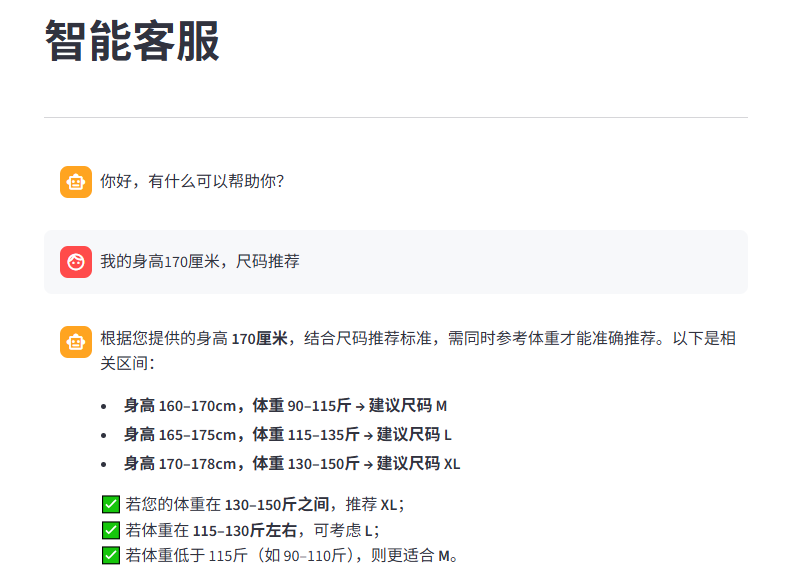
5.2 页面效果
六、运行智能客服
6.1 启动对话服务
streamlit run app_qa.py
6.2 测试流程
- 准备知识库:先运行
add_file_uploader.py上传尺码推荐文档 - 启动对话:运行
app_qa.py打开对话页面 - 测试问答:
- “我的体重 180 斤,推荐什么尺码?”
- “我身高 175cm,体重 150 斤呢?”
- “刚才说的尺码有现货吗?”(测试历史记忆)
七、项目文件结构
/projects
├── config_data.py              # 全局配置
├── knowledge_base.py           # 知识库服务(离线)
├── add_file_uploader.py        # 上传页面(离线)
├── vector_stores.py            # 向量检索服务(在线)
├── file_history_store.py       # 历史存储(在线)
├── rag.py                      # RAG 核心服务(在线)
├── app_qa.py                   # 对话页面(在线)
├── chroma_db/                  # Chroma 向量数据库
├── chat_history/               # 会话历史文件
└── data/
    └── md5_records.txt         # MD5 去重记录
八、关键技术点总结
8.1 离线流程
| 技术点 | 实现方式 |
|---|---|
| 文件上传 | Streamlit st.file_uploader |
| MD5 去重 | hashlib.md5() + 文件记录 |
| 文本分割 | RecursiveCharacterTextSplitter |
| 向量存储 | Chroma + DashScopeEmbeddings |
8.2 在线流程
| 技术点 | 实现方式 |
|---|---|
| 向量检索 | as_retriever() 转 Runnable |
| Prompt 组装 | ChatPromptTemplate + MessagesPlaceholder |
| 历史记忆 | RunnableWithMessageHistory + 文件存储 |
| 流式输出 | chain.stream() + write_stream() |
8.3 Chain 链结构
chain = (
    {
        "input": RunnablePassthrough(),
        "context": retriever | format_docs
    }
    | prompt_template
    | model
    | StrOutputParser()
)

# 增强历史记忆
conversation_chain = RunnableWithMessageHistory(
    chain,
    get_history,
    input_messages_key="input",
    history_messages_key="history"
)
九、系列总结
🎉 恭喜!你已经完成了整个 RAG 开发实战系列!
9.1 知识体系回顾
┌─────────────────────────────────────────────────────────┐
│              RAG 开发知识体系                            │
├─────────────────────────────────────────────────────────┤
│                                                         │
│  基础层                                                  │
│  ├── LLM API 调用                                       │
│  ├── 提示词工程(Few-Shot, Zero-Shot)                   │
│  └── 幻觉问题解决                                        │
│                                                         │
│  框架层(LangChain)                                     │
│  ├── 模型抽象(LLM, Chat, Embedding)                    │
│  ├── Prompt 模板                                        │
│  ├── Chain 链式调用                                     │
│  ├── 输出解析器                                         │
│  ├── 会话记忆                                           │
│  └── 文档处理                                           │
│                                                        │
│  核心层(RAG)                                          │
│  ├── 向量概念                                           │
│  ├── 相似度计算                                         │
│  ├── 向量存储                                           │
│  └── 检索增强生成                                       │
│                                                        │
│  实战层                                                 │
│  ├── 知识库构建(离线)                                  │
│  ├── 智能客服(在线)                                    │
│  └── Streamlit 界面                                     │
│                                                         │
└─────────────────────────────────────────────────────────┘
9.2 可扩展方向
- 多格式支持:PDF、Word、Markdown 文档加载
- 多向量库:Milvus、Pinecone、Weaviate
- 高级检索:混合检索、重排序、多路召回
- Agent 集成:工具调用、任务规划
- 部署优化:Docker 容器化、API 服务化
十、系列文章导航
- LLM 基础与提示词工程:从 API 调用到 Prompt 优化技巧
- LangChain 框架入门:模型抽象与 Prompt 模板
- LangChain 进阶:Chain 链与输出解析器
- LangChain 记忆与文档处理:让 AI 拥有长期记忆
- RAG 核心概念与向量存储
- RAG 实战 (上):知识库构建与文件上传服务
- RAG 实战 (下):智能客服系统(本文)
🎓 学完本系列,你已经具备:
- LLM 应用开发基础
- LangChain 框架熟练使用
- RAG 系统完整实现能力
- 可落地的智能客服项目经验
版权声明:本文基于学习笔记整理,转载请注明出处。

Agent 垂直技术社区,欢迎活跃、内容共建。
更多推荐

 9
9 0
0- 0


 已为社区贡献8条内容

所有评论(0)