小白从零开始勇闯人工智能:Function Calling 指南
引言
大语言模型的知识存储十分丰富,能背诵百科全书,回答各种理论问题。但是,当你问它“合肥今天天气怎么样?”时,它只能告诉你“抱歉,我的知识截止到某年某月,无法查询实时天气”。因为它只有“大脑”(文本生成能力),却没有“手脚”(调用外部 API、查询数据库、执行计算的能力)。Function Calling(函数调用) 正是赋予 AI “手脚”的关键技术。它允许模型在需要时,主动请求调用你预先定义好的函数(例如查询天气、搜索地图、计算总和),然后将执行结果整合成自然语言回复给你。通过这种方式,AI 从一个“只会聊天的机器人”,变成了一个能连接万物、执行实际任务的智能助手。
一、初识 Function Calling —— 让 AI 查询天气
1、核心概念:工具定义
要让 AI 知道它能使用什么“手脚”,我们必须先定义一套“工具说明书”。
工具定义列表中包含一个类型为“函数”的工具,其函数名为“get_current_weather”,描述为“当你想查询指定城市的天气时非常有用”,它接受一个参数对象,参数结构包含一个必需的“location”字段,类型为字符串,描述为“城市或县区,比如北京市”。我们告诉 AI:“有一个叫 get_current_weather 的工具,当你需要查天气时可以用它。使用时需要提供 location 参数。”
tools = [
    {
        "type": "function",
        "function": {
            "name": "get_current_weather",          # 函数名
            "description": "当你想查询指定城市的天气时非常有用。", # 什么情况下用
            "parameters": {                          # 需要什么参数
                "type": "object",
                "properties": {
                    "location": {
                        "type": "string",
                        "description": "城市或县区,比如北京市",
                    }
                },
                "required": ["location"],
            },
        },
    },
]
2、实现工具函数
定义真正的 Python 函数来执行具体任务。这里我们模拟返回随机天气。
def get_current_weather(arguments):
    weather_conditions = ["晴天", "多云", "雨天"]
    random_weather = random.choice(weather_conditions)
    location = arguments["location"]
    return f"{location}今天是{random_weather}。"
3、对话流程:用户 -> AI -> 工具 -> AI
Function Calling 标准流程是:首先用户提出一个自然语言问题,系统第一次调用 AI 模型时,模型根据预设的工具定义判断需要调用 get_current_weather 工具,并返回一个包含函数名和参数的 tool_calls 对象;随后解析该参数,实际执行对应的天气查询函数,得到“合肥今天是晴天”这样的结果;最后将工具返回的结果以 role 为“tool”的消息形式再次发送给 AI 模型,模型据此生成最终的自然语言回复,从而完成整个函数调用与回答的闭环。
# 第一次调用,判断是否需要工具
response = get_response(messages)

# 如果有工具调用请求
if assistant_output.tool_calls is not None:
    tool_call = assistant_output.tool_calls[0]
    func_name = tool_call.function.name
    arguments = json.loads(tool_call.function.arguments)

    # 执行对应函数
    tool_result = get_current_weather(arguments)

    # 构造工具返回消息
    tool_message = {
        "role": "tool",
        "tool_call_id": tool_call.id,
        "content": tool_result,
    }
    messages.append(tool_message)

    # 第二次调用 AI,生成最终回复
    response = get_response(messages)

二、多工具协作 —— 地图 POI 搜索
当需要让 AI 完成更复杂的任务时,往往需要多个工具配合。
1、定义两个工具
我们首先定义了两个工具:第一个工具是“get_location_coordinate”,它能够根据用户提供的地点名称和所在城市,获取该地点对应的精确经纬度坐标;第二个工具是“search_nearby_pois”,它能够基于给定的经纬度坐标和关键词,搜索该位置周边符合条件的兴趣点(POI)信息。
2、主循环:处理多个工具调用
新版模型可以一次返回多个 tool_calls。我们需要遍历处理每一个。
while response.tool_calls is not None:
    for tool_call in response.tool_calls:
        args = json.loads(tool_call.function.arguments)

        if tool_call.function.name == "get_location_coordinate":
            result = get_location_coordinate(**args)
        elif tool_call.function.name == "search_nearby_pois":
            result = search_nearby_pois(**args)

        # 将结果加入历史
        messages.append({
            "tool_call_id": tool_call.id,
            "role": "tool",
            "name": tool_call.function.name,
            "content": str(result),
        })

    # 所有工具执行完后,再次调用 AI
    response = get_completion(messages)
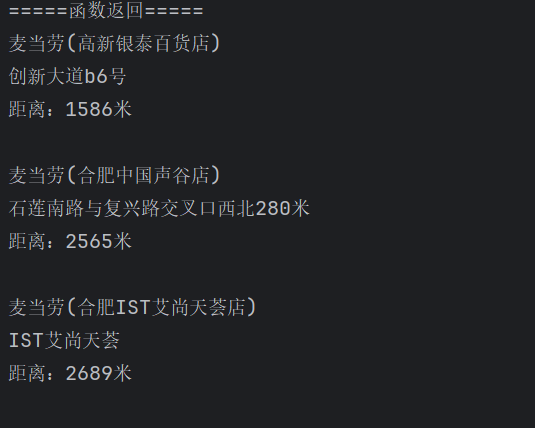
当AI面对用户的问题时,会先调用“get_location_coordinate”工具来获取“英唐工业园”的经纬度,接着再调用“search_nearby_pois”工具搜索附近的“麦当劳”,最后根据这些结果生成一段自然的推荐语。
三、结构化输出 —— 生成 JSON 数据
Function Calling还有一个隐藏的强大功能,即强制输出结构化数据:当需要从文本中提取信息(比如联系人、订单信息)并转换为 JSON 时,使用 Function Calling 比单纯依赖提示词要稳定得多。
1、定义工具
我们并不一定要真正执行函数,只是借用 tools 参数来让模型输出固定格式的 JSON。
tools = [
    {
        "type": "function",
        "function": {
            "name": "add_contact",
            "description": "添加联系人",
            "parameters": {
                "type": "object",
                "properties": {
                    "name": {"type": "string", "description": "联系人姓名"},
                    "address": {"type": "string", "description": "联系人地址"},
                    "tel": {"type": "string", "description": "联系人电话"},
                },
            },
        },
    }
]
2、解析参数
模型返回的 response.tool_calls[0].function.arguments 就是一个标准的 JSON 字符串,我们可以直接解析使用。
args = json.loads(response.tool_calls[0].function.arguments)
print_json(args)
四、连接数据库 —— 自动生成并执行 SQL
1、定义工具:生成 SQL
工具的 description 和 parameters 中直接包含了数据库表结构(database_schema_string),让模型了解如何写 SQL。
tools = [
    {
        "type": "function",
        "function": {
            "name": "ask_database",
            "description": "Use this function to answer user questions about business. Output should be a fully formed SQL query.",
            "parameters": {
                "type": "object",
                "properties": {
                    "query": {
                        "type": "string",
                        "description": f"SQL query ... using this database schema: {database_schema_string}",
                    }
                },
            },
        },
    }
]
2、执行 SQL 并返回结果
模型生成的SQL会被解析后由本地的ask_database函数执行,执行结果再返回给模型。AI并不需要理解数据库底层的实现细节,它只是充当“翻译官”的角色,把人类提出的问题(比如“哪个学生毕业时间最晚?”)翻译成SQL语句,然后由本地代码去实际执行。
五、计算器 —— 简单加法
1、定义加法工具
tools = [
    {
        "type": "function",
        "function": {
            "name": "sum",
            "description": "加法器,计算一组数的和,只能运用于加法操作",
            "parameters": {
                "type": "object",
                "properties": {
                    "numbers": {"type": "array", "items": {"type": "number"}}
                },
            },
        },
    }
]
2、处理自然语言中的数学问题
当用户问“桌上有2个苹果,四个桃子和3本书,一共有几个水果?”时,模型并没有机械地把所有数字都丢给sum工具,而是先理解问题,判断出“书”不属于水果,只提取出苹果和桃子的数量(2和4)进行求和。这说明Function Calling不仅仅是简单的工具调用,它还能结合上下文进行智能筛选,体现出模型在调用工具前的理解和判断能力。


Agent 垂直技术社区,欢迎活跃、内容共建。
更多推荐


 8
8 0
0- 0


 已为社区贡献6条内容

所有评论(0)