【亲测有效】(3)LangGraph 完整教程与案例 状态机
·
01_state_machine.py
"""
状态机案例:订单处理系统
========================

本案例展示如何使用 LangGraph 实现一个订单处理状态机。
状态包括:待支付 -> 已支付 -> 备货中 -> 已发货 -> 已完成
"""

from typing import TypedDict, Annotated, Literal
from langgraph.graph import StateGraph, END
import operator
from datetime import datetime
from enum import Enum

# 定义订单状态枚举
class OrderStatus(Enum):
    PENDING = "pending"  # 待支付
    PAID = "paid"        # 已支付
    PROCESSING = "processing"  # 备货中
    SHIPPED = "shipped"  # 已发货
    COMPLETED = "completed"  # 已完成
    CANCELLED = "cancelled"  # 已取消

# 定义状态类型
class OrderState(TypedDict):
    """订单状态定义"""
    order_id: str  # 订单ID
    status: OrderStatus  # 当前状态
    amount: float  # 订单金额
    items: list  # 商品列表
    history: Annotated[list, operator.add]  # 状态历史记录
    created_at: datetime  # 创建时间
    updated_at: datetime  # 更新时间
    payment_method: str  # 支付方式
    shipping_address: str  # 收货地址
    notes: Annotated[list, operator.add]  # 备注信息

# 节点函数定义
def create_order(state: OrderState) -> dict:
    """创建订单节点"""
    print(f"[{datetime.now()}] 创建订单: {state['order_id']}")
    return {
        "status": OrderStatus.PENDING,
        "created_at": datetime.now(),
        "updated_at": datetime.now(),
        "history": [{"status": OrderStatus.PENDING.value, "timestamp": datetime.now()}],
        "notes": ["订单创建成功"]
    }

def process_payment(state: OrderState) -> dict:
    """处理支付节点"""
    print(f"[{datetime.now()}] 处理支付: {state['order_id']}, 金额: {state['amount']}")

    # 模拟支付处理逻辑
    if state["amount"] <= 0:
        return {
            "status": OrderStatus.CANCELLED,
            "updated_at": datetime.now(),
            "history": [{"status": OrderStatus.CANCELLED.value, "timestamp": datetime.now()}],
            "notes": ["支付失败:金额无效"]
        }

    # 模拟支付成功
    return {
        "status": OrderStatus.PAID,
        "updated_at": datetime.now(),
        "history": [{"status": OrderStatus.PAID.value, "timestamp": datetime.now()}],
        "notes": [f"支付成功,支付方式: {state.get('payment_method', '未知')}"]
    }

def prepare_order(state: OrderState) -> dict:
    """备货节点"""
    print(f"[{datetime.now()}] 备货处理: {state['order_id']}")

    # 检查库存
    items = state.get("items", [])
    if not items:
        return {
            "status": OrderStatus.CANCELLED,
            "updated_at": datetime.now(),
            "history": [{"status": OrderStatus.CANCELLED.value, "timestamp": datetime.now()}],
            "notes": ["订单取消:无商品"]
        }

    # 模拟备货过程
    return {
        "status": OrderStatus.PROCESSING,
        "updated_at": datetime.now(),
        "history": [{"status": OrderStatus.PROCESSING.value, "timestamp": datetime.now()}],
        "notes": [f"开始备货,商品数量: {len(items)}"]
    }

def ship_order(state: OrderState) -> dict:
    """发货节点"""
    print(f"[{datetime.now()}] 发货处理: {state['order_id']}")

    shipping_address = state.get("shipping_address", "")
    if not shipping_address:
        return {
            "status": OrderStatus.CANCELLED,
            "updated_at": datetime.now(),
            "history": [{"status": OrderStatus.CANCELLED.value, "timestamp": datetime.now()}],
            "notes": ["订单取消:无收货地址"]
        }

    # 模拟发货过程
    return {
        "status": OrderStatus.SHIPPED,
        "updated_at": datetime.now(),
        "history": [{"status": OrderStatus.SHIPPED.value, "timestamp": datetime.now()}],
        "notes": [f"订单已发货,收货地址: {shipping_address}"]
    }

def complete_order(state: OrderState) -> dict:
    """完成订单节点"""
    print(f"[{datetime.now()}] 完成订单: {state['order_id']}")

    return {
        "status": OrderStatus.COMPLETED,
        "updated_at": datetime.now(),
        "history": [{"status": OrderStatus.COMPLETED.value, "timestamp": datetime.now()}],
        "notes": ["订单已完成,感谢您的购买!"]
    }

def cancel_order(state: OrderState) -> dict:
    """取消订单节点"""
    print(f"[{datetime.now()}] 取消订单: {state['order_id']}")

    return {
        "status": OrderStatus.CANCELLED,
        "updated_at": datetime.now(),
        "history": [{"status": OrderStatus.CANCELLED.value, "timestamp": datetime.now()}],
        "notes": ["订单已取消"]
    }

# 条件判断函数
def check_payment_status(state: OrderState) -> str:
    """检查支付状态"""
    if state["status"] == OrderStatus.PAID:
        return "to_prepare"
    else:
        return "to_cancel"

def check_preparation_status(state: OrderState) -> str:
    """检查备货状态"""
    if state["status"] == OrderStatus.PROCESSING:
        return "to_ship"
    else:
        return "to_cancel"

def check_shipping_status(state: OrderState) -> str:
    """检查发货状态"""
    if state["status"] == OrderStatus.SHIPPED:
        return "to_complete"
    else:
        return "to_cancel"

# 构建订单处理状态机
def build_order_state_machine():
    """构建订单处理状态机"""
    workflow = StateGraph(OrderState)

    # 添加节点
    workflow.add_node("create", create_order)
    workflow.add_node("pay", process_payment)
    workflow.add_node("prepare", prepare_order)
    workflow.add_node("ship", ship_order)
    workflow.add_node("complete", complete_order)
    workflow.add_node("cancel", cancel_order)

    # 设置入口点
    workflow.set_entry_point("create")

    # 添加边
    workflow.add_edge("create", "pay")

    # 添加条件边
    workflow.add_conditional_edges(
        "pay",
        check_payment_status,
        {
            "to_prepare": "prepare",
            "to_cancel": "cancel"
        }
    )

    workflow.add_conditional_edges(
        "prepare",
        check_preparation_status,
        {
            "to_ship": "ship",
            "to_cancel": "cancel"
        }
    )

    workflow.add_conditional_edges(
        "ship",
        check_shipping_status,
        {
            "to_complete": "complete",
            "to_cancel": "cancel"
        }
    )

    # 添加结束边
    workflow.add_edge("complete", END)
    workflow.add_edge("cancel", END)

    # 编译图
    return workflow.compile()

# 运行示例
def run_order_example():
    """运行订单处理示例"""
    print("=" * 60)
    print("订单处理状态机示例")
    print("=" * 60)

    # 构建状态机
    state_machine = build_order_state_machine()

    # 测试用例1:正常流程
    print("\n测试用例1:正常订单流程")
    print("-" * 40)

    order_state = {
        "order_id": "ORD-20250321-001",
        "status": OrderStatus.PENDING,
        "amount": 199.99,
        "items": ["商品A", "商品B"],
        "history": [],
        "created_at": datetime.now(),
        "updated_at": datetime.now(),
        "payment_method": "支付宝",
        "shipping_address": "北京市朝阳区",
        "notes": []
    }

    result = state_machine.invoke(order_state)
    print_result(result)

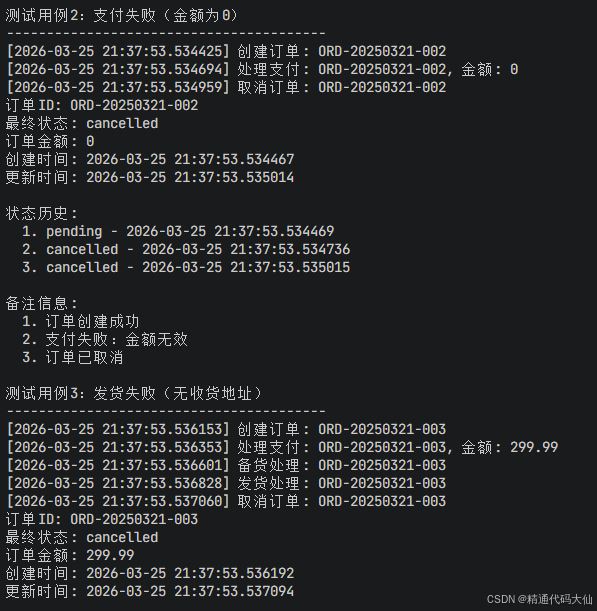
    # 测试用例2:支付失败
    print("\n测试用例2:支付失败(金额为0)")
    print("-" * 40)

    order_state2 = {
        "order_id": "ORD-20250321-002",
        "status": OrderStatus.PENDING,
        "amount": 0,
        "items": ["商品C"],
        "history": [],
        "created_at": datetime.now(),
        "updated_at": datetime.now(),
        "payment_method": "微信支付",
        "shipping_address": "上海市浦东新区",
        "notes": []
    }

    result2 = state_machine.invoke(order_state2)
    print_result(result2)

    # 测试用例3:无收货地址
    print("\n测试用例3:发货失败(无收货地址)")
    print("-" * 40)

    order_state3 = {
        "order_id": "ORD-20250321-003",
        "status": OrderStatus.PENDING,
        "amount": 299.99,
        "items": ["商品D", "商品E"],
        "history": [],
        "created_at": datetime.now(),
        "updated_at": datetime.now(),
        "payment_method": "信用卡",
        "shipping_address": "",  # 空地址
        "notes": []
    }

    result3 = state_machine.invoke(order_state3)
    print_result(result3)

    return state_machine

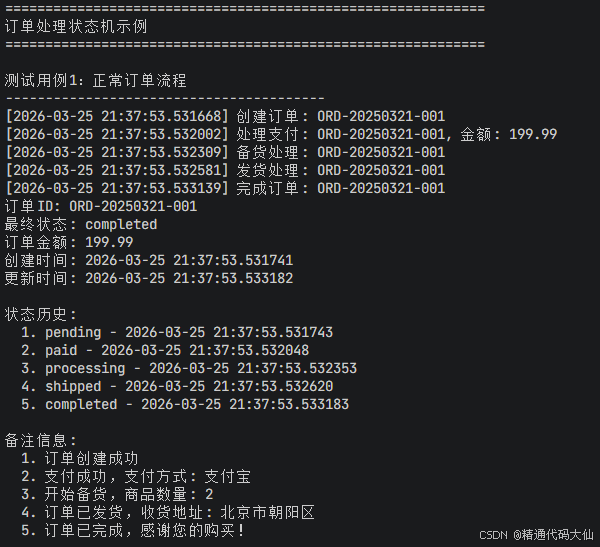
def print_result(result: dict):
    """打印结果"""
    print(f"订单ID: {result['order_id']}")
    print(f"最终状态: {result['status'].value}")
    print(f"订单金额: {result['amount']}")
    print(f"创建时间: {result['created_at']}")
    print(f"更新时间: {result['updated_at']}")

    print("\n状态历史:")
    for i, record in enumerate(result.get("history", [])):
        print(f"  {i+1}. {record['status']} - {record['timestamp']}")

    print("\n备注信息:")
    for i, note in enumerate(result.get("notes", [])):
        print(f"  {i+1}. {note}")

# 状态机可视化
def visualize_state_machine():
    """可视化状态机"""
    try:
        import networkx as nx
        import matplotlib.pyplot as plt

        # 创建状态转移图
        G = nx.DiGraph()

        # 添加状态节点
        states = ["create", "pay", "prepare", "ship", "complete", "cancel", "END"]
        for state in states:
            G.add_node(state)

        # 添加状态转移边
        transitions = [
            ("create", "pay", "创建订单"),
            ("pay", "prepare", "支付成功"),
            ("pay", "cancel", "支付失败"),
            ("prepare", "ship", "备货完成"),
            ("prepare", "cancel", "备货失败"),
            ("ship", "complete", "发货成功"),
            ("ship", "cancel", "发货失败"),
            ("complete", "END", "订单完成"),
            ("cancel", "END", "订单取消")
        ]

        for from_state, to_state, label in transitions:
            G.add_edge(from_state, to_state, label=label)

        # 绘制图
        plt.figure(figsize=(12, 10))
        pos = nx.spring_layout(G, seed=42)

        # 绘制节点
        nx.draw_networkx_nodes(G, pos, node_color='lightblue',
                               node_size=3000, alpha=0.8)

        # 绘制边
        nx.draw_networkx_edges(G, pos, edge_color='gray',
                               arrows=True, arrowsize=20)

        # 绘制标签
        nx.draw_networkx_labels(G, pos, font_size=10, font_weight='bold')

        # 绘制边标签
        edge_labels = nx.get_edge_attributes(G, 'label')
        nx.draw_networkx_edge_labels(G, pos, edge_labels=edge_labels,
                                     font_size=8)

        plt.title("订单处理状态机", fontsize=16, fontweight='bold')
        plt.axis('off')
        plt.tight_layout()

        # 保存图像
        plt.savefig("order_state_machine.png", dpi=300, bbox_inches='tight')
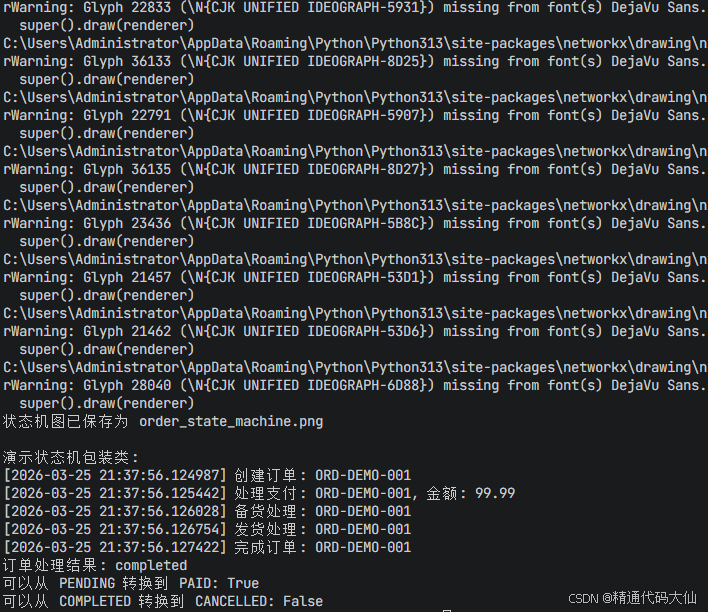
        print("状态机图已保存为 order_state_machine.png")

    except ImportError:
        print("需要安装 networkx 和 matplotlib 进行可视化")

# 状态机查询功能
class OrderStateMachine:
    """订单状态机包装类"""

    def __init__(self):
        self.machine = build_order_state_machine()

    def process_order(self, order_data: dict) -> dict:
        """处理订单"""
        # 确保有必要的字段
        order_data.setdefault("history", [])
        order_data.setdefault("notes", [])
        order_data.setdefault("created_at", datetime.now())
        order_data.setdefault("updated_at", datetime.now())

        return self.machine.invoke(order_data)

    def get_status_history(self, order_id: str, result: dict) -> list:
        """获取状态历史"""
        return result.get("history", [])

    def can_transition_to(self, current_status: OrderStatus, target_status: OrderStatus) -> bool:
        """检查是否可以从当前状态转换到目标状态"""
        valid_transitions = {
            OrderStatus.PENDING: [OrderStatus.PAID, OrderStatus.CANCELLED],
            OrderStatus.PAID: [OrderStatus.PROCESSING, OrderStatus.CANCELLED],
            OrderStatus.PROCESSING: [OrderStatus.SHIPPED, OrderStatus.CANCELLED],
            OrderStatus.SHIPPED: [OrderStatus.COMPLETED, OrderStatus.CANCELLED],
            OrderStatus.COMPLETED: [],
            OrderStatus.CANCELLED: []
        }

        return target_status in valid_transitions.get(current_status, [])

if __name__ == "__main__":
    # 运行示例
    state_machine = run_order_example()

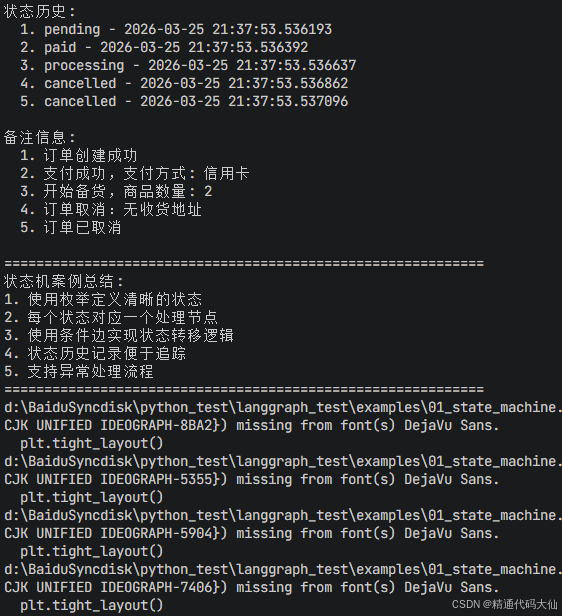
    print("\n" + "=" * 60)
    print("状态机案例总结:")
    print("1. 使用枚举定义清晰的状态")
    print("2. 每个状态对应一个处理节点")
    print("3. 使用条件边实现状态转移逻辑")
    print("4. 状态历史记录便于追踪")
    print("5. 支持异常处理流程")
    print("=" * 60)

    # 可视化状态机
    visualize_state_machine()

    # 演示状态机包装类
    print("\n演示状态机包装类:")
    order_machine = OrderStateMachine()

    test_order = {
        "order_id": "ORD-DEMO-001",
        "status": OrderStatus.PENDING,
        "amount": 99.99,
        "items": ["测试商品"],
        "payment_method": "测试支付",
        "shipping_address": "测试地址"
    }

    result = order_machine.process_order(test_order)
    print(f"订单处理结果: {result['status'].value}")

    # 检查状态转换
    print(f"可以从 PENDING 转换到 PAID: {order_machine.can_transition_to(OrderStatus.PENDING, OrderStatus.PAID)}")
    print(f"可以从 COMPLETED 转换到 CANCELLED: {order_machine.can_transition_to(OrderStatus.COMPLETED, OrderStatus.CANCELLED)}")

Agent 垂直技术社区,欢迎活跃、内容共建。
更多推荐
 0
0 0
0- 0


 已为社区贡献23条内容

所有评论(0)