【】ai -claude
·
mysql 查询
- sql 创建数据表及数据
-- 1. 创建用户表 users
-- DROP TABLE IF EXISTS tz_users;
CREATE TABLE tz_users (
    id BIGINT UNSIGNED NOT NULL AUTO_INCREMENT COMMENT '用户ID',
    email VARCHAR(128) NOT NULL COMMENT '用户邮箱(唯一)',
    created_at DATETIME NOT NULL DEFAULT CURRENT_TIMESTAMP COMMENT '创建时间',
    status TINYINT NOT NULL DEFAULT 1 COMMENT '状态:1-正常,0-禁用,2-注销',
    PRIMARY KEY (id),
    UNIQUE KEY uk_email (email)  -- 邮箱唯一约束
)  COMMENT='用户表';

-- 2. 创建商品表 products
-- DROP TABLE IF EXISTS tz_products;
CREATE TABLE tz_products (
    id BIGINT UNSIGNED NOT NULL AUTO_INCREMENT COMMENT '商品ID',
    name VARCHAR(64) NOT NULL COMMENT '商品名称',
    price DECIMAL(10,2) NOT NULL COMMENT '商品价格(保留2位小数)',
    category VARCHAR(32) NOT NULL COMMENT '商品分类',
    PRIMARY KEY (id)
)  COMMENT='商品表';

-- 3. 创建订单表 orders(关联用户和商品,这里扩展order_items更合理,但按你的需求简化)
-- DROP TABLE IF EXISTS tz_orders;
CREATE TABLE tz_orders (
    id BIGINT UNSIGNED NOT NULL AUTO_INCREMENT COMMENT '订单ID',
    user_id BIGINT UNSIGNED NOT NULL COMMENT '关联用户ID',
    amount DECIMAL(10,2) NOT NULL COMMENT '订单总金额',
    created_at DATETIME NOT NULL DEFAULT CURRENT_TIMESTAMP COMMENT '下单时间',
    status TINYINT NOT NULL DEFAULT 0 COMMENT '订单状态:0-待支付,1-已支付,2-已取消,3-已完成',
    product_id BIGINT UNSIGNED NOT NULL COMMENT '产品ID',
    PRIMARY KEY (id),
    KEY idx_user_id (user_id),  -- 按用户ID查询订单的索引
    -- 外键关联用户表(可选,生产环境可根据业务决定是否启用外键)
    CONSTRAINT fk_order_user FOREIGN KEY (user_id) REFERENCES
    tz_users(id) ON DELETE RESTRICT,
    CONSTRAINT fk_order_product FOREIGN KEY (product_id) REFERENCES  tz_product(id)
)  COMMENT='订单表';

INSERT INTO tz_users (email, created_at, status) VALUES
('user1@163.com', '2026-03-01 10:00:00', 1),
('user2@163.com', '2026-03-02 11:00:00', 1),
('user3@163.com', '2026-03-03 14:00:00', 0);  -- 禁用状态的用户

-- 插入商品数据
INSERT INTO tz_products (name, price, category) VALUES
('小米14手机', 3999.00, '手机'),
('华为MatePad', 2499.00, '平板'),
('苹果AirPods Pro', 1799.00, '耳机'),
('罗技机械键盘', 299.00, '外设'),
('金士顿U盘128G', 59.90, '存储设备');

-- 插入订单数据(关联用户ID)
INSERT INTO tz_orders (user_id, amount, created_at, status,product_id) VALUES
(1, 3999.00, '2026-03-01 10:30:00', 3,1),  -- user1 已完成的手机订单
(1, 299.00, '2026-03-02 09:15:00', 1,4),   -- user1 已支付的键盘订单
(1, 299.00, '2026-03-02 09:15:00', 1,4),   -- user1 已支付的键盘订单
(1, 59.90, '2026-03-02 09:15:00', 1,5),   -- user1 已支付的键盘订单
(2, 1799.00, '2026-03-03 15:20:00', 0,3),  -- user2 待支付的耳机订单
(3, 1799.00, '2026-03-04 11:40:00', 2,3);  -- 禁用用户user3 已取消的平板订单
skill -sql
在.claude下的skills目录下的sql-query-helper目录下的SKILL.md文件内容:
---
name: sql-query-helper
description: |
  Help write and optimize SQL queries for the company database.
  Use when Claude needs to query the production database or
  help with SQL query optimization.

---

# SQL Query Helper

## Database Schema

Our main tables:

- `tz_users` (id, email, created_at, status)
- `tz_orders` (id, user_id, amount, created_at, status,product_id)
- `tz_products` (id, name, price, category)

## Query Guidelines

1. Always use parameterized queries
2. Include LIMIT clauses for safety
3. Use indexes on WHERE clauses
4. Test queries in staging first

## Common Queries

### Active Users

\`\`\`sql
SELECT id, email, last_login
FROM tz_users
WHERE status = 'active'
ORDER BY last_login DESC
LIMIT 100;
\`\`\`

### Revenue by Month

\`\`\`sql
SELECT
  DATE_TRUNC('month', created_at) as month,
  SUM(amount) as revenue
FROM tz_orders
WHERE status = 'completed'
GROUP BY month
ORDER BY month DESC;
\`\`\`

## Note
status字段的值为:1-已支付,0-待支付,2-禁用,3-已完成。status显示时使用文本,比如:status值为1,则显示为已支付。
If you encounter a TLS/SSL error, please use  `--skip-ssl` to skip the verification.
-
使用
- 生新加载
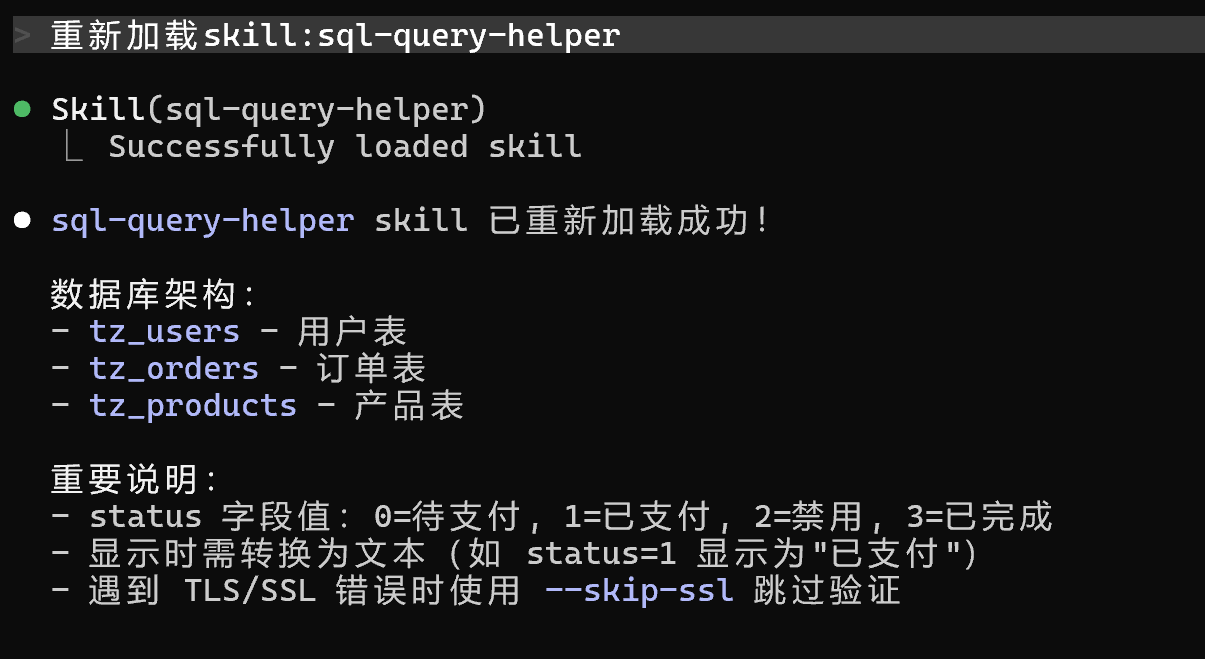
重新加载skill:sql-query-helper
效果图如下:
-
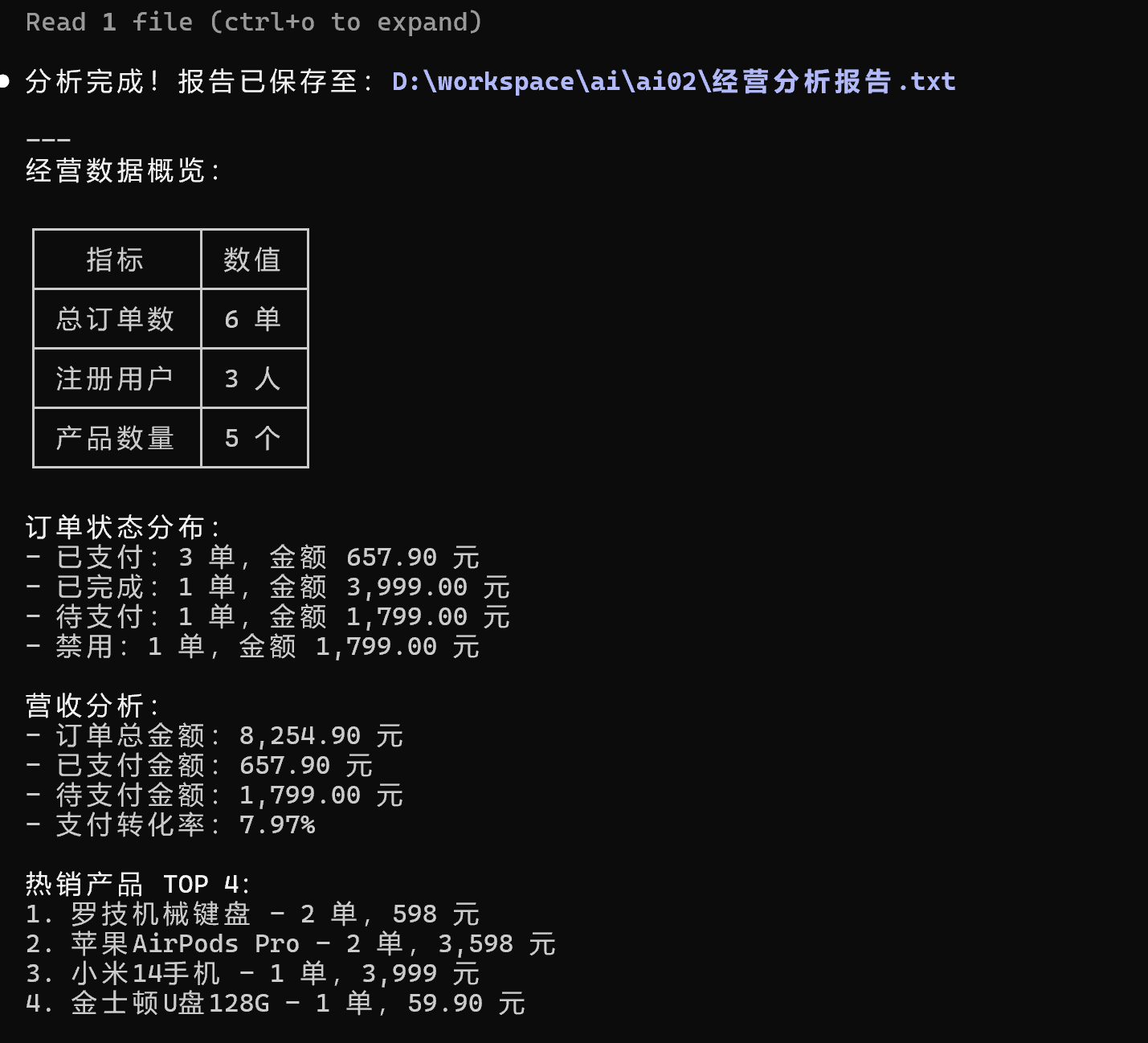
使用统计分析
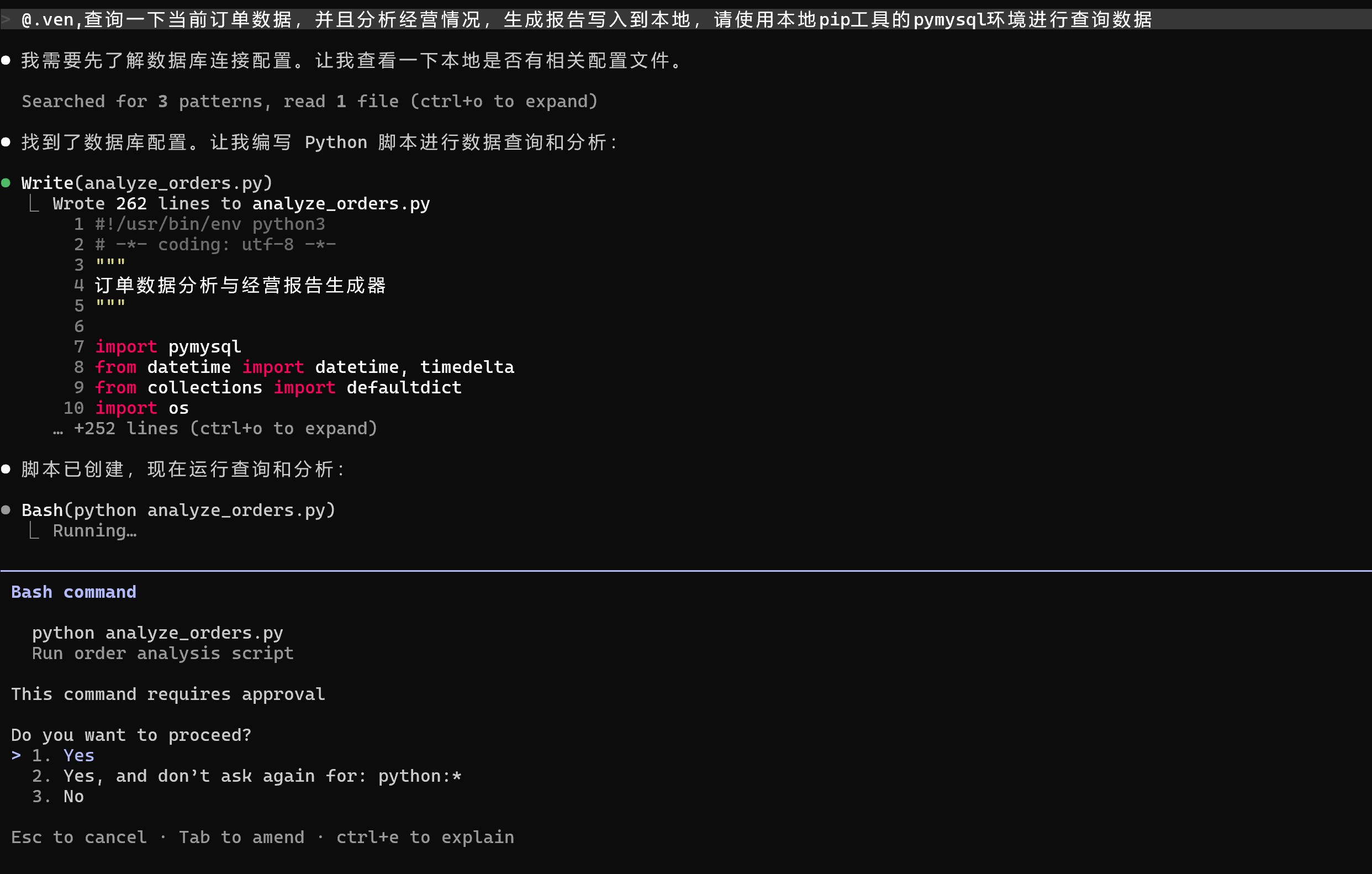
提示词
@.ven,查询一下当前订单数据,并且分析经营情况,生成报告写入到本地,请使用本地pip工具的pymysql环境进行查询数据
效果图如下:
-
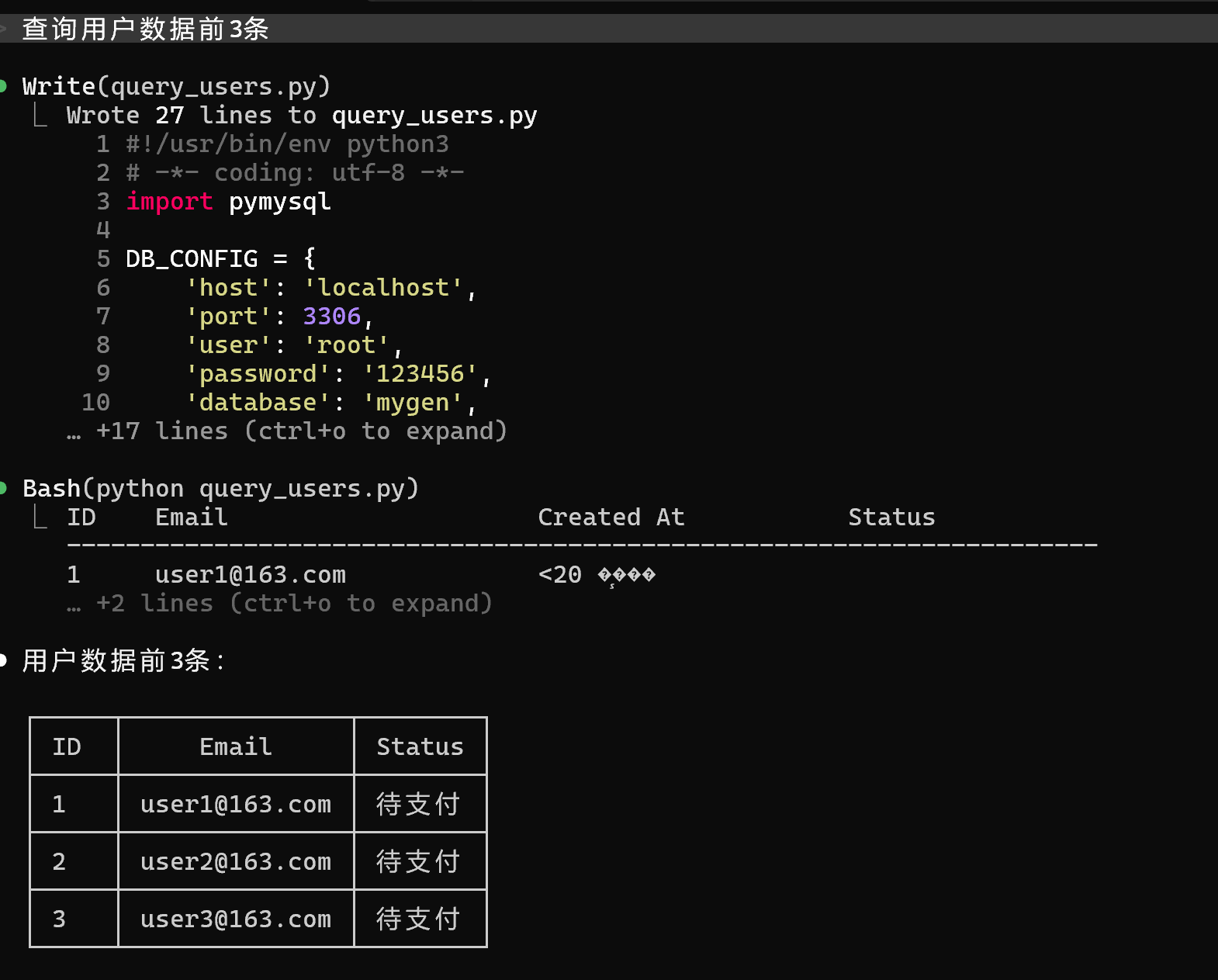
查询用户前3条
提示词:查询用户前3条
效果如下: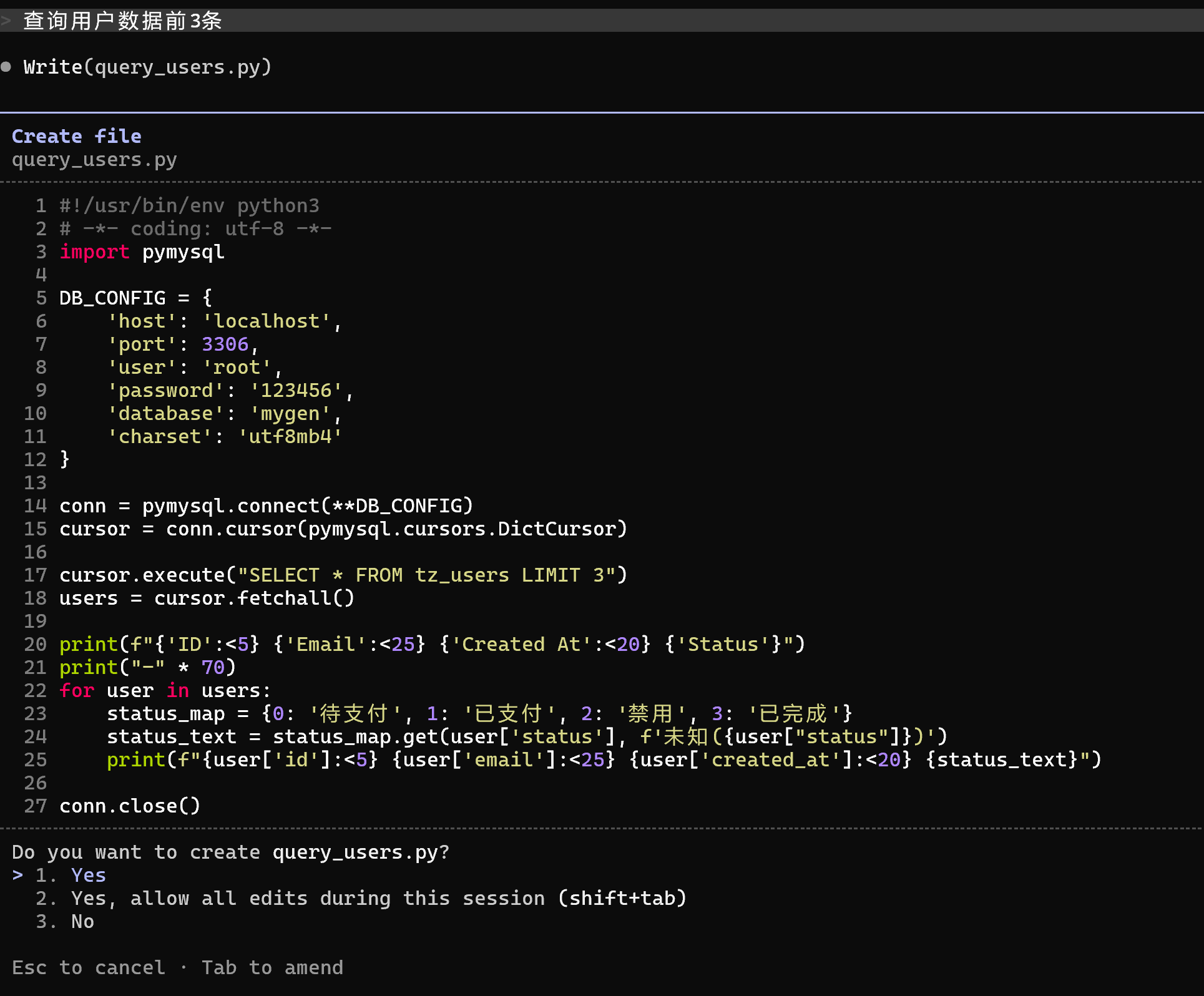

Agent 垂直技术社区,欢迎活跃、内容共建。
更多推荐
 0
0 0
0- 0


 已为社区贡献3条内容

所有评论(0)