OpenClaw sandbox工作原理解析(二)
6. 绑定挂载(Bind Mounts)
6.1 配置方式
配置位置:agents.defaults.sandbox.docker.binds
{
agents: {
defaults: {
sandbox: {
docker: {
binds: [
"/home/user/source:/source:ro", // 只读挂载
"/var/data/myapp:/data:ro"
]
}
}
}
}
}
格式:host_path:container_path:mode
6.2 安全限制
OpenClaw 自动阻止危险的绑定挂载源:
|
阻止的路径 |
原因 |
|
/var/run/docker.sock |
Docker 逃逸风险 |
|
/etc |
系统配置泄露 |
|
/proc |
进程信息泄露 |
|
/sys |
内核信息泄露 |
|
/dev |
设备访问风险 |
最佳实践:
{
// ✅ 推荐:只读挂载
binds: ["/home/user/source:/source:ro"]
// ❌ 避免:读写挂载敏感目录
binds: ["/home/user/.ssh:/ssh:rw"]
// ⚠️ 谨慎:仅在必要时使用读写
binds: ["/tmp/sandbox:/tmp:rw"]
}
7. 执行流程
7.1 容器生命周期
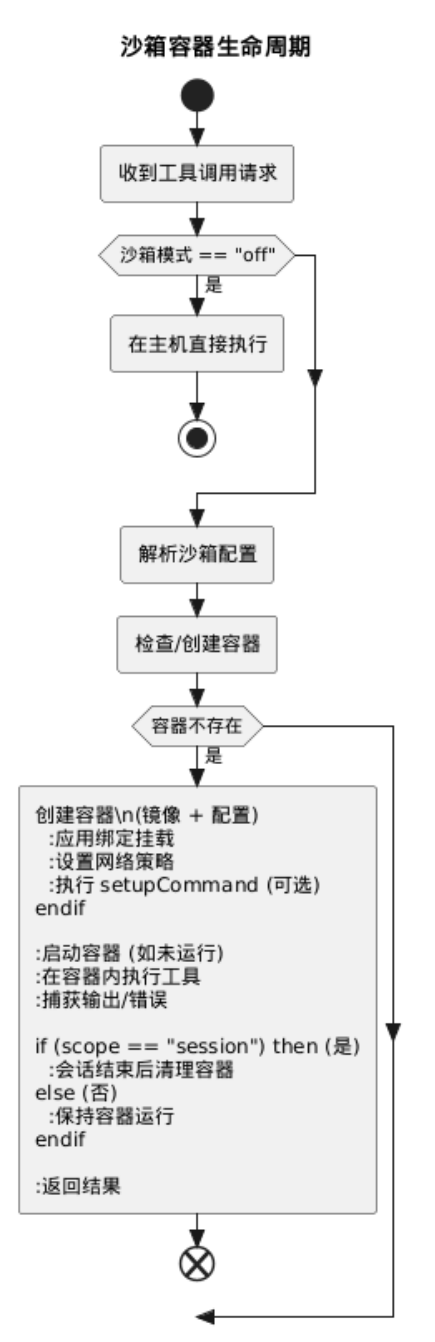
图 - 沙箱容器生命周期
7.2 工具执行流程
步骤详解:
- 策略决策
- 检查沙箱模式(mode)
- 确定目标容器(scope)
- 验证工具策略(allow/deny)
- 容器准备
- 检查容器是否存在
- 如不存在,创建新容器
- 应用配置(网络、挂载、环境变量)
- 工具执行
- 在容器内执行工具
- 捕获 stdout/stderr
- 应用输出限制(200KB)
- 结果返回
- 返回执行结果给 Gateway
- Gateway 转发给 AI 模型
8. 沙箱浏览器隔离
8.1 架构
{
agents: {
defaults: {
sandbox: {
browser: {
autoStart: true, // 自动启动
autoStartTimeoutMs: 30000, // 启动超时
network: "openclaw-sandbox-browser", // 专用网络
cdpSourceRange: "172.21.0.1/32", // CDP(Chrome DevTools Protocol) 访问限制
allowHostControl: false // 禁止控制主机浏览器
}
}
}
}
}
8.2 Chromium 安全参数
--remote-debugging-address=127.0.0.1
--remote-debugging-port=<CDP_PORT>
--user-data-dir=${HOME}/.chrome
--no-first-run
--no-default-browser-check
--disable-3d-apis
--disable-gpu
--disable-dev-shm-usage
--disable-background-networking
--disable-extensions
--no-zygote
--no-sandbox
--disable-setuid-sandbox
9. 安全加固配置
9.1 最小权限配置
{
agents: {
defaults: {
sandbox: {
mode: "non-main",
scope: "session",
workspaceAccess: "none",
docker: {
image: "openclaw-sandbox:bookworm-slim",
network: "none",
binds: [],
setupCommand: ""
}
}
}
},
tools: {
sandbox: {
tools: {
allow: ["group:messaging", "read"],
deny: ["group:runtime", "group:fs", "group:ui"]
}
}
}
}
9.2 生产环境配置
{
agents: {
defaults: {
sandbox: {
mode: "non-main",
scope: "session",
workspaceAccess: "ro",
docker: {
image: "openclaw-sandbox-common:bookworm-slim",
network: "none",
binds: [
"/home/user/source:/source:ro",
"/var/data/app:/data:ro"
]
}
}
}
},
tools: {
exec: {
security: "allowlist",
ask: "on-miss",
allowlist: [
{
pattern: "~/Projects/**/bin/**",
description: "项目构建工具"
}
]
}
}
}
10. 调试与诊断
10.1 诊断命令
# 查看沙箱配置
openclaw sandbox explain
# 查看特定会话
openclaw sandbox explain --session agent:main:main
# 查看特定代理
openclaw sandbox explain --agent work
# JSON 输出
openclaw sandbox explain --json
10.2 常见问题
|
问题 |
原因 |
解决方案 |
|
工具被阻止 |
沙箱工具策略拒绝 |
检查 tools.sandbox.tools |
|
网络访问失败 |
network: "none" |
更改网络配置(谨慎) |
|
挂载失败 |
路径被阻止 |
使用允许的路径 |
|
容器创建失败 |
Docker 未运行 |
启动 Docker 服务 |
11. 总结
11.1 安全架构层次
┌─────────────────────────────────────────┐
│ L1: Gateway 策略决策 │
├─────────────────────────────────────────┤
│ L2: Docker 容器隔离 │
│ - Namespaces (PID/Mount/Network) │
│ - Cgroups (资源限制) │
│ - Capabilities (权限控制) │
├─────────────────────────────────────────┤
│ L3: 绑定挂载控制 │
│ - 阻止危险路径 │
│ - 只读优先原则 │
├─────────────────────────────────────────┤
│ L4: 网络隔离 │
│ - 默认无网络 │
│ - 专用网络(浏览器) │
└─────────────────────────────────────────┘
11.2 最佳实践
|
实践 |
说明 |
|
✅ 启用沙箱 |
至少使用 non-main 模式 |
|
✅ 会话隔离 |
使用 scope: "session" |
|
✅ 最小权限 |
workspaceAccess: "none" 或 "ro" |
|
✅ 网络限制 |
默认 network: "none" |
|
✅ 只读挂载 |
绑定挂载使用 :ro 模式 |
|
✅ 定期审计 |
运行 openclaw security audit |

Agent 垂直技术社区,欢迎活跃、内容共建。
更多推荐
 11
11 0
0- 0


 已为社区贡献3条内容

所有评论(0)