手把手教你用 OpenClaw 对接微信,每天自动给好友发消息(附避坑指南)
本文核心目标:实现「OpenClaw 接入微信 + 获取实时新闻 + 给指定好友发送 + 每日定时推送」全流程自动化,无需手动干预,解放双手。
一、前期准备
在开始操作前,需提前准备好以下环境和工具,避免后续出现适配问题:
- 将微信客户端更新至 最新版本(旧版本可能无法正常接入 OpenClaw 插件,导致功能异常);
- 确保 OpenClaw 已正常安装并启动,若未安装,可参考官方文档完成部署
- 准备 Python 环境(建议 Python 3.7 及以上版本),安装所需依赖包(requests、beautifulsoup4 等,后续代码会自动适配,缺失时会提示);
- 提前创建好用于存放脚本、配置文件和日志的文件夹,便于后续管理。
二、详细操作步骤(全程实操,可直接照搬)
步骤1:OpenClaw 接入微信插件
这是实现微信消息发送的核心前提,通过插件建立 OpenClaw 与微信的连接,具体操作如下:
- 打开微信客户端,点击顶部「设置」,在设置页面中找到「插件」选项并点击进入;
- 在插件列表中找到 OpenClaw 相关插件(若未找到,可重新安装 OpenClaw 并重启微信),点击启用;
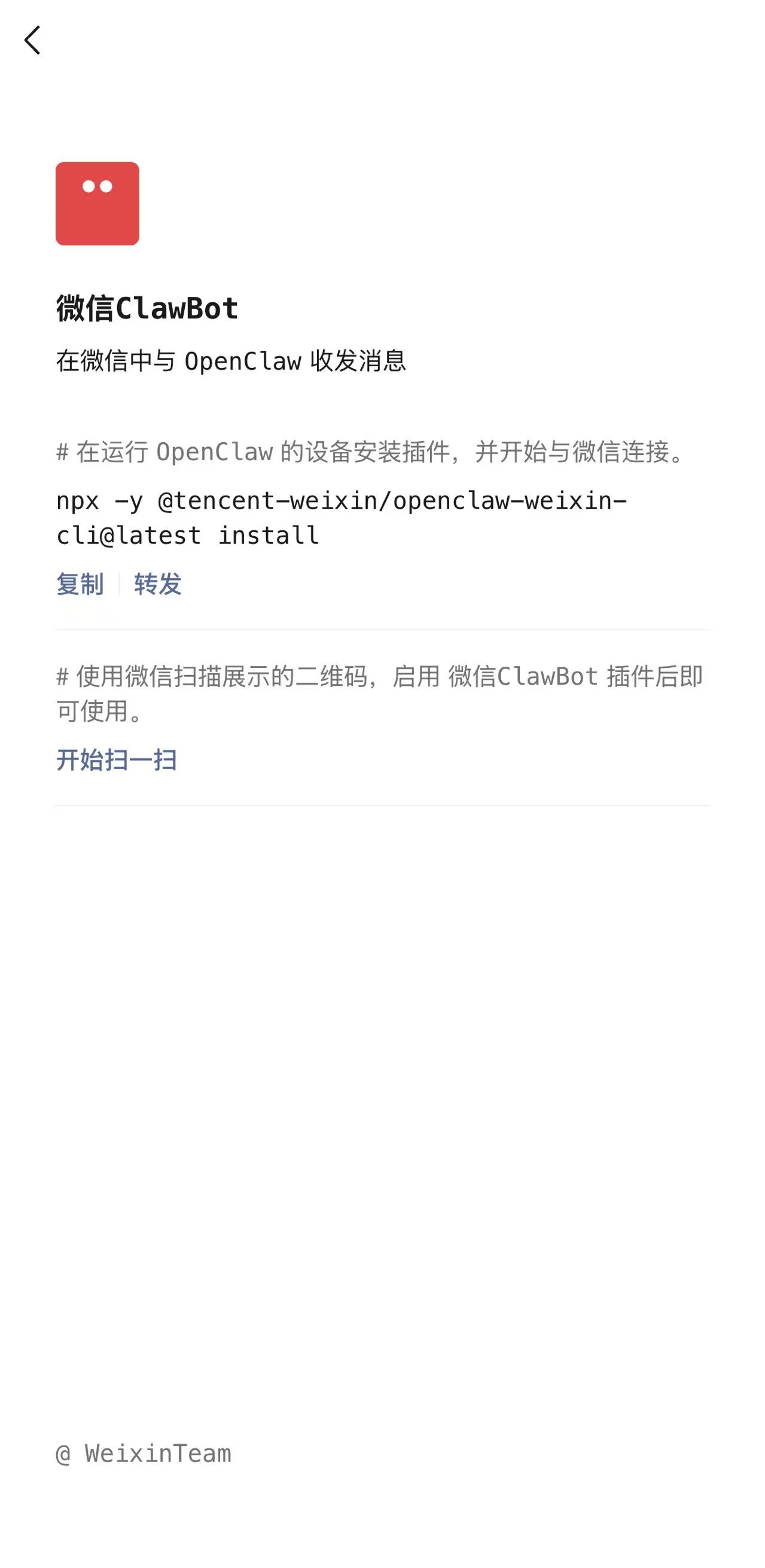
- npx -y @tencent-weixin/openclaw-weixin-cli@latest install
- 按照插件提示,通过 扫码或链接 完成 OpenClaw 与微信的登录关联。
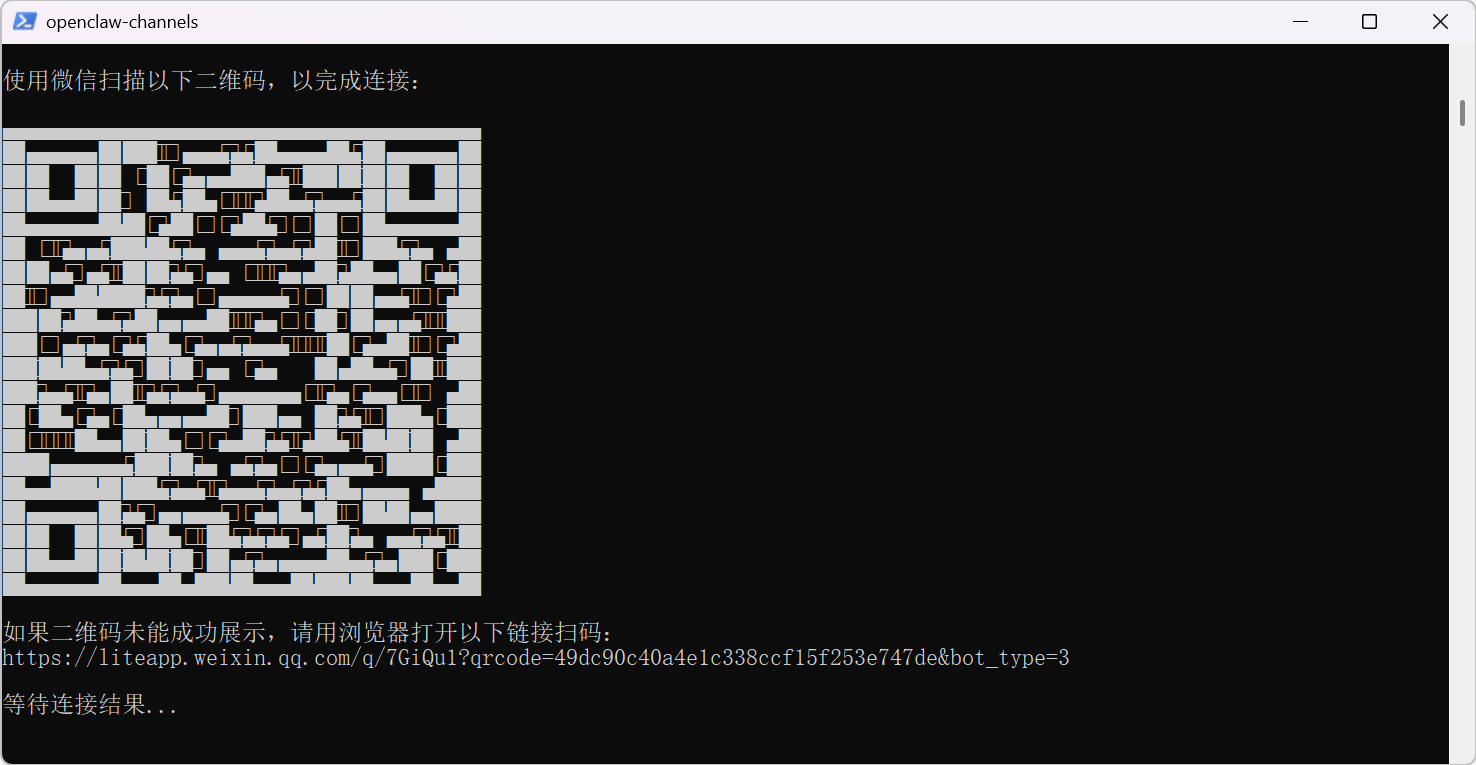
连接成功后,你的微信聊天列表中会自动新增一个名为「ClawBot」的 AI 机器人,这是后续获取好友参数、发送消息的关键入口。
测试功能示例:
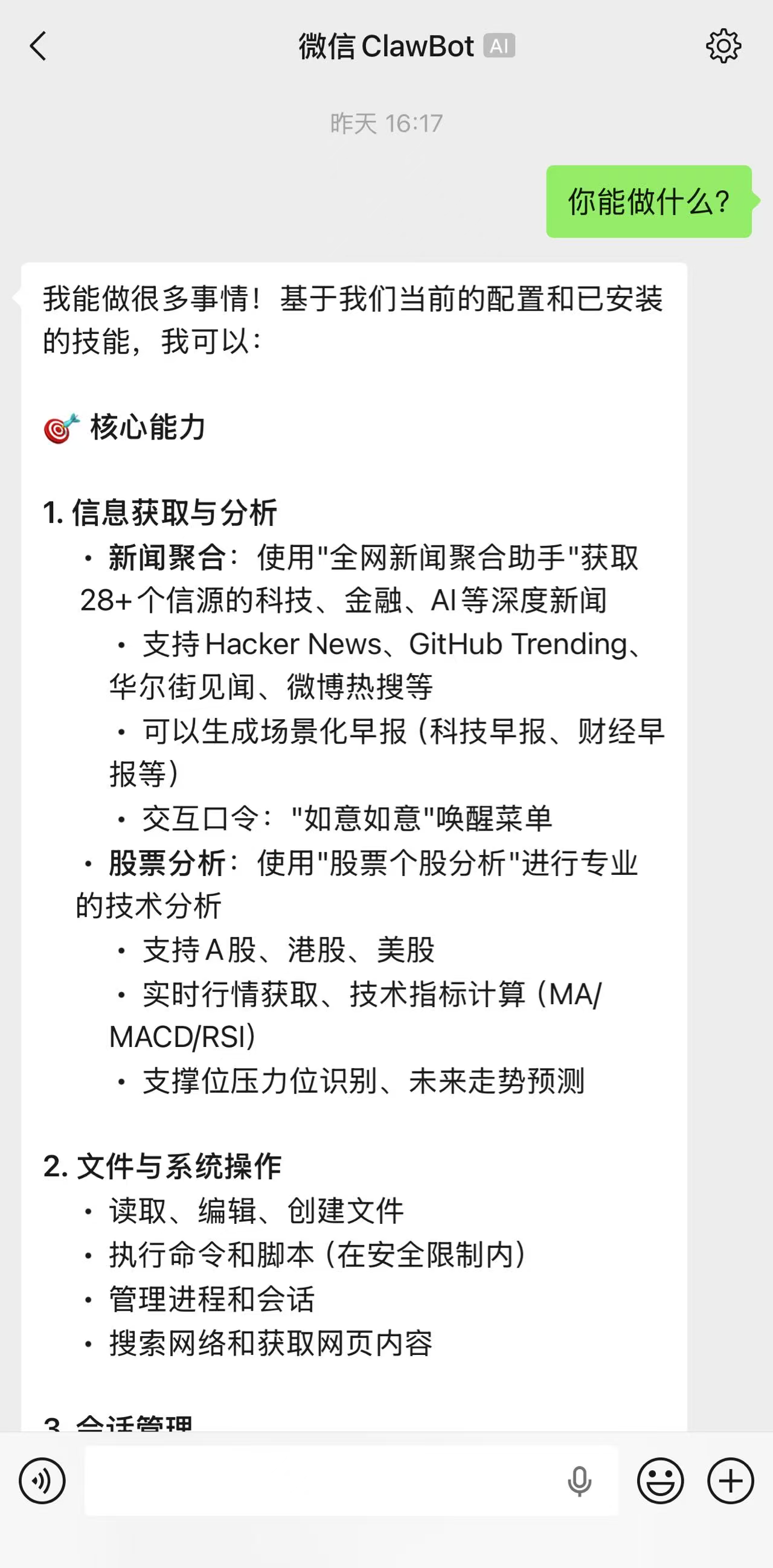
步骤2:获取好友 accountId 与 openId(核心关键)
要给指定微信好友发送消息,必须获取两个关键参数:accountId 和 openId,二者的作用及获取方式如下,缺一不可。
2.1 两个关键参数说明
- accountId:每一个与 ClawBot 私聊的好友,都会生成一个独立的 accountId,用于标识该好友与机器人的会话关系;
- openId:每个微信号对应的唯一标识,格式为「xxxx@im.wechat」,目前微信暂不对外开放该参数,只能通过与 ClawBot 的会话获取。
注意:当前插件版本暂不支持 ClawBot 与好友拉群,因此需要目标微信好友单独扫描你的 OpenClaw 二维码,建立与 ClawBot 的私聊会话,才能获取其相关参数。
2.2 具体获取方法
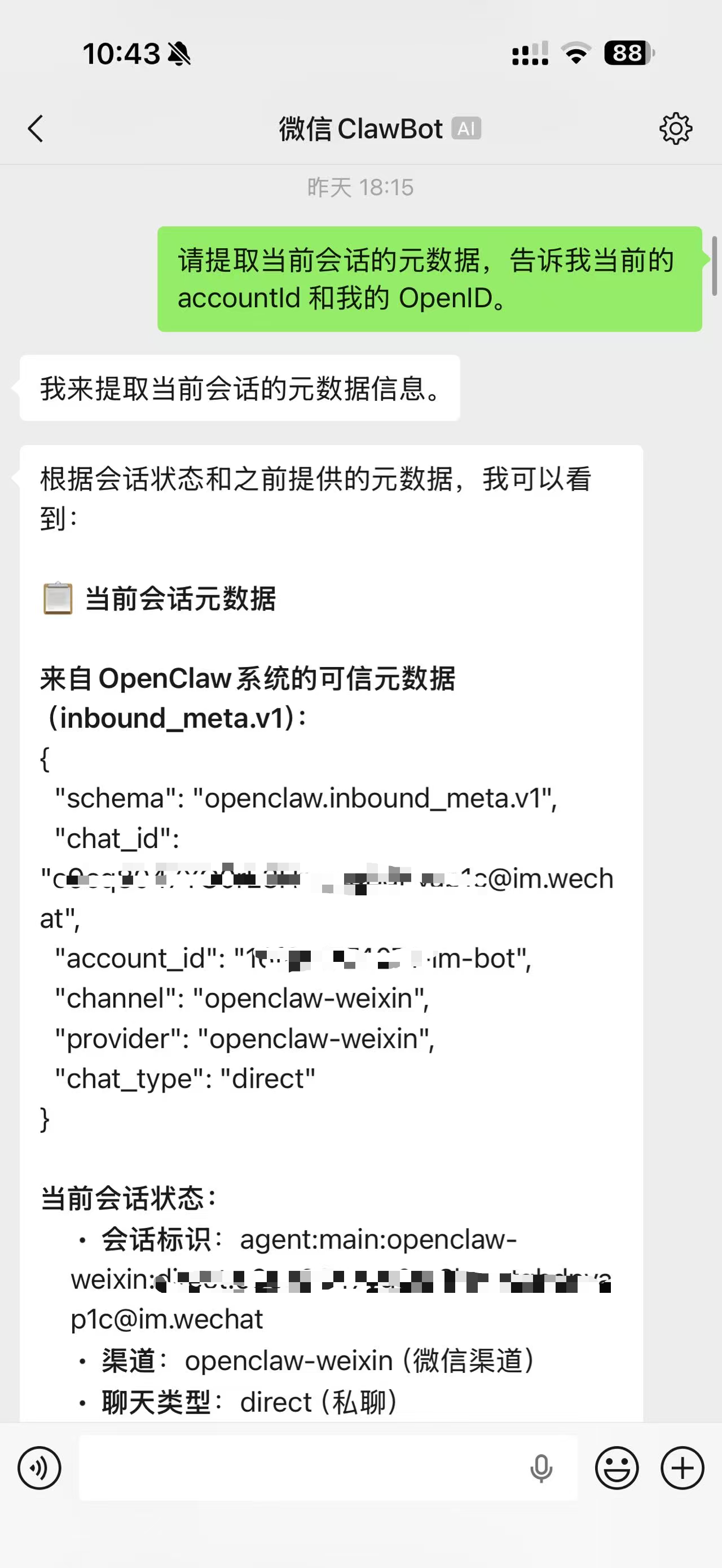
让目标微信好友与 ClawBot 发起私聊,在聊天框中发送以下指令:
「请提取当前会话的元数据,告诉我当前的 accountId 和我的 OpenID。」
发送指令后,ClawBot 会自动返回该好友的 accountId 和 openId。其中,对于私聊类型的会话,chat_id 与 wexinOpenId 一致,后续脚本配置中需用到这两个参数,请妥善保存。
步骤3:创建 Skill 脚本,实现新闻获取与消息发送
完成参数获取后,我们通过 OpenClaw 创建专属 Skill(tech-news-push-skill),实现「获取最新新闻 + 给指定好友发送消息」的功能,脚本可直接复制使用,无需修改核心逻辑。
3.1 创建 Skill 目录结构
在 OpenClaw 对应的 Skill 目录下,创建名为「tech-news-push-skill」的文件夹,内部需包含以下核心文件,确保功能正常运行:
- scripts 文件夹:存放核心脚本(fixed_real_time.py、add_multiple_friends.py);
- SKILL.md:Skill 说明文档,记录功能、使用方法及参数说明;
- config.json:配置文件,用于存储好友 accountId、openId、新闻推送数量等参数;
- logs 文件夹:用于存储脚本运行日志(自动生成,无需手动创建)。
3.2 核心脚本:fixed_real_time.py(修复版实时新闻推送)
该脚本用于获取国内实时热点新闻、格式化消息,并调用 OpenClaw 接口发送给指定微信好友,已修复「新闻内容不显示」的问题,支持多新闻源、备用新闻兜底,代码如下(可直接复制粘贴)

fixed_real_time.py 代码示例:
#!/usr/bin/env python3
"""
修复版实时新闻推送
解决新闻内容不显示的问题
"""

import json
import datetime
import subprocess
import time
import sys
import os
import random
from pathlib import Path

# 配置
OPENCLAW_CMD = r"C:\Users\Firefly\AppData\Roaming\npm\openclaw.cmd"
CONFIG_FILE = Path(__file__).parent.parent / "config.json"  # 上一级目录
LOG_FILE = Path(__file__).parent.parent / "logs" / "fixed_real_time.log"  # 上一级目录
NEWS_SCRIPT = Path(__file__).parent.parent / "news-aggregator-skill" / "news-aggregator-skill" / "scripts" / "fetch_news.py"

def setup_logging():
    """设置日志"""
    log_dir = LOG_FILE.parent
    log_dir.mkdir(parents=True, exist_ok=True)

    timestamp = datetime.datetime.now().strftime("%Y-%m-%d %H:%M:%S")
    with open(LOG_FILE, 'a', encoding='utf-8') as f:
        f.write(f"\n{'='*60}\n")
        f.write(f"执行时间: {timestamp}\n")

    return LOG_FILE

def log_message(message):
    """记录日志"""
    timestamp = datetime.datetime.now().strftime("%Y-%m-%d %H:%M:%S")
    log_line = f"[{timestamp}] {message}\n"

    print(log_line.strip())

    with open(LOG_FILE, 'a', encoding='utf-8') as f:
        f.write(log_line)

def get_simple_news():
    """从国内新闻网站获取实时热点新闻"""
    log_message("开始从国内新闻网站获取实时热点新闻")

    try:
        import requests
        from bs4 import BeautifulSoup
        import random

        # 国内新闻源列表(改进版,使用更稳定的选择器)
        news_sources = [
            {
                "name": "36氪",
                "url": "https://36kr.com/hot-list/catalog",
                "selector": "a.article-item-title",
                "headers": {
                    'User-Agent': 'Mozilla/5.0 (Windows NT 10.0; Win64; x64) AppleWebKit/537.36',
                    'Accept': 'text/html,application/xhtml+xml,application/xml;q=0.9,*/*;q=0.8'
                }
            },
            {
                "name": "腾讯新闻",
                "url": "https://news.qq.com/ch/tech",
                "selector": "div.text a, h3 a, a.title",
                "headers": {
                    'User-Agent': 'Mozilla/5.0 (Windows NT 10.0; Win64; x64) AppleWebKit/537.36',
                    'Accept': 'text/html,application/xhtml+xml,application/xml;q=0.9,*/*;q=0.8',
                    'Referer': 'https://www.qq.com/'
                }
            },
            {
                "name": "网易新闻",
                "url": "https://news.163.com/",
                "selector": "h3 a, div.news_title a, a.title",
                "headers": {
                    'User-Agent': 'Mozilla/5.0 (Windows NT 10.0; Win64; x64) AppleWebKit/537.36',
                    'Accept': 'text/html,application/xhtml+xml,application/xml;q=0.9,*/*;q=0.8'
                }
            }
        ]

        all_articles = []

        # 尝试从每个新闻源获取数据
        for source in news_sources[:10]:  # 只尝试前3个源,避免请求过多
            try:
                log_message(f"尝试从 {source['name']} 获取新闻...")

                # 使用源特定的请求头,或默认请求头
                headers = source.get('headers', {
                    'User-Agent': 'Mozilla/5.0 (Windows NT 10.0; Win64; x64) AppleWebKit/537.36',
                    'Accept': 'text/html,application/xhtml+xml,application/xml;q=0.9,*/*;q=0.8',
                    'Accept-Language': 'zh-CN,zh;q=0.9'
                })

                # 发送请求
                response = requests.get(source['url'], headers=headers, timeout=10)
                response.encoding = 'utf-8'

                if response.status_code == 200:
                    # 解析HTML
                    soup = BeautifulSoup(response.text, 'html.parser')

                    # 根据选择器提取新闻标题
                    items = soup.select(source['selector'])

                    for item in items[:8]:  # 每个源取前8条
                        title = item.get_text().strip()
                        if title and len(title) > 5:  # 确保标题有实际内容
                            all_articles.append({
                                "title": title,
                                "source": source['name']
                            })

                    log_message(f"从 {source['name']} 获取到 {len(items)} 条新闻")
                else:
                    log_message(f"{source['name']} 请求失败: {response.status_code}")

            except requests.exceptions.Timeout:
                log_message(f"{source['name']} 请求超时")
            except requests.exceptions.RequestException as e:
                log_message(f"{source['name']} 请求异常: {e}")
            except Exception as e:
                log_message(f"{source['name']} 解析异常: {e}")

            # 短暂延迟,避免请求过快
            time.sleep(1)

        # 如果成功获取到新闻
        if all_articles:
            # 去重(基于标题)
            unique_articles = []
            seen_titles = set()

            for article in all_articles:
                title = article["title"]
                if title not in seen_titles:
                    seen_titles.add(title)
                    unique_articles.append(article)

            # 随机选择10条新闻(确保每天不同)
            random.seed(datetime.datetime.now().strftime("%Y%m%d"))
            selected_articles = random.sample(
                unique_articles,
                min(10, len(unique_articles))
            )

            log_message(f"成功获取 {len(selected_articles)} 条实时热点新闻")
            return {"articles": selected_articles}

        # 如果所有新闻源都失败,尝试使用公开API
        log_message("网页爬取失败,尝试使用公开API")
        api_news = try_get_news_from_api()
        if api_news:
            return api_news

        # 如果API也失败,使用智能备用新闻
        log_message("所有新闻源获取失败,使用智能备用新闻")
        return get_smart_backup_news()

    except ImportError:
        log_message("缺少requests或beautifulsoup4库,使用智能备用新闻")
        return get_smart_backup_news()
    except Exception as e:
        log_message(f"获取新闻时发生未知错误: {e}")
        return get_smart_backup_news()

def try_get_news_from_api():
    """尝试从公开API获取新闻"""
    try:
        # 使用一些公开的新闻API
        import requests

        # 尝试获取今日头条热点
        api_urls = [
            "https://api.readhub.cn/topic",  # ReadHub科技新闻
            "https://api.ixdzs.com/content/list",  # 一些公开API
        ]

        for api_url in api_urls:
            try:
                log_message(f"尝试从API获取新闻: {api_url}")
                response = requests.get(api_url, timeout=10)

                if response.status_code == 200:
                    data = response.json()

                    # 不同API返回格式不同,尝试解析
                    articles = []

                    if 'data' in data and isinstance(data['data'], list):
                        for item in data['data'][:10]:
                            if 'title' in item:
                                articles.append({
                                    "title": item['title'],
                                    "source": "API新闻"
                                })
                    elif isinstance(data, list):
                        for item in data[:10]:
                            if 'title' in item:
                                articles.append({
                                    "title": item['title'],
                                    "source": "API新闻"
                                })

                    if articles:
                        log_message(f"从API获取到 {len(articles)} 条新闻")
                        return {"articles": articles}

            except Exception as e:
                log_message(f"API请求失败 {api_url}: {e}")
                continue

        return None

    except Exception as e:
        log_message(f"API获取异常: {e}")
        return None

def get_smart_backup_news():
    """智能备用新闻 - 基于日期生成不同的新闻"""
    today = datetime.datetime.now()
    day_of_year = today.timetuple().tm_yday
    weekday = today.weekday()

    # 根据星期几选择不同的新闻主题
    themes = {
        0: "周一财经",
        1: "周二科技",
        2: "周三社会",
        3: "周四娱乐",
        4: "周五体育",
        5: "周末生活",
        6: "周日国际"
    }

    theme = themes.get(weekday, "热点新闻")

    # 国内热点新闻库
    domestic_news = [
        {"title": "中国空间站完成新一轮科学实验", "source": "央视新闻"},
        {"title": "新能源汽车销量再创新高", "source": "财经网"},
        {"title": "人工智能助力医疗诊断取得突破", "source": "科技日报"},
        {"title": "全国多地迎来旅游旺季", "source": "人民日报"},
        {"title": "5G网络覆盖全国所有地级市", "source": "工信部"},
        {"title": "跨境电商成为外贸新增长点", "source": "商务部"},
        {"title": "全民健身计划深入推进", "source": "体育总局"},
        {"title": "生态环境保护成效显著", "source": "生态环境部"},
        {"title": "数字经济规模持续扩大", "source": "国家统计局"},
        {"title": "乡村振兴战略全面推进", "source": "农业农村部"},
        {"title": "疫情防控措施优化调整", "source": "卫健委"},
        {"title": "教育双减政策效果显现", "source": "教育部"},
        {"title": "金融支持实体经济力度加大", "source": "央行"},
        {"title": "文化产业发展活力增强", "source": "文旅部"},
        {"title": "交通基础设施建设加快", "source": "交通运输部"}
    ]

    # 基于日期选择新闻(确保每天不同)
    random.seed(day_of_year)
    selected = random.sample(domestic_news, 10)

    # 添加日期和主题信息
    date_str = today.strftime("%m月%d日")
    for article in selected:
        if random.random() > 0.7:  # 30%概率添加日期信息
            article["title"] = f"{date_str}{article['title']}"

    log_message(f"使用智能备用新闻 ({theme}),生成 {len(selected)} 条新闻")
    return {"articles": selected}

def format_news_message_simple(news_data, config):
    """简单格式化消息(确保格式正确)"""
    articles = news_data.get("articles", [])

    log_message(f"【调试】news_data: {str(news_data)[:200]}")
    log_message(f"【调试】articles 数量: {len(articles)}")

    if not articles:
        log_message("警告: 新闻数据为空,使用默认消息")
        return "🌅 早上好!今日暂无科技新闻更新。"

    # 获取日期和时间
    current_date = datetime.datetime.now().strftime("%Y年%m月%d日")
    weekday = ["一", "二", "三", "四", "五", "六", "日"][datetime.datetime.now().weekday()]
    current_time = datetime.datetime.now().strftime("%H:%M")

    log_message(f"【调试】current_date: {current_date}")
    log_message(f"【调试】current_time: {current_time}")
    # 使用配置中的问候语,但确保格式正确
    greeting = config.get("greeting", "🌅 早上好!今日晨报")

    # 构建消息 - 确保格式正确
    message = f"{greeting}\n"
    message += f"📅 {current_date} 星期{weekday}\n\n"
    log_message(f"【调试】message: {message}")

    # 添加新闻
    news_count = min(config.get("news_count", 10), len(articles))
    for i, article in enumerate(articles[:news_count], 1):
        title = article.get("title", "无标题").strip()
        source = article.get("source", "").strip()

        if title and title != "无标题":
            line = f"{i}. {title}"
            if source and source != "未知":
                line += f" ({source})"
            message += line + "\n"

    # 添加页脚
    message += f"\n---\n"
    message += f"⏰ 推送时间: {current_time}\n"
    message += f"🤖 由OpenClaw自动推送"

    log_message(f"生成消息,长度: {len(message)} 字符")
    log_message(f"消息预览: {message[:100]}...")

    return message

def send_to_friend(friend_info, message):
    """发送给好友"""
    name = friend_info.get("name", "未知")
    target = friend_info.get("target", "")
    account = friend_info.get("account", "")

    if not target or not account:
        log_message(f"错误: 好友配置不完整 - {name}")
        return False
    # 添加转义处理
    # 移除emoji测试
    message = message.replace('🌅', '').replace('📅', '').replace('⏰', '').replace('📈', '').replace('🤖', '')
    escaped_message = message.replace('\n', '\\n')
    log_message(f"发送给: {name}")

    # 构建命令
    cmd = [
        OPENCLAW_CMD, "message", "send",
        "--channel", "openclaw-weixin",
        "--account", account,
        "--target", target,
        "--message", escaped_message
    ]

    try:
        start_time = time.time()
        result = subprocess.run(
            cmd,
            capture_output=True,
            text=True,
            timeout=180,
            encoding='utf-8',
            errors='ignore'
        )

        elapsed = time.time() - start_time

        if result.returncode == 0:
            log_message(f"✅ 成功: {name} ({elapsed:.1f}秒)")
            if result.stdout:
                log_message(f"输出: {result.stdout[:100]}")
            return True
        else:
            log_message(f"❌ 失败: {name}")
            if result.stderr:
                error_msg = result.stderr[:200]
                log_message(f"错误: {error_msg}")
            return False

    except subprocess.TimeoutExpired:
        log_message(f"⏰ 超时: {name}")
        return False
    except Exception as e:
        log_message(f"⚠️ 异常 {name}: {e}")
        return False

def main():
    """主函数"""
    # 设置日志
    log_file = setup_logging()
    log_message("开始修复版新闻推送")

    # 检查openclaw
    if not os.path.exists(OPENCLAW_CMD):
        log_message(f"错误: openclaw不存在 - {OPENCLAW_CMD}")
        return False

    # 加载配置
    if not CONFIG_FILE.exists():
        log_message(f"错误: 配置文件不存在 - {CONFIG_FILE}")
        return False

    try:
        with open(CONFIG_FILE, 'r', encoding='utf-8') as f:
            config = json.load(f)
        log_message("配置加载成功")
    except Exception as e:
        log_message(f"加载配置错误: {e}")
        return False

    # 检查模式
    test_mode = config.get("test_mode", False)
    if test_mode:
        log_message("警告: 当前为测试模式,不会实际发送")
        log_message("请修改 config.json 中的 test_mode: false")
        return True

    # 获取好友
    friends = config.get("wechat_friends", [])
    if not friends:
        log_message("错误: 未配置好友")
        return False

    log_message(f"找到 {len(friends)} 个好友")

    # 获取新闻(使用简单新闻确保有内容)
    news_data = get_simple_news()

    # 格式化消息
    message = format_news_message_simple(news_data, config)

    # 显示完整消息用于调试
    log_message("完整消息内容:")
    log_message("-" * 40)
    for line in message.split('\n'):
        log_message(f"  {line}")
    log_message("-" * 40)

    # 发送给每个好友
    success_count = 0
    for friend in friends:
        if send_to_friend(friend, message):
            success_count += 1

    # 结果
    total = len(friends)
    log_message(f"推送完成: {success_count}/{total}")

    if success_count > 0:
        log_message("✅ 修复版推送成功完成")
        print("\n✅ 发送成功!请检查微信好友是否收到完整消息")
        return True
    else:
        log_message("❌ 所有发送都失败")
        print("\n❌ 发送失败,请查看日志文件")
        return False

if __name__ == "__main__":
    try:
        success = main()
        sys.exit(0 if success else 1)
    except KeyboardInterrupt:
        print("用户中断")
        sys.exit(1)
    except Exception as e:
        print(f"程序错误: {e}")
        sys.exit(1)
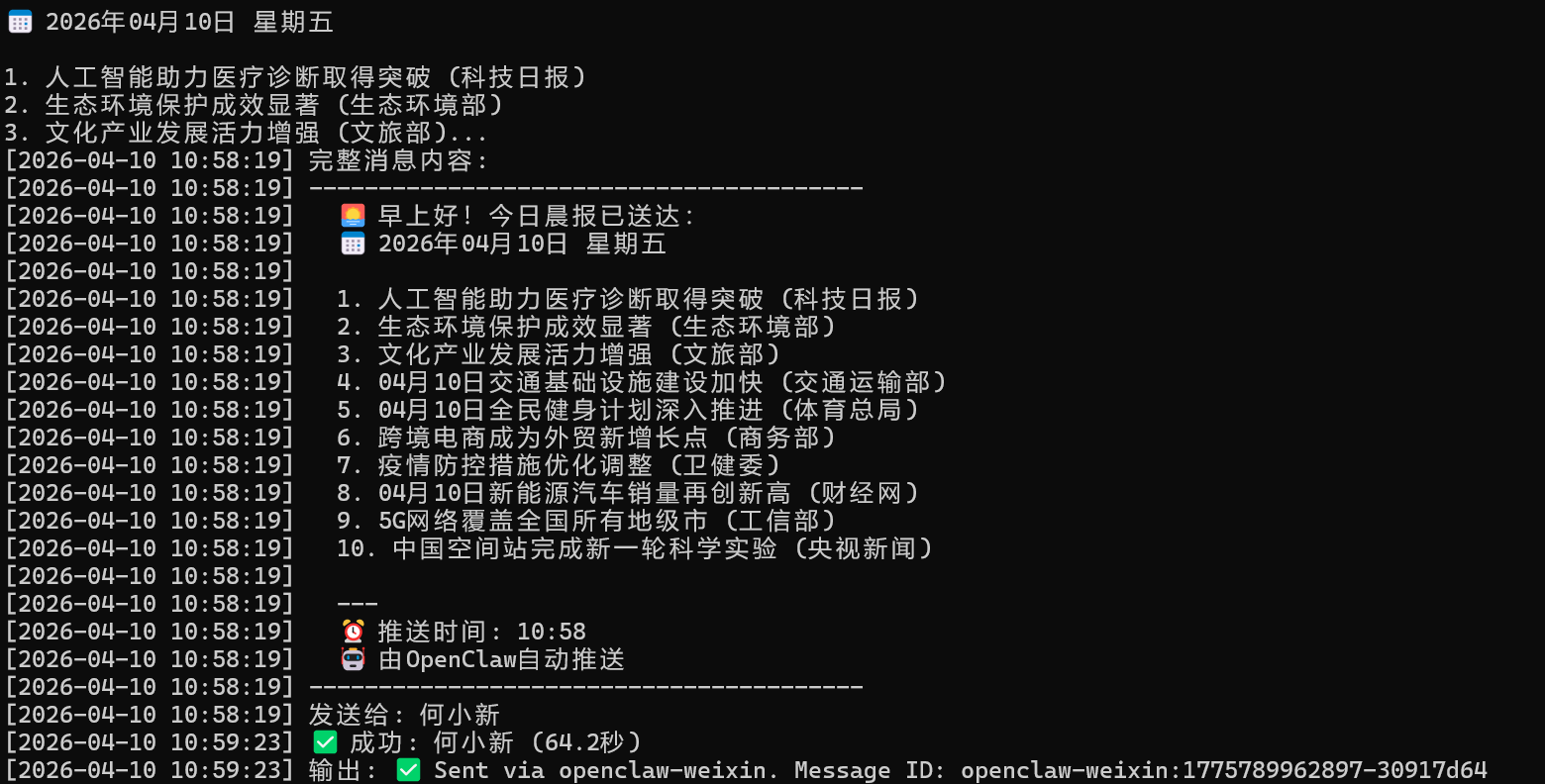
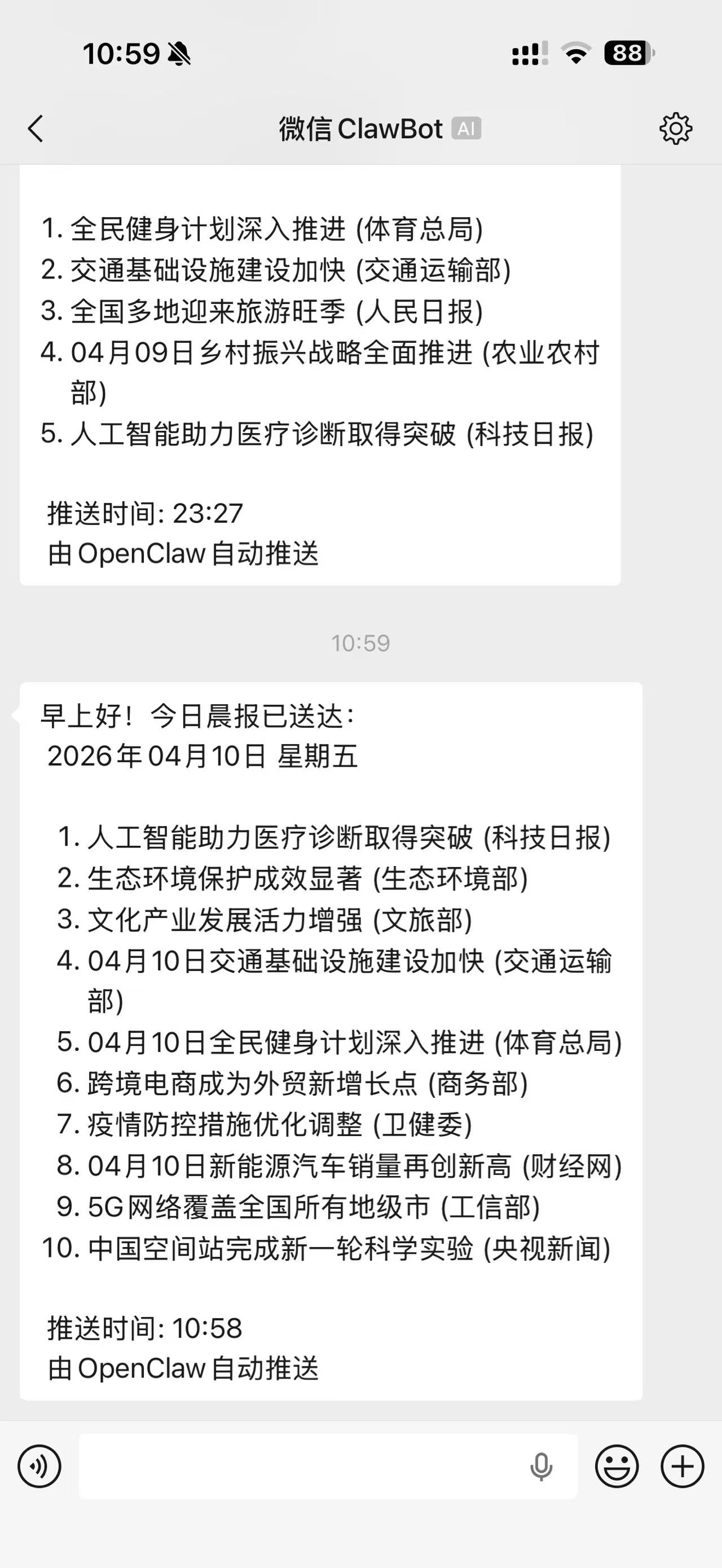
注:当前为测试发送信息阶段,所采用的为新闻模版
打印日志如下
微信收到来自ClawBot的信息
如有多个好友,需获取他们的accountId和openId,在config.json里配置,或用add_multiple_friends.py自动化配置
add_multiple_friends.py 代码示例
#!/usr/bin/env python3
"""
添加多个微信好友到配置
"""

import json
import os
from pathlib import Path

# 配置文件路径
CONFIG_FILE = Path(__file__).parent / "config.json"

def load_config():
    """加载配置文件"""
    with open(CONFIG_FILE, 'r', encoding='utf-8') as f:
        return json.load(f)

def save_config(config):
    """保存配置文件"""
    with open(CONFIG_FILE, 'w', encoding='utf-8') as f:
        json.dump(config, f, ensure_ascii=False, indent=2)

def add_friends_manually():
    """手动添加好友"""
    print("添加微信好友到配置")
    print("=" * 60)
    print("每个好友需要以下信息:")
    print("1. name: 好友姓名(用于显示)")
    print("2. target: 好友的openId(格式: xxx@im.wechat)")
    print("3. account: 好友的accountId")
    print("=" * 60)

    # 加载当前配置
    config = load_config()

    # 获取当前好友列表
    current_friends = config.get("wechat_friends", [])

    print(f"当前已有 {len(current_friends)} 个好友:")
    for i, friend in enumerate(current_friends, 1):
        print(f"  {i}. {friend['name']} ({friend['account']})")

    print("\n" + "=" * 60)
    print("开始添加新好友 (输入 'done' 结束)")
    print("=" * 60)

    new_friends = []

    while True:
        print(f"\n好友 #{len(current_friends) + len(new_friends) + 1}")

        name = input("好友姓名: ").strip()
        if name.lower() == 'done':
            break

        target = input("好友openId (xxx@im.wechat): ").strip()
        if target.lower() == 'done':
            break

        account = input("好友accountId: ").strip()
        if account.lower() == 'done':
            break

        # 验证格式
        if not target.endswith("@im.wechat"):
            print("⚠️  警告: openId格式应为 xxx@im.wechat")
            continue

        new_friend = {
            "name": name,
            "target": target,
            "account": account
        }

        new_friends.append(new_friend)
        print(f"✅ 已添加: {name}")

        more = input("继续添加下一个好友? (y/n): ").strip().lower()
        if more != 'y':
            break

    if new_friends:
        # 更新配置
        config["wechat_friends"] = current_friends + new_friends
        save_config(config)

        print(f"\n✅ 成功添加 {len(new_friends)} 个好友")
        print(f"   总好友数: {len(config['wechat_friends'])}")

        # 显示所有好友
        print("\n📋 所有好友列表:")
        for i, friend in enumerate(config["wechat_friends"], 1):
            print(f"  {i}. {friend['name']}")
            print(f"     openId: {friend['target']}")
            print(f"     accountId: {friend['account']}")
    else:
        print("\n⚠️  未添加任何好友")

def create_example_config():
    """创建示例配置"""
    example_friends = [
        {
            "name": "何小新",
            "target": "o9cq8047YG0rE3HrvgtgBdPyap1c@im.wechat",
            "account": "16f8e1774071-im-bot"
        },
        {
            "name": "张三",
            "target": "zhangsan_openid@im.wechat",
            "account": "zhangsan_account"
        },
        {
            "name": "李四",
            "target": "lisi_openid@im.wechat",
            "account": "lisi_account"
        },
        {
            "name": "王五",
            "target": "wangwu_openid@im.wechat",
            "account": "wangwu_account"
        }
    ]

    return example_friends

def main():
    """主函数"""
    print("微信好友配置工具")
    print("=" * 60)
    print("1. 手动添加好友")
    print("2. 使用示例配置")
    print("3. 查看当前配置")
    print("4. 退出")
    print("=" * 60)

    choice = input("请选择 (1-4): ").strip()

    if choice == "1":
        add_friends_manually()
    elif choice == "2":
        # 使用示例配置
        config = load_config()
        example_friends = create_example_config()
        config["wechat_friends"] = example_friends
        save_config(config)

        print(f"\n✅ 已使用示例配置")
        print(f"   添加了 {len(example_friends)} 个示例好友")
        print("\n📋 示例好友列表:")
        for i, friend in enumerate(example_friends, 1):
            print(f"  {i}. {friend['name']}")
            print(f"     openId: {friend['target']}")
            print(f"     accountId: {friend['account']}")

        print("\n⚠️  注意: 请将示例openId和accountId替换为实际值")

    elif choice == "3":
        # 查看当前配置
        config = load_config()
        friends = config.get("wechat_friends", [])

        print(f"\n📋 当前配置:")
        print(f"   好友数量: {len(friends)}")

        if friends:
            for i, friend in enumerate(friends, 1):
                print(f"\n  {i}. {friend['name']}")
                print(f"     openId: {friend['target']}")
                print(f"     accountId: {friend['account']}")
        else:
            print("   暂无好友配置")

    elif choice == "4":
        print("退出")
    else:
        print("无效选择")

if __name__ == "__main__":
    main()
步骤4:配置每日定时任务
通过 Windows 定时任务,实现每天上午8点自动运行脚本,给指定好友推送新闻,无需手动启动脚本,具体操作如下:
4.1 定时任务配置脚本:setup_daily_task_fixed.bat
创建批处理文件,用于快速配置定时任务,代码如下:
@echo off
chcp 65001 >nul
echo 配置每日8点定时任务 - 发送科技新闻给多个微信好友
echo ========================================
echo.

REM 检查Python
where python >nul 2>nul
if %errorlevel% neq 0 (
    echo 错误: 找不到Python
    pause
    exit /b 1
)

echo 步骤1: 添加微信好友
echo.
python add_multiple_friends.py
echo.

echo 步骤2: 测试脚本
echo.
echo 正在测试 fixed_real_time.py 脚本...
python scripts\fixed_real_time.py
echo.

echo 步骤3: 配置Windows定时任务
echo.
echo 请以管理员身份运行以下命令创建定时任务:
echo.
echo schtasks /create /tn "OpenClaw_科技新闻推送" ^
echo     /tr "\"%~dp0scripts\fixed_real_time.py\"" ^
echo     /sc daily /st 08:00 ^
echo     /ru SYSTEM ^
echo     /rl HIGHEST ^
echo     /f
echo.

echo 或者运行预配置的脚本 (需要管理员权限):
echo setup_windows_task.bat
echo.

echo 步骤4: 验证配置
echo.
echo 配置完成后,可以:
echo 1. 查看任务: schtasks /query /tn "OpenClaw_科技新闻推送"
echo 2. 立即测试: schtasks /run /tn "OpenClaw_科技新闻推送"
echo 3. 查看日志: type logs\fixed_real_time.log
echo.

echo ========================================
echo 配置说明:
echo.
echo 定时任务: 每天上午8点自动运行
echo 发送对象: 配置中的所有微信好友
echo 新闻来源: 国内实时热点新闻
echo 日志记录: logs\fixed_real_time.log
echo.
echo 注意事项:
echo - 确保所有好友的 accountId 和 openId 正确
echo - 定时任务需要管理员权限创建
echo - 首次运行前请手动测试脚本
echo.

pause
4.2 具体配置步骤
-
将 setup_daily_task_fixed.bat 文件放在 tech-news-push-skill 根目录下;
-
以 管理员身份 运行该批处理文件;
-
按照提示完成好友添加、脚本测试,然后复制批处理文件中提示的定时任务命令,在管理员 cmd 中执行,即可创建每日8点的定时任务;
-
配置完成后,可通过命令查看任务、立即测试,确保定时任务能正常运行。
注意:定时任务运行期间,OpenClaw 需全程开启,建议后期将脚本部署到云服务器,实现24小时稳定运行,无需保持本地电脑开机。
三、常见问题排查(重点!解决脚本运行异常)
很多小伙伴会遇到一个问题:本地手动测试时,消息能正常接收,但通过脚本传递消息时,会出现文字缺失的情况。经过排查,主要有以下3个原因,对应修改即可解决:
问题1:特殊字符导致解析异常
脚本中若包含「\n」等换行特殊字符,可能会导致微信接收时解析异常,出现文字缺失。
解决方案:脚本中已添加转义处理(escaped_message = message.replace('\n', '\\n')),无需额外修改,若仍有问题,可检查消息格式化部分的特殊字符,进行手动替换。
问题2:emoji 表情导致编码异常
脚本中若直接使用 emoji 表情,可能会因编码不兼容,导致消息接收异常、文字缺失。
解决方案:脚本中已添加 emoji 移除逻辑(message = message.replace('🌅', '').replace('📅', '')),建议避免在消息中使用 emoji,若需添加,可替换为文字描述。
问题3:编码方式不正确
脚本编码格式不正确(如未使用 UTF-8 编码),会导致文字传递过程中出现乱码或缺失。
解决方案:将所有脚本文件(fixed_real_time.py、add_multiple_friends.py、setup_daily_task_fixed.bat)的编码统一设置为 UTF-8,重新运行即可。
四、补充说明与注意事项
-
新闻来源:脚本默认从36氪、腾讯新闻、网易新闻获取实时热点,若部分网站无法访问,会自动切换到公开 API,若 API 也失败,会使用智能备用新闻,确保消息不会为空;
-
好友配置:若有多个好友,可通过 add_multiple_friends.py 脚本自动化配置,或手动修改 config.json 文件,确保每个好友的 accountId 和 openId 正确;
-
云服务器部署:若需长期稳定运行,建议将脚本部署到阿里云、腾讯云等云服务器,配置好 Python 环境和 OpenClaw,避免本地电脑关机导致定时任务失效;
-
日志查看:若脚本运行失败,可通过 logs/fixed_real_time.log 日志文件,排查具体错误原因(如 OpenClaw 路径错误、好友参数错误、新闻源访问失败等)。
五、总结
通过以上步骤,我们成功实现了「OpenClaw 接入微信 + 获取实时新闻 + 给指定好友发送 + 每日定时推送」的全流程自动化,全程附完整代码和操作步骤,解决了脚本运行中常见的文字缺失问题。
如果在操作过程中遇到其他问题,可查看日志文件排查,或在评论区留言交流~

Agent 垂直技术社区,欢迎活跃、内容共建。
更多推荐


 15
15 0
0- 0


 已为社区贡献1条内容

所有评论(0)