Python 离线语音歌词识别播放器(歌词导入导出txt文本)
·
本文介绍了一个高精度歌词播放器的Python实现,基于tkinter图形界面,具备以下核心功能:
- 音频处理功能:
- 支持MP3/WAV/FLAC格式播放
- 使用pydub+simpleaudio实现播放控制(播放/暂停/停止)
- 歌词处理功能:
- 加载标准TXT格式歌词文件(时间戳+文本)
- 通过Whisper large-v3模型实现高精度语音识别生成歌词
- 支持歌词导出为标准TXT格式
- 可视化效果:
- 动态彩色同步歌词显示
- 实时音频柱状频谱可视化
- 具备网络检测和FFmpeg依赖检查
- 技术特点:
- 采用多线程渲染保证UI流畅
- 实现歌词播放进度缓存机制
- 支持离线环境下的基本播放功能
该播放器适合需要精确歌词同步的场景,特别是中文歌曲的歌词显示和编辑需求。
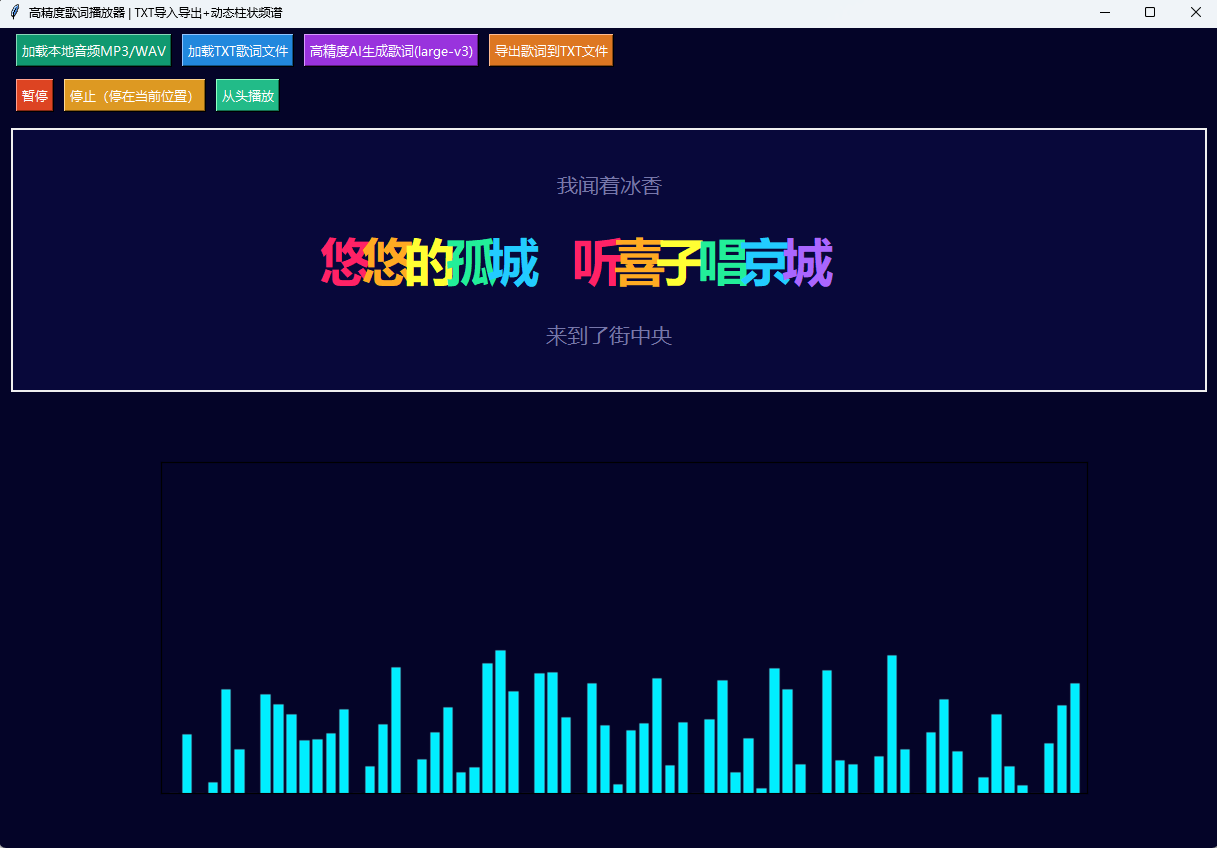
艾北 - 游京(艾北版) 以下为歌词识别
00:00.00 我走在长街中 听戏子唱京城
00:04.86 人杂乱戏小丑 夜晃退入长秋
00:10.85 悠悠的孤城中
00:23.04 我走在长街中 听戏子唱京城
00:28.35 人杂乱戏小丑 夜望退入长秋
00:33.79 悠悠的孤城中 听美人奏琴声
00:38.57 不舍小声离她
00:45.46 滔滔江水 悠悠大云河畔
00:50.06 悠悠孤城 春心荡漾
00:55.17 我闻着冰香
00:58.07 悠悠的孤城 听喜子唱京城
00:58.34 来到了街中央
01:00.32 看街边都是火浪
01:03.14 我寻一朵吉祥
01:08.17 何处声云 我听琴声奏起
01:13.06 我寻神而去 原来有人在唱戏
01:18.65 游进繁华 你看美人蒙山
01:23.29 金袍跨马 微风凛凛
01:32.00 我走在长街中 听喜子唱京城
01:37.37 人杂乱些小畜 夜望退入长秋
01:42.81 悠悠的孤城中 听梅兰奏琴声
01:47.56 朗朗夜色星空 望海同繁华灯
01:52.90 盼望群起潦沙 也不解诉求
01:57.35 我走在长街中 听喜子唱京城
01:57.45 军载着黑军马 微风凛凛许云沓
02:03.20 破本一翠天涯 又走进西方花
02:07.98 不舍小生离他
02:33.59 我走在长街中 听喜子唱京城
02:38.63 人杂乱些小畜 夜望退入长秋
02:44.03 悠悠的孤城中 听美人奏琴声
02:48.81 朗朗夜色星空 望海同繁华灯
02:54.15 盼望群起潦沙 也不解诉求
02:57.43 我走在长街中 听喜子唱京城
02:59.56 军载着黑军马 微风凛凛许云沓
03:04.47 破本一翠天涯 又走进西方花
03:09.25 不舍小生离他
import tkinter as tk
from tkinter import ttk, filedialog, messagebox
import numpy as np
import matplotlib.pyplot as plt
from matplotlib.backends.backend_tkagg import FigureCanvasTkAgg
import time
import random
import whisper
import os
import subprocess
import tempfile
import socket
import re
from pydub import AudioSegment
import simpleaudio as sa

# 网络检测
def is_network_available():
    try:
        socket.create_connection(("www.baidu.com", 80), timeout=3)
        return True
    except:
        return False

# FFmpeg 全局检测
def check_ffmpeg():
    try:
        subprocess.check_output(["ffmpeg", "-version"], stderr=subprocess.STDOUT)
        return True
    except Exception:
        return False

# ===================== TXT本地歌词解析模块 =====================
class TxtLyricParser:
    def __init__(self, txt_path):
        self.lyric_list = []
        self.parse_txt_lyric(txt_path)

    def parse_txt_lyric(self, path):
        # 匹配 00:00.50 文本
        pattern = re.compile(r'(\d{2}):(\d{2})\.(\d{2})\s+(.*)')
        with open(path, "r", encoding="utf-8") as f:
            lines = f.readlines()
        for line in lines:
            line = line.strip()
            res = pattern.match(line)
            if res:
                m = int(res.group(1))
                s = int(res.group(2))
                ms = int(res.group(3))
                text = res.group(4)
                sec = m * 60 + s + ms / 100
                self.lyric_list.append((sec, sec + 4, text))
        self.lyric_list.sort(key=lambda x: x[0])

# ===================== 本地语音识别(large-v3 高精度模型) =====================
class LocalAudioLyricGen:
    def __init__(self, model_root="./whisper_models"):
        self.model_name = "large-v3"  # 效果最好的官方大模型
        model_path = os.path.join(model_root, f"{self.model_name}.pt")

        if os.path.exists(model_path):
            self.model = whisper.load_model(self.model_name, download_root=model_root)
        else:
            if not is_network_available():
                raise ConnectionError(f"无网络,本地无{self.model_name}.pt模型,无法语音识别!")
            self.model = whisper.load_model(self.model_name, download_root=model_root)

    def audio_to_lrc_data(self, audio_path):
        print("高精度AI语音识别中,large-v3模型处理较慢请等待...")
        tmp_wav = tempfile.NamedTemporaryFile(suffix=".wav", delete=False)
        tmp_path = tmp_wav.name
        tmp_wav.close()
        try:
            cmd = [
                "ffmpeg", "-y", "-i", audio_path,
                "-ar", "16000", "-ac", "1", "-f", "wav", tmp_path
            ]
            subprocess.run(cmd, stdout=subprocess.PIPE, stderr=subprocess.PIPE)
            result = self.model.transcribe(tmp_path, word_timestamps=True, language="zh")
        finally:
            if os.path.exists(tmp_path):
                os.unlink(tmp_path)

        lyric_list = []
        for seg in result["segments"]:
            text = seg["text"].strip()
            start = seg["start"]
            end = seg["end"]
            if text:
                lyric_list.append((start, end, text))
        print("语音识别解析完成")
        return lyric_list

# ===================== 新版播放器(pydub+simpleaudio) =====================
class MusicPlayer:
    def __init__(self, root):
        self.root = root
        self.root.title("高精度歌词播放器 | TXT导入导出+动态柱状频谱")
        self.root.geometry("1220x820")
        self.root.configure(bg="#040428")

        # 音频播放变量
        self.music_path = ""
        self.audio_segment = None
        self.play_obj = None
        self.is_playing = False
        self.play_start_time = 0.0
        self.pause_offset = 0.0
        self.total_audio_sec = 0.0

        # 歌词数据(统一格式 [(start, end, text)])
        self.lyric_time_data = []
        self.bar_count = 70
        self.bar_heights = np.zeros(self.bar_count)
        # 新增:缓存当前歌词下标,暂停定格歌词核心变量
        self.cached_lyric_idx = -1

        # 识别模块状态
        self.lyric_generator = None
        self.can_recognize = False

        # FFmpeg检测
        if not check_ffmpeg():
            messagebox.showerror("缺失FFmpeg", "未检测到FFmpeg,语音识别与音频解码全部失效!\n请下载FFmpeg并配置系统环境变量后重启程序")

        # 初始化语音识别
        try:
            self.lyric_generator = LocalAudioLyricGen()
            self.can_recognize = True
        except (FileNotFoundError, ConnectionError) as e:
            messagebox.showwarning("语音识别功能受限", f"{str(e)}\n播放器可正常播放音乐、加载TXT歌词")

        self.build_gui()
        self.update_render_loop()

    def build_gui(self):
        # 第一行:音频、歌词加载 & 导出按钮
        frame_load = tk.Frame(self.root, bg="#040428")
        frame_load.pack(fill=tk.X, padx=12, pady=6)
        tk.Button(
            frame_load, text="加载本地音频MP3/WAV",
            command=self.load_audio_file, bg="#109970", fg="white", font=("微软雅黑",10)
        ).pack(side=tk.LEFT, padx=5)
        tk.Button(
            frame_load, text="加载TXT歌词文件",
            command=self.load_txt_lyric, bg="#2288dd", fg="white", font=("微软雅黑",10)
        ).pack(side=tk.LEFT, padx=5)
        self.btn_recognize = tk.Button(
            frame_load, text="高精度AI生成歌词(large-v3)",
            command=self.generate_lyric_by_voice, bg="#9933dd", fg="white", font=("微软雅黑",10)
        )
        self.btn_recognize.pack(side=tk.LEFT, padx=5)
        tk.Button(
            frame_load, text="导出歌词到TXT文件",
            command=self.export_lyric_to_txt, bg="#dd7722", fg="white", font=("微软雅黑",10)
        ).pack(side=tk.LEFT, padx=5)
        if not self.can_recognize:
            self.btn_recognize.config(state=tk.DISABLED, bg="#666666")

        # 第二行:播放控制按钮 【修复点:分开实例化与pack,不再链式赋值】
        frame_ctrl = tk.Frame(self.root, bg="#040428")
        frame_ctrl.pack(fill=tk.X, padx=12, pady=6)
        self.btn_play = tk.Button(
            frame_ctrl, text="播放/暂停", command=self.toggle_play,
            bg="#dd4422", fg="white", font=("微软雅黑",10)
        )
        self.btn_play.pack(side=tk.LEFT, padx=5)

        tk.Button(
            frame_ctrl, text="停止(停在当前位置)", command=self.stop_audio_keep_pos,
            bg="#dd9922", fg="white", font=("微软雅黑",10)
        ).pack(side=tk.LEFT, padx=5)
        tk.Button(
            frame_ctrl, text="从头播放", command=self.play_from_start,
            bg="#22bb88", fg="white", font=("微软雅黑",10)
        ).pack(side=tk.LEFT, padx=5)

        # 歌词画布
        self.lyric_canvas = tk.Canvas(self.root, bg="#08083a", height=260)
        self.lyric_canvas.pack(fill=tk.X, padx=12, pady=10)

        # 柱状频谱画布
        self.fig, self.ax = plt.subplots(figsize=(12, 3.6), dpi=100)
        self.fig.patch.set_facecolor("#040428")
        self.ax.set_facecolor("#040428")
        self.bars = self.ax.bar(
            np.arange(self.bar_count),
            np.zeros(self.bar_count),
            width=0.72,
            color="#00eeff",
            edgecolor="#ffffff22"
        )
        self.ax.set_xlim(-1, self.bar_count)
        self.ax.set_ylim(0, 1.0)
        self.ax.set_xticks([])
        self.ax.set_yticks([])
        self.canvas_bar = FigureCanvasTkAgg(self.fig, master=self.root)
        self.canvas_bar.draw()
        self.canvas_bar.get_tk_widget().pack(fill=tk.BOTH, expand=True, padx=12, pady=8)

    # 【新增】导出当前歌词为标准TXT歌词文件
    def export_lyric_to_txt(self):
        if len(self.lyric_time_data) == 0:
            messagebox.showwarning("提示", "暂无歌词可导出!请先AI识别或加载TXT歌词")
            return
        # 选择保存路径
        save_path = filedialog.asksaveasfilename(
            defaultextension=".txt",
            filetypes=[("歌词文本文件", "*.txt")],
            initialfile="lyric_output.txt"
        )
        if not save_path:
            return
        try:
            with open(save_path, "w", encoding="utf-8") as f:
                for start_sec, end_sec, text in self.lyric_time_data:
                    # 秒 转 分:秒.毫秒 格式
                    minute = int(start_sec // 60)
                    sec = int(start_sec % 60)
                    ms = int((start_sec - int(start_sec)) * 100)
                    time_str = f"{minute:02d}:{sec:02d}.{ms:02d}"
                    f.write(f"{time_str} {text}\n")
            messagebox.showinfo("导出成功", f"歌词已保存至:\n{save_path}")
        except Exception as e:
            messagebox.showerror("导出失败", f"写入文件出错:{str(e)}")

    # 加载本地TXT歌词
    def load_txt_lyric(self):
        path = filedialog.askopenfilename(filetypes=[("文本歌词", "*.txt")])
        if not path:
            return
        try:
            parser = TxtLyricParser(path)
            self.lyric_time_data = parser.lyric_list
            self.cached_lyric_idx = -1  # 重置缓存下标
            if len(self.lyric_time_data) == 0:
                messagebox.showerror("解析失败", "txt格式不匹配!\n格式示例:00:00.50 歌词内容")
            else:
                messagebox.showinfo("加载成功", f"TXT歌词载入完成,共{len(self.lyric_time_data)}句")
        except Exception as e:
            messagebox.showerror("读取失败", str(e))

    def load_audio_file(self):
        path = filedialog.askopenfilename(
            filetypes=[("音频文件", "*.mp3 *.wav *.flac")]
        )
        if not path:
            return
        try:
            self.audio_segment = AudioSegment.from_file(path)
            self.total_audio_sec = len(self.audio_segment) / 1000.0
            self.music_path = path
        except Exception as e:
            messagebox.showerror("音频加载失败", f"无法读取音频:{str(e)}")
            return
        self.stop_audio()
        self.is_playing = False
        self.btn_play.config(text="播放/暂停")
        self.pause_offset = 0.0
        self.lyric_time_data.clear()
        self.cached_lyric_idx = -1  # 加载新音频清空歌词缓存
        messagebox.showinfo("提示", "音频加载完成,可加载TXT歌词或AI生成歌词")

    # 停止音频,保留当前播放进度
    def stop_audio_keep_pos(self):
        if self.play_obj and self.play_obj.is_playing():
            self.pause_offset += time.time() - self.play_start_time
        self.stop_audio()
        self.is_playing = False
        self.btn_play.config(text="播放/暂停")

    # 从头播放,重置进度+清空歌词缓存
    def play_from_start(self):
        if self.audio_segment is None:
            messagebox.showwarning("提示", "请先加载音频文件")
            return
        self.stop_audio()
        self.pause_offset = 0.0
        self.cached_lyric_idx = -1  # 从头播放重置歌词缓存
        self.is_playing = False
        self.toggle_play()

    def stop_audio(self):
        if self.play_obj and self.play_obj.is_playing():
            self.play_obj.stop()
        self.play_obj = None

    def toggle_play(self):
        if self.audio_segment is None:
            messagebox.showwarning("提示", "请先加载音频文件")
            return
        if self.is_playing:
            # 暂停,保存偏移
            self.pause_offset += time.time() - self.play_start_time
            self.stop_audio()
            self.is_playing = False
            self.btn_play.config(text="播放/暂停")
        else:
            current_ms = int(self.pause_offset * 1000)
            audio_slice = self.audio_segment[current_ms:]
            raw_data = audio_slice.raw_data
            sample_width = audio_slice.sample_width
            channels = audio_slice.channels
            rate = audio_slice.frame_rate
            self.play_obj = sa.play_buffer(raw_data, channels, sample_width, rate)
            self.play_start_time = time.time()
            self.is_playing = True
            self.btn_play.config(text="暂停")

    def generate_lyric_by_voice(self):
        if not self.can_recognize or self.lyric_generator is None:
            messagebox.showerror("不可用", "高精度语音识别未初始化成功")
            return
        if self.music_path == "":
            messagebox.showwarning("警告", "请先加载音频文件!")
            return
        self.root.config(cursor="wait")
        self.root.update()
        try:
            self.lyric_time_data = self.lyric_generator.audio_to_lrc_data(self.music_path)
            self.cached_lyric_idx = -1  # 新识别歌词重置缓存
            if len(self.lyric_time_data) == 0:
                messagebox.showerror("识别失败", "音频未检测到人声歌词")
            else:
                messagebox.showinfo("识别完成", f"高精度模型识别成功,共 {len(self.lyric_time_data)} 句歌词\n可点击【导出歌词到TXT】保存")
        except Exception as e:
            messagebox.showerror("识别异常", f"{str(e)}")
        self.root.config(cursor="")

    def draw_color_sync_lyric(self):
        self.lyric_canvas.delete("all")
        canvas_w = self.lyric_canvas.winfo_width()
        canvas_h = self.lyric_canvas.winfo_height()
        center_y = canvas_h // 2

        if len(self.lyric_time_data) == 0:
            tip = "加载音频后:①加载TXT歌词 ②或AI生成歌词 ③识别后可导出TXT"
            self.lyric_canvas.create_text(
                canvas_w//2, center_y,
                text=tip, font=("微软雅黑", 20), fill="#aaaacc"
            )
            return

        current_time = 0.0
        if self.is_playing:
            current_time = time.time() - self.play_start_time + self.pause_offset
            # 播放状态:实时匹配并更新缓存下标
            current_idx = -1
            for idx, (start, end, text) in enumerate(self.lyric_time_data):
                if start <= current_time <= end:
                    current_idx = idx
                    break
            # 找到有效行更新缓存
            if current_idx != -1:
                self.cached_lyric_idx = current_idx
        else:
            # 暂停状态:直接使用缓存下标,不再重新遍历匹配(核心修复)
            current_idx = self.cached_lyric_idx

        current_text = ""
        prev_text = ""
        next_text = ""
        total_lines = len(self.lyric_time_data)

        # 兜底处理缓存下标越界
        if 0 <= current_idx < total_lines:
            current_text = self.lyric_time_data[current_idx][2]
            if current_idx > 0:
                prev_text = self.lyric_time_data[current_idx - 1][2]
            if current_idx + 1 < total_lines:
                next_text = self.lyric_time_data[current_idx + 1][2]
        else:
            # 无缓存时显示第一行
            current_text = self.lyric_time_data[0][2] if total_lines > 0 else ""

        self.lyric_canvas.create_text(
            canvas_w//2, center_y - 75,
            text=prev_text, font=("微软雅黑", 16), fill="#7777aa"
        )
        self.lyric_canvas.create_text(
            canvas_w//2, center_y + 75,
            text=next_text, font=("微软雅黑", 16), fill="#7777aa"
        )

        color_list = ["#ff2266", "#ffaa22", "#ffff33", "#22ee99", "#22ccff", "#aa66ff"]
        start_x = canvas_w // 2 - len(current_text) * 22
        for char_idx, char in enumerate(current_text):
            fill_color = color_list[char_idx % len(color_list)]
            self.lyric_canvas.create_text(
                start_x + char_idx * 42, center_y,
                text=char, font=("微软雅黑", 38, "bold"), fill=fill_color
            )

    # 动态真实起伏柱状频谱(随播放时间变化振幅)
    def update_bar_spectrum_effect(self):
        base_amp = 0.04
        if self.is_playing:
            play_total_sec = self.pause_offset + (time.time() - self.play_start_time)
            t = play_total_sec
            freq1 = np.sin(t * 1.2)
            freq2 = np.sin(t * 3.7)
            freq3 = np.sin(np.linspace(0, 16 * np.pi, self.bar_count) + t * 5)
            noise = np.random.uniform(-0.22, 0.22, self.bar_count)
            base_amp = np.clip((np.abs(freq1) + np.abs(freq2)) / 2, 0.15, 0.85)
            wave = base_amp * np.abs(freq3) + noise
            bar_heights = np.clip(wave, 0, 1)
        else:
            bar_heights = np.full(self.bar_count, base_amp)

        for bar, h in zip(self.bars, bar_heights):
            bar.set_height(h)
        self.canvas_bar.draw()

    def update_render_loop(self):
        self.update_bar_spectrum_effect()
        self.draw_color_sync_lyric()
        self.root.after(33, self.update_render_loop)

if __name__ == "__main__":
    main_window = tk.Tk()
    app = MusicPlayer(main_window)
    main_window.mainloop()
Agent 垂直技术社区,欢迎活跃、内容共建。
更多推荐

 1
1 0
0- 0


 已为社区贡献1条内容

所有评论(0)