AI Agent 也能“按需查字典“?Claude Code 的 Skill 加载设计太巧妙了
·
需要明确的结构
skills文件夹(存放技能说明书)
skills/ 文件系统(磁盘)
├── python-code-review/
│ └── SKILL.md
├── doc-generator/
│ └── SKILL.md
└── git-helper/
└── SKILL.md
SKILL_REGISTRY 技能注册表
“技能简称”:{“name”: “xxx”, “description”: " 描述 ", “content”: " 完整的SKILL.md 内容 "}
SKILL_REGISTRY ={
    "python-code-review": {
        "name": "python-code-review",
        "description": "检查 Python 代码风格和常见错误。",
        "content": "---\nname: python-code-review\ndescription: 检查 Python 代码风格和常见错误。\n---\n# Python Code Reviewer\n\n你是一个代码审查专家..."
    },
    "doc-generator": {
        "name": "doc-generator",
        "description": "生成项目文档",
        "content": "---\nname: doc-generator\ndescription: 生成项目文档\n---\n# Documentation Generator\n\n根据代码注释生成 Markdown 文档..."
    },
    "git-helper": {
        "name": "git-helper",          # 没有 frontmatter,降级使用目录名
        "description": "Git Helper",   # 降级使用第一行标题去掉 #
        "content": "# Git Helper\n\n帮助执行 git 命令..."
    }
}
SYSTEM prompt 系统提示词
# 统提示词是通过 build_system() 函数动态构建的
# 以下是示例
SYSTEM prompt ={
    You are a coding agent at /path/to/workspace. Skills available:
- **agent-builder**: Help user build custom AI agents with tool use and skills.
- **code-review**: Perform thorough code review for Python, JavaScript, and Go.
Use load_skill to get full details when needed.
}
两层设计
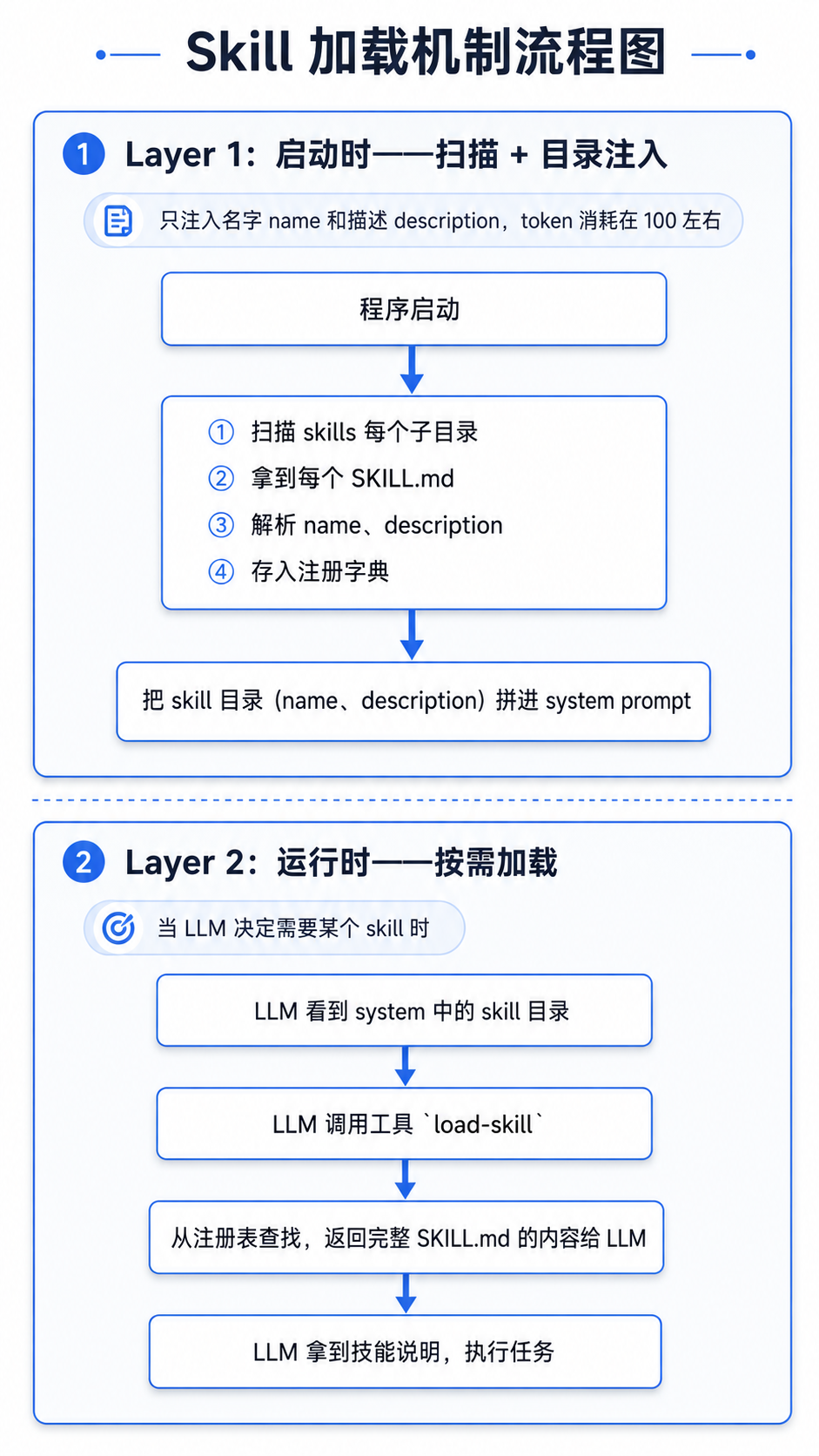
Layer 1:启动时-- 扫描 + 目录注入
【只注入名字name和描述description,token消耗在100左右】
程序启动
⬇️
①扫描skills每个子目录
②拿到每个SKILL.md
③解析name、description
④存入注册字典
⬇️
把skill目录(name、description)拼进system prompt
Layer 2:运行时-- 按需加载
【当LLM决定需要某个skill时】
LLM看到system中的skill目录
⬇️
LLM调用工具load-skill
⬇️
从注册表查找,返回完整SKILL.md的内容给LLM
⬇️
LLM拿到技能说明,执行任务

Agent 垂直技术社区,欢迎活跃、内容共建。
更多推荐
 4
4 0
0- 0


 已为社区贡献1条内容

所有评论(0)