MIT 6.S184 | 基于随机微分方程的生成式AI | 2026 | 笔记 | Lab 1: Working with ODEs and SDEs
目录
前言
本篇文章记录 MIT S.184 作业 Lab 1: Working with ODEs and SDEs 的实现,和大家一起分享交流😄。
Lab One: Simulating ODEs and SDEs
欢迎来到 Lab One!在本实验中,我们将通过直观且动手实践的方式,带你理解 ODE 和 SDE。
我们先为后续实验准备一些基础依赖:
from abc import ABC, abstractmethod
from typing import Optional
import math

import numpy as np
from matplotlib import pyplot as plt
from matplotlib.axes._axes import Axes
import torch
import torch.distributions as D
from torch.func import vmap, jacrev
from tqdm import tqdm
import seaborn as sns

device = torch.device('cuda' if torch.cuda.is_available() else 'cpu')
首先,ABC 和 abstractmethod 用来定义抽象基类。后面会出现类似 ODE、SDE、Simulator 这样的基类,它们只规定接口,而具体实现会交给子类完成。
from abc import ABC, abstractmethod
Optional 用来做类型标注,表示某个参数既可以是指定类型,也可以是 None。例如后面画图函数中可能会传入一个已有的坐标轴 ax,也可能不传。
from typing import Optional
math 和 numpy 提供基础数学运算,matplotlib 用来画图,Axes 是 Matplotlib 中坐标轴对象的类型标注。
import math
import numpy as np
from matplotlib import pyplot as plt
from matplotlib.axes._axes import Axes
torch 是本实验最核心的计算框架。后续 ODE / SDE 的状态变量,采样、梯度计算和模拟过程都会主要基于 PyTorch 张量完成。
import torch
import torch.distributions as D
其中 torch.distribution 提供概率分布工具。例如后面可能会用到高斯分布、混合高斯分布等。
from torch.func import vmap, jacrev
vmap 用于批量化函数计算,jacrev 用于计算雅可比矩阵。它们在处理向量场、score function 或梯度相关计算时会比较有用。
from tqdm import tqdm
tqdm 用来显示循环进度条,后面模拟很多条轨迹或大量时间步时会更直观。
import seaborn as sns
seaborn 是一个更高级的可视化库,通常用于绘制更美观的统计图,比如二维分布图、密度图等。
最后一行是设备选择:
device = torch.device('cuda' if torch.cuda.is_available() else 'cpu')
它会优先使用 GPU。如果当前环境支持 CUDA,就使用 cuda;否则使用 CPU。这样后续代码可以统一写成 .to(device),不用手动区分是在 CPU 还是 GPU 上运行。
Part 0: Introduction
首先,让我们明确本课程要研究的核心对象:常微分方程(ordinary differential equations, ODEs)和 随机微分方程(stochastic differential equations, SDEs)。ODE 和 SDE 的基础都是与时间相关的 向量场(vector fields),回顾下课堂中的定义,向量场是一个函数 u u u ,其形式为:
u : R d × [ 0 , 1 ] → R d , ( x , t ) ↦ u t ( x ) u:\mathbb{R}^d\times [0,1]\to \mathbb{R}^d,\quad (x,t)\mapsto u_t(x) u:Rd×[0,1]→Rd,(x,t)↦ut(x)
也就是说, u t ( x ) u_t(x) ut(x) 接收两个输入:一个是 我们在空间中的位置 x x x ,另一个是 我们所处的时间 t t t ,然后输出一个 我们应该前进的方向 u t ( x ) u_t(x) ut(x) 。于是,一个 ODE 可以表示为:
d X t = u t ( X t ) d t , X 0 = x 0 . d X_t = u_t(X_t)dt, \quad \quad X_0 = x_0. dXt=ut(Xt)dt,X0=x0.
类似地,一个 SDE 可以写成如下形式:
d X t = u t ( X t ) d t + σ t d W t , X 0 = x 0 , d X_t = u_t(X_t)dt + \sigma_t d W_t, \quad \quad X_0 = x_0, dXt=ut(Xt)dt+σtdWt,X0=x0,
它可以理解为:从一个由 u t u_t ut 给定的 ODE 出发,再通过 布朗运动 ( W t ) 0 ≤ t ≤ 1 (W_t)_{0 \le t \le 1} (Wt)0≤t≤1 向其中加入噪声。其中,确定性项被称为 漂移系数 u t ( x ) u_t(x) ut(x),而加入噪声的强度被称为 扩散系数 σ t \sigma_t σt 。
我们来定义两个抽象基类:
class ODE(ABC):
    @abstractmethod
    def drift_coefficient(self, xt: torch.Tensor, t: torch.Tensor) -> torch.Tensor:
        """
        Returns the drift coefficient of the ODE.
        Args:
            - xt: state at time t, shape (bs, dim)
            - t: time, shape ()
        Returns:
            - drift_coefficient: shape (batch_size, dim)
        """
        pass

class SDE(ABC):
    @abstractmethod
    def drift_coefficient(self, xt: torch.Tensor, t: torch.Tensor) -> torch.Tensor:
        """
        Returns the drift coefficient of the SDE.
        Args:
            - xt: state at time t, shape (batch_size, dim)
            - t: time, shape ()
        Returns:
            - drift_coefficient: shape (batch_size, dim)
        """
        pass

    @abstractmethod
    def diffusion_coefficient(self, xt: torch.Tensor, t: torch.Tensor) -> torch.Tensor:
        """
        Returns the diffusion coefficient of the SDE.
        Args:
            - xt: state at time t, shape (batch_size, dim)
            - t: time, shape ()
        Returns:
            - diffusion_coefficient: shape (batch_size, dim)
        """
        pass
注意,ODE 和 SDE 它们本身并不直接完成具体计算,而是规定后续具体 ODE / SDE 类必须实现哪些函数。
1. ODE 抽象类
class ODE(ABC):
这里的 ODE 继承自 ABC,表示它是一个抽象基类。抽象基类通常用于定于统一接口。
在 ODE 中,只定义了一个抽象方法:
def drift_coefficient(self, xt: torch.Tensor, t: torch.Tensor) -> torch.Tensor:
它表示 ODE 中的漂移项,也就是前面公式里的:
d X t = u t ( X t ) d t dX_t = u_t(X_t)dt dXt=ut(Xt)dt
其中 drift_coefficient 对应的就是 u t ( X t ) u_t(X_t) ut(Xt) 。
它接收两个参数:
xt: torch.Tensor:表示当前时刻 t t t 的状态 X t X_t Xt ,形状为(batch_size, dim),也就是说,它可以同时处理一批样本,每个样本是一个dim维向量。t: torch.Tensor:表示当前时间,形状通常是一个标量()。
返回值也是一个张量,形状为 (batch_size, dim),表示每个样本在当前时刻对应的运动方向。
2. SDE 抽象类
class SDE(ABC):
SDE 同样是抽象类,但是它比 ODE 多了一个扩散项。
SDE 的形式是:
d X t = u t ( X t ) d t + σ t d W t dX_t = u_t(X_t)dt + \sigma_t dW_t dXt=ut(Xt)dt+σtdWt
因此它需要定义两个核心函数。
第一个是漂移系数:
def drift_coefficient(self, xt: torch.Tensor, t: torch.Tensor) -> torch.Tensor:
它仍然对应确定性运动部分: u t ( X t ) u_t(X_t) ut(Xt) 。
第二个是扩散系数:
def diffusion_coefficient(self, xt: torch.Tensor, t: torch.Tensor) -> torch.Tensor:
它对应随机噪声部分的强度: σ t \sigma_t σt 。
也就是说,drift_coefficient 决定系统整体往哪里走,diffusion_coefficient 决定系统在演化过程中受到多大的随机扰动。
代码中每个方法前面都有:
@abstractmethod
这表示该方法必须由子类实现。如果某个子类继承了 ODE 或 SDE,但是没有实现这些抽象方法,那么这个子类就不能被实例化。
例如,后面如果定义一个具体的 ODE:
class SomeODE(ODE):
    def drift_coefficient(self, xt, t):
        ...
它必须实现 drift_coefficient,否则无法正常使用。
Note:我们可以把 ODE 看作是扩散系数为零的 SDE 的一种特殊情况。这种直觉是正确的,不过出于教学目的以及性能方面的考虑,在本实验中我们会将二者分开处理。
Part 1: Numerical Methods for Simulating ODEs and SDEs
我们可以把 ODE 和 SDE 理解为描述一个粒子在空间中运动的方程。直观地说,上面的 ODE 表示:“从 X 0 = x 0 X_0=x_0 X0=x0 开始”,然后按照瞬时速度 u t ( X t ) u_t(X_t) ut(Xt) 进行运动。类似地,SDE 表示:“从 X 0 = x 0 X_0=x_0 X0=x0 开始”,然后按照瞬时速度 u t ( X t ) u_t(X_t) ut(Xt) 运动,同时再叠加一点由 σ t \sigma_t σt 缩放后的随机噪声。形式上,由这些直观描述所刻画出来的轨迹,分别被称为对应 ODE 和 SDE 的 解。用于计算这些解的数值方法,本质上都是在对 ODE 或 SDE 进行 模拟,或者说进行 积分。
在本节中,我们将分别实现用于积分 ODE 和 SDE 的 Euler 数值模拟格式和 Euler-Maruyama 数值模拟格式。回顾课堂内容,Euler 模拟格式对应如下离散化过程:
d X t = u t ( X t ) d t → X t + h = X t + h u t ( X t ) , d X_t = u_t(X_t) dt \quad \quad \rightarrow \quad \quad X_{t + h} = X_t + hu_t(X_t), dXt=ut(Xt)dt→Xt+h=Xt+hut(Xt),
其中 h = Δ t h = \Delta t h=Δt 是 步长。类似地,Euler-Maruyama 格式对应如下离散化过程:
d X t = u ( X t , t ) d t + σ t d W t → X t + h = X t + h u t ( X t ) + h σ t z t , z t ∼ N ( 0 , I d ) . dX_t = u(X_t,t) dt + \sigma_t d W_t \quad \quad \rightarrow \quad \quad X_{t + h} = X_t + hu_t(X_t) + \sqrt{h} \sigma_t z_t, \quad z_t \sim N(0,I_d). dXt=u(Xt,t)dt+σtdWt→Xt+h=Xt+hut(Xt)+hσtzt,zt∼N(0,Id).
让我们来实现它们!
class Simulator(ABC):
    @abstractmethod
    def step(self, xt: torch.Tensor, t: torch.Tensor, dt: torch.Tensor):
        """
        Takes one simulation step
        Args:
            - xt: state at time t, shape (batch_size, dim)
            - t: time, shape ()
            - dt: time, shape ()
        Returns:
            - nxt: state at time t + dt
        """
        pass

    @torch.no_grad()
    def simulate(self, x: torch.Tensor, ts: torch.Tensor):
        """
        Simulates using the discretization gives by ts
        Args:
            - x_init: initial state at time ts[0], shape (batch_size, dim)
            - ts: timesteps, shape (nts,)
        Returns:
            - x_fina: final state at time ts[-1], shape (batch_size, dim)
        """
        for t_idx in range(len(ts) - 1):
            t = ts[t_idx]
            h = ts[t_idx + 1] - ts[t_idx]
            x = self.step(x, t, h)
        return x

    @torch.no_grad()
    def simulate_with_trajectory(self, x: torch.Tensor, ts: torch.Tensor):
        """
        Simulates using the discretization gives by ts
        Args:
            - x_init: initial state at time ts[0], shape (bs, dim)
            - ts: timesteps, shape (num_timesteps,)
        Returns:
            - xs: trajectory of xts over ts, shape (batch_size, num_timesteps, dim)
        """
        xs = [x.clone()]
        for t_idx in tqdm(range(len(ts) - 1)):
            t = ts[t_idx]
            h = ts[t_idx + 1] - ts[t_idx]
            x = self.step(x, t, h)
            xs.append(x.clone())
        return torch.stack(xs, dim=1)
上面这一段代码定义了一个统一的模拟器接口 Simulator。它的作用是:给定初始状态 x 和一组离散时间点 ts,不断调用 step() 方法,逐步模拟系统从初始时刻到终止时刻的演化。
1. Simulator 是抽象基类
class Simulator(ABC)
这里继承了 ABC,说明 Simulator 是一个抽象基类。它本身不负责某一种具体的数值方法,而是规定所有模拟器都应该具有统一的接口。
最核心的抽象方法是:
@abstractmethod
def step(self, xt: torch.Tensor, t: torch.Tensor, dt: torch.Tensor):
    pass
step() 表示向前模拟一步。输入包括:
xt: 当前时刻t的状态,shape 为(batch_size, dim)t: 当前时间,标量dt: 时间步长,标量
返回值是下一时刻的状态: X t + d t X_{t+dt} Xt+dt 。
也就是说,step() 对应前面离散化公式中的单步更新。例如对于 ODE 的 Euler 方法,后面会实现为:
X t + h = X t + h u t ( X t ) X_{t+h} = X_t + h u_t(X_t) Xt+h=Xt+hut(Xt)
对于 SDE 的 Euler-Maruyama 方法,后面会实现为:
X t + h = X t + h u t ( X t ) + h σ t z t X_{t+h} = X_t + h u_t(X_t) + \sqrt{h} \sigma_t z_t Xt+h=Xt+hut(Xt)+hσtzt
所以这里先把 step() 定义成抽象接口,具体怎么走一步交给后面的子类完成。
2. simulate():只返回最终状态
@torch.no_grad()
def simulate(self, x: torch.Tensor, ts: torch.Tensor):
这个函数用于完整模拟一条轨迹,但最后只返回终点状态。
其中:
@torch.no_grad()
表示这个函数内部不会记录梯度。因为这里是在做数值模拟,不是在训练神经网络,所以不需要构建计算图。这样可以节省显存和计算开销。
函数主体是:
for t_idx in range(len(ts) - 1):
    t = ts[t_idx]
    h = ts[t_idx + 1] - ts[t_idx]
    x = self.step(x, t, h)
return x
这里 ts 是一组离散时间点,例如:
ts = torch.linspace(0, 1, 100)
循环会依次取出相邻时间点:
t = ts[t_idx]
h = ts[t_idx + 1] - ts[t_idx]
然后调用:
x = self.step(x, t, h)
把状态从当前时刻推进到下一时刻。
因此,simulate() 的作用可以概括为:给定初始状态 x 和时间网格 ts,沿着时间网格一步步模拟,最后返回最终时刻 ts[-1] 的状态。
3. simulate_with_trajectory():返回完整轨迹
@torch.no_grad()
def simulate_with_trajectory(self, x: torch.Tensor, ts: torch.Tensor):
这个函数和 simulate() 类似,但区别是它会保存每一个时间点上的状态,而不是只返回最终结果。
一开始先保存初始状态:
xs = [x.clone()]
这里使用 clone() 是为了保存当前状态的副本,避免后续更新 x 时影响已经存储的历史状态。
然后进行逐步模拟:
for t_idx in tqdm(range(len(ts) - 1)):
    t = ts[t_idx]
    h = ts[t_idx + 1] - ts[t_idx]
    x = self.step(x, t, h)
    xs.append(x.clone())
每推进一步,就把新的状态保存到 xs 中。
最后:
return torch.stack(xs, dim=1)
将列表中的多个张量拼接成一个整体轨迹张量。
假设 x 的 shape 是 (batch_size, dim),ts 的长度是 num_timesteps,那么最终返回的 xs 的 shape 是 (batch_size, num_timesteps, dim),其中:
xs[:, 0, :]   表示初始时刻的状态
xs[:, 1, :]   表示第一个更新后的状态
...
xs[:, -1, :]  表示最终时刻的状态
Question 1.1: Integrate EulerSimulator and EulerMaruyamaSimulator
下面我们就来实现 EulerSimulator 和 EulerMaruyamaSimulator 中的 step 方法。
先实现 EulerSimulator:
class EulerSimulator(Simulator):
    def __init__(self, ode: ODE):
        self.ode = ode

    def step(self, xt: torch.Tensor, t: torch.Tensor, h: torch.Tensor):
        return xt + h * self.ode.drift_coefficient(xt, t)
EulerSimulator 用来模拟 ODE:
d X t = u t ( X t ) d t dX_t = u_t(X_t)dt dXt=ut(Xt)dt
Euler 方法的离散方式是:
X t + h = X t + h u t ( X t ) X_{t+h} = X_t + hu_t(X_t) Xt+h=Xt+hut(Xt)
对应到代码中:
self.ode.drift_coefficient(xt, t)
表示计算当前状态 xt、当前时间 t 下的漂移项:
u t ( X t ) u_t(X_t) ut(Xt)
然后乘上时间步长:
h * self.ode.drift_coefficient(xt, t)
表示在这一个时间小段状态应该前进的增量:
h u t ( X t ) hu_t(X_t) hut(Xt)
最后加到当前状态上:
xt + h * self.ode.drift_coefficient(xt, t)
得到下一时刻的状态:
X t + h X_{t+h} Xt+h
所以这段代码就是对 ODE 进行一步 Euler 积分。
接着实现 EulerMaruyamaSimulator:
class EulerMaruyamaSimulator(Simulator):
    def __init__(self, sde: SDE):
        self.sde = sde

    def step(self, xt: torch.Tensor, t: torch.Tensor, h: torch.Tensor):
        z = torch.randn_like(xt)
        return (
            xt
            + h * self.sde.drift_coefficient(xt, t)
            + torch.sqrt(h) * self.sde.diffusion_coefficient(xt, t) * z
        )
EulerMaruyamaSimulator 用来模拟 SDE:
d X t = u t ( X t ) d t + σ t d W t dX_t = u_t(X_t)dt + \sigma_tdW_t dXt=ut(Xt)dt+σtdWt
Euler-Maruyama 方法的离散形式是:
X t + h = X t + h u t ( X t ) + h σ t z t , z t ∼ N ( 0 , I d ) X_{t+h} = X_t + hu_t(X_t) + \sqrt{h}\sigma_tz_t, \qquad z_t \sim \mathcal{N}(0,I_d) Xt+h=Xt+hut(Xt)+hσtzt,zt∼N(0,Id)
这一步中包含两个部分。
第一部分是漂移项:
h * self.sde.drift_coefficient(xt, t)
对应:
h u t ( X t ) hu_t(X_t) hut(Xt)
它表示状态沿着向量场方向前进。
第二部分是随机扩散项:
torch.sqrt(h) * self.sde.diffusion_coefficient(xt, t) * z
其中:
z = torch.randn_like(xt)
表示采样一个与 xt 形状相同的标准高斯噪声:
z t ∼ N ( 0 , I d ) z_t \sim \mathcal{N}(0, I_d) zt∼N(0,Id)
之所以用 torch.randn_like(xt),是因为 xt 的形状是:
(batch_size, dim)
每个样本、每个维度都需要一个独立的随机噪声。
随机项前面是 torch.sqrt(h),这是因为布朗运动增量满足:
W t + h − W t ∼ N ( 0 , I d ) W_{t+h} - W_t \sim \mathcal{N}(0,I_d) Wt+h−Wt∼N(0,Id)
因此可以写成:
W t + h − W t = h z t W_{t+h} - W_t = \sqrt{h}z_t Wt+h−Wt=hzt
最后完整更新为:
xt + drift_term + diffusion_term
也就是:
X t + h = X t + h u t ( X t ) + h σ t z t X_{t+h} = X_t + hu_t(X_t) + \sqrt{h}\sigma_tz_t Xt+h=Xt+hut(Xt)+hσtzt
Note:当扩散系数为零时,Euler 模拟和 Euler-Maruyama 模拟是等价的!
Part 2: Visualizing Solutions to SDEs
让我们先直观感受一下这些 SDE 的解在实际中长什么样子(ODE 的部分稍后再看……)。为此,我们将实现并可视化课堂中提到的两种特殊 SDE:一种是经过缩放的 布朗运动,另一种是 Ornstein-Uhlenbeck(OU)过程。
Question 2.1: Implementing Brownian Motion
首先,回顾一下,根据定义,当我们令 u t = 0 u_t = 0 ut=0 且 σ t = σ \sigma_t = \sigma σt=σ 时,就可以得到一个布朗运动:
d X t = σ d W t , X 0 = 0. dX_t = \sigma dW_t, \qquad X_0 = 0. dXt=σdWt,X0=0.
Your job:直观地说,当 σ \sigma σ 非常大时,我们预期 X t X_t Xt 的轨迹会是什么样子?当 σ \sigma σ 接近 0 时,又会是什么样子?
Your answer:
当 σ \sigma σ 非常大时,扩散系数很大,说明布朗运动中的随机噪声会被明显放大。因此, X t X_t Xt 的轨迹会表现出更强的随机波动,路径会更加剧烈地上下震荡,并且更容易在短时间内偏离初始位置 X 0 = 0 X_0 = 0 X0=0 。不同采样轨迹之间的差异也会更大。
当 σ \sigma σ 接近 0 时,随机噪声几乎被完全控制。由于这里的漂移项 u t = 0 u_t = 0 ut=0 ,系统本身没有确定性的运动方向,因此 X t X_t Xt 会基本停留在初始位置附近。如果 σ = 0 \sigma = 0 σ=0 ,那么轨迹就完全不会移动,始终保持 X t = 0 X_t = 0 Xt=0 。
下面我们来实现 BrownianMotion 类中的 drift_coefficient 和 diffusion_coefficient 方法:
class BrownianMotion(SDE):
    def __init__(self, sigma: float):
        self.sigma = sigma

    def drift_coefficient(self, xt: torch.Tensor, t: torch.Tensor) -> torch.Tensor:
        """
        Returns the drift coefficient of the ODE.
        Args:
            - xt: state at time t, shape (bs, dim)
            - t: time, shape ()
        Returns:
            - drift: shape (bs, dim)
        """
        return torch.zeros_like(xt)


    def diffusion_coefficient(self, xt: torch.Tensor, t: torch.Tensor) -> torch.Tensor:
        """
        Returns the diffusion coefficient of the ODE.
        Args:
            - xt: state at time t, shape (bs, dim)
            - t: time, shape ()
        Returns:
            - diffusion: shape (bs, dim)
        """
        return self.sigma * torch.ones_like(xt)
这一题对应的 SDE 是:
d X t = σ d W t , X 0 = 0 dX_t = \sigma dW_t, \qquad X_0 = 0 dXt=σdWt,X0=0
它和一般 SDE:
d X t = u t ( X t ) d t + σ t d W t dX_t = u_t(X_t)dt + \sigma_t dW_t dXt=ut(Xt)dt+σtdWt
相比,有两个特点,
首先,布朗运动没有漂移项:
return torch.zeros_like(xt)
这对应:
u t ( X t ) = 0 u_t(X_t) = 0 ut(Xt)=0
也就是说,粒子没有确定性的运动方向,轨迹完全由随机噪声驱动。这里使用 torch.zeros_like(xt) 是为了保证返回值和当前状态 xt 具有完全相同的形状,即:
(batch_size, dim)
其次,扩散系数是一个常数 σ \sigma σ :
return self.sigma * torch.ones_like(xt)
这对应:
σ t = σ \sigma_t = \sigma σt=σ
它表示每个样本、每个维度上的噪声强度都是相同的。使用 torch.ones_like(xt) 同样是为了让返回值形状与 xt 保持一致。
现在让我们画图!我们会使用下面这个辅助函数:
def plot_trajectories_1d(x0: torch.Tensor, simulator: Simulator, timesteps: torch.Tensor, ax: Optional[Axes] = None, show_hist: bool = False, decouple_hist_axis: bool = False):
        """
        Graphs the trajectories of a one-dimensional SDE with given initial values (x0) and simulation timesteps (timesteps).
        Args:
            - x0: state at time t, shape (num_trajectories, 1)
            - simulator: Simulator object used to simulate
            - t: timesteps to simulate along, shape (num_timesteps,)
            - ax: pyplot Axes object to plot on
            - decouple_hist_axis: if True, do not share y-axis between trajectories and histogram
        """
        if ax is None:
            ax = plt.gca()
        trajectories = simulator.simulate_with_trajectory(x0, timesteps) # (num_trajectories, num_timesteps, ...)

        line_color = sns.color_palette("crest", 1)[0]
        hist_color = sns.color_palette("flare", 1)[0]
        label_size = 12
        tick_size = 10

        timesteps_cpu = timesteps.detach().cpu().numpy()
        for trajectory_idx in range(trajectories.shape[0]):
            trajectory = trajectories[trajectory_idx, :, 0].detach().cpu().numpy() # (num_timesteps,)
            sns.lineplot(
                x=timesteps_cpu,
                y=trajectory,
                ax=ax,
                color=line_color,
                alpha=0.45,
                linewidth=1.1,
                legend=False,
            )

        ax.set_xlabel(r"time ($t$)", fontsize=label_size)
        ax.set_ylabel(r"$X_t$", fontsize=label_size)
        ax.tick_params(axis='both', labelsize=tick_size)
        ax.grid(alpha=0.2, linewidth=0.6)

        if show_hist:
            terminal_points = trajectories[:, -1, 0].detach().cpu().numpy()
            data_range = float(terminal_points.max() - terminal_points.min()) if terminal_points.size else 1.0
            binwidth = max(data_range / 25.0, 0.05)

            from mpl_toolkits.axes_grid1 import make_axes_locatable
            divider = make_axes_locatable(ax)
            sharey = None if decouple_hist_axis else ax
            hist_ax = divider.append_axes("right", size="22%", pad=0.45, sharey=sharey)
            sns.histplot(
                y=terminal_points,
                ax=hist_ax,
                binwidth=binwidth,
                color=hist_color,
                alpha=0.7,
                edgecolor="white",
                linewidth=0.5,
            )
            hist_ax.set_xlabel("count", fontsize=label_size)
            hist_ax.set_ylabel("")
            hist_ax.tick_params(axis='both', labelsize=tick_size)
            if decouple_hist_axis:
                hist_ax.tick_params(axis='y', left=True, labelleft=True)
            else:
                hist_ax.tick_params(axis='y', left=False, labelleft=False)
            hist_ax.grid(axis='x', alpha=0.2, linewidth=0.6)

        fig = ax.figure
        if fig is not None:
            title = ax.get_title()
            if title:
                title_size = ax.title.get_fontsize()
                ax.set_title("")

                axes = [ax]
                if show_hist:
                    axes.append(hist_ax)

                fig.canvas.draw()
                bboxes = [a.get_position() for a in axes]

                left = min(b.x0 for b in bboxes)
                right = max(b.x1 for b in bboxes)
                top = max(b.y1 for b in bboxes)

                x_center = 0.5 * (left + right)
                y = top + 0.005

                fig.text(
                    x_center,
                    y,
                    title,
                    ha="center",
                    va="bottom",
                    fontsize=title_size,
                )
上面这段代码主要用于绘制一维 SDE 的多条模拟轨迹,并可选地绘制终点分布的直方图。
下面我们用这个函数可视化 σ = 1.0 \sigma = 1.0 σ=1.0 时的布朗运动轨迹:
sigma = 1.0
n_traj = 500
brownian_motion = BrownianMotion(sigma)
simulator = EulerMaruyamaSimulator(sde=brownian_motion)
x0 = torch.zeros(n_traj,1).to(device) # Initial values - let's start at zero
ts = torch.linspace(0.0,5.0,500).to(device) # simulation timesteps

plt.figure(figsize=(9, 6))
ax = plt.gca()
ax.set_title(r'Trajectories of Brownian Motion with $\sigma=$' + str(sigma), fontsize=18)
ax.set_xlabel(r'time ($t$)', fontsize=18)
ax.set_ylabel(r'$x_t$', fontsize=18)
plot_trajectories_1d(x0, simulator, ts, ax, show_hist=True)
plt.show()
绘制的轨迹如下图所示:
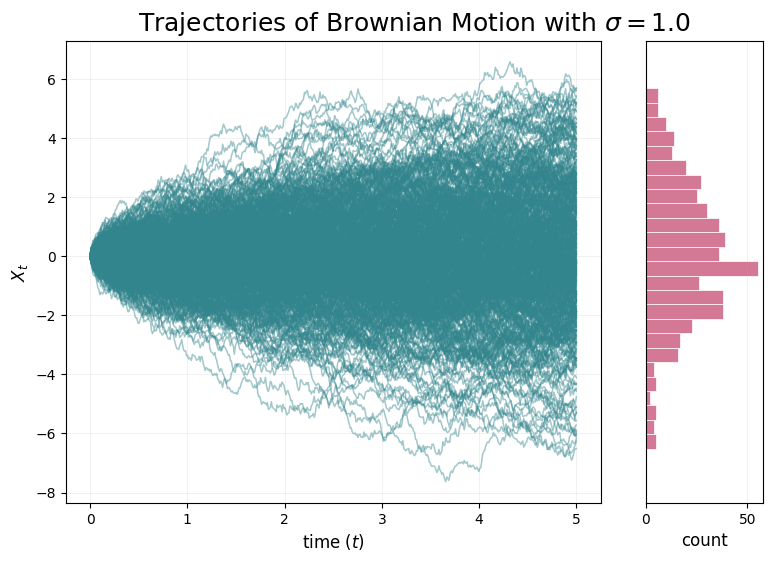
上图左侧展示的是布朗运动的多条轨迹,右侧粉色直方图展示的是 X t X_t Xt 在最终时刻的经验分布。
对于布朗运动:
X t = σ W t X_t = \sigma W_t Xt=σWt
所以在固定时刻 t t t ,它的分布大致满足:
X t ∼ N ( 0 , σ 2 t ) X_t \sim \mathcal{N}(0, \sigma^2t) Xt∼N(0,σ2t)
因此随着时间增加,轨迹会逐渐从 0 附近向外扩散,从图中也能看到,所以轨迹都是从 X 0 = 0 X_0 = 0 X0=0 出发,随后随着 t t t 增大逐渐形成一个 “扇形扩散” 的区域。
Your job:当你改变
sigma的值时,会发生什么?Your answer:
当
sigma增大时,布朗运动中的随机噪声强度会变大,因此轨迹会扩散得更快,波动幅度也会更大。具体表现为:不同轨迹之间的差异变大,曲线更容易远离初始位置 X 0 = 0 X_0=0 X0=0 ,右侧终点分布的直方图也会变得更宽。当
sigma减小时,随机噪声强度会变小,因此轨迹会更加集中在 0 0 0 附近,波动幅度更小,右侧终点分布也会更加集中。如果sigma接近 0,轨迹几乎不会移动;如果sigma=0,由于漂移项也是 0,所有轨迹都会一直保持在 X t = 0 X_t=0 Xt=0 。
Question 2.2: Implementing an Ornstein-Uhlenbeck Process
OU 过程可以通过设置 u t ( X t ) = − θ X t u_t(X_t) = - \theta X_t ut(Xt)=−θXt 和 σ t = σ \sigma_t = \sigma σt=σ 得到,即:
d X t = − θ X t d t + σ d W t , X 0 = x 0 . dX_t = -\theta X_t dt + \sigma dW_t, \quad \quad X_0 = x_0. dXt=−θXtdt+σdWt,X0=x0.
Your job:直观地说,当 θ \theta θ 非常小时, X t X_t Xt 的轨迹会是什么样子?当 θ \theta θ 非常大时,又会是什么样子?
Your answer:
当 θ \theta θ 非常小时,漂移项 − θ X t -\theta X_t −θXt 很弱,系统把轨迹拉回 0 0 0 附近的力量很小。因此,OU 过程会更接近普通布朗运动:轨迹主要受到随机噪声 σ d W t \sigma dW_t σdWt 的影响,会比较自由地向外游走,回到均值附近的趋势不明显。如果 θ = 0 \theta = 0 θ=0 ,它就退化为布朗运动。
当 θ \theta θ 很大时,漂移项 − θ X t - \theta X_t −θXt 很强。只要 X t X_t Xt 偏移 0 0 0 ,系统就会产生很强的反向拉回作用:当 X t > 0 X_t > 0 Xt>0 时,漂移项为负,会把轨迹往下拉;当 X t < 0 X_t < 0 Xt<0 时,漂移项为正,会把轨迹往上推。因此轨迹会快速回到 0 0 0 附近,并围绕 0 0 0 做较小幅度的随机波动。换句话说, θ \theta θ 越大,均值回复越强,轨迹越不容易远离 0 0 0 。
下面我们来实现 OUProcess 类中的 drift_coefficient 和 diffusion_coefficient 方法:
class OUProcess(SDE):
    def __init__(self, theta: float, sigma: float):
        self.theta = theta
        self.sigma = sigma

    def drift_coefficient(self, xt: torch.Tensor, t: torch.Tensor) -> torch.Tensor:
        """
        Returns the drift coefficient of the ODE.
        Args:
            - xt: state at time t, shape (bs, dim)
            - t: time, shape ()
        Returns:
            - drift: shape (bs, dim)
        """
        return -self.theta * xt

    def diffusion_coefficient(self, xt: torch.Tensor, t: torch.Tensor) -> torch.Tensor:
        """
        Returns the diffusion coefficient of the ODE.
        Args:
            - xt: state at time t, shape (bs, dim)
            - t: time, shape ()
        Returns:
            - diffusion: shape (bs, dim)
        """
        return self.sigma * torch.ones_like(xt)
OU 过程对应的 SDE 是:
d X t = − θ X t d t + σ d W t dX_t = -\theta X_t dt + \sigma dW_t dXt=−θXtdt+σdWt
它由两部分组成:漂移项和扩散项。
漂移项是:
return -self.theta * xt
这对应公式中的:
u t ( X t ) = − θ X t u_t(X_t) = - \theta X_t ut(Xt)=−θXt
这个漂移项的作用是把状态拉回到 0 0 0 附近。比如当 X t > 0 X_t > 0 Xt>0 时, − θ X t < 0 - \theta X_t < 0 −θXt<0 ,系数会向负方向移动;当 X t < 0 X_t < 0 Xt<0 时, − θ X t > 0 - \theta X_t > 0 −θXt>0 ,系统会向正方向移动。因此 OU 过程具有明显的 均值回复 特性。
扩散项是:
return self.sigma * torch.ones_like(xt)
这对应公式中的:
σ t = σ \sigma_t = \sigma σt=σ
也就是说,噪声强度是一个常数,不依赖于当前位置 xt,也不依赖于时间 t。这里使用 torch.ones_like(xt) 是为了让返回值的 shape 和 xt 保持一致,即:
(batch_size, dim)
这样后面的 EulerMaruyamaSimulator 在计算随机项时,可以直接逐元素相乘:
torch.sqrt(h) * diffusion * z
其中 z 的形状也是 (batch_size, dim)。
我们来比较下不同 σ \sigma σ 下 OU 过程的轨迹行为:
# Try comparing multiple choices side-by-side
thetas_and_sigmas = [
    (0.25, 0.0),
    (0.25, 0.5),
    (0.25, 2.0),
]
simulation_time = 10.0

num_plots = len(thetas_and_sigmas)
fig, axes = plt.subplots(2, num_plots, figsize=(10.5 * num_plots, 15))

# Top row: dynamics
n_traj = 10
for idx, (theta, sigma) in enumerate(thetas_and_sigmas):
    ou_process = OUProcess(theta, sigma)
    simulator = EulerMaruyamaSimulator(sde=ou_process)
    x0 = torch.linspace(-10.0,10.0,n_traj).view(-1,1).to(device) # Initial values - let's start at zero
    ts = torch.linspace(0.0,simulation_time,1000).to(device) # simulation timesteps

    ax = axes[0,idx]
    ax.set_title(f'Trajectories of OU Process with $\\sigma = ${sigma}, $\\theta = ${theta}', fontsize=15)
    plot_trajectories_1d(x0, simulator, ts, ax, show_hist=False)

# Bottom row: distribution
n_traj = 500
for idx, (theta, sigma) in enumerate(thetas_and_sigmas):
    ou_process = OUProcess(theta, sigma)
    simulator = EulerMaruyamaSimulator(sde=ou_process)
    x0 = torch.linspace(-10.0,10.0,n_traj).view(-1,1).to(device) # Initial values - let's start at zero
    ts = torch.linspace(0.0,simulation_time,1000).to(device) # simulation timesteps

    ax = axes[1,idx]
    ax.set_title(f'Trajectories of OU Process with $\\sigma = ${sigma}, $\\theta = ${theta}', fontsize=15)
    ax = plot_trajectories_1d(x0, simulator, ts, ax, show_hist=True, decouple_hist_axis=True)
plt.show()
执行后绘制的结果如下图所示:
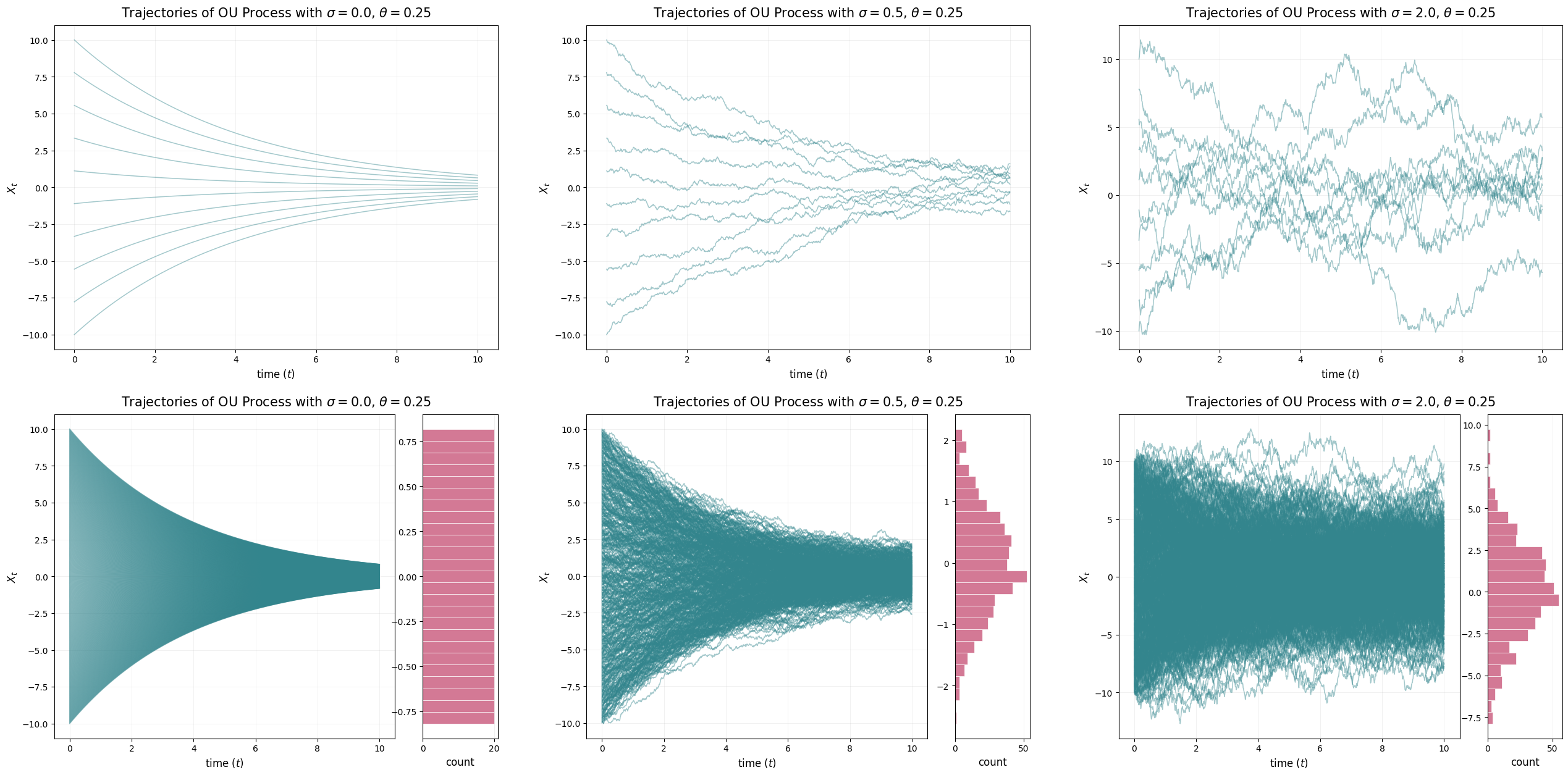
从上图可以看出,当 σ = 0 \sigma = 0 σ=0 时,没有随机噪声,OU 过程退化成确定性的 ODE:
d X t = − θ X t d t dX_t = - \theta X_t dt dXt=−θXtdt
因此所有轨迹都会从不同初始点逐渐收敛到 0 0 0 。这时它们是收敛到一个具体点。
当 σ > 0 \sigma > 0 σ>0 时,轨迹虽然仍然会被 − θ X t - \theta X_t −θXt 拉回 0 0 0 附近,但随机噪声会不断扰动它们,所以轨迹不会精确收敛到 0 0 0 ,而是围绕 0 0 0 形成一个稳定分布。这个稳定分布的宽度和下面这个比值有关:
D ≜ σ 2 2 θ D \triangleq \frac{\sigma^2}{2\theta} D≜2θσ2
在当前实验中, θ = 0.25 \theta = 0.25 θ=0.25 固定,所以 σ \sigma σ 越大, D D D 越大,最终分布越宽。
Your job:你观察到这些解的收敛行为有什么特点?它们是收敛到某个特定的点,还是收敛到某个分布?你的回答应该是两个 定性 句子,形式为:“当( θ \theta θ 或 σ \sigma σ)变大或变小时,我们会看到…”。
Hint:请特别关注比值 D ≜ σ 2 2 θ D \triangleq \frac{\sigma^2}{2\theta} D≜2θσ2 。
Your answer:
当 σ \sigma σ 增大时,我们看到轨迹的波动更加剧烈,并且并非收敛到单个点,而是收敛到一个以 0 0 0 为中心、范围更宽的平稳分布。
当 θ \theta θ 增大时,我们看到向 0 0 0 的均值回归更强,因此轨迹很快地拉回,平稳分布也变得更窄。
下面我们系统性的比较下不同 OU 过程的轨迹和最终分布:
# Let's compare various OU processes!
sigmas = [1.0, 2.0, 10.0]
ds = [0.25, 1.0, 4.0] # sigma**2 / 2t
simulation_time = 15.0
n_traj = 500

fig, axes = plt.subplots(len(ds), len(sigmas), figsize=(8 * len(sigmas), 8 * len(ds)))
axes = axes.reshape((len(ds), len(sigmas)))
for d_idx, d in enumerate(ds):
    for s_idx, sigma in enumerate(sigmas):
        theta = sigma**2 / 2 / d
        ou_process = OUProcess(theta, sigma)
        simulator = EulerMaruyamaSimulator(sde=ou_process)
        x0 = torch.linspace(-20.0,20.0,n_traj).view(-1,1).to(device)
        time_scale = sigma**2
        ts = torch.linspace(0.0,simulation_time / time_scale,1000).to(device) # simulation timesteps
        ax = axes[d_idx, s_idx]
        ax.set_title(f'OU Trajectories with Sigma={sigma}, Theta={theta}, D={d}')
        plot_trajectories_1d(x0=x0, simulator=simulator, timesteps=ts, ax=ax, show_hist=True, decouple_hist_axis=True)
        ax.set_xlabel(r'$t$')
        ax.set_ylabel(r'X_t')
plt.show()
执行后绘制的结果如下图所示:
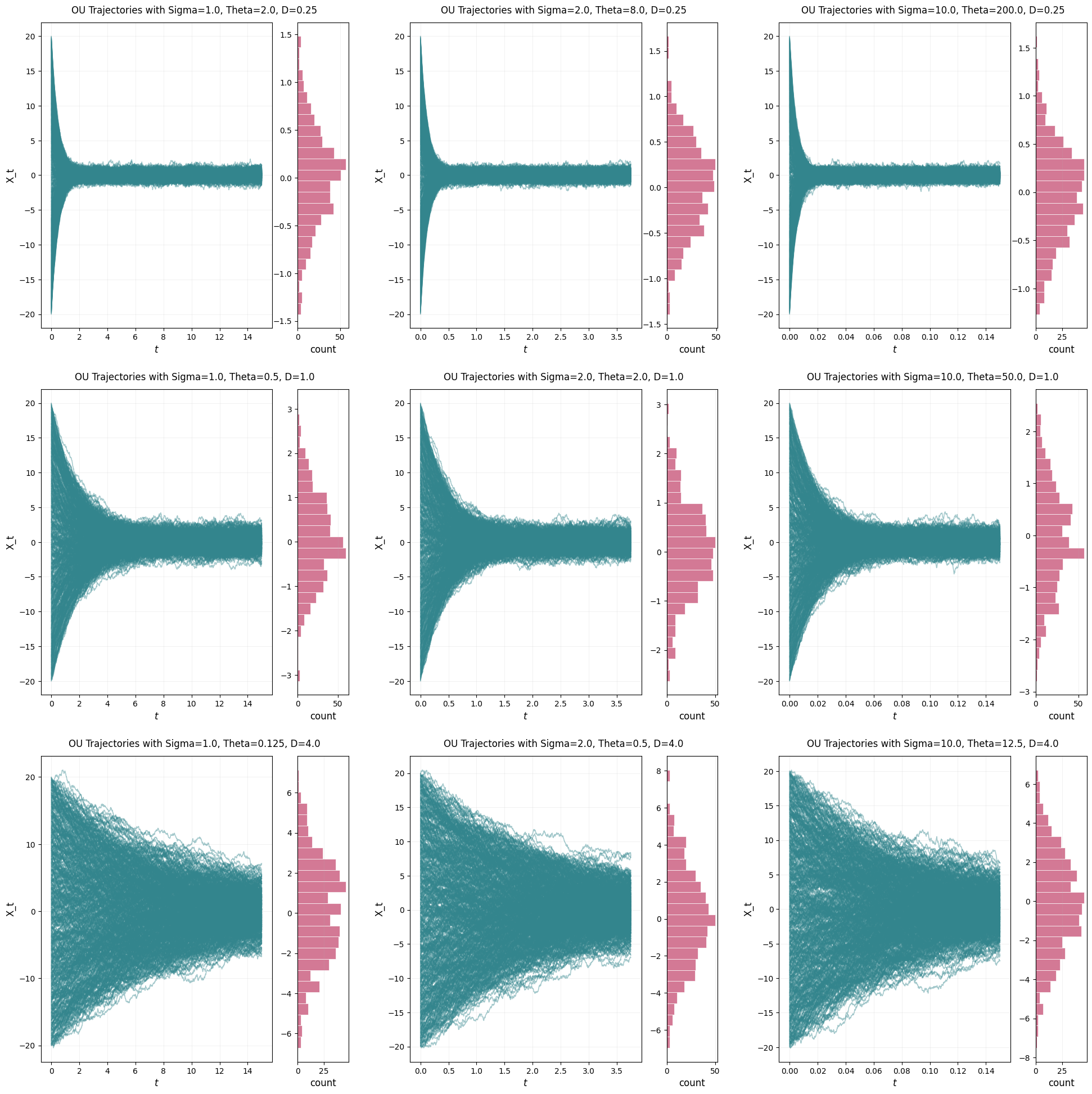
Your job:从上面的图中我们可以得出什么结论?一句定性的描述即可。我们将在 Section 3.2 中再次讨论这一点。
Your answer:
对于 OU 过程,当 D = σ 2 2 θ D=\frac{\sigma^2}{2\theta} D=2θσ2 保持不变时,我们看到长期平稳分布基本保持不变,而更大的 D D D 会导致更宽的极限分布。
Part 3: Transforming Distributions with SDEs
在上一节中,我们观察了单个 点 如何被 SDE 变换。最终,我们真正关心的是理解一个 分布 如何被 SDE 变换(或者被 ODE 变换…)。毕竟,我们的目标是设计一些 ODE 和 SDE,使它们能够将一个噪声分布,例如高斯分布 N ( 0 , I d ) \mathcal{N}(0,I_d) N(0,Id) ,变换为我们感兴趣的数据分布 p data p_{\text{data}} pdata 。在本节中,我们将可视化一种非常特殊的 SDE 家族如何变换分布:Langevin dynamics。
首先,让我们定义一些可以用来实验的分布。在实践中,我们通常希望一个分布具有两个性质:
- 第一个性质是,我们能够计算分布 p ( x ) p(x) p(x) 的 密度。这保证我们可以计算对数密度的梯度 ∇ log p ( x ) \nabla \log p(x) ∇logp(x) 。这个量被称为分布 p p p 的 score,它刻画了分布的局部几何结构。利用 score,我们将构造并模拟 Langevin dynamics,这是一类能够将样本 “驱动” 到分布 π \pi π 的 SDE。特别的,Langevin dynamics 会 保持 分布 p ( x ) p(x) p(x) 不变。在 Lecture 2 中,我们会更精确地解释这种 “驱动” 的含义。
- 第二个性质是,我们能够从分布 p ( x ) p(x) p(x) 中采样。对于一些简单的 toy 分布,例如高斯分布和简单的混合模型,这两个性质通常都能够满足。对于更复杂的 p p p ,例如图像上的分布,我们通常可以采样,但无法计算其密度。
在这些笔记中,我们会强调:分布可以被看作是一类一等对象,并且我们可以从中采样。不过需要强调的是,在实际编程中,这样做通常比较繁琐;实践中我们往往会直接使用例如 torch.randn 之类的函数。
我们先来定义两个抽象基类:
class Density(ABC):
    """
    Distribution with tractable density
    """
    @abstractmethod
    def log_density(self, x: torch.Tensor) -> torch.Tensor:
        """
        Returns the log density at x.
        Args:
            - x: shape (batch_size, dim)
        Returns:
            - log_density: shape (batch_size, 1)
        """
        pass

    def score(self, x: torch.Tensor) -> torch.Tensor:
        """
        Returns the score dx log density(x)
        Args:
            - x: (batch_size, dim)
        Returns:
            - score: (batch_size, dim)
        """
        x = x.unsqueeze(1)  # (batch_size, 1, ...)
        score = vmap(jacrev(self.log_density))(x)  # (batch_size, 1, 1, 1, ...)
        return score.squeeze((1, 2, 3))  # (batch_size, ...)

class Sampleable(ABC):
    """
    Distribution which can be sampled from
    """
    @abstractmethod
    def sample(self, num_samples: int) -> torch.Tensor:
        """
        Returns the log density at x.
        Args:
            - num_samples: the desired number of samples
        Returns:
            - samples: shape (batch_size, dim)
        """
        pass
Density 和 Sampleable 分别描述分布的两个能力,能否计算密度以及能否从中采样。
Density 表示一个具有可计算密度的分布。它要求子类必须实现:
def log_density(self, x: torch.Tensor) -> torch.Tensor:
这个函数输入一批样本点 x,形状为:
(batch_size, dim)
返回这些点上的对数密度:
(batch_size, 1)
也就是:
log p ( x ) \log p(x) logp(x)
在很多生成模型和 SDE 方法中,我们并不直接使用密度 p ( x ) p(x) p(x) ,而是使用对数密度 log p ( x ) \log p(x) logp(x) ,因为对数形式在数值上更稳定,也更方便求梯度。
接着,Density 中还定义了一个普通方法:
def score(self, x: torch.Tensor) -> torch.Tensor:
它用于计算 score:
∇ x log p ( x ) \nabla_x \log p(x) ∇xlogp(x)
score 可以理解为:在当前位置 x x x ,对数密度增加最快的方向。也就是说,score 指向的是局部概率密度更高的方向。因此在 Langevin dynamics 中,score 会被用来引导样本向目标分布的高密度区域移动。
代码中:
x = x.unsqueeze(1)
会把输入从 (batch_size, dim) 变成 (batch_size, 1, dim),这样做是为了让每个样本点都能被单独传入 log_density。
然后:
score = vmap(jacrev(self.log_density))(x)
这里结合了 vmap 和 jacrev:
jacrev(self.log_density):用于对单个样本计算log_density关于输入x的雅可比,也就是梯度;vmap(...):用于把这个操作批量化,对 batch 中的每个样本同时计算。
最后:
return score.squeeze((1, 2, 3))
把多余的维度去掉,得到最终形状:
(batch_size, dim)
也就是每个样本点对应一个 score 向量。
Sampleable 则表示一个可以采样的分布。它要求子类必须实现:
def sample(self, num_samples: int) -> torch.Tensor:
输入是想要采样的数量 num_samples,返回形状为:
(batch_size, dim)
的样本张量。
接着我们定义几个二维分布的可视化工具函数:
# Several plotting utility functions
def hist2d_sampleable(sampleable: Sampleable, num_samples: int, ax: Optional[Axes] = None, **kwargs):
    if ax is None:
        ax = plt.gca()
    samples = sampleable.sample(num_samples) # (ns, 2)
    ax.hist2d(samples[:,0].cpu(), samples[:,1].cpu(), **kwargs)

def scatter_sampleable(sampleable: Sampleable, num_samples: int, ax: Optional[Axes] = None, **kwargs):
    if ax is None:
        ax = plt.gca()
    samples = sampleable.sample(num_samples) # (ns, 2)
    ax.scatter(samples[:,0].cpu(), samples[:,1].cpu(), **kwargs)

def imshow_density(density: Density, bins: int, scale: float, ax: Optional[Axes] = None, **kwargs):
    if ax is None:
        ax = plt.gca()
    x = torch.linspace(-scale, scale, bins).to(device)
    y = torch.linspace(-scale, scale, bins).to(device)
    X, Y = torch.meshgrid(x, y)
    xy = torch.stack([X.reshape(-1), Y.reshape(-1)], dim=-1)
    density = density.log_density(xy).reshape(bins, bins).T
    im = ax.imshow(density.cpu(), extent=[-scale, scale, -scale, scale], origin='lower', **kwargs)

def contour_density(density: Density, bins: int, scale: float, ax: Optional[Axes] = None, **kwargs):
    if ax is None:
        ax = plt.gca()
    x = torch.linspace(-scale, scale, bins).to(device)
    y = torch.linspace(-scale, scale, bins).to(device)
    X, Y = torch.meshgrid(x, y)
    xy = torch.stack([X.reshape(-1), Y.reshape(-1)], dim=-1)
    density = density.log_density(xy).reshape(bins, bins).T
    im = ax.contour(density.cpu(), extent=[-scale, scale, -scale, scale], origin='lower', **kwargs)
接着我们来定义两个具体分布类:Gaussian 类(二维高斯分布)和 GaussianMixture 类(二维高斯混合分布):
class Gaussian(torch.nn.Module, Sampleable, Density):
    """
    Two-dimensional Gaussian. Is a Density and a Sampleable. Wrapper around torch.distributions.MultivariateNormal
    """
    def __init__(self, mean, cov):
        """
        mean: shape (2,)
        cov: shape (2,2)
        """
        super().__init__()
        self.register_buffer("mean", mean)
        self.register_buffer("cov", cov)

    @property
    def distribution(self):
        return D.MultivariateNormal(self.mean, self.cov, validate_args=False)

    def sample(self, num_samples) -> torch.Tensor:
        return self.distribution.sample((num_samples,))

    def log_density(self, x: torch.Tensor):
        return self.distribution.log_prob(x).view(-1, 1)

class GaussianMixture(torch.nn.Module, Sampleable, Density):
    """
    Two-dimensional Gaussian mixture model, and is a Density and a Sampleable. Wrapper around torch.distributions.MixtureSameFamily.
    """
    def __init__(
        self,
        means: torch.Tensor,  # nmodes x data_dim
        covs: torch.Tensor,  # nmodes x data_dim x data_dim
        weights: torch.Tensor,  # nmodes
    ):
        """
        means: shape (nmodes, 2)
        covs: shape (nmodes, 2, 2)
        weights: shape (nmodes, 1)
        """
        super().__init__()
        self.nmodes = means.shape[0]
        self.register_buffer("means", means)
        self.register_buffer("covs", covs)
        self.register_buffer("weights", weights)

    @property
    def dim(self) -> int:
        return self.means.shape[1]

    @property
    def distribution(self):
        return D.MixtureSameFamily(
                mixture_distribution=D.Categorical(probs=self.weights, validate_args=False),
                component_distribution=D.MultivariateNormal(
                    loc=self.means,
                    covariance_matrix=self.covs,
                    validate_args=False,
                ),
                validate_args=False,
            )

    def log_density(self, x: torch.Tensor) -> torch.Tensor:
        return self.distribution.log_prob(x).view(-1, 1)

    def sample(self, num_samples: int) -> torch.Tensor:
        return self.distribution.sample(torch.Size((num_samples,)))

    @classmethod
    def random_2D(
        cls, nmodes: int, std: float, scale: float = 10.0, seed = 0.0
    ) -> "GaussianMixture":
        torch.manual_seed(seed)
        means = (torch.rand(nmodes, 2) - 0.5) * scale
        covs = torch.diag_embed(torch.ones(nmodes, 2)) * std ** 2
        weights = torch.ones(nmodes)
        return cls(means, covs, weights)

    @classmethod
    def symmetric_2D(
        cls, nmodes: int, std: float, scale: float = 10.0,
    ) -> "GaussianMixture":
        angles = torch.linspace(0, 2 * np.pi, nmodes + 1)[:nmodes]
        means = torch.stack([torch.cos(angles), torch.sin(angles)], dim=1) * scale
        covs = torch.diag_embed(torch.ones(nmodes, 2) * std ** 2)
        weights = torch.ones(nmodes) / nmodes
        return cls(means, covs, weights)
下面我们来把前面定义的三个二维分布可视化出来:
# Visualize densities
densities = {
    "Gaussian": Gaussian(mean=torch.zeros(2), cov=10 * torch.eye(2)).to(device),
    "Random Mixture": GaussianMixture.random_2D(nmodes=5, std=1.0, scale=20.0, seed=3.0).to(device),
    "Symmetric Mixture": GaussianMixture.symmetric_2D(nmodes=5, std=1.0, scale=8.0).to(device),
}

fig, axes = plt.subplots(1,3, figsize=(18, 6))
bins = 100
scale = 15
for idx, (name, density) in enumerate(densities.items()):
    ax = axes[idx]
    ax.set_title(name)
    imshow_density(density, bins, scale, ax, vmin=-15, cmap=plt.get_cmap('Blues'))
    contour_density(density, bins, scale, ax, colors='grey', linestyles='solid', alpha=0.25, levels=20)
plt.show()
绘制出的图像如下所示:
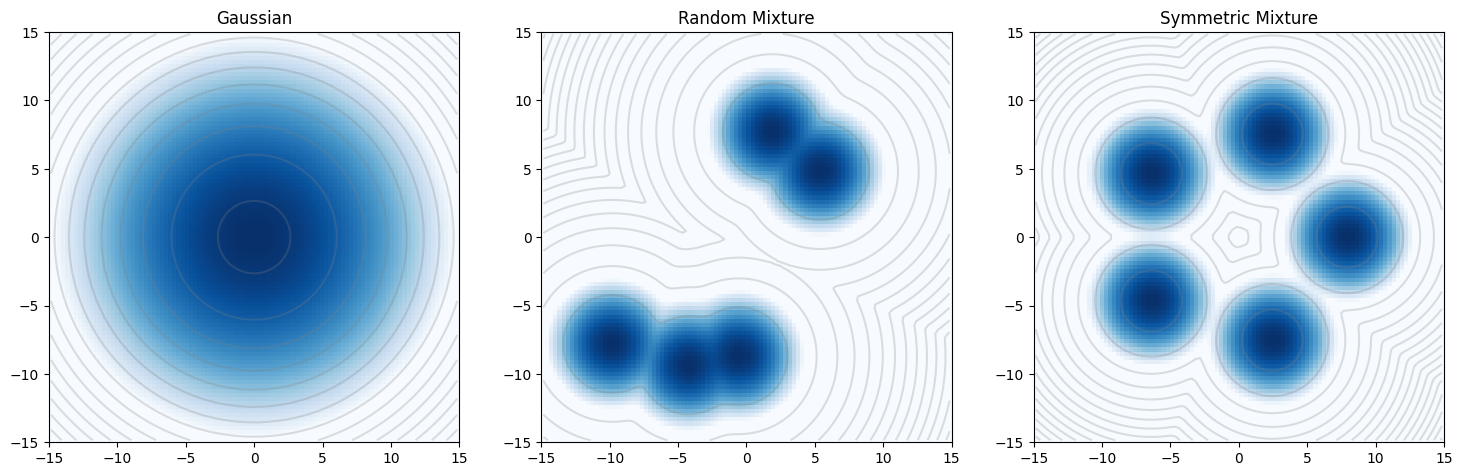
从图中我们可以直观看到:
1. Gaussian:密度在中心最高,向四周平滑下降,整体呈圆形对称;
2. Random Mixture:出现多个彼此分离的高密度峰,每个峰对应一个高斯分量,整体性质不规则;
3. Symmetric Mixture:多个高密度峰均匀分布在圆周上,结构非常对称,显示出明显的多模态特征。
这三种分布从简单到复杂,正好为后面研究 Langevin dynamics 提供了不同难度的目标分布。特别是后两个混合高斯分布,是后续观察 “样本是否会被 score 引导到高密度模态附近” 的很好例子。
Question 3.1: Implementing Langevin Dynamics
在这一节中,我们将模拟 过阻尼 Langevin dynamics:
d X t = 1 2 σ 2 ∇ log p ( X t ) d t + σ d W t . dX_t = \frac{1}{2} \sigma^2\nabla \log p(X_t) dt + \sigma dW_t. dXt=21σ2∇logp(Xt)dt+σdWt.
下面我们就来实现 LangevinSDE 类中的 drift_coefficient 和 diffusion_coefficient 方法:
class LangevinSDE(SDE):
    def __init__(self, sigma: float, density: Density):
        self.sigma = sigma
        self.density = density

    def drift_coefficient(self, xt: torch.Tensor, t: torch.Tensor) -> torch.Tensor:
        """
        Returns the drift coefficient of the ODE.
        Args:
            - xt: state at time t, shape (bs, dim)
            - t: time, shape ()
        Returns:
            - drift: shape (bs, dim)
        """
        return 0.5 * self.sigma**2 * self.density.score(xt)

    def diffusion_coefficient(self, xt: torch.Tensor, t: torch.Tensor) -> torch.Tensor:
        """
        Returns the diffusion coefficient of the ODE.
        Args:
            - xt: state at time t, shape (bs, dim)
            - t: time, shape ()
        Returns:
            - diffusion: shape (bs, dim)
        """
        return self.sigma * torch.ones_like(xt)
这一题对应的 SDE 是:
d X t = 1 2 σ 2 ∇ log p ( X t ) d t + σ d W t dX_t = \frac{1}{2} \sigma^2\nabla \log p(X_t) dt + \sigma dW_t dXt=21σ2∇logp(Xt)dt+σdWt
它和一般 SDE:
d X t = u t ( X t ) d t + σ t d W t dX_t = u_t(X_t)dt + \sigma_tdW_t dXt=ut(Xt)dt+σtdWt
对比可知,Langevin dynamics 的漂移项是:
u t ( X t ) = 1 2 σ 2 ∇ log p ( X t ) u_t(X_t) = \frac{1}{2} \sigma^2\nabla \log p(X_t) ut(Xt)=21σ2∇logp(Xt)
所以代码中写成:
return 0.5 * self.sigma ** 2 * self.density.score(xt)
其中:
self.density.score(xt)
表示计算:
∇ log p ( X t ) \nabla \log p(X_t) ∇logp(Xt)
也就是目标分布在当前位置的 score。直观地说,score 指向对数密度上升最快的方向,因此它会把样本往目标分布的高密度区域推动。
扩散项是:
σ t = σ \sigma_t = \sigma σt=σ
所以代码中写成:
return self.sigma * torch.ones_like(xt)
这里使用 torch.ones_like(xt) 是为了保证扩散系数的 shape 和 xt 一致,都是:
(batch_size, dim)
这样在 EulerMaruyamaSimulator 中计算随机项时可以直接逐元素相乘:
torch.sqrt(h) * diffusion * z
现在,让我们把结果画出来!
首先,让我们定义两个辅助函数:
# First, let's define two utility functions...
def every_nth_index(num_timesteps: int, n: int) -> torch.Tensor:
    """
    Compute the indices to record in the trajectory given a record_every parameter
    """
    if n == 1:
        return torch.arange(num_timesteps)
    return torch.cat(
        [
            torch.arange(0, num_timesteps - 1, n),
            torch.tensor([num_timesteps - 1]),
        ]
    )

def graph_dynamics(
    num_samples: int,
    source_distribution: Sampleable,
    simulator: Simulator,
    density: Density,
    timesteps: torch.Tensor,
    plot_every: int,
    bins: int,
    scale: float
):
    """
    Plot the evolution of samples from source under the simulation scheme given by simulator (itself a discretization of an ODE or SDE).
    Args:
        - num_samples: the number of samples to simulate
        - source_distribution: distribution from which we draw initial samples at t=0
        - simulator: the discertized simulation scheme used to simulate the dynamics
        - density: the target density
        - timesteps: the timesteps used by the simulator
        - plot_every: number of timesteps between consecutive plots
        - bins: number of bins for imshow
        - scale: scale for imshow
    """
    # Simulate
    x0 = source_distribution.sample(num_samples)
    xts = simulator.simulate_with_trajectory(x0, timesteps)
    indices_to_plot = every_nth_index(len(timesteps), plot_every)
    plot_timesteps = timesteps[indices_to_plot]
    plot_xts = xts[:,indices_to_plot]

    # Graph
    fig, axes = plt.subplots(2, len(plot_timesteps), figsize=(8*len(plot_timesteps), 16))
    axes = axes.reshape((2,len(plot_timesteps)))
    for t_idx in range(len(plot_timesteps)):
        t = plot_timesteps[t_idx].item()
        xt = plot_xts[:,t_idx]
        # Scatter axes
        scatter_ax = axes[0, t_idx]
        imshow_density(density, bins, scale, scatter_ax, vmin=-15, alpha=0.25, cmap=plt.get_cmap('Blues'))
        scatter_ax.scatter(xt[:,0].cpu(), xt[:,1].cpu(), marker='x', color='black', alpha=0.75, s=15)
        scatter_ax.set_title(f'Samples at t={t:.1f}', fontsize=15)
        scatter_ax.set_xticks([])
        scatter_ax.set_yticks([])

        # Kdeplot axes
        kdeplot_ax = axes[1, t_idx]
        imshow_density(density, bins, scale, kdeplot_ax, vmin=-15, alpha=0.5, cmap=plt.get_cmap('Blues'))
        sns.kdeplot(x=xt[:,0].cpu(), y=xt[:,1].cpu(), alpha=0.5, ax=kdeplot_ax,color='grey')
        kdeplot_ax.set_title(f'Density of Samples at t={t:.1f}', fontsize=15)
        kdeplot_ax.set_xticks([])
        kdeplot_ax.set_yticks([])
        kdeplot_ax.set_xlabel("")
        kdeplot_ax.set_ylabel("")

    plt.show()
然后,构建模拟器并绘制结果:
# Construct the simulator
target = GaussianMixture.random_2D(nmodes=5, std=0.75, scale=15.0, seed=3.0).to(device)
sde = LangevinSDE(sigma = 0.6, density = target)
simulator = EulerMaruyamaSimulator(sde)

# Graph the results!
graph_dynamics(
    num_samples = 1000,
    source_distribution = Gaussian(mean=torch.zeros(2), cov=20 * torch.eye(2)).to(device),
    simulator=simulator,
    density=target,
    timesteps=torch.linspace(0,5.0,1000).to(device),
    plot_every=334,
    bins=200,
    scale=15
)
绘制的结果如下图所示:
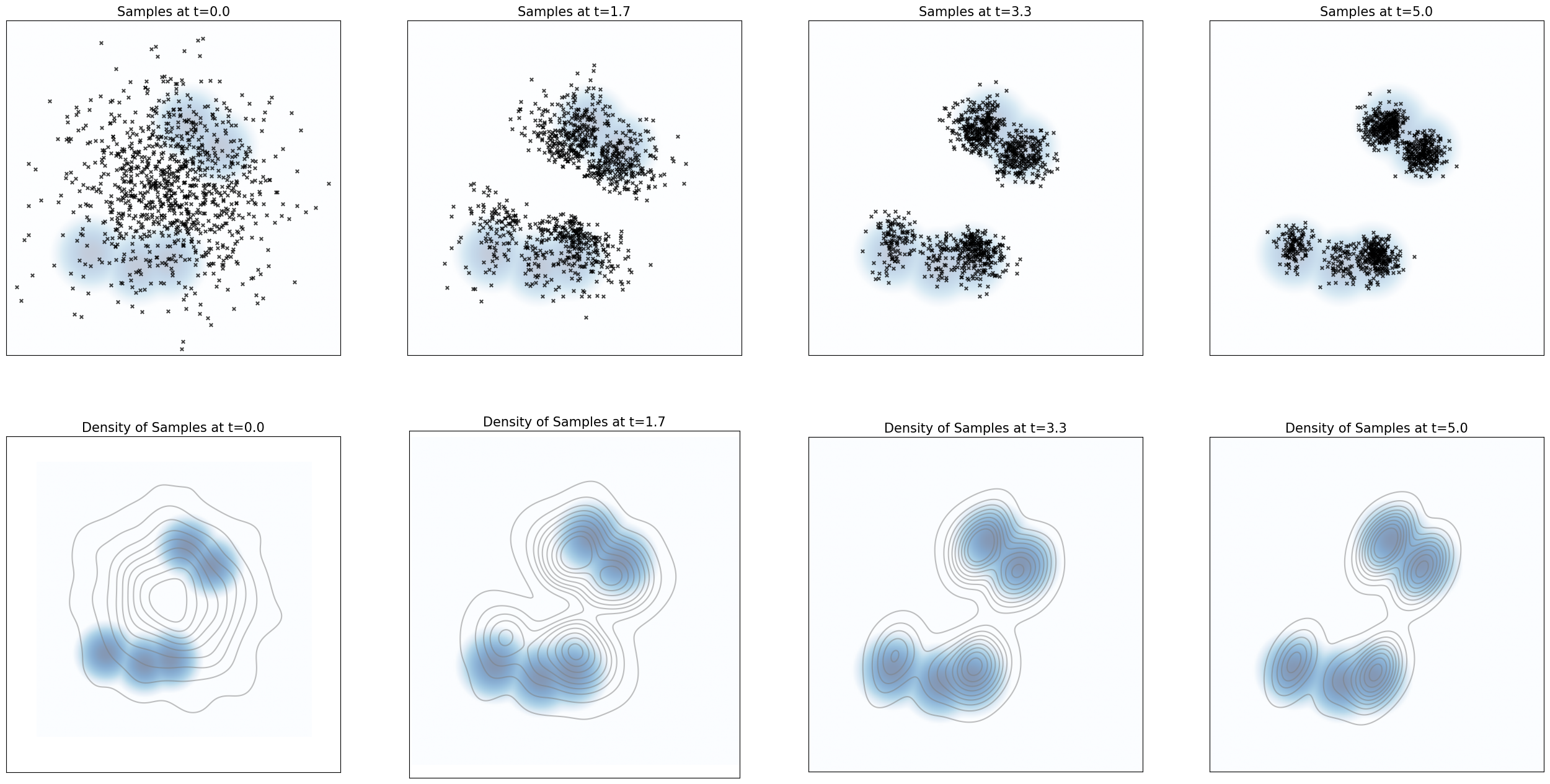
从图中可以看到,在 t = 0 t=0 t=0 时,样本主要来自一个宽高斯分布,整体比较分散;随着时间增加,样本逐渐聚集到目标分布的多个模态附近;到 t = 5.0 t = 5.0 t=5.0 时,样本分布已经明显接近目标高斯混合分布。
Your job:尝试改变 σ \sigma σ 的值、模拟步数的数量和范围、源分布以及目标密度。你观察到了什么?为什么?
Your answer:
当 σ \sigma σ 增大时,样本通常会移动和混合得更快,因为得分漂移 1 2 σ 2 ∇ log p ( x ) \frac{1}{2} \sigma^2 \nabla \log p(x) 21σ2∇logp(x) 和噪声项 σ d W t \sigma dW_t σdWt 都变得更强;但如果离散化的步长过大,模拟结果会变得噪声较大或不精确。
当我们使用更多的模拟步数或更长的模拟时间时,样本分布会有更多时间来接近目标密度;如果步长太少或时间范围过短,许多样本仍会停留在源分布附近,无法在目标模态周围充分稳定下来。
当源分布与目标分布相距较远时,收敛需要更长的时间,因为样本必须首先被输送到目标的高密度区域。对于多模态的目标密度,样本往往会聚集在不同模态周围;但如果模态之间相距较远或噪声过小,模态之间的混合就会变慢。
下面我们来看动态演化视频的生成。
Note:要运行接下来的两个 可选 cell,你需要先安装 ffmpeg 库。你可以使用例如 conda install -c conda-forge ffmpeg(或者更推荐 mamba)来安装。运行 pip install ffmpeg 或类似命令 很可能无法正常工作。
我们先来定义一个动画可视化函数:
from celluloid import Camera
from IPython.display import HTML

def animate_dynamics(
    num_samples: int,
    source_distribution: Sampleable,
    simulator: Simulator,
    density: Density,
    timesteps: torch.Tensor,
    animate_every: int,
    bins: int,
    scale: float,
    save_path: str = 'dynamics_animation.mp4'
):
    """
    Plot the evolution of samples from source under the simulation scheme given by simulator (itself a discretization of an ODE or SDE).
    Args:
        - num_samples: the number of samples to simulate
        - source_distribution: distribution from which we draw initial samples at t=0
        - simulator: the discertized simulation scheme used to simulate the dynamics
        - density: the target density
        - timesteps: the timesteps used by the simulator
        - animate_every: number of timesteps between consecutive frames in the resulting animation
    """
    # Simulate
    x0 = source_distribution.sample(num_samples)
    xts = simulator.simulate_with_trajectory(x0, timesteps)
    indices_to_animate = every_nth_index(len(timesteps), animate_every)
    animate_timesteps = timesteps[indices_to_animate]
    animate_xts = xts[:, indices_to_animate]

    # Graph
    fig, axes = plt.subplots(1, 2, figsize=(16, 8))
    camera = Camera(fig)
    for t_idx in range(len(animate_timesteps)):
        t = animate_timesteps[t_idx].item()
        xt = animate_xts[:,t_idx]
        # Scatter axes
        scatter_ax = axes[0]
        imshow_density(density, bins, scale, scatter_ax, vmin=-15, alpha=0.25, cmap=plt.get_cmap('Blues'))
        scatter_ax.scatter(xt[:,0].cpu(), xt[:,1].cpu(), marker='x', color='black', alpha=0.75, s=15)
        scatter_ax.set_title(f'Samples')

        # Kdeplot axes
        kdeplot_ax = axes[1]
        imshow_density(density, bins, scale, kdeplot_ax, vmin=-15, alpha=0.5, cmap=plt.get_cmap('Blues'))
        sns.kdeplot(x=xt[:,0].cpu(), y=xt[:,1].cpu(), alpha=0.5, ax=kdeplot_ax,color='grey')
        kdeplot_ax.set_title(f'Density of Samples', fontsize=15)
        kdeplot_ax.set_xticks([])
        kdeplot_ax.set_yticks([])
        kdeplot_ax.set_xlabel("")
        kdeplot_ax.set_ylabel("")
        camera.snap()

    animation = camera.animate()
    animation.save(save_path)
    plt.close()
    return HTML(animation.to_html5_video())
接着导出动态视频:
# OPTIONAL CELL
# Construct the simulator
target = GaussianMixture.random_2D(nmodes=5, std=0.75, scale=15.0, seed=3.0).to(device)
sde = LangevinSDE(sigma = 0.6, density = target)
simulator = EulerMaruyamaSimulator(sde)

# Graph the results!
animate_dynamics(
    num_samples = 1000,
    source_distribution = Gaussian(mean=torch.zeros(2), cov=20 * torch.eye(2)).to(device),
    simulator=simulator,
    density=target,
    timesteps=torch.linspace(0,5.0,1000).to(device),
    bins=200,
    scale=15,
    animate_every=100
)
导出的动态视频如下所示:
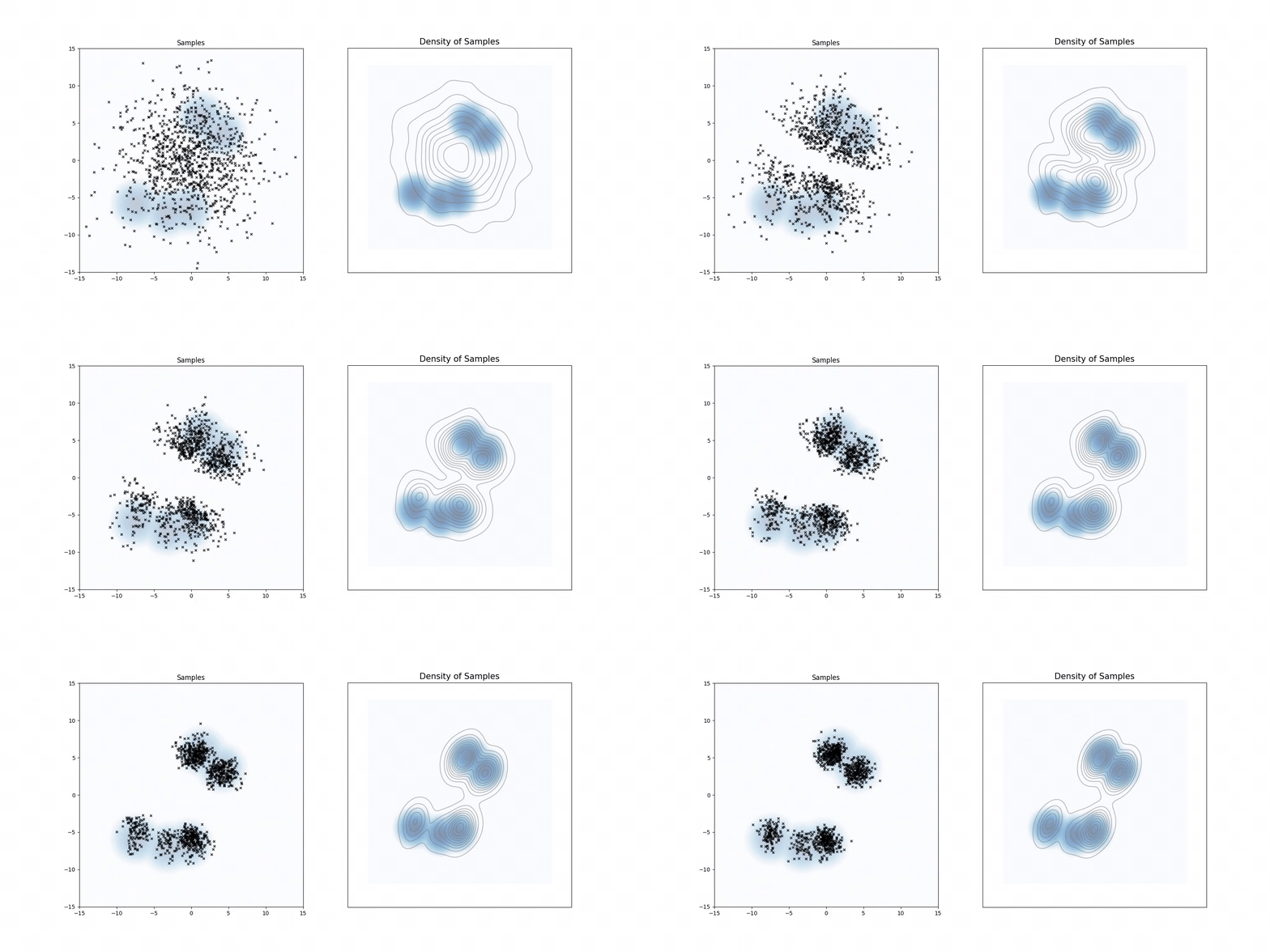
上面视频对应的动态现象,本质上和前面静态图是一致的,只是这里更容易观察到连续过程:
- 一开始样本主要集中在源分布附近;
- 随着时间推进,score 会把样本逐渐吸引到目标分布的多个高密度模态;
- 同时噪声项让样本保持一定随机探索能力,不会机械地只塌缩到某一个单点;
- 最终,样本整体分布越来越接近目标混合高斯分布。
Question 3.2: Ornstein-Uhlenbeck as Langevin Dynamics
在这一节中,我们将用一个简短的数学练习来结束本实验,说明 Langevin dynamics 和 Ornstein-Uhlenbeck 过程之间的联系。回顾一下,对于一个足够良好的分布 p p p ,Langevin dynamics 定义为:
d X t = 1 2 σ 2 ∇ log p ( X t ) d t + σ d W t , X 0 = x 0 , dX_t = \frac{1}{2} \sigma^2\nabla \log p(X_t) dt + \sigma dW_t, \quad \quad X_0 = x_0, dXt=21σ2∇logp(Xt)dt+σdWt,X0=x0,
而对于给定的 θ , σ \theta, \sigma θ,σ ,Ornstein-Uhlenbeck 过程定义为:
d X t = − θ X t d t + σ d W t , X 0 = x 0 . dX_t = -\theta X_t dt + \sigma dW_t, \quad \quad X_0 = x_0. dXt=−θXtdt+σdWt,X0=x0.
Your job:证明当 p ( x ) = N ( 0 , σ 2 2 θ ) p(x) = N(0, \frac{\sigma^2}{2\theta}) p(x)=N(0,2θσ2) 时,score 为:
∇ log p ( x ) = − 2 θ σ 2 x . \nabla \log p(x) = -\frac{2\theta}{\sigma^2}x. ∇logp(x)=−σ22θx.
Hint:高斯分布 p ( x ) = N ( 0 , σ 2 2 θ ) p(x) = N(0, \frac{\sigma^2}{2\theta}) p(x)=N(0,2θσ2) 的概率密度为:
p ( x ) = θ σ π exp ( − x 2 θ σ 2 ) . p(x) = \frac{\sqrt{\theta}}{\sigma\sqrt{\pi}} \exp\left(-\frac{x^2\theta}{\sigma^2}\right). p(x)=σπθexp(−σ2x2θ).
Your answer:
对于
p ( x ) = θ σ π exp ( − x 2 θ σ 2 ) , p(x)=\frac{\sqrt{\theta}}{\sigma\sqrt{\pi}}\exp\left(-\frac{x^2\theta}{\sigma^2}\right), p(x)=σπθexp(−σ2x2θ),
我们取对数:
log p ( x ) = log ( θ σ π ) − x 2 θ σ 2 . \log p(x) = \log\left(\frac{\sqrt{\theta}}{\sigma\sqrt{\pi}}\right) -\frac{x^2\theta}{\sigma^2}. logp(x)=log(σπθ)−σ2x2θ.
第一项是关于 x x x 的常数,因此其导数为零。于是,
∇ log p ( x ) = d d x ( − x 2 θ σ 2 ) = − 2 θ σ 2 x . \nabla \log p(x) = \frac{d}{dx} \left( - \frac{x^2\theta}{\sigma^2} \right) = -\frac{2\theta}{\sigma^2}x. ∇logp(x)=dxd(−σ2x2θ)=−σ22θx.
因此,当 p ( x ) = N ( 0 , σ 2 2 θ ) p(x)=N(0,\frac{\sigma^2}{2\theta}) p(x)=N(0,2θσ2) 时,得分函数为:
∇ log p ( x ) = − 2 θ σ 2 x . \nabla \log p(x) = -\frac{2\theta}{\sigma^2}x. ∇logp(x)=−σ22θx.
Your job:由此说明,当 p ( x ) = N ( 0 , σ 2 2 θ ) p(x) = N(0, \frac{\sigma^2}{2\theta}) p(x)=N(0,2θσ2) 时,Langevin dynamics:
d X t = 1 2 σ 2 ∇ log p ( X t ) d t + σ d W t , dX_t = \frac{1}{2} \sigma^2\nabla \log p(X_t) dt + \sigma dW_t, dXt=21σ2∇logp(Xt)dt+σdWt,
等价于 Ornstein-Uhlenbeck 过程:
d X t = − θ X t d t + σ d W t , X 0 = 0. dX_t = -\theta X_t dt + \sigma dW_t, \quad \quad X_0 = 0. dXt=−θXtdt+σdWt,X0=0.
Your answer:
将得分函数
∇ log p ( X t ) = − 2 θ σ 2 X t \nabla \log p(X_t) = -\frac{2\theta}{\sigma^2}X_t ∇logp(Xt)=−σ22θXt
代入 Langevin dynamics,得到:
d X t = 1 2 σ 2 ( − 2 θ σ 2 X t ) d t + σ d W t . dX_t = \frac{1}{2}\sigma^2 \left( -\frac{2\theta}{\sigma^2}X_t \right)dt + \sigma dW_t. dXt=21σ2(−σ22θXt)dt+σdWt.
简化漂移项:
1 2 σ 2 ( − 2 θ σ 2 X t ) = − θ X t . \frac{1}{2}\sigma^2 \left( -\frac{2\theta}{\sigma^2}X_t \right) = -\theta X_t. 21σ2(−σ22θXt)=−θXt.
因此,
d X t = − θ X t , d t + σ d W t . dX_t = -\theta X_t,dt + \sigma dW_t. dXt=−θXt,dt+σdWt.
这正是 Ornstein-Uhlenbeck 过程。因此,以 p ( x ) = N ( 0 , σ 2 2 θ ) p(x)=N(0,\frac{\sigma^2}{2\theta}) p(x)=N(0,2θσ2) 为目标分布的 Langevin dynamics,等价于漂移项为 − θ X t - \theta X_t −θXt、扩散系数为 σ \sigma σ 的 OU 过程。
OK,以上就是本次作业 Lab 1: Working with ODEs and SDEs 的全部实现了。
结语
基于本次 Lab 1 的完整实现与实验记录,我们从数值模拟与概率建模两个层面系统性地理解了 ODE 与 SDE 的基本结构与行为机制 。
在实现层面,本实验首先统一抽象了常微分方程与随机微分方程的接口形式,将 “漂移项 +(可选)扩散项” 的结构显式编码为可复用的系统框架。随后通过 Euler 方法与 Euler–Maruyama 方法,将连续时间动力系统离散化为可计算的迭代过程,使得复杂的随机动力学可以在统一 simulator 框架下进行稳定模拟与可视化。
在实验观察层面,我们通过布朗运动与 Ornstein–Uhlenbeck(OU)过程直观展示了扩散强度与均值回归强度对轨迹行为的影响:前者体现了纯噪声驱动下的无结构扩散,而后者则展示了 “噪声 + 拉回势场” 共同作用下的稳态分布形成机制。这一过程帮助我们建立了一个关键直觉——SDE 的长期行为并不一定收敛到单一点,而是可能收敛到一个稳定分布。
在更进一步的部分中,我们引入了 Langevin Dynamics,将 “分布的 score function” 直接转化为动力系统的漂移项,从而实现了 “用梯度定义分布演化” 的建模方式。这一点也揭示了一个非常核心的视角:生成模型不再是静态的密度拟合问题,而是一个动态的随机过程设计问题。
从更宏观的角度来看,这一实验实际上是在回答一个核心问题:如何用一个可计算的动力系统去刻画复杂数据分布的生成过程。这一思想将贯穿后续课程中所有基于扩散与流模型的生成式方法🤗。
参考

Agent 垂直技术社区,欢迎活跃、内容共建。
更多推荐

 6
6 0
0- 0


 已为社区贡献5条内容

所有评论(0)