cocos 让deepseek 生成小丑牌伪3d shader
·
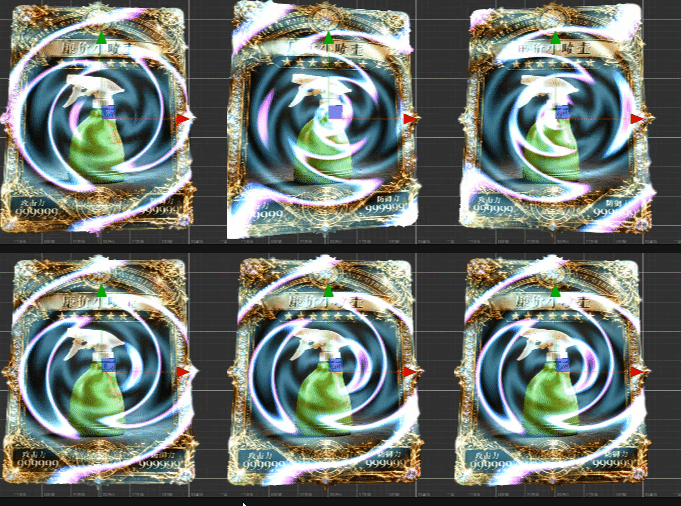
下面是提示词
// Copyright (c) 2017-2020 Xiamen Yaji Software Co., Ltd.
// Copyright (c) 2017-2020 Xiamen Yaji Software Co., Ltd.
// Copyright (c) 2017-2020 Xiamen Yaji Software Co., Ltd.
// Copyright (c) 2017-2020 Xiamen Yaji Software Co., Ltd.
// Effect Syntax Guide: https://docs.cocos.com/creator/manual/zh/shader/index.html

// Copyright (c) 2017-2020 Xiamen Yaji Software Co., Ltd.
// Effect Syntax Guide: https://docs.cocos.com/creator/manual/zh/shader/index.html

// Copyright (c) 2017-2020 Xiamen Yaji Software Co., Ltd.
// 最简兼容版光柱Shader

/** glow-simple.effect **/

CCEffect %{
  techniques:
  - name: glow
    passes:
    - vert: vs:vert

      frag: fs:frag
      blendState:
        targets:
        - blend: true

          blendSrc: src_alpha

          blendDst: one_minus_src_alpha
      depthStencilState:
          depthTest: false
          depthWrite: false
      rasterizerState:
        cullMode: none
      properties:
        glowColor:  { value: [1.0, 0.8, 0.3, 1.0], editor: { type: color } }


        moveSpeed: { value: 1.0, editor: { range: [0.1, 5.0, 0.1] } }
        beamWidth: { value: 0.1, editor: { range: [0.01, 0.5, 0.01] } }
        curveIntensity: { value: 0.2, editor: { range: [0.0, 1.0, 0.01] } }
        noiseTexture: { value: white, editor: { type: texture } }
        noiseScale: { value: 5.0, editor: { range: [0.1, 20.0, 0.1] } }

        noiseSpeed: { value: 0.5, editor: { range: [0.0, 2.0, 0.01] } }

}%

CCProgram vs %{
  precision highp float;
#include <cc-global>
#if USE_LOCAL


  #include <builtin/uniforms/cc-local>
#endif
in vec3 a_position;

in vec2 a_texCoord;
out vec2 uv;

#if USE_LOCAL
  in vec4 a_color;

  out vec4 v_color;
#endif


vec4 vert() {

  vec4 pos = vec4(a_position, 1);

  #if USE_LOCAL
    pos = cc_matWorld * pos;

    v_color = a_color;
  #endif

  pos = cc_matViewProj * pos;
  uv = a_texCoord;

  return  pos;
}

}%

CCProgram fs %{
  precision highp float;
  #include <sprite-texture>
  #include <cc-global> // 添加cc_time支持
  in vec2 uv;

  // 添加噪声纹理采样器
  uniform sampler2D noiseTexture;

  uniform UBO {
    vec4 glowColor;
    float moveSpeed;
    float beamWidth;
    float curveIntensity;
    float noiseScale;
    float noiseSpeed;
  };

  // 从噪声纹理获取曲线偏移值
  float getCurveOffset(float xPos) {
    // 计算噪声纹理采样坐标
    // 使用x位置和时间来创建动态噪声效果
    vec2 noiseUV = vec2(xPos * noiseScale, cc_time.x * noiseSpeed);

    // 从噪声纹理采样
    // 使用r通道作为偏移值(噪声纹理通常是灰度图,所以r=g=b)
    float noiseValue = texture(noiseTexture, noiseUV).r;

    // 将噪声值从[0,1]映射到[-1,1]范围
    return (noiseValue - 0.5) * 2.0 * curveIntensity;
  }

  vec4 frag() {
    vec4 o = texture(cc_spriteTexture, uv);
    vec4 original = o;

    // 使用时间控制光柱移动
    float time = cc_time.x * moveSpeed;
    float beamPosX = mod(time, 1.5) - 0.25;

    // 使用噪声纹理获取曲线偏移
    float curveOffset = getCurveOffset(beamPosX);
    float beamPosY = 0.5 + curveOffset;

    // 计算到曲线路径的距离


    vec2 curvePoint = vec2(beamPosX, beamPosY);
    float dist = distance(uv, curvePoint);


    if(dist < beamWidth) {
      if(o.a>0.0){


// 计算光柱强度 (中心最强,边缘最弱)
        float strength = 1.0 - dist / beamWidth;

        // 从白色渐变到 glowColor
        vec3 glowEffect = mix(vec3(1.0), glowColor.rgb, dist / beamWidth);

        // 应用发光效果
        o.rgb = original.rgb + glowEffect * strength;
        o.a = max(original.a, strength);
      }

    }

    return o;
  }
}%


请你用这个作为模版 生成 cocos 2d 实现类似《小丑牌》特殊卡牌的“伪 3D 倾斜”效果

Agent 垂直技术社区,欢迎活跃、内容共建。
更多推荐


 0
0 0
0- 0


 已为社区贡献2条内容

所有评论(0)