Claude Code 最值得收藏的 14 个黄金工作流:别再只会写代码了
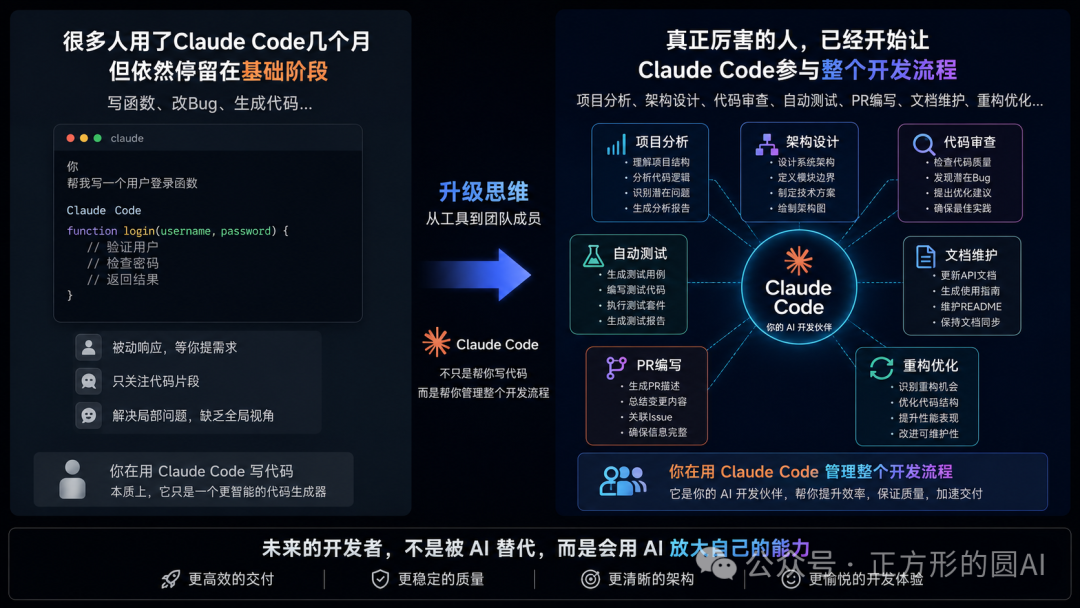
很多人用了Claude Code几个月,但依然停留在写函数、改Bug、生成代码的阶段。
真正重度用户已经在用Claude Code做:
项目分析、架构设计、代码审查、自动测试、PR编写、文档维护、重构优化......
-
普通用户用Claude Code写代码。
-
高手用Claude Code管理项目。
今天整理14个最常见、最实用的 Claude Code 工作流。 建议直接收藏。
很多命令你今天就能用上。
01 新项目必做:先执行 /init
很多人打开 Claude Code。
第一句话就是:“帮我写个功能。”
这是典型错误。
正确做法:先让 Claude 认识项目。
直接执行:
/initClaude会自动分析:项目结构、技术栈、核心文件、开发规范,并生成项目上下文。
很多大神进入新项目第一件事就是这个。
02 建立长期记忆:创建 CLAUDE.md
如果项目比较复杂,建议建立专属规则文件。
直接告诉Claude:
Create a CLAUDE.md for this repository.或者:
Create a comprehensive CLAUDE.md containing:

- Project architecture
- Coding standards
- Testing requirements
- Deployment workflow
- Naming conventions
以后 Claude 每次进入项目,都会参考这份规则,相当于拥有长期记忆。
03 快速理解陌生代码库
接手老项目时,先别翻代码。
直接问:
Analyze this codebase and explain:

- Architecture
- Main business flow
- Entry points
- Database relationships
- External integrations
或者:
Map the entire request lifecycle from API entry to database.通常几分钟就能建立整体认知。
04 遇到Bug:先追踪,不要直接修
很多人一看到报错,马上开始改代码,结果越改越乱。
推荐这样做:
Trace this issue from root cause.

Do not fix it yet.

Explain:

- Where it starts
- Why it happens
- Which files are involved
- Potential side effects
先找到病因,再开药方。
05 修改前先进入 Plan Mode
这是高手最喜欢的工作流之一。
修改前先规划:
Think about this task.

Create a detailed plan.

Do not write code yet.或者:
Analyze first.

List:

- Required changes
- Risks
- Affected files
- Dependencies

Wait for approval.
大型项目尤其推荐。
06 开启深度思考模式
复杂问题不要催 Claude,让它多想一会儿。
直接说:
Think harder.或者:
Think deeply before answering.更复杂一点:
Think deeply.

Consider:

- Performance
- Security
- Scalability
- Maintainability
很多架构方案质量会明显提升。
07 使用 Sub Agent 并行分析
这是很多人没用过的高级玩法。
例如:
Use a subagent to review this codebase for security issues.或者:
Use a subagent to analyze performance bottlenecks.再进一步:
Use parallel subagents.

One reviews backend.

One reviews frontend.

One reviews database design.
多个 Agent 同时工作,效率提升非常明显。
08 让Claude做代码审查
代码写完别急着提交。
先Review。
Review all recent changes.

Focus on:

- Bugs
- Security issues
- Performance problems
- Code quality
或者:
Act as a senior engineer.

Review this implementation critically.
很多隐藏问题都能提前发现。
09 自动生成测试
很多项目最大的问题:测试覆盖率太低。
直接让Claude补。
Generate comprehensive tests for this module.或者:
Create:

- Unit tests
- Integration tests
- Edge case tests
- Failure scenario tests
通常效果不错。
10 自动生成PR
很多开发最烦写PR,但Claude很适合干这个。
Generate a GitHub pull request for these changes.进阶版:
Create a professional PR including:

- Summary
- Technical changes
- Risks
- Testing
- Review notes
基本可以直接提交。
11 自动更新文档
代码更新了,文档也要同步。
直接输入:
Update documentation based on recent changes.或者:
Generate documentation for:

- APIs
- Configuration
- Deployment
- Architecture
避免文档越来越旧。
12 善用/compact压缩上下文
很多人聊着聊着,上下文越来越长。
Claude开始变笨。
这时候直接执行:
/compact作用:
-
压缩历史内容
-
保留核心上下文
-
减少 Token 消耗
这是重度用户必备命令。
13 会话管理:一个任务一个窗口
不要一个会话干所有事。
推荐这样分:
支付模块优化 登录异常排查 订单系统重构
复杂项目尤其重要。
否则上下文污染非常严重。
14 结束任务后及时清空
很多人不知道,Claude Code有清理命令。
执行:
/clear作用:
-
清空上下文
-
重置会话状态
-
避免旧任务影响新任务
养成习惯非常重要。
15 推荐收藏的Claude Code标准工作流
以后做任何需求,建议按照下面这套流程。
/init
↓
Analyze
↓
Plan
↓
Think Harder
↓
Implement
↓
Review
↓
Test
↓
Generate PR
↓
Update Docs
↓
/compact
很多人以为Claude Code最厉害的是写代码。
其实不是。
真正拉开差距的是分析能力、规划能力、审查能力和项目管理能力。
当你开始让Claude Code参与整个开发流程的时候。
你会发现,写代码这件事,反而成了最简单的一环。

Agent 垂直技术社区,欢迎活跃、内容共建。
更多推荐


 15
15 0
0- 0


 已为社区贡献5条内容

所有评论(0)