dangerously-load-development-channels ignored (server:wechat) Claude Code WeChat Channel 微信操作claude
·
Claude Code WeChat Channel 改动说明
适用环境:Windows 10/11 + Claude Code v2.1.147 + claude-code-wechat-channel
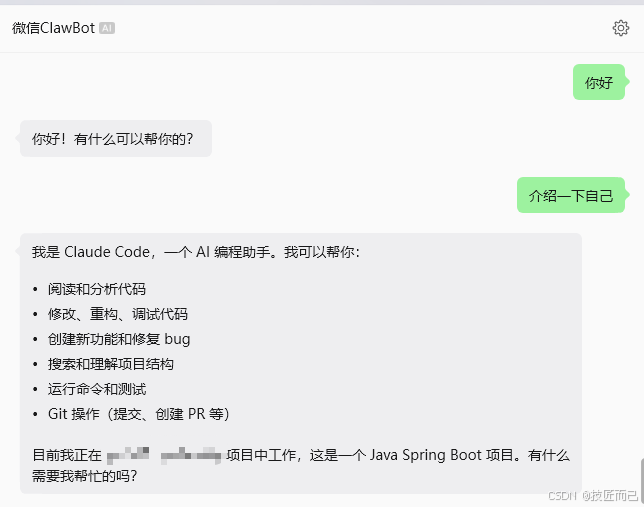
一、问题背景
1.1 现象
- 已安装
claude-code-wechat-channel,微信扫码登录成功 --> 未安装点击跳转Git - 执行
claude --dangerously-load-development-channels server:wechat时提示:--dangerously-load-development-channels ignored (server:wechat) Channels are not currently available - 微信发消息后 Claude 不自动回复;手动在终端里跑
npx claude-code-wechat-channel start也达不到「手机直连对话」效果
1.2 根因(非微信配置问题)
| 层级 | 说明 |
|---|---|
| 主因 | Claude Code 内置特性开关 tengu_harbor 默认为关闭,Channels 功能被整体禁用 |
| 冲突 | 在终端后台单独执行 npx claude-code-wechat-channel start,与 Claude 内置 MCP 重复,消息无法正确路由到当前会话 |
微信 iLink 收消息、MCP 连接、wechat_reply 发消息在排查时均已验证可用;卡点在于 Channel 模式未真正启用,入站通知不会自动变成 Claude 的用户消息。
二、改动总览
改动范围
├── 【本机 Claude Code 二进制】打补丁(核心)
├── 【用户目录】新增启动脚本
├── 【本项目】新增补丁脚本 + 本文档
└── 【未改动】MCP / 微信登录凭据 / settings.json(保持原样)
三、具体改动清单
3.1 已修改的文件(本机全局)
① Claude Code 可执行文件(二进制补丁)
| 项目 | 内容 |
|---|---|
| 文件路径 | C:\Users\Administrator\AppData\Roaming\npm\node_modules\@anthropic-ai\claude-code\bin\claude.exe |
| 备份路径 | 同目录 claude.exe.bak(首次打补丁时自动生成,用于恢复) |
| 改动方式 | 二进制内字符串替换(长度不变,不破坏 PE 结构) |
| 补丁 1 | tengu_harbor 特性标志:由默认 false 改为始终 true |
| 补丁 2 | Channel 鉴权门控:绕过 accessToken 检查,避免 Channel 被静默跳过 |
效果:claude --dangerously-load-development-channels server:wechat 不再出现 Channels are not currently available。
注意:
- 执行
npm update -g @anthropic-ai/claude-code或重装 Claude Code 后,补丁会被覆盖,需重新执行补丁脚本(见第六节)。 - 恢复原版:关闭所有 Claude 进程后,用
claude.exe.bak覆盖claude.exe。
修改增加参数配置 C:\Users\Administrator.claude\settings.json
  "experimental": {
    "channels": true
  }
3.2 新增的文件
② Channels 补丁脚本(本项目)
| 项目 | 内容 |
|---|---|
| 路径 | scripts/patch-claude-channels.js |
| 作用 | 对 claude.exe 应用与上文相同的两处二进制补丁;可重复执行(已补丁则跳过) |
| 默认目标 | %USERPROFILE%\AppData\Roaming\npm\node_modules\@anthropic-ai\claude-code\bin\claude.exe |
执行示例:
node "patch-claude-channels.js"
指定其他路径:
node scripts/patch-claude-channels.js "D:\path\to\claude.exe"
【注意】js文件 (patch-claude-channels.js)
#!/usr/bin/env node
/**
 * Patch Claude Code binary to enable Channels (tengu_harbor flag).
 * Based on cc-wechat patch logic.
 */
const fs = require('fs');
const path = require('path');
const os = require('os');

const EXE = process.argv[2] || path.join(
  os.homedir(),
  'AppData', 'Roaming', 'npm', 'node_modules', '@anthropic-ai', 'claude-code', 'bin', 'claude.exe'
);

const BINARY_REGEX_PATCHES = [
  {
    desc: 'Channels feature flag (tengu_harbor)',
    regex: /function ([\w$]+)\(\)\{return ([\w$]+)\("tengu_harbor",!1\)\}/,
    buildReplacement(m) {
      const prefix = `function ${m[1]}(){return `;
      return prefix + '!0 '.padStart(m[0].length - prefix.length - 1) + '}';
    },
    isPatched: (text) => !text.includes('"tengu_harbor",!1'),
  },
  {
    desc: 'Channel gate auth check',
    regex: /if\(!([\w$]+)\(\)\?\.accessToken\)/,
    buildReplacement(m) {
      const inner = m[0].length - 4;
      const pad = Math.floor((inner - 5) / 2);
      return 'if(' + ' '.repeat(pad) + 'false' + ' '.repeat(inner - 5 - pad) + ')';
    },
    isPatched: (text) => /if\(\s{2,}false\s+\)/.test(text),
  },
];

function patchBinary(exePath) {
  if (!fs.existsSync(exePath)) {
    console.error('File not found:', exePath);
    process.exit(1);
  }
  let buf = fs.readFileSync(exePath);
  let text = buf.toString('latin1');
  let patched = 0;
  let skipped = 0;

  for (const p of BINARY_REGEX_PATCHES) {
    if (p.isPatched(text)) {
      console.log('  skip (already patched):', p.desc);
      skipped++;
      continue;
    }
    const m = text.match(p.regex);
    if (!m) {
      console.log('  not found:', p.desc);
      continue;
    }
    const replacement = p.buildReplacement(m);
    const idx = text.indexOf(m[0]);
    if (idx < 0) {
      console.log('  index miss:', p.desc);
      continue;
    }
    const patchBuf = Buffer.from(replacement, 'latin1');
    patchBuf.copy(buf, idx);
    text = buf.toString('latin1');
    patched++;
    console.log('  patched:', p.desc);
  }

  if (patched === 0) {
    console.error('\nNo patches applied.');
    process.exit(skipped > 0 ? 0 : 1);
  }

  const backupPath = exePath + '.bak';
  if (!fs.existsSync(backupPath)) {
    fs.copyFileSync(exePath, backupPath);
    console.log('\nBackup:', backupPath);
  }
  fs.writeFileSync(exePath, buf);
  console.log('\nSuccess:', exePath);
}

console.log('\nPatching:', EXE, '\n');
patchBinary(EXE);
四、架构与数据流(修复后)
微信 (iOS ClawBot)
    ↓  iLink API (ilinkai.weixin.qq.com)
claude-code-wechat-channel (MCP Server,由 Claude 子进程拉起)
    ↓  notifications/claude/channel
Claude Code(server:wechat 通道模式)← 需 tengu_harbor 补丁启用
    ↓  wechat_reply 工具
微信用户收到回复
关键:必须由 Claude 以 server:wechat 模式启动并托管 MCP,不能在外部单独长期运行 npx claude-code-wechat-channel start。
五、正确使用方式
5.1 前置条件
- Node.js ≥ 18
- Claude Code ≥ 2.1.80(当前 2.1.147)
- 微信 iOS 最新版 + ClawBot 插件
- 已完成扫码:
npx claude-code-wechat-channel setup
5.2 日常启动(推荐)
双击:C:\Users\Administrator\start-wechat-channel.bat
或 PowerShell:
cd $HOME
claude --dangerously-skip-permissions --dangerously-load-development-channels server:wechat
5.3 不要这样做
| 错误操作 | 后果 |
|---|---|
只运行 claude,在对话框输入 server:wechat |
不会进入 Channel 模式 |
另开终端执行 npx claude-code-wechat-channel start |
与内置 MCP 冲突,消息难自动进会话 |
| 关闭 Channel 终端窗口 | 微信通道立即断开 |
| 在 Android/PC 微信使用 ClawBot | 官方目前主要支持 iOS |
六、维护与恢复
6.1 Claude Code 升级后重新打补丁
node "e:\cursorCode\lingwei\xwOne\basaltic-one-new\scripts\patch-claude-channels.js"
若输出 skip (already patched) 表示仍有效;若又出现 Channels are not currently available,说明二进制已被新版本覆盖,需再执行一次。
6.2 恢复未补丁的 Claude Code
- 退出所有
claude进程 - PowerShell:
$exe = "$env:APPDATA\npm\node_modules\@anthropic-ai\claude-code\bin"
Copy-Item "$exe\claude.exe.bak" "$exe\claude.exe" -Force
6.3 重新微信登录
npx claude-code-wechat-channel setup
6.4 检查 MCP 配置
type $env:USERPROFILE\.mcp.json
应仅保留一个 wechat 条目,指向 claude-code-wechat-channel(不要与 cc-wechat 的 wechat-channel 混用)。
七、故障排查速查
| 现象 | 处理 |
|---|---|
| 仍提示 Channels not available | 重新执行 patch-claude-channels.js |
| 终端有消息、微信无回复 | 确认 Claude 是否调用 wechat_reply;看 Channel 会话是否在运行 |
| 微信完全无反应 | 确认 iOS + ClawBot;重新 setup 扫码 |
| 升级 Claude 后失效 | 重新打补丁 |

Agent 垂直技术社区,欢迎活跃、内容共建。
更多推荐


 5
5 0
0- 0


 已为社区贡献1条内容

所有评论(0)