AI Agent的状态管理:Checkpointing、恢复与工作流持久化(工程实战)
很多团队做 Agent 的第一阶段,都会把精力放在:
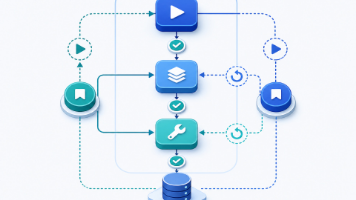
你把 Agent 跑起来了:能调用工具、会写 SQL、能查文档、还能自己总结。
但一上线,真实世界会用一种很朴素的方式把你打回原形:进程会死、网络会断、模型会超时、工具会失败、用户会反复追问、任务会跨天。
这篇文章不聊“Agent 很酷”,聊的是工程师真正会被 KPI 追着问的东西:状态怎么存?怎么恢复?怎么避免重复执行?怎么让一个任务在 30 分钟后还能接着跑?
0. 为什么状态管理是 Agent 的“第二个大脑”
很多团队做 Agent 的第一阶段,都会把精力放在:
- Prompt 怎么写
- Tool schema 怎么设计
- RAG 怎么接
- 模型怎么选
这些当然重要,但它们解决的是“能不能跑”。
状态管理解决的是“能不能在生产环境里活下来”。
0.1 现实里会发生什么
我见过(也踩过)几类非常典型的问题:
-
长任务被中断
- 用户发起“整理一份 200 页 PDF 的合规要点”,Agent 跑到第 70 页进程挂了
- 第二天用户问:“昨天那份怎么样了?”
- 你只能:重跑一遍(成本爆炸 + 结果不一致)
-
工具重复调用导致副作用
- 工具是“创建工单”“发消息”“下单”这类有副作用的动作
- Agent 重试一次 -> 工单重复、消息刷屏、订单重复
-
并发 + 多租户把状态弄乱
- A 用户的 task_id 被 B 用户读到了
- 或者同一用户同时开 3 个任务,状态互相覆盖
-
模型输出不稳定导致流程漂移
- 第一次解析到“下一步调用 tool_x”
- 第二次恢复后模型换了一种表述,流程分叉
如果你不做状态管理,Agent 会表现得像一个“健忘的实习生”:每次断线就失忆,或者靠猜。
1. 定义问题:我们到底要保存什么“状态”?
先把“状态”拆开。Agent 的状态通常分三层:
-
对话状态(Conversation State)
- 用户输入、系统消息、模型回复
- 常见是 messages[]
-
执行状态(Execution State)
- 当前处于哪个 step
- 已经调用过哪些工具、返回了什么
- 是否需要重试、重试次数
-
业务状态(Business State)
- 任务产物(草稿、摘要、结构化数据)
- 外部资源引用(文件 id、URL、数据库主键)
很多人只存 messages,然后希望“恢复时把 messages 喂回模型就行”。
这在 Demo 阶段能用,但在生产环境会出现两个致命问题:
- 成本:messages 会越来越长;恢复时要把所有东西重新喂回去
- 不确定性:LLM 不是确定性机器,同样的 messages 也可能走不同分支
所以工程上更可靠的做法是:
把 Agent 当作一个可恢复的工作流引擎:LLM 只负责决策,工作流负责状态。
2. 一个可落地的状态模型:Run / Step / Artifact
下面是我在生产里比较推荐的抽象(足够通用,也足够好实现):
- Run:一次任务执行(从用户点击开始,到结束)
- Step:Run 内部的一个原子步骤(比如“检索资料”“调用工具”“生成报告”)
- Artifact:可复用产物(比如“已解析的 PDF 文本”“提取出的 JSON”“最终 Markdown”)
2.1 Run 结构(建议)
Run 至少包含:
- run_id:全局唯一
- user_id / tenant_id:多租户隔离
- status:running / paused / failed / completed
- input:用户原始请求
- plan:高层计划(可选)
- created_at / updated_at
2.2 Step 结构(关键)
Step 是你恢复的锚点。建议包含:
- step_id、run_id
- name:如“fetch_sources”
- state:pending / running / succeeded / failed / skipped
- attempt:第几次尝试
- input:该 step 的输入(包括 prompt、tool args)
- output:成功结果(重要!)
- error:失败原因(含可重试/不可重试分类)
- started_at / finished_at
2.3 Artifact 结构(可选但很香)
Artifact 用来存大块内容/文件/中间产物,避免塞进 messages。
- artifact_id
- run_id
- type:“pdf_text” / “markdown” / “json” / “file_ref” …
- uri:存储位置(S3/OSS/本地路径/DB blob)
- hash:内容 hash(用于去重/校验)
3. 工程目标:我们要实现什么能力?
把需求写清楚,才能设计出不烂尾的系统。
3.1 Checkpointing
- 任何时候进程挂了,都能从最近的 checkpoint 继续
- checkpoint 不应该只靠“重新喂 messages”
3.2 Resume(恢复)
- 恢复后能知道:
- 上次跑到哪一步
- 哪些工具已经成功调用(不要重复)
- 哪些失败且可重试
3.3 Exactly-once / At-least-once 的权衡
现实里你很难做到绝对 exactly-once(因为外部工具可能没有幂等)。
工程上一般选择:
- 内部状态更新:exactly-once(通过事务/幂等键)
- 外部副作用:at-least-once + 幂等设计
3.4 可观测性(不是监控那篇)
这里不是讲 observability 平台,而是:
- 每一步能追踪
- 失败能定位
- 恢复能解释“为什么这么做”
4. 关键设计 1:幂等(Idempotency)不是一句口号
Agent 最怕的不是失败,是“失败后重试导致副作用翻倍”。
4.1 给每个 tool call 一个幂等键
原则:
- 幂等键必须来自业务语义,而不是随机 uuid
- 同一个 step 的同一次业务动作,幂等键应一致
例子:给“创建工单”工具:
- tenant_id + run_id + step_name + payload_hash
4.2 Node.js 示例:工具调用包装器
下面用 Node.js 写一个最小可用的执行器。
说明:示例使用 SQLite(方便本地演示)。线上你可以替换为 Postgres。
// file: agent_state/db.js
import Database from 'better-sqlite3';

export function openDb(path = './agent_state.sqlite') {
  const db = new Database(path);
  db.pragma('journal_mode = WAL');

  db.exec(`
    create table if not exists runs (
      run_id text primary key,
      tenant_id text not null,
      user_id text not null,
      status text not null,
      input text not null,
      created_at integer not null,
      updated_at integer not null
    );

    create table if not exists steps (
      step_id text primary key,
      run_id text not null,
      name text not null,
      state text not null,
      attempt integer not null,
      input text,
      output text,
      error text,
      started_at integer,
      finished_at integer,
      unique(run_id, name, attempt)
    );

    create table if not exists tool_calls (
      id integer primary key autoincrement,
      run_id text not null,
      step_id text not null,
      tool_name text not null,
      idem_key text not null,
      args text not null,
      result text,
      state text not null,
      created_at integer not null,
      unique(idem_key)
    );
  `);

  return db;
}
工具调用包装:
// file: agent_state/tool_executor.js
import crypto from 'node:crypto';

function sha256(input) {
  return crypto.createHash('sha256').update(input).digest('hex');
}

export function makeIdemKey({ tenantId, runId, stepName, toolName, args }) {
  const payload = JSON.stringify({ tenantId, runId, stepName, toolName, args });
  return sha256(payload);
}

export async function executeToolWithIdempotency({ db, ctx, toolName, args, callTool }) {
  const idemKey = makeIdemKey({
    tenantId: ctx.tenantId,
    runId: ctx.runId,
    stepName: ctx.stepName,
    toolName,
    args,
  });

  const now = Date.now();

  // 1) 先查是否执行过
  const existing = db
    .prepare('select state, result from tool_calls where idem_key = ?')
    .get(idemKey);

  if (existing && existing.state === 'succeeded') {
    return JSON.parse(existing.result);
  }

  // 2) 写入一条 running 记录(如果并发,这里 unique(idem_key) 会保护)
  try {
    db.prepare(`
      insert into tool_calls(run_id, step_id, tool_name, idem_key, args, state, created_at)
      values(?,?,?,?,?,?,?)
    `).run(ctx.runId, ctx.stepId, toolName, idemKey, JSON.stringify(args), 'running', now);
  } catch (e) {
    // 可能是并发插入导致的唯一键冲突,重新读取
    const again = db
      .prepare('select state, result from tool_calls where idem_key = ?')
      .get(idemKey);
    if (again?.state === 'succeeded') return JSON.parse(again.result);
    // 仍然 running:这里你可以选择等待或直接抛错
    throw new Error(`Tool call already in progress for idemKey=${idemKey}`);
  }

  // 3) 真正调用外部工具
  try {
    const result = await callTool(toolName, args);

    db.prepare('update tool_calls set state=?, result=? where idem_key=?')
      .run('succeeded', JSON.stringify(result), idemKey);

    return result;
  } catch (err) {
    db.prepare('update tool_calls set state=?, result=? where idem_key=?')
      .run('failed', JSON.stringify({ message: String(err) }), idemKey);
    throw err;
  }
}
关键点:幂等键的唯一索引让你在“重试/恢复/并发”时不容易重复执行。
5. 关键设计 2:Step 的事务边界(别把状态写成薛定谔)
一个常见坑:
- 你先调用工具(有副作用)
- 工具成功了
- 你还没来得及写入 step=success
- 进程挂了
恢复时:你看 step 还是 running/failed,于是又调用一次工具 -> 副作用翻倍。
5.1 正确的顺序
对外部副作用动作,推荐的顺序是:
- 先写 tool_calls 表:running(带 idem_key)
- 调用外部工具
- tool_calls:succeeded + result
- step:succeeded + output
即便在 (2)~(3) 中间挂了:
- tool_calls 记录存在(running)
- 恢复逻辑可以识别:这可能已经执行过
- 你可以做“工具层查询”或“超时后人工校验”
5.2 running 的 tool_call 如何处理?
两种策略:
- 保守策略:当发现 running 且超时 -> 标记为 unknown,进入人工队列
- 乐观策略:对有查询接口的工具(比如“创建工单”能用 idem_key 查询) -> 直接查
工程上我更推荐:
- 对关键副作用工具:设计成“可查询 + 幂等键”
- 对不可查询工具:保守处理
6. 关键设计 3:恢复逻辑(Resume)怎么写才不“自欺欺人”
恢复不只是“把 messages 重新喂回去”。
它更像是:
- 找到最后一个成功的 step
- 从下一个 step 继续
- 如果某 step 失败且可重试 -> 重试
- 如果某 step 失败且不可重试 -> 终止 run
6.1 一个最小可用的工作流执行器
我们用一种非常朴素的方式实现:
- workflow = [step1, step2, step3]
- 每个 step 是一个 async 函数
- step 内部可以调用 executeToolWithIdempotency
// file: agent_state/workflow.js
import crypto from 'node:crypto';

function uuid() {
  return crypto.randomUUID();
}

export async function runWorkflow({ db, tenantId, userId, input, steps }) {
  const runId = uuid();
  const now = Date.now();

  db.prepare(`
    insert into runs(run_id, tenant_id, user_id, status, input, created_at, updated_at)
    values(?,?,?,?,?,?,?)
  `).run(runId, tenantId, userId, 'running', JSON.stringify(input), now, now);

  try {
    for (const stepFn of steps) {
      await executeStep({ db, runId, tenantId, stepFn });
    }
    db.prepare('update runs set status=?, updated_at=? where run_id=?')
      .run('completed', Date.now(), runId);

    return { runId, status: 'completed' };
  } catch (err) {
    db.prepare('update runs set status=?, updated_at=? where run_id=?')
      .run('failed', Date.now(), runId);
    throw err;
  }
}

export async function executeStep({ db, runId, tenantId, stepFn, attempt = 1 }) {
  const stepId = uuid();
  const name = stepFn.stepName;
  const startedAt = Date.now();

  db.prepare(`
    insert into steps(step_id, run_id, name, state, attempt, started_at)
    values(?,?,?,?,?,?)
  `).run(stepId, runId, name, 'running', attempt, startedAt);

  try {
    const output = await stepFn({
      ctx: { runId, tenantId, stepId, stepName: name },
      db,
    });

    db.prepare('update steps set state=?, output=?, finished_at=? where step_id=?')
      .run('succeeded', JSON.stringify(output ?? null), Date.now(), stepId);

    return output;
  } catch (err) {
    db.prepare('update steps set state=?, error=?, finished_at=? where step_id=?')
      .run('failed', JSON.stringify({ message: String(err) }), Date.now(), stepId);
    throw err;
  }
}
6.2 Resume:从数据库重建执行上下文
恢复逻辑的关键是:
- 查 runs.status
- 查 steps 的最后状态
- 找到最后成功 step 的 index
// file: agent_state/resume.js
export function loadRun(db, runId) {
  const run = db.prepare('select * from runs where run_id=?').get(runId);
  if (!run) throw new Error('Run not found');

  const steps = db.prepare(
    'select * from steps where run_id=? order by started_at asc'
  ).all(runId);

  return { run, steps };
}

export async function resumeWorkflow({ db, runId, steps }) {
  const { run, steps: doneSteps } = loadRun(db, runId);

  if (run.status === 'completed') return { runId, status: 'completed' };

  // 找到最后一个 succeeded 的 step
  const succeededNames = new Set(doneSteps.filter(s => s.state === 'succeeded').map(s => s.name));

  for (const stepFn of steps) {
    if (succeededNames.has(stepFn.stepName)) continue;
    await stepFn({ ctx: { runId, tenantId: run.tenant_id }, db });
  }

  db.prepare('update runs set status=?, updated_at=? where run_id=?')
    .run('completed', Date.now(), runId);

  return { runId, status: 'completed' };
}
注意:这里为了简洁,resume 直接跳过已成功的 step。
更严谨的做法是:
- 允许 step 多次 attempt
- 保证 step 是幂等的(或内部 tool call 幂等)
7. 关键设计 4:对话状态别全塞进 messages(成本与漂移)
Agent 项目到后期,messages 常常会长成这样:
- 100+ 条消息
- 其中 80% 是工具返回的长文本
- 每次恢复都要重新拼接
工程上我更喜欢:
- messages 里只保留“对话必要信息”
- 工具大结果存 artifact
- messages 里放 artifact 引用
例如:
{
  "role": "tool",
  "name": "extract_pdf_text",
  "content": {
    "artifact_ref": "artifact:pdf_text:ab12...",
    "summary": "Parsed 200 pages, 180k chars"
  }
}
这样做的好处:
- 可控的上下文长度
- 恢复时不必重喂所有原始文本
- 可做缓存/去重
8. 关键设计 5:Checkpoint 的粒度怎么选?
粒度太细:
- 每个 token 都写 DB,性能炸
粒度太粗:
- 失败重跑成本高
我的经验:
- 以“外部副作用”与“长耗时计算”作为 checkpoint 边界
典型边界:
- 调用外部工具前后
- 大文件解析完成后
- 生成最终产物前
实践里常用的 checkpoint 节点:
- plan 已生成
- sources 已拉取
- 关键工具调用完成
- 草稿生成完成
- 发布完成
9. 失败分类:可重试 vs 不可重试(别让重试变成 DDoS)
工程里重试策略必须非常明确。
9.1 可重试(Retryable)
- 网络抖动
- 429 限流
- 5xx 服务异常
- 模型超时
9.2 不可重试(Fatal)
- 参数校验失败
- 权限不足
- 资源不存在
- 业务逻辑冲突(比如“同名工单已存在且不允许重复”)
9.3 Node.js 的指数退避
export async function retryWithBackoff(fn, {
  retries = 5,
  baseMs = 500,
  maxMs = 10_000,
  jitter = 0.2,
  isRetryable = (e) => true,
} = {}) {
  let attempt = 0;
  while (true) {
    try {
      return await fn();
    } catch (e) {
      attempt++;
      if (attempt > retries || !isRetryable(e)) throw e;

      const exp = Math.min(maxMs, baseMs * Math.pow(2, attempt - 1));
      const noise = exp * jitter * (Math.random() * 2 - 1);
      const wait = Math.max(0, Math.floor(exp + noise));
      await new Promise(r => setTimeout(r, wait));
    }
  }
}
配合前面的 tool idempotency,你可以做到:
- step 失败 -> 重试 step
- 但工具调用不会重复产生副作用(因为 idem_key)
10. 一个完整示例:可恢复的“资料搜集 → 生成报告 → 发送通知” Agent
假设你要做一个内部 Agent:
- 输入:一个 Jira issue 链接
- 动作:拉取 issue、查相关文档、生成总结
- 最后:把总结发到飞书群
其中:
- 拉取 Jira:外部工具(可能失败、但无副作用)
- 查文档:外部工具(无副作用)
- 发消息:有副作用(必须幂等)
示例 workflow:
// file: demo_agent.js
import { openDb } from './agent_state/db.js';
import { executeToolWithIdempotency } from './agent_state/tool_executor.js';
import { runWorkflow } from './agent_state/workflow.js';

const db = openDb('./demo.sqlite');

async function callTool(toolName, args) {
  // 这里用伪实现代替真实 API
  if (toolName === 'jira_get_issue') {
    return { key: args.key, title: 'Bug: checkout failed', desc: '...' };
  }
  if (toolName === 'kb_search') {
    return { hits: [{ title: 'How to fix checkout', url: 'https://kb/123' }] };
  }
  if (toolName === 'send_message') {
    return { ok: true, messageId: 'm_001' };
  }
  throw new Error('unknown tool');
}

const stepFetch = async ({ ctx, db }) => {
  const issue = await executeToolWithIdempotency({
    db,
    ctx,
    toolName: 'jira_get_issue',
    args: { key: 'PROJ-123' },
    callTool,
  });
  return issue;
};
stepFetch.stepName = 'fetch_issue';

const stepSearch = async ({ ctx, db }) => {
  const hits = await executeToolWithIdempotency({
    db,
    ctx,
    toolName: 'kb_search',
    args: { query: 'checkout failed' },
    callTool,
  });
  return hits;
};
stepSearch.stepName = 'search_kb';

const stepNotify = async ({ ctx, db }) => {
  const msg = await executeToolWithIdempotency({
    db,
    ctx,
    toolName: 'send_message',
    args: { channel: 'team', text: 'Report ready' },
    callTool,
  });
  return msg;
};
stepNotify.stepName = 'notify_team';

await runWorkflow({
  db,
  tenantId: 't1',
  userId: 'u1',
  input: { issueKey: 'PROJ-123' },
  steps: [stepFetch, stepSearch, stepNotify],
});
这个 demo 不复杂,但把核心原则都带上了:
- step 有记录
- tool call 幂等
- 可恢复
11. 多租户下的状态隔离:tenant_id 不只是一个字段
如果你的 Agent 是 SaaS,多租户会带来额外坑。
11.1 数据隔离
最低要求:
- runs/steps/tool_calls 都必须带 tenant_id
- 查询必须以 tenant_id 过滤
更严谨:
- tenant_id + run_id 组成复合主键
- 或者在数据库层做 row-level security(Postgres RLS)
11.2 配额与限流(只是状态管理的旁边)
状态管理系统通常也会承载:
- 每个 tenant 的并发 run 数
- 每个 tenant 的 token 使用统计
- 超额任务的排队/拒绝
这也是为什么 Run 不是一个纯日志,而是一个“执行实体”。
12. 最容易被忽略的坑:LLM 决策的可复现性
当你恢复一个 run,你希望它“按原计划继续”,而不是重新想一遍。
12.1 把 plan 固化
第一次决策产生的计划(plan)应该写入 run.plan。
恢复时:
- 优先执行 plan
- 只有在 plan 不可用/失败时才让模型重新规划
12.2 把关键决策写成结构化数据
比如:
- 选择了哪些工具
- 每一步输入输出是什么
这样恢复时:
- 直接按照结构化状态继续
- LLM 只用于“下一步需要什么参数”
13. 落地建议:从“能恢复一次”到“稳定运行”
如果你准备把 Agent 推向生产,我建议按这个路线做:
-
先做 run/step 记录
- 先别追求完美
- 至少能看到执行轨迹
-
给所有副作用 tool 加幂等键
- 不然你会被重复工单/重复消息折磨
-
做 resume
- 能从最后成功 step 继续
-
把大结果移出 messages
- artifact 存储
-
失败分类 + 重试策略
- 别让系统自己把自己打挂
14. 总结
Agent 的状态管理,本质是在做一件事:
把不确定的 LLM,包裹进一个确定的、可恢复的工程系统。
你不需要一开始就上复杂的工作流引擎(Temporal / Cadence / Airflow)。
但你一定要从第一天就把:
- Run/Step
- 幂等
- Checkpoint
- Resume
这几块做对。
否则你的 Agent 会在 Demo 里很聪明,在生产里很脆弱。
附录:你可以直接复制的最小表结构(Postgres 版)
create table runs (
  run_id text primary key,
  tenant_id text not null,
  user_id text not null,
  status text not null,
  input jsonb not null,
  plan jsonb,
  created_at timestamptz not null default now(),
  updated_at timestamptz not null default now()
);

create table steps (
  step_id text primary key,
  run_id text not null references runs(run_id),
  name text not null,
  state text not null,
  attempt int not null,
  input jsonb,
  output jsonb,
  error jsonb,
  started_at timestamptz,
  finished_at timestamptz,
  unique(run_id, name, attempt)
);

create table tool_calls (
  idem_key text primary key,
  run_id text not null references runs(run_id),
  step_id text not null references steps(step_id),
  tool_name text not null,
  args jsonb not null,
  result jsonb,
  state text not null,
  created_at timestamptz not null default now()
);
如果你正在做一个真正要上线的 Agent:
- 先把“可恢复”做出来
- 再去谈“更聪明”
这会帮你省下大量线上事故时间。
15. 进阶:把状态管理做成“可回放”的事件流(Event Sourcing 轻量版)
上面的 Run/Step 模型已经足够让 Agent “能恢复”。但当你开始排查线上问题时,会遇到一个新痛点:
- 你能看到 step 成功/失败
- 但你不知道“中间到底发生了什么细节”
- 尤其是 LLM 决策链路:为什么当时选了这个工具?为什么填了这个参数?
如果你把每次关键动作都当作一个事件(event)记录下来,你就能做到:
- 回放(replay):用同样的事件序列重建当时的执行轨迹
- 审计(audit):对外部副作用操作给出可解释记录
- 模拟(simulate):离线替换某个事件结果,验证策略
15.1 事件表结构(建议)
最小 event 记录:
- event_id
- run_id
- seq(单调递增序号)
- type(如 llm_decision / tool_call_started / tool_call_succeeded)
- payload(JSON)
- created_at
Postgres 版:
create table run_events (
  run_id text not null references runs(run_id),
  seq bigserial,
  type text not null,
  payload jsonb not null,
  created_at timestamptz not null default now(),
  primary key(run_id, seq)
);
15.2 Node.js:写事件的统一入口
export function appendEvent(db, { runId, type, payload }) {
  db.prepare(
    'insert into run_events(run_id, type, payload) values(?,?,?)'
  ).run(runId, type, JSON.stringify(payload));
}
在 tool executor 里埋点:
appendEvent(db, { runId: ctx.runId, type: 'tool_call_started', payload: { toolName, idemKey, args } });
...
appendEvent(db, { runId: ctx.runId, type: 'tool_call_succeeded', payload: { toolName, idemKey, result } });
你会发现:事件比 step 更细,但它们不需要复杂的状态机,纯追加即可。
16. 工程实战:如何让“生成中”的 Agent 也能断点续写(Streaming + 增量产物)
很多 Agent 的耗时不在工具调用,而在“生成长文本”。
比如:
- 写一份 8000 字报告
- 生成 50 条测试用例
- 输出 200 行代码
如果生成过程中断,你不想整段重写。
16.1 把生成当作增量写入 Artifact
思路:
- 生成采用流式输出
- 每次收到一段 chunk,就追加写入 artifact(或对象存储的 multipart upload)
- 同时更新 checkpoint(记录写入偏移量 / chunk 序号)
一个很“土但有效”的实现:artifact 存文件 + checkpoint 存 offset。
import fs from 'node:fs';

export function appendToArtifact(path, chunk) {
  fs.appendFileSync(path, chunk, 'utf-8');
}
checkpoint 表里记录:
- artifact_path
- bytes_written
恢复时:
- 读取已写入部分
- 让模型从“未完成段落”继续(通常需要提示:不要重复前文)
16.2 生成恢复的提示词套路(避免重复)
恢复时给模型的输入不要是全量正文,而是:
- 已完成正文的最后 N 行(比如 30 行)
- 明确要求:从下一段继续,不要改写已有文本
- 给出剩余大纲
这样能把漂移压到可控范围。
17. 状态膨胀与清理:别让你的数据库变成“垃圾堆”
上线一段时间后,你会发现状态数据会疯狂增长:
- 每个 run 产生几十个 step
- 每个 step 产生若干 tool_calls
- artifact 可能是几十 MB 的文件
17.1 设计 TTL
不同类型数据保留周期不同:
- runs/steps:30~90 天(够排查线上问题)
- tool_calls:30 天(幂等校验一般不需要更久)
- artifacts:7~30 天(看业务合规)
17.2 “可删但可追溯”
常见做法:
- artifact 先打标 soft-delete
- 延迟一周物理删除
- 保留 hash/元信息用于审计
18. 给一个工程 checklist(真的能救命)
如果你准备把 Agent 做到“能长期稳定跑”,建议自查:
- 每个 run 是否有 run_id、tenant_id、user_id?
- 每个 step 是否可重放、是否记录 input/output?
- 所有有副作用的 tool 是否有幂等键?是否有唯一约束?
- 失败是否分类?重试是否有上限与退避?
- 恢复时是否会重复执行副作用?(重点演练)
- 大结果是否走 artifact,而不是 messages?
- 是否有清理策略(TTL + soft-delete)?
- 是否能解释“为什么这么做”(事件/日志)?
做到这 8 条,你的 Agent 基本就不会在生产环境里“脆皮”。
19. 结语:工程化的 Agent 才配得上“上线”
Agent 的魅力在于它看起来很聪明。
但真正决定它能不能被团队长期依赖的,是这些不性感的工程能力:
- 状态
- 幂等
- 恢复
- 清理
- 可追溯
把这些做好,你会发现:
- 线上事故少了
- 成本可控了
- 用户体验稳定了
- 迭代速度反而更快
因为你终于不用每天在“重跑一遍”里浪费生命了。

Agent 垂直技术社区,欢迎活跃、内容共建。
更多推荐


 15
15 0
0- 0


 已为社区贡献10条内容

所有评论(0)