springboot结合ES8向量检索实现智能客服
springboot结合ES8实现向量检索构建智能客服
·
springboot结合ES8向量检索实现智能客服
- 一、前言
- 二、实现思路
- 三、代码实现
-
- 1. springboot版本:3.3.2
- 2. ES版本8.13.2
- 3. pom文件
- 4. 创建索引
- 5. 构造数据
- 6. 向量化数据到ES
- 7. ES余弦相似度检索
- 8. 向量检索(运行方式参看[将向量模型构建成可以Java调用的api服务](https://blog.csdn.net/zhych0828/article/details/144763821)或使用云服务)
- 9. 重排序(运行方式参看[将重排模型构建成可以API调用的服务](https://blog.csdn.net/zhych0828/article/details/144785193)或使用云服务)
- 10. 模型增强生成,使用的是阿里的通义千问
- 11. controller
- 四、运行测试
一、前言
1. 什么是RAG?
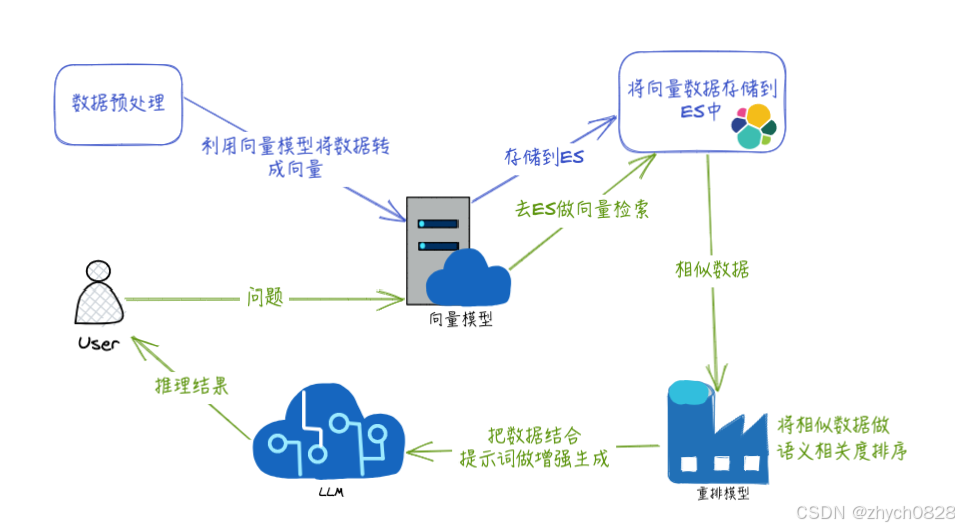
RAG 全称 Retrieval-Augmented Generation,是一种结合了信息检索和语言生成模型的方法,用于改进自然语言处理任务中的文本生成。RAG模型通常会先从大量的文档集合中检索相关信息,然后利用这些信息来辅助生成更准确、更有上下文关联性的文本,以此来优化大模型的生成结果。
二、实现思路
三、代码实现
1. springboot版本:3.3.2
2. ES版本8.13.2
3. pom文件
<?xml version="1.0" encoding="UTF-8"?>
<project xmlns="http://maven.apache.org/POM/4.0.0" xmlns:xsi="http://www.w3.org/2001/XMLSchema-instance"
         xsi:schemaLocation="http://maven.apache.org/POM/4.0.0 https://maven.apache.org/xsd/maven-4.0.0.xsd">
    <modelVersion>4.0.0</modelVersion>
    <parent>
        <groupId>org.springframework.boot</groupId>
        <artifactId>spring-boot-starter-parent</artifactId>
        <version>3.3.2</version>
        <relativePath/> <!-- lookup parent from repository -->
    </parent>
    <groupId>com.zhych</groupId>
    <artifactId>embeddings-for-es</artifactId>
    <version>0.0.1-SNAPSHOT</version>
    <name>embeddings</name>
    <description>embeddings</description>
    <url/>
    <licenses>
        <license/>
    </licenses>
    <developers>
        <developer/>
    </developers>
    <scm>
        <connection/>
        <developerConnection/>
        <tag/>
        <url/>
    </scm>
    <properties>
        <java.version>17</java.version>
    </properties>
    <dependencies>
        <dependency>
            <groupId>org.springframework.boot</groupId>
            <artifactId>spring-boot-starter-web</artifactId>
        </dependency>
        <dependency>
            <groupId>org.apache.commons</groupId>
            <artifactId>commons-lang3</artifactId>
            <version>3.12.0</version>
        </dependency>
        <dependency>
            <groupId>org.projectlombok</groupId>
            <artifactId>lombok</artifactId>
            <optional>true</optional>
        </dependency>
        <dependency>
            <groupId>org.springframework.boot</groupId>
            <artifactId>spring-boot-starter-test</artifactId>
            <scope>test</scope>
        </dependency>
        <dependency>
            <groupId>org.springframework.boot</groupId>
            <artifactId>spring-boot-starter-data-elasticsearch</artifactId>
        </dependency>
        <dependency>
            <groupId>com.alibaba</groupId>
            <artifactId>fastjson</artifactId>
            <version>2.0.15</version>
            <scope>compile</scope>
        </dependency>
        <dependency>
            <groupId>cn.hutool</groupId>
            <artifactId>hutool-all</artifactId>
            <version>5.8.25</version>
        </dependency>
        <dependency>
            <groupId>com.squareup.okhttp3</groupId>
            <artifactId>okhttp</artifactId>
            <version>5.0.0-alpha.3</version>
        </dependency>
        <dependency>
            <groupId>org.apache.httpcomponents</groupId>
            <artifactId>httpclient</artifactId>
            <version>4.5.13</version>
        </dependency>
        <dependency>
            <groupId>org.elasticsearch.client</groupId>
            <artifactId>elasticsearch-rest-high-level-client</artifactId>
            <version>7.17.23</version>
        </dependency>
        <dependency>
            <groupId>co.elastic.clients</groupId>
            <artifactId>elasticsearch-java</artifactId>
            <version>8.13.4</version>
        </dependency>
        <dependency>
            <groupId>com.fasterxml.jackson.core</groupId>
            <artifactId>jackson-databind</artifactId>
            <version>2.15.2</version>
        </dependency>
        <dependency>
            <groupId>com.alibaba</groupId>
            <artifactId>dashscope-sdk-java</artifactId>
            <version>2.8.3</version>
        </dependency>
    </dependencies>

    <build>
        <plugins>
            <plugin>
                <groupId>org.springframework.boot</groupId>
                <artifactId>spring-boot-maven-plugin</artifactId>
                <configuration>
                    <excludes>
                        <exclude>
                            <groupId>org.projectlombok</groupId>
                            <artifactId>lombok</artifactId>
                        </exclude>
                    </excludes>
                </configuration>
            </plugin>
        </plugins>
    </build>

</project>
yml配置
server:
  port: 80

spring:
  main:
    allow-bean-definition-overriding: true
  application:
    name: embeddings-for-es

  elasticsearch:
    uris: http://localhost:9200  # 修改成自己的
    username: elastic # 修改成自己的
    password: 123456 # 修改成自己的

qwen:
  api-key: sk-**************.  # 修改成自己的
  model: qwen-plus

embedding:
  uri: http://localhost:6009/v1/embeddings  # 修改成自己的
  api-key: sk-aaabbbcccdddeeefffggghhhiiijjjkkk # 修改成自己的

re-rank:
  uri: http://localhost:6010/v1/reRank  # 修改成自己的
  api-key: sk-aaabbbcccdddeeefffggghhhiiijjjkkk...  # 修改成自己的
4. 创建索引
public void createIndex() throws IOException {
        CreateIndexRequest request = new CreateIndexRequest.Builder()
                .index("sell_service")
                .mappings(m -> m
                        .properties("remark_vec", p -> p
                                .denseVector(dv -> dv
                                        .dims(1024)
                                        .index(true)
                                        .similarity("cosine")
                                )
                        )
                        .properties("remark", p -> p
                                .text(t -> t
                                        .analyzer("ik_smart") // 使用 IK 分词器
                                )
                        )
                )
                .build();

        CreateIndexResponse createIndexResponse = client.indices().create(request);
        System.out.println("Index created: " + createIndexResponse.acknowledged());
    }
5. 构造数据
@Data
public class Sell {

    private String id;

    private String remark;

    private double[] remark_vec;

    // 方法来创建用户列表
    public static List<Sell> createSellList() {
        Sell sell1 = new Sell();
        sell1.setId("111111");
        sell1.setRemark("几个、多少个、哪里下单:下方小黄车1号链接3个款式,您可以进去挑一下喜欢的,先选款式再选数量。今天拍下30个送20个连接器。快递、哪里、多久:浙江义乌工厂直发,江浙沪次日达,其他地区2-3天就可以收到货的。连接器:亲,连接器就是把衣架挂到一起的,可以节省空间,可以看下主播背后的展示视频");

        Sell sell2 = new Sell();
        sell2.setId("222222");
        sell2.setRemark("问题:已拍 拍了 买了 下单了 加急 回答:感谢支持已备注加急,左上角可以给主播点个关注,有任何售后问题都可以通过关注找到主播");

        Sell sell3 = new Sell();
        sell3.setId("333333");
        sell3.setRemark("问题:材质 多大 多长 尺寸 儿童 大号 小孩 回答:新升级无痕防滑衣架,abs材质,长度42cm,高度22cm。承重20斤,大人儿童都可以用的。3年质保放心带");

        Sell sell4 = new Sell();
        sell4.setId("444444");
        sell4.setRemark("问题:快递 哪里 多久\\t回答:浙江义乌工厂直发,江浙沪次日达,其他地区2-3天就可以收到货的");
        return List.of(sell1, sell2, sell3, sell4);
    }
}
6. 向量化数据到ES
public void indexSellList(List<Sell> sellList) throws IOException {
        for (Sell sell : sellList) {
            sell.setRemark_vec(EmbedClient.getEmbedding(embeddingUri, embeddingApiKey, sell.getRemark()));
            IndexResponse response = client.index(i -> i
                    .index(INDEX_NAME)
                    .id(sell.getId())
                    .document(sell)
            );
            System.out.println("Sell indexed: " + response.id());
        }
    }
7. ES余弦相似度检索
public List<SearchResult> searchWithGivenVector(double[] queryVector) throws IOException {
        // 创建向量相似度查询
        ScriptScoreQuery scriptScoreQuery = ScriptScoreQuery.of(q -> q
                .query(QueryBuilders.matchAll().build()._toQuery())
                .script(Script.of(s -> s.inline(i -> i
                        .source("double score = cosineSimilarity(params.query_vector, 'remark_vec'); " +
                                "score = Math.min(1.0, Math.max(0.0, score)); " + // 确保评分在[0, 1]之间
                                "if (score < params.threshold) { return 0; } else { return score; }")
                        .params(Map.of(
                                "query_vector", JsonData.of(queryVector),
                                "threshold", JsonData.of(SIMILARITY_THRESHOLD) // 将阈值作为参数传递给脚本
                        ))))));

        // 创建bool查询,向量相似度查询作为should子句
        Query boolQuery = QueryBuilders.bool(b -> b
                .should(scriptScoreQuery._toQuery())
        );

        Query functionScoreQuery = QueryBuilders.functionScore(fs -> fs
                .query(boolQuery)
                .scoreMode(FunctionScoreMode.Max)
                .boostMode(FunctionBoostMode.Replace)
                .minScore((double) SIMILARITY_THRESHOLD)
        );

        // 执行合并后的查询
        SearchResponse<Sell> combinedSearchResponse = client.search(s -> s
                        .index(INDEX_NAME)
                        .query(functionScoreQuery),
                Sell.class);

        // 处理查询的结果
        return combinedSearchResponse.hits().hits().stream()
                .map(hit -> {
                    double finalScore = Objects.nonNull(hit.score()) ? hit.score() : 0.0;
                    return finalScore >= SIMILARITY_THRESHOLD ? new SearchResult(hit.source(), finalScore) : null;
                })
                .filter(Objects::nonNull)
                .sorted(Comparator.comparingDouble(SearchResult::getScore).reversed())
                .collect(Collectors.toList());
    }
8. 向量检索(运行方式参看将向量模型构建成可以Java调用的api服务或使用云服务)
public class EmbedClient {

    public static double[] getEmbedding(String uri, String apiKey, String inputText) throws IOException {
        OkHttpClient client = new OkHttpClient();

        // 创建请求体
        JSONObject requestBody = new JSONObject();
        requestBody.put("input", Collections.singletonList(inputText));

        // 创建请求
        MediaType mediaType = MediaType.parse("application/json; charset=utf-8");
        RequestBody body = RequestBody.Companion.create(requestBody.toJSONString(), mediaType);
        Request request = new Request.Builder()
                .url(uri)
                .addHeader("Authorization", "Bearer " + apiKey)
                .addHeader("Content-Type", "application/json")
                .post(body)
                .build();

        // 发送请求
        Response response = client.newCall(request).execute();
        if (!response.isSuccessful()) {
            throw new IOException("Unexpected code " + response);
        }

        // 解析JSON响应
        String responseBody = response.body().string();
        EmbeddingResponse embeddingResponse = JSON.parseObject(responseBody, EmbeddingResponse.class);

        // 返回嵌入向量
        return embeddingResponse.getData().get(0).getEmbedding();
    }

    static class EmbeddingResponse {
        private List<Data> data;

        public List<Data> getData() {
            return data;
        }

        public void setData(List<Data> data) {
            this.data = data;
        }
    }

    static class Data {
        private double[] embedding;
        private int index;
        private String object;

        public double[] getEmbedding() {
            return embedding;
        }

        public void setEmbedding(double[] embedding) {
            this.embedding = embedding;
        }

        public int getIndex() {
            return index;
        }

        public void setIndex(int index) {
            this.index = index;
        }

        public String getObject() {
            return object;
        }

        public void setObject(String object) {
            this.object = object;
        }
    }
}
9. 重排序(运行方式参看将重排模型构建成可以API调用的服务或使用云服务)
public class ReRankClient {

    public static String reRank(String uri, String apiKey, List<String> textsList, String query) throws IOException {
        OkHttpClient client = new OkHttpClient();
        JSONObject requestBody = new JSONObject();
        String[] texts = textsList.toArray(new String[0]);
        requestBody.put("textList", texts);
        requestBody.put("query", query);
        // 创建请求
        MediaType mediaType = MediaType.parse("application/json; charset=utf-8");
        RequestBody body = RequestBody.Companion.create(requestBody.toJSONString(), mediaType);
        Request request = new Request.Builder()
                .url(uri)
                .addHeader("Authorization", "Bearer " + apiKey)
                .addHeader("Content-Type", "application/json")
                .post(body)
                .build();

        // 发送请求
        Response response = client.newCall(request).execute();
        if (!response.isSuccessful()) {
            throw new IOException("Unexpected code " + response);
        }
        return response.body().string();
    }
}
10. 模型增强生成,使用的是阿里的通义千问
public class Main {

    public static GenerationResult callWithMessage(String model, String apiKey, String query, String content) throws ApiException, NoApiKeyException, InputRequiredException {
        Generation gen = new Generation();

        Message systemMsg = Message.builder()
                .role(Role.SYSTEM.getValue())
                .content("你是一个无痕晾衣架产品的直播间在线销售客服小乐,你有10年在线客服工作经验,必须严格按照知识库检索的内容做最精简的回答,只回答关键信息。" +
                        "对于用户问题中可能出现的同音不同意错别字,你要根据读音、语义和语境多维度识别并匹配知识库中的正确信息。" +
                        "当所有知识库内容都与产品问题无关时,或者知识库检索到任何相关信息时,你的回答必须是“404”这句话。" +
                        "你只对知识库检索的知识,找出其中最相关的信息做精简回答,坚决杜绝胡编乱造,对于产品的关键参数要严格按照知识库数据回复,不能有误差,注意数字。" +
                        "对于组合问题,先单个组织语言,然后再组合回答。问候语可以相应的礼貌回复!\n" +
                        "        以下是知识库:\n" +
                        "        {" + content + "}\n" +
                        "        以上是知识库。")
                .build();

        Message userMsg = Message.builder()
                .role(Role.USER.getValue())
                .content(query)
                .build();

        GenerationParam param = GenerationParam.builder()
                .model(model)
                .messages(Arrays.asList(systemMsg, userMsg))
                .resultFormat(GenerationParam.ResultFormat.MESSAGE)
                .apiKey(apiKey)
                .topK(50)
                .temperature(0.1f)
                .topP(0.8)
                .seed(1234)
                .build();

        return gen.call(param);
    }
}
11. controller
@RestController
@RequestMapping("/embedding")
public class DataProcessController {

    @Value("${qwen.api-key}")
    private String apiKey;

    @Value("${qwen.model}")
    private String model;

    @Value("${embedding.uri}")
    private String embeddingUri;

    @Value("${embedding.api-key}")
    private String embeddingApiKey;

    @Value("${re-rank.uri}")
    private String ReRankUri;

    @Value("${re-rank.api-key}")
    private String ReRankApiKey;

    @Resource
    private EsDocumentService service;

    @PostMapping("/process")
    public List<SearchResult> process(@RequestBody Map<String, String> dto) throws IOException {
        String keyword = dto.get("keyword");
        return service.searchWithGivenVector(EmbedClient.getEmbedding(embeddingUri, embeddingApiKey, keyword));
    }

    @PostMapping("/generate")
    public String generate(@RequestBody Map<String, String> dto) throws IOException, NoApiKeyException, InputRequiredException {
        String keyword = dto.get("keyword");
        List<SearchResult> searchResults = service.searchWithGivenVector(EmbedClient.getEmbedding(embeddingUri, embeddingApiKey, keyword));
        List<String> collect = searchResults.stream().map(searchResult -> searchResult.getSell().getRemark()).toList();
        System.out.println("搜索结果searchResults = " + collect);

        // 重排处理
        List<String> contentList = new ArrayList<>();
        searchResults.forEach(searchResult -> contentList.add(searchResult.getSell().getRemark()));
        String reRank = ReRankClient.reRank(ReRankUri, ReRankApiKey, contentList, keyword);
        System.out.println("重排结果reRank = " + reRank);

        JSONObject jsonObject = JSON.parseObject(reRank, JSONObject.class);
        Object reRankPassages = jsonObject.get("rerank_passages");

        //增强生成
        GenerationResult result = Main.callWithMessage(model, apiKey, keyword, reRankPassages.toString());
        System.err.println("~~~~~~~~~~~~~~~~~~~~~~~~~~~~~~回答开始~~~~~~~~~~~~~~~~~~~~~~~~~~~~");
        System.out.println("千问:" + result.getOutput().getChoices().get(0).getMessage().getContent());
        return result.getOutput().getChoices().get(0).getMessage().getContent();
    }
}
四、运行测试
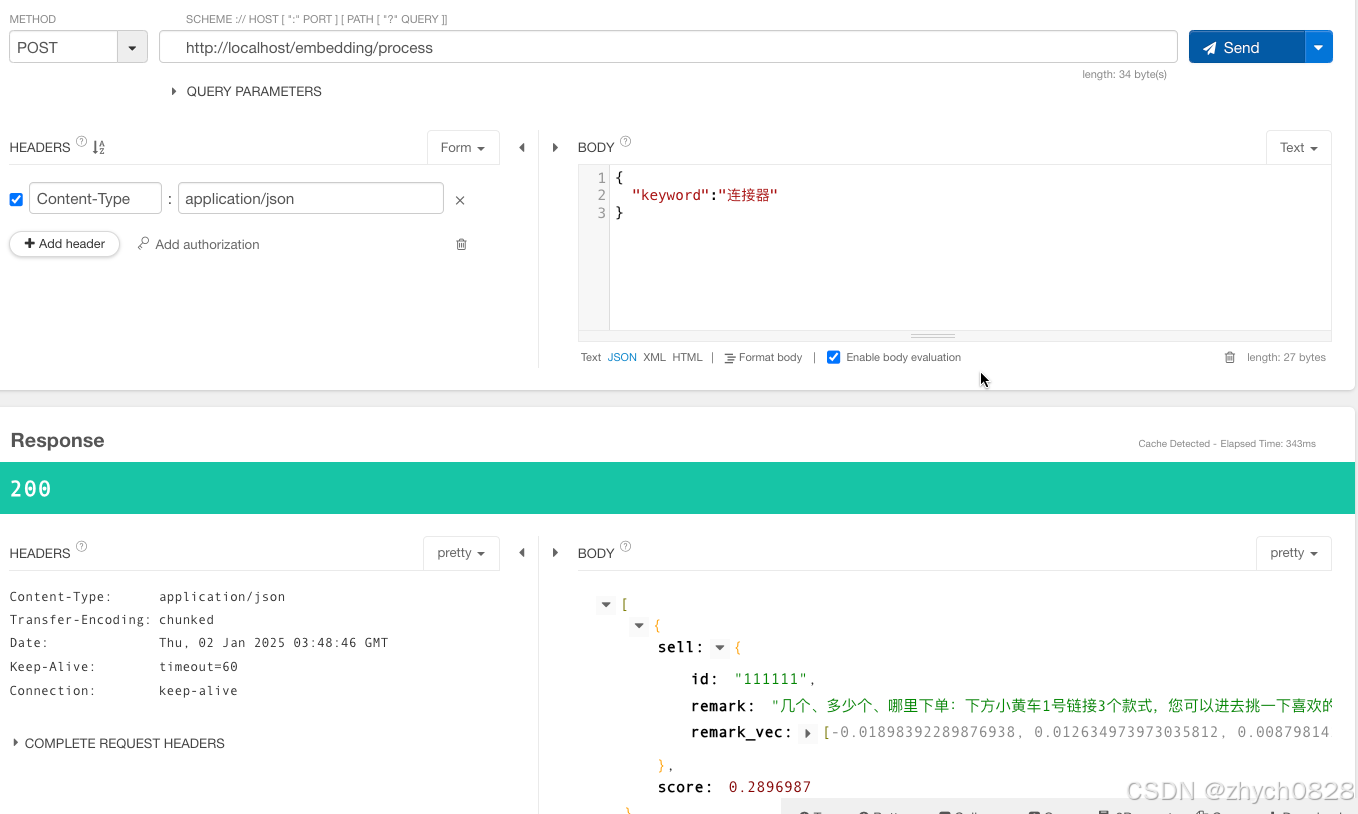
1. ES检索测试
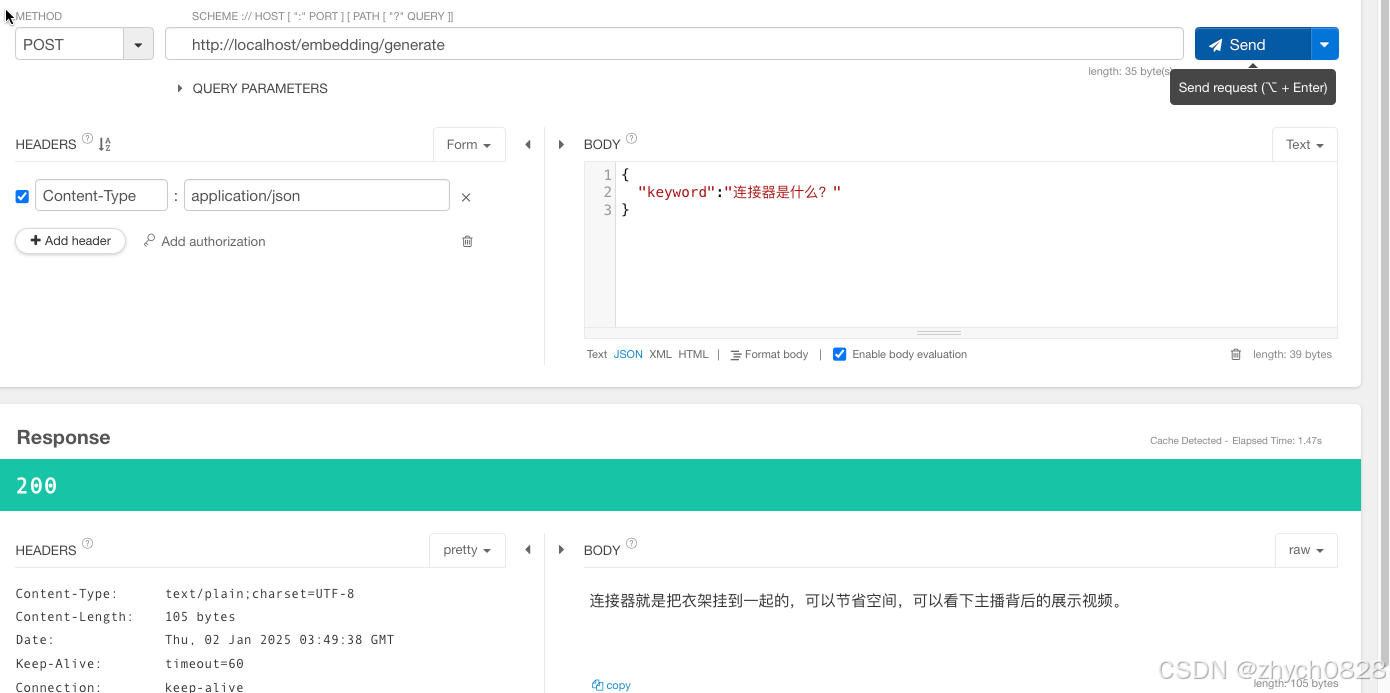
2. 增强生成
想要源码的铁子,三连+私信

Agent 垂直技术社区,欢迎活跃、内容共建。
更多推荐
 14
14 0
0- 0



 已为社区贡献6条内容

所有评论(0)